# We Turned Our AI Corrections Into a Checklist. Here's What It Caught
> Save the fixes you keep making as yes/no checks, and you can grade any model or prompt by your own standards. We tested it on a weekly update.
By AI for Mortals Staff · November 11, 2026 · 9 min
Canonical: https://www.aiformortals.co/blog/ai-evals-checklist
AI evals sound like something only engineers build, but the simplest kind is a list of yes/no questions made from the corrections you already give an AI. Each time you say "too long" or "don't put that in", that note can become a check you run on every future answer.
Once the list exists, you can grade any model, or any rewording of your prompt, by your own standards.
We tried it on a job plenty of people hand to AI every week: a status update to the boss. It took one round of corrections to build the checklist, and then we graded 16 new updates from five models against it.
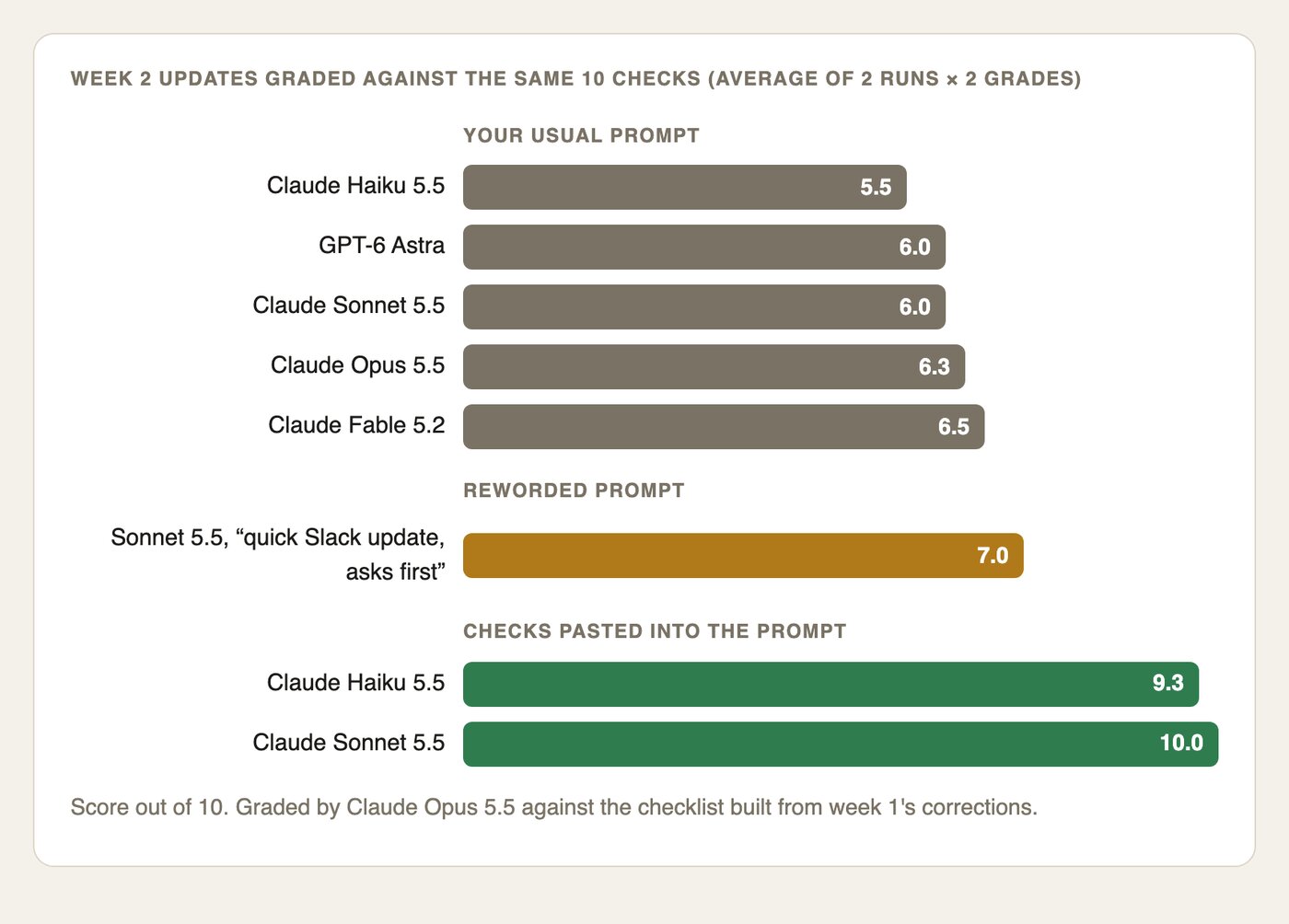
The usual prompt never scored above 7 out of 10 on any model. Pasting the checklist into the prompt took Claude Sonnet 5.5 to 10 out of 10 on both tries.
## What AI evals are, and why yours can be a yes/no list
An eval is a test for AI output. The famous ones are benchmarks full of math and coding problems with one right answer, which is why model makers can report a score for each new release.
Your work rarely has one right answer, but you do have standards. You know your boss reads updates on her phone, or that a client hates exclamation marks, and those standards show up every time you correct a draft.
Anthropic's guide to building evaluations says good success criteria are specific and measurable: "accurate sentiment classification" beats "good performance". A yes/no check is the easiest way to get there without any numbers. "Is it 150 words or fewer?" can only pass or fail, and so can "Does every request for money say what we'd get for it?"
## The prompt that turns your corrections into checks
The next time you're fixing an AI draft for a job you do often, talk through what's wrong as you would to a colleague. Voice dictation works well here, because you'll say more than you'd type. Then paste the draft and your comments into this:
```
Below is an AI draft for a job I do every week: [the job, e.g. my weekly update to my boss]. After it are my comments on the draft, roughly as I said them out loud.
Turn each comment into a yes/no check that someone who has never met me could apply to a future [job]. Each check should be one question with a clear pass or fail, and say what counts as a pass.
Then go back over your checks and flag any that only make sense for this week's content, or that would mark a good [job] as a fail in a normal week. Suggest a better wording for those.
Give me the final list titled "[job] checks", numbered.
DRAFT:
[paste the AI's draft]
MY COMMENTS:
[paste or dictate your comments]
```
The third paragraph of the prompt, the one that asks for flags, does most of the work. Without it, you get checks that describe this week's draft instead of your standards, and we'll show what that costs further down.
## How we tested it on a weekly update
We made up a marketing ops lead, Dana, who sends her boss Priya an update every Friday, and wrote two weeks of rough notes for her: webinar sign-ups, an email platform move, a case study stuck with a client's lawyers, a new freelance designer and a budget deadline.
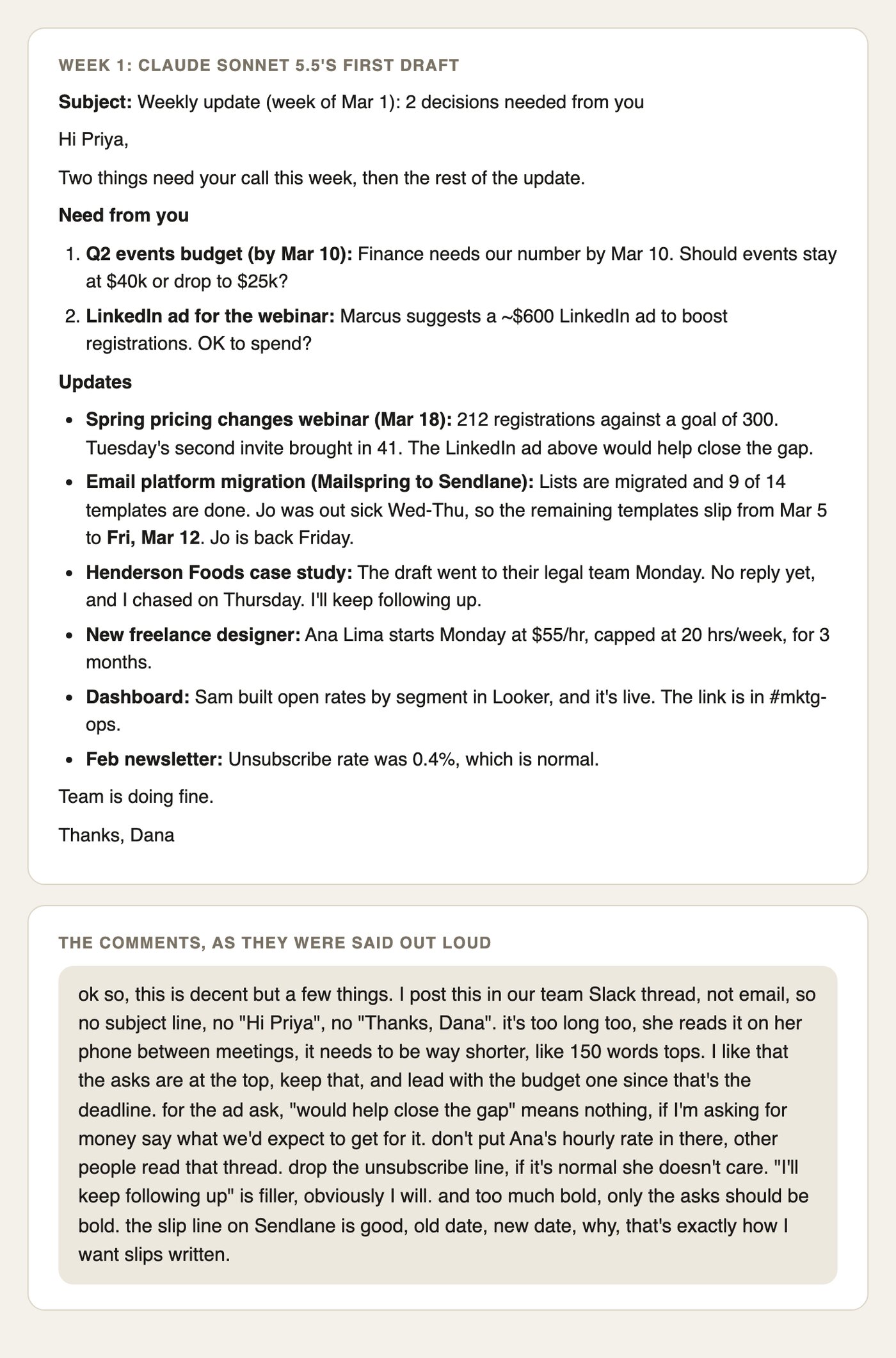
For week one, we gave Claude Sonnet 5.5 the kind of prompt most people would type ("Write my weekly update email to my boss, Priya, from my notes below") and then reacted to its draft the way Dana would, out loud and a bit rambling.
Week one: Sonnet's draft and the corrections we gave it, rendered as text from our test files.
The draft would have worked fine as an email. Dana posts in a Slack thread that her boss skims on her phone, though, and no model could have known that.
We pasted the draft and the comments into the checklist prompt above on Claude Opus 5.5. It came back with ten checks.
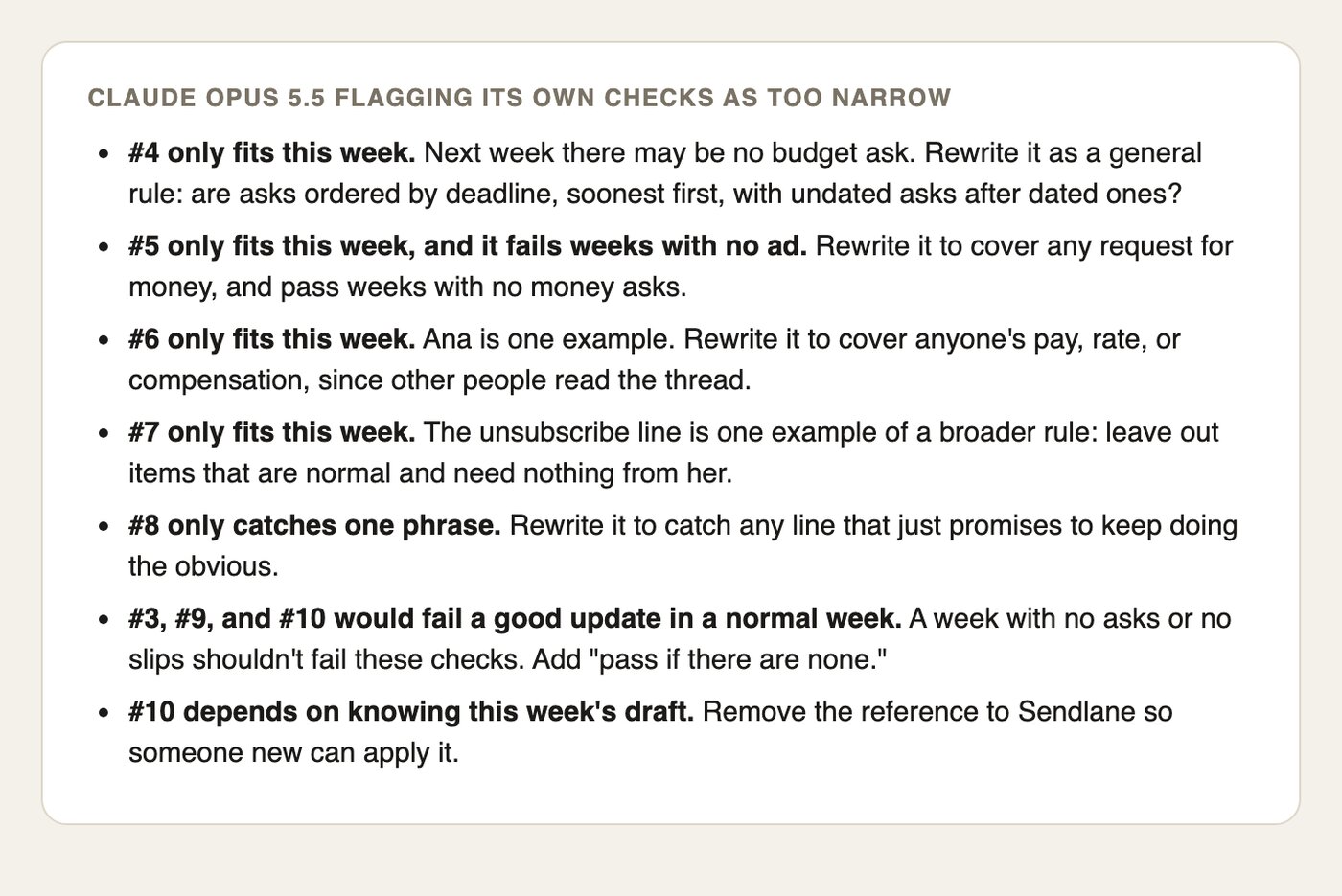
## Claude flagged 7 of its own 10 checks as too narrow
The first-pass checks were literal copies of the comments: "Is the budget item ask #1?", "Is Ana's hourly rate left out?", "Is the unsubscribe-rate line left out?" Then the flagging step at the end of the prompt kicked in, and Claude marked seven of them as too tied to week one.
The flags Claude Opus 5.5 raised on its own first-pass checks.
Here is the final list it gave us, shortened. Every pass condition was spelled out in full in the original:
1. **Slack format:** no subject line, greeting or sign-off.
2. **Length:** 150 words or fewer.
3. **Asks first:** every request for a decision comes before the status items (pass if there are none).
4. **Ask order:** asks sorted by deadline, soonest first.
5. **Money asks show the return:** every request to spend money names a concrete expected result.
6. **No pay details:** no one's rate, salary or fee.
7. **No "all normal" items:** every item reports a change, a risk or progress, or needs something.
8. **No filler promises:** nothing like "I'll keep following up" or "I'll keep you posted".
9. **Bold only on asks.**
10. **Slips fully stated:** old date, new date and the reason (pass if nothing slipped).
We ran the same prompt twice more, once on Opus and once on Sonnet, and all three runs landed on the same ten rules with slightly different wording.
That's a good sign the list came from Dana's comments themselves.
## How to compare AI models on your own checklist
For week two we wrote a fresh set of notes (templates finished, a broken mobile link, a paused ad, two new questions for Priya) and generated the update eight ways, two runs each:
- **The usual prompt** on Claude Haiku 5.5, Claude Sonnet 5.5, Claude Opus 5.5, Claude Fable 5.2 and GPT-6 Astra.
- **A reworded prompt** on Sonnet, the kind of tweak people make after a bad week: "Turn my notes into a quick Slack update for my boss Priya. Keep it short and put anything I need from her first."
- **The checks pasted into the prompt** on Sonnet and Haiku.
Then Claude Opus 5.5 graded all 16 updates against the ten checks, twice each.
Average scores from our test: two runs per setup, each graded twice.
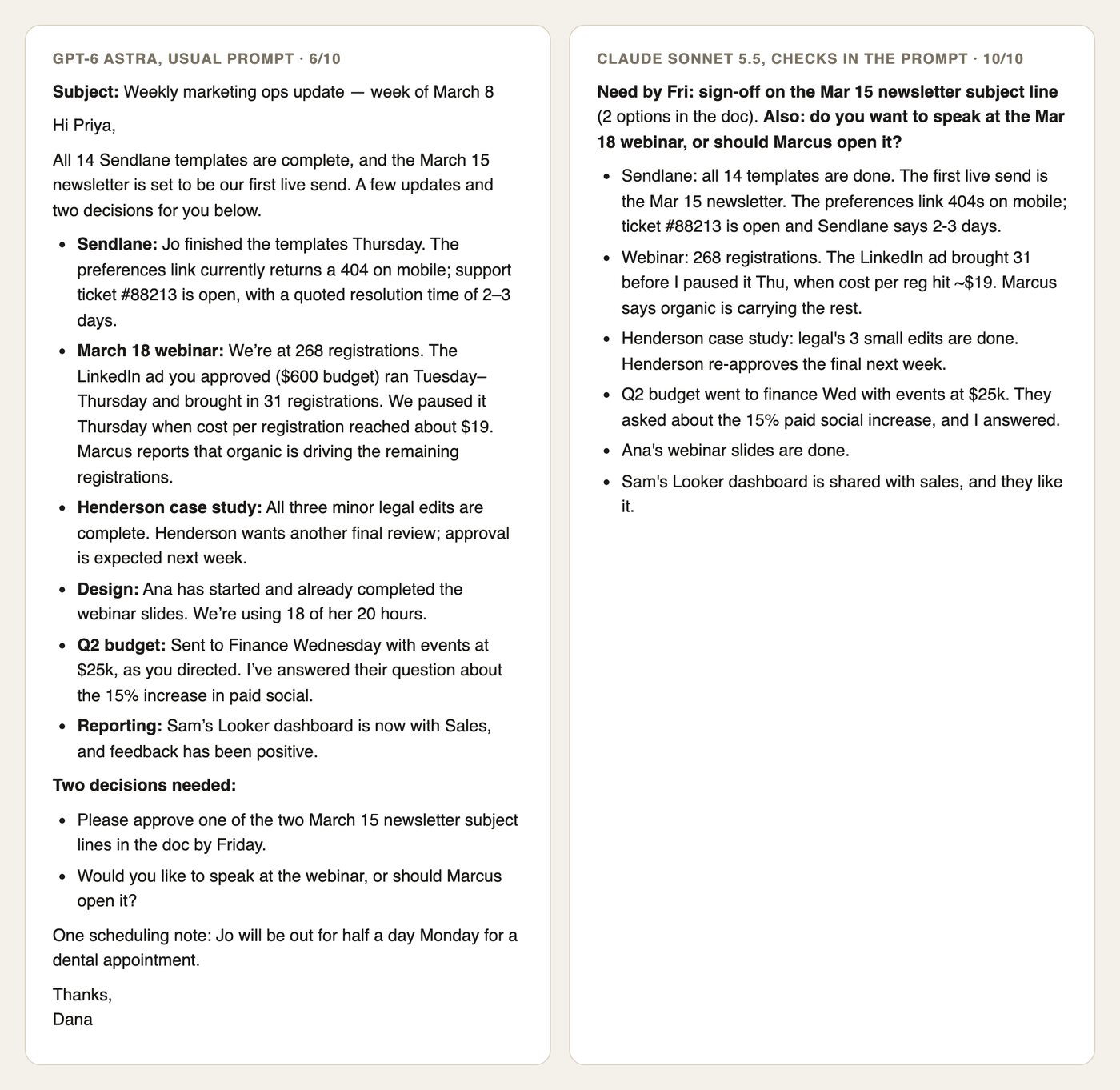
Switching models barely moved the score. With the usual prompt, every one of the ten updates wrote an email with a subject line, a "Hi Priya" and a sign-off, and every one ran between 223 and 283 words. Half of them put the two questions for Priya at the bottom, and four promised to keep following up on something.
The priciest model, Fable 5.2, scored 6.5, about the same as Sonnet at 6.0. None of the five had any way to know Dana's preferences, so a better model couldn't fix that on its own.
The reworded prompt helped a little (7.0). It dropped the subject line and moved the asks up, but both runs still opened with "Hi Priya" and ran 199 and 217 words, and one started with "Here's a draft:".
Same notes, two setups: GPT-6 Astra with the usual prompt (left) and Sonnet with the checks in the prompt (right).
## Paste your checks into the prompt for the biggest jump
The checklist turned out to be more useful as instructions than as a grading tool. Sonnet with the checks pasted in scored 10 out of 10 on both runs, at 140 and 144 words.
Even Claude Haiku 5.5, the cheapest model we ran, scored 9.3 with the checks. Its only misses were on length, at 170 and 151 words. On the usual prompt it had scored 5.5.
You don't need to rewrite your prompt to use them. Add this under whatever you already type:
```
Before you answer, make sure it passes every one of these checks:
[paste your numbered checks]
```
At API prices, each Sonnet run with the checks cost about 2 cents, against 1 cent for the usual prompt. On a chat plan you won't notice the difference.
## LLM as a judge: let a second AI grade it, then check the grader
Having one AI grade another's work is a technique researchers call "LLM as a judge". A widely cited 2023 study found strong models agreed with human graders more than 80% of the time, about as often as two people agree with each other. The same study found judges lean toward longer answers and sometimes toward their own model's writing.
This is the grading prompt we used. Paste it into a new chat with your checks and the output you want graded:
```
Here are my saved checks for [the job]. Below them is a new [output], written from this week's material. Grade it against every check.
For each check, give PASS or FAIL and one short line on why. Then list the checks that failed and give a score out of the number of checks.
[paste your checks]
THIS WEEK'S [OUTPUT]:
[paste the output]
```
We checked the judge against a script on the two checks a computer can count, format and length. It matched on 63 of 64 grades. The one miss was Haiku's 151-word update, which one grading run called "about 149 words".
When the judge estimated word counts, it was often off by dozens: it called a 282-word update "roughly 330 words". It still got the pass or fail right, because none of those counts sat near the line. If a check says "150 words or fewer", paste the text into a word counter instead.
On the other eight checks, the two grading runs agreed on all 16 updates except one. Opus graded Opus's own update both times, and that's where the disagreement landed, on the vaguest check. The GPT-6 Astra updates scored the same as Sonnet's, so we didn't see the judge favoring Claude's writing in this test.
## Three ways a checklist goes wrong, and the fix for each
**Too narrow.** We graded the best week-two update, Sonnet's 10 out of 10, against Claude's unflagged first-pass checks. It scored 7. It failed "Is the budget ask listed first?" because there was no budget ask that week, and it failed the ad check and the slip check for the same reason.
The narrow version also let a new filler line through, "I'll follow up if it isn't fixed ahead of the send", because it only looked for the exact words "I'll keep following up". The fix is the third paragraph of the checklist prompt, which asks the AI to flag anything that only fits this week.
**Too vague.** Check 7, "No 'all normal' items", was the one the two grading runs disagreed on. One run passed a line saying the new designer was "off to a strong start", and the other failed it as an item that only says things are fine. The fix is to add an example of a pass and a fail to any check that needs judgment.
**Never triggered.** Week two had no money asks, no pay details and no missed deadlines, so three of the ten checks passed without testing anything. A checklist shows its value over a few weeks of real work, so keep running it before you decide whether it works.
## Where to keep your AI checklist so you don't lose it
Put the checks wherever the job already lives. In ChatGPT or Claude, that's a project for the task, with the checks pasted into the project's instructions so every new chat starts with them. Our guide to [ChatGPT custom instructions](/blog/chatgpt-custom-instructions) covers the account-wide version for rules that apply to everything you write.
Add a check whenever you catch yourself correcting the same thing twice. When a new model comes out, run your next real task through it with the checklist before you switch. Our [Claude Sonnet vs Opus test](/blog/claude-sonnet-vs-opus) found that the cheaper model often keeps up on everyday jobs, and a checklist lets you see that for your own work.
If writing style is the thing you keep correcting, our guide to [teaching Claude your writing style from your own edits](/blog/teach-claude-your-writing-style) takes the same idea further, with a whole style file built from your edits. Pat's Opus 5.5 review below shows how he puts a new model through his own tests.
## Sources
- [Anthropic: Define success criteria and build evaluations](https://platform.claude.com/docs/en/test-and-evaluate/develop-tests)
- [OpenAI: Evaluation best practices](https://developers.openai.com/api/docs/guides/evaluation-best-practices)
- [Zheng et al., Judging LLM-as-a-Judge with MT-Bench and Chatbot Arena (arXiv, 2023)](https://arxiv.org/abs/2306.05685)
- [Claude Help Center: Create and manage projects](https://support.claude.com/en/articles/9519177-how-can-i-create-and-manage-projects)