# Apple Puts an AI Assistant in Keynote, Pages and Numbers
> Apple's new assistant designs slides in Keynote, drafts writing in Pages and builds charts in Numbers. It arrives in November for Apple Creator Studio subscribers at $12.99 a month, and the free versions of the apps don't get it.
By Pat Simmons · October 27, 2026 · 5 min
Canonical: https://www.aiformortals.co/blog/apple-iwork-assistant
Apple [announced an AI assistant](https://www.apple.com/newsroom/2026/10/apple-creator-studio-adds-powerful-new-ai-features-and-even-more-creative-tools/) on Tuesday that works inside Keynote, Pages and Numbers. It's built on Apple's own models and OpenAI's, and it reads the document you have open, so you can ask for changes to that deck, page or spreadsheet without copying anything into a chatbot.
It's in beta and comes to subscribers of Apple Creator Studio, Apple's paid bundle of creative apps, with a free update in November.
## What the assistant does in each app
The assistant opens as a panel beside your document, from a button in the app's toolbar. In Apple's screenshot at the top of this post, the Keynote panel offers starting points like "Write speaking points for these slides", "Help me animate my slides" and "Give me a summary of this presentation", with a box at the bottom to ask for anything else.
Apple splits the work by app:
- **Keynote:** designing, animating and refining slides.
- **Pages:** drafting, restructuring and fine-tuning your writing.
- **Numbers:** doing calculations, organizing data, recommending a chart type with a one-tap preview, and building custom tables using general knowledge.
The [update notes for the Pages app](https://apps.apple.com/us/app/pages/id361309726) add a few more details. The assistant can draft a single section or change the tone of what you wrote, generate images and shapes from a description, and search the web for up-to-date information to add to your document. It can also walk you through features you've never used, which helps if you only open Pages a few times a year.
I haven't tried it yet. The panel carries a beta label and a note to check its responses for accuracy.
## Who the $12.99 bundle is worth it for
The assistant only comes with [Apple Creator Studio](https://www.apple.com/apple-creator-studio/), which Apple launched in January. It costs $12.99 a month or $129 a year in the US and includes Final Cut Pro, Logic Pro, Pixelmator Pro, Motion, Compressor and MainStage, plus premium extras in Keynote, Pages, Numbers and Freeform.
So you're paying for a video editor, a music studio and a photo editor to get the assistant, and Apple doesn't sell the iWork features separately.
It adds up best for three groups:
- **People who already make video, music or graphics on a Mac or iPad.** If you'd use Final Cut Pro or Logic Pro anyway, the iWork assistant comes along at no extra cost.
- **Students and educators.** Apple's education price is $2.99 a month or $29.99 a year for college students and educators, after verification.
- **Families.** Up to six people can share one subscription through Family Sharing.
For someone who makes a few decks a year, the subscription is harder to justify, especially alongside a ChatGPT, Claude or Copilot plan that can already draft slides.
## What you already get in Keynote and Numbers with a subscription
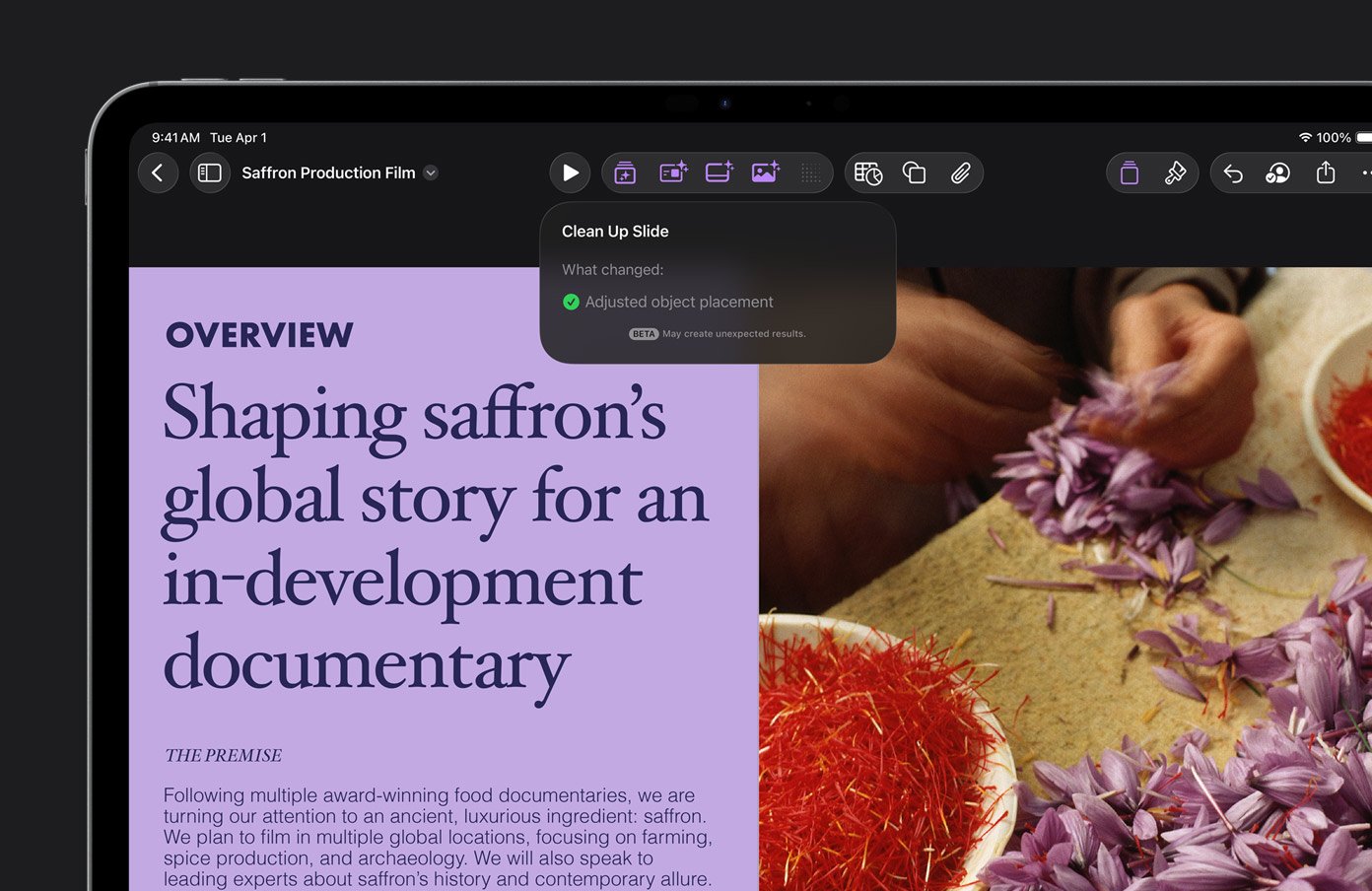
Creator Studio subscribers have had some AI tools in these apps since before this announcement. Keynote can generate presenter notes for each slide, turn an outline into a full deck, and fix a slide's layout, typography and alignment problems in one tap.
Keynote's Clean Up Slide, already part of the subscription, telling you what it changed. From Apple
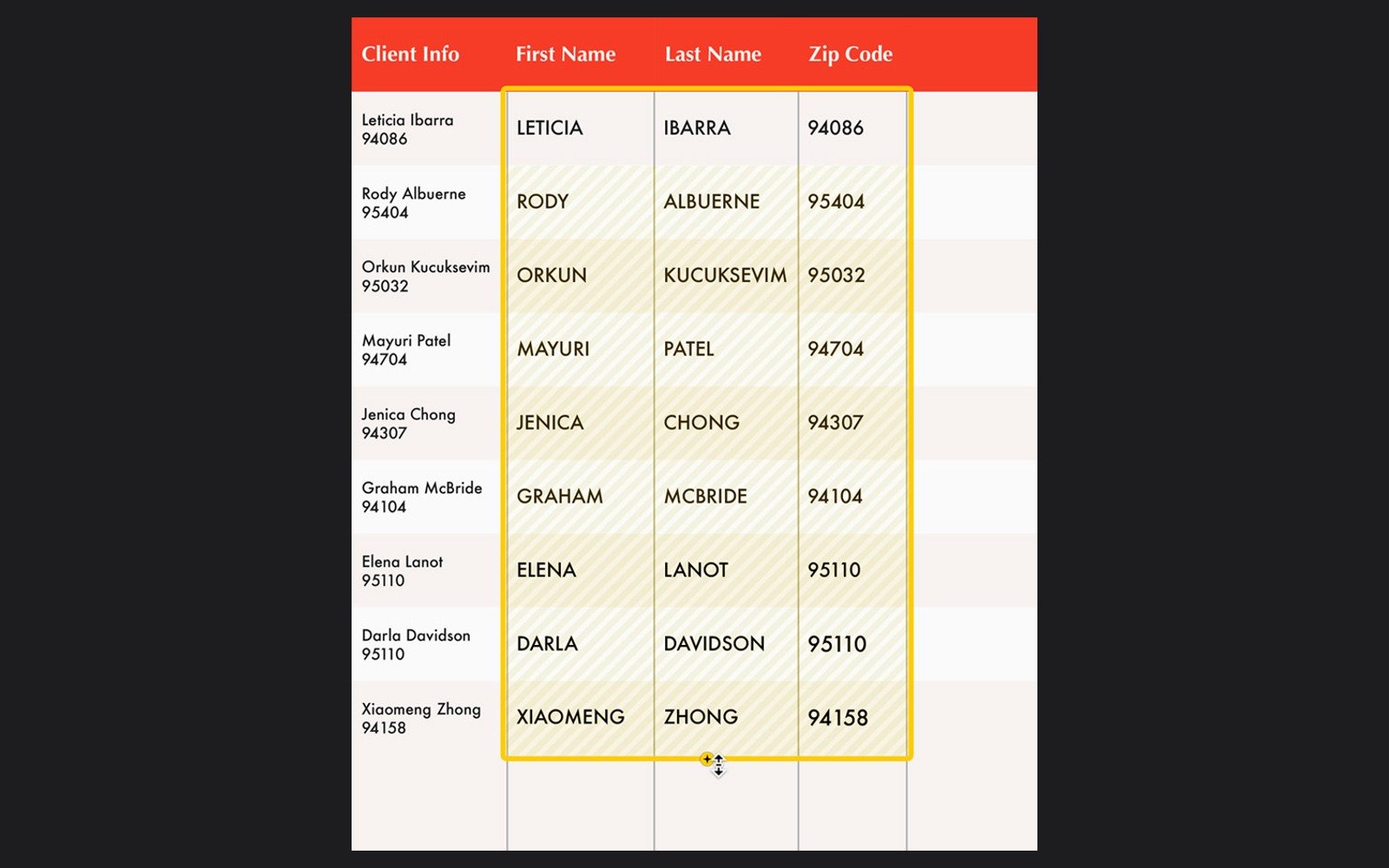
Numbers has Magic Fill, which suggests contents or formulas for empty cells based on the pattern in nearby data. In Apple's example, it splits a column of names and zip codes into separate first name, last name and zip code columns.
Magic Fill in Numbers filling three columns from one. From Apple
Those tools each do one job. The new assistant is the first one you can talk to about the whole document.
## How ChatGPT and Claude can now work inside your Keynote files
The update also adds support for MCP, a standard way for AI tools to connect to other apps. On a Mac, that lets outside assistants like ChatGPT or Claude read your Keynote, Pages and Numbers files, make edits and run tasks inside the apps.
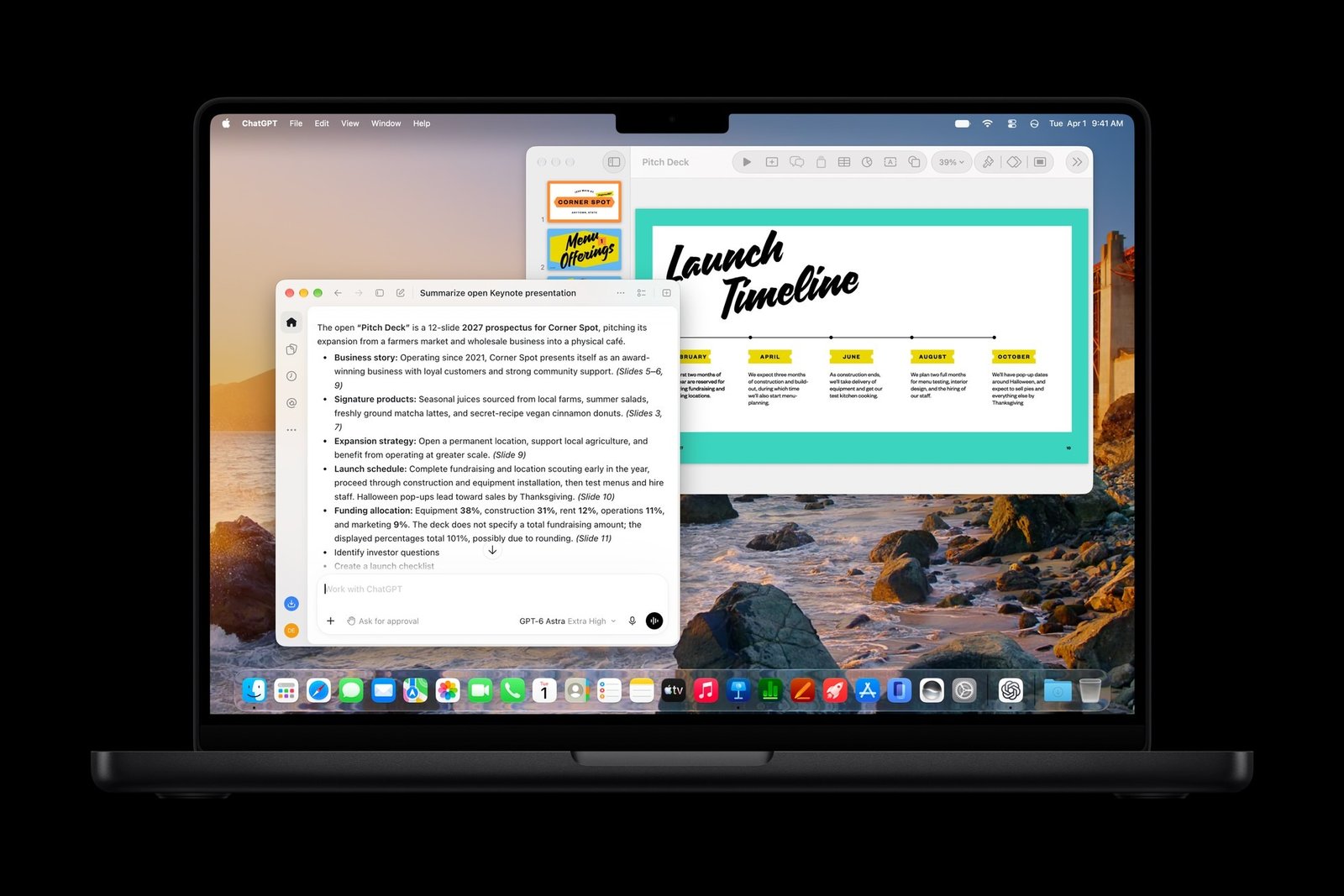
In Apple's own example, ChatGPT summarizes a 12-slide pitch deck that's open in Keynote, citing which slides each point comes from. It even flags that the funding percentages on one slide add up to 101%.
ChatGPT summarizing an open Keynote deck through the new MCP support. From Apple Newsroom
This part is Mac-only and needs macOS 27. Keynote also gets a new open file format, .keyx, which Apple designed so other apps and AI agents can read and work with your decks.
If you already work this way in Microsoft's apps, it's close to how [Copilot now opens a real Word, Excel or PowerPoint file beside its chat](https://www.aiformortals.co/blog/office-in-copilot), or what Claude does with its [sidebar in Google Docs, Sheets and Slides](https://www.aiformortals.co/blog/claude-google-workspace).
## What you need to run the assistant when it arrives
Apple says the assistant arrives in a free update in November, without a specific date. New subscribers get a one-month free trial, and the trial clock starts the day you sign up.
The latest Pages update in the App Store already lists the assistant in its notes, but Apple's announcement still puts its arrival in November. If you don't see it in your apps yet, that's why.
The assistant needs an [Apple Intelligence-capable](https://support.apple.com/121115) iPhone, iPad or Mac running iOS 27, iPadOS 27 or macOS 27, and it only works in US English. If you buy a new Mac or a qualifying iPad, Apple gives you three months of Creator Studio free instead of one.
If you cancel later, your Keynote, Pages and Numbers files stay yours and you can keep editing them in the free apps. You just can't use the paid features on them anymore.
The free versions of Keynote, Pages, Numbers and Freeform aren't going anywhere. They still come with every iPhone, iPad and Mac, without the assistant.
## How it compares with making slides in ChatGPT or Claude
Apple is late here, since Copilot and Gemini have worked inside Word and Google Docs for a while. OpenAI's models are doing part of the work in Apple's version.
Outside Apple's apps, [Claude's slide decks are free on every plan](https://www.aiformortals.co/blog/claude-docs-free), and [ChatGPT Slides](https://www.aiformortals.co/blog/chatgpt-slides) lets a team edit one deck together on the pricier plans.
Bundling the assistant with video and music apps makes it a steep ask for people who only want help in Keynote. November will show whether its first drafts need less fixing than ChatGPT's or Claude's, and it does have one edge: it works on the file you'll present from.
In my Claude Design test, I had it build a full pitch deck:
## Sources
- [Apple Newsroom: Apple Creator Studio adds powerful new AI features and even more creative tools](https://www.apple.com/newsroom/2026/10/apple-creator-studio-adds-powerful-new-ai-features-and-even-more-creative-tools/)
- [Apple: Apple Creator Studio](https://www.apple.com/apple-creator-studio/)
- [Apple Newsroom: Introducing Apple Creator Studio](https://www.apple.com/newsroom/2026/01/introducing-apple-creator-studio-an-inspiring-collection-of-creative-apps/)
- [App Store: Pages version history](https://apps.apple.com/us/app/pages/id361309726)
- [MacRumors: Apple Updates Creator Studio With New Tools and AI Features](https://www.macrumors.com/2026/10/27/apple-updates-creator-studio-ai-features/)
- [9to5Mac: Apple Creator Studio gets powerful new AI features using OpenAI models](https://9to5mac.com/2026/10/27/apple-creator-studio-gets-powerful-new-ai-features-using-openai-models/)