# ChatGPT Health Comes to Android and the Desktop App
> Health in ChatGPT now reads Android's Health Connect data, works in the desktop app, and lets Dots send health reminders before they're asked.
By AI for Mortals Staff · November 19, 2026 · 6 min
Canonical: https://www.aiformortals.co/blog/chatgpt-health-android
OpenAI [is rolling out Health](https://help.openai.com/en/articles/6825453-chatgpt-release-notes) to ChatGPT's Android app, its desktop app and Dots, its always-on agents.
Health, already on iPhone and the web, is the part of ChatGPT that answers health questions using the medical records and fitness data you choose to connect. It's free on ChatGPT Free, Go, Plus and Pro in the US, and the new versions are arriving gradually, so your account may not have them on day one.
Health is now available in more of the places you use ChatGPT, including the desktop app, dots, Sites, and Android.
## What ChatGPT Health can read on Android
On Android, Health connects to Health Connect, the phone's store of sleep, activity and workout data. iPhone users could already connect Apple Health.
If you wear a WHOOP, Oura or Garmin, or log in Strava or MyFitnessPal, OpenAI's [Health help page](https://help.openai.com/articles/20001036) says to set that app to share with Health Connect first. ChatGPT then sees whatever the app passes along, and some app-specific numbers, like a sleep score, may not come through.
The connection is read-only. ChatGPT can't write anything back to Health Connect, Apple Health or your doctor's records.
## How to find Health and connect your records
Update the ChatGPT app, then follow the steps on OpenAI's help page:
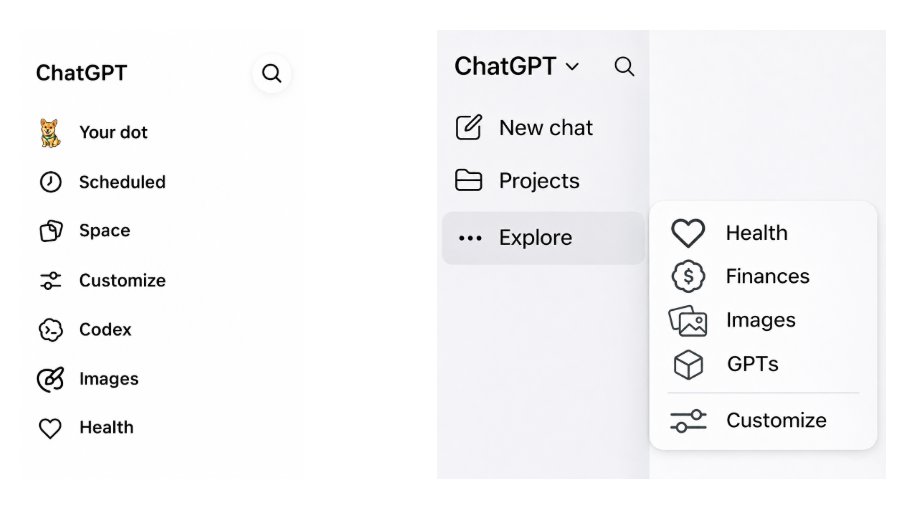
1. Open **Health** from the ChatGPT sidebar. If it isn't listed, look in the **Explore** menu in the phone or desktop app, or the **•••** menu on the web.
2. Select **Connect Health** or **Get started**.
3. Choose **Health Connect** on Android, **Apple Health** on iPhone, **Medical Records**, or another supported source.
4. Follow the sign-in and permission steps, and pick the kinds of data to share.
5. Wait for the data to sync, which can take a few minutes or longer for a long history.
6. Review your current conditions, medications and family history.
Health in the ChatGPT sidebar (left) and inside the Explore menu (right). Source: OpenAI
Medical records come from supported US hospital systems, One Medical and Function Health. You can ask health questions without connecting anything, and the answers then draw on what you type in the chat.
Once your data has synced, you can ask about it in any chat. The help page says adding **@Health** to a message makes ChatGPT more likely to use it.
## What Health does in the desktop app
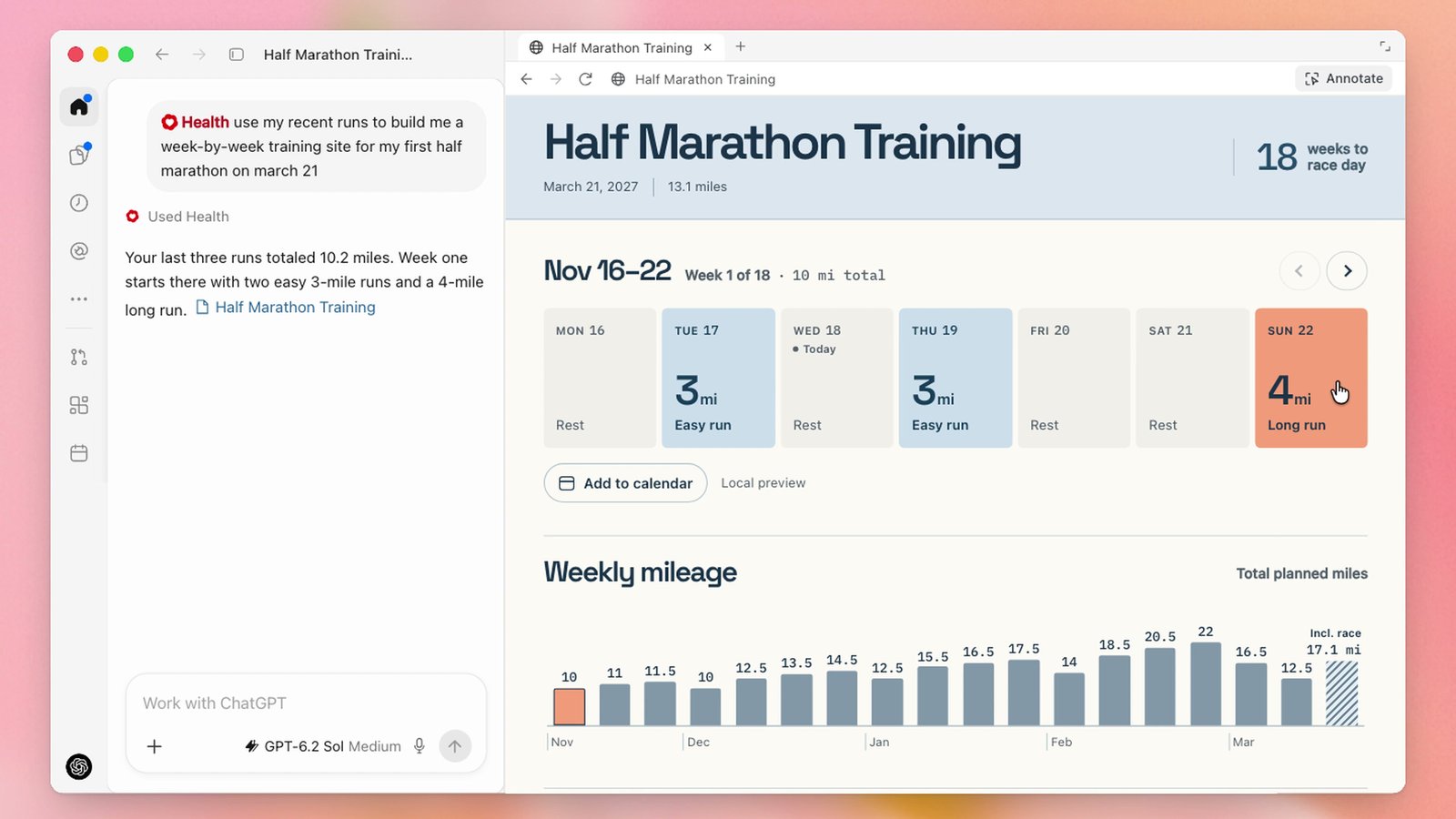
OpenAI's example for the desktop app is a personal site that tracks marathon training, with your runs and your progress in one place.
In its launch video, someone types "use my recent runs to build me a week-by-week training site for my first half marathon on march 21." ChatGPT answers that the last three runs totaled 10.2 miles, then builds a page with a race countdown, the week's runs and a mileage chart.
The request on the left and the training site ChatGPT built from Health data on the right, from OpenAI's launch video. Source: ChatGPT on X
The person then asks ChatGPT to "deploy it as a private site and check off my completed runs every morning," and it replies that the site is live and that it will check for completed runs each morning.
OpenAI's post on X says sites are available on Plus and Pro, so building one needs either of those plans.
## Dots can now message you first about your health
With Health connected, a Dot can bring things up on its own. OpenAI gives two examples: suggesting another time for a workout when a meeting is booked over it, and reminding you about preventive care based on your connected medical records.
You need access to both Health and Dots for this. OpenAI's release note says Dots are available to Pro subscribers, a plan that starts at $100 a month, and its [Dots help page](https://help.openai.com/articles/20001530) says a gradual rollout to selected Plus accounts has started.
That help page also explains what a Dot does with a connected app. It can review the information on its own and form memories from it before you've asked a question, and disconnecting the app later doesn't delete what the Dot already took in.
Dots can already [pay for things with ChatGPT Wallet](https://www.aiformortals.co/blog/chatgpt-wallet). When Pat [gave a Dot real jobs for a day](https://www.aiformortals.co/blog/openai-dots), it caught a billing problem in his email without being asked.
## The privacy setting to check before you connect anything
OpenAI says the data you sync through Health, such as medical records and Health Connect data, isn't used to train its foundation models or to target ads.
Conversations are handled differently. According to the help page and OpenAI's [Health Privacy Notice](https://openai.com/policies/health-privacy-policy/), chats that reference your connected health data can be used to improve its models if your model improvement setting allows it.
To opt out, go to **Settings**, then **Data Controls**, and turn off **Improve the model for everyone**.
Check it even if you set Health up months ago. OpenAI's [July launch post](https://openai.com/index/health-in-chatgpt) said conversations using connected health data wouldn't be used for training "regardless of the model-training setting you choose," and the help page and privacy notice now tie those conversations to the setting.
A few more controls from the help page:
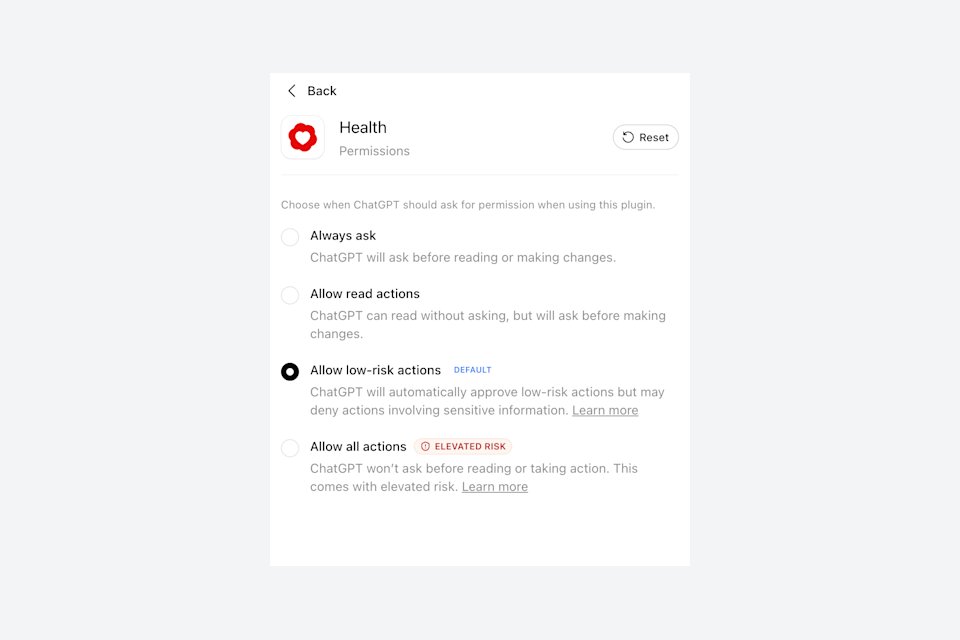
- **Permissions.** Health follows your general plugin setting, which is "Allow low-risk actions" unless you've changed it. You can switch Health to "Always ask" under **Settings**, then **Plugins**, then **Health**.
- **Memory.** With memory on, a chat that uses Health can create memories for later chats. Temporary Chat avoids that.
- **Disconnecting.** Remove a source under **Health**, then **Accounts**, and OpenAI deletes the synced data within 30 days. Anything already in a conversation stays until you delete that conversation.
- **Teens.** A parent can turn Health off for a linked teen account.
The four permission levels for Health, with "Allow low-risk actions" as the standard setting. Source: OpenAI
OpenAI also says Health is designed to support medical care and isn't intended for diagnosis or treatment.
## How Health fits OpenAI's plan for one assistant that knows your records and your money
When Health was announced on January 7, OpenAI executive Fidji Simo [called it](https://fidjisimo.substack.com/p/chatgpt-health) "another step toward turning ChatGPT into a personal super-assistant."
It started as a waitlist. On July 23, OpenAI began opening it to every logged-in US adult on the web and iPhone, and Thursday's update adds Android, the desktop app and Dots.
Most of that assistant now exists. ChatGPT can hold your medical records and, through [Finances](https://www.aiformortals.co/blog/chatgpt-finances-free), your bank records, and its agents pay for things and now message first about your health.
Anthropic took a narrower step this month. Claude can read [records from doctors' offices that use athenahealth](https://www.aiformortals.co/blog/athenahealth-claude-records), and it uses them to answer questions in a chat, while OpenAI lets Dots read records to send reminders.
## Sources
- [ChatGPT release notes: Health on Android, desktop, dots and sites](https://help.openai.com/en/articles/6825453-chatgpt-release-notes) (OpenAI, November 19, 2026)
- [Health in ChatGPT](https://help.openai.com/articles/20001036) (OpenAI Help Center)
- [Getting started with your dot](https://help.openai.com/articles/20001530) (OpenAI Help Center)
- [Health Privacy Notice](https://openai.com/policies/health-privacy-policy/) (OpenAI)
- [Launching Health in ChatGPT](https://openai.com/index/health-in-chatgpt) (OpenAI, July 23, 2026)
- [Introducing ChatGPT Health](https://openai.com/index/introducing-chatgpt-health) (OpenAI, January 7, 2026)
- [ChatGPT Health and what AI can do for a broken system](https://fidjisimo.substack.com/p/chatgpt-health) (Fidji Simo, January 7, 2026)
- [ChatGPT Health feature now works with Mac app, Dots, more](https://9to5mac.com/2026/11/19/chatgpt-health-feature-will-soon-work-with-mac-app-dots-more/) (9to5Mac, November 19, 2026)