# ChatGPT’s Dots Can Now Buy Things for You
> ChatGPT Wallet lets a Dot pay for something it found once you approve it with Face ID or a fingerprint, starting with US ChatGPT Pro subscribers.
By AI for Mortals Staff · November 15, 2026 · 5 min
Canonical: https://www.aiformortals.co/blog/chatgpt-wallet
OpenAI launched [ChatGPT Wallet](https://openai.com/index/introducing-chatgpt-wallet/) on Friday, a way for Dots, the always-on agents in ChatGPT, to pay for something they found once you approve the purchase. ChatGPT Wallet is rolling out first to ChatGPT Pro subscribers in the US, the plan that costs $100 a month or more.
The rollout is gradual, so even an eligible Pro subscriber might not see it yet. When it reaches your account, your Dot offers to set it up the first time a purchase gets to checkout.
Now your dot can securely complete purchases on your behalf—with your approval. With ChatGPT Wallet, agents pay without access to your actual card details. Every purchase requires a security check. ChatGPT Wallet is rolling out starting today to dots, for Pro subscribers in the US.
## How a ChatGPT Wallet purchase works, start to finish
You ask your Dot for something the way you'd ask a person. OpenAI's [help article](https://help.openai.com/en/articles/20001654-making-purchases-with-chatgpt-wallet) gives two examples: "Help me find a new sweater" and "Book me a hotel for my trip to Chicago next weekend."
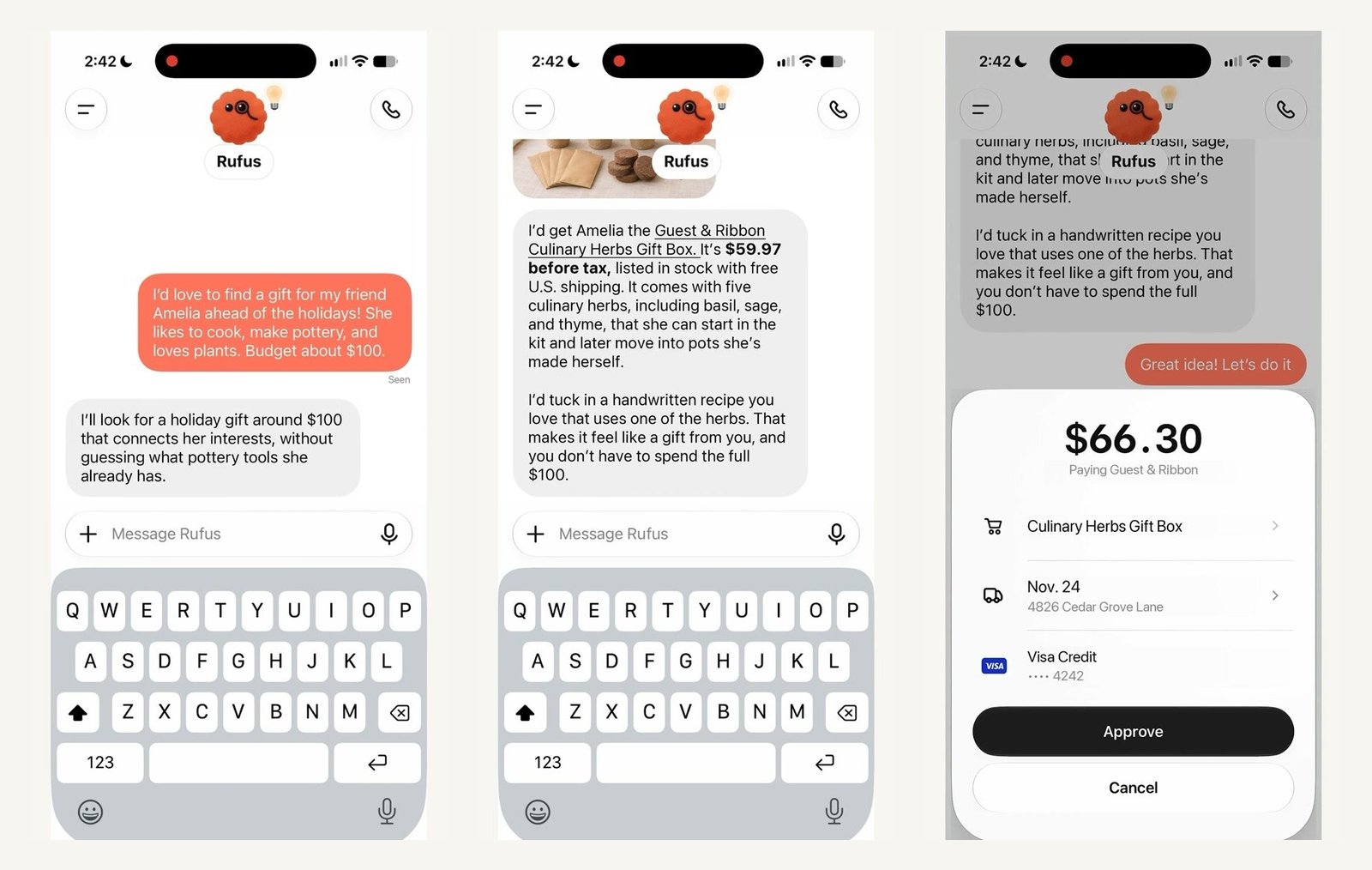
The Dot searches, suggests something and waits for your yes. In OpenAI's launch video, a user asks for a holiday gift for a friend who likes cooking, pottery and plants, with a budget of about $100, and the Dot comes back with a $59.97 herb gift box.
From request to approval in OpenAI's demo: the Dot suggests a gift, then shows the store, item, delivery and card before you approve. Image: OpenAI's launch video
When you say go ahead, an approval sheet slides up with the store, the items, the total, the card and any shipping or recurring-payment terms. You tap **Approve** and confirm with Face ID, Touch ID or a fingerprint. If your device can't do that check, the help article says you can finish on a phone signed in to the same ChatGPT account.
The Dot then fills in the checkout and reports back. The store gets the shipping address and contact details it needs from the Dot, and **you never type your card number into the chat**.
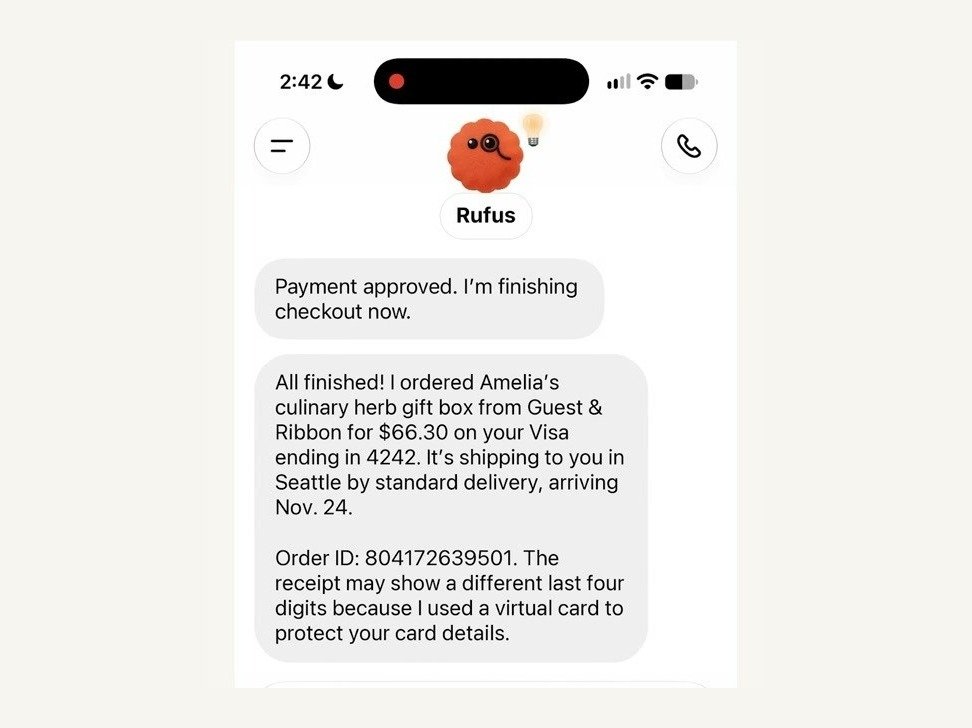
After checkout the Dot reports the order and warns that the receipt may show different last four digits. Image: OpenAI's launch video
## Why the store never sees your real card number
After you approve, the card network (Visa, Mastercard or American Express) creates a payment token, a stand-in card number with its own security code and expiration date. The charge lands on your real card, but neither the store nor the Dot ever sees the real number.
The stand-in number isn't always single-use. If you agree to a subscription or another recurring payment, the store can keep it and charge it again under the terms you approved, and canceling those charges goes through the store.
That's why your receipt can show different last four digits from the card in your wallet. Because it's still a normal card payment, **your card's rewards and its protection for disputed charges still apply**, for example when an item arrives broken.
OpenAI says each approval also creates a record of exactly what you authorized the agent to buy. That record matters if a charge is ever disputed, because it shows the bank what you agreed to.
## Who can use ChatGPT Wallet, and which cards work
You need all of these:
- **A ChatGPT Pro subscription** and a Dot already set up. Wallet only works in conversations with your Dot, not in regular Chat, Work or Codex threads.
- **Age 18 or older**, living in the US, with a US billing address on the card.
- **A US-issued credit card** from Visa, Mastercard or American Express. Chase cards work if you're the main cardholder and approve the connection in the Chase app. Debit cards and virtual cards aren't supported at launch.
To add a card, ask your Dot ("Help me add a card to Wallet") or go to **Settings > Wallet > Add Card** on your phone. Either way you type the card details into a secure form, never into the chat, and your bank may ask you to verify the card with a code or in its app.
Removing a card later doesn't cancel orders or recurring charges you already approved. Those stay between you and the store.
## Where it can fail: approval isn't proof of an order
OpenAI is clear that **"Ready to check out" means your approval went through, not that the store placed your order**. The proof is the store's own confirmation email or order page. If something looks stuck, the help article says to check for that confirmation before you try again, so you don't end up paying twice.
Some stores won't take the purchase at all. Retailers have been blocking AI shopping agents over fraud and security worries, and Amazon, the biggest of them, keeps sending agents away and points shoppers to its own assistant, Alexa. eBay, Booking.com and, as of last week, [United Airlines](https://www.aiformortals.co/blog/united-blocks-ai-agents) have similar rules.
ChatGPT Wallet is OpenAI's answer to the fraud worry: every purchase arrives as a card payment the bank can check, with a fingerprint or face scan behind it. A card network can't force a store to let agents in, though, so OpenAI also published a [guide for businesses](https://developers.openai.com/commerce) on letting agents through and working with fraud-checking companies like Forter, Riskified, Sardine and Signifyd.
American Express already added [its own safety check for AI agent purchases](https://www.aiformortals.co/blog/amex-ai-agent-purchases) in October, so the card side has been getting ready for this.
## How much people actually shop through agents so far
OpenAI says ChatGPT Wallet is the first wallet that lets agents pay without seeing your card details and checks every purchase, in a form stores can accept with the systems they already use. Agent shopping is still small, though: DoorDash said in October it had seen [only several hundred orders from AI agents](https://techcrunch.com/2026/10/30/doordash-said-its-only-received-several-hundred-orders-from-ai-agents/) in total.
## What's coming next for ChatGPT Wallet
For now every single purchase needs your face or fingerprint. OpenAI says it plans to let you set spending limits, purchase categories or time periods, so a Dot can buy within those rules without asking each time.
If you haven't set up a Dot yet, Pat walked through [what Dots can do on a real day of jobs](https://www.aiformortals.co/blog/openai-dots), and here's his first look:
## Sources
- [OpenAI: Introducing ChatGPT Wallet](https://openai.com/index/introducing-chatgpt-wallet/)
- [OpenAI Help Center: Making purchases with ChatGPT Wallet](https://help.openai.com/en/articles/20001654-making-purchases-with-chatgpt-wallet)
- [OpenAI Help Center: ChatGPT release notes, November 13, 2026](https://help.openai.com/en/articles/6825453-chatgpt-release-notes)
- [OpenAI: Commerce Partner Playbook](https://developers.openai.com/commerce)
- [TechCrunch: ChatGPT's new wallet lets AI agents shop and check out for you](https://techcrunch.com/2026/11/13/chatgpts-new-wallet-lets-ai-agents-shop-and-check-out-for-you/)
- [Business Insider: Companies are banning AI agents. Here's the list.](https://www.businessinsider.com/list-companies-banning-ai-agents-retail-travel-united-amazon-target-2026-11)