# Claude Stops Asking Before Every Step Next Week
> Anthropic is switching Claude's web, desktop and phone apps to auto mode by default next week on Pro, Max and Team, so Claude stops asking you to approve each step of a task.
By Pat Simmons · October 22, 2026 · 5 min
Canonical: https://www.aiformortals.co/blog/claude-auto-mode
Anthropic is switching Claude's apps on the web, desktop and phone to auto mode by default next week, on the Pro, Max and Team plans.
When Claude works through a task for you, like going through your connected apps or clicking around a website, it will stop asking you to approve each step. A safety check reviews every action instead and blocks the risky ones, and you can switch back whenever you want.
## What changes when Claude works on a task for you
In the Claude apps, the box where you type has a setting for how Claude checks with you. Until this change, the default has been Manual, which used to be called "Ask before acting": Claude pauses before an action, and you tap Allow or Deny.
Next week the default flips to Auto, which Anthropic's [help page](https://support.claude.com/en/articles/13345190-get-started-with-claude-cowork) describes as Claude working "without stopping to ask about every step." It covers the actions where those approval pop-ups show up today:
- your connected apps and plugins
- the browser built into the Claude desktop app, and Claude in Chrome
- some Cowork actions, like fetching websites
The permissions you've set for each connected app still apply. Tools that only read things get approved automatically, Claude decides on tools that write or delete, and anything you've set to Blocked stays blocked.
Anthropic says the same check already approves the actions of [Claude Duet, its agent that messages you first](https://www.aiformortals.co/blog/claude-duet).
## How the safety check decides what to block
Before each action runs, Claude reviews it for safety. Anthropic names two things it looks for: your data being sent somewhere it shouldn't go, and instructions hidden in a web page or file that try to steer Claude into doing something you didn't ask for.
If an action looks unsafe, it gets blocked. Claude then looks for a safer way to finish the job or stops and asks you, and if it keeps hitting blocks, it goes back to asking before every step.
Anthropic first built the check for Claude Code. Its [write-up on how it works](https://www.anthropic.com/engineering/claude-code-auto-mode) says the check judges what an action would actually do and never reads Claude's own explanation for it, so Claude can't talk its way past it with a good-sounding reason.
It also never sees the text of the web pages and files Claude reads, which is where hidden instructions live. Sending your private files to an outside website is the kind of action it's built to block, no matter what convinced Claude to try it.
Anthropic says it tested the check with outside security experts who tried to sneak dangerous actions past it, then used what they found to strengthen auto mode across all its products.
## Why Anthropic trusts the check more than your clicks
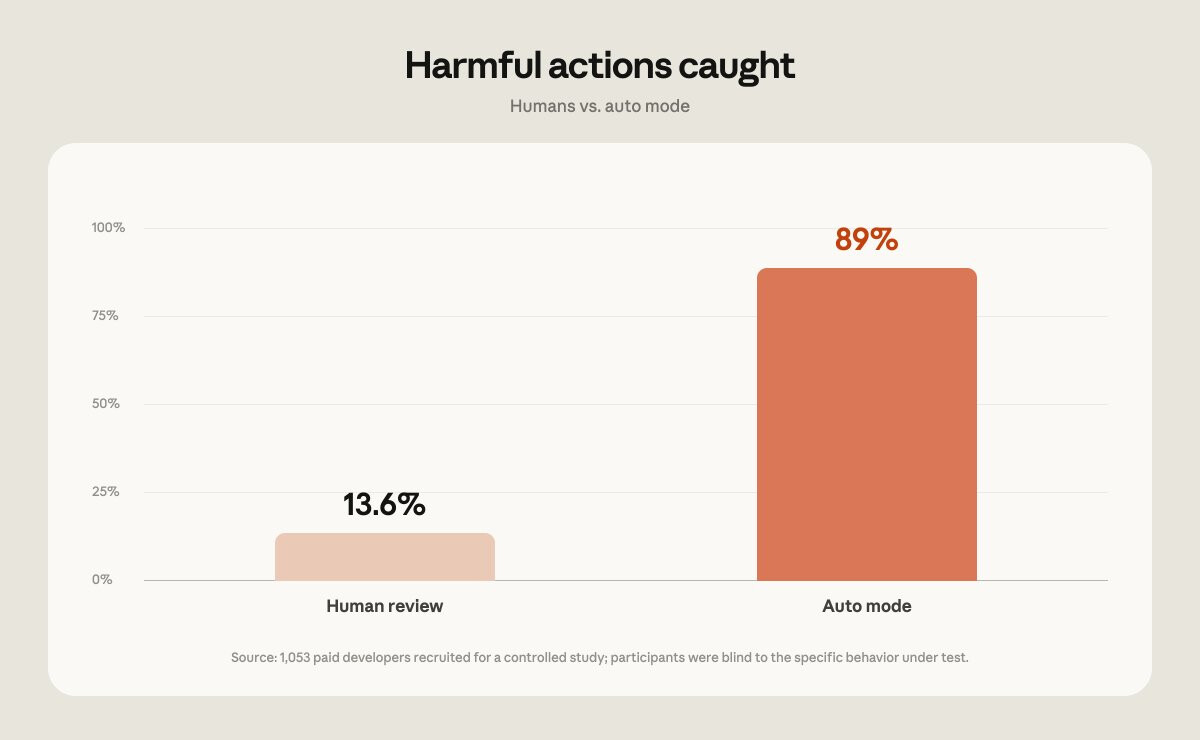
When Anthropic made auto mode the default in Claude Code in August, it shared a study with 1,053 paid testers. It slipped a clearly dangerous command into the usual stream of permission prompts, and testers caught it 13.6% of the time, dropping closer to 5% after 50 prompts, according to the [@ClaudeDevs thread](https://x.com/ClaudeDevs/status/2085794862608318627).
Auto mode blocked 89% of the dangerous commands in the same kind of test.
People approving each step caught 13.6% of dangerous actions in Anthropic's study, and auto mode caught 89%. From Anthropic's @ClaudeDevs thread
Anthropic calls this approval fatigue: after enough harmless pop-ups, most of us stop reading and just tap Allow.
Anthropic admits the check misses some. In its write-up from March, 17% of real cases where Claude Code tried something risky that nobody had asked for got past the check.
Anthropic's read is that auto mode is a big step up from turning approvals off entirely, and that someone who carefully reads every request could still catch more.
## When to switch back to Manual
Anthropic's own advice is to stay close for work with real consequences, like money, messages sent as you and important files, and to consider switching back to Manual for those.
Switching is one tap in the same setting in the message box. You'll see three choices:
- **Manually approve:** Claude asks before each action.
- **Automatically approve:** Claude keeps going, and the check reviews every action.
- **Skip all approvals:** Claude doesn't ask and nothing checks its actions. Anthropic says to use it only when you completely trust everything involved in the task.
You can also give Cowork a standing instruction that applies to every task. Something like this, if you want auto mode for the busywork and a heads-up for anything that goes out under your name:
> Before you send an email or a message as me, make a payment, or delete a file, show me exactly what you're about to do and wait for my OK.
On Team plans, your admin decides whether new tasks start in Auto, and can turn the mode off for everyone. Enterprise plans start new tasks in Manual unless an admin changes it, according to [Anthropic's admin guide](https://support.claude.com/en/articles/13455879-use-cowork-on-team-and-enterprise-plans).
## Why I'm glad auto mode is the default
The Claude apps have been doing more of this kind of work lately. [Cowork keeps running tasks while your laptop is closed](https://www.aiformortals.co/blog/claude-cowork-comes-to-web-and-mobile), which doesn't do much good if the task sits waiting on an Allow button.
There's nothing more annoying than turning on dangerously skip permissions, the Claude Code setting that turns off approvals completely, just so it stops asking about every step. I had Claude Fable 5 [build me a setup for running a whole team of agents](https://www.youtube.com/watch?v=HhWwllcbc2g), and every new agent tab in it starts Claude Code with dangerously skip permissions turned on.
Auto mode keeps the work moving and still checks every action, so it's nice to see it become the default in the Claude apps too. Here's that agent setup:
## Sources
- [Claude on X: auto mode becomes the default in the Claude apps](https://x.com/claudeai/status/2113360845409583307)
- [Claude Help Center: Get started with Claude Cowork](https://support.claude.com/en/articles/13345190-get-started-with-claude-cowork)
- [Claude Help Center: Use Claude Cowork on Team and Enterprise plans](https://support.claude.com/en/articles/13455879-use-cowork-on-team-and-enterprise-plans)
- [Claude Help Center: Use Claude Cowork safely](https://support.claude.com/en/articles/13364135-use-claude-cowork-safely)
- [Anthropic: How we built Claude Code auto mode](https://www.anthropic.com/engineering/claude-code-auto-mode)
- [ClaudeDevs on X: auto mode becomes the default in Claude Code](https://x.com/ClaudeDevs/status/2085794862608318627)
- [Anthropic: Introducing Claude Duet](https://claude.com/resources/articles/claude-duet)