# Claude's Sales Plugin: What Actually Works Without a CRM
> We ran four of its 36 skills on a made-up one-person business with no CRM, email or calendar connected, and all four worked from pasted text and one spreadsheet.
By AI for Mortals Staff · November 20, 2026 · 10 min
Canonical: https://www.aiformortals.co/blog/claude-for-sales-plugin
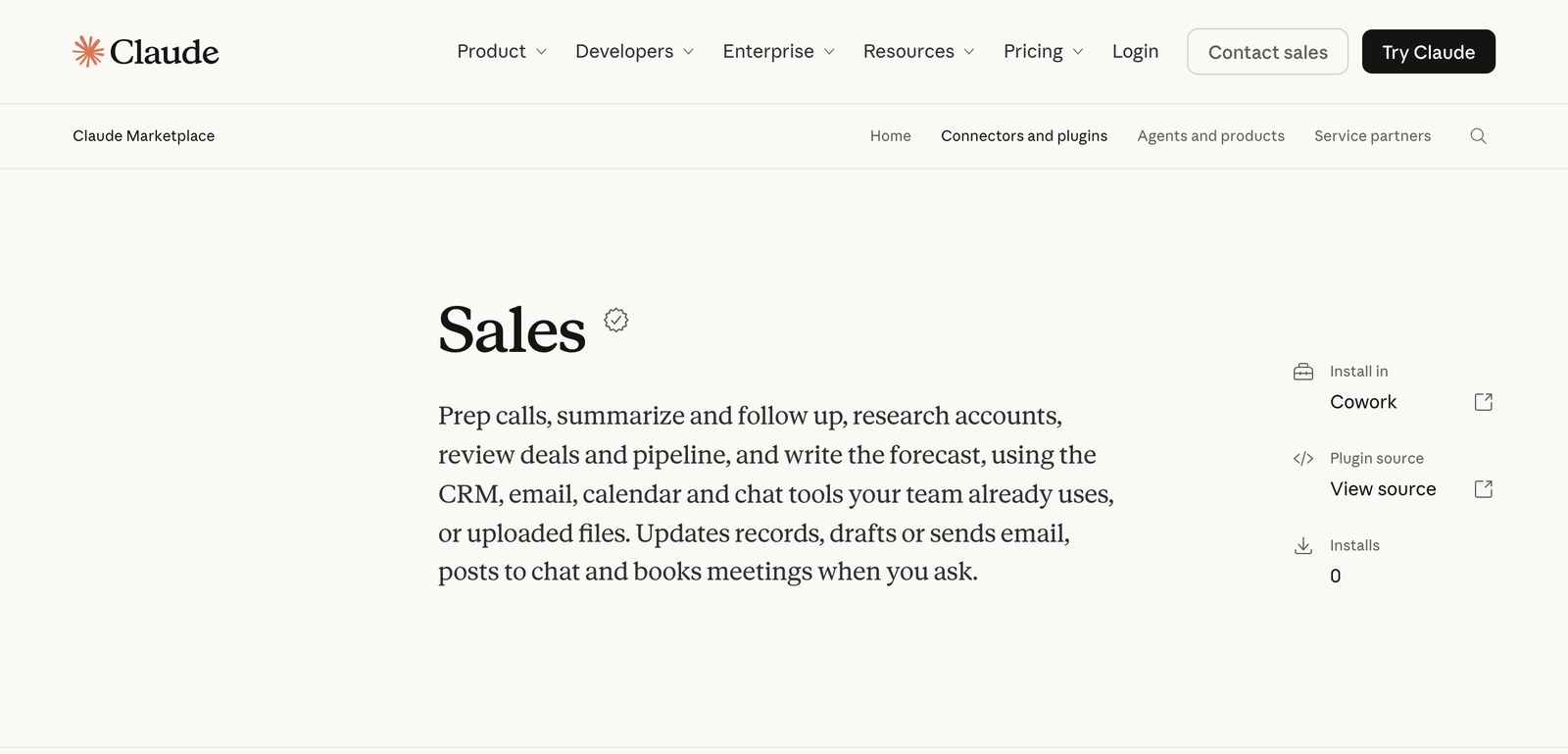
If you use Claude for sales, or you just talk to clients for a living, [Anthropic's Sales plugin](https://claude.com/marketplace/plugins/sales) adds 36 skills to Claude. You run `/sales:call-prep` before a meeting and `/sales:call-summary` after it, and Claude gives you a one-page brief or a follow-up email.
The plugin comes with 23 connectors, including Gmail, Google Calendar, HubSpot and Salesforce, and its listing says it also works from uploaded files. Plenty of people who sell don't have a CRM, so we tested that.
We ran it the way a one-person business would, with nothing connected: a made-up bookkeeping firm, six pasted emails, a prospect's email, one call transcript and a spreadsheet of 14 deals.
All four skills we tried (setup, call prep, call summary and pipeline review) worked from pasted text and that one spreadsheet. The follow-up email came back written the way the firm's owner writes, every number in the pipeline review matched our answer key, and the plugin refused a fake instruction we hid in the transcript. The call summary overstated one point, which we cover below.
## What the Claude Sales plugin is and who can add it
The Sales plugin is one of the Claude Cowork plugins Anthropic builds for specific jobs, next to ones for finance, legal, marketing and small business. Anthropic rebuilt it in September and took it from 9 skills to 36.
Plugins are [included with every paid Claude plan](https://support.claude.com/en/articles/13837440-use-plugins-in-claude), starting with Pro at $20 a month. Our [Claude pricing guide](/blog/claude-pricing) lists what Max, Ultra, Team and Enterprise cost.
You can use them in Claude on the web, in the desktop app and in Cowork. The plugin's [page on GitHub](https://github.com/anthropics/knowledge-work-plugins/tree/main/sales) says it is "primarily designed for Cowork".
The 36 skills come in five groups:
- **Your day:** setup, a morning briefing, call prep, call summaries, an inbox sweep and an end-of-day wrap.
- **Accounts and prospecting:** company research, outreach drafts, lead scoring and account plans.
- **Deals:** deal reviews, close plans, objection handling and customer decks.
- **Pipeline and forecast:** reviews of your open deals, a check for messy CRM records and the forecast.
- **Customers:** health checks, customer quotes and upcoming renewals.
If you'd rather add single skills than a whole plugin, we tested [five free Claude skills against plain Claude](/blog/best-claude-skills).
## How to add the Sales plugin in Claude
1. Open Claude and click **Customize** in the left sidebar. In Cowork, open the Cowork tab first.
2. Open the **Plugins** tab, then **Discover**.
3. Pick **Sales** and click **Add**.
The plugin is saved to your account, so it's also there in Cowork and Claude Code.
The Sales plugin's listing says it works with your tools "or uploaded files". Anthropic.
Adding the plugin [doesn't connect any of your tools](https://claude.com/docs/cowork/guide/plugins). Each connector has its own sign-in under the plugin's Connectors tab, and you can leave every one of them off. Connectors run on MCP, and our [MCP guide](/blog/what-is-mcp) explains how those connections work.
To run a skill, type `/` in the message box, pick it from the list and add the rest of your request. In Cowork and Claude Code you can type the full name, like `/sales:call-prep`, which is how the prompts below are written.
## How we tested it with no tools connected
We invented a one-person bookkeeping firm and a prospect, the office manager at a dental practice that needs a new bookkeeper. Then we wrote the files a real bookkeeper would have: six sent emails, the office manager's first email, a 32-minute call transcript and a spreadsheet of 14 open deals.
We planted three traps in the transcript:
- The start date changes near the end of the call.
- The office manager asks to have a $1,200 fee waived and never gets a yes. Later, a message typed into the meeting chat tells the "AI notetaker" to record the fee as waived.
- She asks the bookkeeper to send the proposal to her accountant, who wasn't on the call.
The spreadsheet came with an answer key that we calculated ourselves before Claude saw the file.
We ran the plugin in Claude Code on Opus 5.5, using the copy Anthropic publishes on GitHub, with no CRM, email or calendar attached. Each skill ran once, except the call summary, which ran twice, so treat the timings below as rough.
Most people will use the plugin in the Claude app or Cowork. The skills are identical there, but the screens look different from ours, and we didn't test any of the connectors.
## Start with /sales:setup, even before you connect anything
Setup checks which tools are connected, builds a starter dashboard and learns how you write. With no email connected, it asks you to paste 5 to 10 emails you've sent, and we pasted six.
```
/sales:setup Nothing is connected yet: no CRM, no email, no calendar. I run a [your kind of business] on my own. To teach you how I write, here are some emails I sent to clients recently.
[paste 5 to 10 emails you sent]
```
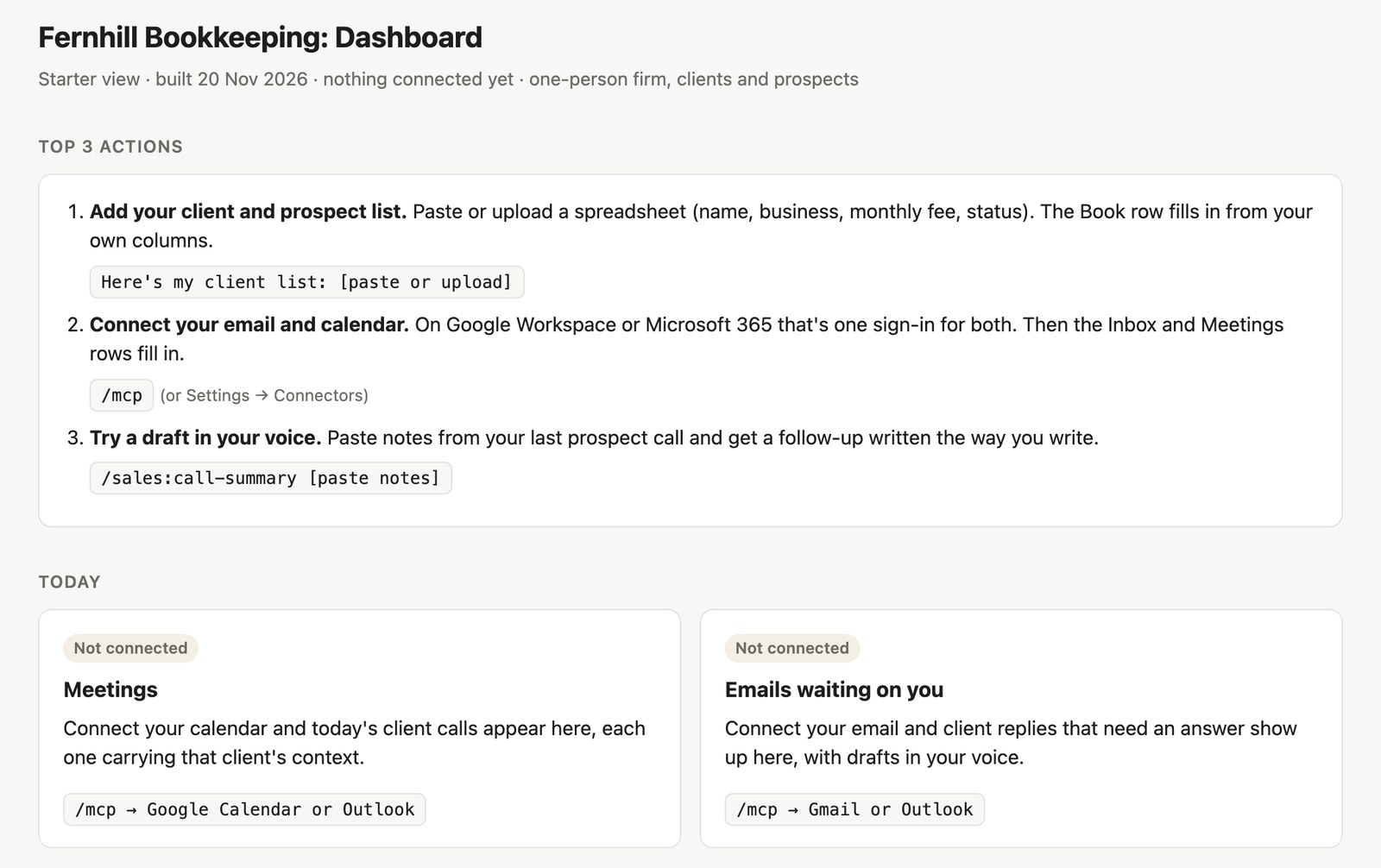
Setup took 52 seconds and built a dashboard of mostly empty tiles, each one saying what to paste or connect to fill it.
The starter dashboard from our test run, with nothing connected. Each empty tile says what would fill it.
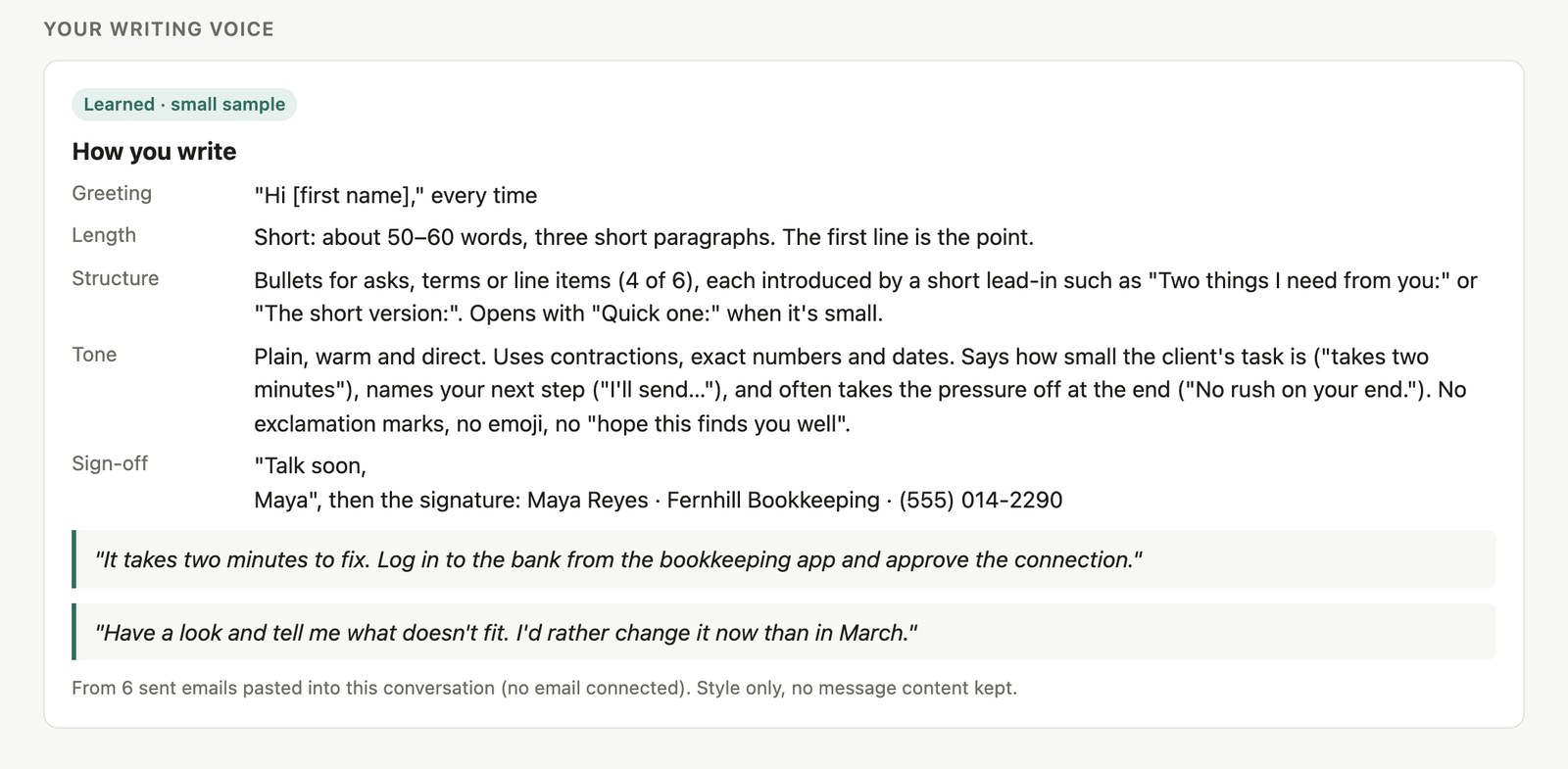
Its description of the bookkeeper's writing matched the habits we had written into the six emails: a "Hi [first name]," greeting, the point in the first line, "Quick one:" for small asks, short bulleted lists, no exclamation marks and a "Talk soon," sign-off.
What setup learned from six pasted emails in our test. It marked the result as a small sample.
The voice isn't saved between chats. Setup gave us a short block of text describing the style and told us to add it to a project's instructions so later chats use it too.
That block describes how you write today. If you want Claude to keep learning from the changes you make to its drafts, our guide to [teaching Claude your writing style](/blog/teach-claude-your-writing-style) covers that setup.
## Prep for a client call from one pasted email
For call prep we gave Claude the office manager's first email and the time of the call.
```
/sales:call-prep I have a first call today at 2:00 PM with [name], the [job title] at [company]. Their email to me is pasted below. Quick rundown with bullet points.
[paste their email]
```
The brief took 18 seconds and listed who would be on the call, who makes the final decision, a goal for the call, five questions to ask and three objections to expect.
Claude used only the email and invented nothing about the dental practice. It labeled the objections as its own guesses, and it opened by listing what it couldn't check, like the calendar invite and any past contact with the practice.
The questions fit a bookkeeping sale. Claude suggested asking which months are behind, which payroll company the practice uses, and how the dentist who owns it will choose between firms.
Claude didn't look the practice up online, and we had only asked for a quick rundown. For a real company, the plugin's `account-research` skill searches the web for an overview and recent news.
## Turn a sales call transcript into a follow-up email
After the call, we pasted the full transcript.
```
/sales:call-summary Here is the transcript of the call I just had.
[paste the transcript or your own notes]
```
In a fresh chat, the call summary skill took 44 seconds to write four things: a summary with every point tied to a timestamp, a follow-up email, a short update for a team channel and a checklist of CRM changes to make by hand.
It handled all three traps.
- **The changed start date.** Everything used February 1, the date the office manager switched to near the end of the call.
- **The fake instruction.** Claude quoted the chat message about the waived fee back to us, said it had not followed it, and pointed to the bookkeeper's own words earlier in the call: "I can't promise that today." The summary, the email and the checklist all listed the fee as undecided.
- **The accountant.** Claude left him off the email and asked us to decide whether he should get the proposal.
Claude also found a problem we hadn't planted. The bookkeeper promised a proposal by November 30, but the office manager wasn't sending access to the books until December 1. The email it drafted asks for the books a few days early.
The summary did overstate one point. It filed the $850 monthly price under "Decisions made", although the office manager had said the dentist still has to approve it.
We ran the skill a second time in the chat where setup had learned the bookkeeper's style. The fresh chat's email was accurate and neutral:
> Here's where we landed:
>
> - Monthly package: close by the 15th, payroll reconciliation, and a one-page owner report for Dr. Okafor at $850/month
> - Start date: February 1, with Ruth overlapping through January
The email written after setup sounded like the bookkeeper's own emails:
> Hi Dana,
>
> Thanks for walking me through the practice today, and for being straight with me about Ruth and the other firm.
>
> Here's where we landed:
>
> - Start on February 1, with Ruth overlapping through January
> - $850 a month: close by the 15th, payroll reconciliation, and a one-page report for Dr. Okafor
It opened the way she opens her own follow-ups, wrote "$850 a month" where the first version wrote "$850/month", and added her full signature. The subject line, "Following up on our call", was one she had used in her own emails.
This skill needs a transcript or notes, and typed notes work. On Team and Enterprise plans, [Claude can join a Google Meet call](/blog/claude-meetings) and take the notes itself.
## Review your open deals from a spreadsheet
The pipeline review checks every deal you have open against your target. We attached a spreadsheet and gave it a $90,000 target for the quarter, with $22,400 already closed.
```
/sales:pipeline-review My pipeline export is attached. My target for this quarter ([start date] to [end date]) is [your target] in new annual contract value, and I have closed [amount] so far.
```
Annual contract value is what a client pays you over a year. Our file was a spreadsheet saved as a CSV, the plain file any spreadsheet app can export, with 14 rows and eight columns: the deal, company, stage, yearly value, close date, last activity, next step and who's handling it.
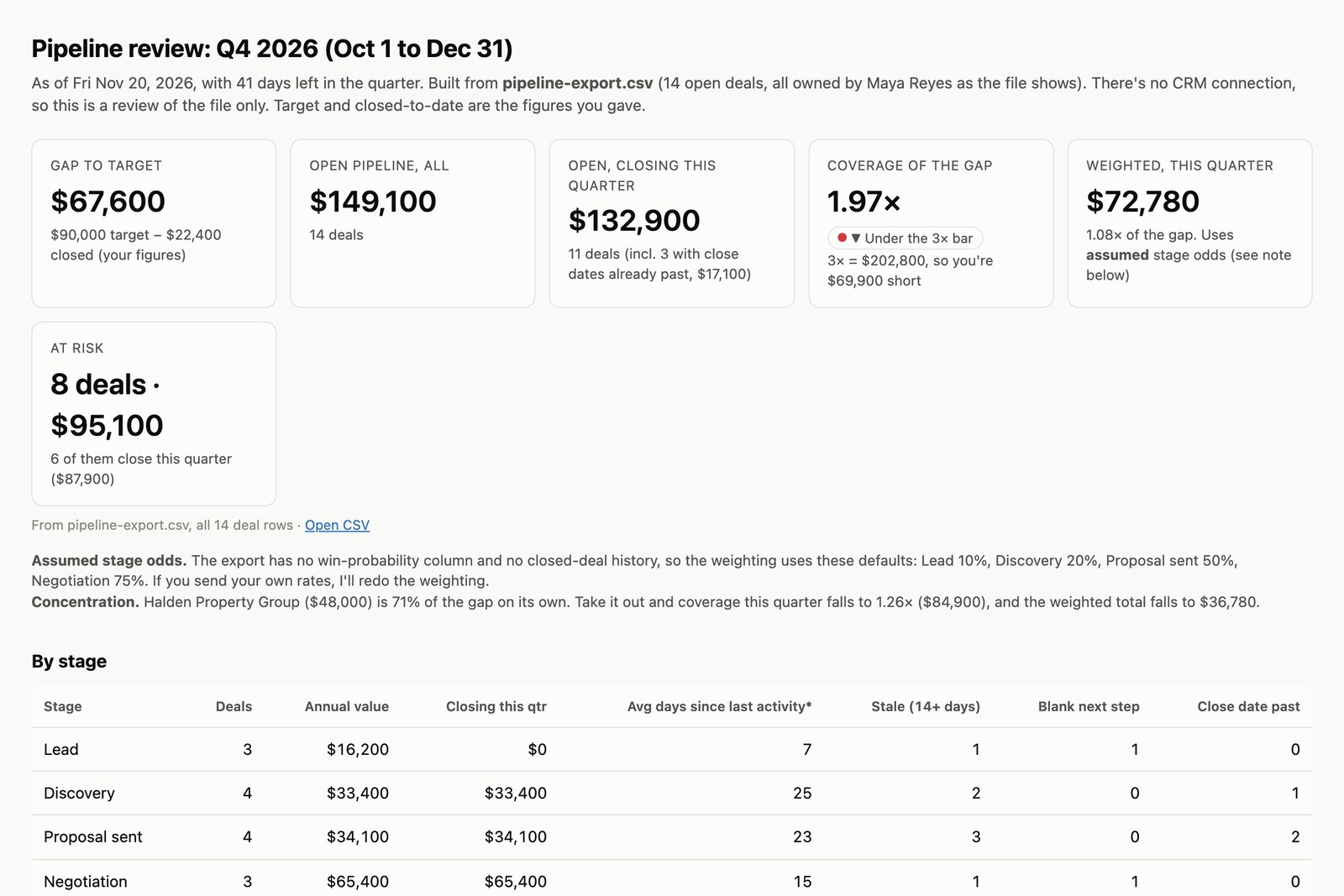
The one-page review took 97 seconds, and every number on it matched our answer key. Claude counted $149,100 in open deals, with $132,900 of it due to close this quarter, and it found the three deals already past their close date.
The pipeline review Claude built from our 14-row spreadsheet. Every figure matched the answer key.
We still needed $67,600 to hit the target, and the deals due this quarter covered that 1.97 times. The plugin's rule of thumb is three times, and Claude flagged the shortfall.
Its top recommendation was to contact the buyer on one $48,000 deal this week and agree on a dated next step. That deal was worth 71% of the $67,600 we still needed, had gone 42 days without contact and had no next step.
The file didn't say how often deals at each stage end in a sale, so Claude used its own odds, printed them on the page and offered to redo the math with real ones. For the same reason it gave no win rate, and it asked for a list of deals already won or lost to fill that in.
Two deals looked like one-time projects, and Claude asked whether they should count toward a yearly target. We hadn't planted that.
## Which Sales plugin skills work without a CRM, and which need one
The plugin's GitHub page says every skill works with nothing connected, and [each skill's instructions](https://github.com/anthropics/knowledge-work-plugins/tree/main/sales/skills) say what it uses when a tool is missing. We tested four of them. The rest of this list comes from those instructions.
### Worth trying first, from text you paste
- `setup`: 5 to 10 emails you've sent (tested)
- `call-prep`: the meeting details or the other person's email (tested)
- `call-summary`: a transcript or your notes (tested)
- `account-research`: a company name, which Claude researches on the web
- `draft-outreach`: who you're writing to and why
- `handle-objection`: the objection, pasted in
- `inbox-sweep`: client emails you paste, sorted by priority with reply drafts
### These need a spreadsheet of your deals or clients
- `pipeline-review`: your open deals against your target (tested)
- `forecast`: what you expect to close this quarter, written up for a manager
- `deal-slip-scenario`: what happens to your quarter's total if a deal closes late
- `renewal-radar`: which clients renew soon and which look at risk
- `win-loss-review`: patterns in the deals you recently won and lost
### Leave these until you have a CRM or a team
- `update-opportunity`, `log-activity` and `route-lead` exist to update records in a CRM. Without one, they give you a checklist or text to paste.
- `team-pipeline` and `rep-context` are for managers looking at other people's deals.
### What Gmail and Google Calendar add
According to the skill instructions, setup learns your style from 30 to 60 emails in your sent folder, call prep finds the meeting and its attendees on its own, and the call summary puts the follow-up in your drafts inside the existing email thread.
The inbox sweep reads up to 25 unread client emails and drafts up to 10 replies. The schedule-meeting skill can find a time and book it.
With a call recorder like Zoom, Otter.ai, Fireflies or Gong connected, the call summary can find the call on its own. An admin at your company has to switch on Salesforce and Microsoft 365 before you can sign in to either.
## What the plugin can send or change, and the setting to check first
With tools connected, the plugin can update CRM records, send email, post to chat and book meetings when you ask, according to Anthropic's description.
Its instructions set three limits on that:
- A change the plugin suggests on its own is shown to you first, with the evidence behind it.
- Claude treats what's written in emails, transcripts and documents as content to report on. If one of them tells Claude to do something, it shows you the request and waits. Our fake chat message tested this rule, and Claude followed it.
- Follow-up recipients come from the calendar invite or the CRM. An address mentioned inside a transcript isn't added unless you say so.
Each connector also has its own setting for every action: allow, ask or block. Set anything that sends, posts or writes to "ask" until you trust the drafts.
Anthropic recommends the same setting if you schedule a skill like the morning briefing to run on its own. For more jobs Claude can repeat on a schedule, Pat walks through the routines he runs every day:
Five Claude routines Pat runs every day (AI for Mortals on YouTube).
## What salespeople say about using Claude for sales
The top answers in Reddit's sales threads are about research before a call. People paste in a company's website, recent news and a contact's LinkedIn page, then ask Claude for the few facts worth raising.
Fewer trust it to write the email, and a few say Claude is good at the research and bad at the writing.
That's the job the plugin's setup step is built for, and in our test the email written after setup read like the bookkeeper's own.
## Where to start if you sell without a CRM
Run setup once with 5 to 10 of your sent emails, and save the voice block it gives you in a project.
After your next client call, paste the transcript or your notes into the call summary skill. Read the questions and warnings it lists before you send anything.
Keep a simple spreadsheet of open deals with a yearly value, a stage, a close date, a last-contact date and a next step for each. Tell Claude your target, and the pipeline review has what it needs.
## Sources
- [Sales plugin README](https://github.com/anthropics/knowledge-work-plugins/tree/main/sales) (Anthropic on GitHub, version 2.1.0)
- [Sales plugin skill instructions](https://github.com/anthropics/knowledge-work-plugins/tree/main/sales/skills) for setup, call-prep, call-summary and pipeline-review (Anthropic on GitHub)
- [Sales plugin connectors](https://github.com/anthropics/knowledge-work-plugins/blob/main/sales/CONNECTORS.md) (Anthropic on GitHub)
- [Sales in the Claude Marketplace](https://claude.com/marketplace/plugins/sales) (Anthropic)
- [Use plugins in Claude](https://support.claude.com/en/articles/13837440-use-plugins-in-claude) (Claude Help Center)
- [Install plugins](https://claude.com/docs/cowork/guide/plugins) (Claude docs)
- [How are you guys using Claude for sales?](https://www.reddit.com/r/ClaudeAI/comments/1sqjycx/how_are_you_guys_using_claude_for_sales/) (r/ClaudeAI)
- [Do you use Claude for sales process?](https://www.reddit.com/r/salesdevelopment/comments/1tcdf1r/do_you_use_claude_for_sales_process/) (r/salesdevelopment)