# Claude Can Now Turn What It Builds Into Mac and Windows Apps
> Claude artifacts can now be installed as desktop apps on Mac and Windows, in beta on every plan, with permissions you set for each app.
By AI for Mortals Staff · November 24, 2026 · 5 min
Canonical: https://www.aiformortals.co/blog/claude-install-as-app
Claude artifacts, the pages and tools Claude builds for you in a chat, can now be installed as apps on your computer. Anthropic [is rolling out "Install as app"](https://claude.com/resources/articles/install-as-app) in beta in Claude for Mac and Windows, on every plan.
An installed artifact gets its own icon and opens in its own window, like any other app on your Mac or PC. Anthropic's examples are the kind of thing people already build in Claude for daily work: a meeting prep page that pulls from your calendar and email, or a tracker for the orders that need to ship that day.
You can now install Claude artifacts as desktop apps on Mac and Windows. Ask Claude to build an artifact, click "Install as app", and open it like any other app. It can use your connectors and, if you allow it, send notifications or add a menu bar item.
## What your Claude artifact can do once it's an app
An installed app is still the same artifact underneath. When you or anyone else who can edit it changes the artifact, [the app changes too](https://support.claude.com/en/articles/18516354-install-an-artifact-as-an-app), so there's nothing to re-install.
It can use Claude and the apps you've already connected to Claude, like your email or calendar, the same way the artifact does in a chat. Every request it makes to Claude counts toward your plan's usage limits, and so does building it in the first place.
You can also share an installed app with other people. You don't package it, sign it or set up an API key, because it runs on your Claude account.
An app only opens while your computer is online and signed in to Claude. The "Add to Dock" or "Add to Home Screen" options in a web browser only make a shortcut, without any of the desktop features below.
## How to install a Claude artifact as a desktop app
First, update Claude for Mac or Windows. Anthropic's help page lists version 6.28899.0 or later; on a Mac that's **Claude > Check for Updates**, and on Windows it's **Help > Check for Updates** under the menu button (☰).
Then ask Claude for the app you want. The help page's own examples:
- "Make a Pomodoro timer that lives in my menu bar."
- "Make a small Mac app that reminds me to stretch every hour."
- "Make a Windows app that renames the photos in a folder by date."
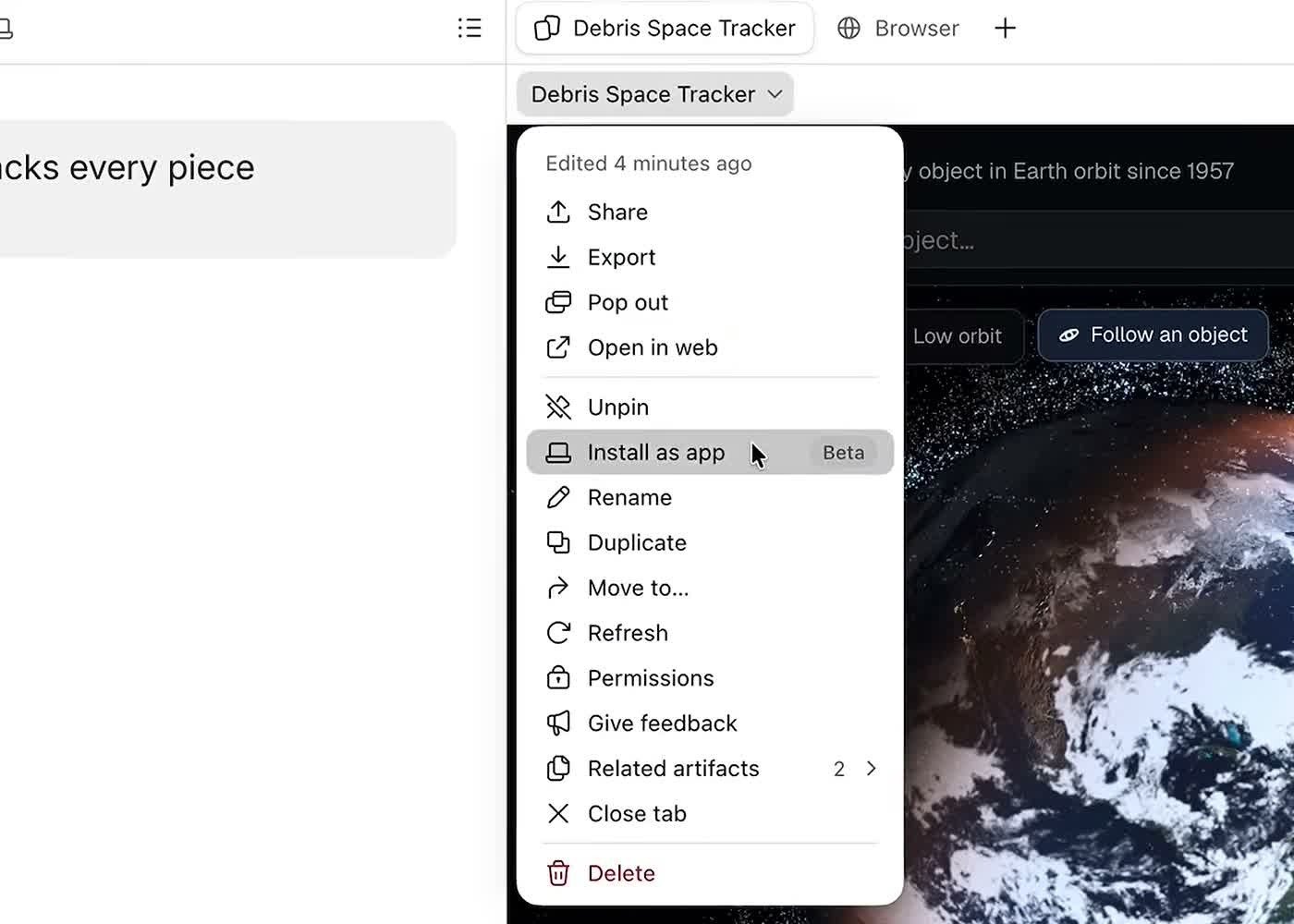
Open the finished artifact in the main Claude window, open its title menu (or right-click it) and choose **Install as app**. It's also under the artifact's **Share** menu.
"Install as app" in an artifact's title menu, from Anthropic's launch video. Source: Anthropic
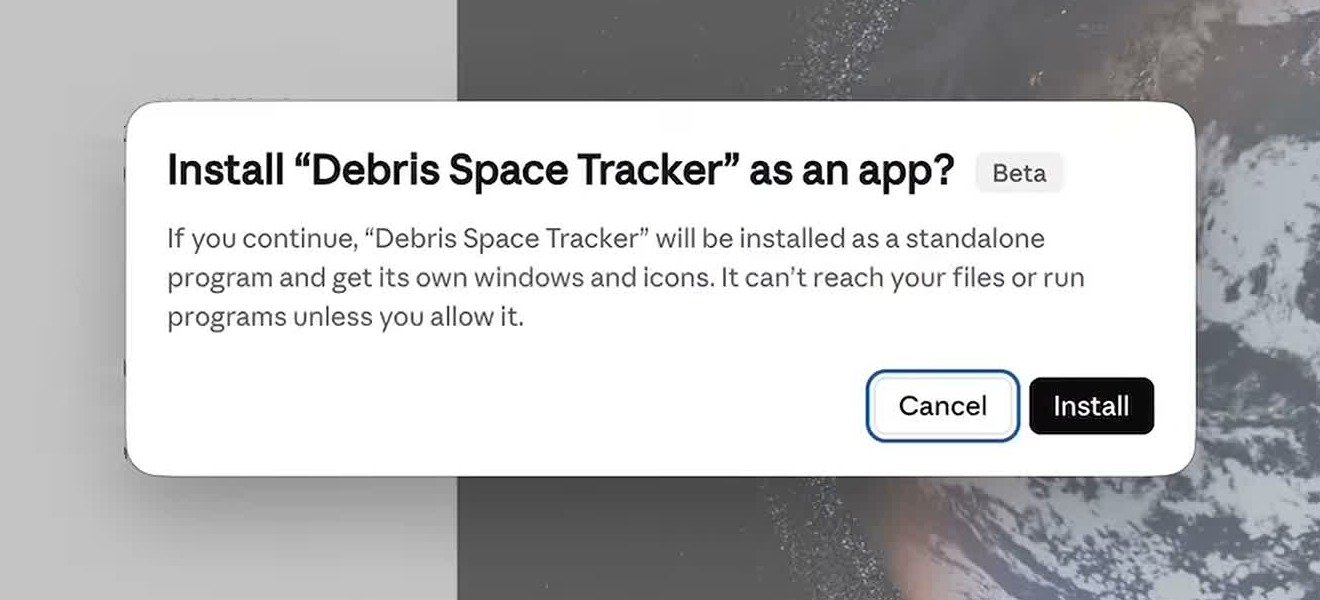
Claude then asks you to confirm, whichever way you started the install.
The install confirmation, from Anthropic's launch video (embedded further down).
On a Mac, installed apps go in a **Claude Apps** folder inside the Applications folder in your home folder, and they show up in Spotlight. On Windows, they're in a **Claude Apps** folder in the Start menu, with a shortcut on your desktop.
To remove one, go to **File > Apps** in Claude Desktop, pick the app and choose **Uninstall**. That removes the app and the permissions you gave it, and the artifact stays in Claude.
## Three permission levels decide what each app can touch
Every app starts with the same limits as a web page, and it has to ask before it does more. You answer each request with "Allow" or "Don't allow."
| Level | What the app can do |
|---|---|
| Default | Only what it could do in a web browser |
| App permissions | Ask for notifications, keyboard shortcuts, always-on-top windows, or a menu bar or system tray item |
| Full access | Run programs and read, change or delete your files without asking each time |
Full access is only for apps you made yourself or, on Team and Enterprise, apps made by people in your organization. On Free, Pro, Max and Ultra, the help page says anyone other than you counts as outside your organization, and Claude shows a warning when an app comes from outside it.
Anthropic doesn't review apps before you install them, so it tells you to give full access only to apps you trust. An "Allow" covers just the current version of an app: Claude asks again after every update, "even your own edits." The one exception is any part of an app that loads from another website, which can change without a new request.
You can change or take back a permission from the app's own menu (its name in the Mac menu bar, or Alt+Space on Windows). Turning off full access stops the programs the app started, but it doesn't undo changes the app already made.
Anthropic's launch video: an artifact installed as an app, then a run of apps people at Anthropic built.
## Who gets Install as app, and what can't be installed yet
Free, Pro, Max and Ultra users get it in Claude for Mac and Windows. On Team plans it's on by default with full access switched off until an admin enables it, and on Enterprise the whole feature is off until an owner turns it on.
Organizations with HIPAA-ready setups and hybrid deployments can't use it. In Claude for Teachers and K-12 organizations, full access isn't available.
Some artifacts can't be installed at all. That includes anything made from a template, like Claude Docs, Slides and Sheets (the [spreadsheets Claude started building this month](https://www.aiformortals.co/blog/claude-sheets-whiteboards) among them), plus older artifacts and live artifacts from Claude Cowork.
The apps don't run on Linux, on the web or on phones yet.
## Claude artifacts have grown from chat output into personal software
Artifacts arrived in June 2024 [alongside Claude 3.5 Sonnet](https://www.anthropic.com/news/claude-3-5-sonnet), as charts, documents and small web pages shown in a panel beside the chat. People at Anthropic have now used them to build a layered image editor, a file manager, folder rules that use Claude to keep files organized, a terminal with Claude beside it, and a menu bar app for checking a computer's performance.
ChatGPT and Gemini spent this year publishing what they build to the web, with [ChatGPT Sites and Gemini Canvas apps on Google Sites](https://www.aiformortals.co/blog/notebooklm-alternatives-notes-to-website). Claude now puts its builds on your desktop, as apps you open like any other.
That's the kind of personal software app builders like [Lovable, Replit and Bolt](https://www.aiformortals.co/blog/lovable-vs-replit-vs-bolt) charge for, and it now comes with every Claude plan. For a sense of how far each lab's models get on full builds, Pat put [Gemini 4 Neon, Opus 5.5 and GPT-6.2 Sol on the same app prompts](https://www.aiformortals.co/blog/gemini-4-neon-opus-5-5-gpt-6-2-sol-results).
## Sources
- [Turn artifacts into Mac and Windows apps](https://claude.com/resources/articles/install-as-app) (Anthropic, November 24, 2026)
- [Install an artifact as an app](https://support.claude.com/en/articles/18516354-install-an-artifact-as-an-app) (Claude Help Center)
- [Claude release notes, November 24, 2026](https://support.claude.com/en/articles/12138966-release-notes) (Claude Help Center)
- [Claude Devs on X, November 24, 2026](https://x.com/ClaudeDevs/status/2125315491522650299) (launch post and thread)
- [Introducing Claude 3.5 Sonnet](https://www.anthropic.com/news/claude-3-5-sonnet) (Anthropic, June 2024: the first artifacts)