# Gemini Omni 1.2 Flash, Tested: We Edited a Video Just by Chatting With It
> Google's updated video model makes clips up to 15 seconds long with sound, costs 30% less, and lets you change a finished clip by typing what you want. We made ten clips with it. Swapping the scene worked every time we asked plainly. Changing the camera never did.
By AI for Mortals Staff · November 5, 2026 · 7 min
Canonical: https://www.aiformortals.co/blog/gemini-omni-flash-1-2-tested
Gemini Omni Flash is Google's AI video model, and the new 1.2 version came out on November 5. It makes clips up to 15 seconds long with sound built in, and once a clip is made you can change it by typing what you want, the way you'd ask for a change to a photo.
We made ten clips with it on launch day: a product shot, a talking clip, a 15-second scene, the same prompt on the old version, and six rounds of chat edits.
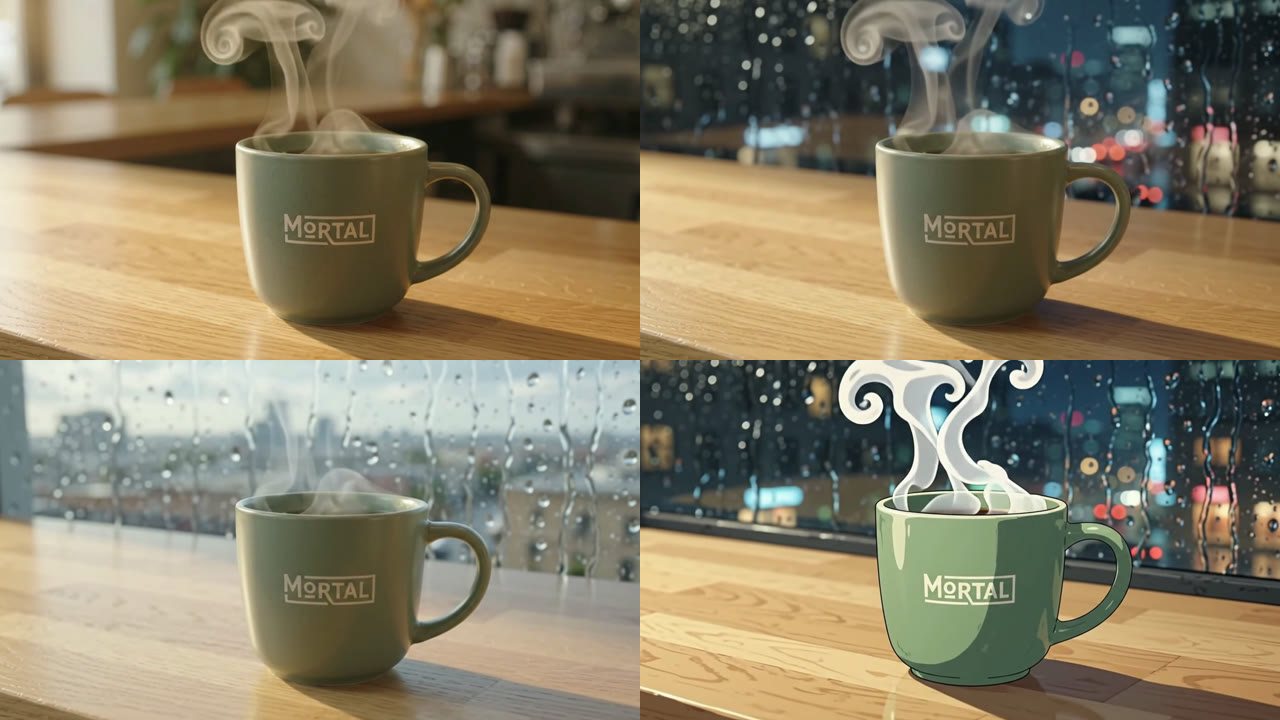
Changing what's in the scene worked well. Rain became sunshine, a kitchen became a city at night, and the whole thing turned into anime with the logo still spelled right. Asking it to move the camera differently did nothing, twice.
One clip, three chat edits. Top left is the original. The rest are typed requests: "a rainy city window at night", "bright daytime instead of night", and "make this video anime".
## What's new in Gemini Omni 1.2 Flash
Google's announcement lists five changes from version 1.1:
- **Longer clips.** Up to 15 seconds, up from 10. You can pick any whole number of seconds from 3 to 15.
- **Editing in conversation.** Ask for a change to a clip you already made, and it changes that clip instead of starting over. This works on full 15-second clips.
- **Better at following your pictures.** Give it up to six photos of a person, a product or a style, and it keeps faces, clothes, packaging and brand colors steady from start to finish.
- **More natural speech.** Clearer lip sync, and different voices for different characters in the same scene.
- **Steadier camera moves.** Fewer unwanted jump cuts during long sweeps, drone shots and orbits.
It also costs 30% less for developers: about 7 cents a second of video at 720p, down from about 10 cents.
Google lists what it still struggles with too: fast sports action, rapid script changes and complex physics.
## Where you can use Gemini Omni Flash, and is it free
**In the Gemini app**, Omni 1.2 Flash is rolling out to everyone on a paid Google AI plan, with chat edits included. The 15-second clips are for Google AI Ultra subscribers, the top plan. Other plans get shorter clips.
Google doesn't publish a set number of videos per day for the app. Video counts against the same usage allowance as everything else you do in Gemini, and video uses it up fast.
**In Google Vids**, Google says you can make 15-second clips at no extra cost with a regular Google account.
**In Flow**, Google's filmmaking tool, you can direct scenes and do the same multi-turn edits.
**For developers**, it's in Google AI Studio and the Gemini API, billed by the second. There's no free tier for this model on the API.
We ran our tests through the Gemini API, which is the same model the app uses. The app wraps it in a chat window; the API lets us time every clip and see exactly what each one cost.
## Test 1: A product clip from one sentence
The first prompt was one sentence describing a coffee mug with our name on it:
```
A 10-second product clip: a matte sage-green ceramic coffee mug with a small cream logo that says "MORTAL" sits on a light oak kitchen counter in soft morning light. Steam curls up from the coffee as the camera slowly pushes in. Gentle cafe ambience, no dialogue.
```
It came back in 35 seconds. The logo was spelled right in every frame, the steam moved like steam, and the soundtrack was quiet cafe noise.
Test 1: a 10-second product clip from a one-sentence prompt (Gemini Omni 1.2 Flash, 720p, sound on).
We ran the same prompt on the old version, Omni 1.1 Flash. It was just as fast and also spelled the logo right. The difference showed up at the end of the push-in: 1.1 drifted so close that the logo slid out of the bottom of the frame, while 1.2 kept the word on screen.
The last frame of the same prompt. Left: Omni 1.1 Flash, logo gone. Right: Omni 1.2 Flash, logo still in shot.
## Test 2: A talking clip with lip sync
Next, a person talking to the camera, with the exact line written into the prompt:
```
A single continuous medium shot of a woman in her 30s with curly dark hair and a denim shirt, sitting at a desk in a bright home office, looking into the camera. She says, warmly and naturally: "I used to spend an hour editing every video. Now I just tell it what to change, and it changes it." She smiles at the end. Quiet room tone, no music.
```
We ran the audio through a transcription tool, and she said the line word for word. Her mouth moves with the words, her hands move the way people's do when they talk, and the shot stays in one take like we asked.
Test 2: an 8-second talking clip. The line came out exactly as written.
We wrote "a single continuous medium shot" on purpose. Google's own guide says the model adds a few cuts by default to tell a little story, so one unbroken shot has to be asked for.
## Gemini Omni video editing: three rounds of chat edits
We took the mug clip from Test 1 and asked for three changes, one at a time, each building on the last.
**Edit 1, the background:** "Change the background to a rainy city window at night. Keep everything else the same."
This one was close to perfect. Same mug, same steam, same camera move, frame for frame, with a wet city at night behind it.
Edit 1: the same clip with only the background changed.
**Edit 2, the lighting:** "Change the lighting to warm golden-hour sunlight. Keep everything else the same."
Nothing changed. The clip came back still dark, still rainy, still night. Our guess is that golden-hour sun clashed with the night scene from the last edit, and the model held on to "keep everything else the same."
**Edit 3, the pacing:** "Make the camera push in twice as fast, then hold still on the logo for the last few seconds. Keep everything else the same."
Nothing changed again. Same speed, same push-in, no hold at the end.
Edit 3 asked for a faster camera and a hold on the logo. The camera moves exactly as it did in Edit 1.
## What worked when we asked again
We went back to Edit 1 and asked three shorter things, written the way Google's guide suggests (short, one change at a time).
**"Make it bright daytime instead of night. Keep everything else the same."** This worked. Same window, same rain on the glass, now with daylight and a city skyline.
The shorter lighting request: night turned to day, everything else kept.
**"Make this video anime."** This worked too, and it's the most fun of the bunch. The whole clip is redrawn as animation, with the steam as cartoon swirls, and MORTAL still spelled right on the mug.
"Make this video anime." Four words, and the logo survived the restyle.
**"Make the camera move much faster. Keep everything else the same."** No change, for the second time.
Across six edits, requests about what's in the shot (the background, the time of day, the art style) worked when they were short and didn't fight the scene. Requests about how the camera moves didn't work at all. Google's own demo of chat editing swaps backgrounds while "keeping camera framing intact," so the camera seems to be the thing it holds on to hardest.
When the camera or timing is wrong, the fix is a new clip with the move written into the first prompt.
## A 15-second scene in three beats
The longer clips are the other big change. We wrote one prompt with time codes, which Google's guide says the model follows:
```
[0-5s] A cyclist rides through a quiet European street at dawn. [5-10s] She stops at a bakery, buys a baguette and tucks it into her basket. [10-15s] She rides off toward the sunrise as the camera rises above the rooftops. Light acoustic guitar music, no dialogue.
```
It hit all three beats close to on time: the ride, the stop at a bakery where a baker hands over the bread, and a camera rising over the rooftops as she rides away. It took about a minute.
A 15-second clip from one prompt with time codes. In the Gemini app, 15-second clips are for AI Ultra subscribers.
## What it cost and how long it took
Every clip came back in 33 to 66 seconds. Fresh clips took about 35 seconds; edits and the 15-second clip took about a minute.
| Clip | Length | Wait | Cost |
|---|---|---|---|
| Product (1.2) | 10s | 35s | $0.70 |
| Product (1.1) | 10s | 34s | $1.02 |
| Talking clip | 8s | 33s | $0.56 |
| 15s scene | 15s | 59s | $1.05 |
| Edit 1 | 10s | 56s | $0.79 |
| Edit 2 | 10s | 62s | $0.87 |
| Edit 3 | 10s | 62s | $0.96 |
Wait is how long each clip took to come back. Costs are from the API's own usage counts at Google's posted prices. Our ten clips came to $8.58 in all.
Each edit costs a little more than the one before. The model rereads the earlier clips in the conversation every time, and that reading is billed. Three edits in, the extra was about 26 cents a clip.
## Copy-paste prompts for Gemini Omni Flash
These follow Google's prompt guide and what worked in our tests. Swap in your own product, person or place.
A product clip, one shot:
```
A single continuous shot of [your product] on [a surface] in [kind of light]. The camera slowly [pushes in / orbits / pans]. [Sound: e.g. soft room tone], no dialogue.
```
A talking clip with an exact line:
```
A single continuous medium shot of [who, what they wear, where they sit], looking into the camera. They say, [how they say it]: "[your exact line]". Quiet room tone, no music.
```
A chat edit that keeps everything else:
```
Change the [background / time of day / weather / style] to [what you want]. Keep everything else the same.
```
## What the community says
The loudest reaction from people trying Omni is about the editing. A Reddit thread showing off its video editing drew close to 900 upvotes, and people there keep comparing it to Google's image editor: strong at changing something specific in a picture you already have.
People testing it on their own phone footage want to know how it handles shaky, low-light clips, since most demos use clean studio shots. Several commenters in Europe are asking when they get it. Editing your own uploaded videos isn't available yet in the EU, Switzerland or the UK.
## Related reading and video
We compared another new video model's cheaper, faster version in [Kling 4.0 Flash vs Kling 4.0](https://www.aiformortals.co/blog/kling-ai-pricing-4-0-flash). For editing your own footage with AI instead of generating it, see [how Claude Opus 5.5 does 95% of an edit in Premiere Pro](https://www.aiformortals.co/blog/opus-5-5-edits-my-videos-premiere). And Gemini's chat editing goes beyond video: it can also [edit the files it makes for you](https://www.aiformortals.co/blog/gemini-edit-files).
Pat's video on pairing an AI model with a video generator to make Vox-style motion graphics:
## Sources
- [Gemini Omni 1.2 Flash: Fast and cost-effective with longer clips](https://blog.google/innovation-and-ai/technology/developers-tools/introducing-gemini-omni-1-2-flash/) (Google)
- [Generate and edit videos with Gemini Omni Flash](https://aistudio.google.com/docs/omni) (Gemini API docs)
- [Gemini API pricing: Gemini Omni 1.2 Flash](https://aistudio.google.com/docs/pricing#gemini-omni-1.2-flash) (Google AI Studio)
- [Gemini Omni 1.2 Flash is generally available](https://cloud.google.com/blog/products/ai-machine-learning/gemini-omni-1-2-flash-generally-available) (Google Cloud)
- [Gemini Omni 1.2 Flash rolling out in the Gemini app](https://x.com/GeminiApp/status/2118406227533435391) (Gemini app on X)
- [Meet Gemini Omni 1.2 Flash](https://x.com/Google/status/2118390406316728555) (Google on X)
- [Gemini Omni Flash video editing capabilities](https://www.reddit.com/r/singularity/comments/1ujxrzl/gemini_omni_flash_video_editing_capabilities/) (r/singularity)
- [I tested Gemini Omni on my phone footage](https://www.reddit.com/r/singularity/comments/1uowx4u/i_tested_gemini_omni_on_my_phone_footage/) (r/singularity)