# Ideogram 4.6: Native 4K Images and Edits That Leave the Rest of Your Photo Alone
> Ideogram's new model makes 4K pictures from scratch and changes one detail of a photo without redrawing the rest, and you can try it today.
By AI for Mortals Staff · November 19, 2026 · 7 min
Canonical: https://www.aiformortals.co/blog/ideogram-ai-4-6
Ideogram AI released Ideogram 4.6 on November 19, and it's built for editing. You ask for one change in a picture, and everything around that change should stay exactly as it was.
It also makes new images at native 4K, so skin, fabric and small print are drawn at full size from the start, with no upscaling. You can use it today in the Ideogram app, and it showed up the same day in apps like HeyGen, Leonardo and invideo.
We haven't run our own tests yet. Ideogram 4.6 isn't on any of the services we test from, and we'll update this post once it is. Everything below comes from Ideogram's model page and developer docs, the apps that added it, and the first reactions from people who've tried it.
Ideogram's launch video: one photo, recolored and restyled edit by edit (Ideogram on YouTube).
## What's new in Ideogram 4.6
- **Edits that stay where you put them.** Ask for one change, like a new shirt color, and the rest of the photo should come back untouched. Ideogram says 4.6 leaves "significantly less pixel drift" outside your edit than 4.5 did.
- **Exact colors.** You can give it a brand color as a hex code, like #FF6B00, and it recolors the object to match. Ideogram says that works 83% of the time now, up from 46% on 4.5.
- **Native 4K.** New images come out at up to 4096 by 4096 pixels, drawn at that size. Ideogram also says it worked to remove the airbrushed AI look, so skin keeps its pores and fabric keeps its weave.
- **Keep going on the same image.** Each result can be the starting point for the next change, so you can recolor, then swap a material, then change the background, one step at a time.
- **Up to five reference images.** You can upload a face, a product or a style and point the model at them.
- **An optional mask.** Paint over the area you want changed, and only that area changes.
- **Sketch to picture.** Ideogram says 4.6 sticks closely to a rough sketch you upload.
Ideogram's own test numbers show where 4.6 got better. These are the share of results it judged usable, on the same requests, at the highest quality setting:
| Task | 4.6 | 4.5 |
|---|---|---|
| Same person in a new scene | 85% | 69% |
| Recolor to a hex code | 83% | 46% |
| Fix a small product flaw | 86% | 61% |
| Stage or relabel a product | 88% | 66% |
| Change only a painted area | 90% | 82% |
Those are Ideogram's own tests on its own requests, so check the results on your own pictures too.
An outside leaderboard backs up the editing claim. On Rapidata's multi-step image editing test, people vote on which model kept a picture truest across a run of edits. Ideogram 4.6 ranks first with a score of 1,892, just ahead of Ideogram 4.5 and well ahead of Seedream 5.5 and FLUX 3 Image.
## How to use Ideogram 4.6 in the Ideogram app
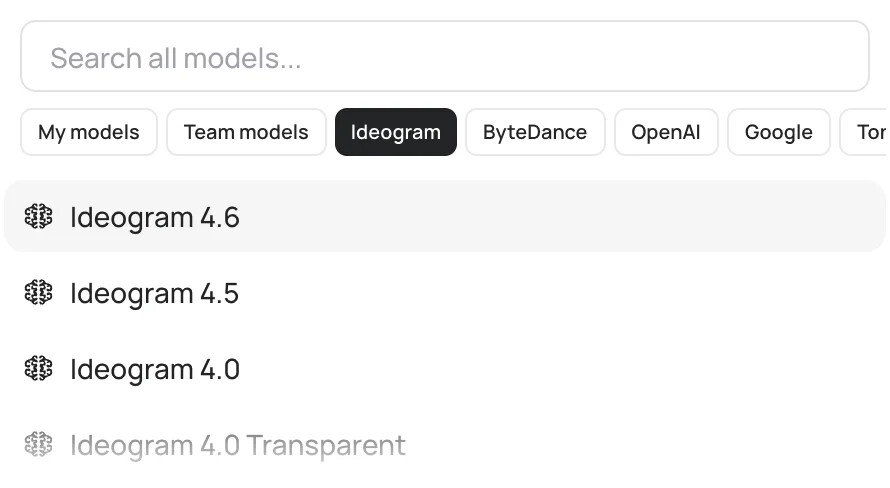
Open the Image app at ideogram.ai, click the Model menu and pick Ideogram 4.6. The menu defaults to Auto, so choose it by name or you may get a different model. The same menu also offers image models from OpenAI, Google and ByteDance.
Pick Ideogram 4.6 by name in the Model menu instead of leaving it on Auto. Ideogram.
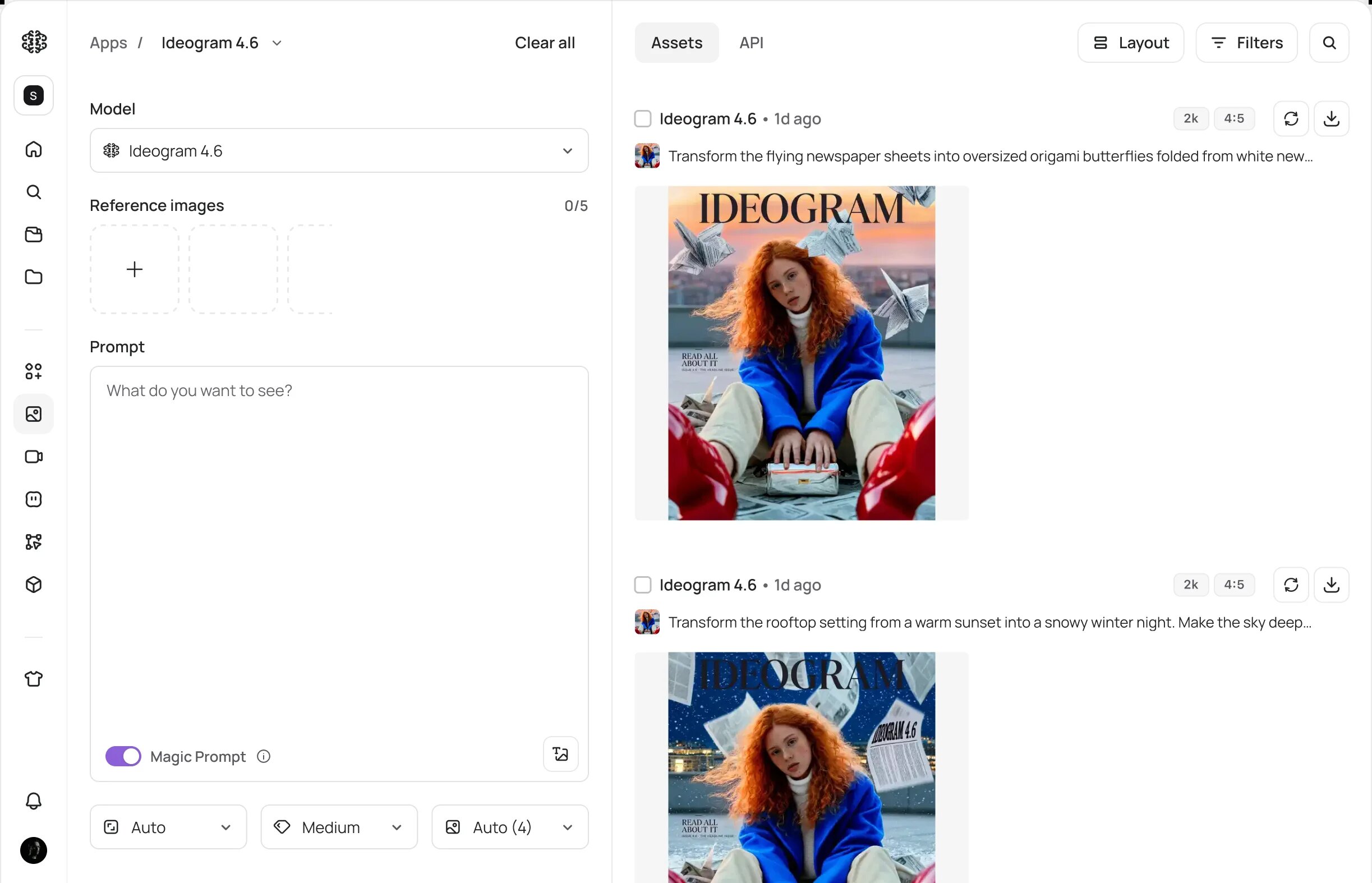
To edit a photo, add it under Reference images, type the one change you want, and check the credit cost shown on the Generate button before you click it. When the result comes back, use it as the source for your next change.
The Ideogram app with 4.6 selected. On the right, two edits of the same magazine cover, one change each. Ideogram.
Ideogram's advice is to make one change per request, then check faces, colors and any text in the result before you ask for the next one.
```
Change only the jacket to a deep forest green wool coat with the same cut and length. Keep the person's face, hair, pose, the background, the lighting and everything else exactly the same.
```
## Is Ideogram AI free? What 4.6 costs
Yes, with limits. Free accounts that sign in with Google or Apple get 30 credits a week, and Ideogram says the amount can vary. Images made on the free plan are public, so anyone can see them in Ideogram's gallery.
Ideogram's help pages say every plan, free included, can use all of its own models. The 4.6 page adds that you should pick it "when it is available in your account," so it may take a little while to reach everyone. Check the Model menu before you pay for anything.
| Plan | Price | Credits |
|---|---|---|
| Free | $0 | 30 a week |
| Plus | $20 a month, or $15 billed yearly | 2,400 a month |
| Pro | $60 a month, or $42 billed yearly | 7,500 a month |
Paid plans keep your images private. When the monthly credits run out you can keep making images in a slower queue, but editing needs credits, and editing is what 4.6 is for. There's no free trial for paid plans.
Ideogram hasn't listed a credit price for a 4.6 image in the app yet. The Generate button shows the cost of each run before you click, and it goes up with quality and size.
Through Ideogram's API, a new 4K image costs 20 cents at the highest quality, and a 4K edit costs 60 cents. A rough draft at 2K starts under a cent. fal and Runware charge the same.
## Make a 4K product photo
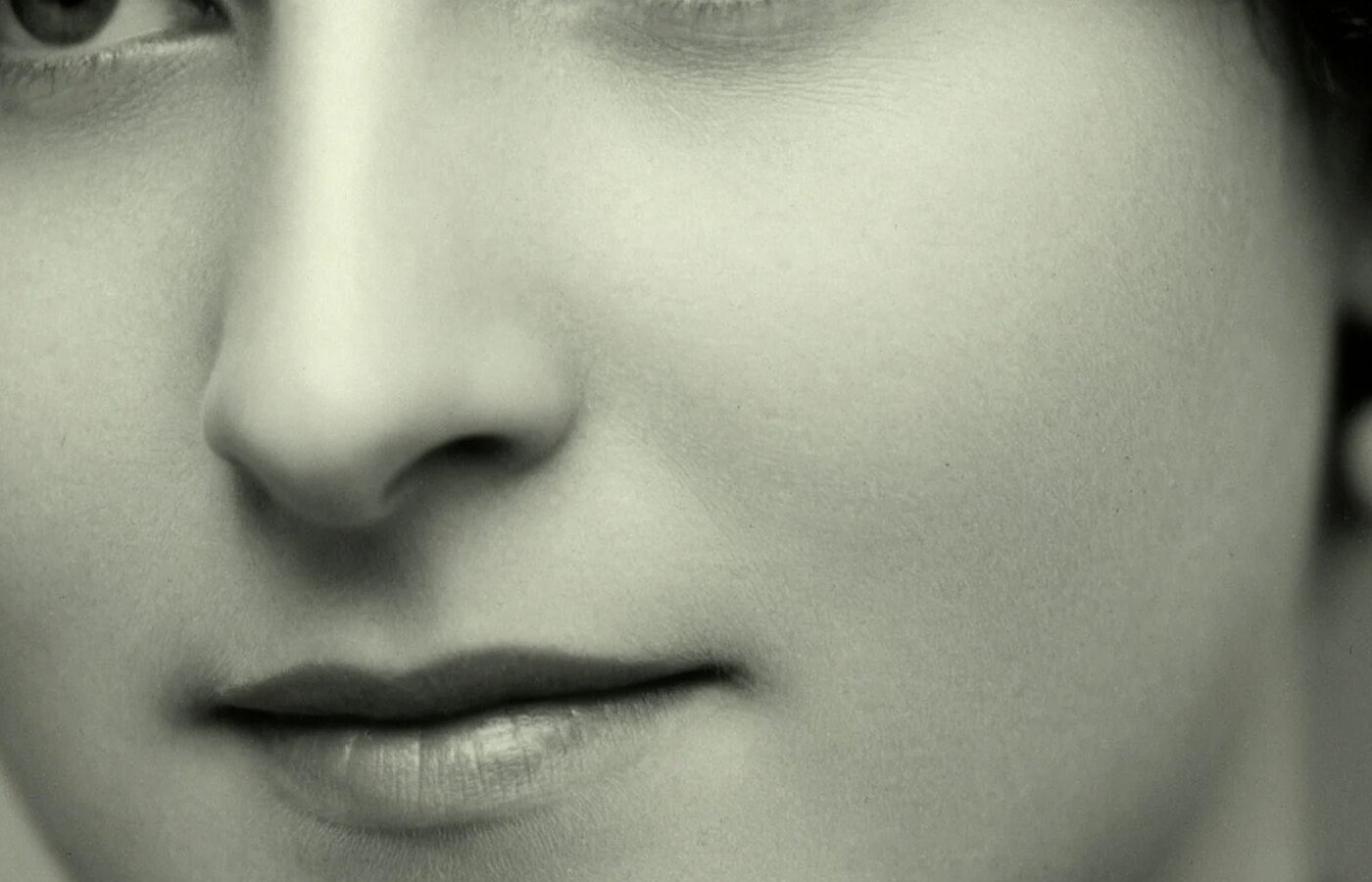
Native 4K matters when you'll print a picture or crop deep into it. A 2K image blown up to poster size gets soft, and a 4K one still has detail to spare.
A crop at full size from one of the samples on Ideogram's 4.6 page. The full picture is 3,648 by 4,576 pixels. Ideogram.
A 4K image costs about twice as much as a 2K one through the API, and one partner's test runs took anywhere from 22 seconds to over a minute. So try an idea at 2K, and switch to 4K for the version you'll use.
```
A product photo of a matte black stainless steel water bottle standing on a light oak table, soft window light from the left, a sprig of eucalyptus and a folded linen napkin beside it, plain warm off-white wall behind. Shot like a catalog photo, 50mm lens, natural colors, sharp detail on the bottle's brushed metal. No text or logos.
```
## Change one color to match your brand
This is the feature Ideogram improved the most. If you have a brand color, give the model its hex code instead of a color name. "Orange" can mean a dozen shades, and #FF6B00 means one.
```
Change only the color of the mug to exactly #1E6F5C. Keep the mug's shape, the handle, the reflections, the table, the background and the lighting exactly as they are.
```
Check the result against your brand color in any color picker. Ideogram's own guidance says to look over colors, faces and text after every edit, especially across a long run of changes.
## Swap a material or a product detail
Ideogram's launch video shows one sneaker switching between suede, mesh and smooth white leather while the person, the pose and the backdrop stay put. That's useful for anyone who sells a product in several colors or wants to preview a design before it's made.
```
Change only the upper of the sneakers to bright orange mesh fabric. Keep the soles, the laces, the logo, the person, the pose and the purple background exactly the same.
```
It can also fix small flaws in a product photo, like a scratch, a smudge or a crooked label. Paint a mask over the spot if your app offers one, so nothing else changes.
## Fix the words on a poster or slide
Ideogram has always been one of the better image models at spelling, and 4.6 lets you change the words in an image you already have. Ideogram suggests editing the text first, then fixing the design around it in a separate step.
```
Change only the headline text on the poster to "Spring Plant Swap, Saturday April 12, 10am". Use the same font, size, color and position as the current headline. Keep everything else in the image exactly the same.
```
Proofread the result. Ideogram's own page tells you to check spelling and placement in the final image.
## Where else you can use Ideogram 4.6
Ideogram says 4.6 is live in its own app and API and in a long list of other apps, including Leonardo, Runway, HeyGen, invideo, Scenario and ComfyUI. We could confirm it on the partners' own pages or posts for **fal**, **Runware**, **ComfyUI**, **Leonardo**, **HeyGen**, **invideo** and the print-on-demand app **MyDesigns**.
HeyGen's version is built for its avatars. Make a picture of a person, change their shirt or hair color, then turn the picture into a talking video with HeyGen Avatar 6. Our [HeyGen Avatar 6 guide](/blog/heygen-avatar-6) covers that half.
ideogram 4.6 is live in HeyGen. generate an image and make precise edits to swap a shirt, change a hair color, or turn someone into a 3D character, then bring that image to life with Avatar 6
It isn't on Replicate or Krea yet, though both carry Ideogram 4.5, so it may show up there soon.
Ideogram also said 4.6 will be its next open-weights release, meaning a version anyone can download and run on their own computer. It skipped the 4.5 version it had promised in September, and it gave no date. Today only Ideogram 4.0 can be downloaded.
## How Ideogram 4.6 compares with ChatGPT Images, Nano Banana and Seedream
Nobody has published a side-by-side test of 4.6 against the big names yet. The one outside number is that Rapidata editing test, and the gap there is large.
| Model | Rapidata editing score |
|---|---|
| Ideogram 4.6 | 1,892 |
| Seedream 5.5 | 1,805 |
| ChatGPT's image model | 1,001 |
| Nano Banana Pro | 987 |
That test only measures one thing: whether a picture stays the same across a run of edits. It says nothing about which model makes the nicest picture from scratch or spells best, and 4.6's lead over 4.5 is inside the test's margin of error.
So if you already pay for ChatGPT or Gemini, keep using them for everyday pictures. Our [AI image generator comparison](/blog/ai-image-generators-guide) and [ChatGPT Images 2.6 test](/blog/chatgpt-image-generator-images-2-6) show what you already have.
Ideogram 4.6 is worth trying when you need to make five changes to one product photo and have the product still look like itself at the end, or when a color has to match your brand exactly. [Seedream 5.5 in CapCut](/blog/seedream-5-5-capcut) is the cheaper option for quick edits, and [Kling Image 4.0](/blog/kling-ai-image-generator-4-0) is the one to look at for very large prints.
## What people are saying about Ideogram 4.6
It's early. The first posts came from people Ideogram gave early access to the night before, and they mostly praise how real the pictures look and how tightly edits stay in place. Several say their best results came on the first try.
The complaints so far are about open weights, not the model. Ideogram promised a downloadable 4.5 in September and never shipped it, and people in the launch replies and on Reddit want a date for 4.6. A few Reddit users also expect it to refuse more requests than other models, as earlier versions did.
Nobody has posted careful tests of text, speed or credit cost yet. We'll run our own and update this post.
For a sense of what a strong image model can do in everyday work, here's our walkthrough of 50+ real uses for ChatGPT's image model. The same kinds of prompts are a good way to test Ideogram 4.6.
50+ real ways to use an AI image model (AI for Mortals on YouTube).
## Sources
- [Ideogram 4.6 model page](https://ideogram.ai/models/4.6/) (Ideogram, Nov 19, 2026)
- [Ideogram plans and pricing](https://ideogram.ai/pricing/) (checked Nov 19, 2026)
- [Ideogram API docs](https://developer.ideogram.ai/ideogram-api/api-overview) (Ideogram)
- [Rapidata Multi-step Image Edit leaderboard](https://www.benchmark.ai/multi-step-image-edit) (Rapidata)
- [Ideogram on X: Introducing Ideogram 4.6](https://x.com/ideogram_ai/status/2123461101224624402) (Nov 19, 2026)
- [HeyGen on X: Ideogram 4.6 is live in HeyGen](https://x.com/HeyGen/status/2123470876977090871) (Nov 19, 2026)
- [Ideogram on X: where 4.6 is live](https://x.com/ideogram_ai/status/2123461117473091641) and [on 4.6 open weights](https://x.com/ideogram_ai/status/2123483923632025908) (Nov 19, 2026)
- [Ideogram help: available plans](https://docs.ideogram.ai/plans-and-billing/available-plans) and [models](https://docs.ideogram.ai/create/models) (Ideogram)
- [Ideogram 4.6 on fal](https://fal.ai/models/ideogram/v4.6) and [on Runware](https://runware.ai/models/ideogram-4-6)
- [Leonardo on X: Ideogram 4.6 launch partner](https://x.com/LeonardoAi/status/2123464535507923295) (Nov 19, 2026)
- [Ideogram 4.6 will be released as open weights soon](https://reddit.com/r/StableDiffusion/comments/1y0ib5j/ideogram_46_will_be_released_as_open_weights_soon/) (r/StableDiffusion, Nov 19, 2026)