# Meta's Muse Ember, Tested: What a Small, Cheap Model Can Actually Do
> Meta's smallest Muse model costs 10 cents per million tokens you send it and is built for routine agent work. We gave it five everyday jobs, from a messy email thread to a working calculator. All five came back in under 20 seconds, the five together cost less than 2 cents, and one email reply had a real slip.
By AI for Mortals Staff · November 9, 2026 · 11 min
Canonical: https://www.aiformortals.co/blog/meta-muse-ember-review
Meta Muse Ember is the newest and smallest model in Meta's Muse family, released on November 9. Meta built it for the repetitive work agents do all day: calling tools one after another, pulling details out of files, running tests and making small code fixes. It has a 1-million-token context window, enough to read several long reports in one go.
Small models are the ones that end up doing most of the routine work behind the scenes, so we wanted to know whether this one is good enough for ordinary office jobs. We gave Muse Ember five of them: reply to a messy email thread, answer questions about a 50-page report, clean up a contact spreadsheet, turn rough notes into a 10-slide deck, and build a small web page that works.
Every job came back usable on the first try, though the first email reply left out a detail. Each job took under 20 seconds, and all five together cost us 1.7 cents.
## Where you can use Meta's Muse Ember today: Muse Code and the API
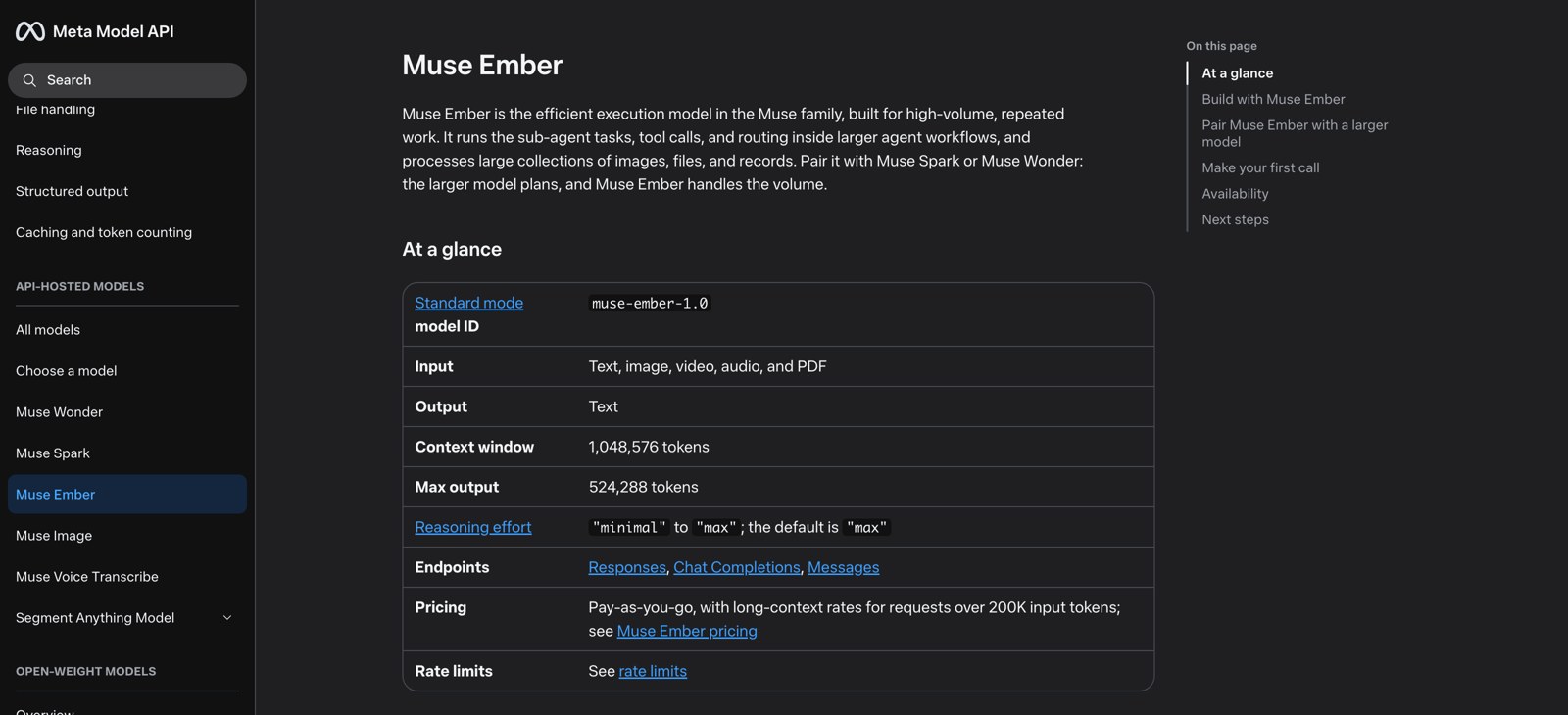
Meta's launch post lists two places to use Muse Ember: [Muse Code](https://dev.meta.ai/products/muse-code), Meta's coding agent for Mac and Windows, and the Meta Model API, where developers call it as `muse-ember-1.0`. The launch post doesn't mention the Muse app or Meta AI, so if you only use Muse on your phone, you won't find Ember there.
Muse Code subscriptions start at $5 a month for the Everyday plan, which includes Muse Ember, Muse Spark, Muse Wonder and Muse Image with 10 to 50 prompts every five hours. The $15, $50 and $200 plans give 5, 20 and 80 times as much use.
**Check one setting when you subscribe.** Meta's help page says Muse Code subscriptions start in Contributor mode, which gives you more usage in exchange for letting Meta train its models on your content. If you'll paste in work files, switch it off first.
Muse Ember is also on OpenRouter, the service that sells access to hundreds of models through one account, at the same price as Meta's own API. That's how we ran our tests.
Muse Ember's page in Meta's developer docs. It reads text, images, video, audio and PDFs, and thinks at its highest effort setting unless you change it.
## Meta Muse pricing: what Ember costs per job
On the API, Muse Ember costs $0.10 per million tokens you send it and $0.50 per million tokens it writes back. A million tokens is roughly 750,000 words. Text it has seen recently (cached input) drops to $0.004 per million, and requests over 200,000 tokens move to a higher long-context rate.
That's the same per-token price as Claude Haiku 5.5 and GPT-6 Luna, the small models from Anthropic and OpenAI. Meta says Ember gets more done with fewer tokens, so each job costs less.
In our tests, most of what we paid for was Ember thinking before it answered. On the email job, 3,620 of the 3,887 tokens it produced were thinking we never saw. (If tokens are new to you, [our guide to what a token is](/blog/what-is-token-in-ai) explains how they turn into a bill.)
## Five everyday jobs we gave Muse Ember
We ran each job twice through OpenRouter, at Ember's default "max" thinking setting, and timed every run. The prompts below are the ones we used, so you can paste them into Muse Code or any chat window and swap in your own files.
### A messy email thread: mostly right, one gap
The thread was six emails about booking a staff AI workshop at a clinic. The date moved from November 19 to November 20 because of a clash, the budget moved from $2,400 to $2,800 with a $150 travel cap, one person asked about laptops and patient data, and the organizer asked for one reply to everyone.
```
Here's a messy email thread. Write the reply Dana asked for, addressed to everyone on the thread. Keep it short and friendly, and include a short agenda for the workshop.
[paste the whole thread here]
```
Both replies had the right date, day and time (Friday, November 20, 8:30 to noon), the room and the headcount, and both promised no patient data. Each came back in 5 to 10 seconds.
The first reply left out the money entirely, so nobody on the thread would know the fee was settled. It also told the staff they didn't need laptops while the agenda included 45 minutes of "Hands-on practice." The second run fixed both: it confirmed "$2,800 plus travel up to $150" and said people would work in pairs on the clinic desktops.
For a reply you'd actually send, read it against the thread once. Ember got every date and name right, so the check takes seconds, but it can drop a detail someone asked about.
### A 50-page report: every answer checked out
We gave Ember the full text of NIST's AI Risk Management Framework, a 48-page government report of about 16,000 words, and asked for a 150-word summary plus five questions with quotes. One question was a trap: it asked what penalties the framework sets, and it sets none, because it's voluntary.
```
Below is a long document. First, summarize it in about 150 words for a busy manager. Then answer these five questions, quoting the document where you can:
1. What are the framework's core functions, and which one is described as cross-cutting?
2. List the characteristics of trustworthy AI the framework names.
3. How many categories does each core function have?
4. Is the framework mandatory, and what penalties does it set for organizations that don't follow it?
5. What does MANAGE 4.1 ask organizations to do?
[paste the document here]
```
All five answers were right in both runs, and it took under 5 seconds each time. It said plainly that the framework is voluntary and sets no penalties, and it counted the categories correctly (6, 5, 4 and 4).
We checked every quote against the PDF. Each one is real, including several the model had to piece back together from a two-column table, where the PDF's text comes out with the columns interleaved line by line. That's the kind of thing smaller models used to garble.
Reading the whole report cost about a third of a cent.
### A messy contact list: 61 rows down to 52, with zero errors
We built a contact spreadsheet with 61 rows that hid 9 duplicate people. The copies were written differently ("Mehta, Raj", "NADIA ALI", an email in capitals, a stray space), and phones, states and dates came in five, four and three formats.
```
Clean up this contact list. Merge duplicate people into one row each. Format names as First Last in normal capitalization, emails in lowercase with no spaces, phone numbers as (555) 555-5555, states as two-letter codes, and dates as YYYY-MM-DD. Return the cleaned CSV in a code block, then list which duplicates you merged and how many rows are left.
[paste your CSV here]
```
We checked every cell of the result against our answer key with a script. Both runs found all 9 duplicates, returned exactly 52 people, and got every name, phone, state and date right. Each run took 10 to 14 seconds and cost about half a cent.
If you paste in real customer data, remember where it's going: through the API it goes to Meta's servers, and on a Muse Code plan it can be used for training unless you turn Contributor mode off.
### A 10-slide deck from rough notes: ready to present
We gave it the kind of notes you'd scribble before a team meeting: quarterly support numbers, a missed target, two new hires, a shoutout and a budget ask. We asked for the deck as a single web page, so we could open it in any browser.
```
Turn these notes into a 10-slide presentation for a Monday all-hands. Make it a single self-contained HTML file: each slide is a 16:9 section (1280x720) stacked vertically, clean modern design, readable from the back of a room, no external libraries or images. Use only the numbers in the notes. Return only the HTML in one code block.
[paste your notes here]
```
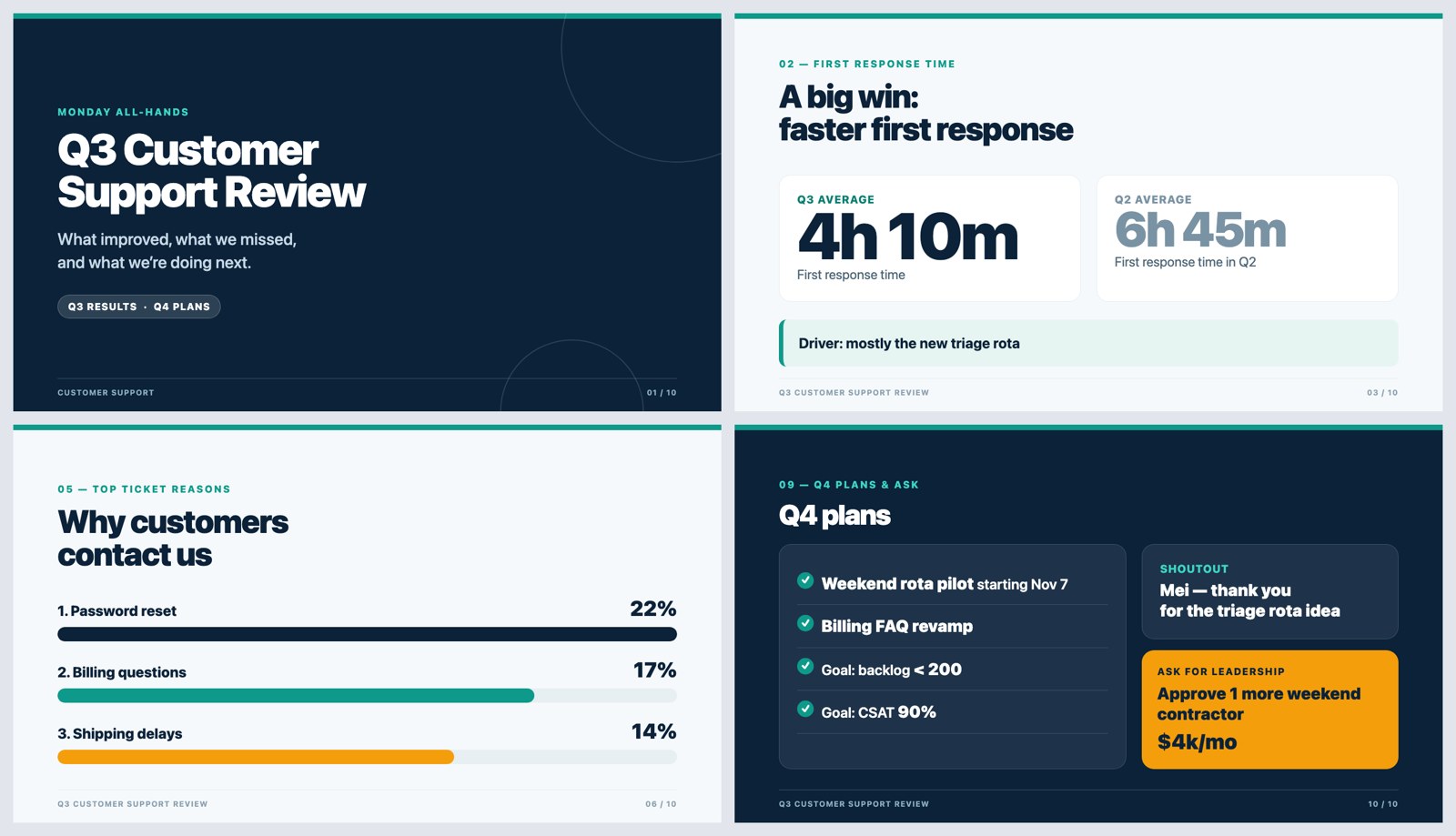
It came back in 13 seconds with exactly 10 slides, and every number matched the notes. It gave the missed target its own red "Missed target" label instead of hiding it, and put the budget ask in its own orange box on the last slide.
Four of the 10 slides Muse Ember made from our notes, screenshotted as it delivered them, with no edits.
The slips were small. The Q4 plans have green check marks, which suggest they're already done, and one slide's caption sits a little close to the footer. To get it into PowerPoint or Google Slides, ask for the same deck as "a python-pptx script," or paste the slide text into Gemini or Copilot inside your slides app.
### A tip calculator you can use: built in 7 seconds
For the build, we asked for a tip and bill-split calculator for a phone, then tested it with a script that typed in real numbers and bad ones.
```
Build a tip and bill-split calculator as a single self-contained HTML file (no external libraries). Inputs: bill amount, tip percent (with 15/18/20/25% quick buttons and a custom field), number of people, and a 'round each person's share up to the nearest dollar' checkbox. Show the tip, the total, and each person's share, updating as you type. Handle bad input (empty, negative, zero people) gracefully. Make it look good on a phone. Return only the HTML in one code block.
```
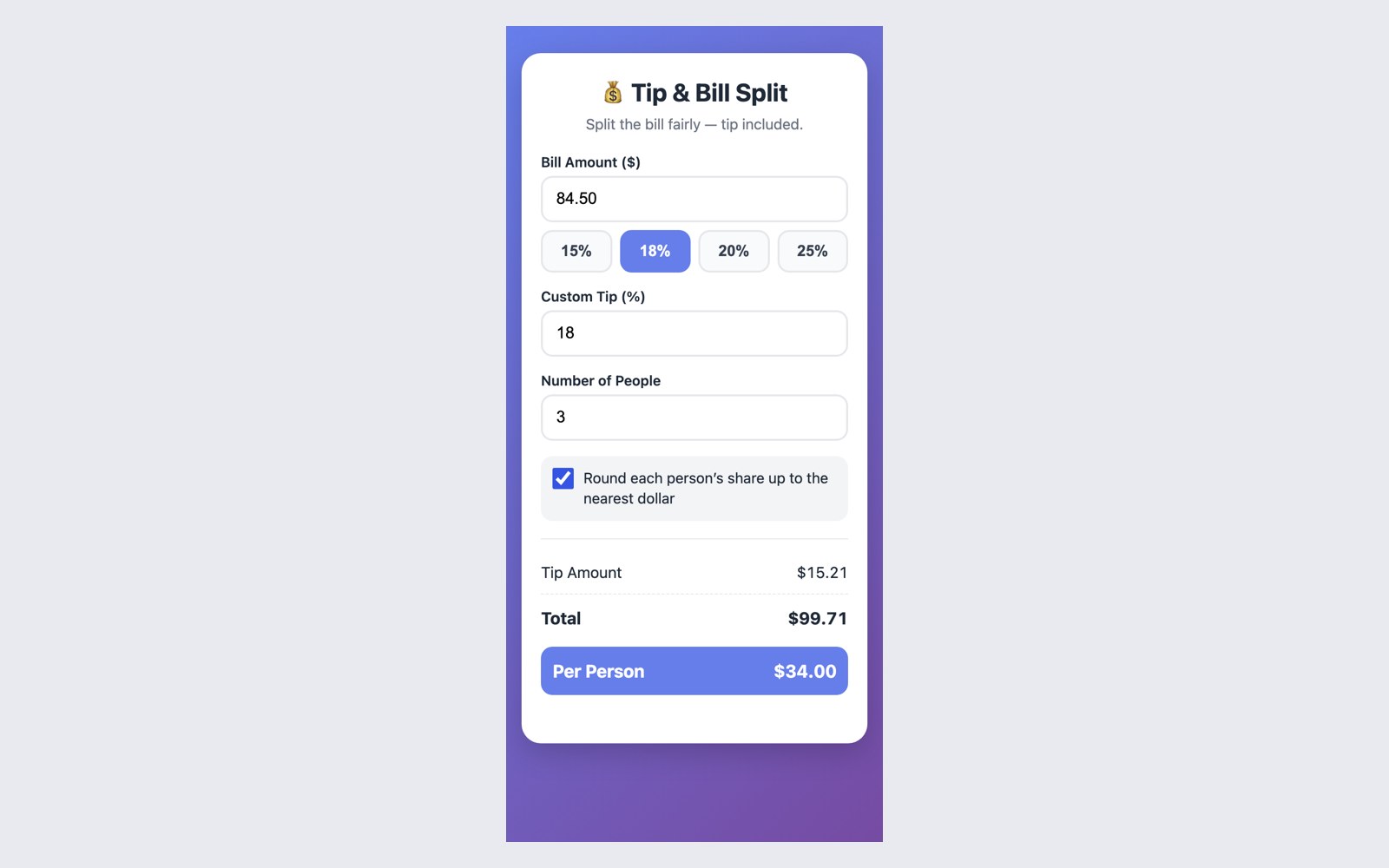
A bill of $84.50 with an 18% tip split three ways came out to $15.21 tip, $99.71 total and $33.24 each, which is right. The quick-tip buttons worked, rounding up gave $34.00 each, and zero people showed "Please enter at least 1 person" instead of crashing. It cost a fifth of a cent.
The calculator Muse Ember built, on a phone-sized screen. With rounding on, each share goes up to $34.00 but the total still says $99.71.
The one thing we'd change: with rounding on, three people paying $34 each is $102, but the total still says $99.71. One follow-up message ("make the total match the rounded shares") would fix it.
## Is Muse Ember really a third of the cost of Claude Haiku 5.5?
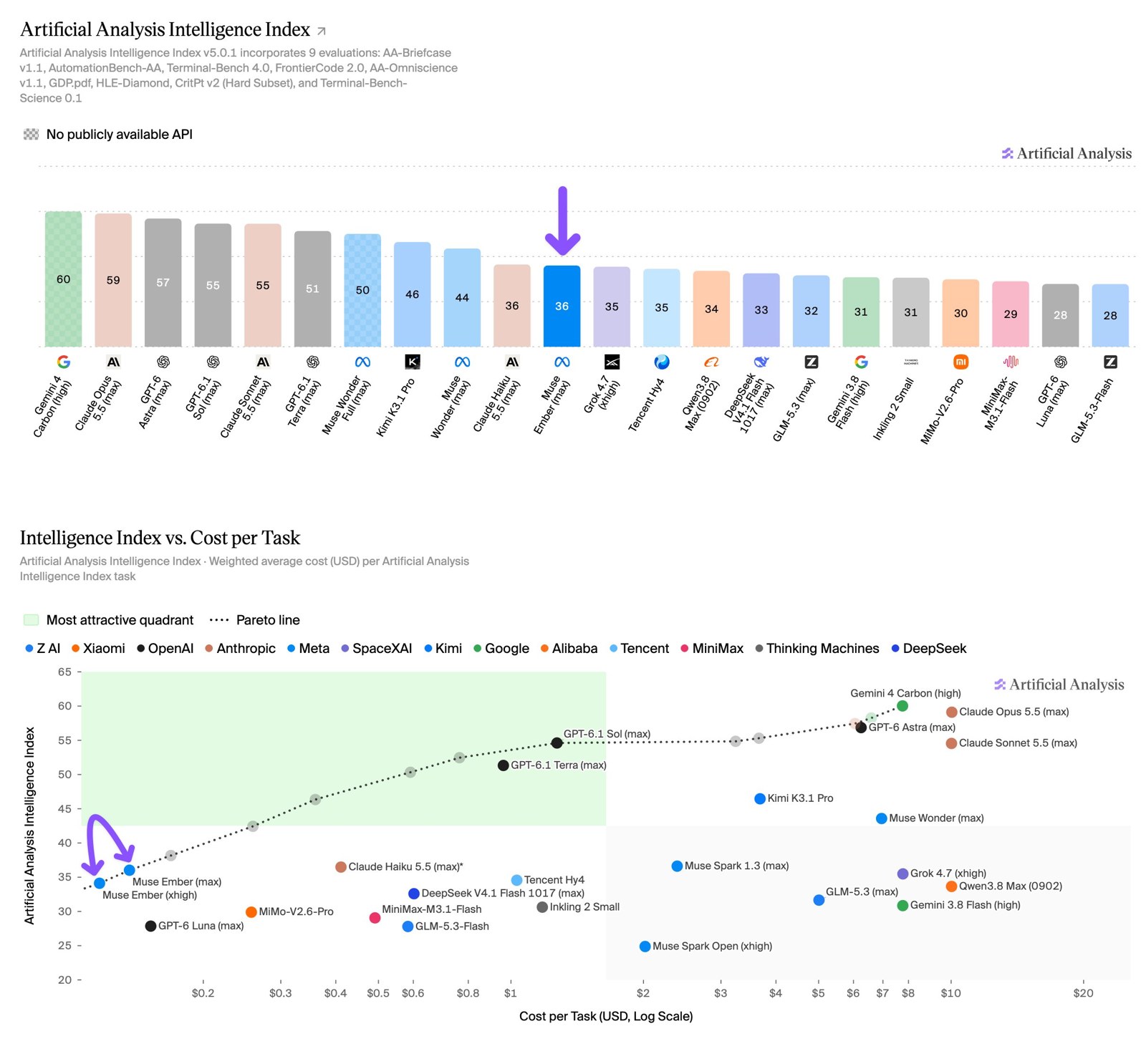
Artificial Analysis, an independent group that runs the same tests on every model, scored Muse Ember 36 on its Intelligence Index, the same as Claude Haiku 5.5 at its highest setting. It says Ember costs $0.14 per test task against $0.41 for Haiku, almost three times less, because Ember uses fewer tokens to get there.
Artificial Analysis puts Muse Ember level with Claude Haiku 5.5 on its index (top) and far to the cheap side on cost per task (bottom).
We checked the cost claim on our own five jobs by running Claude Haiku 5.5 on the same prompts. The result depends a lot on how hard you let Haiku think.
- **Muse Ember, default "max" thinking:** all five jobs for $0.017 to $0.018, in about 47 seconds of total waiting.
- **Claude Haiku 5.5, "max" thinking:** $0.116 and 14 minutes. Two jobs, the deck and the calculator, spent all 60,000 tokens we allowed on thinking and never returned an answer.
- **Claude Haiku 5.5, "high" thinking:** $0.024 and 141 seconds, with all five jobs done.
So at the matching top setting, Ember was about seven times cheaper on our jobs. Against Haiku on "high," the gap shrinks to about a quarter cheaper and three times faster. Part of the difference is how each model counts: the same 50-page report came to 22,231 tokens for Ember and 36,315 for Haiku, so the "same price per token" buys more text with Ember.
Quality was close. Both got the report questions and the spreadsheet fully right. Haiku's email reply called November 20 a Thursday (it's a Friday) and also skipped the fee, and its deck had text spilling out of two slides.
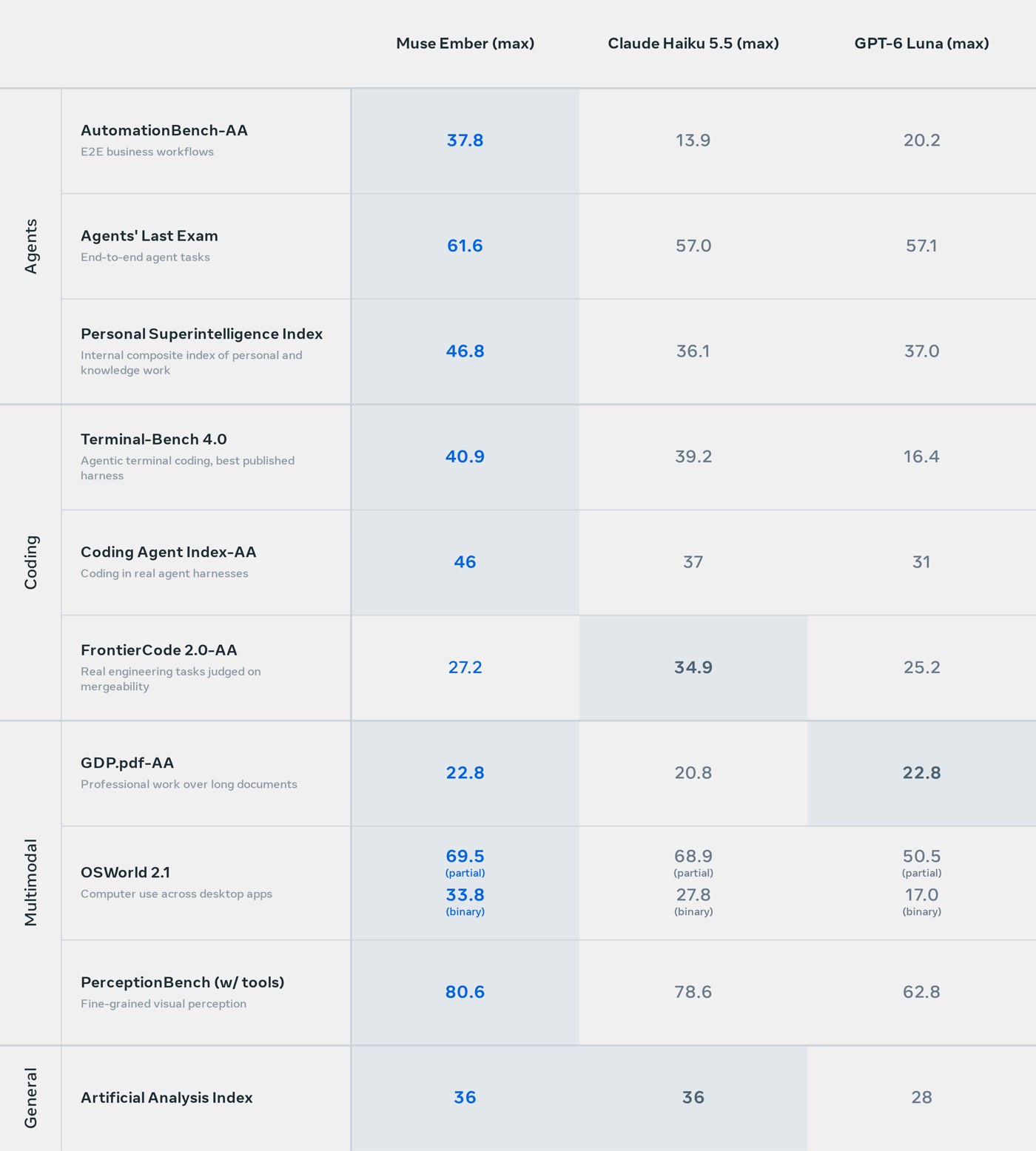
Meta's own launch numbers show Ember ahead of Haiku 5.5 and GPT-6 Luna on most agent and coding tests, and behind Haiku on one coding test.
Meta's comparison at each model's highest setting. Ember trails only on FrontierCode, a test of real engineering changes judged on whether they'd be merged.
## Where Muse Ember falls short
**It knows fewer facts than its rivals.** Artificial Analysis found Ember declines to answer 64% of its general-knowledge questions, so its accuracy there is the lowest of the models it compared. The upside is that it makes things up about half as often as Haiku 5.5. In our own quick quiz of eight obscure facts, it answered seven correctly and said "I don't know" to the eighth instead of guessing. For research questions, give it the documents or a web search tool instead of relying on what it remembers.
**Meta doesn't recommend it for hard thinking.** Its docs call Ember the model for "bounded work that repeats many times" and suggest pairing it with Muse Spark or Muse Wonder, which plan the work while Ember does the volume. Our jobs fit that description. A tangled strategy question or a big, multi-file coding change is a job for a larger model.
**It isn't open.** Meta released the earlier [Muse Spark Open](/blog/meta-muse-spark-open) for people to run on their own computers, and a lot of people in the launch threads wanted the same here. Ember only runs on Meta's servers.
Reactions on Reddit and Hacker News were mostly about price: many welcomed a small model this cheap that holds its own on tests, while others warned that Meta's benchmark scores have run ahead of real use before. Our five jobs mostly backed up the claims, with the misses listed above.
## Who should try Meta's Muse Ember
If you already pay for a model through an API or a tool like OpenRouter, Ember is worth a try for the jobs you run over and over: sorting email, pulling fields out of documents, cleaning lists, first drafts of slides and small pages. At these prices, a thousand runs of our spreadsheet cleanup would cost about $5.
If you use AI only through the ChatGPT, Claude or Muse apps, there's nothing to switch on yet. The $5 Muse Code plan is the cheapest way to try Ember yourself, and it's built for coding, so expect a terminal window.
For how Anthropic's small model compares with its bigger ones on real builds, see [our Claude Sonnet vs Opus (and Haiku) test](/blog/claude-sonnet-vs-opus). And for what Meta's Muse app itself can do now, see [Muse's new voice and avatars](/blog/muse-voice-avatars).
Pat put Ember's big sibling, Muse Wonder, through a full set of tests here:
## Sources
- [Meta AI Research: Introducing our smallest, most efficient model, Muse Ember](https://research.meta.ai/blog/muse-ember)
- [Meta Model API docs: Muse Ember](https://dev.meta.ai/docs/muse-ember)
- [Meta Model API: What is a Muse Code subscription?](https://dev.meta.ai/help/subscriptions/what-is-a-muse-code-subscription)
- [AI at Meta on X: the launch post](https://x.com/AIatMeta/status/2119853591703998787)
- [Artificial Analysis on X: Muse Ember's Intelligence Index results](https://x.com/ArtificialAnlys/status/2119854348587123007)
- [TechCrunch: Meta releases Muse Ember, a new lightweight model for agent execution](https://techcrunch.com/2026/11/09/meta-releases-muse-ember-a-new-lightweight-model-for-agent-execution/)
- [NIST: AI Risk Management Framework (AI RMF 1.0), the report we tested with](https://nvlpubs.nist.gov/nistpubs/ai/NIST.AI.100-1.pdf)
- [Hacker News: launch discussion](https://news.ycombinator.com/item?id=50429024)