I Tested OpenAI's Decisions API on 7 Real Use Cases
I built seven things with OpenAI's new Decisions API, from an AI that plays a first-person shooter to voice control for my Mac. Here are the prompts, the real speed and cost numbers, and demos you can try.

On this page
- What the Decisions API is
- Use case 1: Playing a first-person shooter (AssaultCube)
- Use case 2: Voice control for my whole Mac
- Use case 3: A Wikipedia race against Jev
- Use case 4: Cleaning up my X feed
- Use case 5: A focus orb that watches my screens
- Use case 6: Cleaning up my recordings
- Use case 7: Playing Beholder 2
- How to start using it yourself
- Why I think it's a game changer
I took OpenAI's new Decisions API and built seven things with it: an AI that plays a first-person shooter (AssaultCube), voice control for my whole Mac, a Wikipedia race against its rival Jev, an X feed cleaner, a focus timer that watches my screens, a tool that cleans up my screen recordings, and a player for the story game Beholder 2. Most decisions came back in well under half a second and cost a tiny fraction of a cent. Below is the prompt for every build, the real numbers, and a demo you can open or download.
 What the Decisions API is
You give it something to look at, text or a screenshot, and a question with answers you wrote in advance. It picks one and tells you how sure it is. It never writes a sentence.
There are three kinds of question:
- yes or no, answered as a probability
- pick one option from your list
- a score on a scale you define
It runs on gpt-6-luna and costs $0.10 per million input tokens. Output is free. OpenAI's own slide puts it at about 150 ms per decision, against 1.6 seconds for a normal Luna call. It went into public beta for all developers on October 6.
TypeSafe's Jev did this first, on September 15. Jev is cheaper. OpenAI's version can look at images, which most of my builds needed.
| Decisions API |  TypeSafe Jev TypeSafe Jev | |
|---|---|---|
| Price per million input tokens | $0.10 | $0.042 |
| Output | Free | Free |
| Can look at images | Yes | No, text only |
| Claimed speed | About 150 ms | 70 to 500 ms |
| Launched | Public beta, Oct 6 | Sep 15 |
 Use case 1: Playing a first-person shooter (AssaultCube)
AssaultCube is a free, open-source shooter. I set it up offline against 3 of its built-in bots on the easiest setting, called "bad", and let the Decisions API play.
It's modelled on the Jev bot that plays Doom in ThePrimeagen's video. A small patch to the game hands over where the player, the enemies and the items are. Every tick, the Decisions API answers a stack of questions in parallel:
- the goal first: fight, grab health, armour or ammo, or scout
- which enemy to target and how to move, with the goal written into the question
- yes or no: fire, reload, jump, switch gun
Plain code does the walking, along the routes the game's own bots use, and the aiming.
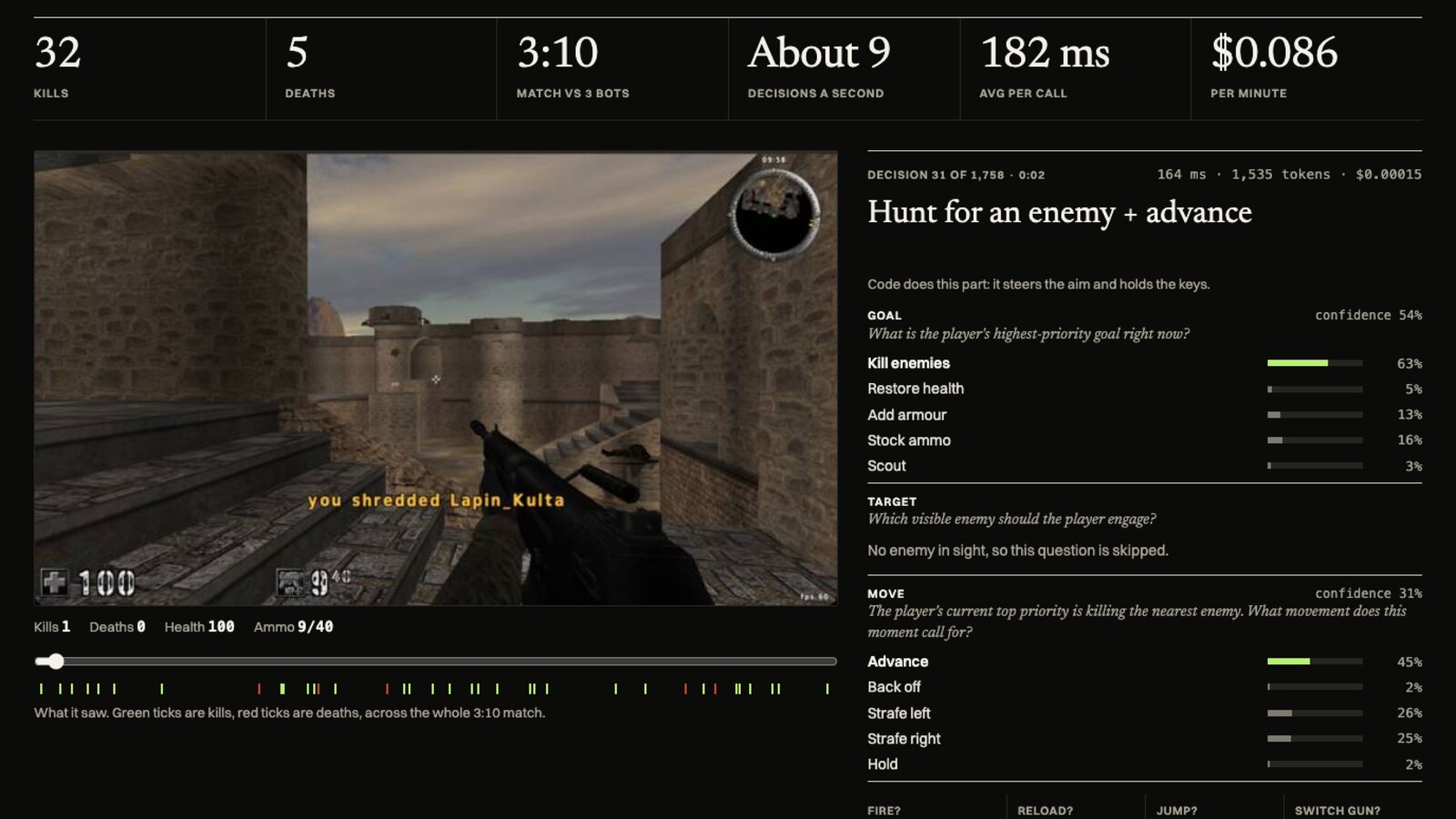
In a 3:10 match it went 32 kills and 5 deaths:
- About 9 decisions per second
- 182 ms per call on average
- About $0.086 per minute of play
- About $0.87 for all my testing
The first versions only looked at screenshots. They went 0 kills and 1 death and spun in place. It still spins sometimes.
Build an AI that plays AssaultCube, the free open-source first-person shooter, using OpenAI's Decisions API.

Run AssaultCube offline against its built-in bots. Several times a second, take a screenshot of the game and ask the Decisions API (POST /v1/decisions, model gpt-6-luna) to choose what to do next from a fixed set of moves: move forward, back, strafe left or right, turn left or right, aim up or down, shoot, reload, jump, or switch weapon. Then press it.

Show a clean panel beside the game with every decision as it happens: what it saw, the options, the pick, its confidence, how many milliseconds the call took, and the running cost. Keep a scoreboard of kills and deaths.
 Use case 2: Voice control for my whole Mac
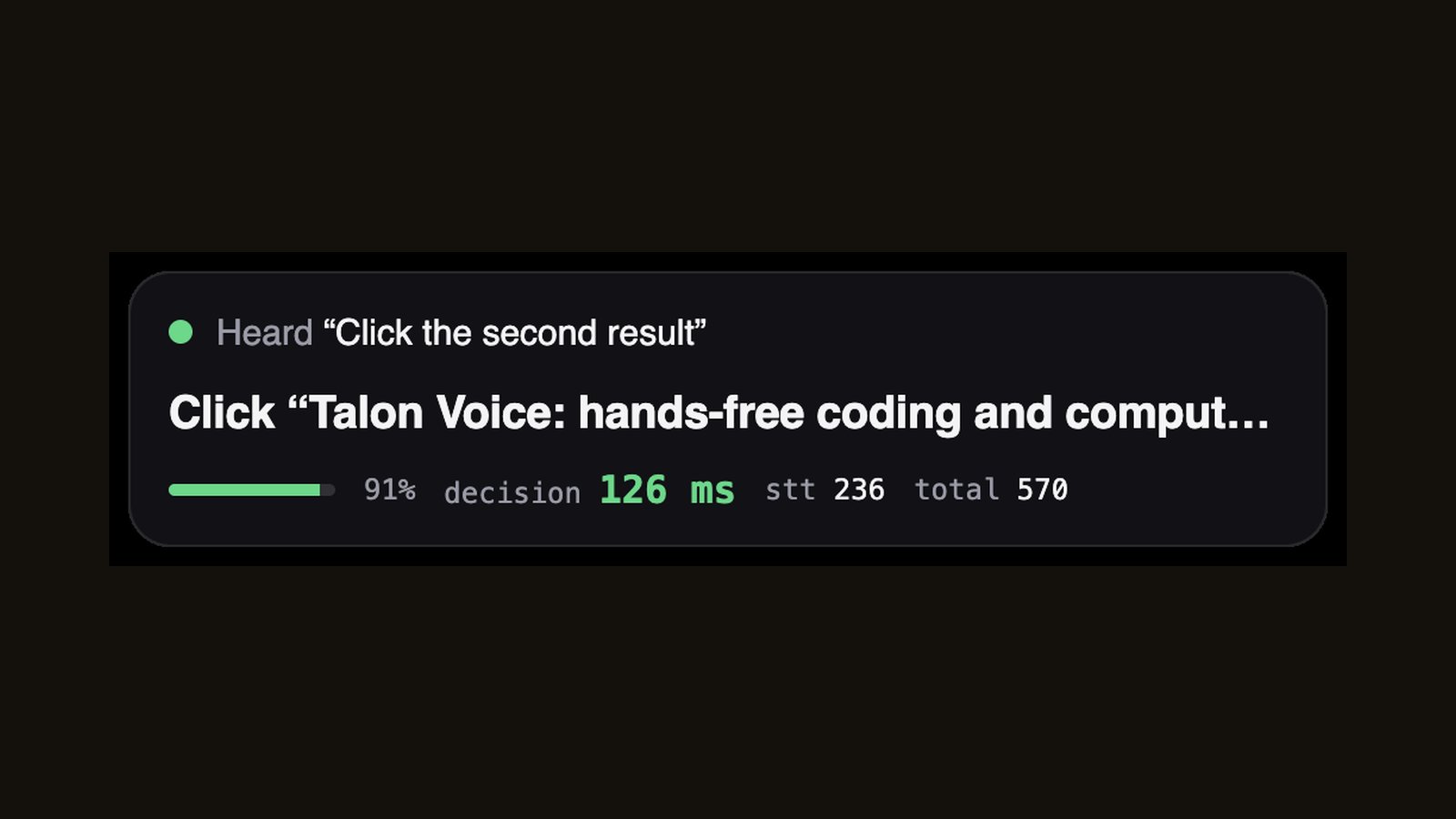
I hold Right Option, say a command and let go. Local Whisper turns it into text, and one Decisions API call picks the action from a fixed list: open, switch to or quit any of my 223 apps, or in Chrome go back, reload, open or close a tab, scroll, or click any link or button on screen. "Click the second result" works.
- Decision: 175 ms (median)
- Speech to text: 73 ms (median)
- Letting go of the key to the action being done: 362 ms (median)
- About $0.0003 per command
It passed 17 of 17 test commands. Those were synthetic voice clips made with the Mac's built-in voice. The hold-to-talk key with a live mic still needs a real run.
Build a voice control for my whole Mac.

I hold a key and talk. Turn my speech into text, then use OpenAI's Decisions API (POST /v1/decisions, model gpt-6-luna) to pick which action I meant from a fixed list, and run it instantly:
- open, switch to or quit any app on this Mac (build the list from /Applications)
- in the browser: go back, go forward, reload, new tab, close tab, scroll up or down, and click any link or button on the current page (send the visible links and buttons as the options)

Show a tiny overlay with what it heard, what it picked, the confidence, and the milliseconds the decision took. Make it feel instant.
 Use case 3: A Wikipedia race against Jev
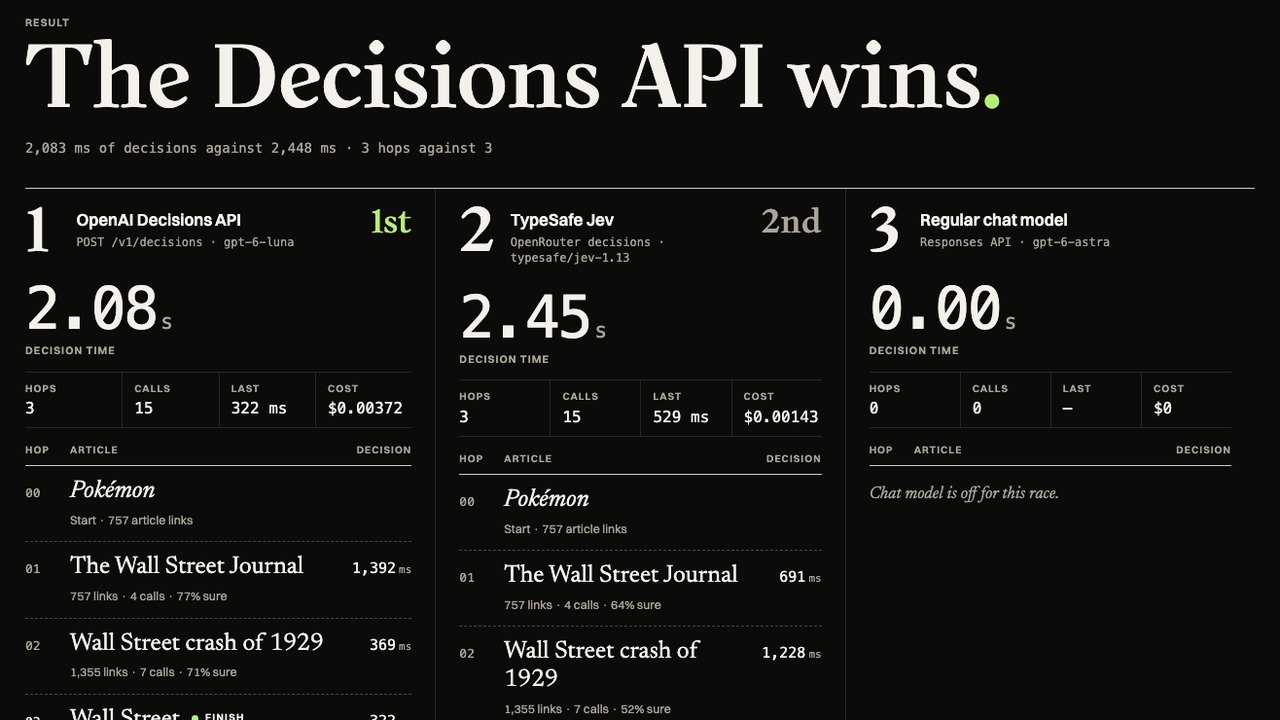
Both racers start on the same Wikipedia article and get the page's links as their options. Each one picks the link that gets closest to the target, follows it and repeats. Pages have up to 1,750 links and both APIs cap a question at 255 options, so big pages are split into groups and the winners of each group go head to head. Then a regular chat model, GPT-6 Astra, runs the same race. I ran it in four of the six races.
| Race | Decisions API | TypeSafe Jev |
|---|---|---|
| Pokémon to Wall Street | 3 hops, 1.41 s, $0.0037 | 3 hops, 2.34 s, $0.0014 |
| Coffee to Moon landing | 6 hops, 2.885 s, $0.0053 | 4 hops, 2.884 s, $0.0022 |
| Batman to Printing press | 2 hops, 1.71 s, $0.0031 | 3 hops, 4.07 s, $0.0013 |
| Rajarshi to a village in Bashkortostan | 7 hops, 2.52 s, $0.0053 | 5 hops, 3.21 s, $0.0014 |
| WBVI to 2026 LigaPro Serie A | 8 hops, 2.95 s, $0.0070 | 4 hops, 1.97 s, $0.0034 |
| Estelle M. H. Merrill to Schistura pertica | 8 hops, 2.26 s, $0.0038 | 7 hops, 3.12 s, $0.0016 |
The Decisions API won 4 of the 6 races on speed. Jev was cheaper in every race, by about 2 to 4 times. Every racer reached the target every time.
The chat model is the slow, expensive one. It took 5 to 12 seconds and $0.02 to $0.22 per race.
The Decisions API also refused a few groups of links (mythology and religion pages). Those get split and retried, which costs an extra call or two.
Build a Wikipedia race between OpenAI's Decisions API and Jev.

Pick a start article and a target article. At each step, give the model the current page's links as the options and ask which link gets closest to the target. Follow it and repeat until it reaches the target.

Run both at the same time, side by side: OpenAI's Decisions API (POST /v1/decisions, model gpt-6-luna) on one side and TypeSafe's Jev on the other. Show each path live, every hop, the milliseconds per decision, the total time, and the total cost. Then run the same race with a regular chat model for comparison.
Click the card to run your own race right here. Paste an OpenAI key and an OpenRouter key (Jev runs through OpenRouter). They're saved only in your browser and sent only to OpenAI and OpenRouter.
 Use case 4: Cleaning up my X feed
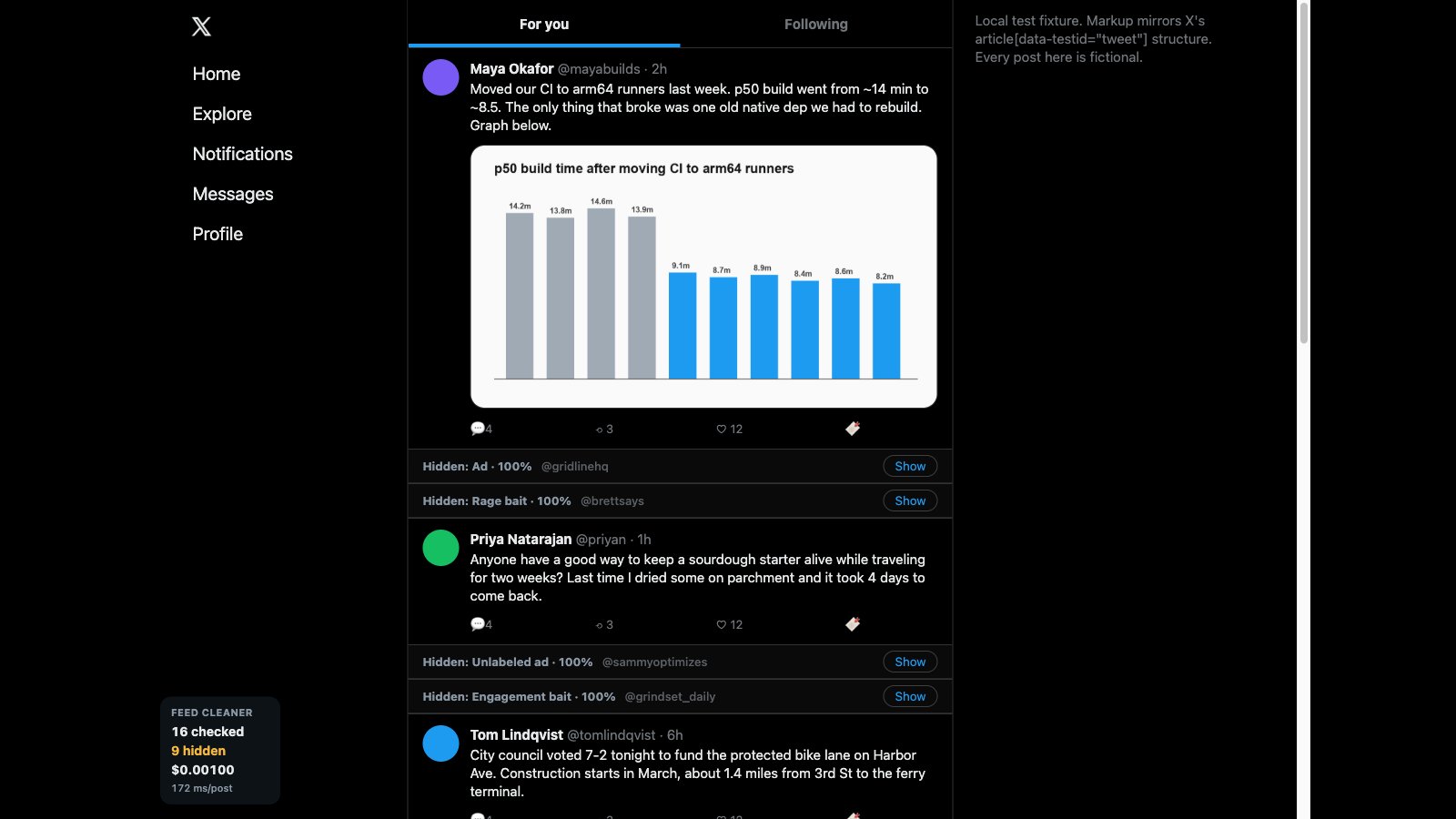
A Chrome extension sends each post's text and images to the Decisions API as it loads and asks two things: is this an ad, including the unlabeled ones, and is it engagement bait, rage bait, a low-effort repost or a real post. Ads and bait fold into a thin bar you can open with one click. It only reads and hides. It never likes, posts, follows or clicks.
- 198 ms per post (median)
- $0.0063 per 100 posts
- 16 of 16 posts sorted correctly, three runs in a row
Those 16 posts were a made-up copy of an X feed. If X changes its page layout, the counter stays at zero.
Build a Chrome extension that cleans up my X feed while I scroll.

As each post loads, send its text and any image to OpenAI's Decisions API (POST /v1/decisions, model gpt-6-luna) and ask two things:
- a predicate: is this an ad or a sponsored post, including hidden ones that aren't labeled?
- a choice: is this engagement bait, rage bait, a low-effort repost, or a real post?

Collapse anything that's an ad or bait into a thin bar that says what it was and lets me reveal it with one click. Keep a counter in the corner of how many posts it checked, how many it hid, and what it's cost so far. It should never like, post, follow or click anything on X. It only reads and hides.
Use case 5: A focus orb that watches my screens
In the morning I tell it my one thing for the day. A glowing orb sits in the corner with a Pomodoro ring around it. Every 10 seconds it screenshots all three of my displays and asks the Decisions API whether I'm working on my one thing. If I drift for more than a minute, it grows, moves to the front and says something out loud.
In one test the one thing was "Knit a wool scarf by hand". It said: "Reading tech drafts about iPhone mirrors again? Wool scarves don't knit themselves, back you go."
- 442 ms per check on average, 820 ms including the screenshots
- About 3,000 tokens per check for all three screens
- About $0.11 per hour
- 8 of 8 test screens judged correctly
Build a next-gen Pomodoro timer: a little animated orb that watches my screens and keeps me on my one thing.

In the morning I tell it my one thing for the day. Then it lives as a small glowing orb in the corner, out of the way. Every few seconds it takes a screenshot of each of my three displays and asks OpenAI's Decisions API (POST /v1/decisions, model gpt-6-luna) whether what I'm doing right now is working on my one thing.

If I drift for more than a minute, the orb floats to the front, gets bigger, and says something to me out loud with a text-to-speech voice, short and a little funny, naming what I'm doing instead. When I'm back on track it shrinks back down.

Include a Pomodoro timer (25 on, 5 off) that the orb shows as a ring around itself, and a simple end-of-day summary of how much time I spent on my one thing versus not. Show the cost per day.

Use case 6: Cleaning up my recordings
Blurring private info
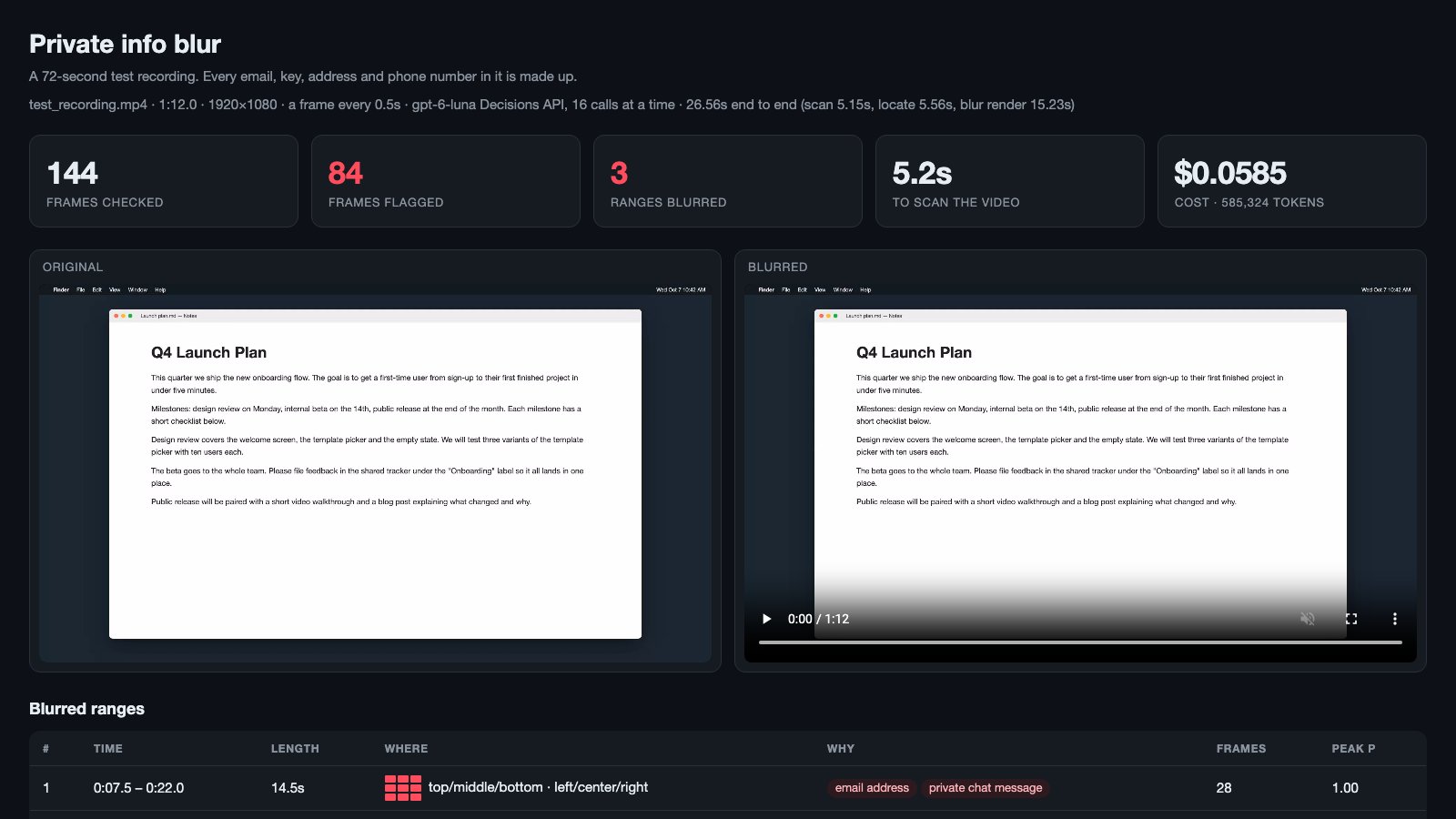
It pulls a frame every half second from a screen recording and asks whether it shows private information: an email address, a phone number, a key or password, a home address or a private chat. Then it asks where on screen it is and blurs that area with a soft blur.
On a 72-second test recording full of made-up emails, keys and addresses:
- 144 frames checked, 84 flagged
- 5.2 seconds to scan the whole video
- $0.06
- No leaks and no false alarms
It finds the location in thirds of the screen, so it blurs more than it needs to. A full inbox gets the whole screen blurred.
Build a tool that finds private information in a screen recording and blurs it automatically.

Give it a video file. Pull a frame every half second and ask OpenAI's Decisions API (POST /v1/decisions, model gpt-6-luna) a predicate question about each frame: does this frame show private information, like an email address, a phone number, an API key or password, a home address, or a private chat message?

Group the flagged frames into time ranges, then ask a follow-up choice question to find where on screen it is (left, center or right; top, middle or bottom), and blur that region for that time range with ffmpeg, using a real soft blur, not a black box. Output the blurred video plus a list of every range it blurred and why.

Show the frames it checked, which ones it flagged, how long the whole video took to scan, and what it cost.
Finding my bad takes
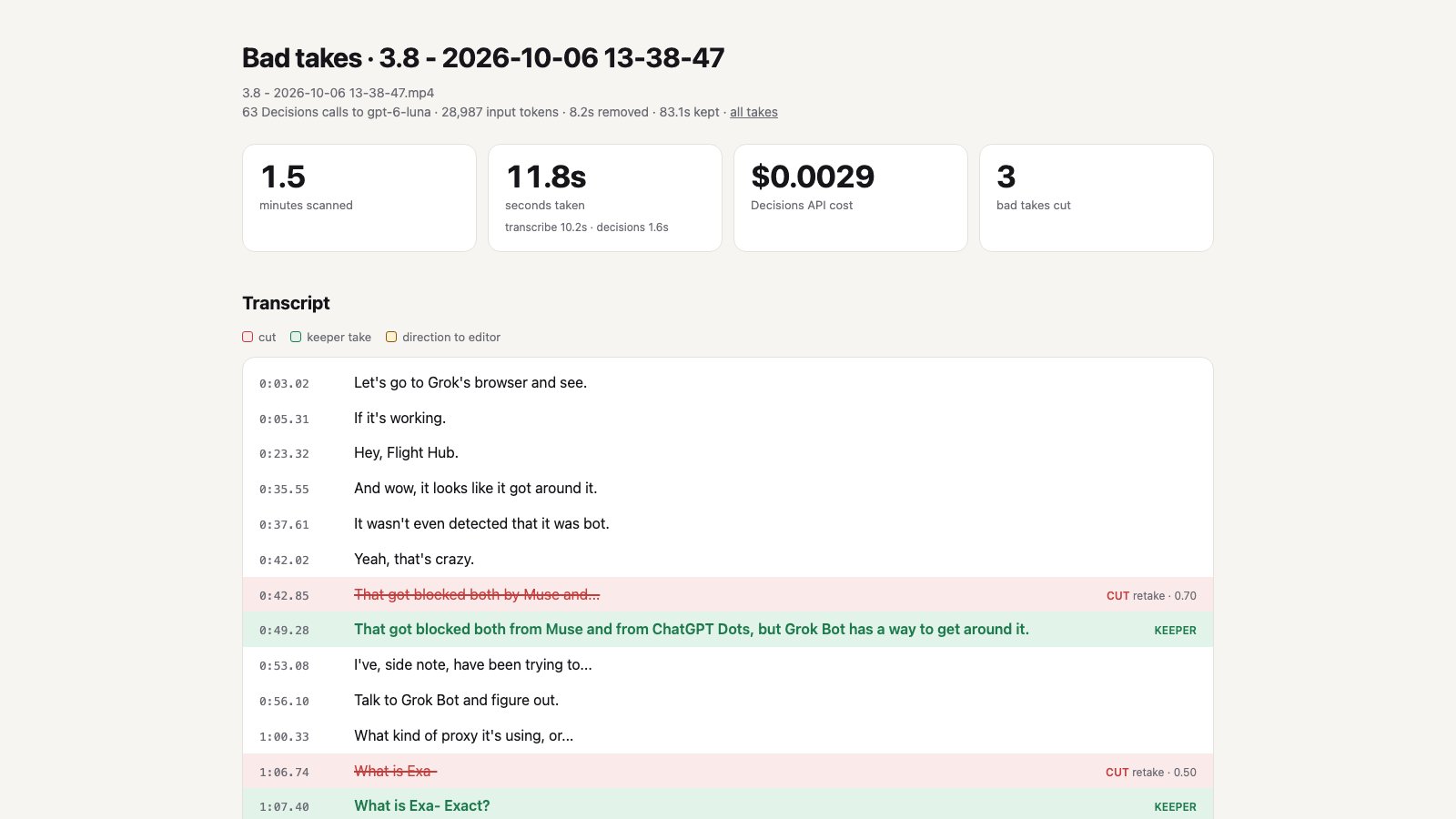
This one transcribes a raw recording and sends each sentence to the Decisions API with the line before and after it. It asks whether the sentence is a flub or a restart. When I say the same line twice, it asks which take to keep. Then it cuts the video.
I ran it on four raw takes from my Grok Bot vs Muse vs Dots recording:
- 4.75 minutes of footage
- 34 seconds to scan, almost all of it transcription; the Decisions API took about a second per take
- $0.0091 in total
- 7 bad takes cut, and it kept the last full attempt each time
It doesn't fix a stumble inside a line it keeps. Two of its picks came back with low confidence and were still right.
Build a tool that finds the bad takes in a raw video recording so I can cut them.

Give it a raw recording. Transcribe it with timestamps, split it into sentences, and send each sentence (with the sentence before and after it for context) to OpenAI's Decisions API (POST /v1/decisions, model gpt-6-luna):
- a predicate: is this a flub, a false start, or a line I restarted?
- when I say the same line more than once in a row, a choice: which of these takes is the keeper?

Output a cut list with the timecodes to remove, the reason for each, and the takes it kept, plus a version of the video with the bad takes cut out. Show how long the scan took and what it cost.
 Use case 7: Playing Beholder 2
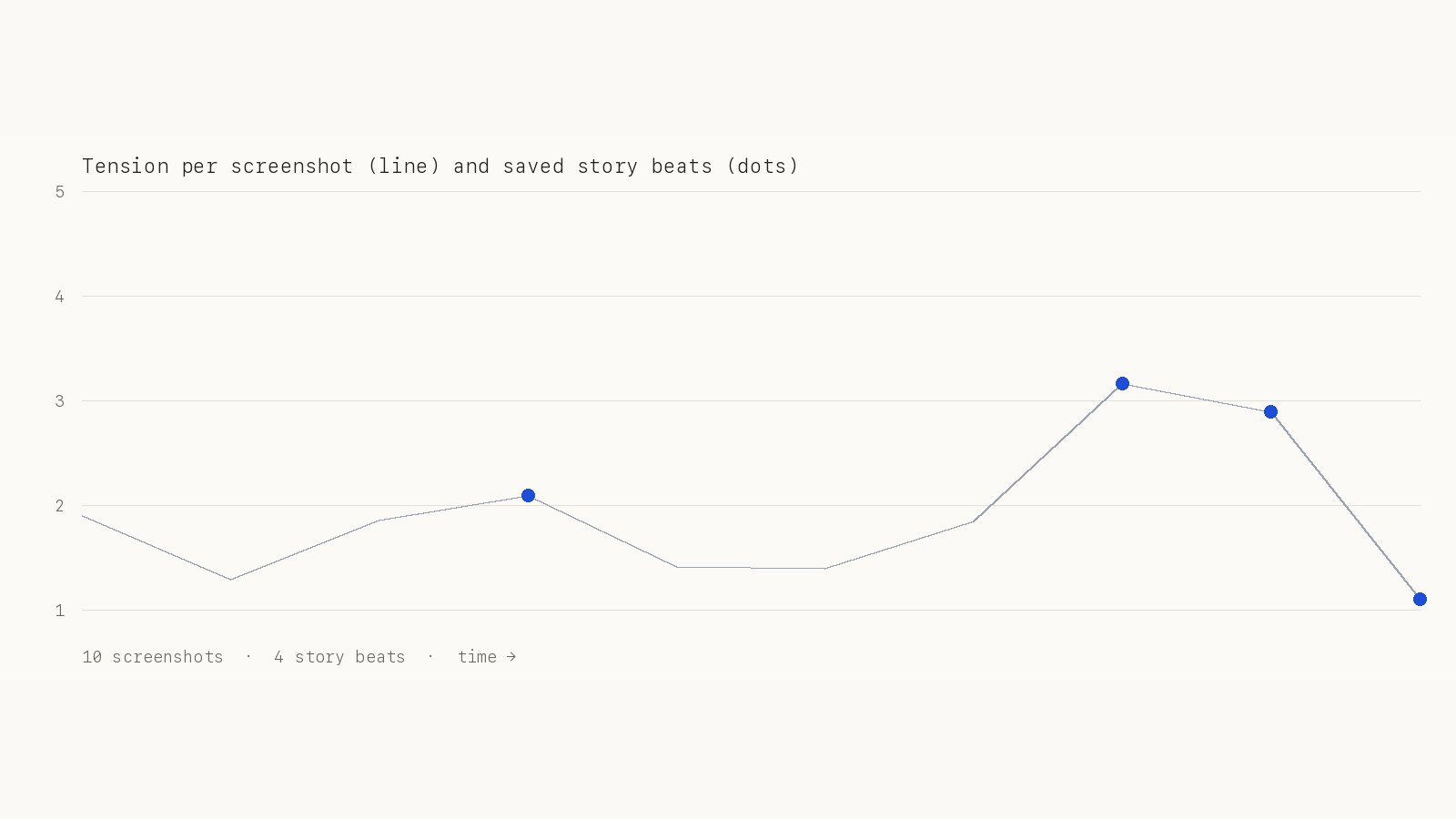
I'm building a game, and the hard part is the story. So I built a player for Beholder 2 that studies how a story game keeps you hooked. On every screenshot, one Decisions API call asks three questions: is this a story beat, how tense is it from 1 to 5, and what should it click next. Only the story beats go to GPT-6 Astra, which writes up the arc and a pacing chart.
The test run used 10 store screenshots: 4 were saved as story beats and 6 were passed on. Each screenshot cost $0.0001, at 312 ms per call. Finding the buttons with Astra and writing the arc cost far more than the decisions, $0.23 for the run in total.
I'm building a game and the hardest part isn't the 3D, it's the story: the arc, the stakes, what keeps people hooked. So I want an AI that plays other story games and tells me how they do it.

Build a player for Beholder 2 (Steam, running on this Mac). It takes a screenshot of the game, uses OpenAI's Decisions API (POST /v1/decisions, model gpt-6-luna) to pick what to do next from the options on screen (dialogue choices, report or don't report, which tenant to talk to), and then clicks it.

While it plays, ask the Decisions API about every screenshot too:
- a predicate: is this a story beat (a reveal, a twist, a moral choice, a consequence landing)?
- a score from 1 to 5: how tense or high-stakes is this moment?

Save only the screenshots flagged as story beats, with their tension score and timestamp.

When the session ends, hand those saved story beats to a writing model (GPT-6 Astra) and have it write up the story arc: the setup, the stakes, the turning points, how the choices raise the pressure, and a pacing chart from the tension scores. Show me how many screenshots the Decisions API looked at, how many it passed on, and what each part cost.
How to start using it yourself
You need an OpenAI API account. A ChatGPT subscription doesn't cover API calls: OpenAI says API usage is billed separately from your ChatGPT subscription.
- Try it in the Playground at platform.openai.com/decisions with your own question and answers.
- Create an API key on the same site.
- Copy any prompt from this post into
 Codex or
  Claude Code and let it build.
Every build here started from one of these prompts.
Why I think it's a game changer
| Build | Speed per decision | Cost |
|---|---|---|
| AssaultCube | 182 ms on average | About $0.086 per minute |
| Voice control | 175 ms (median) | About $0.0003 per command |
| Wikipedia race | 1.4 to 3 s for a whole race | Under a cent per race |
| X feed cleaner | 198 ms (median) | $0.0063 per 100 posts |
| Focus orb | 442 ms on average | About $0.11 per hour |
| Auto-blur | 5.2 s to scan a 72 s video | $0.06 per video |
| Bad-take finder | About 1 s per take | $0.0091 for 4.75 minutes |
| Beholder 2 | 312 ms on average | $0.0001 per screenshot |
When a decision takes a third of a second and costs a fraction of a cent, you can run it on every frame, every post and every sentence. An AI can react while things happen, the way a person does.


Comments
Sign in to join the conversation.