What Is HeyGen? Avatars, Video Translation and What Each Plan Costs
HeyGen makes talking-head videos from a typed script and translates videos into other languages. It has a free plan, with paid plans from $29 a month.

On this page
- What is HeyGen?
- Is HeyGen free?
- How much does HeyGen cost? Every plan compared
- How does HeyGen video translation work?
- How HeyGen's AI avatar generator works (stock avatars, photo avatars, your digital twin)
- Can HeyGen clone your voice and lip-sync it?
- HeyGen vs Synthesia and other alternatives
- Who HeyGen is for, and who should skip it
- Questions people ask about HeyGen
HeyGen is an AI video app: you type a script, pick an AI presenter (a stock avatar, a talking photo or a digital twin made from a short video of yourself), and it makes a talking-head video with a matching voice and lip movements. It also translates videos you already have into 175+ languages and dialects, keeping the speaker's own voice. The Free plan costs $0, needs no credit card and gives you 3 watermarked videos a month. Creator costs $29 a month ($24 a month billed yearly), Pro starts at $49 and Business costs $149 plus $20 for each added seat, all from HeyGen's pricing page.
Prices and limits on this page were checked on HeyGen's own pages on November 14, 2026. We haven't tested HeyGen at AI for Mortals, so everything here describes what HeyGen and its rivals say about their products, with links, and there's no quality verdict.
What is HeyGen?
HeyGen is an online video tool that makes presenter videos without a camera. HeyGen calls itself an AI avatar company: on its About page it says you record yourself once and then turn new scripts into videos of you, with your face and voice, without filming each one. The same page says more than 40 million people and 85% of the Fortune 100 use it.
You can start a video three ways, according to HeyGen's AI avatar generator page: paste a script, upload a PDF or PowerPoint, or drop in a link. HeyGen then adds the avatar, the voice and the rendering, and you finish the video in its editor with templates, captions, transitions, music, extra footage (B-roll) and your brand colors and logos.
Video Agent is the prompt-first way in. On HeyGen's Video Agent page you type an idea of up to 500 characters, choose 15, 30 or 60 seconds and landscape or portrait, and HeyGen plans the video scene by scene so you can preview it and ask for changes before it renders. Text, colors and timing stay editable afterwards.
HeyGen also makes HyperFrames, a free tool for building animated videos with an AI coding agent, and its site advertises a HeyGen plugin for ChatGPT. For news on the company itself, see our HeyGen company page.
Is HeyGen free?
Yes, HeyGen has a free plan, and it is limited. HeyGen's pricing page lists the Free plan at $0 a month with no credit card, and it includes:
- 3 videos a month, with a HeyGen watermark
- Videos up to 1 minute each
- One custom video avatar of you, plus 500+ ready-made presenters
- Up to 3 photo avatars and 1 voice clone
- 30+ languages
- A limited trial of Avatar 6 (HeyGen's newest avatar engine), Video Agent and lip-sync translation
To publish without the watermark or make anything longer than a minute, you need a paid plan. If you cancel a paid plan, HeyGen keeps your paid features until the end of the billing cycle and then moves you to Free; unused credits don't carry over.
How much does HeyGen cost? Every plan compared
HeyGen has five plans: Free, Creator ($29 a month), Pro (from $49), Business ($149 plus seats) and Enterprise (priced by sales). Paid plans come with a monthly allowance of credits, HeyGen's single currency for everything you make. How many credits a video uses depends on the AI model, the length of the video and how complex it is. HeyGen's pricing page listed these plans on November 14, 2026:
| Plan | Price | Credits a month | Longest video | Export | Languages | Watermark | Custom video avatars |
|---|---|---|---|---|---|---|---|
| Free | $0 | None listed (3 videos a month) | 1 minute | Not listed | 30+ | Yes | 1 |
| Creator | $29 a month, or $24 a month billed yearly | 600 | 30 minutes | Up to 1080p | 175+ | No | 1+ |
| Pro | From $49 a month (1,000 credits) up to $4,300 (100,000 credits) | 1,000 to 100,000 | 30 minutes | Up to 4K | 175+ | No | 1+ |
| Business | $149 a month, plus $20 a month per added seat | 1,500 | 60 minutes | Up to 4K, plus upscaling | 175+ | No | 5 |
| Enterprise | Contact sales | Set to your usage | No maximum | Up to 4K | 175+ | No | 10+ |
Creator is the plan for one person publishing videos. On top of the Free features it adds 1080p downloads without HeyGen branding, a custom avatar with your own voice and likeness, up to 10 hours of HeyGen's text-to-speech voice, 700+ stock avatars, unlimited photo avatars, and credits that roll over for one month.
Pro adds 4K export, Avatar 6 Pro (which HeyGen calls its most lifelike avatar), one Professional Voice Clone (its highest-quality copy of your own voice), 16+ hours of text-to-speech, faster processing and the option to edit and proofread translation scripts. Pro also includes the Seedance 2.5 video model (with no second subscription, HeyGen says) and Veo 3.1 and Nano Banana for AI video and images. Every Pro tier has the same features; only the credits change, and you can switch tiers any time.
Business is for teams: a shared workspace, central billing, sign-in through your company's login system (SAML/SSO), course exports for training platforms, and links to n8n, Make, HubSpot and Zapier. Enterprise removes the video length limit and adds account management and security controls.
Monthly subscribers' unused credits roll over for one more month. Yearly subscribers' credits build up until the yearly renewal date. Upgrades take effect right away with prorated billing, and downgrades or cancellations take effect at the end of the billing cycle.
How does HeyGen video translation work?
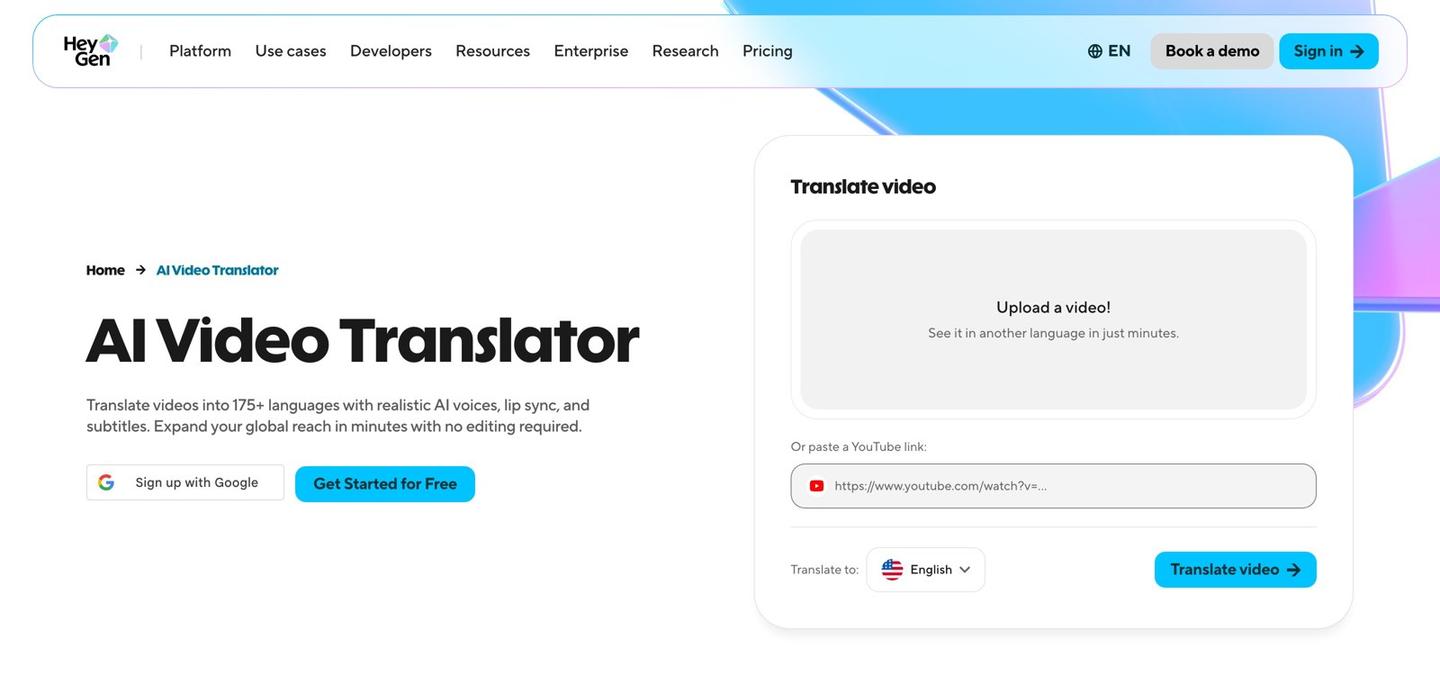
HeyGen's video translator takes a video you already have and remakes it in another language with an AI voice that sounds like the original speaker, lips matched to the new words, and subtitles. HeyGen's translation page lists three steps:
- Upload a video from your computer or paste a YouTube link, then choose up to 10 languages to translate into at once.
- Click translate, and HeyGen makes each version with the matched voice, lip sync and expressions.
- Optionally click Edit & Review to proofread the translated script before you finish.
HeyGen says the translation keeps the speaker's own tone and delivery by cloning their voice. You can add a brand glossary, a list of names and terms that must be translated a set way, left alone, or pronounced correctly. The translator also works on HeyGen's own avatar videos, so one script can come out in several languages.
The free allowance depends on which HeyGen page you read. The translation page's FAQ says the Free plan translates up to 3 videos a month, each up to 3 minutes long. The pricing page lists a 1-minute maximum for translated videos on Free, 30+ languages, and only a "limited trial" of lip-sync translation. Paid plans translate videos up to 30 minutes (Creator and Pro), 60 minutes (Business) or any length (Enterprise), into 175+ languages and dialects.
How HeyGen's AI avatar generator works (stock avatars, photo avatars, your digital twin)
HeyGen's avatar generator gives you three kinds of presenter: a stock avatar from its library, a photo avatar made from a single picture, or a Personal Avatar, a digital twin of you trained on a short video. You give any of them a script, and the avatar reads it on camera.

Stock avatars are ready-made AI presenters that HeyGen says are cleared for commercial use. The avatar page advertises 1,100+ of them, while the pricing page lists 500+ on Free and 700+ on paid plans.
Photo avatars start from one front-facing photo, which HeyGen turns into a talking character that reads your script. HeyGen says its Avatar 6 model can also animate stylized and non-human characters this way. Free accounts get up to 3 photo avatars, and every paid plan gets unlimited ones.
Personal Avatars are what people mean by a HeyGen AI twin or AI clone. You record a short video of yourself (the About page says a 15-second phone video, the avatar page says about 30 seconds) and read a consent statement on camera to confirm it's you. HeyGen says most are ready in 10 to 20 minutes and can wear up to 500 different outfits and settings. Making an avatar of someone else needs that person's verified consent. The pricing page calls these custom video avatars: Free includes one, Creator and Pro include one with more sold as add-ons, Business includes 5 and Enterprise 10+.
Can HeyGen clone your voice and lip-sync it?
Yes. HeyGen copies your voice from a short sample, only with your permission, so your avatar sounds like you, and it matches the avatar's lips to the words. The avatar page says lips are synced at the phoneme level, meaning to each separate speech sound, and that a cloned voice works in 177+ languages.
The Free plan includes 1 voice clone. Creator and Pro give expanded and maximum voice-cloning use, and Pro adds one Professional Voice Clone, which the pricing page shows as a $29-a-month item marked free on Pro. If you'd rather not use your own voice, the pricing page lists 1,000+ stock AI voices, and the avatar page says you can adjust tone, pace and emotion line by line.
Lip sync also works on videos you filmed yourself: when HeyGen translates an existing video, it matches the speaker's lip movements to the new language. HeyGen's paid plans list Avatar Lipsync, which HeyGen calls its proven avatar engine, alongside the newer Avatar 6 engines.
HeyGen vs Synthesia and other alternatives
HeyGen, Synthesia and Colossyan all turn a script into a video with an AI presenter, and all three have a free plan. HeyGen lists the most languages of the three, Synthesia has the cheapest paid plan, and Synthesia and Colossyan build more of their plans around company training videos. We haven't tested any of them, so this compares what each company's own pricing page lists on November 14, 2026, without ranking them.
| Tool | Free plan | Cheapest paid plan | Avatars | Languages | Built around |
|---|---|---|---|---|---|
 HeyGen | 3 watermarked videos a month, up to 1 minute each | Creator, $29 a month ($24 billed yearly) | 500+ stock on Free, 700+ on paid plans | 175+ on paid plans | Creators and marketers, plus translation |
 Synthesia | 10 minutes of video a month, with a watermark | Starter, $19 a month ($9 for the first month) | 9 on Free, 125+ on Starter, 240+ on Enterprise | 140+ languages and voices | Training videos, roleplays and surveys |
 Colossyan | 20 minutes a month, 15 custom avatars, 15 auto translations | Professional, $59 a month on a yearly plan | 300+ in its library | 120+ | Training and courses |
Synthesia's pricing page lists a free Basic plan with 10 minutes of video a month, then Starter at $19 a month (125+ avatars and no Synthesia logo) and Pro at $89 a month ($49 for the first month) with 5 Personal Avatars and 180+ stock avatars. Its one-click translation into 140+ languages is listed on Enterprise. See our Synthesia tool page for its latest updates.
Colossyan's pricing page describes it as a platform for training and enablement content. Its free Starter plan includes 20 minutes of video a month, 15 custom avatars and 3 voices, and 15 automatic translations a month. Professional costs $59 a month on a yearly plan, removes the watermark, and adds SCORM exports, the file format that online course systems import.
Fit by job, from those pages: HeyGen's translator takes a YouTube link directly and covers the most languages, which suits a creator turning existing videos into other languages. Synthesia and Colossyan put interactive training features (roleplays, surveys, interactive videos, course exports) on more of their plans, though HeyGen's Business plan also lists course exports. For AI video beyond talking heads, our guide to the best AI for video by job covers video generators and editing.
Who HeyGen is for, and who should skip it
HeyGen is built for people who need to appear in a lot of videos without filming each one, and for teams that need the same video in many languages. HeyGen's About page names real estate agents, financial advisors, attorneys, coaches and creators, plus large companies using it for training, sales, onboarding and translation. Its avatar page adds course creators, short vertical videos for TikTok, Reels and YouTube Shorts, and personalized sales videos that greet each prospect by name.
It's a poor fit in a few cases, going by its own plan limits:
- You want free videos to publish: Free videos carry a watermark and stop at 1 minute.
- You make videos longer than 30 minutes: that needs Business ($149 a month) or Enterprise.
- You want an avatar of someone who can't record a consent statement: HeyGen requires their verified consent.
- You want animated explainers or motion graphics rather than a presenter: HyperFrames, HeyGen's free tool for making videos with Claude, is built for that.
For everything HeyGen has shipped recently, see HeyGen updates and new features.
Questions people ask about HeyGen
Is HeyGen paid?
HeyGen has a free plan and paid plans. Free gives 3 watermarked videos a month; paid plans start at $29 a month for Creator.
What are HeyGen credits?
Credits are HeyGen's single currency for making videos and other assets on paid plans. A video's cost in credits depends on the AI model, the length and how complex it is.
Do HeyGen credits roll over?
Yes. Monthly subscribers keep unused credits for one more month, and yearly subscribers' credits build up until renewal. Credits expire if you cancel.
Can I cancel HeyGen at any time?
Yes. A cancellation takes effect at the end of your billing cycle, and your account then moves to the Free plan.
How many languages does HeyGen support?
The pricing and translation pages say 175+ languages and dialects on paid plans and 30+ on Free. HeyGen's About and avatar pages say 177+.
Can HeyGen translate a YouTube video?
Yes. HeyGen's translator accepts a pasted YouTube link as well as an uploaded file.
How long does it take to make a HeyGen avatar of yourself?
HeyGen says most Personal Avatars are ready in 10 to 20 minutes after you record a short video and a consent statement.
Is HeyGen in ChatGPT?
Yes. HeyGen's site advertises a HeyGen plugin for ChatGPT that you can install.
What is the HeyGen Video Agent?
Video Agent turns a short written idea into a 15-, 30- or 60-second video, shows you a scene-by-scene plan first, and lets you change it by chatting. Free accounts get a limited trial, and paid plans get more use.
Which HeyGen plan includes 4K?
Pro, Business and Enterprise export up to 4K. Creator exports up to 1080p.


Comments
Sign in to join the conversation.