Claude Code for Beginners: We Built a Small App Without Writing Any Code
We gave Claude Code one plain-English paragraph about a freelancer's invoice problem and got a working app in 90 seconds. Here's what it built, what it got wrong, how we fixed it by just describing the problem, and the prompts to build your own.
 AI for Mortals Staff
We tested Claude Code for beginners the simplest way we could think of. We typed one paragraph about a freelancer's money problem, wrote no code at all, and had a working app open in a browser about 90 seconds later.
The idea was deliberately small: a list of clients who still owe you money, with the late ones at the top and a button that writes the reminder email. It's the kind of tool nobody would pay a developer to build, which is exactly why it's worth building yourself.
Below is everything we typed, word for word, what came back, the one thing it got wrong, and how you can do the same with your own idea.
What we asked Claude Code to build
We opened Claude Code in an empty folder and wrote the request the way a freelancer would, with no technical words in it:
I'm a freelancer and I always forget who still owes me money. I don't know how to code. Can you build me a simple app I can open in my web browser where I can type in a client's name, what the job was, how much they owe, and the date the invoice was due. It should show me everyone who hasn't paid yet, with the ones that are late at the top and how many days late they are. Next to each one I want a button that writes a short, polite reminder email I can copy and paste into Gmail. It needs to remember my list when I close it and open it again. Keep it simple and make it look clean. When you're done, tell me exactly how to open it.
Asking for opening instructions in the same message gets you steps a beginner can follow. Ours came back as Finder directions, down to which folder to click.
We ran it on Claude Opus 5.5, which Anthropic says is especially good at long, sprawling coding jobs and costs about 40% less to run than Opus 5.
What came back in 90 seconds
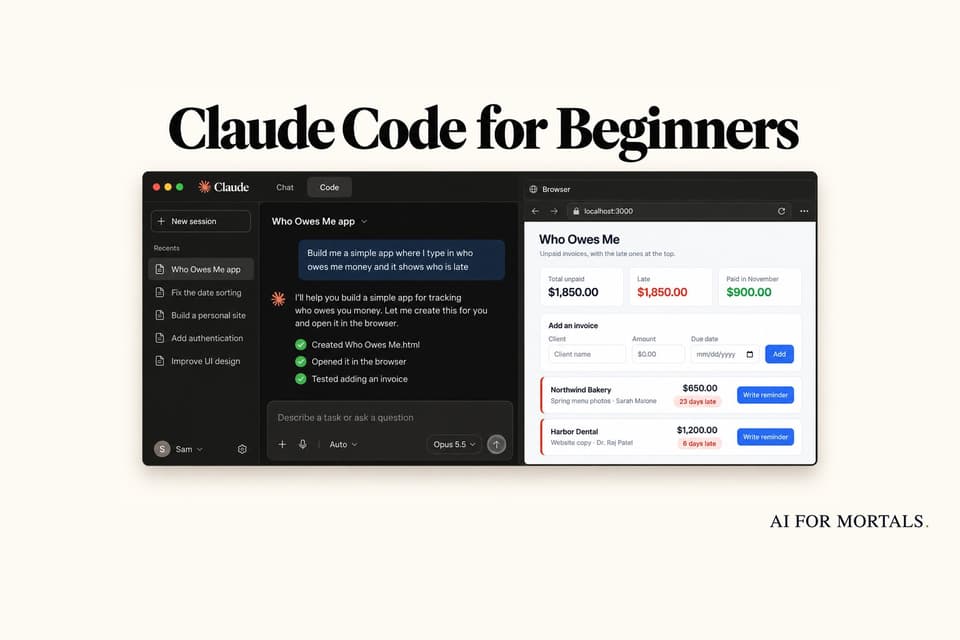
Claude Code built the whole app as a single file and called it Who Owes Me. Then it did two things we never asked for.
First, it noticed the folder we'd given it gets wiped when the computer restarts, so it moved the app into a new Who Owes Me folder in Documents. Then it opened the app in a browser on its own, typed in some sample invoices, clicked the buttons, closed and reopened the page to check the list was still there, and looked at screenshots of the result before telling us it was done.
Here is the app with four made-up clients typed in:

It also added a few things on its own that turned out to be sensible:
- Totals at the top, for everything unpaid and for the late part of it.
- Firmer wording the later the payment is, while staying polite.
- A Paid section with an undo button, for when you click Mark paid by mistake.
- Download a backup and Restore a backup links, because the list lives inside your browser and clearing your browsing data would erase it.
A total beginner wouldn't know the list could disappear. Claude Code warned us about it in plain words in its reply.
What broke: "Hi Northwind"
Clicking Write reminder opens a ready-made email with Copy buttons for the subject and the message. It reads well, apart from the first two words.

The app only knew the client's name, so it greeted the first word of it. That works for "Jane Smith" and falls apart for "Northwind Bakery".
Expect this kind of mistake. The app does exactly what you described, and what you described had a gap in it. You fix it the same way you'd tell a person.
Round two: reacting in plain English
We wrote back the way you would after trying something for five minutes, and threw in three more wishes while we were at it:
I tried it and it's great, but a few things:
1. The reminder email starts "Hi Northwind," and Northwind is a bakery, not a person. Let me add the name of the person I deal with for each client and use that in the email.
2. Some of my clients pay me in euros or pounds. Let me pick the currency for each invoice, and don't add euros and dollars together in the totals.
3. Copying and pasting into Gmail is a bit fiddly. Can there be a button that opens the email in Gmail already filled in?
4. At the top, show me how much I've been paid this month.
About two minutes later all four were done, and Claude Code had tested each one in the browser again.

The greeting now uses the contact's first name, and the reminder window has an Open in Gmail button. We checked the link it builds: it goes to Gmail's compose window with the address, subject and message already filled in.

Claude Code even handled the invoices we'd already typed in. It kept them, treated them as dollars, and added an Edit button so we could fill in the missing contact names.
Its reply also flagged a quirk we'd never have thought to ask about. If you're signed into more than one Gmail account, the draft opens in whichever one you signed into first.
Ask before you let it change anything
Next we wanted the same list on a phone. That's a bigger change, so we switched Claude Code to Plan mode, where it can look and explain but can't edit anything, and asked:
I'd love to check this list on my phone too, and have the same list there. What are my options? Don't change anything yet, just explain it simply and tell me which one you'd pick.
It came back with four options in plain language. Copying the file to your phone gives you a second list that never matches. Moving backups across by hand works but drifts. A proper website with a login means signing up for a new service.
Its pick was the fourth: keep the list in a Google Sheet in your own Google account, behind a private link that works on both your computer and your phone. It listed the downsides too, including a second or two of loading and a small grey notice Google puts at the top of the page.
We stopped there on purpose. Once an app starts touching your Google account, you should read the plan and understand it before you say yes.
How to use Claude Code if you've never coded
You don't need the terminal, the black text window developers use. The easiest way in is the Claude desktop app, which includes Claude Code.
- Get a paid Claude plan. Claude Code is included from the Pro plan, $20 a month (or $17 a month billed yearly). The free plan doesn't include it. Building counts toward your plan's usage limits, so you don't pay per app.
- Install the Claude desktop app for Mac or Windows from Anthropic's download page, sign in, and click the Code tab at the top of the sidebar.
- Make an empty folder for your app, in Documents for example, and pick it with the project folder button under the prompt box.
- Pick how much Claude asks you first. The mode button under the prompt box has Manual, Accept edits, Plan and Auto. Manual asks before every change, which is the calmest place to start. Plan is for asking questions without changing anything.
- Describe your idea and press Enter. When it's done, the desktop app can show your running app in a Browser pane next to the chat, and Claude checks its own work there.
Then use it, and write back about whatever feels wrong. You can type a correction while Claude is still working, and it picks it up after the step it's on.
Prompts to start your own small app
Copy any of these into the Code tab and swap in your own details. They all follow the same shape that worked for us: who you are, the annoying problem, what you want to see, and how you'll use it.
I'm a [your job] and I keep [the annoying thing that happens]. I don't know how to code. Build me a simple app I can open in my web browser that [what it should do, in a sentence or two]. It should remember everything I type when I close it and open it again. Keep it simple and clean. When you're done, test it yourself in a browser, then tell me exactly how to open it.
I just tried the app. Here's what felt wrong: [describe it like you would to a friend]. Fix those things, test them yourself, and tell me what you changed in plain English.
Explain what you built like I've never seen code. What is each file for, where is my information saved, and what could make me lose it?
Before you change anything: I want [the bigger thing, e.g. to use this on my phone]. Give me my options in plain English, the downsides of each, and which one you'd pick. Don't edit any files yet.
Pat builds his own apps the same way, describing what he wants and reacting to what comes back. He rebuilt a note-taking app with Opus 5.5 from six prompts, and this video walks through every one:
He also built a free Wispr Flow alternative in two prompts, if you want to see a bigger app made the same way.
What to watch out for with vibe coding
Building an app by describing it is often called vibe coding. Some people who build software for a living call it prompting and hoping for the best. Meanwhile, beginners are posting games and tools they made in a few days. A few habits keep your own builds on the safe side.
- Know where your data lives. Our app keeps the list inside one browser on one computer. A different browser shows an empty list, and clearing your browsing data can wipe it. Use the backup button, or ask Claude where your information is saved.
- Keep sensitive details out of homemade apps. Client names and amounts are fine. Bank logins, card numbers and passwords don't belong in something you built in an afternoon.
- Expect extras. Claude Code added features we didn't ask for. Ours were useful, but if something appears that you don't want, say "remove the X" and it will.
- Watch your usage on bigger projects. Three rounds on a small app is light work. Long sessions on a bigger app use more of your plan's limits, and Claude's usage limits can stop you mid-project.
- Ask before big changes. Plan mode, or the words "don't change anything yet", costs nothing and gives you a choice before Claude starts editing.
Once you've built a couple of these, Claude Code can be set up to work more your way, with mods that change how it behaves. And if you'd like your app on your Android phone, Google now lets you install apps you build with AI through Google Play.
Sources
- Use Claude Code Desktop (Claude Code docs)
- Get started with the desktop app (Claude Code docs)
- Quickstart (Claude Code docs)
- Introducing Claude Opus 5.5 (Anthropic)
- Claude plans and pricing (Anthropic)
- Claude Code product page (Anthropic)
- Security engineer here. The anti-AI hate is getting ridiculous (r/ClaudeAI)
- I started vibe coding games 2 weeks ago (r/aigamedev)




Comments
Sign in to join the conversation.