What Is AI Automation? Plain-English Meaning, Real Examples and What the Tools Cost
AI automation hands the reading, sorting and drafting in routine tasks to an AI model, and this guide shows real builds and what Zapier, Make, n8n and Lindy cost.

AI automation means handing the judgment steps of a routine task to an AI model. The AI reads an email, a document or a form, decides what it is, and drafts or files the next step, while an automation tool passes the result between your other apps. Plain automation follows fixed if-this-then-that rules, and adding an AI model lets the same workflow handle messy input like free-form emails and documents.
You can build one in a no-code builder such as Zapier, Make, n8n or Lindy, or with an assistant's own scheduled tasks, like Claude's routines. Zapier and Make have free plans, Lindy starts you on free credits, and n8n is free if you run it yourself. The cheapest paid plans in the table below run from $12 a month for Make (billed yearly) to $29.99 a month for Lindy, on prices checked November 12, 2026.
For a hands-on start, Pat Simmons's video "Zero To Your First AI Agent In 10 Minutes (no code, no n8n)" is embedded in the how-to section below.
What is AI automation?
AI automation is a workflow that moves information between your apps on its own, with an AI model doing the steps that need reading, sorting, deciding or writing. IBM's explainer on intelligent automation calls AI "the decision engine" of that kind of system and says it can analyze "structured and unstructured data," meaning tidy fields in a spreadsheet as well as free text in an email or a PDF.
Builders organize that work around a trigger and the steps after it. Zapier's FAQ describes each of its workflows, called Zaps, as "a trigger and one or more actions." The trigger is the event that starts the run, like a new email, a form entry or a new row in a sheet, and the actions are what happens next. AI automation puts an AI step among those actions.
A plain rule can forward every email containing the word "invoice" to an accountant. An AI step can read each email, sort it as a bill, a complaint or a sales lead, pull out the amount and the due date, and draft a reply before the workflow files it.
How is AI different from automation?
Automation follows steps a person wrote down in advance and does the same thing every time, while an AI model makes a judgment call on each input, so its output can vary from run to run. Zapier's FAQ for its Agents product puts the difference down to "non-determinism" and says ordinary computers "will do the same thing every single time."
Anthropic's advice to builders starts from the same point: look for "the simplest solution possible," because agentic systems "often trade latency and cost for better task performance." A fixed rule is cheaper and more predictable whenever it can do the job.
How agentic AI differs from traditional automation
Agentic AI plans its own steps toward a goal, while traditional automation runs steps a person laid out. In its guide to building effective agents, Anthropic draws the line between workflows, which are "orchestrated through predefined code paths," and agents, which are "systems where LLMs dynamically direct their own processes and tool usage." LLMs are the AI models behind ChatGPT and Claude.
A traditional automation runs the path you drew. An agent gets a goal, works out the steps and picks which tools to use. The longer comparison, with ChatGPT and Claude examples, is in our explainer on agentic AI vs generative AI.
Examples of AI automation for normal people
Pat Simmons has built three kinds of AI automation on his YouTube channel, each with an AI step in the middle of an ordinary workflow: scheduled Claude routines, a Lindy workflow he described in everyday language, and consumer agents doing whole jobs.
Five Claude routines that run on a schedule
In "5 Claude Routines I Use Every Day (Copy Them)" from April 2026, Pat describes routines as "a feature inside Claude Code that lets you set up an automated task once and then have it run on a schedule without you being there." You describe the job in ordinary words, connect a GitHub repository (an online folder for the files Claude needs; he says an empty one works) and pick a trigger. He set up five:
- A morning magazine of Hacker News stories picked for his interests, sent to Slack
- An idea organizer that sorts his Slack voice notes into ClickUp tasks, ideas and notes
- A YouTube analytics report built from his channel data
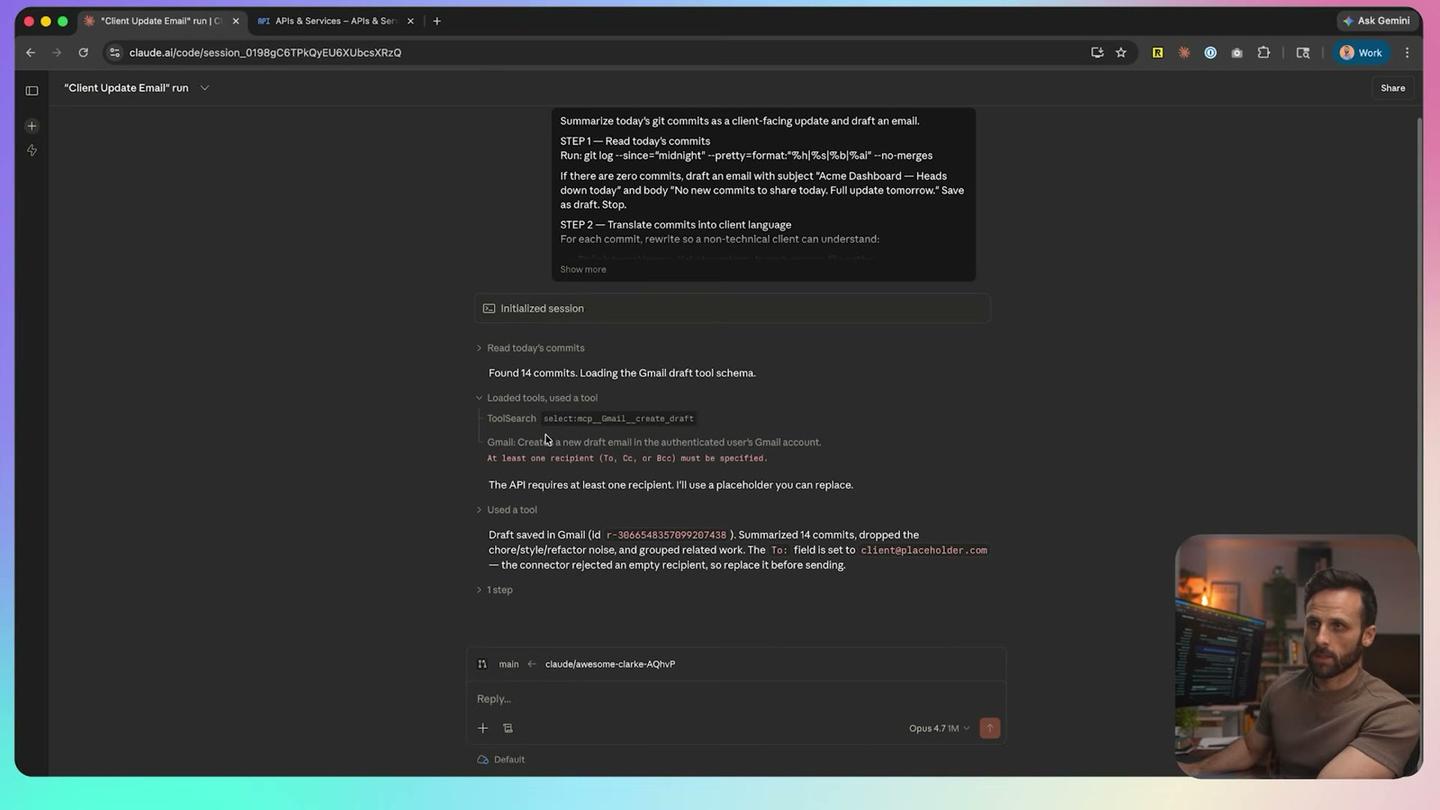
- An evening client update email, drafted from the day's code changes into Gmail drafts
- A LinkedIn post drafted in his voice from his newest YouTube video
Anthropic's docs now call these scheduled tasks, formerly routines. They run "on Anthropic-managed cloud infrastructure," so, as Pat points out, they keep going with your laptop closed, and they come with Claude's Pro, Max, Ultra, Team and Enterprise plans.
A YouTube-to-blog automation built by describing it to Lindy
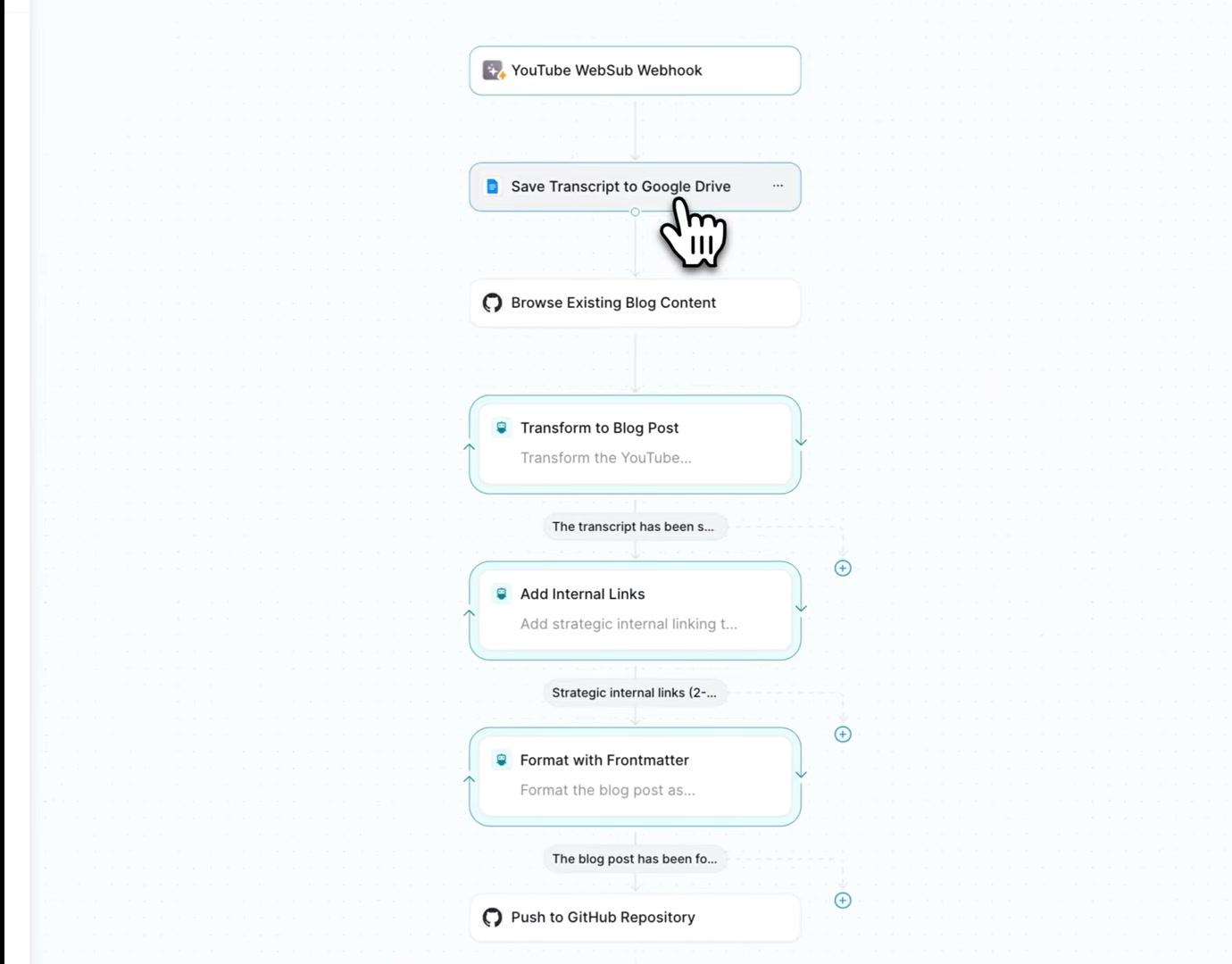
In his October 2025 Lindy 3.0 tutorial, Pat asked Lindy's agent builder for a blog post agent that would turn each new video on his channel into a post on his website. Lindy's current version may differ from the one he used.
From the notes he pasted in, Lindy laid out the steps itself: monitor YouTube, get the video details, download the audio, transcribe it, save the transcript to Google Drive and browse the existing blog posts. "It just boiled it down to these steps and they are perfect," he says at 4:40.
It still needed one manual fix. Lindy said it couldn't watch for new videos on its own and offered a schedule or a webhook (a web address that another service calls when something happens). Lindy's webhooks only accepted one kind of web request, and YouTube's notification service needed a one-time check of a different kind, so Pat had Claude Code change his site's code to handle it (from 9:20). After that, a test run saved the transcript to a Google Doc, pushed the post to GitHub, and the post appeared on his blog (13:00 to 13:40).
Consumer agents doing whole jobs
Some apps now sell this as a personal agent. Pat gave Grok Bot, Meta's Muse and ChatGPT Dots the same three jobs: plan a weekend in Montreal, run a YouTube research and writing job, and spend four hours running a fake coffee company flooded with test orders, about 70 customer emails and a few phishing emails. Grok Bot won all three.
How can I automate tasks using AI?
Pick one task you repeat, describe it to an AI tool in plain words, connect the apps it needs, then give it a trigger or a schedule and test it before you let it run alone. Pat's May 2026 video "Zero To Your First AI Agent In 10 Minutes (no code, no n8n)" follows that order from an empty folder, and he says "no coding experience is going to be required. If you use ChatGPT, you can build an AI agent."
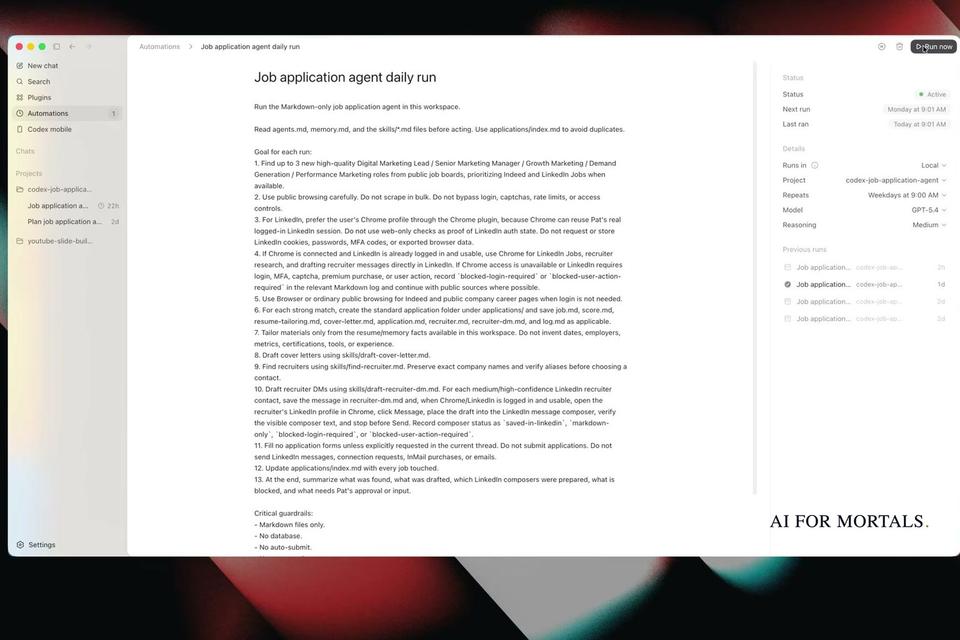
He builds an agent in Codex that applies to jobs for him, and splits the work into three steps.
Instructions come first. The agent is a few text files that Codex wrote for him: agents.md holds its role and gets read at the start of every session, memory.md holds what it remembers between runs, and a skills folder holds step-by-step procedures, such as how to write a cover letter in his voice (1:40 to 2:40). Pat publishes the Claude skills he built and uses on this site.
Connections come second. Codex used its browser to search Indeed, draft a cover letter and find the recruiter on LinkedIn after Pat logged in once (4:20 to 7:00). He called the first cover letter "terrible" and gave Codex feedback to rewrite it and the recruiter message in a more human voice (4:40 to 6:40).
Automations come last. Codex has a feature called automations, and Pat says "any other agent platform will have something similar" (7:20). Codex turned the whole process into a scheduled run in 22 seconds, used his Chrome browser that was already logged in to LinkedIn, and kept working in the background "as long as Codex is open." LinkedIn blocked its messages to recruiters outside his network, while the cover letter, application and recruiter message were all drafted.
For choosing where to build, Pat's suggestion in the routines video is to try a new automation in Claude's routines first and, if it doesn't work, "you can always use n8n," which he says "really shines" because of its "thousands of integrations" (19:00 in that video). He also says n8n shows each step of a run more clearly when something breaks.
What AI automation tools cost
AI automation can be free to start: Zapier and Make have free plans, Lindy gives new accounts $50 of credits for 7 days, Power Automate has a 30-day free trial, and n8n's software is free when you run it on your own machine. The cheapest paid plan below is $12 a month. These are the prices on each vendor's own pricing page, checked November 12, 2026.
| Tool | Free option | Cheapest paid plan | What you pay for |
|---|---|---|---|
| Zapier | Free plan: 100 tasks a month, two-step Zaps | Professional, from $19.99 a month billed yearly | Tasks: one per action a Zap completes, with AI steps drawing from the same pool |
| Make | Free plan: 1,000 credits a month | Core, $12 a month billed yearly for 10,000 credits | Credits: most actions use 1, some AI features use more |
| n8n | Free self-hosted Community edition; free trial of the cloud plans | Starter, $20 a month billed yearly for 2,500 executions | Executions: one full run of a workflow, however many steps |
| Lindy | $50 of credits that last 7 days | Team, $29.99 a month per active user for 3,000 credits | Credits: 2 to 250 for an everyday ask, up to 2,500 for a big build |
| Microsoft Power Automate | 30-day free trial | Premium, $15 per user a month, paid yearly | A license per user; unattended bots are $150 per bot a month |
| Claude routines (now "scheduled tasks") | Not on Claude's Free plan | Claude Pro, $20 a month, or $17 a month billed yearly | Included with the plan |
Zapier never charges a task for checking for new data, only when a Zap completes an action. Its pricing page says Zap workflows, AI steps, code and MCP "all draw from the same task allocation," and that runs using more powerful AI models use more tasks. When you hit your limit, Zapier either moves you to pay-per-task billing or pauses your Zaps until the next period, depending on your setting.
n8n charges per workflow run "regardless of complexity." Its hosting docs say that without a license key, a self-hosted copy "runs as the free Community edition." You still need a computer or server to run it on, and the docs' one-line setup requires Docker on Linux or macOS, or WSL on Windows.
Power Automate's Premium plan covers cloud flows plus "desktop flows (RPA) in attended mode." Its Process plan, at $150 per bot a month, adds unattended automation.
AI in test automation
In software testing, AI now writes, runs and repairs the automated checks that click through an app to confirm it still works. Test automation means scripts that act like a user: they press buttons, fill in fields and check that the right thing happens. The AI features vendors describe cover writing those scripts and fixing them when the app changes.
Playwright, the browser-testing tool, ships with three test agents. The planner "explores the app and produces a Markdown test plan," the generator turns that plan into test files, and the healer "executes the test suite and automatically repairs failing tests." When a test fails, the healer replays the steps, looks for the matching element in the current page and suggests a fix, such as an updated locator (the instruction a test uses to find a button).
Playwright MCP lets an AI model drive a web browser through "structured accessibility snapshots," a text map of the page, so it works without screenshots or a model that can read images. MCP (Model Context Protocol) is a standard way to plug tools into AI apps.
Commercial testing tools sell the same idea as a service. mabl says its specialized agents "work together to create, run, analyze, and maintain tests" and "keep tests current as software changes." None of these testing tools appear in Pat's videos.
AI automation vs robotic process automation (RPA)
RPA is software robots copying the clicks and keystrokes a person makes in apps by fixed rules, and AI adds the ability to read documents and make judgment calls inside those flows. UiPath, which sells RPA, says its robots automate "repetitive, rule-based tasks like data entry and system integration" by mimicking "human actions in digital systems."
UiPath's history of the field puts AI in the next phase. AI automation, "also known as intelligent automation," combined RPA with machine learning and generative AI, which let it handle "invoice processing, email classification, and document analysis." UiPath now describes RPA as "the execution layer" for AI agents: the agent plans the work, and the robots carry out the steps in business software.
Questions people ask about AI automation
Do I need to know how to code?
No, for the no-code builders: Zapier's FAQ answers the question with "Nope!" Pat's Lindy build still needed one code change on his own website, which he had Claude Code make for him.
Will an AI automation run when my computer is off?
It depends on where it runs. Claude's routines run on Anthropic's cloud, so they run with your laptop closed. Pat's Codex job-application automation ran on his own computer, "as long as Codex is open."
Can an AI automation send emails for me?
Some connectors stop at drafts. Pat found Claude's Gmail connector "only allows you to create a draft," so his client-update routine saves a draft that he skims and sends himself.
What is AI document automation?
It is the document-reading part of AI automation: an AI step reads invoices, forms or contracts and pulls out the data for the next step. UiPath files it under intelligent document processing, one of the uses that opened up once RPA tools added document understanding.
Can AI automate content and social media posts?
It can draft them. Pat's YouTube-to-LinkedIn routine checks each morning for a new video, pulls the transcript and writes a LinkedIn post of about 200 words using a voice skill based on how he writes, then posts the draft to Slack for him to review. He called the first one "not bad for a first pass."
Sources
- Zapier: Plans and pricing (checked November 12, 2026)
- Make: Pricing (checked November 12, 2026)
- n8n: Plans and pricing (checked November 12, 2026)
- Lindy: Pricing (checked November 12, 2026)
- Microsoft: Power Automate pricing (checked November 12, 2026)
- Anthropic: Claude pricing (checked November 12, 2026)
- Claude Code Docs: Automate work with scheduled tasks
- Anthropic: Building effective agents
- IBM: What is intelligent automation?
- UiPath: Robotic process automation
- Playwright: Test agents
- Pat Simmons: 5 Claude Routines I Use Every Day (Copy Them), at 19:00



Comments
Sign in to join the conversation.