AI for Project Managers: How to Use ChatGPT, Claude and the AI in Asana, Jira and Monday, With Prompts
Use ChatGPT, Claude or the AI built into Asana, Monday, ClickUp, Jira and Notion to draft status updates, risk lists and plans, with prompts to copy and each tool's price.

On this page
- Can AI do project management?
- How to use AI for project management, step by step
- Copy-paste AI prompts for project managers
- AI tools for project management: what Asana, Monday, ClickUp, Jira and Notion include, and what they cost
- ChatGPT for productivity: what it does for project and operations managers
- Is it safe to paste project data into AI?
- AI certifications and courses for project managers
- Questions people ask
AI helps project managers most as a drafting assistant. Paste in meeting notes, a task export or last week's status, and ask a general assistant (ChatGPT, Claude, Gemini or Microsoft Copilot) for the status update, the risk list, the action items or a first project plan. Then check every date, owner and number before you send it.
If your team already works in Asana, Monday, ClickUp, Jira or Notion, that tool's built-in AI works on the tasks that are already there, and each puts its full AI on a paid plan: Asana from $10.99 a user a month, Monday from $9 a seat, ClickUp's Business plan at $17 a user and Notion's Business plan at $20 a seat (all billed yearly), and Jira from $8.48 a user. ChatGPT's free plan is enough to start, and its paid plans begin at $8 a month for Go.
Last checked November 13, 2026: plans and prices for ChatGPT, Claude, Microsoft 365 Copilot, Gemini in Google Workspace, Asana, Monday, ClickUp, Jira and Notion, and the cost and length of the PMI, APMG and Coursera AI courses, each linked where this page first states it.
Can AI do project management?
Yes, for the writing and sorting part of the job. AI drafts status updates, turns notes into action items, sorts a task list into risks and suggests a first plan. Deciding what matters, what gets cut and who to call stays with you.
The Project Management Institute (PMI) puts the same split in its report Shaping the Future of Project Management With AI: the more complex the task, the more human intervention it needs. The same report cites unpublished PMI customer research in which only about 20% of project managers reported extensive or good practical experience with AI tools, and 49% had little to no experience with or understanding of AI in project management.
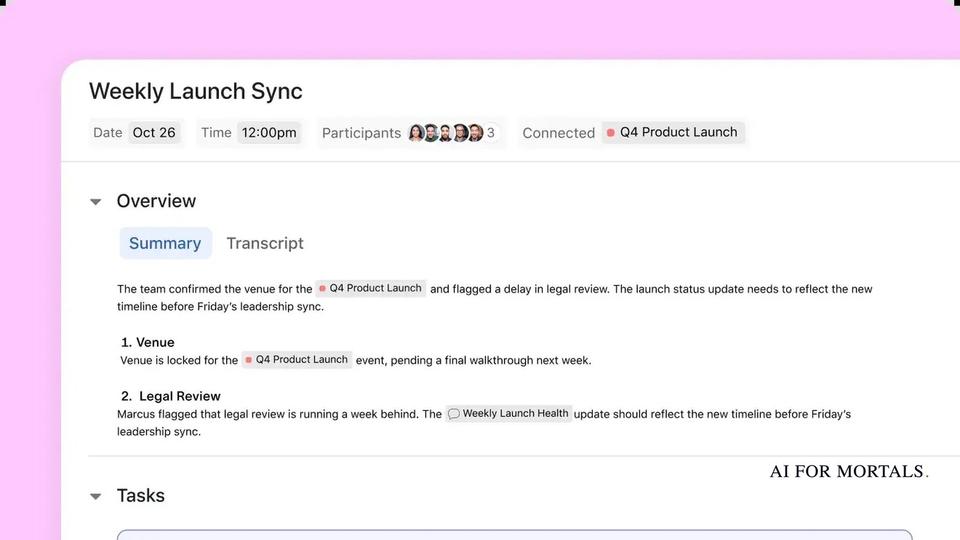
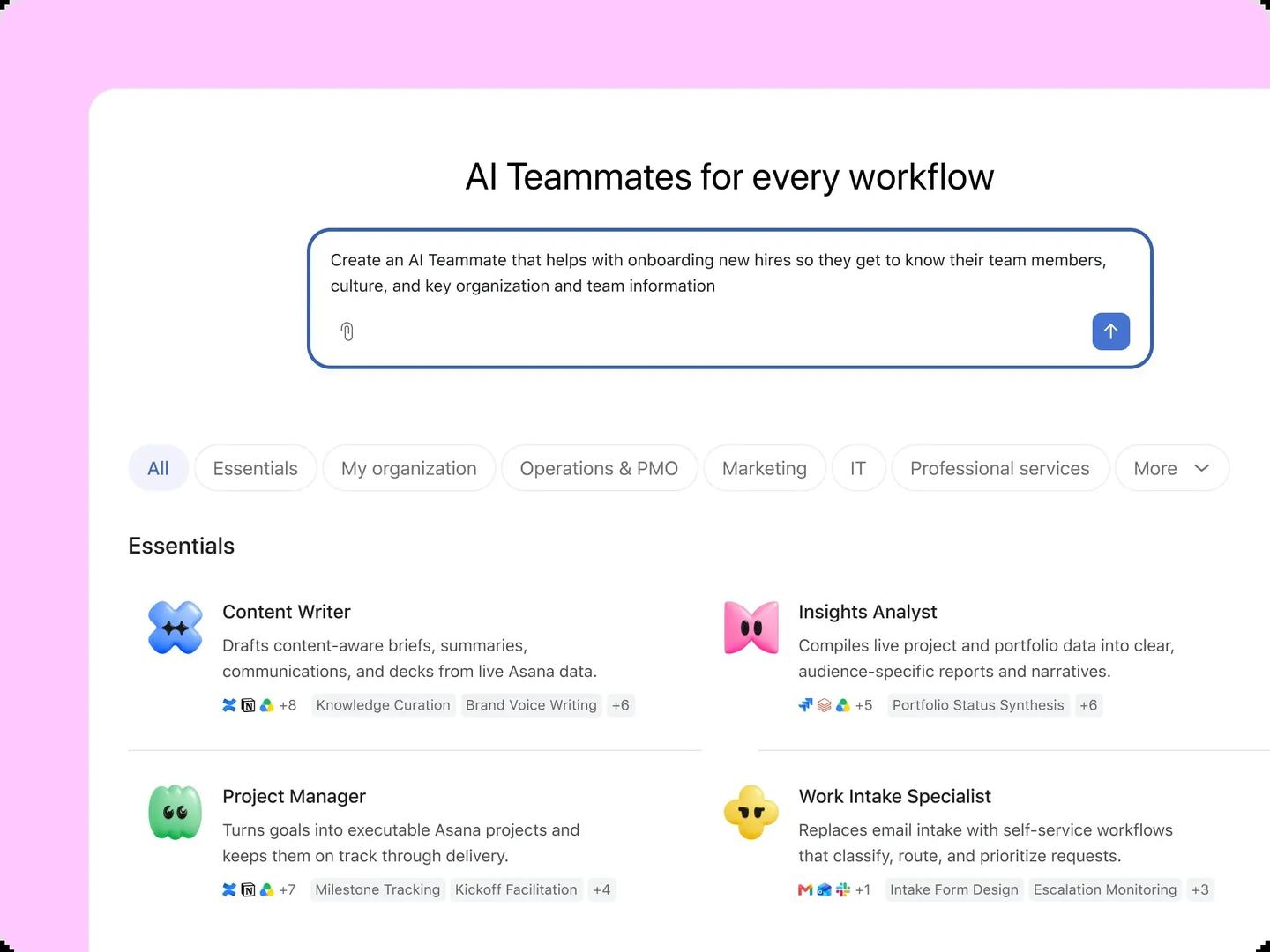
Project tools now build this kind of help in. Asana sells ready-made "AI Teammates", including one called Project Manager that it says turns goals into Asana projects and keeps them on track, and monday.com shows agents that write project statuses and flag tasks that are behind schedule. Each of them works on the tasks already in that tool, and a person still reviews what it does.
How to use AI for project management, step by step
Start with one recurring job you already do every week, give the AI the real material for it, tell it the exact format you want, and check the result against your source before anyone else sees it. Six steps cover it.
1. Pick the job you repeat most
The weekly status update, the meeting recap and the risk list are the best first jobs, because the material already exists (your notes, the task list, the email thread) and you know what a good version looks like. Leave decisions about scope, budget and people to yourself.
2. Choose where the AI runs
If your project lives in Asana, Monday, ClickUp, Jira or Notion and your plan includes its AI, use that, because it can read the tasks, owners and dates without you copying anything. Otherwise use a general assistant such as ChatGPT or Claude and paste the material in. Check what your company allows first (the safety section below covers which plans keep your chats out of training).
3. Give it the real material, and only that
Paste the notes, export the task list as a spreadsheet or upload the document. Say who the output is for (your manager, the client, the team) and tell it to use only facts from what you gave it. Anything it adds that wasn't in your material, such as a date, a percentage or a name, has to be checked or cut.
4. Ask for your format
Name the sections you want in the order you want them, the length, and what goes first. In the AI for Mortals test of Claude skills for status updates and long projects, a skill that used a fixed Progress, Plans and Problems format wrote a 143-word update from messy Friday notes, but it buried the one approval the manager needed in the third paragraph. Plain Claude's 219-word email opened with that request. The fix in both cases is one extra line in the prompt: put anything you need from the reader in the first line.
5. Save your standing context
Typing your team, your project and your status format into every chat wastes time. A ChatGPT Project or a Claude Project keeps files and instructions together for one piece of work, and custom instructions hold the rest. Our guide shows how to set ChatGPT custom instructions for your projects, for example your role, the projects you run and the format your stakeholders expect.
For a job that runs over several days, the same Claude skills test found that a free skill called Planning with Files let Claude pick a multi-day job back up in a new chat. It kept the plan, the findings and a progress log in files, and the next day it went straight to the next step and remembered the booking deadline it had noted.
6. Check it before you send it
Read every date, owner, number and promise against your source. The AI writes just as fluently when a fact is wrong, so fix or cut anything you can't trace back to your notes.
Copy-paste AI prompts for project managers
The seven prompts below were written for this page as templates. They work in ChatGPT, Claude, Gemini or Copilot. Replace the brackets with your details and paste your own material at the bottom.
Turn meeting notes into a status update
Turn my notes below into this week's status update on [project] for [manager or stakeholder group].
Put anything I need from them (a decision, an approval, a budget) in the first line.
Then three short sections: Done this week, Next week, Risks and blockers.
Give it an overall status of on track, at risk or off track, and say why in one sentence.
Use only facts from my notes. If something is unclear, list it as a question at the end instead of guessing.
Keep it under 200 words.

[paste your notes]
If your team uses a set format, paste last week's update above the notes and say "same format".
Build a RAID log from a task list
A RAID log is a running list of a project's risks, assumptions, issues and dependencies.
Below is the task list for [project], exported from [tool], with owners, due dates and status.
Build a RAID log as a table with these columns: Type (Risk, Assumption, Issue or Dependency), Description, Owner, Date raised, Impact (high, medium or low), Next step.
Flag any task that is overdue, has no owner, or depends on another task that is late.
Only use what is in the list. Mark anything you inferred with "(inferred)" so I can check it.

[paste the task list or attach the file]
Ask for the table as a CSV if you want to paste it straight into a spreadsheet.
Pull action items from a meeting
Here are my notes (or the transcript) from today's [meeting name].
List every action item as: what, who owns it, due date.
If the notes don't name an owner or a date, write "owner?" or "date?" instead of guessing.
Then list the decisions we made, one line each.
Finish with a short follow-up email to the attendees with both lists.

[paste notes or transcript]
A long email thread works the same way. AI for Mortals gave Gemini 4 Carbon and Argon seven work jobs, including a messy email thread where the date and budget had both moved, and the two models tied on the reply.
Draft a first plan from a project brief
A work breakdown structure (WBS) splits a project into phases, then into the deliverables and tasks inside each phase.
Here is the brief for [project]. The deadline is [date], the team is [roles and number of people], and the budget is [amount].
Draft a work breakdown structure: phases, then deliverables, then tasks, numbered 1, 1.1, 1.1.1.
For each phase, give a rough duration and the main dependency.
Then list the five biggest risks to the deadline and the questions I should ask the sponsor before we commit.
Treat this as a first draft for me to edit. Don't invent requirements that aren't in the brief.

[paste the brief]
In a second message, ask it to "challenge this plan as a skeptical sponsor would" to find the gaps.
Write one update at two levels of detail
Using the update below, write two emails about [project].
Version 1 is for [executive sponsor]: five sentences at most, covering status, the one decision I need, and the date it's needed by.
Version 2 is for [the delivery team]: the full detail, with next steps by person.
Same facts in both. Plain words, no jargon, no exclamation marks.

[paste the update]
To make the wording sound like you, our guide to using ChatGPT as an editor for your drafts covers how to give it your own writing to match.
Turn a CSV export into a weekly operations report
The attached CSV is this week's [tickets / orders / tasks] export from [tool]. Last week's numbers are [paste or attach].
Write a weekly operations report with: the five numbers that changed most since last week, anything past its target date, and the three items that need attention, with a one-line reason each.
Show the totals you calculated so I can check them against the file.
Keep it to one page.

[attach the CSV]
The line asking for the totals matters most, because a wrong total in a report is easy to miss.
Summarize a retrospective
Below are the sticky notes and comments from our [project or sprint] retrospective.
Group them into: what went well, what didn't, and what we'll change.
Merge duplicates and count how many people raised each point.
Turn each "what we'll change" item into an action with an owner placeholder [owner] and a check-in date placeholder [date].
Don't add points nobody raised.

[paste the notes]
Remove names from the notes before you paste them if the retro was meant to be anonymous.
AI tools for project management: what Asana, Monday, ClickUp, Jira and Notion include, and what they cost
All five project tools now build AI into their paid plans, and most give the free plan either no AI or a trial. The table puts them next to the general assistants, using each company's own pricing page as of November 13, 2026. Nobody at AI for Mortals has tested these project tools against each other, so they're sorted by what you already use, with no ranking.
| Tool | What its AI does for a project manager | Free option | Plan with the AI, and price |
|---|---|---|---|
 ChatGPT | Drafts updates, plans and emails from what you paste or upload; Projects keep one piece of work together | Yes, with limited uploads and deep research | Go, $8 a month; Plus, $20 a month; Business priced per user, from 2 users |
 Claude | Drafts and edits from your files; Projects, connectors to your apps | Yes, with up to 5 Projects and limited usage | Pro, $20 a month ($17 billed yearly); Team, $25 a seat a month ($20 billed yearly) |
 Microsoft 365 Copilot | Recaps Teams meetings and highlights action items; summarizes Outlook threads | Copilot Chat comes with eligible Microsoft 365 plans | Copilot Business add-on, from $18 a user a month paid yearly (originally $21) |
 Gemini in Google Workspace | Gemini in Gmail on every plan; in Docs, Meet and more from Business Standard | 14-day trial | Business Starter, $7 a user a month; Business Standard, $14 (both with a one-year commitment; Google showed a 50% introductory discount when checked) |
| Asana | AI Teammates and Asana Dash; AI Meetings suggests action items and owners on Advanced | Personal plan, no AI listed | Starter, $10.99 a user a month billed yearly ($13.49 monthly); Advanced, $24.99 |
| Monday | Sidekick assistant and agents, such as one that writes project statuses | Up to 2 seats; AI starts on Basic | Basic, $9 a seat a month billed yearly, with 1,000 AI credits a month |
| ClickUp | ClickUp Brain², its built-in AI | Brain² trial, 500 credits per workspace | Business, $17 a user a month billed yearly (Core at $9 has a Brain² trial) |
| Jira | Rovo search, chat and agents; AI-made reports and charts | Up to 10 users, with AI-driven reports and dashboards (no Rovo) | Standard, $8.48 a user a month, with 25 Rovo credits a user |
| Notion | Notion Agent and AI Meeting Notes | Trial of Notion AI | Business, $20 a seat a month billed yearly |
Asana
Asana's AI is on every paid plan. Asana's pricing page lists Starter at $10.99 a user a month billed yearly, or $13.49 billed monthly, with AI Teammates and Asana Dash included. Starter and Advanced both include 5 AI requests per user per month, up to 50 per account, and extra requests cost $0.50 each prepaid or $0.60 pay as you go.
Advanced, at $24.99 a user a month billed yearly, adds AI Meetings, which Asana says suggests action items and who should own them and links meeting summaries to your projects. The free Personal plan, for up to 2 users, includes status updates but lists no AI. Asana says on its AI page that its AI partners don't use customer data to train their models.
Monday
Monday's AI starts on its Basic plan. monday.com's pricing page lists Basic at $9 a seat a month billed yearly with 1,000 AI credits a month, Standard at $12 with 2,000, and Pro at $19 with 3,000. The credits pay for Sidekick (monday's AI assistant), its agents and its app builder. The free plan covers up to 2 seats and has no AI features.
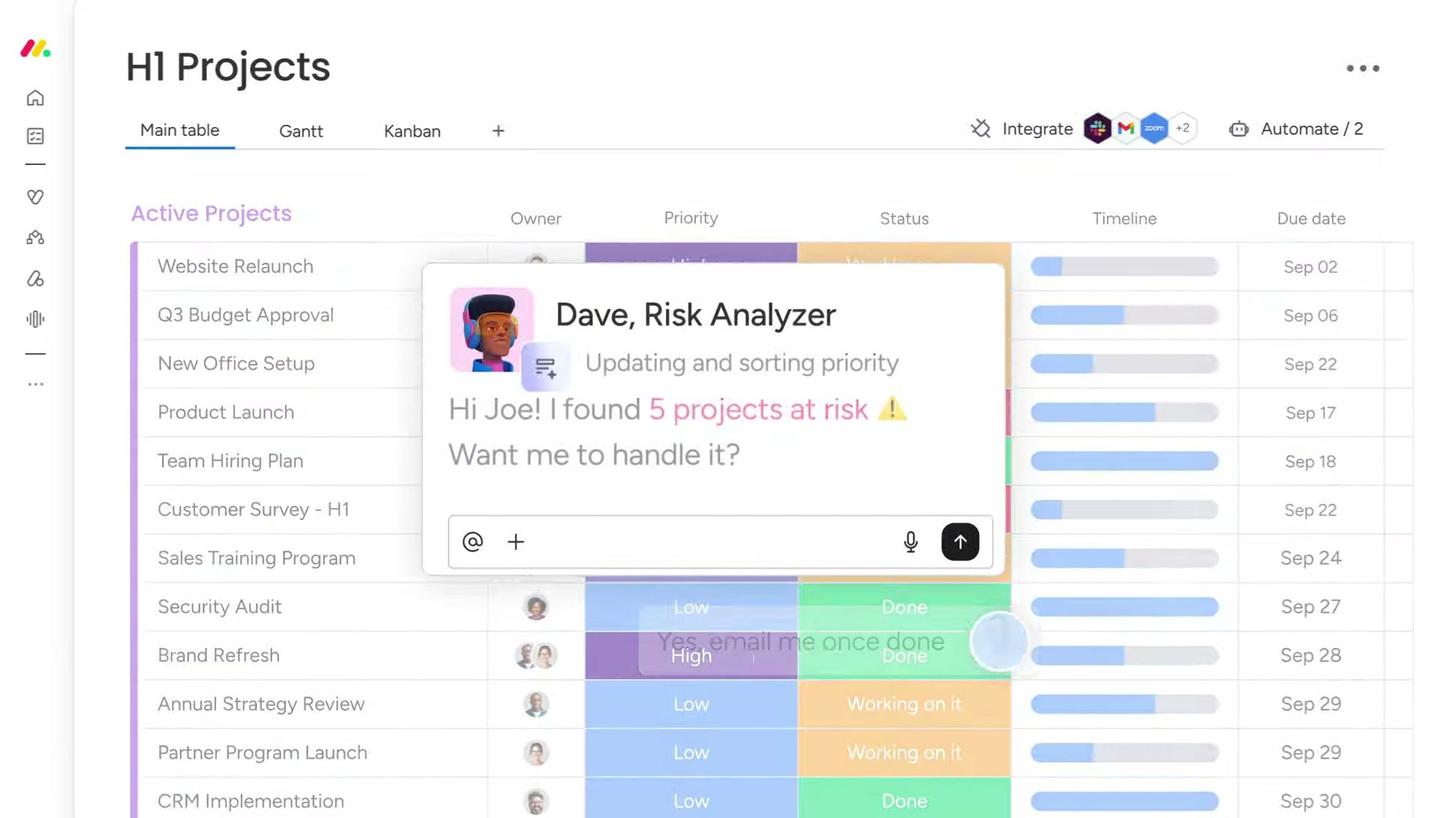
Among the agents on monday's AI page are a Status Reporter that generates project statuses with progress, risks and blockers, and a Risk Analyzer that flags tasks nearing their deadlines.
ClickUp
ClickUp includes its AI, Brain², with a monthly credit allowance on every plan, and the full version starts on Business. ClickUp's pricing page lists Business at $17 a user a month billed yearly (regular price $25), and Core at $9 a user a month billed yearly with a Brain² trial. The Free Forever plan comes with a Brain² trial of 500 credits per workspace, and more credits cost $10 per 10,000 on any plan.
Jira
Jira's AI is called Rovo, and it starts on the Standard plan. Atlassian's Jira pricing page lists Standard at $8.48 a user a month with Rovo Search, Chat and Agents and 25 Rovo credits per user per month, and Premium at $15.56 with 70. Rovo Search doesn't use credits; chat and agent requests do.
The Free plan, for up to 10 users, lists AI-driven reports and dashboards, though Atlassian's own FAQ on the same page says the Free plan doesn't include Rovo.
Notion
Notion's full AI comes with its Business plan. Notion's pricing page lists Business at $20 a seat a month billed yearly, with Notion Agent, which Notion says completes multi-step tasks using your Notion pages, connected apps and the web, plus AI Meeting Notes for notes and follow-ups. The Free and Plus ($10 a seat a month billed yearly) plans include a trial of Notion AI, and Notion says it won't use your data to train its models unless you opt in.
Microsoft 365 Copilot and Gemini in Google Workspace
If your company runs on Microsoft 365 or Google Workspace, the AI may already be in the email and meeting tools you use every day. Microsoft's Copilot pricing page says Copilot in Teams recaps meetings and highlights action items from chats, and Copilot in Outlook summarizes long email threads. Microsoft lists the Microsoft 365 Copilot Business add-on as originally $21 and now from $18 a user a month, paid yearly, and Microsoft 365 Business Standard with Copilot built in at $23.50 a user a month, paid yearly. Copilot Chat comes at no extra cost with eligible Microsoft 365 plans.
Google Workspace's pricing page lists Business Starter at $7 a user a month with a one-year commitment, including the Gemini assistant in Gmail, and Business Standard at $14, with Gemini in Gmail, Docs, Meet and more. When checked, Google was showing both at half price as an introductory offer. Google says your company data in Gemini isn't used to train its models.
ChatGPT for productivity: what it does for project and operations managers
ChatGPT does the most for a project or operations manager as a drafting and summarizing assistant for status updates, reports, plans and emails. It works on anything you can paste, upload or export, so it fits whichever project tool your team uses.
ChatGPT's own comparison table lists Projects on every plan, including Free, so you can keep a project's files and chats in one place without paying. The free plan has unlimited everyday text chats with limited uploads and limited deep research, which is enough for drafting updates from notes.
Go costs $8 a month and adds more uploads and longer memory. Plus, at $20 a month, adds expanded deep research and uploads, and custom GPTs (versions of ChatGPT set up for one job). For a team, ChatGPT Business is priced per user per month, starts at 2 users and gives the company admin controls.
For operations work, the most useful habit is to upload the spreadsheet or CSV export and ask for totals, changes and exceptions, as in the weekly operations report prompt above. Ask it to show the numbers it calculated so you can check them against the file.
The same approach works in Claude. Claude's free plan includes up to 5 Projects, file creation and connectors to other apps, with usage limited every five hours and every week. Pro costs $20 a month, or $17 a month billed yearly, and Team costs $25 a seat a month, or $20 billed yearly, for teams of 2 to 150.
Is it safe to paste project data into AI?
It depends on the plan. On a work plan such as ChatGPT Business or Enterprise, the company doesn't train its models on what you type by default. On a personal plan, it may train on your chats unless you turn that off.
OpenAI's business data page says it doesn't use data from ChatGPT Enterprise, Business or Edu for training by default. ChatGPT's pricing page shows that on Free, Go, Plus and Pro, your content is used to train its models unless you opt out.
Before you paste a client contract, a budget or anything with personal data into a personal account, check your company's AI policy. Our plan-by-plan guide covers what ChatGPT, Claude, Copilot and Gemini keep from your work, including who can see your chats on a work plan.
AI certifications and courses for project managers
The cheapest way to start is PMI's free one-hour course, and the most involved is PMI's own AI certification, which costs $699 for PMI members. The table lists what each issuer states on its own page.
| Course or certification | Issuer | Cost | Length and format |
|---|---|---|---|
| Generative AI Overview for Project Managers | PMI | Free | 1 hour of eLearning, 5 PDUs |
| PMI Certified Professional in Managing AI (PMI-CPMAI) | PMI | $699 for members, $899 full price, including the exam prep course | 21-hour self-paced prep course; exam of 120 questions in 160 minutes |
| AI-Driven Project Manager (AIPM) | APMG International | Set by the training provider | One day of training; no prerequisites or renewal requirements |
| Project Management with AI | Coursera, taught by Anton Voroniuk | Free to enroll | About 5 hours, 7 modules, beginner level |
PMI's Generative AI Overview for Project Managers is listed at USD $0, with a one-hour course length and 5 PDUs (professional development units, the credits PMI certification holders earn to keep their certifications).
PMI-CPMAI is PMI's certification for managing AI projects. PMI sells it as a bundle of the 21-hour exam prep course and the certification, at $699 for members and $899 full price, and says no experience is required. The course also earns 21 PDUs toward your other PMI certifications.
APMG's AI-Driven Project Manager certification covers its material in one day of training. You can study through an accredited training organization, take a one-day masterclass from PMAI Revolution, or buy the course materials and exam bundle for self-study. APMG doesn't list a price, because the training providers set their own.
Coursera's Project Management with AI is a beginner course of about five hours that covers ChatGPT, Microsoft Copilot and Google Gemini for project management tasks.
Questions people ask
What is the best AI for project management?
The one inside the tool your team already uses, if your plan includes it, because it can see the tasks, owners and dates. If your team works in Jira, try Rovo on the plan you already have; if you live in Teams and Outlook, look at Copilot. For drafting from notes, the free plans of ChatGPT and Claude are enough to start. Nobody at AI for Mortals has tested the project tools head to head, so this page doesn't rank them.
Is ChatGPT free for project management?
Yes. ChatGPT's free plan includes unlimited everyday text chats and Projects, with limits on uploads and deep research. Paid plans start at $8 a month for Go and $20 a month for Plus, and Pro starts at $100 a month.
Can ChatGPT write a project plan?
It can write a first draft from your brief, such as phases, tasks, rough durations and risks, using the plan prompt above. Treat the durations and dependencies as guesses until your team confirms them.
Which project management tools have AI on the free plan?
Jira's free plan, for up to 10 users, lists AI-driven reports and dashboards, but Rovo itself starts on Standard. ClickUp's free plan has a Brain² trial of 500 credits per workspace, and Notion's has a trial of Notion AI. Monday's free plan has no AI features, and Asana's free Personal plan lists none.
Is there a free AI course for project managers?
Yes. PMI's Generative AI Overview for Project Managers is free, takes about an hour and earns 5 PDUs, and Coursera's Project Management with AI is free to enroll.
Sources
- OpenAI: ChatGPT pricing (checked November 13, 2026)
- Anthropic: Claude pricing (checked November 13, 2026)
- Microsoft: Copilot for business pricing (checked November 13, 2026)
- Google Workspace: Pricing (checked November 13, 2026)
- Asana: Pricing (checked November 13, 2026)
- monday.com: Pricing (checked November 13, 2026)
- ClickUp: Pricing (checked November 13, 2026)
- Atlassian: Jira pricing (checked November 13, 2026)
- Notion: Pricing (checked November 13, 2026)
- PMI: Shaping the Future of Project Management With AI
- PMI: PMI-CPMAI certification
- APMG International: AI-Driven Project Manager (AIPM)




Comments
Sign in to join the conversation.