
ChatGPT Can Now Work Inside Your Chrome Tabs
OpenAI updated ChatGPT's free Chrome extension so ChatGPT can read the tabs you have open and, when you hand it a task, click around in them for you.

OpenAI updated ChatGPT's free Chrome extension on October 15. ChatGPT can now read the tabs you have open, and when you hand it a task, it can click around in those tabs for you.
This is an update to an extension that already existed, which you add from the Chrome Web Store. What changed is how much it can do once it's there.
It works in two ways. In Chat, ChatGPT's everyday mode, it reads across your open tabs and pulls the details together. In Work, the mode built for getting tasks done, it takes control of your tabs to send messages, fill out forms, download files and sort your tabs into groups.
Ask ChatGPT about everything you have open at once
The simplest use helps most when you're shopping or researching. You leave your tabs open, open ChatGPT and ask it to compare them, so you no longer copy and paste each page into the chat.
OpenAI's demo starts with a row of couch listings open in Chrome. ChatGPT worked for 25 seconds, said it found seven sofa options across the tabs, and came back with its top three, each with its size and why it made the cut.
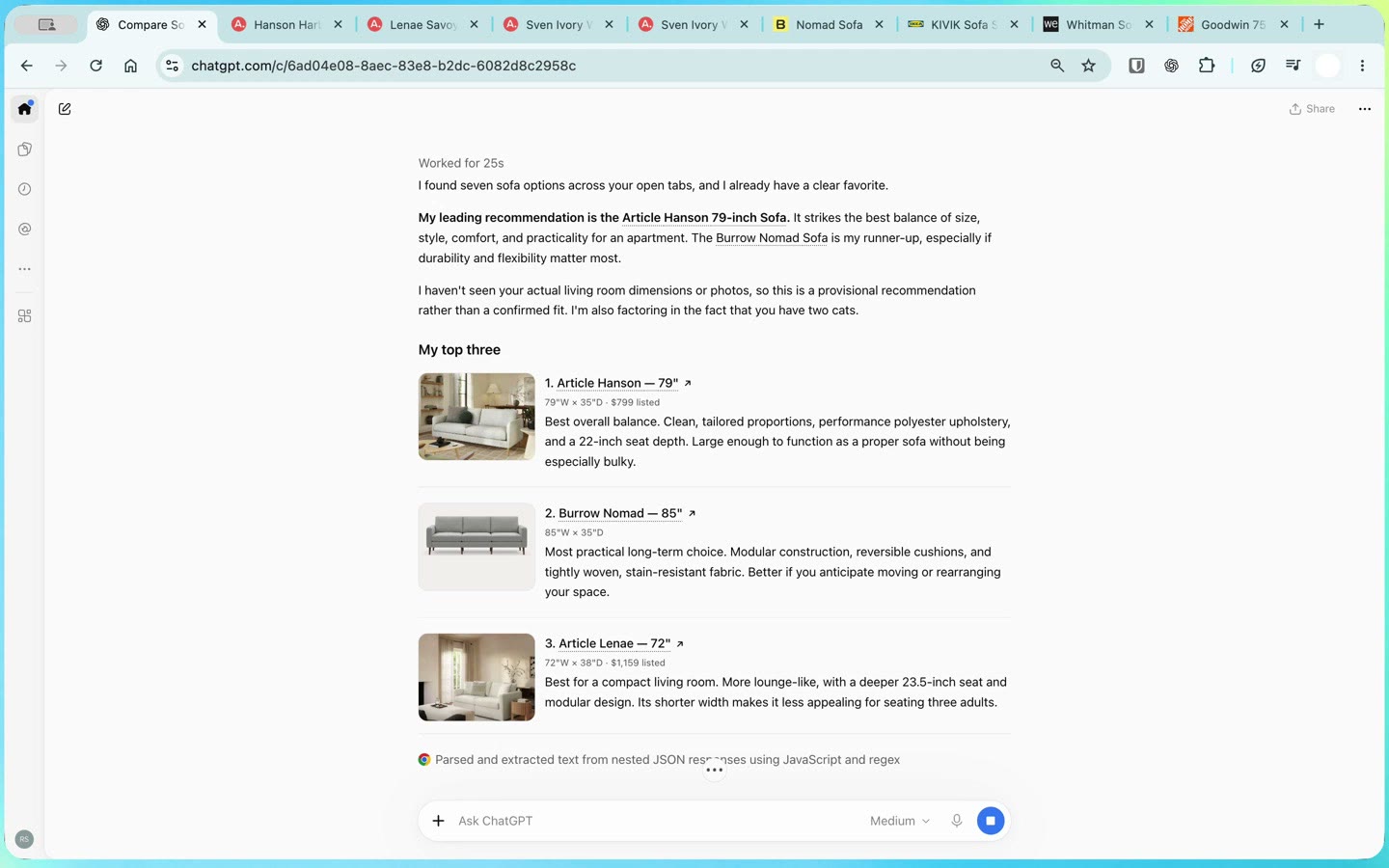
It also flagged what it didn't know. It said it hadn't seen the room's measurements, so the pick was provisional, and that it had factored in the person's two cats.
OpenAI's setup guide lists a few more ways to point ChatGPT at a page. You can @-mention a specific tab in your message, highlight a passage and bring just that selection into the chat, or right-click a page and choose Ask ChatGPT. On a YouTube video with captions, it can read the timestamped transcript and answer questions about it.
Hand it a task and it does the clicking
In Work, ChatGPT acts on the sites themselves. It works in the browser where you're already signed in, so it can use your Gmail, your company's expense tool or a site's booking form the same way you would.
The ChatGPT panel that opens beside a page also got a big upgrade. It now has the full ChatGPT, with your whole chat history, and you can switch between Chat and Work right there while you're on the site, OpenAI said on X.
You open it by clicking the ChatGPT icon in Chrome's toolbar, or with Cmd+Shift+period on a Mac. The panel stays with the tab where you opened it, and those chats show up in the ChatGPT app too.
OpenAI's second demo shows how that plays out. Someone types "submit my hothouse yoga receipt from my email please!" into the panel beside an expense app. ChatGPT finds the $85 receipt in their email, forwards it to the expense app and saves it as a draft.
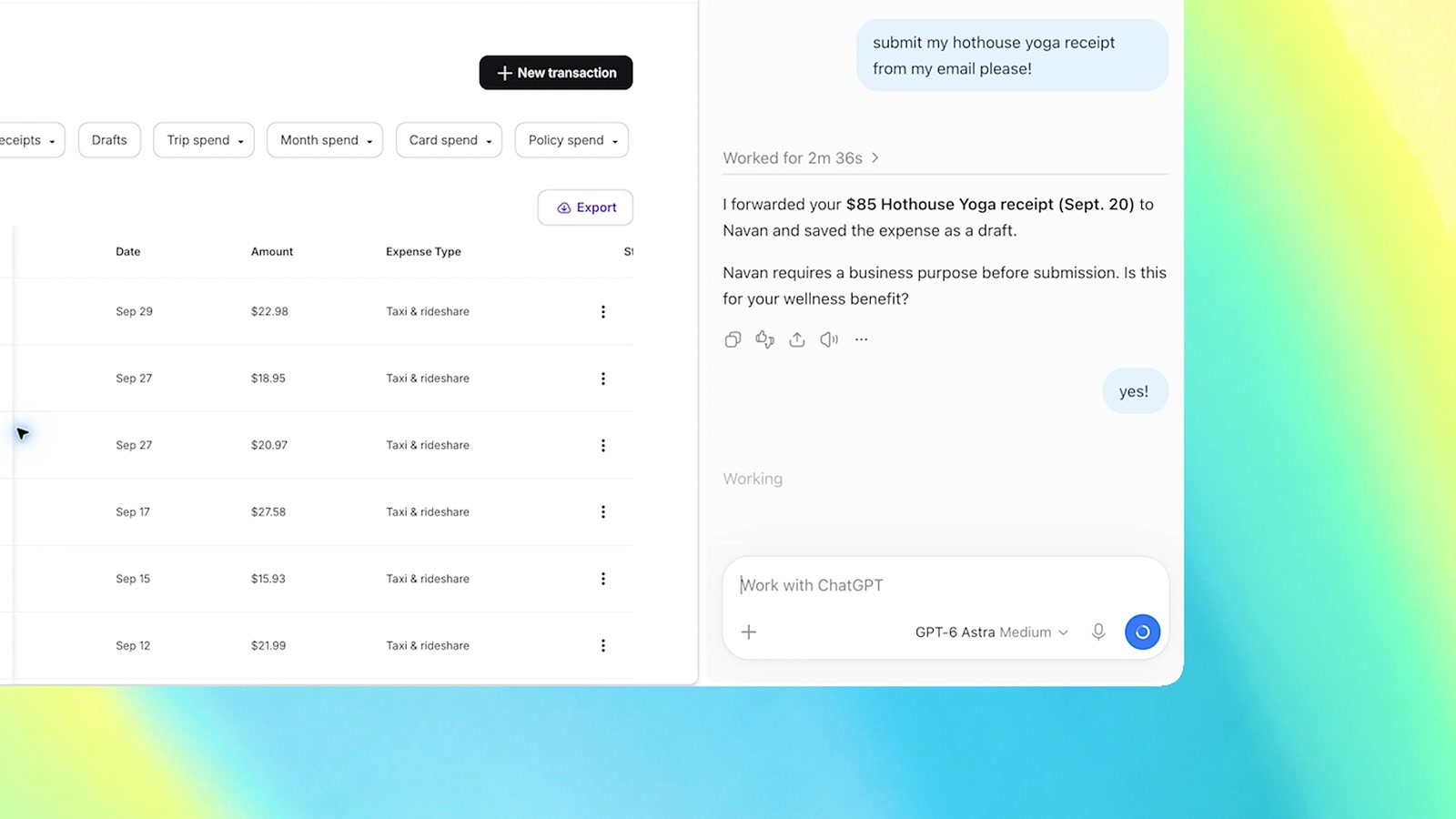
Then it stops and asks a question. The expense app needs a business purpose, so ChatGPT asks whether the class counts toward the person's wellness benefit, and it submits the expense once they answer yes. Finding the receipt and saving the draft took about two and a half minutes.
In OpenAI's expense demo and its Web Store screenshots, ChatGPT does its work in a separate group of tabs it opens and labels for the task. The Web Store listing says it works "in the background, without ever taking over your active browsing session," so you can keep using your own tab while it works.
It asks before it touches each new website
Unless you change the setting, ChatGPT asks before it acts on any website it hasn't used before, according to OpenAI's guide. You get four choices:
- Allow once, for this one task.
- Allow for this site, so it can come back without asking.
- Allow for all sites, which stops the questions entirely. OpenAI labels this one "Elevated Risk."
- Decline, which keeps it off that site.
The sites you approve or block go on two lists you can edit later. Your browsing history gets stricter treatment. ChatGPT asks every time it wants to look at your history, and there's no option to let it look whenever it likes.
While ChatGPT is working, Chrome shows a bar across the top of the page saying ChatGPT "started debugging this browser," with a Cancel button. That's Chrome's own warning that something else is driving the browser, and Cancel stops it.
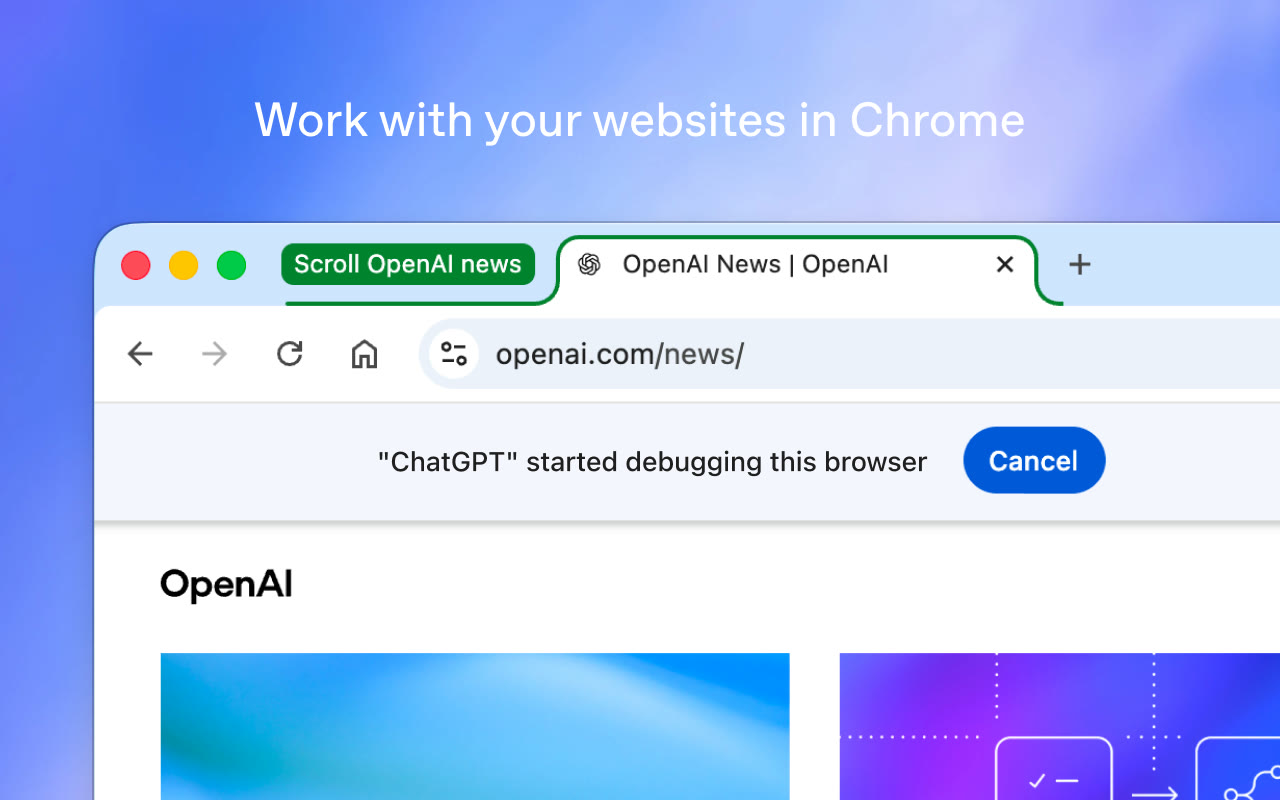
When you install the extension, Chrome may ask you to accept a long list of permissions, including reading and changing your data on all websites and managing your downloads. OpenAI says the extension needs those to work, and ChatGPT still runs its own site-by-site checks on top.
On privacy, OpenAI says it doesn't keep a separate log of everything the extension does in your browser. It keeps what ends up in the chat, such as text ChatGPT read from a page or screenshots it took. Its guide also says to avoid sending passwords or very sensitive information through these tasks unless you're there to review each step.
How to get it, and what's still unclear
You add the ChatGPT extension from the Chrome Web Store. OpenAI says it works on every ChatGPT plan, and it's rolling out gradually, so it may not show up for you right away.
OpenAI's setup guide walks through letting ChatGPT control the browser from the ChatGPT desktop app, under Settings, then Computer Use. The same extension works in Edge, Brave, Opera and Vivaldi, a change OpenAI made in August.
OpenAI hasn't said whether every plan gets the clicking in Work or just the tab reading in Chat. It also hasn't said whether Work shows you the exact text of a message before it sends one.
Prompts worth trying first
OpenAI posted a list of things to try, and the best ones keep you in charge of the final click. Its form-filling example ends with "and stop before submitting," which is about as much trust as I'd give ChatGPT at first. A few from OpenAI's list:
Compare the three couches I have open by dimensions, material, delivery time, and return policy.
Use the details in this event brief to fill out the registration form, and stop before submitting.
Look at all the tabs I have open and compare the contractor services. Then draft an email to the one that fits my home renovation.
The first and last work in Chat. The form one needs Work, since ChatGPT has to type into the page.
Anthropic's Claude in Chrome extension has done this for a while on paid Claude plans, and now ChatGPT, the AI app most people already use, can act in their browser too.
OpenAI already tried a separate route with Atlas, its own AI browser, and shut it down in August, so building this into the browser people already use makes a lot more sense to me.
I saw how much the browser you're signed into changes things when I gave OpenAI's Dots real jobs for a day. Amazon blocked Dots' own browser straight away, and Dots fell back to using Chrome on my computer. In my comparison of Dots, Grok Bot and Meta's Muse, that fallback to my own Chrome was the way around sites like Amazon that block its built-in browser.
It's also a big step for ChatGPT Work, which OpenAI launched in July as its answer to Anthropic's Claude Cowork, since Work can now act inside the tabs you already have open. Here's my video on Dots, including the Amazon run:
Sources
- ChatGPT on X: ChatGPT can now use your tabs in Chrome
- ChatGPT on X: the full ChatGPT in a Chrome tab
- ChatGPT on X: example tasks to try
- OpenAI: Browser extension setup and permissions
- Chrome Web Store: ChatGPT extension
- OpenAI: ChatGPT release notes (Atlas retirement, more browsers)
- Anthropic: Claude in Chrome



Comments
Sign in to join the conversation.