Gmail’s AI Inbox and Gmail Live Come to Work Accounts
Google is bringing AI Inbox, a Gmail page that turns your email into a to-do list, and Gmail Live, which answers questions about your email out loud, to US work accounts on paid Google Workspace plans.

Google is bringing two of Gmail's AI features to work accounts on paid Google Workspace plans in the US. AI Inbox is a page in Gmail that reads your email and turns it into a to-do list, and Gmail Live lets you ask questions about your email out loud in the Gmail phone app.
Both used to come with Google's AI Plus, Pro and Ultra subscriptions for personal accounts. Now they're coming to the work email you spend your day in, for accounts set to US English.
Google announced both in two posts on its Workspace Updates blog on October 15. I haven't used either one myself, so everything below on how they work comes from Google's announcements and help pages.
What AI Inbox pulls out of your work email
AI Inbox sits in Gmail's left-hand menu, right under your regular inbox, and opens as its own page. You can open it on your computer or from the menu in the Gmail phone app. Your normal inbox stays where it is, and you can switch between the two whenever you like.
The page has two parts. Suggested to-dos pulls the action items, deliverables and deadlines out of your email, and puts what you need to do in bold, like the due date on a utility or credit-card bill.
Topics to catch up on sums up conversations that run across several email threads. If a deal, a project or a launch has updates scattered through a dozen messages, AI Inbox groups them under one heading with a short summary of each update and how long ago it came in.
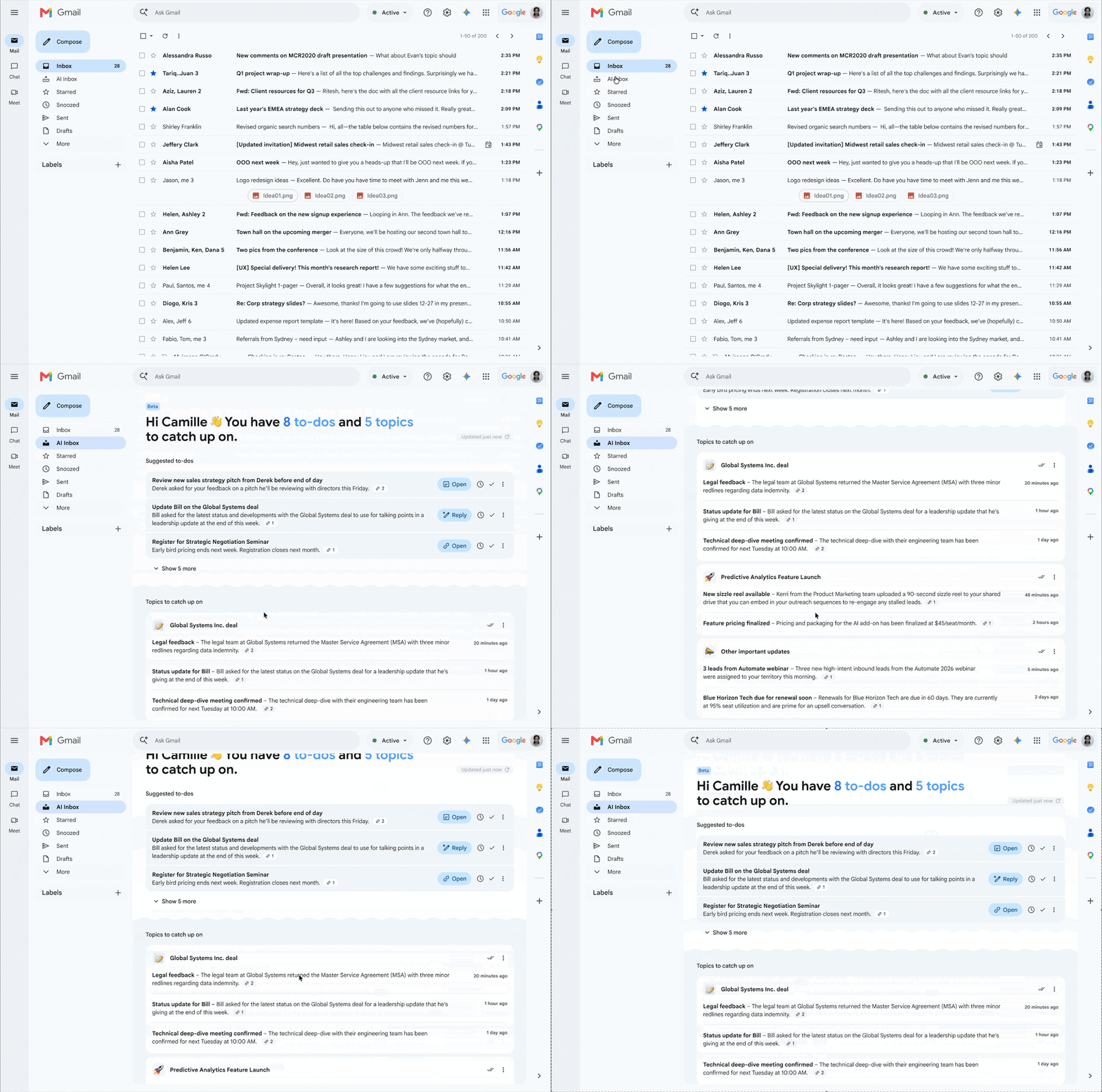
In Google's demo, each to-do comes with a button to open the email or start a reply, plus a check mark to clear it once it's done. Every update links back to the email it came from, so you can check the original before you act on it.
Here's Google's own walkthrough from when AI Inbox first launched for personal accounts in January:
How to turn on AI Inbox, and why it can look empty at first
Your IT team can't switch AI Inbox on or off for you. Google says there's no admin control for it, so each person decides for themselves. Once it shows up in your account, here's how Google's help page says to show or hide it:
- Open Gmail on your computer and click the Settings gear, then See all settings.
- Click the Inbox tab at the top.
- Check or uncheck the box next to "Show AI Inbox."
It also needs two of Gmail's settings switched on: Smart features in Google Workspace and Smart features in other Google products.
The list can take a while to fill in. Google says your first to-dos and topics can take up to 7 days to show up after you turn on those smart features, and the page can look empty if you haven't sent or received much email lately. There's a refresh button at the top to pull in the newest updates.
What AI Inbox reads, and what it leaves out
AI Inbox reads your Primary tab and nothing else, so anything Gmail sorts into Promotions or Social never makes the list. It also skips spam and anything you've archived, deleted, muted or snoozed.
It doesn't read attachments, inboxes someone has delegated to you (like a boss's inbox you manage for them), or encrypted email. If the important details of a request live in an attached PDF, AI Inbox won't see them.
Google calls AI Inbox a beta. When it first showed the feature in January, it said Gmail's AI features are optional and that it doesn't train its foundation models on your personal content. If a to-do is wrong or unhelpful, you can rate it with a thumbs up or down, and "Mark all as read" on a topic also marks those emails as read in your regular inbox.
Ask Gmail Live about your email out loud, and see where each answer came from
Gmail Live is the voice side of this. In the Gmail app on an iPhone or Android phone, you tap Live in the search bar at the top, give the app microphone access the first time, and start talking.
Google's examples are the kind of question you'd otherwise dig through threads for: "What gate is my flight leaving from tomorrow?", "When is my next mandatory training due?", or "Show me the latest update from my manager." You can cut in mid-answer to change the subject or ask a follow-up without starting over.
Every answer shows a source card with the email it came from. You tap it to open that email (which ends the voice session), or tap the Sources card at the bottom to see every email it used.
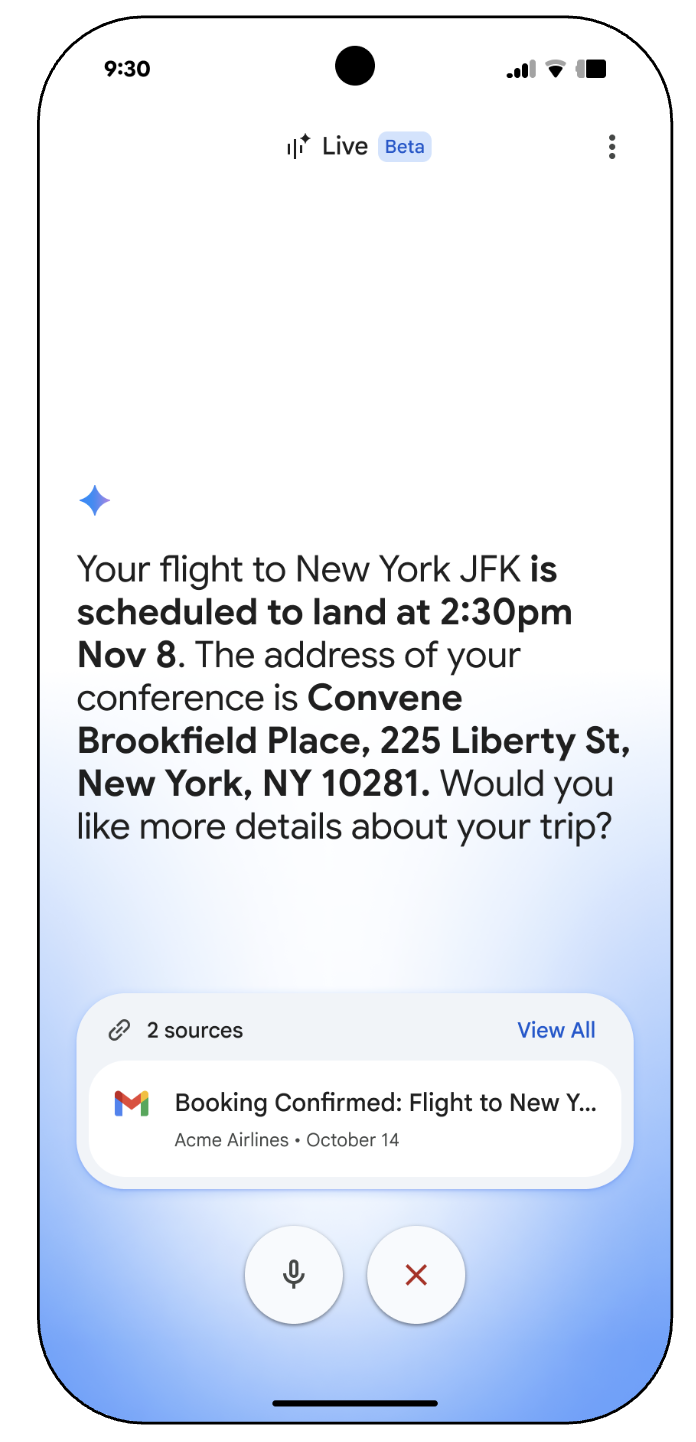
Gmail Live saves a transcript of each conversation in your Gemini history, which you can check and delete from a web browser. Google's Gmail Live help page also has a mute button that turns off your microphone while it finishes talking.
Gmail Live works the opposite way to AI Inbox when it comes to your company's say. It's on by default for any company whose Workspace plan includes Gemini, and your admin can turn it off.
Which work plans get it, and when it shows up
AI Inbox is coming to most Business and Enterprise plans, plus Frontline Plus. Google lists the Starter plans and Google AI Pro for Education as eligible, but also says they'll get it "in the coming months," so those accounts may have to wait longer.
When it appears depends on how your company gets Google's updates. Companies that take new features early started seeing AI Inbox on October 12, the rest start October 26, and each rollout can take up to 15 days, so most people should have it within the next few weeks.
Gmail Live started rolling out on October 15 to the same Business and Enterprise plans, plus Google Workspace for Nonprofits. Both features need your account set to US English.
Until now AI Inbox only came with the AI subscriptions Google sells to individuals, so most people never saw it in the work email they spend their day in. It started with a small group of testers in January, then went to Ultra subscribers, then to AI Plus and Pro at Google I/O in May.
I got a taste of an AI pulling to-dos out of email a couple of weeks ago, when Dots, OpenAI's always-on agent in ChatGPT, flagged a failed $22 payment in my Gmail that I needed to fix. I never asked it to look for that. All I did was connect my Gmail, and that's exactly the kind of thing AI Inbox is built to surface.
Dots needed me to hook it up to my email, while AI Inbox is already inside Gmail, so a lot of people will get this without setting anything up.
It's also part of a bigger fight over your work apps: Claude now works inside Google Docs, Sheets and Slides, and Grok Bot even got its own email address so it can handle mail for you. Google putting its own AI straight into work Gmail means a lot of offices will meet it there first.
Sources
- Google Workspace Updates: Gmail's AI Inbox is rolling out to paid Workspace users
- Google Workspace Updates: Gmail Live is rolling out to paid Workspace users
- Google Help: Manage to-dos & topics with AI Inbox
- Google Help: Talk naturally with Gmail Live
- Google: Gmail is entering the Gemini era
- Google: Everything announced at Google I/O 2026
- TechCrunch: Gmail debuts a personalized AI Inbox, AI Overviews in search, and more


Comments
Sign in to join the conversation.