We Let Fable Plan and Opus Build. Here's What It Cost
We tested the Fable-plans, Opus-builds routine on a real-looking project to see what carried over, what got lost and how much usage each step burned.
 AI for Mortals Staff
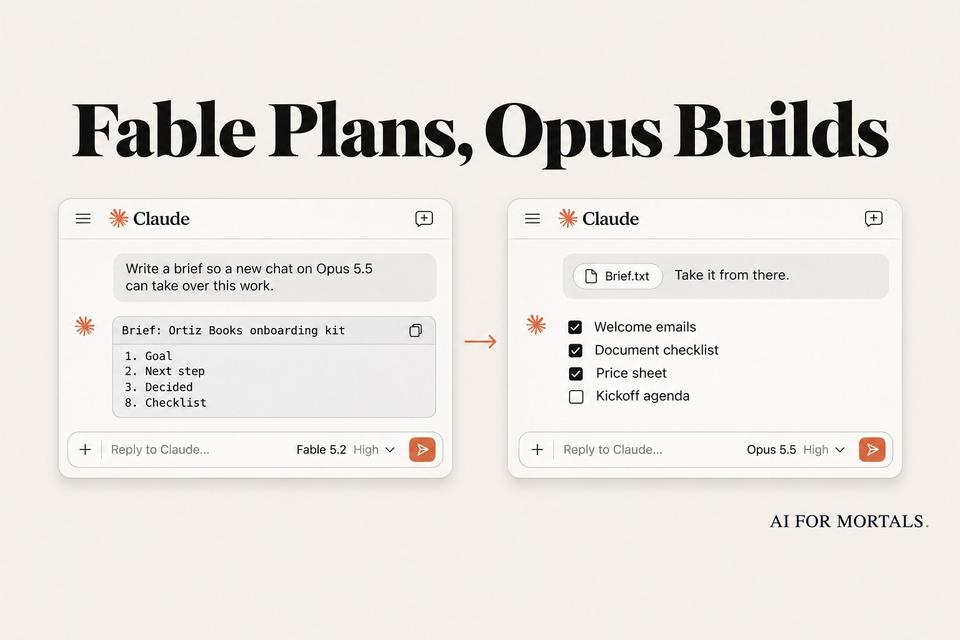
Claude Pro usage limits run out fastest on Fable 5.2, so a routine is going around to stretch them. Fable plans the big job, writes a handoff brief, and a fresh Opus 5.5 chat does the work.
We ran that routine on one realistic project to see if it holds up. We tracked what carried over, what got lost, and what each step cost.
The short version: Fable's brief carried every detail, and Opus built the whole project from it in one go. The brief itself was the most expensive step.
The routine in 30 seconds
- Step 1, Fable 5.2: describe the job and ask for a step-by-step plan. Answer its questions.
- Step 2, Fable 5.2: ask for a handoff brief a brand-new chat can follow.
- Step 3, a new Opus 5.5 chat: paste the brief and type "Take it from there."
- Before step 3: read the brief's "Ask me first" section and delete any stop you never asked for. That one line decided how much work got done in our test.
How Claude usage limits work with Fable 5.2
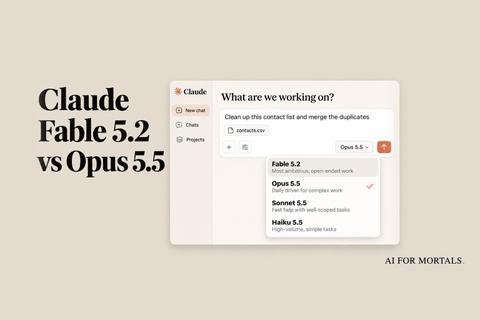
Fable 5.2 costs twice as much as Opus 5.5 per token through the API: $8 per million tokens in and $40 out, against $4 and $20. On a subscription, that difference comes out of your weekly limit.
Max and Ultra plans can spend up to half of their weekly limit on Fable. Pro plans and standard Team seats get the same deal only until Monday, November 16, at 11:59 pm Pacific.

After that, Fable on Pro runs on usage credits you pay for separately. So this week is the time to give it one big job, and the routine is a way to get the most out of it.
Anthropic's own advice points the same way. Opus 5.5 is the everyday model, and Fable is for large, open-ended work where judgment matters most.
How we tested Fable plans, Opus builds
We made up a client: Dana Ortiz, a one-person bookkeeper in Tucson with 34 clients. She wants a reusable onboarding kit for new clients: three welcome emails, a document checklist, a kickoff call agenda, a one-page price sheet and a 30-day timeline.
Her first message gave the business, the prices, the tools she already has, a December 1 deadline, and one hard rule: nothing can sound like she does tax filing.
Her second message answered the model's questions and changed things on purpose. Catch-up cleanup went from $95 to $125 with a $375 minimum, the Starter tier became "Essentials", and the payroll add-on was held back until March 2027.
She also set the call length, the Calendly link, the email days, the sign-off and phone number, no exclamation marks, and two things to ask her about first. In all, we planted 17 details that only existed in the chat, then checked the finished kit for each one with a script.
We ran four routes, all at high effort, in Claude Code with its tools switched off so each model answered from the chat alone:
- Fable plans, Opus builds: the full routine, with Opus building twice from the same Fable brief.
- Opus plans, Opus builds: the same three steps with Opus throughout, run twice.
- Switch in the same chat: Fable plans, then we switched the chat to Opus and typed "Take it from there."
- Fable does everything: planned, but it never got to the build, because Fable ran out (details below).
Claude Code reports what each step would cost at API prices. That's our stand-in for how much of your limit each step uses.
The prompts we used
The planning prompt. Fill in the brackets with your own project:
Goal: a step-by-step plan for [your goal]. Don't build it yet.
Context: [what you have, what you want at the end, your limits: budget, deadline, what's off-limits]
If you need more context, ask me questions.
Answer whatever Fable asks, and tell it what changed. Then, in the same Fable chat, the handoff prompt:
Write a brief so a new chat on Claude Opus 5.5 can take over this work. It won't see this chat or your thinking.

Write it for a smart reader who saw none of this. Plain words. Copy the exact names, numbers, dates, links and file names from this chat. Only the final version of anything we changed. Add nothing we didn't say.

Use these parts:
1. Goal: one sentence, then "Done when:" with the checks I'd use.
2. Next step: the first thing Opus should do. Pick one it can do without me.
3. Decided: each final decision, with its reason in a few words. Then what we rejected, and why.
4. Facts: everything the work depends on.
5. Done here: what we already finished, so it isn't redone.
6. Ask me first: what needs my OK, and why.
7. Open: only what we left undecided. No new questions.
8. Checklist: every step left, as boxes to tick.
9. For Opus: copy these lines as they are.
- Before you act, open every file and connected app that could matter, including ones this brief doesn't name, and use what you find.
- Work through the checklist and tick each box as you go. Don't end with a summary that announces the next step: take it. Don't offer to continue: continue.
- Stop only for what's under "Ask me first", or when you need a decision only I can make.
- Don't reopen what's under "Decided". If something you find contradicts it, tell me.
- End with a short recap: what you did, and what's next.

Make it as short as it can be while complete. Give me the brief in one block I can copy.
Open a new chat, switch it to Opus 5.5, paste the brief, and send:
Take it from there.
What carried over, and what got lost
Nothing got lost in Fable's brief. It copied all of Dana's final numbers, kept "Essentials", left out payroll and the prepay discount, and listed the rejected ideas (a client portal and a Loom welcome video) with her reasons.
From that brief, Opus drafted the whole kit in a single reply, both times. That meant the standard wording, the timeline, the checklist, the price sheet, the 45-minute call agenda and all three emails.
Both builds had all 17 planted details. Both also said what they couldn't do from a plain chat (build the Google Form, save Gmail templates) and listed those as Dana's next steps.
The Opus-written briefs also kept the facts. The difference was in section 6, "Ask me first."

Dana asked to approve two things: anything going to a client, and anything mentioning prices to her current clients. Both Opus briefs added a rule of their own: she reviews every draft before the next one starts.
The new chat followed that rule exactly. One Opus build drafted a style guide and stopped. The other drafted the checklist and an intake form and stopped. Each finished one or two pieces of the kit and handed back a list of questions.
Fable's brief stayed closer to "Add nothing we didn't say." Fable was also the most precise about instructions in our six-job Fable test, so this fits.
Two runs a route is a small sample, so read this as a pattern to watch for. The fix is the same either way: before you paste a brief, read "Ask me first" and delete anything you didn't ask for.
What each step cost
Here's what each route cost for a finished, usable kit, at API prices:
- Fable plans, Opus builds: $0.65 of Fable for the three planning messages, then $0.13 to $0.19 of Opus for the build. About $0.80 in all, with the whole kit done.
- Opus plans, Opus builds: $0.40 to $0.50 to plan, $0.11 to $0.14 to build. $0.51 to $0.64, with one or two pieces done.
- Switch in the same chat: $0.34 of Fable to plan, $0.19 of Opus to build. $0.53, with the whole kit done.
The handoff brief was the most expensive single step. Fable spent a minute and $0.32 writing it, more than either Opus build cost. Fable's brief ran to 1,321 words.
The switch-in-the-same-chat route was the cheapest way to a finished kit. It skips the brief entirely, and Opus still kept every detail but one wording quirk ("business day 10" for "10 business days").
The brief still earns its place on long chats. Each model keeps its own cached copy of your chat, which is how a long chat stays cheap to continue.
Switch models and the new model reads the whole chat again at full price. In our test, Opus wrote about 3,400 tokens into its cache after the switch, which costs next to nothing.
On a long chat it adds up. In Anthropic's own cost guide, a turn that had to write a 100,000-token Opus conversation back into the cache cost $0.80. A turn that read the cache cost $0.02.
So for a short planning chat, switching models in place is fine. For a long one, with files and dozens of messages, the brief gives Opus a clean, short starting point.
The Fable usage we ran out of
Partway through the test, the account we test on ran out of Fable usage. Our Fable-does-everything run stopped before it built anything, with a message to switch models or manage usage credits.
That's the problem this routine exists to solve. Fable spent about 80% of the money in the full routine, and almost all of it went on thinking and writing, not on the build.
Fable resets came up a lot this week too. People on Reddit warn against spending one when your weekly limit is already full. A reset gives back only what you spent on Fable, so if most of your week went on other models, it buys back very little.
Our usage limits explainer covers how the weekly limit and five-hour window work together.
When to use Fable plans, Opus builds
Use it for one big job with lots of decisions: a project plan, a launch, a migration, a kit like Dana's. Fable's value is in the plan and the brief, so give it the messy part.
Skip it for emails, summaries and spreadsheet questions. In that six-job test, Opus matched Fable on every everyday job for less than half the cost.
If you're on Pro, you have until Monday night to try it on Fable at no extra cost. Pat's full Fable 5.2 review shows what Fable does with a big build:
Sources
- Claude Help Center: Claude Fable 5.2 launch offers
- Claude Help Center: Claude Fable models on your plan
- Anthropic: Introducing Claude Fable 5.2 and Claude Mythos 5.2
- Claude Platform Docs: Optimizing for cost and intelligence
- Claude Platform Docs: Prompting Claude Fable 5.2
- Claude: Pricing
- Reddit r/claude: Fable 5.2 launch thread



Comments
Sign in to join the conversation.