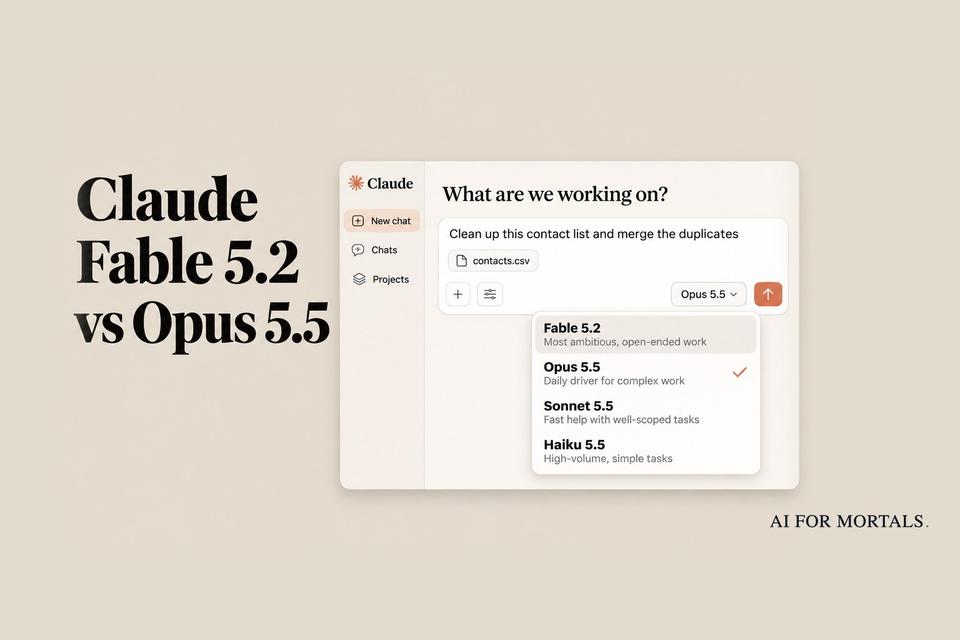
Claude Fable 5.2 vs Opus 5.5: We Ran the Same Five Office Jobs on Both
Fable 5.2 costs twice as much per token as Opus 5.5. We gave both the same email thread, 48-page report, messy contact list, slide deck and small build. Three jobs were a tie, Fable won two on details, and it cost about twice as much to get there.
 AI for Mortals Staff
On this page
- Claude Fable vs Opus: the short answer
- Claude Fable pricing: what Fable 5.2 costs next to Opus 5.5
- The five office jobs we ran on Fable 5.2 and Opus 5.5
- What the runs cost: Fable used about twice the budget
- Which Claude model to use for each kind of work
- Where Fable 5.2 pulls ahead: big builds and long jobs
- How to check Fable against Opus on your own work
Claude Fable vs Opus became a live choice for a lot more people on November 9, when Anthropic released Fable 5.2 and opened it to Pro subscribers for a week. Fable 5.2 is Anthropic's most capable model, and it costs twice as much per token as Opus 5.5.
We wanted to know what that extra money buys on ordinary office work. So we gave both models the same five jobs: reply to a messy email thread, answer questions about a 48-page report, clean up a contact list, turn rough notes into a 10-slide deck, and build a small invoice tool.
Three of the five jobs were a tie. Fable 5.2 won the other two on details, and it used about twice the budget across the set.
Claude Fable vs Opus: the short answer
- Everyday work (email, summaries, list cleanup, a small tool): use Opus 5.5. It matched Fable on three of our five jobs for about half the cost.
- Anything where one wrong detail is expensive: Fable 5.2 was more careful. It got a date right that Opus got wrong three times in a row.
- A deck you'll present without touching: Fable's slides were tidier in both runs.
- Big builds and long jobs you leave running: Fable 5.2. That's what Anthropic built it for, and it ranked first in all three of Pat's large build tests.
- On Pro after November 16: Opus 5.5, unless you're willing to pay for Fable separately.
Anthropic's own advice points the same way. Its new guide to picking a model says to start most work on Opus 5.5 and move up to Fable 5.2 only for the hardest technical projects.
Claude Fable pricing: what Fable 5.2 costs next to Opus 5.5
Through the API, Fable 5.2 costs $8 per million tokens you send it and $40 per million tokens it writes back. Opus 5.5 costs $4 and $20. Fable 5.2 is 20% cheaper than Fable 5.1 was, and Anthropic says it writes up to 30% faster.
On a subscription you don't pay per token, but the same gap shows up in how fast your weekly limit drains. (Our guide to what a token is and how tokens turn into a bill has the basics.)
Here's how each plan gets Fable, according to Anthropic's help pages:
- Max and Ultra: Fable is part of your plan, and you can spend up to half of your weekly limit on it.
- Pro: Fable normally bills to usage credits you buy on top of your plan. Through November 16 at 11:59 pm Pacific, it runs inside your plan instead, for up to half your weekly limit.
- Free: no Fable.
Our earlier post on the Fable 5.2 launch and the free Pro week covers the launch offer and the resets in full.
Anthropic doesn't publish how many Fable messages a plan gets. In our runs, Fable cost 1.8 to 2.5 times what Opus did for the same jobs, so expect it to use up your limit about that much faster.
The five office jobs we ran on Fable 5.2 and Opus 5.5
Each job ran twice on each model, and the email ran three times. The first run went through the API, where we could time each answer and see what it cost. The second went through Claude Code on a subscription with its tools switched off, so both models answered from the prompt alone.
Both models ran at medium effort, the setting the Claude apps and Claude Code use by default. Every prompt below is the one we used, so you can paste it into Claude and swap in your own files.
A messy email thread: Fable got the date right, Opus didn't
The thread was six emails about booking a staff AI workshop at a clinic. The date moved from November 19 to November 20, the budget moved from $2,400 to $2,800 with a $150 travel cap, one person asked about laptops and patient data, and the organizer wanted one reply to everyone.
Here's a messy email thread. Write the reply Dana asked for, addressed to everyone on the thread. Keep it short and friendly, and include a short agenda for the workshop.

[paste the whole thread here]
All six replies had the right time, room, headcount and fee, and all of them answered the laptop and patient-data questions.
Opus 5.5 confirmed the workshop for "Thursday, Nov 20" in all three of its replies. November 20 is a Friday, and the thread itself calls the 19th a Thursday. Fable 5.2 wrote "Friday" all three times.
Fable also ended each reply with a short list of the calls it had made for us, such as assuming people could share laptops in pairs, and Opus did the same in two of its three. That list makes the reply quicker to check before you send it.
A wrong weekday in a confirmation email can put people in the room on the wrong day. If you use Opus for scheduling email, read every date against the thread.
A 48-page report: both got every answer right
We gave each model the full text of NIST's AI Risk Management Framework, a 48-page government report, and asked for a 150-word summary plus five questions with quotes. One question was a trap. It asked what penalties the framework sets, and it sets none, because it's voluntary.
Below is a long document. First, summarize it in about 150 words for a busy manager. Then answer these five questions, quoting the document where you can:
1. What are the framework's core functions, and which one is described as cross-cutting?
2. List the characteristics of trustworthy AI the framework names.
3. How many categories does each core function have?
4. Is the framework mandatory, and what penalties does it set for organizations that don't follow it?
5. What does MANAGE 4.1 ask organizations to do?

<document>
[paste the document here]
</document>
Both models answered all five questions correctly in both runs. Both said plainly that the framework is voluntary and sets no penalties, and both counted the categories correctly from the tables.
We checked every quote against the report with a script, and all of them are real.
Each answer came back in 13 to 16 seconds. Through the API, reading the report cost 35 cents on Fable and 17 cents on Opus, for answers we couldn't tell apart.
A 172-row contact list: zero errors from either model
We built a contact list with 172 rows that hid 26 duplicate rows. Phone numbers came in six formats and dates in four. Ten people had copies with different signup dates, and six pairs of people shared a name but were different people with different email addresses.
Clean up this contact list. Two rows are the same person only when the email address matches (ignoring capitals and stray spaces); two people can share a name. Merge duplicate people into one row each, and when the copies disagree on the signup date, keep the earliest. Format names as First Last in normal capitalization, emails in lowercase with no spaces, phone numbers as (555) 555-5555, states as two-letter codes, and dates as YYYY-MM-DD (dates with slashes are month/day/year). Return the cleaned CSV in a code block, then say how many rows are left, how many duplicate rows you removed, and list any people who share a name but are different people.

[paste your CSV here]
We compared every cell of all four results against our answer key. Each one came back with exactly 146 people and no errors.
Both models kept all six same-name pairs apart, and both picked the earliest date for all ten people whose copies disagreed.
The job took each model about two minutes. It cost 70 cents on Fable and 36 cents on Opus through the API.
A 10-slide deck from rough notes: Fable's was tidier
We gave both models the notes you'd scribble before a team meeting: quarterly support numbers, a missed target, two new hires, a shoutout and a budget ask. We asked for the deck as a single web page, so it opens in any browser.
Turn these notes into a 10-slide presentation for a Monday all-hands. Make it a single self-contained HTML file: each slide is a 16:9 section (1280x720) stacked vertically, clean modern design, readable from the back of a room, no external libraries or images. Use only the numbers in the notes. Return only the HTML in one code block.

[paste your notes here]
All four decks had exactly 10 slides, and every number matched the notes.
Fable's two decks needed no fixes. Each slide's heading stated the finding ("Weekend customers still wait 11 hours"), and the missed target got its own red card.

Opus's decks were good, and each had something to fix. One wrapped "4h 10m" onto two lines in a narrow card and said the team "handled more tickets than ever," which the notes never claimed. The other ran its last slide past the bottom edge, so the footer sat on top of a card.

These are five-minute fixes. If you're going to present the deck as it comes out, Fable saved us that pass.
A small invoice tool: every build passed every check
For the build, we asked for an invoice maker a freelancer could use, with line items, a discount, tax, saving and printing. Then we tested each result with a script that typed in real numbers and bad ones.
Build an invoice maker as a single self-contained HTML file (no external libraries). I'm a freelancer and I want to type in a client name, add and remove line items (description, quantity, rate), set a discount percent and a tax percent, and see the subtotal, discount, tax and total update as I type. Apply the discount first, then tax on the discounted amount. Keep my invoice if I close the tab and come back. Add a Print button that prints a clean invoice without the form controls. Handle bad input (empty, negative, letters) gracefully. Make it look good on a phone and a laptop. Use these ids and classes so I can wire it up later: #client, #addItem, each line item row has class .item with inputs .item-desc, .item-qty, .item-rate and a button .item-remove, #discount, #tax, and outputs #subtotal, #discountAmount, #taxAmount, #grandTotal, plus #print. Start with one empty line item. Return only the HTML in one code block.
The line about ids and classes is there so our test script could find each field, and you can delete it.
All four builds worked on the first try. Three line items with a 10% discount and 8.25% tax came to $2,932.46 in every one, which is right.
Each build kept the invoice after we reloaded the page, ignored negative and empty quantities, printed without the buttons, and fit a phone screen with no sideways scrolling. None threw an error.

The extras changed from run to run. In the first run Opus added fields for your business name, an invoice number and a currency picker that Fable left out. In the second run Fable was the one that added the extra fields.
The cost didn't even out. In Claude Code, Fable took 3 minutes 19 seconds on this build and wrote about 22,000 tokens. Opus took 1 minute 37 seconds and wrote about 12,400, for a tool that passed the same checks.
What the runs cost: Fable used about twice the budget
Here are all five jobs added up, once through the API and once in Claude Code. Claude Code reports what a run would have cost at API prices, even on a subscription.
- Through the API: Fable 5.2 cost $1.82 and Opus 5.5 cost $1.02. The waiting time was about the same, at 4 minutes 50 seconds for Fable and 5 minutes 7 seconds for Opus.
- In Claude Code: Fable 5.2 cost $2.90 and took 7 minutes 31 seconds. Opus 5.5 cost $1.18 and took 4 minutes 51 seconds.
That's 1.8 times the cost of Opus in the first run and 2.5 times in the second.
The per-token price explains the first number. The second is higher because Fable thought and wrote more on the deck and the build that time.
People testing Fable 5.2 this week are reporting the same thing. Early testers describe it as slow and heavy on tokens, and several people in the launch threads pointed out that it uses far more tokens per task than Fable 5.1 did, so the price cut doesn't make a finished job cheaper.
A few dollars is nothing for one afternoon. On a subscription, though, the same ratio comes out of your weekly limit, and Fable is capped at half of it.
Which Claude model to use for each kind of work
Anthropic published a table of starting points with its guide. It recommends Opus 5.5 for everyday work and for the times you aren't sure, and Fable 5.2 for major code overhauls, deep research and scientific or financial analysis.

For everyday documents, slides and spreadsheets, that table starts even lower, on Sonnet 5.5. Our Sonnet vs Opus test on five identical builds shows how far the cheaper model gets.
The guide also says to try raising the effort setting, which controls how long Claude thinks before it answers, before you switch models.
Our five jobs fit that advice. The report, the contact list and the invoice tool are well-defined jobs with a checkable answer, and Opus did them as well as Fable did. We gave an easier version of the same set to Meta's small, cheap Muse Ember, and it handled most of those too.
Fable's two wins were both about care: a weekday worked out correctly from the thread, and slides that fit their frames.
Where Fable 5.2 pulls ahead: big builds and long jobs
Our jobs were small on purpose. Fable is built for much larger ones, and the difference is easier to see there.
In Pat's Fable 5.2 review, five models built the same three large projects, including an interactive 3D history of Central Park, and he ranked the results without knowing which model made which. Fable 5.2 came first on all three and Opus 5.5 came second every time.
It also cost four times as much. The three Fable builds added up to $998.12 at API prices against $250.66 for Opus, and Pat's verdict was that the jump in quality wasn't a big one.
His recommendation is to let Fable plan and manage a group of Opus agents, and to bring it in as the builder only when a job needs it.
Anthropic's launch numbers show the same split. On its test of everyday knowledge work, Fable 5.2 scored 66.1% to Opus 5.5's 61.2%, and Opus came out slightly ahead when the two were ranked head to head.

The gap opens on long, independent work. On the Remote Labor Index, which measures whole freelance projects done start to finish, Fable scored 41.3% to Opus's 21.3%.
Anthropic's biggest example is a math proof. A team of 1,000 Fable 5.2 agents wrote out a full computer-checked proof of Fermat's Last Theorem in 30 hours, and the same setup running Opus 5.5 got 26% of the way.
How to check Fable against Opus on your own work
Pro subscribers have until November 16 to run this comparison inside their plan.
Pick one job you'd really hand to Claude, and make it a big one. Run it in Opus 5.5, then start a new chat, switch the model menu to Fable 5.2 and paste the identical prompt.
A prompt like this one gives Fable room to show a difference:
Here are our last 12 months of support tickets and our help center articles. Find the ten questions customers ask most that the help center doesn't answer, draft an article for each in our existing style, and list which current articles contradict each other.

[attach your files]
Then open Settings, then Usage, and see how much of your weekly limit each run used. Check the dates, names and numbers in both answers against your source files, because that's where the two models differed for us.
Sources
- Anthropic: Introducing Claude Fable 5.2 and Claude Mythos 5.2
- Anthropic: Which Claude model should you build with? Fable, Opus, Sonnet, or Haiku
- Claude Developers on X: Fable 5.2 speed and pricing
- Claude Developers on X: the model guide
- Claude Help Center: Claude Fable models on your plan
- Claude Help Center: Claude Fable 5.2 launch offers
- NIST: AI Risk Management Framework (AI RMF 1.0), the report we tested with
- Hacker News: Claude Fable 5.2 and Mythos 5.2 launch discussion
- Reddit r/ClaudeAI: Fable 5.2 launch thread





Comments
Sign in to join the conversation.