The prompt
Rebuild https://why.zero.university/ pixel for pixel, every WebGL effect, interaction and motion included, making every asset yourself.

Context you should know: this is going into a video watched by a large audience. Your clone is put on screen next to the real site and next to other frontier models given this identical prompt, at the same viewport.

The comparison is blind. Never put your model name, your company's name, or any mention of which AI made it anywhere in what you build: not in on-screen text, credits, the page title, file names, code comments, or metadata.

**First, read the methodology.** Clone `https://github.com/per-simmons/clone-app-pat-pro-public` and read `SKILL.md` and `references/00-contract.md` before anything else, then each stage reference as you reach it. Follow its workspace layout, artifacts, verification gate and convergence loop. `scripts/assert-styles.mjs` is the gate.

Two overrides, and they win where they conflict with the repo:

- **Do not stop to check in.** You are running unattended. Run the whole pipeline start to finish without asking for approval or asking questions.
- **Use your own browser automation**, headless Playwright or Puppeteer, anywhere the repo says to use the Claude Chrome extension. Computed styles read off the live page through the CSSOM are ground truth. Screenshots and screen recordings are visual reference only, never the gate.

You have two creative tools: **Blender**, driven headless with Python scripts, and an **image generator** you call from the command line. Every raster image and texture in your clone comes from the image generator or your own code. Every 3D model comes from Blender or your own code.

**The visuals must match the original exactly. This is judged strictly, side by side.** The ice, the light through it, the 3D hand, the colours, the grain and every animated effect must match so closely that a viewer has to look twice. No placeholder, flat or "close enough" substitutes.

**What the site does, scene by scene**

The whole site is one fixed, full-viewport WebGL canvas (three.js, visible in its public JS, with GSAP for tweens) under a thin DOM HUD. The page never scrolls natively: the wheel, trackpad or touch drives a virtual scroll that scrubs each scene's timeline, and scrolling back reverses it. Five stages are chained, each with its own scroll length (stage 1 = 175vh, stage 2 = 250vh, stage 3 = 325vh, stage 4 = 368vh, stage 5 = 50vh), joined by short gate segments. Every scene sits under a constant fine film grain, a soft lens blur at the frame edges and a gentle mouse-parallax camera rig (the camera eases toward the cursor). Ambient music and SFX per stage (click, whoosh, hand entry, glass shatter, money burn, tunnel, hold-button rise, XP top-up), muted by the audio toggle.

**Persistent HUD (every scene after the loader):**
- **Top left:** a round audio toggle with a small sine-wave glyph.
- **Top centre:** the **BZ scale**, a horizontal ruler of thin ticks (one major tick per stage, minor ticks every ~10vh of scroll, 12px apart). The major ticks are labelled `-100 BZ`, `-75 BZ`, `-50 BZ`, `-25 BZ` and `0 BZ` in 12px uppercase mono at 0.08em tracking. A fixed centre needle stays put while the track slides left continuously with scroll progress. It fades in (0.6s, 0.5s delay, power2.out) once stage 1 starts, and its colours flip between a dark theme and a light theme per scene.
- **Top right:** the **XP counter** pill: a small gold four-point star icon, the number, then `XP`. On each award the number counts up rapidly (0→100, 100→200 and so on, about 1s) with the top-up chime and a brief glow. It reads 100 after the zero, 200 after the first hold, 300 in stage 3, 400 after the tunnel and 500 on the map.
- **Bottom centre nav:** a small grey glass pill reading `Beta is open to everyone.` with a white pill button `Start now`. Below it sits the main bar: a round green avatar button with a glossy striped green orb, a wide near-black pill `Join Beta` (white, Google Sans Flex 500), and a round white `=` menu button. The menu opens a frosted glass panel above the bar with `Home`, `Letters` and `Why Zero` in a serif, and the `=` becomes `×`. `Join Beta` expands the bar into an email field (`enter your email`, with a back arrow on the left and a `Join Beta` submit on the right).
- **The bevel:** every HUD pill and button uses a layered **glassmorphism bevel**: a translucent fill, a backdrop blur of 14px at 120% saturation, a 1px white border at 10% opacity, an outer shadow `0 4px 16px` black at 30%, and stacked inset highlights. Those highlights are a strong top-left inset white rim, a soft bottom-right overlay rim, a plus-lighter edge light, an overlay edge dark and a soft inner glow. The result reads as a raised, rounded glass lozenge catching light top-left. Reproduce it exactly. It is a signature detail.
- **Custom cursor:** the OS cursor is hidden and replaced by an illustrated hand cursor that switches between open, grab and pointing states.
- **Hold button ("TAP / HOLD"):** a 95px white radial-glow orb (transparent core, bright white ring, wide white bloom `0 0 34px 12px` / `0 0 90px 40px`) at screen centre. The label `TAP` / `HOLD` sits on two lines to its right in bold uppercase mono at 1.4rem. It fades in over 0.4s when a scene's progress passes 95% and hides again below 90%. Pressing fills a thin circular progress ring around it (stroke-dashoffset). Releasing early rewinds the ring (0.3s, power2.out) and cancels the transition. A full hold (3s by default, 1.5s for the stage-3 tunnel) fires the transition, and a ripple spreads out from the button.

**Scene 0: Loader (first ~2–9s).** The background is a radial gradient from pale mint at the bottom centre, through `rgb(212,246,235)`, `rgb(145,199,183)` and `rgb(78,151,130)`, to deep `rgb(28,72,57)` at the edges. Over it lies a full-screen **frozen ice sheet** shader: a frost texture with a normal map, milky white cracks and scratches, caustic-like cell patterns and the light refracting through the ice, which shimmers slowly. In the bottom-left, a large loading counter (bold sans, 180/1080 of the viewport height, 40px from the left and bottom) counts up to `99`, printed as if frosted into the ice: white, eroded and grainy-edged. At 99 the counter dissolves into a frosted `zero` wordmark. Then the counter fades out, and a **green 3D hand** under the ice rises into view from the bottom with its index finger pointing up. The hand is a smooth, rubbery, realistic stylised hand with a glossy green matcap, yellow-green highlights and cyan-blue shadows. Seen through the ice, it looks refracted and broken up by the cracks.

**Scene 1: DRAW A ZERO (interaction).** A faint white guide circle (~440px across, centred) appears with a bright white dot at its start point (top right) and an animated arc tracing counter-clockwise, showing the gesture. Centred inside it is `DRAW A ZERO` in small white letter-spaced mono with a slow left-to-right shimmer: a gradient sweeps across the text every 9s, linear and infinite. A small chevron sits under it. Hovering the ice frosts it locally around the cursor. When the user presses and drags, the stroke **melts a channel through the frost**: the trail clears the milky surface to reveal darker, clearer ice beneath, with a glowing white wet rim and a soft white blob at the stroke head. Closing the circle makes the cleared ring flare. A ragged, glowing white **crack front bursts outward** from the ring, the ice shatters away and the green hand punches up through the hole. The screen washes to white. A glowing gold four-point star appears centre with `+ 100 XP` in pale grey beneath it, which fades. The XP pill counts 0→100.

**Scene 2: "You Believed" title (white).** This is a white screen with soft mint-green vignetting at the edges. `You Believed` is set in a teal-to-slate gradient serif: `You` is upright, and `Believed` has a huge swash calligraphic `B`. The title fades up and blurs in, and the BZ ruler and the nav fade in. Scrolling starts stage 1.

**Scene 3: Stage 1, the green hand and the coin ring (−100 BZ, scroll 0–40%).** In a soft pale aqua sky, the big glossy green 3D hand (the same material as before) sweeps in from the lower left, palm open, and keeps moving and rotating as you scroll. A **ring of floating white tokens orbits the hand's wrist**: thick white discs like poker chips or coins, each stamped with a coloured company or brand logo. They tumble and spin in 3D, their spin speeds up with scroll velocity, and they burst outward as the hand moves. A bright white light glows from the palm. Serif text reveals pop in at the corners as the scroll passes: `College` (swash `C`) with `would` small beneath it at top left, and `You` with `land` small above it at bottom right, in teal script/serif. Each reveal blurs and fades in, then out.

**Scene 4: Stage 1, the garden of pillars (scroll 25–95%).** The background cross-fades into a dreamy **classical garden**: broken white marble Greek columns, meadows of lavender and pink flowers, a still pond, a hazy sky with soft clouds and strong **volumetric god rays** streaming from the top right. **Pink rose petals drift and tumble** through the foreground in 3D, some huge and out of focus near the lens. On scroll, the green hand stretches across from the left while a **realistic human hand** rises from the lower right toward it, in a *Creation of Adam* reach. The serif word `JOB` (with a swash `J`) appears between the fingertips. The background has a subtle mouse parallax. At 95% the TAP/HOLD button appears in the gap between the two hands.

**Scene 5: Hold 1, the red shatter (−100 → −75 BZ).** Holding the button pushes the camera into the gap. Contrast rises, exposure falls to black and a red tint builds over the hold. When the hold completes, the screen goes black and the frame **shatters like glass**: jagged red-lit shards fly outward toward the camera, catching red light on their edges. This is the shatter sound. The ambient track cross-fades from stage 1 to stage 2 in step with the hold progress.

**Scene 6: Stage 2, "That's Bullsh*t" (red, −75 BZ).** This is a deep red theatre: **red velvet curtains** with vertical light shafts, film grain and dark vignetting. A **realistic human hand and forearm** rises from the bottom, palm open and fingers spread, slowly flexing. First, `But.` appears in white italic serif. Then the headline `That's Bullsh*t` sweeps in with a horizontal motion-blur and smear: large white condensed serif with a soft bloom glow, and a small swash `That's` tucked above the `B`. The XP pill goes 100→200.

**Scene 7: Stage 2, the glass stats (scroll 30–85%).** As you scroll, the hand reaches up and **jagged shards of thick clear glass** float in front of it, each carrying a statistic engraved in white serif. Each shard is a real refractive pane: it bends the curtain and hand behind it (refraction strength ~0.25), shows **chromatic aberration** fringes in rainbow red, green and blue along the edges (~0.15 dispersion), has a strong Fresnel rim (power ~10) and bright, crystalline, chipped edges. The hand's fingertip glows red where it touches the glass. The hand moves *inside and behind* the glass, so you see it distorted through the shards. The shards drift, rotate slowly and pass the camera, and smaller blank shards float in the background, out of focus. The stats appear in this order:
  - `50%` / `drop in Grad hiring at BIG tech`
  - `Worst since 1988` / `the hardest it's been to land a first job in 37 years`
  - `73%` / `Who land in the wrong First job are still stuck 10 ten years later.`
  - `25%` / `of Jobless americans have a degree`
  - `70%` / `grads aren't working in their Field`

  Then the shards clear away. Near the end, the hand loses its colour into a pale, ghostly grey, and the background cross-fades to the next stage (at 85–100%, the hand fades out). The stage advances automatically at 99%.

**Scene 8: Stage 3, the burning money (−50 BZ).** This is a dark green-black void with faint chalk-like equations and diagrams in the background, plus grain. **Hyper-realistic US $100 bills** (Franklin portrait, a "Z" seal, serials starting `ZR`) float and tumble toward the camera in 3D, with soft depth of field. As you scroll, each bill **burns from its edges inward**: a glowing yellow-orange ember line eats across the paper, the edge chars to black, the paper curls away to nothing and **orange ember particles and sparks** drift upward. The burn sound plays. The text reveals are script and serif in pale mint with a soft glow: `University sells` at the lower left, then `Paper` large in the centre with a swash `P`. XP goes to 300.

**Scene 9: Stage 3, the ripped paper world (scroll ~50–95%).** You fly forward through a world of **3D ripped paper**: torn strips and shreds of pale green paper (like shredded diplomas and certificates) tumble around the camera at many depths, some very close and blurred. Torn **newspaper clippings** float among them. Each clipping is a paper slip with a quote and a small headshot byline, for example a quote beginning `There's no need to have a college degree at all…`, a quote ending `what's the most impressive thing you've built?` with a tech-company byline, and `That matters most is relevant skills, not a degree`. Text reveals continue in order, each blurring in, holding and then fading: `but Companies`, `want Someone`, `who can do the`, `Job` (large swash `J`), then `see the Disconnect`, and finally `and that's Why` at the top left with `we had to` drifting in at the lower right. Petal-sized dust and ember points keep floating. At 95%, the TAP/HOLD button appears. Here it is wrapped in **concentric dashed rings of glowing green glass segments** that rotate slowly, like a portal or gate.

**Scene 10: Hold 2, the tunnel (1.5s hold, −50 → −25 BZ).** Holding the button eases the camera into the ring with smoothstep easing. The green rings tighten and glow brighter, and the camera dives into a **green tunnel** of segmented glowing rings with a light running ahead. The tunnel then flashes to pure white.

**Scene 11: Stage 4, Introducing zero (−25 BZ, white).** Out of the white comes `Introducing` in a slate-teal calligraphic script with a big swash `I`. **Volumetric white clouds** part and drift past the camera, revealing an aerial isometric **city far below**. The city map fades in over 3.5s (power1.inOut). As you scroll, the clouds keep thinning while the camera descends, and the text sequence plays: a big chrome/ice-blue 3D **`zero` wordmark** sweeps in with a cyan motion-blur and settles as a brushed-metal logo, then `Real projects from companies`, then `Real skills that employers need`, then `world's most in-demand Careers`, each in teal serif and script blurring in and out. XP goes to 400. The stage advances automatically at 99%.

**Scene 12: Stage 5, the career city map (0 BZ, final).** This is a detailed, sunlit, photoreal **isometric city** viewed through an orthographic camera and shown in full. The buildings are company landmarks, each a recognisable brand-themed building (a Netflix "N" tower, an Amazon dome, Samsung, Uber, Airbnb, Stripe, Intel, Apple, a rocket launch tower and so on), with a coastline and beach on the right. At the centre stands a **glowing green glass cylinder** (a halo tower) over a white dome. A ticker reading `JOIN THE WAITLIST • JOIN THE WAITLIST •` in green mono wraps around the cylinder and scrolls continuously. A band of light travels up the column on a loop, and a green centre ring with **ripples** pulses outward on the ground. A small star-topped marker floats over one building. Users can drag to pan the map (it eases with inertia). Round glass zoom (+/−) and arrow controls sit at the bottom right, a joystick-style glass knob sits at the bottom left, and a `Controls` label sits at the top right. Hovering a building highlights it. Clicking opens a glass map panel card: a hero image, company chips with logos, and a black `Join` button that scales to 0.975 on press. XP reaches 500. `Join Beta` opens the waitlist form (name, age, city, education: `I'm in university` / `I'm a graduate` / `Other`, university, and `Lastly, is there anything we should know about you that will help us as we select people for the beta?`).

**Mobile (≤767px):** the same flow in portrait. The loader counter shrinks to 110/1080 of the viewport height at an 80/1920 left margin, and the frosted `zero` wordmark sits along the bottom. The hand and the guide circle are recentred for a narrow screen, `DRAW A ZERO` is drawn with a finger, touch drags drive the scroll and holding works with a long-press.

Requirements:

1. **Recon the whole experience before writing code.** Every scroll position and state from first load to the end, the loader, the "DRAW A ZERO" interaction, the scale, every hover and transition, at desktop and mobile widths.
2. **Extract, don't guess.** Pull real computed values off the live page for every DOM element: type, colours, spacing, easing curves and durations, fonts and weights. Study the WebGL scene closely and match its look and motion.
3. **The WebGL is the site.** The ice surface, the hand, the drawing interaction and every scroll-driven change must work and feel like the original.
4. **No lifted assets.** Do not hotlink, download, or trace the original's images, textures, video, 3D files, shaders or fonts. Make them yourself. Fonts come from an open CDN with metrics matched as closely as you can. List every substitution in the README.
5. **Prove the match.** Run `assert-styles.mjs` against your extracted tokens and iterate until there are zero failures and the project builds clean. Then compare your clone to the real site at the same viewport, desktop and mobile, state by state, and fix what your eye catches that the assertions missed.
6. **Ship it runnable**, with a documented run command and a README covering what you substituted, how you made the 3D and the effects, and your final assertion results.The exact prompt from the article.
The builds
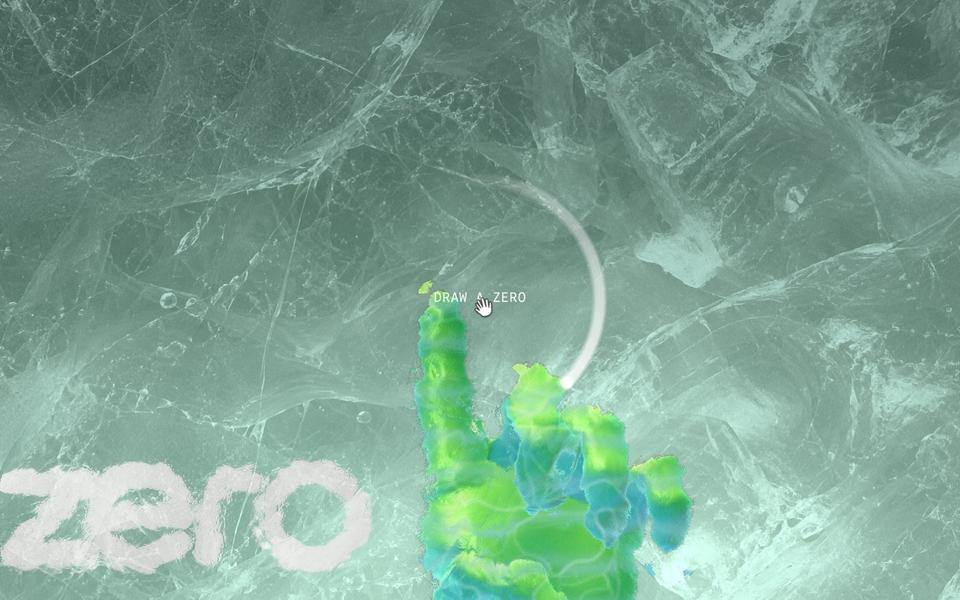
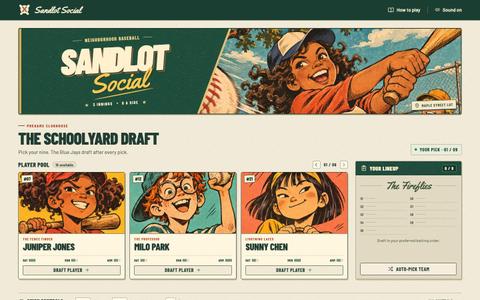
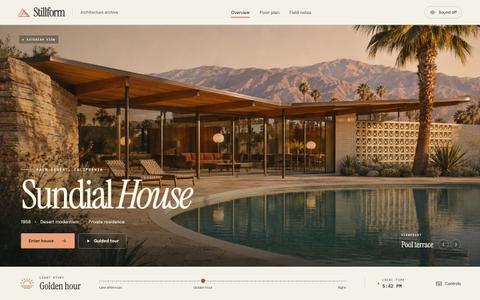
GPT-6.2 Astra · Screenshot of the buildRuns in your browser

Written by
Pat Simmons. Pat tests AI models and tools on his YouTube channel.