I cancelled Wispr Flow and built a free one
A free push-to-talk dictation app for the Mac, built with Claude Code, that keeps everything on your machine.

On this page
The first prompt asked Claude Code to look up Wispr Flow, recommend an architecture for my machine and build a push-to-talk dictation app. It came back with Murmur, which uses the speech transcriber built into macOS 26, so there's no API to pay for and no model to download. After I granted microphone and accessibility permissions and Claude fixed one bug with typing into Electron apps like Cursor, it worked.
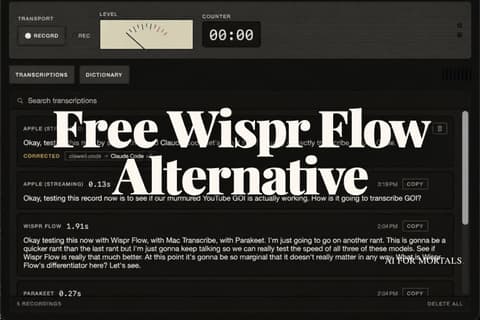
Next, Claude downloaded NVIDIA's Parakeet model from Hugging Face and built a side-by-side test. Parakeet and Apple's transcriber both finished faster than Wispr Flow in my test, with about the same accuracy. I kept Apple's transcriber because it works out of the box on a Mac, and Parakeet is the option for Windows.
The last prompt turned Murmur into a proper Mac app with a 1980s tape recorder look, a history of past dictations and a dictionary of words it should spell your way, like Claude Code. The repo is on GitHub if you'd rather hand it to Claude and have it set up on your machine.
Chapters
- 0:00Intro
- 0:36The first prompt
- 1:35What the architecture actually means
- 3:16Checking the build and granting permissions
- 4:25First test
- 5:08The injection bug
- 5:37It works, and it's fast
- 6:50Downloading Parakeet from Hugging Face
- 8:14Parakeet vs Apple's speech model
- 9:58Head to head with Wispr Flow
- 12:07Building a proper interface
- 13:51The dictionary
- 14:42Wrap up
The full write-up
Free Wispr Flow Alternative: How I Built Murmur With Claude CodeEvery prompt, the full clone and the GitHub repo.Read the write-upTranscript
Show the full transcript
Whisper flow. Whisper flow. Whisper flow. Whisper flow. Whisper flow. Whisper flow.
Whisper flow. Whisper flow. Whisper flow. Whisper flow is, I'm just going to say it, completely unnecessary. They just raised $280 million at a $2 billion valuation for exactly what I'm doing right now using a tool I built in 20 minutes with Claude code. Look at that perfect dictation.
So, in this video, I'm going to show you exactly how to build your own version of Whisper Flow, how to run it completely on your own machine, so nothing you say ever leaves your computer, how to make it look like a real app instead of a script in a terminal, and how to make it even faster than the one you're already paying $15 a month for. This tutorial is designed for a complete beginner. All we're going to be doing is talking to Claude Code, the natural language. By the end, you'll have your own version of Whisper Flow. So, not wasting any more time, let's dive right into the build. And we're going to start with this prompt into Claude Code.
And for this prompt, we're actually going to keep it really simple. All I'm going to say is I want to clone whisper flow. Look up what this is. I basically want it to be a pushto talk dictation app. What would you recommend for architecture based on my machine? We'll start with the skeleton, then build this out into a proper MacOss application and add some cool branding.
So, let's just take that, copy it, and I'm going to open up cursor here. I'm going to open up Claude in here and I'm just going to paste this prompt so you can see just how easy this is. All I'm doing is I'm going I I don't know anything about the architecture or anything like that. All I'm doing is I'm saying this is what I want to build. Look this up, come up with the architecture, and we'll just get to a working prototype really quickly and then we can layer on things like building out an actual Mac OS application, updating some of the branding, you know, the waveform that shows up, all that kind of stuff. So Claude has a plan for us now, and it's laid out all these things.
shell, HUD, hotkey audio ST cleanup injection. Now, you really don't need to know what any of this stuff means, but for the sake of this being a proper tutorial, I just threw an explanation of these in this deck here. So, this is what the architecture is. So, first the shell, this is just the app itself. This is the going to be the container that everything lives in. So, we're building a proper Swift application, how we're actually going to build the interface.
But this is just the heads up display. So, when I actually just like you saw when I was transcribing initially, that little waveform that's going to pop up. So we can see that it's actually being transcribed in real time. Hotkey CG event tap. So this is just what button we're going to hold to actually activate the transcription. In this case, we're just going to use Fn.
Audio is just actually the microphone that's going to be picked up when we are talking. Then of course, we have ST, speech to text. This is the model that turns your voice into words. In this case, we're just using Axe native speech transcriber. This is relatively new. I wanted to experiment with this.
It's built directly into Mac OS, so it's 100% local. You're not calling an API. You're not paying for anything. and you're not even downloading a local model just directly out of the box through Mac OS. And then just as an alternative, just in case speech transcriber is not good enough, we have Parakeet, which is Nvidia's local model that you can download really easily. I'll show you how to do that through hugging face.
We're going to just have that as a backup in case speech transcriber is just not that good. And then cleanup as well. This one's completely optional, but we're going to have a small local model that's just going to add punctuation, cut the ums, do that kind of stuff that Whisper Flow, I know, does really well. Like I said, we absolutely do not need to do this, but just to see how good it can actually get to Whisper Flow, we're adding the second small model. And then finally, we have injection. So, this is just making sure that the text is injected properly where our cursor is.
So, with that, let's check in on the latest in the architecture build. So, it looks like it is done, I think. Yeah. So, you can see here it's just explaining Mac OS 26 ships speech analyzer/spech transcriber. Apparently, Parakeet V3 beats it on English accuracy. So, it did some research on that.
We're going to start with just speech transcriber just to see how good it is. And then we can test parakeet later on. And then it has basically all the things that I already explained. The HUD hotkey, CG event tab, FN button, and then the only thing it looks like I need to do is just grant permissions. So system settings, privacy and security, accessibility, and then add what we're calling murmur, this application that the agent just built. So we'll do that now.
I'll just go to privacy and security, accessibility, and then minor confusing thing, I already have a whisper flow clone that I've been using for a couple months now, also called Murmur. We're just going to change the name of this. We'll just call it Murmur YouTube. Change name. Also, I just gave permissions. Do you have full access?
I just need to open this system settings. Open system settings. Okay. Remember YouTube and change the name. All right. Okay.
Should have full access now. Please test. Hey, would like to access the microphone. Allow. Try now. All right.
So, after allowing those permissions, it looks like this is working. Collad drove this with a synthetic right control hold and confirmed everything is working in the logs started listening finishing idle speech analyzer starts HUD renders etc etc so what do I need to do right control testing oh look at this testing hey uh can you hear me oh look at this oh that's a nice little touch uh just continued to test here I just want to see how much you can pick up here and how fast you are uh if I just keep ranting like this um I like the waveform too it's it's a fancy it's A fancy little waveform. Okay. Where'd it go? Where'd it go? Did it capture that testing again?
Can you hear me? All right. It's close, Claude. It picks up on my voice, I think. Do you see this in the logs? It's just not inserting it where my cursor is.
Please look at logs and fix. Okay, the logs show it's working further than you'd think. Okay, transcription and injection both succeeded. Then why is it not working? Let's see. What does it say?
That's the classic AX. Uh yeah, classic AX silent failure. Return success and Electron apps. Oh, interesting. Okay, so it's a cursor thing when I'm trying to type in cursor. All right, so it's fixing that now.
All right, rebuilt and armed. This should work. Testing. Hello. Can hear me? Hey, look at that.
That was fast, too. Dang, that was really fast. Let's do some long rant here. Uh this is just a long rant here. Uh just to test how well this is working. Let's just keep talking.
I do like this little thing on the on the right here where it just auto transcribes even though it's kind of irrelevant because you can't even really see it. But anyway, this is uh this is pretty good. Claude did a pretty good job for literally a one shot more or less. There was a couple there's a couple, you know, permissions that need to be granted and this ax this classic AX error. Okay, let's see how fast. Whoa, that is fast.
Holy I bet that's faster than parakeet. That is crazy. So, I I haven't I haven't been using this new Mac OS model, so I might need to switch my own Whisper Flow clone to this. Uh, testing this again. Let's just see how fast this goes again. I'm going to talk really fast and see what happens.
Dude, that's crazy. [laughter] So, holy crap, that actually worked way better than I even thought. You can see how easy that was, right? That was like one and a half turns. We told Claude we wanted to create a whisper flow clone. We granted some permissions.
We had one minor issue with just inserting into Electron apps like cursor. And then now this thing is fully working. We have a Whisper Flow clone that we can use, which by the way, I'll include as a repo in the link below if you want to just take this and run with it. But I mean, pretty freaking cool. So, what we're going to do next is we're just going to show you how to download a local model just in case you want to do this. But it looks like this Mac, this new speech transcriber is very fast and works really well.
And I'm just going to tell Claude to do that with our new Murmur YouTube. So, good job, Claude. This looks great. It's very fast. We're using the Mac Mac OS 26 speech transcriber. It's It's really good.
I want to do a sideby-side test with Parakeet somehow. Um, I don't know how you can do this, but just figure out how to run a test. Maybe just come up with a quick little dashboard and I'll just record something. We'll see how quick and accurate each of these are. I want you to explain and just show how we grab this parakeet model via hugging face too. So, okay, it's doing two things.
The first is it's accessing this model via hugging face. I have the hugging face MCP server. Quick random aside, that makes it easier to access and find these models, but you might not have that. I I don't want to get into setting up the MCP server. So I just said don't use the MCP server. So it's just using plain curl to access this model via Hugging Face's public API.
So anyone can do this. I do highly recommend that you download the Hugging Face MCP server. But that is outside the scope of this demo. It's just going to access that via Hugging Face and then just download this parakeet model and then we're going to do a sideby-side test. Okay, cool. So we have something built here.
Cloud just needs to run this. What I'd expect so you can judge the results. Parakeet should win on raw RTF by wide margin. Oh, interesting. Okay, we'll see about that. Uh, cool.
Just build this. I don't know what else to say. I don't know what it wants from me. All right. So, Claude just got done putting together this engine comparison. We're going to compare Mac speech transcriber versus parakeet, the local model that we just downloaded from Hugging Face.
We have this handy little window here, engine comparison. And all I need to do is just hold control and test to see how fast and accurate each of these are. So, I'm just going to say, okay, just testing this record now with our Murmur YouTube whisper flow clone. And I'm going to talk for a minute here and kind of go on a rant. I may have to cut this down because this is kind of ridiculous to spend like 30 seconds to probably a minute talking. Uh complete nonsense.
Okay. Wow. Jeez, those are freaking both of them are really fast. Okay. So, looks like parakeets's a little bit faster. 0.32 seconds.
0.58. Let's see what actually came out in the transcript. Okay. Just testing this with remember YouTube whisperflow clone. Yep, that all looks all right. Okay.
Interesting. So AL called it cologne which is wrong. We won't be able to tell quickly. You will actually pick up some testing that I honestly can't even believe. Let me test something else too. Also want to see how well you pick up on words like claw code for whatever reason.
Claude code is very hard to get right. All these speech text models don't seem to get clawed code right. Let's see how well it does. Parakeet still faster. They get they can't get clawed code. Claw code.
Claw code. All right. This is what we're going to do. We're just going to go with Apple just because it's native to Mac OS. It's a little easier to set up. You don't need to go through the trouble of downloading a local model via hugging face.
It'll just be available pretty much out of the box in the GitHub repo below. But what I will do because I know of course that means if you're a Windows user, this won't work. So I'll include a separate GitHub repo below that will use parakeet and make our own version of Whisper Flow available to you. I'll include instructions too on how to actually download that local model and you'll be able to just copy the repo, give it to your agent, say figure this out. All right, so that being said, our WhisperFlow clone is fully working. But the question is, how does this compare to Whisper Flow?
Is Whisper Flow faster or better in any way? Let's just quickly find that out. I'm going to pull up Whisper Flow and compare it with our clone somehow and see how accurate and fast it is relative to our clone. All right, so Claude added something to our comparison engine where it's pulling from Whisper Flow's database. So I have Whisper Flow open here and in our engine, if I open this comparison view, I can record all three now. So it's going to record Parakeet, it's going to record Max Speech Transcribe, and then it's going to record Whisper Flow.
and we're going to see how quickly these transcribe and how accurate they are. So, let's go record all three. Okay, testing this now with Whisper Flow, with Mac Transcribe, with Parakeet. I'm just going to go on another rant. This is going to be a quicker rant than the last rant, but I'm just going to keep talking so we can really test the speed of all three of these models. See if Whisper Flow is really that much better at this point.
It's going to be so marginal that it doesn't really matter in any way. Like, what is Whisper Flow's differentiator here? Let's see. All right. So, it looks like Parakeet was the fastest, 0.27 seconds. Apple was second, and then Whisper Flow was third.
So, okay, let's look at the transcript. Just going to go into the rant. This is going to be quicker. See if Whisper Flow Whisper Flow got its own spelling correct. Apple's missing some things like saying rent instead of rant. Apple got that question mark at the end.
That's pretty good. All right, so there we go. Both of these models are officially faster than Whisper Flow. And our little clone is completely free. And you can see at least in this example that it is just as accurate in the actual text transcription. Now the one caveat and Claude calls this out here is there is a little bit of latency because we're actually pinging Whisperflow's database to get how long the transcription takes.
So there's likely some latency. And so that's why that number is showing up much slower. But even if it was, so if we look at the numbers, even if it was a second slower, it would still take 0.91 seconds versus 0.48 versus 0.27. And there probably is a way to be more methodical and get accurate numbers between Whisperflow's model parakeet and Mac speech transcribe, but the point being the difference in speed and accuracy is marginal at best. Now, we could stop right here and just have our little waveform HUD. But let's get this close to Whisper Flow and build a proper interface, a guey as the pros call it.
That way, we can start and close the app and just have it function very similar to Whisper Flow. So, what I'm going to ask Claude to do is have this dictation history. We're not going to do notetaker or anything like that. And then we're going to add a dictionary, too, and an ability to add words. So, this is the prompt I'm going to give to Claude. Basically, what I'm saying, we'll just open up in this doc here.
I'll include this in the link below as well if you need it, but I'm just saying turn this into a proper Mac OS application, not a menu bar. The main window holds the past transcriptions, start a dictionary, exactly what Whisper Flow contains. By the way, too, to get this prompt, I just went to a separate Claude agent that was familiar with this project, and I said, "What would be a good prompt to give to this agent?" And then I also wanted it to lean into some kind of design direction. So I said the direction is a 1980s tape recorder. Plot just listed out some brands.
And then I just said don't use neon vapor wave synth wave purple and pink gradients. I feel like these are just too overused. So I really want to just like lean into some kind of design style and have be kind of quirky and fun and a little bit different than these other voice transcribers. So we'll get Claude working on that. I'm guessing it will be built relatively quickly. All right.
So Claude has built our Murmur YouTube interface. We've got the application. We've got transcription history. We've got dictionary. So, let's open it up and check it out. So, here it is.
It doesn't look bad. It's a little plain, but I guess it technically got the recorder kind of 80s feel. Could have done a better job, but let's see if it actually works. So, I'm just going to hit record. Okay. Testing this record now to see if our murmur YouTube guey is actually working.
How is it going to transcribe guey? Okay. Didn't get gooey, right? Goey, but okay. Testing this record now. Murmured YouTube.
Okay. Well, there we go. We have transcription history. So, let's go to dictionary. I just had claude add some random phrases. So, claude code.
Let's see if it'll pick up on clad code. Okay. Testing this now by saying the word claude code. Let's see if it will actually correctly transcribe claude code. Boom. There we go.
Cool. Oh, and it even shows like a correction. Corrected. Wow. That really does that very fast. Like corrects it in real time like that.
Okay. Testing this cloud code. Cloud code. Boom. Just like that. All right.
So, we have dictionary. We can add different words here for the model to pick up on that transcription history. I mean, that's basically all you need. Don't need anything fancy. And then you can just close this and have it running in your menu bar and then just be recording stuff. So, I could say like I could open that Google doc again.
Just say testing this again or murmur YouTube transcribing. See if this actually works in this Google doc. Boom. There we go. Beautiful. So, that's going to do it.
That's how to clone Whisper Flow or really any of these voice dictation apps in just a couple prompts with Claude Code. And don't get me wrong, too. I have a lot of respect for Whisper Flow. They've built a great brand. I mean, their marketing is fantastic. And if you want something that just works immediately, it is a great option.
But if you're trying to save money, if you're trying to own your own data, if you're trying to customize this to your liking, you can see just how easy it is to do. Not to mention, if you don't want to build any of this yourself, I'll leave the repo below. Literally, just copy it from GitHub, give it to Claude or Codex or whatever you use, and just say set this up on my own machine. So, appreciate you watching. There are so many apps like this, by the way, that could just be cloned in really just a few prompts with cloud code. So, if you have any ideas, if you have any apps that you use daily that you're paying a lot of money for, let me know and I can just put these together, make the GitHub repos available, and give you the ability to have fully custom software.
All right, I'll see you in the next one.


Comments
Sign in to join the conversation.