What I was testing
I wanted a 3D iPod on my Mac that played its own library of AI-generated music. The prompt also asked for my Codex conversations, so both apps ended up with project menus alongside the songs.
Astra's screen and click wheel looked more like the real thing. Fable added click sounds I liked, and some of its pop-punk tracks were close enough to have me naming bands on camera. Astra's music choices were less convincing, with several tracks missing the vocals I wanted.
The prompt
Build a native macOS application called Codex iPod: a photoreal 3D iPod Classic floating on the desktop, whose screen is a working browser for my real Codex threads, driven by the click wheel, that also plays music.

Context you should know: this is going into a video watched by a large audience, your build will be shown on camera next to another frontier model's version of the same app, and your work will be credited to you by name. Everyone watching knows what an iPod looks like. Go all out.

You are running headless. Do not ask me any questions, do not stop for approval, and do not wait for input at any point. Make every decision yourself and finish the whole thing in one pass.

### Deliverable

A buildable Xcode/SwiftPM project at `./CodexIPod`, plus a built, launchable `.app`. Swift 6.2, SwiftUI + SceneKit (or RealityKit/Metal if you prefer), macOS 26 target, Apple Silicon. No external Swift packages. It must build from a clean checkout with a single command, documented in `RUN.md`.

### The 3D iPod — authored in Blender

Write a Python script at `blender/ipod.py` and run it headless with `/opt/homebrew/bin/blender --background --python blender/ipod.py`. That script procedurally models the iPod and exports `CodexIPod/Resources/ipod.usdz` and `.glb`. Do not download a model, do not use a store asset, and do not fake it with rounded cubes in Swift. The mesh comes out of Blender or this build has failed.

Model an **iPod Classic 6th generation, silver**, at real dimensions: 103.5 mm tall × 61.8 mm wide × 10.5 mm deep.

**The proportions are the whole thing.** Get these exactly, because they are what the eye checks first:

- The **click wheel is 43 mm in diameter**, horizontally centered, and the **center button is 17.5 mm**. A wheel that is too small or too large reads as a toy instantly.
- The **screen is 2.5 inches diagonal at 4:3**, roughly 51 × 38 mm of visible glass, horizontally centered, sitting in the upper portion of the face with **equal margins left and right**. The gap between the bottom of the screen and the top of the wheel is **larger** than the gap between the bottom of the wheel and the bottom edge of the device.
- In plan view the **corner radius is about 7 mm** — generous. But the **edge chamfer where the face rolls into the side is under 0.5 mm** — tiny. Getting that ratio backwards is the single most common way this ends up looking like a generic rounded rectangle instead of an iPod.

**Construction, not just shape:**

- Two shells: an **anodized aluminum front face** in silver with a fine bead-blast micro-texture, and a **polished stainless steel back** that is a shallow continuous curve, not a flat plate. They meet at a **hairline seam that runs the entire perimeter**, with a thin polished chamfer along it. That seam is a major part of why the real object reads as a machined product.
- The steel back gets **anisotropic reflection** with a directional grain, plus a subtle roughness variation for micro-scratches and fingerprints. A perfect chrome mirror is wrong and looks CG immediately.
- The **screen sits behind a glass plane that is flush with the face**, with a **black bezel surround visible under the glass** framing the active area. The screen is not printed onto the aluminum.
- The **click wheel is recessed slightly below the face**, matte light-grey plastic, and the **center button is set into it with a visible circular gap** and a **concave** top face. Not flush, not proud, not a floating disc.
- `MENU` at 12 o'clock, rewind at 9, fast-forward at 3, play/pause at 6, as **subtly printed light-grey glyphs with a hint of translucency** — printed on, never raised geometry.
- A hold switch and headphone jack on the top edge, a 30-pin dock connector on the bottom edge, both modeled.
- Chamfer every hard edge on the whole model. Nothing anywhere is a razor corner.

**Lighting and rendering:** a large soft key from upper-left, a fill from the right, a rim behind to separate the metal from the background, and a soft contact shadow anchoring it. PBR values: aluminum around 0.35 roughness, steel around 0.08, wheel plastic around 0.6. The screen emits, but a **specular highlight passes over the glass above it** so it reads as being behind glass rather than glowing out of a hole.

**Fail conditions — if any of these are true when you look at your own render, go back and fix the model:** it reads as a rounded rectangle with a circle stuck on it; the steel back is flat grey instead of carrying a gradient reflection; the screen looks painted on; the wheel looks like a decal; the corners look sharp; the whole thing looks like a phone.

**Self-check you must actually run:** render a straight-on orthographic front view, measure the wheel diameter, the screen width and the body width in pixels, and confirm the ratios match the millimetre figures above. Write the measured numbers into `BUILD_NOTES.md`. If they are off, fix the model and re-measure.

### The window

No window chrome. Transparent, borderless, no titlebar, no traffic lights — just the floating iPod and its contact shadow over the desktop. Movable by dragging the device body. The menu bar carries the app name **Codex iPod** and one menu, **View**.

At rest the iPod sits at a slight three-quarter angle. Left-click-dragging the background orbits it around its vertical axis and it settles back to a front-facing rest pose with an ease-out on release. Mouse movement near it produces a few degrees of parallax tilt. The screen renders live onto the screen geometry as a texture — part of the 3D scene, not a 2D overlay pasted on top — and stays correctly mapped as the device rotates.

### The data

Read my real threads from `<local-path-redacted>` — nested by year/month/day, roughly 1,500 files. `<local-path-redacted>` may help. Each file is one thread of JSONL events. Derive per thread: a title (the first user message trimmed to one line), a timestamp, the ordered messages with roles, and any file paths mentioned. Sort newest first. Parse defensively — malformed or empty files get skipped silently, never crash. Never write to, move, or modify anything under `<local-path-redacted>`.

### The music

An iPod that cannot play music is a prop. Generate the library yourself.

Generate the library yourself with the **ElevenLabs Music API**. Your key is in the `ELEVENLABS_API_KEY` environment variable in this directory's `.env`. Go read their documentation, work out how to call it properly, and figure out how to prompt it well — getting good output out of a music model is part of this task, and I am not going to hand you the prompts.

What I want: **five original tracks that sound like they came off an iPod in the early 2000s.** That era's textures — think the guitar tones, the drum sounds, the production style of roughly 2001 to 2006. Iterate on your prompting until the output actually sounds like the period rather than like generic stock music, and listen to what comes back before you accept it.

**Budget — this is a hard limit.** The key has a finite, shared credit balance and another model is drawing on the same pool, so you do not get to burn it all. Generate **no more than 10 minutes of audio in total, including every failed attempt and retry.** Keep tracks to 60–90 seconds each — an iPod demo does not need full-length songs. Check what you have spent as you go, and stop generating when you hit the limit even if you are not happy with the results; ship what you have and say so in `BUILD_NOTES.md`.

**Original compositions only — do not name, imitate, or reference any real artist, band or song, in your prompts or in the output.** Write the exact prompts you ended up using into `BUILD_NOTES.md`, along with what you tried first and why you changed it. Save the audio into the app bundle so it plays offline, and generate simple square cover art for each track.

Then wire the music in properly: a **Music** item on the main menu, an album/track list, and a **Now Playing** screen with the cover art, track title, a progress bar with elapsed and remaining time, and working transport. The wheel scrubs the playhead on Now Playing and changes volume on a second press, exactly like the real thing. Play/pause, next and previous work from the wheel. If the API call fails, ship the app with a clearly-labelled empty library rather than silent placeholder tones, and say so in `BUILD_NOTES.md`.

### The screen — exact spec

320 × 240 logical pixels, rendered crisp, correct 4:3 aspect. Chicago-style bitmap-feel typography, black on white, blue-grey gradient title bar. Every screen shares that title bar: the screen name on the left, a small play glyph and a battery icon on the right.

**1 — Main menu.** Split view: menu list on the left half, and on the right a square album-art panel showing a generated CODEX graphic — a terminal prompt glyph over a dark gradient, the wordmark CODEX, and a small subtitle line beneath. Items in this order: Threads, Music, Projects, Pinned, Recent, Search, Settings, Shuffle Tasks, Now Reading. The selected row is a solid blue gradient bar, white text, chevron at the right edge.

**2 — Threads list.** Full width, nine rows visible, each row the thread title with a chevron, ellipsized cleanly. Same blue gradient selection. A footer strip reads `Center: read · Play: open in Codex` on the left and the position as `36 of 994` on the right.

**3 — Thread reader.** Title bar carries the thread title. Beneath it a sub-header with the current message's role on the left (`You` / `Codex`) and its position on the right as `1 / 22`. Body is the wrapped, scrollable message text with a thin scrollbar when it overflows. Footer reads `Wheel: scroll · ◀ ▶: message` on the left and the scroll position on the right.

**4 — Now Playing.** As described above.

**5 — Settings.** Brightness, Clicker, Sync Now, About. Brightness and Clicker toggle in place with the center button and show their current value at the right of the row.

Every other main-menu item goes somewhere real — a working screen or an honest empty state. No dead ends, no lorem text.

### The controls

The click wheel is the primary input and it works **by angle, not by drag distance**. Dragging in a circle anywhere on the ring accumulates rotation; roughly every 20 degrees advances the selection by one row in the direction of travel, accelerating if the user keeps spinning. Center selects and pushes. MENU pops back up the hierarchy and restores the previous selection on the screen you return to. Play/pause opens the highlighted thread in Codex. Rewind and fast-forward step between messages in the reader.

Transitions are the classic iPod OS horizontal slide — push left, pop right, about 250 ms, ease-in-out. A mouse or trackpad scroll also drives selection. Everything is reachable from the keyboard too: arrows, return, escape.

### Acceptance criteria — verify each yourself before you finish

1. `blender/ipod.py` runs headless without error and produces `ipod.usdz`. Delete the export and re-run it to prove it regenerates.
2. The orthographic proportion check above passes, with the measured numbers written down.
3. The app builds clean and launches with no window chrome visible.
4. The threads list is populated from the real `<local-path-redacted>` data and the footer count matches the number of threads actually parsed.
5. Opening a thread shows real text from that file and the stepper reaches the last message.
6. A generated track plays end to end, and the wheel scrubs it.
7. Circular dragging moves the selection both directions, and MENU returns up the stack with the previous selection intact.
8. The screen texture stays correctly mapped while the device rotates.
9. Screenshot the main menu, the threads list, the reader and Now Playing into `qa/`, plus a three-quarter render of the device itself. Look at them. If the type is blurry, the metal reads flat, the proportions look off, or the screen is misaligned on the mesh, fix it and shoot again.

Write `BUILD_NOTES.md` covering the measured proportions, the material and lighting values you chose, the music prompts you used, how the wheel gesture math works, and anything you could not get to.
Full prompt from the published experiment.
The builds
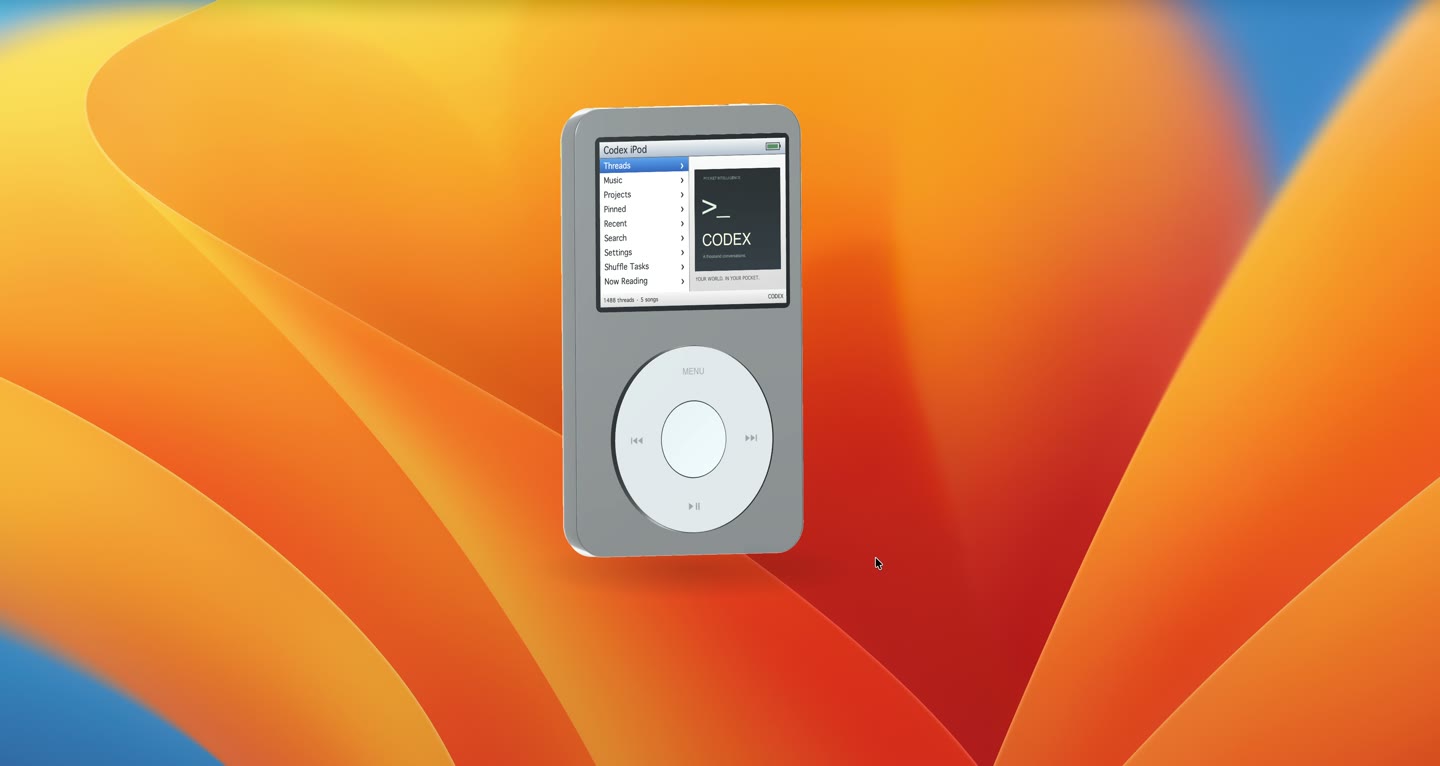
GPT-6 Astra · Screenshot of the buildNative app, no web version
Featured in
I Made GPT-6 Astra & Fable 5.1 Build the Same App (RAW RESULTS)
This build’s chapter starts at 0:29: Build 1: A 3D iPod loaded with 2003 songs.

Written by
Pat Simmons. Pat tests AI models and tools on the AI for Mortals YouTube channel.