AI-Powered Personal Finance Apps: What ChatGPT Finances and Claude Personal Finance Do, Cost and See
ChatGPT Finances is free in the US and Claude Personal Finance needs a paid plan, both read your bank through Plaid, and neither can move money.

On this page
- What is an AI-powered personal finance app?
- ChatGPT Finances: what it does and what it costs
- Claude Personal Finance: what it does and who gets it
- Is Claude or ChatGPT better for personal finance?
- Can ChatGPT be your financial advisor?
- Copy-paste prompts for budgeting with ChatGPT or Claude
- Is it safe to link your bank to an AI app?
- Is there a free app to organize your finances?
- Questions people ask
An AI-powered personal finance app links to your bank and card accounts and answers plain-English questions about your own money: where it went, which subscriptions you pay for, and what's due before payday. The two biggest chatbots now have this built in. ChatGPT Finances is free for US users on every plan, including Free and Go. Claude Personal Finance is a beta for US subscribers on the paid Pro, Max and Ultra plans.
Both connect to your bank through Plaid, both can only read your accounts, and neither can move money or act as a licensed adviser. Pick ChatGPT if you want it free, with an optional Experian credit score on Plus and Pro. Pick Claude if you already pay for it and want the chats in its Personal Finance hub kept out of model training.
Last checked November 23, 2026: plans, prices, what each app can read, and the privacy terms, on OpenAI's and Anthropic's own help, pricing and announcement pages (linked below).
What is an AI-powered personal finance app?
It's a chatbot that can see your real account data. You connect your bank, cards, loans and investment accounts once, and then you ask questions in your own words instead of opening every banking app and adding things up yourself.
OpenAI says more than 200 million people come to ChatGPT every month for budgeting, investment questions and planning. Finances lets those same questions draw on your actual account data.
Budgeting apps such as Intuit's Mint already showed linked accounts and transactions in one place, and Mint's users had to move elsewhere when it shut down on March 23, 2024. ChatGPT and Claude add a conversation on top: you ask a follow-up like "Is that more than usual?" and get an answer built from your own transactions.
ChatGPT Finances: what it does and what it costs
ChatGPT Finances costs nothing extra. OpenAI's help page says it's available in the US to Free, Go, Plus and Pro users on web, iOS and Android, and the ChatGPT pricing page lists Finances on all four plans.
It started as a paid feature. OpenAI's release notes show a preview for Pro users on May 15, 2026, Plus users and Android in late June, and Free and Go users from October 2, 2026. We covered that last step when ChatGPT Finances opened to free users in October.
What ChatGPT can read
Once you connect through Plaid, ChatGPT reads your balances, transactions, investments and loans. You can also connect your Experian credit report as a separate link, and you don't need a bank connection to do that. The release notes say the credit-score feature rolled out on September 21, 2026 to Plus and Pro users in the US; OpenAI's help article doesn't list a plan limit for it.
The Finances page turns that data into widgets. OpenAI lists spending by category, this month against your recent trend, upcoming payments, bills, subscriptions (with the amount, how often it's charged and the next charge date), net worth over time, how your portfolio is split, a daily market update for your stock holdings, and your credit score.
ChatGPT can also keep "financial memories": things you tell it, such as "My rent is split with my partner" or a car you're saving for. You can view or delete them from the Finances page. Temporary chats can't see your connected accounts.
How to connect your accounts in ChatGPT
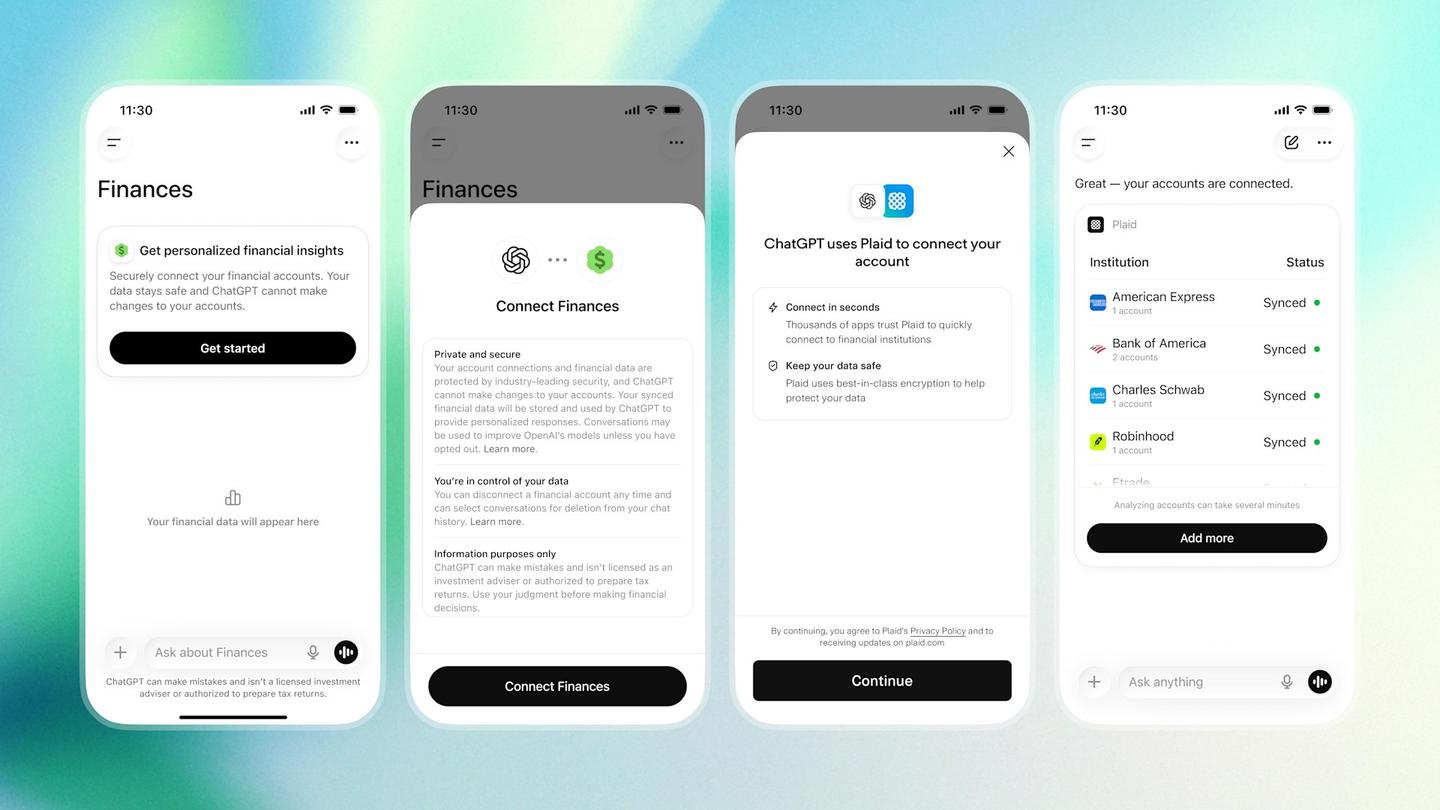
OpenAI's steps: open Finances in ChatGPT, select Get started, select Connect with Plaid, sign in and pick the banks you want to connect, then go back to ChatGPT. You can also type @Finances, connect my accounts in any chat. Syncing usually takes a few minutes and, in rare cases, several hours.
What ChatGPT Finances costs
Finances itself is included on every plan. The plan prices on OpenAI's pricing page are Free at $0, Go at $8 a month, Plus at $20 a month, and Pro from $100 a month. The plan mainly changes the models and limits you get across ChatGPT, plus the credit score on Plus and Pro. Our guide to what ChatGPT Plus adds over Free and Go goes through the rest.
Claude Personal Finance: what it does and who gets it
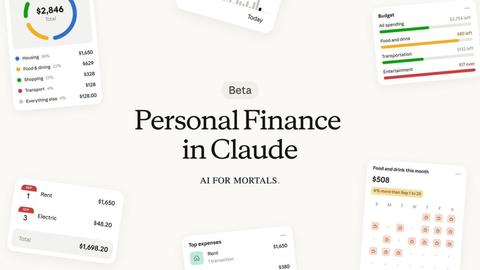
Claude Personal Finance needs a paid plan. Anthropic's help page says it's in beta on Pro, Max and Ultra plans in the US only, on the web, the desktop app, iPhone and Android. It isn't on the Free, Team or Enterprise plans, and Anthropic is rolling it out gradually, so a paying subscriber may not see it yet.
On the Claude pricing page, Pro is $20 a month billed monthly ($17 a month if you pay $200 for the year up front), Max is $100 a month and Ultra is $200 a month.
What Claude can read
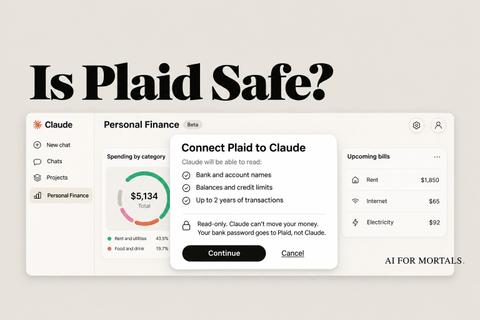
For the accounts you choose to share, Claude reads bank names, account names and types with the last four digits, balances and credit limits, and up to 24 months of transactions. The help page also lists card and loan details (interest rates, statement balances, due dates, payoff dates) and what your investment and retirement accounts hold. You can link up to 16 US banks.
Anthropic says balances can be a day or two old, and an account you link through two logins may be counted twice. Linked accounts don't work in scheduled tasks, Cowork tasks, Claude Code or Claude Duet.
How to set up Claude Personal Finance
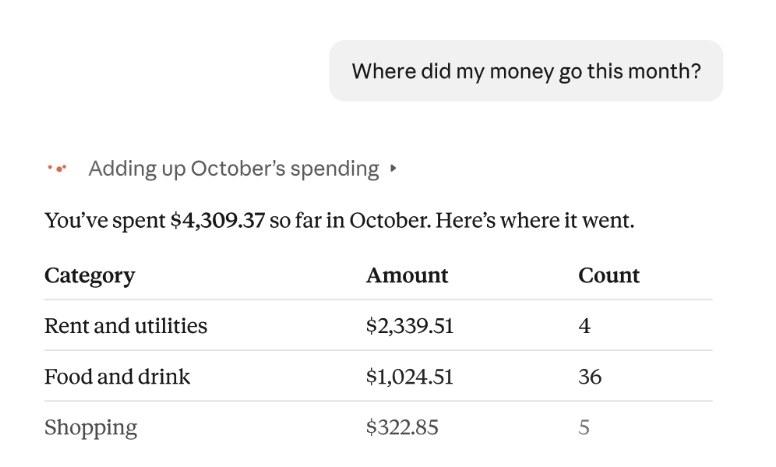
Anthropic's steps: open Personal Finance in the side menu (hover over More if you don't see it), select Get started, choose your goals or skip them, then select Link accounts with Plaid. Sign in to your bank in Plaid, choose the accounts to share, and come back to Claude within 10 minutes. Our walkthrough covers how to set up Claude Personal Finance and how to check its math.
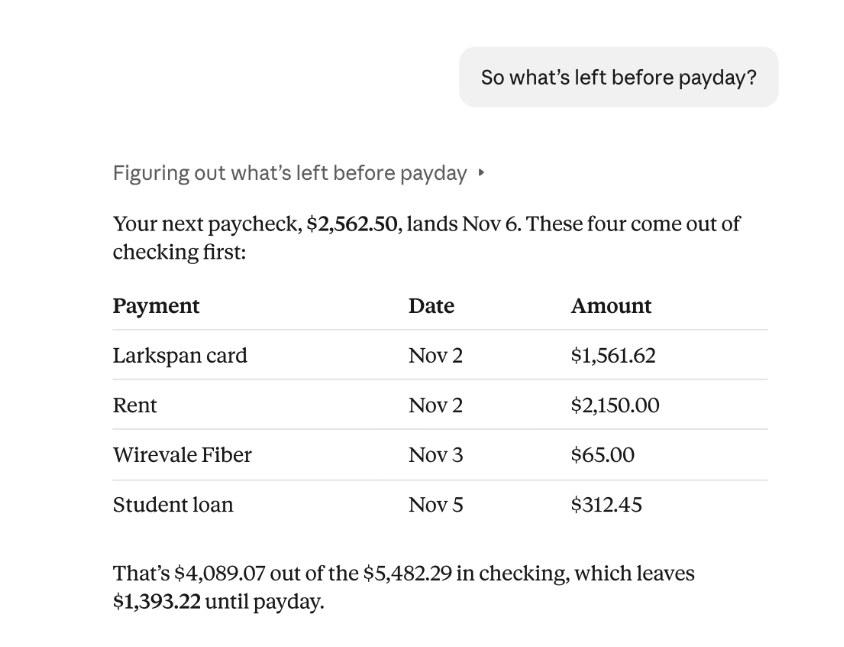
Anthropic's own walk-through follows one question further. After the spending total, you ask "So what's left before payday?" and Claude lists the payments due from checking before the next paycheck.
Is Claude or ChatGPT better for personal finance?
On price and features, ChatGPT suits more people: it's free on every US plan, it reads investments and loans, and it adds an Experian credit score on Plus and Pro. Claude suits people who already pay for Claude and care most about privacy, because chats in its Personal Finance hub aren't used for training and it has no ads or sponsored product picks. We haven't tested either one on real accounts, so this comparison comes from each company's own pages.
| ChatGPT Finances | Claude Personal Finance | |
|---|---|---|
| Plans | Free, Go, Plus and Pro | Pro, Max and Ultra (beta) |
| Cheapest way in | $0 (Free plan) | $20 a month (Pro, billed monthly) |
| Countries | US only | US only, US banks only |
| Apps | Web, iOS, Android | Web, desktop, iOS, Android |
| What it reads | Balances, transactions, investments, loans | Balances, credit limits, transactions, card and loan details, investment holdings |
| Transaction history | Whatever your bank shares through Plaid | Up to 24 months |
| Credit score | Experian, rolled out to Plus and Pro | Not offered |
| Bank limit | None stated | Up to 16 banks |
| Model training | Follows your Data controls setting | Not used for chats in the Personal Finance hub |
| Memory | Saves financial memories you can view and delete | Designed not to save anything to memory from a chat that used your accounts |
| After you disconnect | OpenAI and Plaid delete synced data within 30 days | Claude stops reading; unlinking your last bank deletes the dashboard |
| Can it move money? | No | No |
Sources for the table: OpenAI's Finances help article, release notes and pricing page, and Anthropic's help article, announcement and pricing page, all checked November 23, 2026.
Two more differences are in how each one remembers and asks. ChatGPT's financial memories let it carry what you've told it (a shared rent, a savings target) into later chats, while Claude is designed not to save anything to memory from a chat that used your accounts. On the phone apps, Claude can also be set to ask before each read: tap +, then Connectors, then Plaid, and choose Needs approval (or Blocked to turn it off). On the web and desktop you switch Plaid off or on from the same Connectors menu.
Both are general chatbots you may already use for other work, so the plan you're on decides a lot. If you pay for Claude already, Personal Finance costs nothing extra. If you use ChatGPT on the free plan, Finances is already there.
Can ChatGPT be your financial advisor?
No. OpenAI says ChatGPT is not a fiduciary, registered investment adviser, broker-dealer, tax preparer or law firm, and that its answers are for information and planning only. Anthropic says Claude Personal Finance isn't designed to give investment advice.
Inside those limits, OpenAI says ChatGPT can explain tradeoffs: paying down debt, building an emergency fund, raising retirement contributions, or moving idle cash into a higher-yield account. For taxes it can organize information and point to things worth reviewing, such as deductions or estimated payments, but it doesn't file anything. OpenAI tells you to talk to a qualified professional before decisions with legal, tax or investment consequences.
Neither app can act on your accounts. Through Finances, ChatGPT can't move money, pay bills, make trades, change retirement contributions, open or close accounts, or file taxes. Claude's access is read-only too: it can't move, manage or invest your money.
Both companies also say the numbers can be wrong. OpenAI notes that transfers, card payments, reimbursements and duplicate pending charges can get counted as spending, and you can ask ChatGPT which transactions it included. Anthropic says to check important figures against your bank's own app or statements.
Copy-paste prompts for budgeting with ChatGPT or Claude
These are prompts to start with, taken from OpenAI's and Anthropic's own examples plus a few of ours for people who don't want to link a bank. We haven't run them on real accounts.
Find where the money goes
OpenAI suggests: "Where did I spend the most money this month?" and "What subscriptions am I paying for?"
Anthropic's examples: "Where did my money go this month?" followed by "Is that more than usual?" and "Anything else I'm missing?"
Spot double charges and interest
OpenAI suggests: "Do I have any duplicate payments?"
Anthropic's example: "What's an APR, and what has mine cost me this year?" Anthropic says Claude explains the term, then adds up the interest you've been charged.
Stay on budget until payday
OpenAI suggests: "Am I on pace to stay within my grocery budget?" and "What bills are coming up?"
Anthropic's examples: "So what's left before payday?" and "Am I spending more than I make?"
Plan a goal or pay down debt
OpenAI suggests: "What's a practical plan to pay down my credit card debt?" and "Which factors are affecting my credit score?"
Anthropic's examples: "Can I afford a trip this spring?" and "How much could I save each month?"
Build a budget without linking a bank
Any plan of either chatbot can do this one, because you type the numbers in yourself: "My take-home pay is $3,800 a month. Rent is $1,450, my car payment is $310 and my phone is $65. Make me a monthly budget table with columns for category, planned amount and actual amount, and leave room for groceries, gas, eating out and savings."
Then follow up with: "I want to save $2,000 for a car repair by June. How much is that a month, and which of my flexible categories would you cut to get there?" The dollar figures are placeholders: swap in your own.
Is it safe to link your bank to an AI app?
Linking gives the chatbot read-only access, and your bank password never reaches it: you sign in through Plaid, and Anthropic says Claude doesn't ask for or see your bank password. What you're trusting is Plaid and the chatbot company with your transaction data. On its consumer page, Plaid says it doesn't share your bank username and password with the app, and that the app pays Plaid a fee for the connection, so you're not charged for linking. OpenAI's help page says Plaid connects to more than 12,000 financial institutions.
Plaid has a privacy case on its record. In Cottle v. Plaid, plaintiffs alleged that Plaid used people's bank logins to collect and sell financial data without consent. Plaid agreed to pay $58 million, and the court granted final approval of the settlement on July 20, 2022; the order notes that Plaid denied liability.
You can see every app you've linked through Plaid in Plaid Portal, Plaid's free site where you can view your connections, disconnect accounts from an app and delete your data from Plaid. Both OpenAI's and Anthropic's help pages link to it. Our seven checks before you link your bank through Plaid go through it step by step.
Each chatbot also keeps what it said in your chat history after you disconnect. OpenAI deletes synced account data within 30 days of disconnecting, but past conversations stay until you delete them. Anthropic says what Claude already said stays in your chats, artifacts and shared links until you remove them.
Is there a free app to organize your finances?
Yes. In the US, ChatGPT Finances works on ChatGPT's Free plan at $0, with bank linking through Plaid.
If you'd rather use a dedicated budgeting app, EveryDollar, the zero-based budgeting app from Dave Ramsey's company Ramsey Solutions, has a free version you can use as long as you want. Pulling transactions in automatically from your bank needs EveryDollar premium, which starts with a 14-day free trial for new users.
Mint is no longer an option: Intuit shut it down in March 2024 and pointed its users to Credit Karma.
Questions people ask
Is ChatGPT Finances free?
Yes, for US users. OpenAI lists Finances on the Free, Go, Plus and Pro plans. The credit-score feature rolled out to Plus and Pro.
Is ChatGPT Finances available outside the US?
OpenAI's help page describes it as available in the US only. Claude Personal Finance is US-only as well, and Anthropic says it doesn't appear while you're outside the US or on a VPN connecting from another country.
Is there a ChatGPT finance plugin?
Finances is built into ChatGPT, with no plugin to install: you open it from ChatGPT or type /finances or @finances in a chat. OpenAI says separate third-party apps connected to ChatGPT can handle things like trades, and those run outside Finances.
Can ChatGPT make me money?
Through Finances, ChatGPT can't trade, invest or move money for you. OpenAI says it can help you think through choices such as moving idle cash into a higher-yield account or paying down debt, and you make the decision.
Does ChatGPT use my financial data for training?
Finances chats follow the same training setting as the rest of your ChatGPT account, which you can change in Settings > Data controls. Temporary chats can't see your connected accounts.
Does Claude use my financial data for training?
Not for chats inside the Personal Finance hub. Anything you share with Claude outside the hub follows your regular privacy settings.
Why don't the numbers match my bank?
Balances can lag a day or two, some banks share only part of your history, and transfers or card payments can be counted as spending. Ask the chatbot which transactions it used, and check big figures against your bank's app.
Sources
- OpenAI Help Center: Finances in ChatGPT
- OpenAI: ChatGPT for personal finance and budgeting
- OpenAI: ChatGPT release notes
- OpenAI: ChatGPT pricing
- Claude Help Center: Use Personal Finance in Claude
- Anthropic: Introducing Personal Finance in Claude
- Anthropic: Claude pricing
- Plaid: How Plaid works for consumers
- Plaid Portal
- Cottle v. Plaid: order granting final approval of the settlement (N.D. Cal., 2022)
- Ramsey Solutions: EveryDollar
- CNBC Select: Mint is gone


Comments
Sign in to join the conversation.