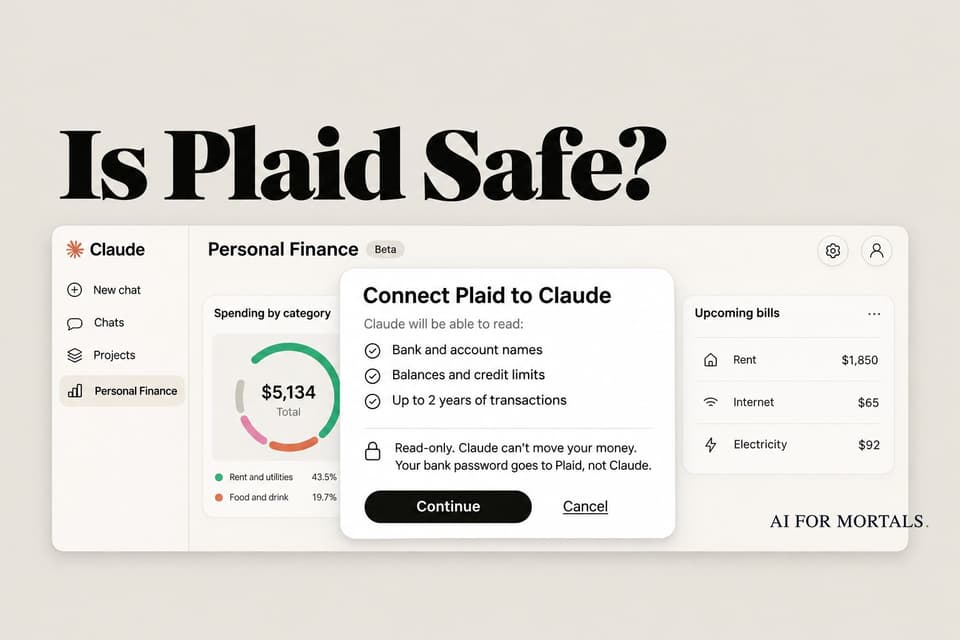
Is Plaid Safe? What to Check Before You Link Your Bank to Claude
Claude's new Personal Finance and ChatGPT's Finances both connect to your bank through Plaid. Here's what Plaid and each AI can see, what Plaid settled over in 2022, and seven checks to run before you link an account.
 AI for Mortals Staff
On this page
- What is Plaid, and is it safe?
- What Plaid's privacy policy lets it do with your data
- Plaid's $58 million privacy settlement, and what changed
- Claude vs ChatGPT Finances: what each one sees and keeps
- Is Plaid safe to use with your bank account? Seven checks before you link
- How to disconnect Claude from your bank and delete Plaid's copy
- Should you link your bank to Claude?
Is Plaid safe? It's the first thing to ask before you try Personal Finance in Claude, because Claude never connects to your bank directly. You sign in through Plaid, the same service that links your bank to Venmo, Robinhood and ChatGPT's Finances.
Plaid encrypts your data, doesn't sell it, and gives Claude read-only access. It also collects more than most people realize, and it paid $58 million to settle a privacy lawsuit in 2022. Here's what each side can see, what to check before you link, and how to cut the connection later.
What is Plaid, and is it safe?
Plaid sits between your bank and the apps you use. It doesn't hold your money or offer bank accounts. When an app wants your balances or transactions, Plaid fetches them from your bank and passes them on, and the app pays Plaid for that connection, so you don't pay anything.
It's everywhere. Plaid says 1 in 2 US adults has connected an account through it, across more than 12,000 banks and credit unions.

On security, Plaid says it encrypts data with AES-256 and TLS and that security researchers and banks regularly audit it. Plaid Portal says Plaid doesn't sell or rent your financial information to outside companies.
How you sign in depends on your bank. At big banks such as Chase, Wells Fargo and U.S. Bank, Plaid sends you to the bank's own login page, so Plaid never sees your password. At banks that don't support this, you type your username and password into Plaid's window, and Plaid passes the data along without sharing those credentials with Claude or any other app.
What Plaid's privacy policy lets it do with your data
The fine print is broader than the marketing. Plaid's privacy policy says Plaid can collect your account and routing numbers, balances, transactions, loan details, and your name, email, phone number, birth date and address. It says it may infer things such as your income and where you live from that data.
Three parts of that policy are worth reading before you link:
- Plaid may pull every account under one login. Its policy says the data may come from "all accounts (e.g., checking, savings, credit card, and joint accounts)" you can reach with one set of credentials, even if you only share one of them with an app.
- Plaid can use your data to build AI. The policy lets Plaid "develop, train, test, and deploy artificial intelligence" systems and create insights from your transactions.
- Anonymized data has few limits. Plaid can use data it has aggregated or de-identified for any purpose the law allows.
Plaid says it keeps data only as long as it needs it and that its systems are designed to delete your data once no app is connected, with exceptions for fraud prevention and legal reasons.
Plaid's $58 million privacy settlement, and what changed
In 2020, a class action called Cottle v. Plaid accused Plaid of using people's bank logins to collect and sell their financial data without consent. It also said Plaid's login screens were designed to look like the banks' own. Plaid denied it, and settled for $58 million, which a federal judge approved in July 2022.
About 98 million people were in the class. Only about 1.3% filed a claim, which worked out to roughly $31.50 each.
As part of the deal, Plaid agreed to delete transaction data that apps never asked for, store less data overall, explain more inside its login window, and put a link to Plaid Portal (the tool for seeing and cutting your connections) on its homepage. Plaid's lawyer said at the time that the claims didn't reflect today's Plaid.
Claude vs ChatGPT Finances: what each one sees and keeps
Claude Personal Finance and ChatGPT Finances both use Plaid, both are read-only, and neither can move your money. They differ on who gets the feature, training and deletion.
| Claude | ChatGPT | |
|---|---|---|
| Who gets it | Pro, Max and Ultra plans, US only (beta) | Free, Go, Plus and Pro, US only |
| What it reads | Account names and last four digits, balances, credit limits, up to 2 years of transactions | Balances, transactions, investments and loans, plus Experian credit data if you add it |
| Training | Not for chats inside the Personal Finance page; regular chats follow your settings | Follows your Data controls setting |
| Memory | Designed not to save anything from a chat that used your accounts | Saves financial memories you can view and delete |
| After you unlink | Claude stops reading; no deletion timeline given | OpenAI and Plaid delete synced data within 30 days |
Sources: Anthropic's Help Center and OpenAI's Help Center.
Anthropic also warns that if your bank writes a full account number into an account name or transaction description, Claude may see it, since Plaid itself only passes the last four digits.
Is Plaid safe to use with your bank account? Seven checks before you link
On Claude's subreddit, the most upvoted reaction to the launch was some version of "I know I shouldn't, but I'm going to try it anyway." Others said Plaid is what made them comfortable, since it's the same service behind budgeting apps they already use. If you're going to try it, these seven checks keep your exposure small.
1. Watch where you type your password. If Plaid sends you to your bank's own website or app, Plaid never gets your password. If Plaid asks for your username and password in its own window, your bank doesn't support that, and you're trusting Plaid with your login. Turn on two-factor authentication at your bank either way.
2. Start with one credit card. Link one card first and leave checking and savings out until you've seen what Claude does with it. Plaid's screen lets you pick which accounts to share.
3. Ask money questions on the Personal Finance page. Anthropic doesn't train on chats inside that page. A money question asked in a regular Claude chat follows your normal privacy settings.
4. Make Claude ask before each read. By default, Claude reads your linked accounts in any chat without asking. To change that, click + in the message box, then Connectors, then Plaid, and pick Needs approval (or Blocked to turn it off).
5. Don't share chats or artifacts that used your accounts. A shared chat link shows every figure Claude pulled from your bank, and an artifact (a chart, a dashboard, a page Claude made) keeps those figures even after you delete the chat.
6. Set up Plaid Portal. It's free and shows every app you've ever connected through Plaid, including ones you forgot about. Sign up at my.plaid.com with your phone number and email.
7. Unlink before you cancel. If your Claude plan ends, Anthropic says your banks stay linked until you unlink them. Do it before you downgrade if you don't plan to come back.
"Which transactions is this total based on? List them with dates and amounts."
Ask that after any number Claude gives you, then check the big ones against your bank's app. Anthropic says balances can be a day or two behind.
How to disconnect Claude from your bank and delete Plaid's copy
In Claude: open Personal Finance, click the ... menu at the top (the gear icon on a phone), choose Manage linked accounts, then click Unlink on the bank and Unlink again to confirm.
Unlinking removes every account from that bank login at once. What Claude already said stays in your chats, so delete those too. If it's your last bank, your dashboard and budgets are deleted for good.

In Plaid Portal: log in, open the Overview tab, pick Claude, scroll to Manage connections and select Disconnect app. Plaid's help page notes that this stops future sharing only, and the app may keep what it already collected.
To wipe Plaid's own copy, go to Accounts, pick the bank and select Delete from Plaid, or file a request through Plaid's data request form. Deletion can't be undone, and Plaid keeps some records for security and legal reasons.
Your bank can show the connection too. Chase, for example, lets you revoke an app's access from its Security Center, and many big banks make you re-approve the connection about once a year.
Should you link your bank to Claude?
Linking your bank through Plaid is about as safe as using any budgeting app, which millions of people already do. Read-only access, no password shared with Claude and no training on the Personal Finance page cover the biggest worries.
What you're accepting is that two more companies, Plaid and Anthropic, now hold two years of your transactions. If that's fine, link one card, ask what changed since last month, and keep Plaid Portal open in a tab. If you're on the fence about which plan includes Personal Finance, our guide to what Claude's Free plan includes and what Pro, Max and Ultra add lays it out.
This is also the second time in a week Claude has asked for something personal. Patients can now connect their athenahealth medical records to Claude, and the same checks apply there.
Sources
- Claude Help Center: Use Personal Finance in Claude
- Anthropic: Introducing Personal Finance in Claude
- OpenAI Help Center: Finances in ChatGPT
- Plaid: End User Privacy Policy
- Plaid: How we handle data
- Plaid: How it works for consumers
- Plaid docs: OAuth bank connections
- Plaid Portal help: Disconnect your accounts from an app
- Cottle v. Plaid: Order granting final settlement approval (N.D. Cal., 2022)
- FinTech Futures: Plaid agrees $58m settlement over data privacy class action
- r/ClaudeAI: Claude can now analyze your spending




Comments
Sign in to join the conversation.