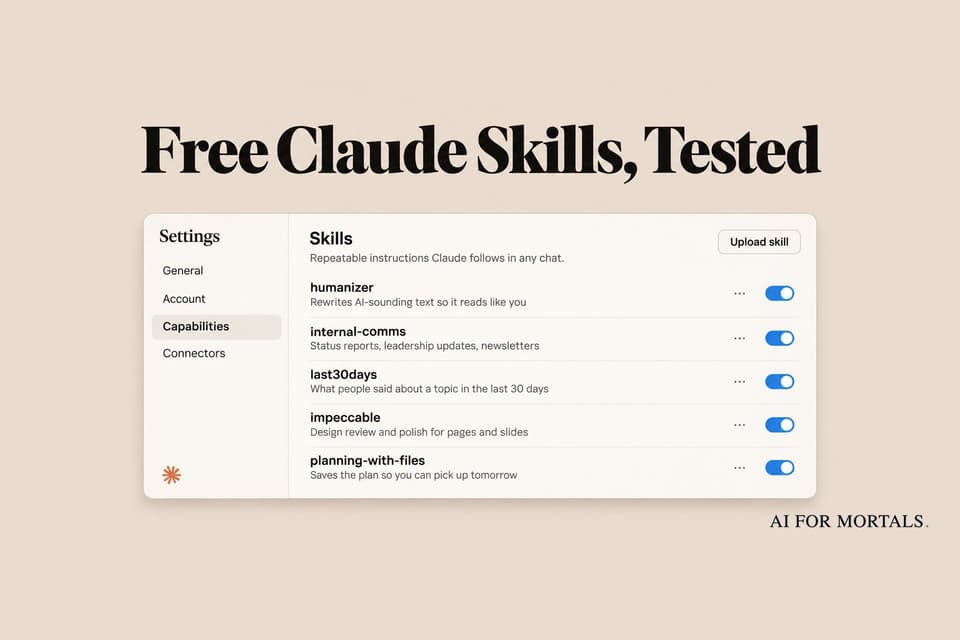
The Best Claude Skills for Office Work: We Tested 5 Free Ones Against Plain Claude
Hundreds of free Claude skills are floating around, and most lists never check whether they change anything. We installed five popular ones for writing, status updates, research, design review and long projects, ran each on a real work task next to plain Claude, and kept score.
 AI for Mortals Staff
On this page
- The short answer: which skills earned a spot
- What are Claude skills?
- How we tested five free Claude skills
- Planning with Files: Claude picked up where it stopped
- Impeccable: the design review that caught a wrong number
- last30days: real reactions, at twice the effort
- Internal Comms: a tighter update, with one problem
- Humanizer: plain Claude already did this
- How to use Claude skills you download
- Check a skill before you switch it on
- What people say about the skills worth keeping
The best Claude skills for office work are the ones that change what Claude hands back. Plenty of the free ones out there don't.
A skill is a small folder of instructions (sometimes with a script or two) that Claude reads when a task matches. People share them on GitHub by the hundred, and roundups of "50 skills you need" are everywhere this month.
So we installed five of the most popular non-coding ones, gave each a real work task, and ran the same task through plain Claude for comparison. Three made a real difference, one depends on how your team works, and one did nothing we could see.
The short answer: which skills earned a spot
| Skill | What it's for | Verdict |
|---|---|---|
| Planning with Files | Picking a long job back up in a new chat | Install it. It remembered where we stopped. |
| Impeccable | Reviewing the design of a page or report | Install it. It caught a label that misstated our numbers. |
| last30days | Finding what people say about a topic this month | Worth it for research, but slower and heavier. |
| Internal Comms | Weekly updates and status reports | Only if your team uses its format. |
| Humanizer | Making AI writing sound less like AI | Skip it on current Claude. Plain Claude did the same job. |
All five are free and open source. The rest of this post covers how we tested them, what each one changed and how to add the ones you want.
What are Claude skills?
A skill is a saved set of instructions for one kind of job. Its first few lines say what it's for, and Claude keeps only that short description in mind until a request matches. Then it opens the full instructions and follows them.
That's the difference from a Claude Project, whose files sit in the background of every chat inside it. A skill works in any chat, and only switches on when the job calls for it.
Skills are available on every Claude plan, including Free, under Customize > Skills. Anthropic's help page says the ones you turn on also work in Claude for Excel, PowerPoint, Word and Outlook, and in Claude Code when you sign in with the same account.

How we tested five free Claude skills
We wrote four sets of made-up but realistic work material: a stiff price-increase email to a client, a manager's messy Friday notes, a quarter of customer support numbers and three venue options for a team offsite. The fifth task was a research question.
Each task ran twice on Claude Opus 5.5 in Claude Code, each time in a fresh, empty folder. One folder had the skill installed and one didn't, and both got the exact same prompt. We also kept Claude from loading any of our own settings or other skills, so the only difference was the skill.
We picked five popular free skills from GitHub that suit office work:
- Humanizer, built from Wikipedia's guide to spotting AI writing.
- Internal Comms, from Anthropic's own skills library.
- last30days, which searches Reddit, YouTube, Hacker News and more for the past month.
- Impeccable, a design review and polish skill.
- Planning with Files, which keeps a project's plan and progress in files on disk.
Planning with Files: Claude picked up where it stopped
This was the test we cared about most, because it's the problem everyone has. You start a multi-day job with Claude, close the chat, and the next day it has no idea what you were doing.
We asked Claude to plan a team offsite in three steps (pick a venue, draft an agenda, write the invite) and to do only the venue that day. Then we opened a brand-new chat in the same folder and typed one line: "Let's pick the offsite planning back up."
Plain Claude had answered the venue question in the chat and saved nothing. In the new chat it said it couldn't find any earlier planning notes, and picked the venue all over again from scratch.
With the skill called by name, Claude wrote three short files on day one: a task plan with every step and its status, a findings file with the venue math and a progress log. Its "next step" line read: "Next session: start Phase 2 (draft the 2-day agenda for Pinecrest Inn). Book Pinecrest before Dec 15."
In the new chat it read those files first, went straight to the agenda and remembered the booking deadline. It even planned the day around the 2.5-hour drive it had flagged the day before.
When we only installed the skill and didn't name it, Claude never opened it, since the skill describes itself as being for jobs with five or more steps. Claude did save a simpler plan file on its own in those runs, so the session still picked up. To be sure it kicks in, start the job by typing /planning-with-files in front of your request.
/planning-with-files I'm planning [the project]. The whole job: [step 1], [step 2] and [step 3]. Today only do [step 1], then stop. We'll do the rest another day.
Let's pick the [project name] back up.
Impeccable: the design review that caught a wrong number
We had plain Claude build a one-page Q3 summary for a support team's leadership, then asked for a design review in a fresh folder, with and without Impeccable: "Review the design of q3.html and improve it."

Both versions had the same good idea. They split the six cards into the numbers that improved and the two that slipped, so the page shows "faster and busier, but quality slipped" before anyone reads a word.
Impeccable went a step further and caught a mistake. The satisfaction card said "Missed goal · −3 pts," which reads as missing the goal by 3 points. The goal was 90% and the score was 88%, so the miss was 2 points, and the 3 was the drop from last quarter. It changed the tag to "Missed 90% goal by 2 pts" and gave the drop its own line.
Plain Claude kept the confusing pairing ("3 pts, missed 90% goal").

Plain Claude also added a little chart to every card and a legend explaining the colors, which pushed the page from 241 words to 330. The Impeccable version came in at 259 words and still printed on one page, which it checked before finishing.
Impeccable is built for web pages and app screens. If you make reports, one-pagers or simple sites with Claude, it's the most useful of the five. If your work never leaves Word and PowerPoint, you can skip it.
/impeccable critique [file name]. Then fix what you found and save the new version as [new file name]. Tell me every number or label you changed.
last30days: real reactions, at twice the effort
We asked both setups the same question: what are people saying in the last 30 days about Claude for Google Workspace, and is it worth turning on for a 10-person marketing team?
Plain Claude searched the web for about a minute and a half and wrote a solid brief. It leaned on reviews and the add-on's store rating, and it found something useful for a marketing team: open bug reports saying the Gmail connection was rewriting links in sent emails into redirects that expire.
The last30days version took about four minutes and used a little over twice as much of our Claude allowance. It added far more from real people, pulling YouTube walkthroughs with their view counts, the top comments on Anthropic's launch video, a Reddit thread and the Hacker News discussion, and it said plainly that hands-on reports from real teams were still thin.
It also turned the help center's fine print into a table of gaps that matter for marketers, like comments in Docs being off-limits to Claude and charts in Slides arriving as flat pictures.
Neither brief was better across the board. Plain Claude found the sharper warning, and last30days gave a better picture of what people actually think. If your job involves a lot of "what's the reaction to X" questions, it's worth having.
Two things we noticed while it ran. It saves its raw research files to a Last30Days folder in your Documents, and one of its source links pointed to the wrong page, so click through before you forward anything. Without paid add-ons it searched Reddit, YouTube, Hacker News, GitHub and the web, and skipped X.
/last30days [topic]. I'm deciding whether [the decision you need to make]. Give me what people like, what they complain about and a short recommendation, with links.
Internal Comms: a tighter update, with one problem
Anthropic's Internal Comms skill gives Claude house formats for status reports, newsletters and FAQs. We handed both setups the same messy Friday notes about a spring catalog and asked for a weekly update to the manager.
Plain Claude wrote a 219-word email. It opened with the one thing the manager had to do, approve $1,800 for a photo reshoot, then listed progress, risks and next week.
The skill ran the notes through its "3P" format (Progress, Plans, Problems) and came in at 143 words, short enough to paste into Slack. It read well, but the approval request ended up in the third paragraph, under Problems, and it's the one line the manager most needed to see.
If your team already uses Progress, Plans and Problems updates, the skill saves you explaining the format every week. If not, plain Claude does fine with one extra line in the prompt.
Turn my notes into my weekly update for [manager's name]. Use Progress, Plans and Problems, and put anything I need from them in the first line.
Humanizer: plain Claude already did this
Humanizer is one of the most-starred skills on GitHub, with more than 60,000 stars. We gave it a stiff, AI-sounding client email announcing a price rise from $2,400 to $2,750 a month, packed with lines like "I hope this email finds you well!" and "Rest assured, our commitment to you remains unwavering."
Both versions came back almost word for word the same: a short note with the new price in the first lines, one sentence on why and an offer to talk it through. Neither dropped a fact.
Claude Opus 5.5 already strips those habits when you ask it to sound like a person, so we couldn't find a difference worth installing it for. If you care about how your writing sounds, a better use of the same idea is to teach Claude your own style from your edits.
How to use Claude skills you download
Most free skills live on GitHub as a folder with a file called SKILL.md inside. Here's how to add one to the Claude app:
- Open the skill's GitHub page, click Code, then Download ZIP, and unzip it.
- Find the folder that holds SKILL.md (in big libraries it's one folder among many) and zip just that folder.
- In Claude, go to Customize > Skills, choose Upload skill and pick the ZIP.
- Switch it on, then start a new chat and either mention the job it's for or type a slash and its name.
Humanizer and Internal Comms are plain instructions, so they upload to the Claude app as they are. The other three run small programs on your computer (Impeccable downloaded its own design checker from GitHub the first time, and Planning with Files runs a short script each time you send a message), so they're built for Claude Code. Each GitHub page has a one-line install for it.
Check a skill before you switch it on
A skill can tell Claude to run programs and reach the internet, and Anthropic's own help page says to read a skill's files before enabling one from a source you don't fully trust, including one a coworker sends you.
You don't have to read code to do that. Download the folder, open it in Claude Code or attach the files to a chat, and ask:
Read every file in this skill folder. In plain English, tell me what it does, whether it runs any programs, whether it sends anything over the internet and where it saves files. Flag anything I should worry about.
What people say about the skills worth keeping
In one of the busiest Claude threads this month, the skills people rave about are mostly ones they made themselves. One popular example turns a plain document into a Word file or deck with all the company's fonts, logos and headers, and its maker says they've almost stopped working in Word directly. Another runs at the end of every chat and saves what Claude got wrong, so the same mistakes stop coming back.
That matches what we saw. The skills that helped us gave Claude something it lacked (files to remember a project, a design checklist, sources it doesn't usually search). The ones that only told Claude to write better added little, because current Claude already writes that way.
Skills reach well past documents, too. Pat gave GPT-6 Astra a set of video-editing skills and had it cut his own talking-head clips in Premiere:
If you want the same kind of help on the pages Claude makes for you, our test of one GitHub link that makes Claude's reports easier to read does a similar job with no install at all.
Sources
- Use skills in Claude (Claude Help Center)
- What are skills? (Claude Help Center)
- Agent Skills overview (Claude docs)
- Anthropic's skills library, including Internal Comms (GitHub)
- Planning with Files (GitHub)
- Impeccable (GitHub)
- last30days (GitHub)
- Humanizer (GitHub)
- Drop your best Claude skills in here (r/ClaudeAI)




Comments
Sign in to join the conversation.