ChatGPT Is Merging Its Chat and Work Tabs Into One
OpenAI is folding ChatGPT's Work tab into regular chat, and from December the Plus, Pro and Business plans share one usage allowance across ChatGPT and Codex. Here's what the merged ChatGPT does, how the new limits work, and why Plus subscribers are the ones to watch their meter.
 AI for Mortals Staff
On this page
OpenAI told users in an email on November 2 that it's merging the Chat and Work tabs in ChatGPT. The place where you talk through an idea will also be where ChatGPT takes on longer jobs for you, like building a website, making a presentation or doing things on the web.
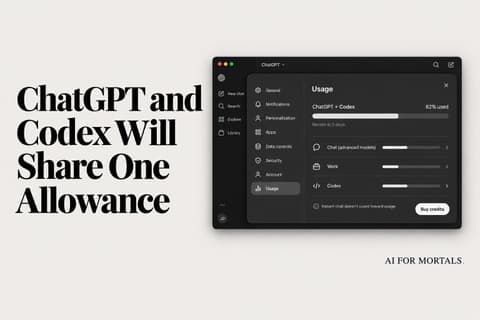
The merge comes with a change to ChatGPT Plus usage limits, and to Pro and Business too. From December, those plans get one allowance shared across ChatGPT and Codex, OpenAI's coding agent.
A small group of users gets the combined version first to give feedback, before it rolls out more widely. The email gives no date for the wider rollout.
What the merged ChatGPT does that Chat couldn't
Today the ChatGPT desktop app has a ChatGPT section and a Codex section, and inside ChatGPT you choose between a Chat tab and a Work tab. Start a project in the wrong one and you go looking for it later.
After the merge, one conversation covers both. OpenAI's email says you can bring in your files and plugins and "ask ChatGPT to build a website, create a presentation, or do things for you on the web, while reviewing and guiding its work."
Codex stays a separate section of the ChatGPT desktop app.
Anthropic made the same move first. In September it put Claude's chat and Cowork, its agent for longer jobs, on one screen, where Claude decides which one a request needs so you don't have to pick a tab. OpenAI first said on October 6 that Chat and Work would merge, as part of a month of promised ChatGPT and Codex updates.
How ChatGPT usage limits work today
Right now regular chats have their own limits. OpenAI's model help page says usage rules in Work and Codex are separate from Chat.

That means a heavy week in Codex can empty the Work and Codex bucket while your everyday chats keep going on their own limits.
What changes in December: one allowance, counted in tokens
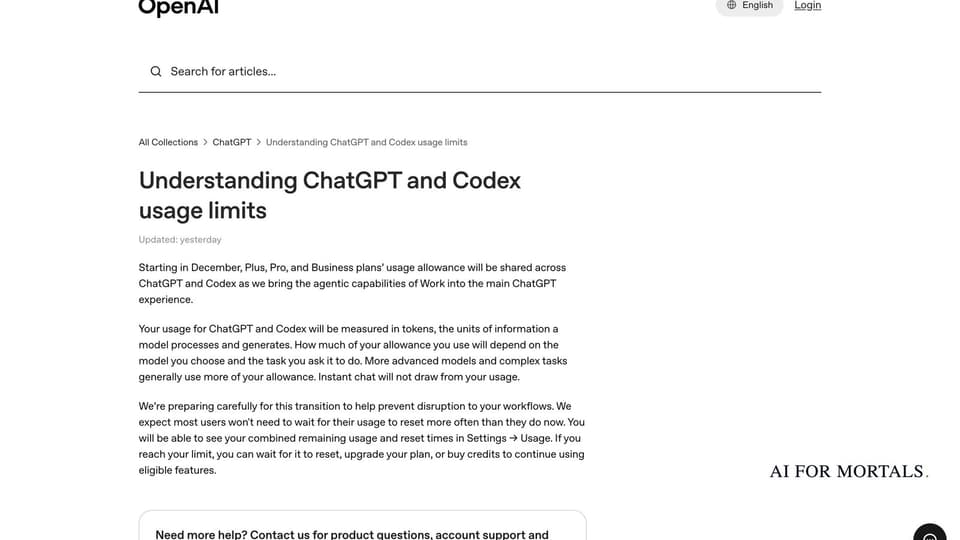
From December, chats join Work and Codex in a single allowance on the Plus, Pro and Business plans. OpenAI's help page doesn't mention the free plan or Go, the cheapest paid one.
Usage will be measured in tokens, the units of text the AI reads and writes. A stronger model or a harder task uses more of the allowance, while chats in Instant, the quick-answer setting, don't count at all.
You'll see what's left and when it resets in Settings → Usage. We broke down the help page line by line in our post on ChatGPT and Codex sharing one allowance.
What happens when the shared allowance runs out
When you hit the limit, you can wait for it to reset, upgrade your plan or buy credits. Credits kick in after your plan's included usage is gone.

OpenAI says it expects most people to wait for resets about as often as they do now. It hasn't said how big the shared allowance will be next to the two separate ones people have today.
Why ChatGPT Plus subscribers are the most likely to run short
OpenAI doubled Work and Codex usage on its Pro plans last week, and left the $20 Plus plan as it was.
So Plus subscribers are the most likely to run out sooner once everyday chats and Work jobs draw from one pool. Someone who chats with the stronger models all day and also runs Codex or Work jobs is putting two habits on one meter.
How to make one shared allowance last longer
Because Instant doesn't touch the meter, quick questions, rewrites and lookups cost nothing there. Save the stronger settings for chats that need them.
In Work and Codex, the model you pick changes what each job costs. OpenAI built GPT-6.1 Terra, a faster, cheaper model for routine computer work that you choose from the model menu in Work or Codex. OpenAI says a paid plan covers far more tasks with Terra than with GPT-6 Astra, its top model.
Once December comes, Settings → Usage will show one number with a reset time. Checking it after a big job is the quickest way to see which habit is using up your allowance.
Here's our hands-on with GPT-6 Astra, so you can judge which jobs are worth spending the top model on:
Sources
- TechCrunch: OpenAI is finally merging ChatGPT's Chat and Work tabs
- OpenAI Help: Understanding ChatGPT and Codex usage limits
- OpenAI Help: GPT-6 and other models in ChatGPT
- OpenAI Help: Using credits for flexible usage in ChatGPT
- ZDNET: OpenAI will merge ChatGPT's chat and work tabs
- TechCrunch: Anthropic merges Claude chat and Cowork in one interface



Comments
Sign in to join the conversation.