ChatGPT's New Image Model Makes Animated GIFs
OpenAI's Images 2.6 turns ChatGPT into a GIF maker: ask for an animation in one line or upload a photo, then change the speed and fix single frames right in the chat. Here's how it works, prompts to try and what else got faster.
 AI for Mortals Staff
OpenAI is rolling out Images 2.6, the new version of ChatGPT's image maker, and it turns ChatGPT into a GIF maker. You can make a ChatGPT GIF from a one-line request or from a photo you upload, then change how fast it plays and edit single frames before you share it.
OpenAI says Images 2.6 is available in ChatGPT and Codex on every plan, on the web and in the desktop and phone apps.

How to make a GIF in ChatGPT
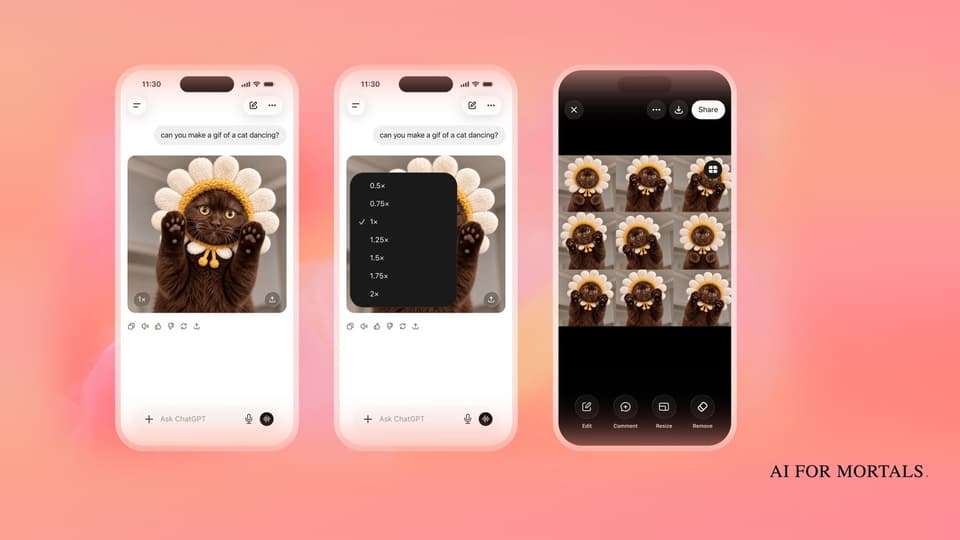
You ask for it in plain words. OpenAI's own demo is the request "can you make a gif of a cat dancing?", and ChatGPT answers with a short looping animation of one cat in a flower hat, made from a run of slightly different frames played in order.
Under the GIF sits a speed button. Tap it and you can pick anything from half speed (0.5x) to double speed (2x).
Open the GIF and ChatGPT lays every frame out in a grid, with Edit, Comment, Resize and Remove buttons along the bottom. That's where you fix the one frame where the cat's paw looks wrong, or drop a frame that makes the loop jump.
When it looks right, you share it or download it from the same screen.
Prompts to try for a work GIF
OpenAI suggests GIFs for animating a brand mascot, making reactions and memes for social media, turning a product shot into a loop and sketching out how a character moves before anyone films a video.
Its own example prompts describe the motion beat by beat, keep the character and background the same in every frame, and ask for the last frame to lead back into the first so the loop doesn't stutter. You can copy that pattern:
- A Slack reaction: "Make a looping GIF of a small cartoon coffee cup that slowly fills up, smiles, then gives a thumbs up. Keep the cup and background exactly the same in every frame, and make the last frame flow back into the first."
- A product loop from a photo: upload a product photo and say "Turn this into a short looping GIF where the bottle slowly turns to the right and back. Keep the label, colors and lighting exactly the same."
- A wave for an email header: "Make a GIF of our mascot, a round green owl, waving hello. White background, no text, a smooth loop."
A drawing works too. OpenAI shows a pen sketch of an owl on lined notebook paper turning into an animated owl.

Why the same cat stays the same cat
A GIF only works if the subject looks identical from frame to frame. In OpenAI's demo, the cat keeps the same face, hat and collar across the loop. OpenAI says Images 2.6 keeps characters, products and brand details consistent as you edit.
That builds on September's Images 2.5 update, which got better at changing only what you asked for while keeping the rest of a picture the same, and added comments you can pin to an image for a targeted fix.
Before this update, ChatGPT couldn't make a GIF in one step. Now the whole thing, frames included, comes out of one request and stays in one chat.
Regular images got faster too
OpenAI's launch post says Images 2.6 makes images 50% faster than before, so the change shows up even if you never make a GIF.
For developers, the API gets two versions. GPT-Image-2.6 Flare is the quick one, and OpenAI says it can make an image in as little as six seconds on low quality. Sunburst is the higher-quality one and keeps details more consistent from one edit to the next on medium or high quality.
People now make 4 billion images a week across ChatGPT, Codex and the API, OpenAI says, up from 3 billion in September.
If you use Codex, the same model is in there now. Here's what each ChatGPT plan gets in Codex.
Where a ChatGPT GIF earns its place at work
OpenAI hasn't said how many GIFs each plan can make in a day.
The frame grid is what makes this work for office use. When you want a reaction for Slack, a looping product shot for a landing page or a wave at the top of a newsletter, you can make it in one ChatGPT request and fix the one frame that looks off before anyone sees it.
If you're picking an image tool in the first place, our test of ChatGPT Images 2.0 against Nano Banana on 50+ prompts shows where each one wins.
Canva also now has its own homemade image model built into its design editor.
Sources
- OpenAI: Introducing Images 2.6
- OpenAI Developers on X: GPT-Image-2.6 in Codex and the API
- The Verge: ChatGPT will now make you animated GIFs
- The Decoder: ChatGPT can now turn text prompts and photos into animated GIFs
- Unite.AI: ChatGPT adds animated GIF creation and editing with Images 2.6
- OpenAI: Introducing ChatGPT Images 2.5


Comments
Sign in to join the conversation.