
Gemini in Your Car Can Now Answer From Your Gmail, Calendar and Photos
Google is bringing Personal Intelligence to Android Auto, so Gemini can check your email, calendar and photos while you drive and answer questions about your own plans out loud.

Google is bringing Personal Intelligence, the Gemini setting that lets it look through your Gmail, Google Calendar, Google Photos and Maps, to Android Auto, the app that puts your Android phone on your car's screen.
Gemini was already in Android Auto, where you can talk to it while you drive to get things done or think through an idea. What's new is that it can now answer questions about your own plans: your flight, your appointments, the places in your photos.
It's rolling out now on Android Auto, according to Google's announcement, and comes to cars with Google built-in, the ones that run Google's software right in the dashboard, in the coming months.

Five things you can ask Gemini from the driver's seat
Google says Personal Intelligence does two jobs. It pulls one specific detail out of an email, a photo or a place you saved in Google Maps, and it puts several of those together to answer a bigger question. With your hands on the wheel, that means you can ask for things you'd normally have to dig up on your phone.
These are the five examples in Google's post:
- "What's my flight gate? And is my flight on time?" Gemini finds the confirmation email and checks for delays, so you get both answers at once.
- "Take me to my doctor's appointment." Gemini finds the appointment and starts directions, so you don't have to remember or look up the address.
- "Find the car wash from the photo I took last week and navigate there." Gemini goes through your Google Photos for the place, so you don't have to pull over and scroll your camera roll.
- "Find me an indoor restaurant along my route that matches my usual vibe." Gemini uses what it knows about your tastes to shortlist places on your way. If you're vegetarian, Google says the shortlist fits that.
- "Take me to the coffee shop we were talking about yesterday." Gemini picks up the place from the conversation you had with it the day before and starts directions.
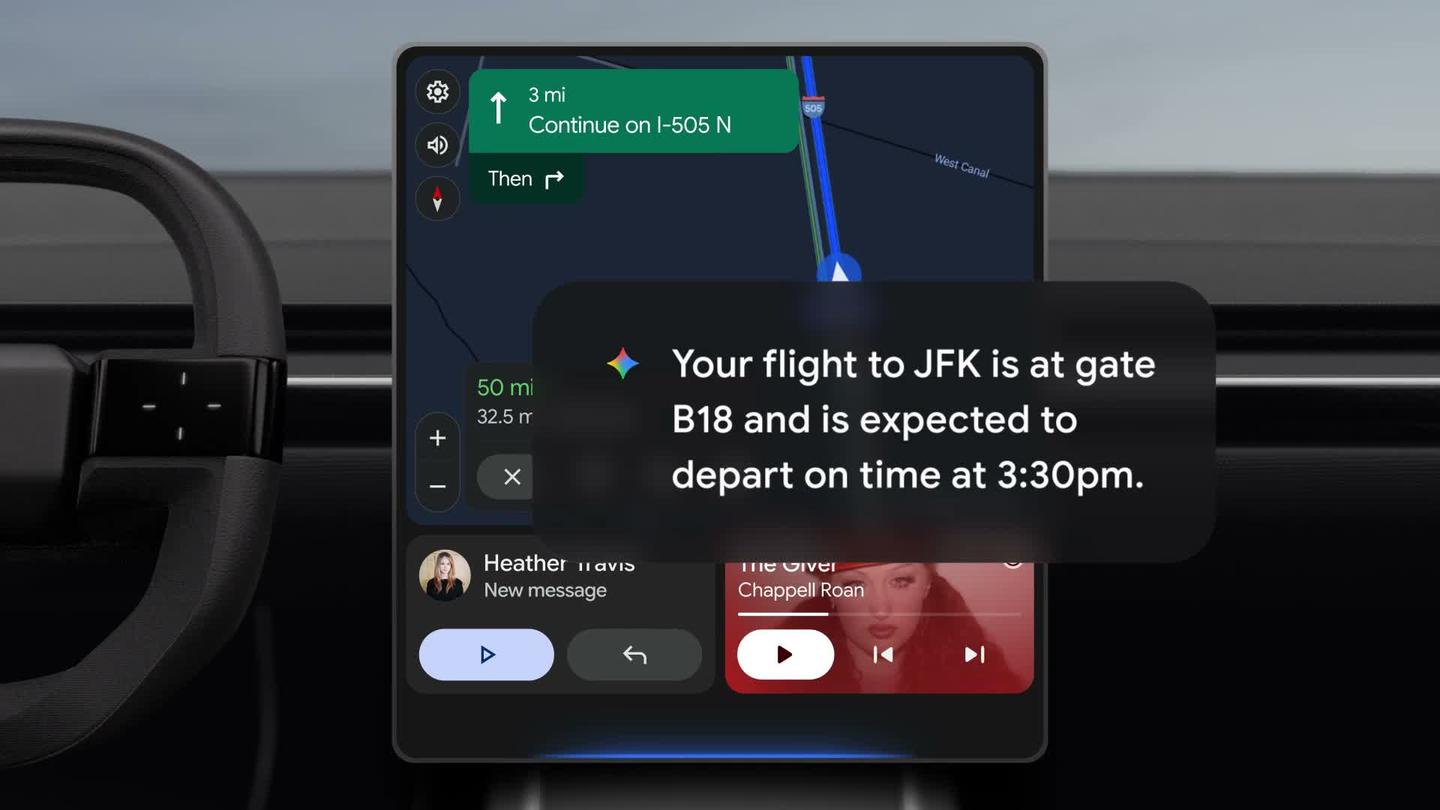
Google's demo video carries a note that these results are examples and that you should check what Gemini tells you. That's worth doing with a gate number, since gates change.
Turn it on in the Gemini app before you drive
Personal Intelligence stays off until you turn it on, and you do that in the Gemini app on your phone or at gemini.google.com, before you get in the car.
On the web, Google's help page says eligible accounts see a card offering Personal Intelligence. You click Get started, then choose Connect all to link every available app, or Choose apps to pick only the ones you want.
You need three things for it to work: you're 18 or older, you're signed in with a personal Google account, and the Gemini setting Keep Activity is on, which saves your Gemini chats to your Google account so Gemini can draw on them later.
Once it's on in the Gemini app, it comes with you into the car with nothing else to set up. You can turn it off anytime in your Gemini settings.
If you'd rather not use it, everything else in the car keeps working. Google says you can still navigate, play music, make calls and ask questions, and the answers just won't be about you.
Who gets it, and where it isn't available yet
Personal Intelligence is rolling out to personal Google accounts for people 18 and up in every country except those in the European Economic Area (the EU plus Iceland, Liechtenstein and Norway), the UK, Switzerland and Nigeria.
Work and school accounts are left out, since Google excludes Workspace business, enterprise and education users.
In the US it's free. In March, Google opened Personal Intelligence to everyone in the US at no cost in the Gemini app, Gemini in Chrome and AI Mode in Search, after it had been a paid feature. Google's car announcement doesn't list a price anywhere else.
Google's announcement covers Android Auto and cars with Google built-in and doesn't mention iPhones or Apple CarPlay. In cars with Google built-in, Google says Gemini only gives personal answers when you're in the car with your phone connected.
What Gemini can see once you connect your apps
The apps you can connect go beyond the five in the car demos. Google's page on connected apps lists Gmail, Calendar, Drive, Docs and the rest of Google Workspace, plus Maps, Search, YouTube, Google Photos and Google Wallet.
That page also says what Google does with the data. It uses it to build a picture of you, your relationships and the people in your life, to do things for you, and to improve Google's services, including training its AI models. Some of it can be read by human reviewers under the Gemini privacy notice.
In March, Google said that Gemini doesn't train directly on your Gmail inbox or your Google Photos library, and it trains on what you ask Gemini and how Gemini responds. So what you say to Gemini in the car, and what it says back, is the part that can be used for training.
One more thing to know if you change your mind later. Disconnecting an app doesn't delete your saved Gemini chats (Google calls them Gemini Apps Activity), which you manage and delete separately in your Google account.
Personal Intelligence has been free in the Gemini app for everyone in the US since March, and it stays off until you turn it on in the Gemini app's settings, after which it works in the car too.
Letting an AI see your own apps is what made Meta's Muse app stand out when I tested three AI agents that run errands for you: xAI's Grok Bot, OpenAI's Dots and Muse. Muse can connect to my contacts, my health data, my Peloton workouts and my Spotify, and having all of that information made it feel much more like a personal assistant.
Now Gemini gets that same view of your Gmail, calendar and photos, right in the car.
Gemini can already pull from your whole Drive and Gmail in the Google Docs sidebar (the same sidebar we looked at next to Claude's new add-on for Google Docs), and now it can do the same from the driver's seat, where you can't look anything up yourself.
Here's the video where I gave Grok Bot, Dots and Muse the same three jobs:
Sources
- Google: Get hands-free personalized help on the road with Gemini
- Google on X: Personal Intelligence in Android Auto
- Google Gemini Help: Personal Intelligence requirements and setup
- Google Gemini Help: About personalization with Connected Apps
- Google: Personal Intelligence in Gemini
- Google: Android Auto and cars with Google built-in updates
- TechCrunch: Google's Personal Intelligence feature is expanding to all US users



Comments
Sign in to join the conversation.