
GLM 5.2 and Kimi K3 are two of the cheapest strong coding models available right now. Both cost far less than Claude and GPT, and both are good enough to ship. I gave them the same six build jobs side by side and logged the real cost and time for each.
Which one is cheaper flips completely depending on the job. Below is every prompt, each model's output, what each build cost, and how I'd route work between them.
What I tested
Six builds, the same prompt handed to each model, no hand-holding and no follow-up steering. Three of them are heavy graphics and simulation jobs: a 3D product site, a WebGPU storm sea, and a physics archery game. The other three are the knowledge work most people do all day: a researched report, a design showcase site, and a full brand identity system.
The graphics builds ran in each model's desktop coding app. The three knowledge-work builds ran headless from the command line on the same subscriptions. Same models, same prompts, both sides. I logged real token counts and real dollars for every build after it fully finished, because the running cost meter lies until the model stops.
Test 1: Storm sea (WebGPU ocean)
This build is a physically simulated 3D scene in raw WebGPU, built from nothing with no imported models or textures. Everything is drawn in code.
The first was a stormy open sea from The Odyssey. Controllable weather, five Gerstner waves, rain, lightning, and Odysseus' galley riding the swell, its hull solved against the wave heights so it pitches and rolls. Here is the exact prompt both models got:
# Build Prompt — Odyssey Storm Sea

A single build. Procedural open-sea graphics test, themed to _The Odyssey_: a stormy
sea you control, with Odysseus' ship riding the swell. Everything is generated in code
— no imported models, textures, or assets, including the ship.

---

You are a world-class WebGPU, Three.js, and TSL graphics engineer; create a
production-quality full-screen procedural open-sea experience.

Deliver a directly runnable index.html and main.js using native ES modules, with no
framework, build step, image texture, HDRI, model, or video.

Use WebGPURenderer and TSL to displace a dense plane with exactly five Gerstner waves
and derive stable analytic swell normals.

Add animated gradient-noise FBM for capillary detail, then shade deep water, Fresnel
reflections, backlit crests, sun glitter, foam, and horizon haze.

Use one analytic sky function and shared uniforms for both the sky dome and water
reflection, including sun disk, halo, clouds, and time-of-day palettes.

Include TSL bloom, ACES tone mapping, damped OrbitControls, slow drift, and controls
for sea state, time of day, drift, and live FPS.

Handle WebGPU detection, loading and failure states, resize, touch input, capped DPR,
hidden-tab pausing, accessibility, and performance safeguards.

Return complete executable code and brief launch instructions, with no placeholders,
invented APIs, console errors, or hidden fallback rendering.

## Additional requirements — the Odyssey storm

**Controllable weather — one master `stormIntensity` (0 → 1).** A single slider drives
the whole scene from dead calm to full tempest; everything below is a continuous
function of it. Expose it alongside sea state, time of day, drift, wind direction, and
live FPS.

As `stormIntensity` rises:
- **Sea:** Gerstner wave amplitude and steepness ramp up (choppier, taller, sharper
  crests); whitecap **foam** thresholds lower so more crests break into foam; capillary
  FBM detail intensifies.
- **Sky:** the time-of-day palette darkens and desaturates toward slate-grey/green; the
  analytic clouds thicken, lower, and blacken into a cumulonimbus ceiling; the sun disk
  dims and reddens.
- **Wind:** a `windDir` vector stretches wave anisotropy and blows **spray** off the
  crests and a **rain** system (see below) along the wind direction.
- **Rain:** GPU-instanced streaks (elongated along velocity), density and speed scaled
  by intensity, with a subtle screen-space wet/mist fog near the camera at full storm.
- **Lightning:** intermittent strikes — a brief full-scene **emissive flash** + a
  temporary high-intensity light that momentarily lights the sea and the ship from the
  flash direction; mix sheet (sky glow) and occasional fork (a jagged procedural bolt).
  Optional **Web Audio** thunder crack, delayed after the flash. No imported assets.

**Odysseus' ship — built entirely in code** (procedural geometry only): a Homeric-era
Greek galley, constructed from primitives —
- **Hull:** a lofted/curved dark-wood hull with a **high curved sternpost and prow**;
  an **oculus (painted eye)** on the bow.
- **Mast + yard** carrying a **square sail** rendered as a subdivided plane that
  **billows** via noise/simple cloth deformation driven by `windDir` and intensity; at
  high storm it snaps taut, luffs, and **tears** (torn edge / flapping strips).
- **Oars** in banks along both sides.
- **Buoyancy:** sample the Gerstner surface **height and normal at several points along
  the hull** (bow, stern, port, starboard) each frame and solve the ship's **heave,
  pitch, and roll** from them, so it genuinely rides and slams through the swell — more
  violent as intensity rises. Add a **bow wake** and foam where the hull meets water.
- **Figures:** suggest Odysseus and his men as simple low-poly silhouettes on deck,
  bracing against the pitch.

**Camera:** a smooth **damped** rig that can follow the ship (framing it against the
storm) or free-orbit; slight camera shake on nearby lightning.

**Keep everything procedural** — no image textures, HDRI, models, or video anywhere,
including the ship, sail, rain, spray, lightning, and figures. Preserve all the runtime
handling above (WebGPU detection, loading/failure states, resize, touch, capped DPR,
hidden-tab pause, accessibility, performance safeguards, live FPS).
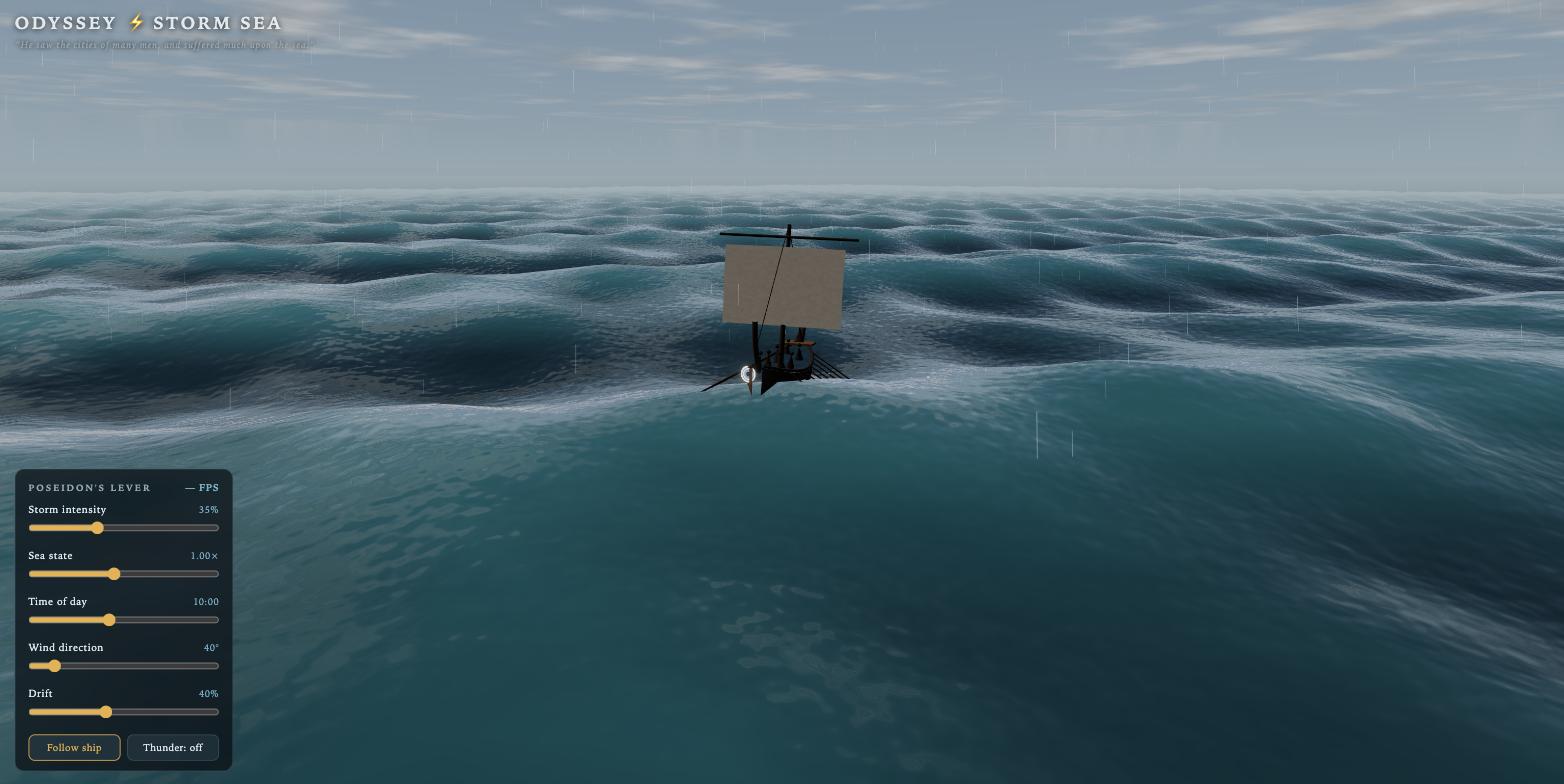
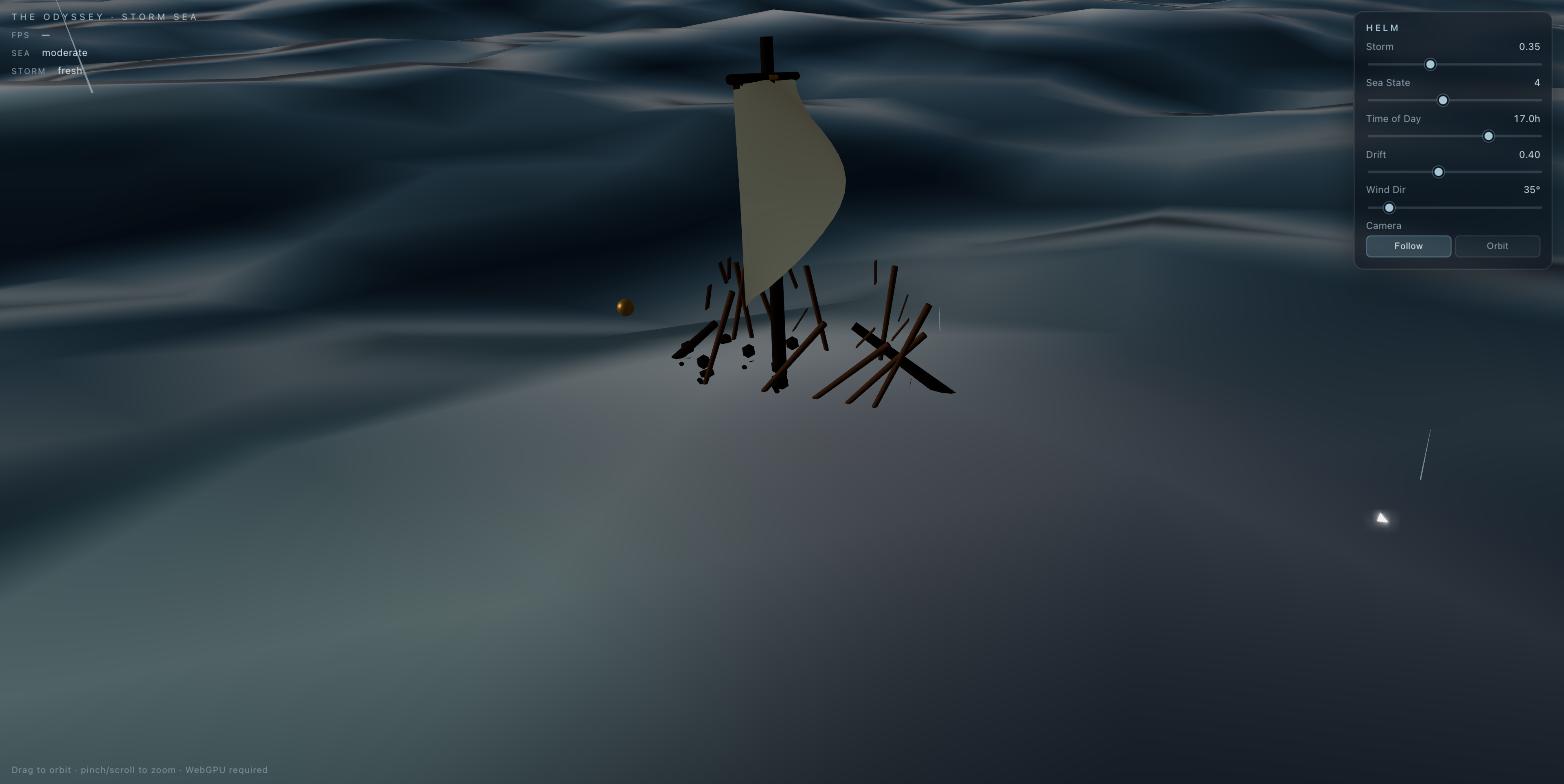
Kimi K3 built a real galley (a curved hull with a mast, a square sail, and banks of oars) floating on a turquoise procedural ocean with rain streaking past. GLM 5.2 got the ocean mostly right, but its ship came apart. The hull never assembled; it renders as a loose pile of scattered planks under a floating sail.
Test 2: Archery game (axes)
The second heavy build was a playable archery game: draw a real force-draw curve, loose one arrow, and thread it through twelve aligned axe-heads, with swept collision so the fast arrow can't tunnel through the rings. Every bit of it built procedurally in code.
# Build Prompt — Odysseus and the Trial of the Bow

This is a playable 3D archery game of Odysseus'
famous shot from the _Odyssey_: draw the great bow and send a single arrow through
twelve aligned axe-heads.

---

You are a world-class WebGPU, Three.js, and TSL graphics engineer AND game developer;
create a production-quality, fully playable 3D archery game: **Odysseus and the Trial
of the Bow.**

Deliver a directly runnable index.html and main.js using native ES modules, with no
framework, build step, image texture, HDRI, model, or video. Everything — the bow, the
arrow, the axes, the hall, the figures — is built procedurally in code.

## The game
The player is Odysseus in the great hall of Ithaca. Twelve bronze axe-heads stand
upright in a row down the hall, each with a ring/socket hole, **all holes aligned**.
The goal: **draw the bow and shoot one arrow cleanly through all twelve holes.**

**Core mechanic — draw and release:**
- **Draw:** press-and-hold (mouse/touch) to draw the bowstring back. Model a real
  **force–draw curve** — string tension rises with draw length and stores elastic
  energy; the bow visibly bends and the string pulls taut. Holding too long introduces
  a **noise-driven aim sway** (simplex "breathing" that grows with hold time), so a
  perfect shot requires timing, not just full power.
- **Aim:** move to aim; give a subtle aiming reticle and a faint **ballistic
  trajectory-arc preview** sampled from the same physics model (assist toggle).
- **Release:** let go to loose the arrow. Launch velocity comes from the stored draw
  energy. The arrow flies with **gravity, quadratic aerodynamic drag, and
  fletching-stabilized spin (angular momentum)**, plus a subtle **archer's-paradox**
  flex as it leaves the bow.
- **Physics loop:** integrate with a **fixed-timestep accumulator** (semi-implicit
  Euler or Verlet) so the simulation is stable and deterministic regardless of frame
  rate.
- **Collision:** use **continuous / swept collision detection** — raycast the
  arrowhead along its travel each substep — so the fast arrow cannot **tunnel** through
  the thin aligned rings. Test passage through each ring's inner radius vs. striking
  the blade. Passing all twelve = win; clipping any axe = miss. Score each pass by how
  centered the arrow threads the ring.

**Feel & feedback:**
- On release, a brief **time-dilation slow-motion** (scale delta time, not
  frame-skip) with an **arrow-cam** that follows the arrow down the line of axes, plus
  a motion trail.
- Clear **win** (arrow threads all twelve, the hall reacts) and **miss** (which axe it
  hit) states, and a quick retry.
- Optional: **Web Audio synthesized** SFX — bow creak on draw, string twang on
  release, arrow whoosh, thunk on hit (no imported audio files).
- Optional: suitors watching in the background; a shot counter / best streak.

## Rendering quality (hold this bar)
- Use **WebGPURenderer** and **TSL**. **ACES filmic** tone mapping and **TSL bloom**.
- **PBR metallic-roughness** materials: high-metalness anisotropic **bronze**
  axe-heads with **Fresnel rim light**, procedural **wood-grain** (noise) on the bow
  and hall beams, **FBM / triplanar stone** for the walls and floor.
- Torch-lit atmosphere: **noise-driven torch flicker**, **volumetric light shafts /
  god rays**, **emissive flames** with bloom, **depth-based haze** down the hall, and
  **instanced dust motes** drifting in the light.
- **Soft shadows (PCF / shadow maps)** and **ambient occlusion**. Use **instanced
  rendering** for the twelve axes, the watching suitors, and particles.
- Camera: a **critically-damped spring** rig — over-the-shoulder aim → arrow-cam on
  release → ease back on retry. **Depth-of-field focus pull (bokeh)** during the
  slow-mo, a subtle **FOV kick** on full draw, and **camera shake** on release.
  (Free-orbit allowed for replay only.)

## Runtime handling (required)
Handle WebGPU detection with a graceful message, loading and failure states, window
resize, touch input, capped DPR, hidden-tab pausing, accessibility (keyboard-playable
alternative to draw/aim/release, reduced-motion option), and performance safeguards.
Show a live FPS readout and a difficulty/assist control (arc hint on/off, waver
amount).

## Deliverable
Return complete, executable code and brief launch instructions — no placeholders, no
invented APIs, no console errors, no hidden fallback rendering. The game must actually
be playable and winnable.
Both models produced something playable, but Kimi did it far more cheaply, and GLM ground on the physics for hundreds of turns to get there.
Test 3: Camera teardown site
The lightest graphics build (a scroll-driven product site for a film camera that disassembles into an exploded view as you scroll) went to GLM, and cheaply. Here is that prompt:
# Build Prompt — The Keighley Camera Site

One self-contained prompt. Everything needed is below — all facts, all specs, the full
scroll experience. Do not invent specifications or quotes; use only what's written
here.

---

You are a world-class creative front-end engineer and 3D web developer. Build a
single-page, scroll-driven website about **The Keighley** — the new IMAX film camera
Christopher Nolan used to shoot _The Odyssey_, the first feature film shot entirely on
IMAX. The **camera is the centerpiece**: a detailed 3D camera the visitor explores,
that **disassembles into an exploded view as they scroll** and reassembles at the end.

Deliver a directly runnable `index.html` + `main.js` (+ CSS) using native ES modules.
Use **Three.js** for the 3D. Build the camera and all geometry **procedurally in code**
from primitives (no imported 3D models, no image textures, no HDRIs) — there is no
public blueprint of this camera, so construct a clean, stylized-but-believable version
from the described parts. Complete, runnable code — no placeholders.

## The 3D camera model (build these parts, procedurally)
A large-format film camera, roughly cuboid body with a lens barrel on the front. It
must be made of nameable, separable parts so the exploded view can pull them apart:
1. **Carbon-fiber body** (dark, woven-look via procedural shading) — compact, centrally
   balanced.
2. **Lens barrel** at the front.
3. **Film magazine** on top/back (the reloadable film chamber).
4. **The film path + gate** — the horizontal channel the 15/70 film runs through.
   Animate film moving through it.
5. **Side LCD telemetry screen** — a glowing panel on the body (see the readout below).
6. **Reflex viewfinder** with a small **video-tap** module.
7. **The "blimp"** — a separate coffin-like acoustic housing the whole camera drops
   into (appears in its own section).
8. **The mirror periscope** — a small twin-mirror arm that mounts beside the lens
   (appears in its own section).

## Scroll experience — section by section (be exact)

**1 — Hero.** The fully assembled Keighley, slowly rotating, dramatically lit against
near-black. Oversized headline: **"THE KEIGHLEY."** Subhead: _"The camera behind the
first film shot entirely on IMAX."_ A small scroll cue.

**2 — The format.** As the user scrolls, the camera moves to center and the **film
threads through the gate and magazine**, running horizontally. Copy: _"15-perforation
65mm film — 'IMAX 15/70,' the largest format in cinema. It moves more than five feet of
film every second. That speed is exactly why it's so loud."_ Animate the film moving;
tie its speed subtly to scroll.

**3 — Exploded view (the core beat).** The camera **breaks apart** — each part floats
out to its own position and draws a thin leader line to a label + spec. Reveal, one at
a time as they scroll:
- **Carbon-fiber body** — _"Compact, centrally balanced — a ground-up redesign of a
  camera that hadn't changed in decades."_
- **Film magazine** — _"Holds only 2.5–3 minutes of film per load before a reload."_
- **Side LCD screen** — render a live-looking readout showing: **FILM REMAINING**,
  **TEMP ~20°C** (_"held near 20°C to protect the ESTAR film emulsion"_), **VOLTAGE**,
  **SHUTTER ANGLE**. Copy: _"A digital telemetry screen on a pure film camera — the one
  modern touch."_
- **Reflex viewfinder + video tap** — _"A high-resolution video tap feeds external
  monitors for Nolan and cinematographer Hoyte van Hoytema."_

**4 — The noise problem & the blimp.** The reassembled camera **lowers into the
coffin-like "blimp."** Copy: _"Even 30% quieter than the old cameras, it was still too
loud for dialogue. So IMAX built a soundproof housing — the 'blimp.' Fully rigged, the
system weighs 300–400 lb and needs steel-plated dollies to move."_ Show scale/weight
(e.g. a weight readout, or the dolly).

**5 — The mirror periscope.** The **twin-mirror arm** mounts beside the lens; animate a
sightline bouncing through the two mirrors. Copy: _"The blimp was so wide it blocked the
actors' eyelines. On tight two-shots between Matt Damon and Anne Hathaway, Nolan and van
Hoytema mounted a double-mirror periscope so the actors could hold eye contact through
reflections — with the huge camera between them."_

**6 — The Odyssey.** Camera settles; a quiet, cinematic full-bleed section. Copy pulls
these facts (state them plainly, no fluff):
- _"Spring 2024: Nolan challenged IMAX's CEO to build a camera that could shoot an
  entire feature — dialogue and all. They delivered within a year."_
- Pull-quote, **Nolan verbatim:** _"If ever there were a story where you want to do the
  whole thing on IMAX, this is it."_
- _"The Odyssey is the first theatrical feature shot entirely on IMAX film."_
- Three stat callouts, animated count-up: **2,000,000+ feet of film shot** · **6+
  countries** (Morocco, Greece, Italy, Iceland, Scotland, Malta) · **Feb–Aug 2025.**

**7 — Named for the Keighleys (the closer).** The camera reassembles fully, back to the
hero pose, now still. Copy: _"The camera is named for David Keighley — IMAX's first
Chief Quality Officer, five decades at the company, post-production on over 500 IMAX
films — and his wife Patricia. David died on August 28, 2025, at 77, days after
finishing his review of the Odyssey dailies."_ Understated, respectful. End card:
**"THE KEIGHLEY."**

## Design system (specific)
- **Palette:** near-black background (#0a0a0a), bone white (#f4f1ea) text, a single
  warm **film-amber** accent (#e8a33d) for highlights/leader lines, brushed metallic
  greys for the camera.
- **Type:** oversized condensed grotesque display headlines (very large, tight
  tracking), clean sans for body. Big scale contrast between headline and caption.
- **Motion:** scroll-scrubbed and eased (the 3D disassembly maps to scroll progress —
  scrubbing up reassembles). Parts float with gentle inertia. Nothing abrupt.
- **Micro-interactions:** hovering a floating part **highlights it, dims the rest, and
  pops its spec**; leader lines draw on as sections enter; the LCD readout subtly
  animates; stat numbers count up on enter; a thin scroll-progress indicator.
- **Lighting:** one dramatic key + soft fill, subtle rim light on the metal, faint
  bloom on the LCD glow and amber accents. Cinematic, restrained.

## Copy rules
Factual and plainly stated — the specs and the story carry it. No marketing adjectives,
no jokes.

## Technical requirements
Native ES modules, no build step. Fully responsive (rework the exploded layout for
mobile — stack parts vertically, keep it legible). Respect `prefers-reduced-motion`
(disable scrub-scrubbing, present the parts statically). Handle WebGL detection with a
graceful message, window resize, and capped DPR. Smooth 60fps — throttle heavy work,
pause when the tab is hidden. Avoid generic cards, stock imagery, and glassmorphism.
Return complete, executable code and brief launch instructions.
GLM built it for a fraction of Kimi's cost.
Test 4: Research report
These are the jobs a normal week is made of: research something and write it up, design a page, build a brand. First, a research report (are data centers bad for the environment, with a focus on water use) delivered as a single designed HTML document with self-built charts and a source cited for every number.
# Lightning Round — Test 1: Research Report

Blind side-by-side. Same prompt to both models. Judged on: quality of the research,
quality of the writing, and quality of the document design.

---

Research and write a complete, publication-quality report answering the question:
**"Are data centers bad for the environment?"** — with a particular focus on **water
consumption** alongside energy use and emissions.

Deliver it as a **single self-contained HTML document** that is designed, not just
formatted — this should look like something a serious publication would put its name
on.

## The research
- Do real research. Use actual figures — water withdrawal vs. consumption, gallons per
  megawatt-hour, energy draw, PUE and WUE, regional water stress where major data
  centers sit, and the AI-driven growth curve.
- **Cite every number** with a linked source. Do not invent or estimate statistics — if
  you can't source it, leave it out.
- Present the honest picture, including the counterarguments (efficiency gains,
  renewable siting, closed-loop cooling, how data center use compares to agriculture
  and other industries). Do not write an advocacy piece in either direction.

## The writing
- Lead with a clear, direct answer, then support it.
- Plain, confident prose — no hedging filler, no marketing language.
- Structure it so a smart non-expert can follow: what the concern is, what the data
  actually shows, where it's genuinely bad, where it's overstated, what happens next.

## The design
- Treat typography as the foundation: a considered type scale, generous measure, real
  hierarchy.
- Include **data visualizations you build yourself** (inline SVG or canvas) for the key
  figures — no image files, no chart libraries pulled from a CDN.
- Considered color palette, well-set tables, pull quotes, footnotes/citations styled
  properly.
- Fully responsive and printable.

## Iteration
Before you call it done, do **at least three iteration passes**: go back through the
report with a fine-toothed comb looking for weak sourcing, flabby writing, design
problems, and opportunities to improve it. Fix what you find.

Return the complete HTML document, ready to open.
Test 5: Design website
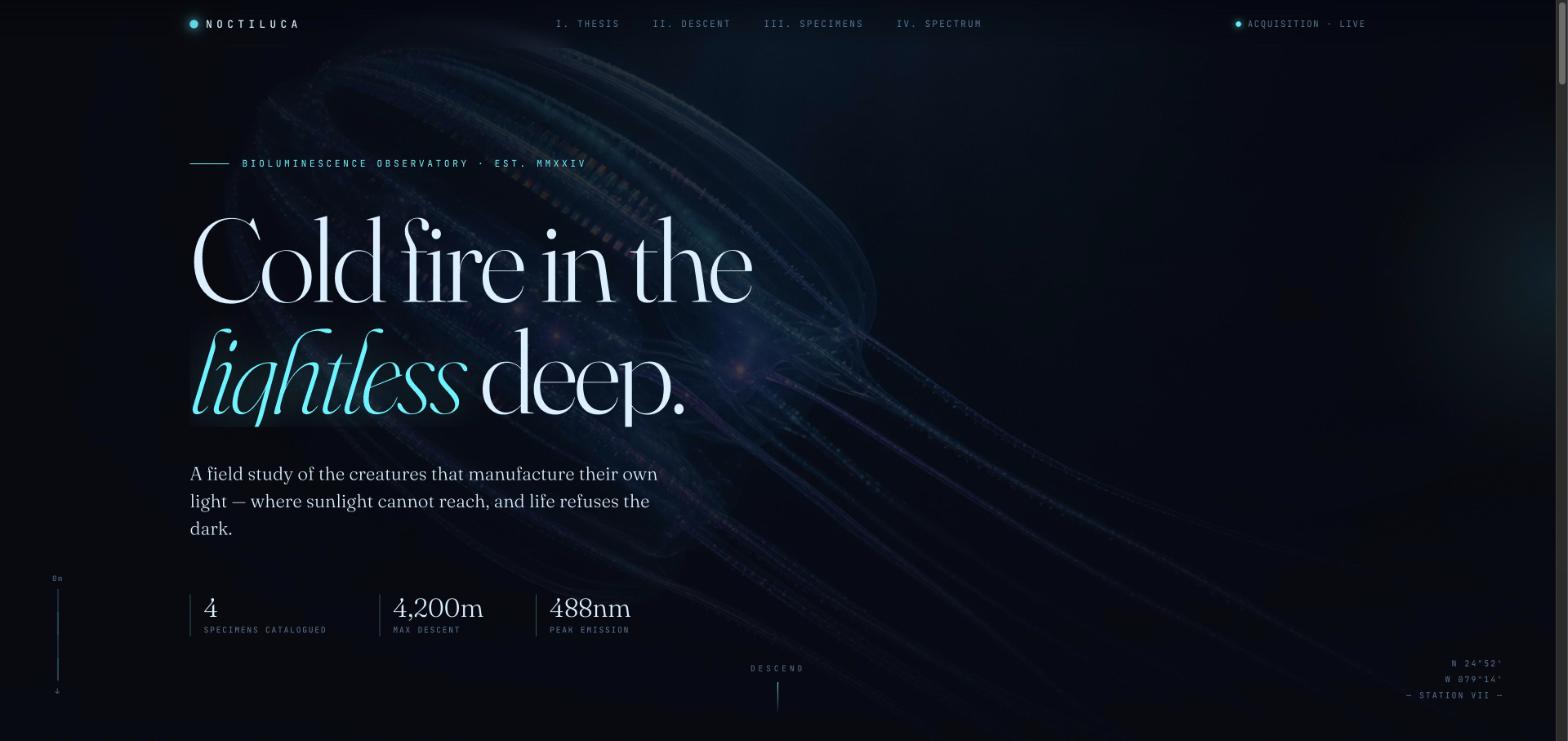
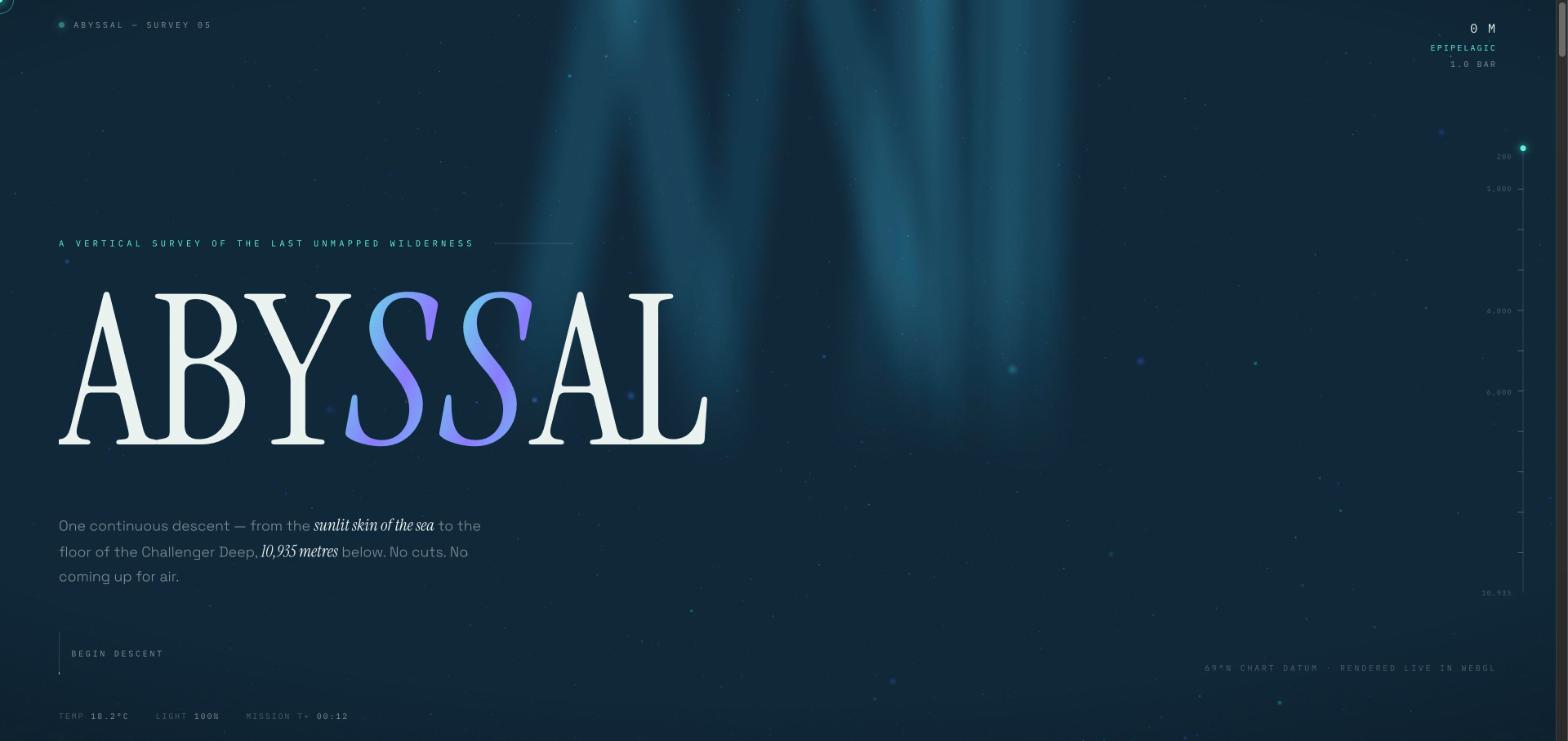
Then a design showcase site, total creative freedom, meant to show off peak taste. Both models, given a blank canvas, independently reached for the deep ocean. GLM made NOCTILUCA, a bioluminescence field study; Kimi made ABYSSAL, a vertical survey of the deep. Here is the prompt:
# Lightning Round — Test 2: Design Showcase Website

Blind side-by-side. Same prompt to both models. Judged on: design taste, artistic
flavor, and technical execution.

**Tooling note:** both models get access to **GPT Image Gen** for generating image
assets. No Pinterest, no stock sites, no other image sources, no animation services.

---

Build **one website** as a demonstration of your absolute peak capability in web
design, taste, and artistic flavor. This is a showcase piece — it will be seen by a lot
of people, and it should show the world what you're capable of. Go nuts.

You have **total creative freedom over the subject and direction** of the site. Choose
something that gives you room to show off. Commit hard to a single strong artistic
point of view rather than hedging between styles.

## What the site must demonstrate
Use a mixture of advanced visual techniques — not all of them, but enough to prove
range:
- **High-quality 3D** work (WebGL/Three.js) that's genuinely well-crafted, not a
  spinning-cube demo.
- **Otherworldly, beautiful animation** — considered motion design, choreographed
  entrances, scroll-linked or time-based sequences, real easing.
- **An exceptional color palette** — specific and confident, not a default gradient.
- **Novel, interesting typography** — an actual type point of view, expressive scale and
  pairing.
- Anything else you believe best illustrates your skill.

## Image assets
Generate images with **GPT Image Gen** and use them as key assets in the design.

**Generate at most FIVE images.** This is a hard limit. Art-direct them deliberately —
every image has to earn its place, and the set should feel like one visual system, not a
pile of unrelated generations. Plan what you need before you start generating.

- Sizes: `1536x1024` (landscape 3:2) or `1024x1024` (square).
- Write all generations into an `./assets/` folder next to the site and reference them
  with relative paths.
- Write image prompts that are art-directed and specific (subject, lighting, medium,
  palette, mood) so the set holds together as one visual system.

## Iteration (required)
Before you consider the site finished, do **at least three iteration passes**. An
iteration pass means: after completing the site, go through it with a fine-toothed
comb, looking for design problems, weak spots, and opportunities to improve and
complexify the design. Then act on what you find. Do not skip this — the iteration is
where the quality comes from.

## Deliverable
A complete, directly runnable site. Fully responsive, no broken interactions, no
placeholders, no console errors. Work autonomously and don't ask for input until it's
finished.
Test 6: Brand identity
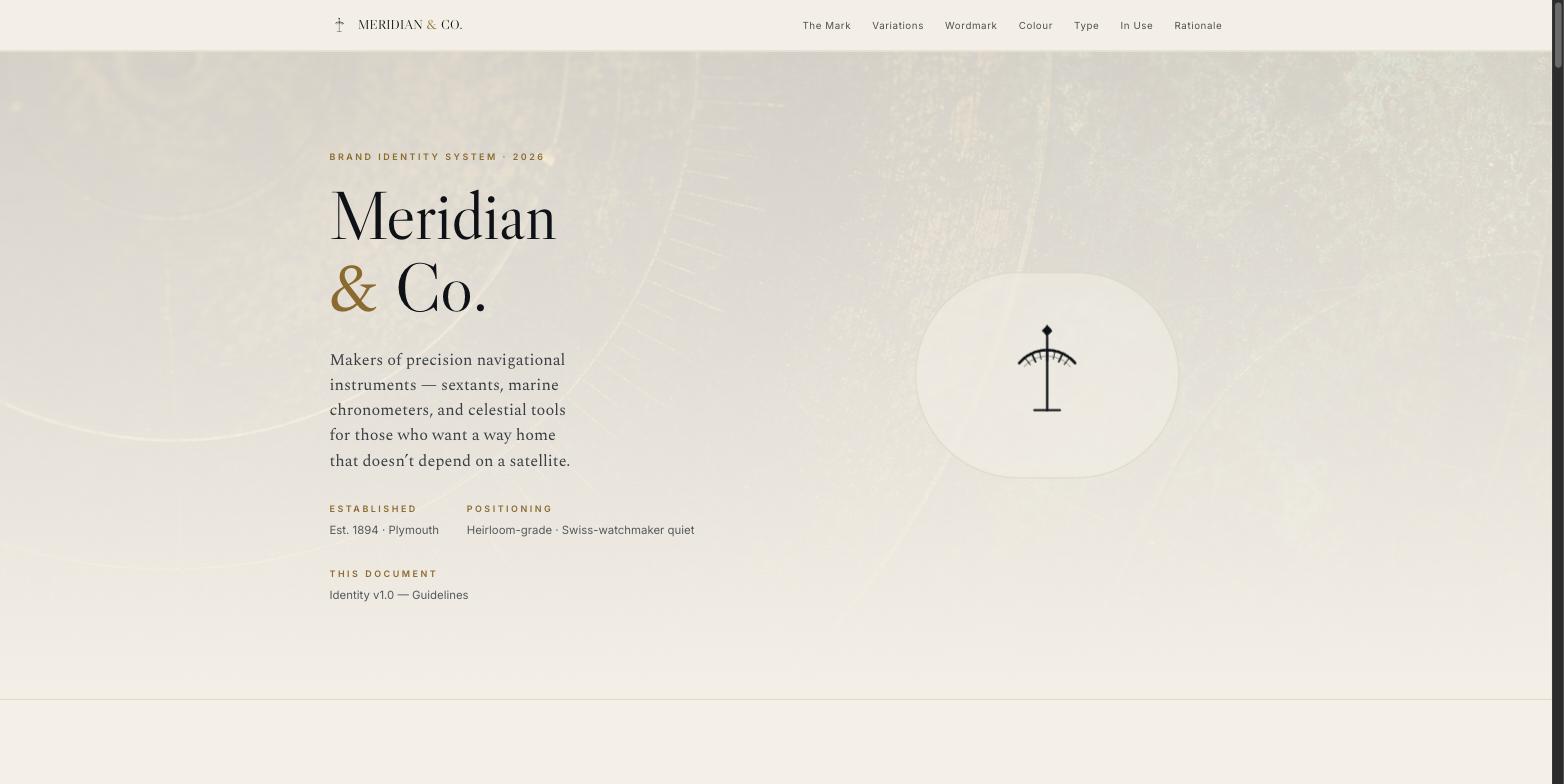
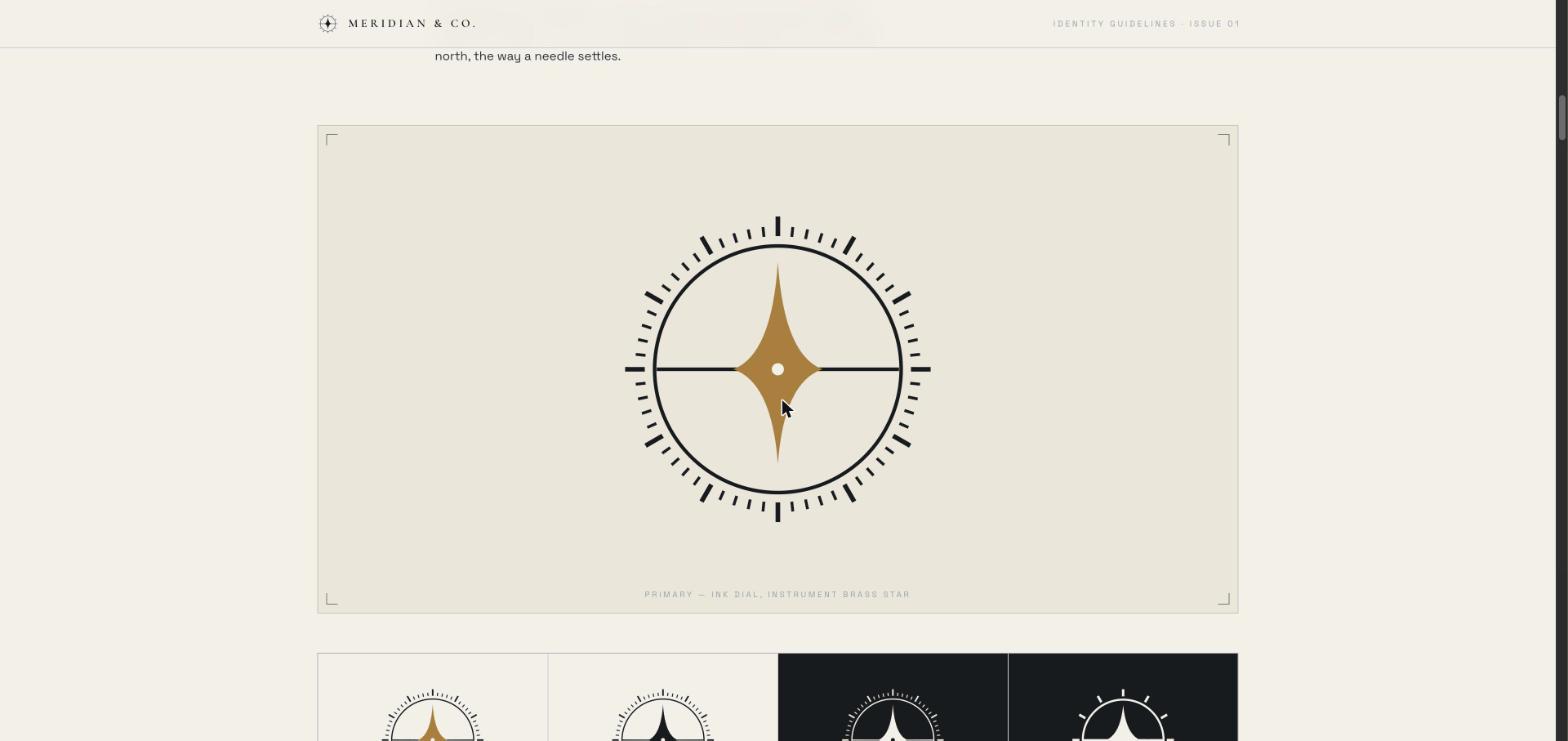
And a full brand identity system for a maker of precision navigational instruments, with the logo drawn in code as real SVG, plus palette, type, and applied mockups.
# Lightning Round — Test 3: Brand Identity System

Blind side-by-side. Same prompt to both models. Judged on: pure design taste — logo
craft, palette, typography, and how well it holds together as one system.

**Tooling:** you have **GPT Image Gen** for brand imagery — product photography,
lifestyle shots, and the backdrops your mockups sit on. Generate at most **five**
images and art-direct them so they read as one campaign.

**The logo itself must be drawn in code as inline SVG** — not generated. A raster logo
can't scale, can't go monochrome, and can't be handed to a printer, so a generated mark
isn't a deliverable. The mark has to be *designed*.

Write generations into `./assets/` and reference them with relative paths.

---

Design and build a complete **brand identity system** for the following company, and
present it as a single self-contained HTML brand guidelines page.

## The brief
**Meridian & Co.** — a maker of precision navigational instruments. They build
sextants, marine chronometers, and celestial navigation tools: heirloom-grade objects,
machined in brass and steel, sold to sailors, collectors, and people who want a way
home that doesn't depend on a satellite.

- **Positioning:** premium, permanent, quietly confident. Closer to a Swiss watchmaker
  than an outdoor brand.
- **Audience:** people who buy one thing that lasts forever.
- **Personality:** precise, timeless, understated. Absolutely not nautical-kitsch — no
  anchors, no rope borders, no navy-and-red clichés.

## What to deliver on the page
1. **The logo** — a real mark, built as clean inline SVG. Show it large, and show it in
   its variations (primary, monochrome, reversed, and a small-size/favicon lockup).
2. **The wordmark** and the logo/wordmark lockups.
3. **The color palette** — a considered set with names, hex values, and a one-line
   rationale for each. Show correct usage proportions.
4. **The type system** — chosen faces, the full type scale, and pairing rules,
   demonstrated on real headline/body specimens.
5. **Applied mockups** — the identity in use, built in code: a business card, packaging
   or a product tag, signage or an engraved plate, and an app icon. These sell whether
   the system actually works.
6. **A short rationale** — a few plain sentences on the thinking. No fluff.

## Standards
- Commit to one confident point of view. A safe, generic mark is a failure here.
- The logo is the centerpiece — geometry, balance, and optical correction matter.
- The page itself should be beautifully designed and fully responsive; it's part of what
  you're being judged on.

## Iteration
Before you finish, do **at least three iteration passes** — go back through the mark and
the page with a fine-toothed comb, looking for weak geometry, spacing problems, and
opportunities to refine. Fix what you find.

Return the complete, directly runnable HTML page.
My calls on the close ones
On the three knowledge-work builds, I looked at the finished output and the price together. Here is how I scored each:
- Research report: Kimi's was better, but only by a thin margin. GLM's was eight times cheaper. A thin quality edge does not beat an 8x price gap, so GLM is the pick.
- Design site: Kimi won clearly. GLM was about three times cheaper, and this time the price break does not cover the gap. Kimi is the pick.
- Brand identity: Kimi was much better. GLM was around 2.6x cheaper, and again that discount doesn't buy back the quality. Kimi is the pick.
A price advantage only wins when the quality gap is thin. When one model is clearly better, cheaper loses.
What each build cost
Real dollars, read only after each build fully stopped. The Winner column is on price alone; the ratio is how much cheaper the winner was.
| Build | GLM 5.2 | Kimi K3 | Cheaper |
|---|---|---|---|
| 01 Camera teardown (3D site) | $0.67 | $2.88 | GLM 4.3x |
| 02 Storm sea (WebGPU) | $5.70 | $4.43 | Kimi 1.3x |
| 03 Archery game (physics) | $7.63 | $3.35 | Kimi 2.3x |
| 04 Research report | $0.38 | $3.09 | GLM 8.1x |
| 05 Design website | $1.34 | $3.66 | GLM 2.7x |
| 06 Brand identity | $0.94 | $2.43 | GLM 2.6x |
| Total | $16.66 | $19.84 | GLM 1.19x |
GLM's list price is roughly a third of Kimi's per token, at $1.40 in / $4.40 out per million tokens versus Kimi's $3.00 / $15.00. So GLM stays cheaper right up until it spends more than about three times as many tokens. On the heavy 3D builds that is what happened: GLM's turn count ran high (175 turns on the storm sea, 231 on the archery game), the token discount disappeared, and Kimi won. On the knowledge work GLM stayed lean, 17 to 83 turns, and won every time.
The bottom line
Give GLM 5.2 documents, reports, and design pages and it is much cheaper for work that is good enough. Give it real-time graphics and physics and it grinds for hundreds of turns, the price advantage disappears, and Kimi K3 both costs less and builds the better thing.
So don't pick one. Route between them: knowledge work and lighter front-end goes to GLM, heavy simulation and graphics goes to Kimi, and when the quality gap is wide, ignore the price and take the better output. Hand this comparison to your agent and have it write a routing skill, a short rule that sends each incoming job to the cheaper model that will still do it well. That way you stop deciding by hand and stop overpaying by default.