
Google Search Can Now Read Your Google Wallet
AI Mode in Google Search can now use your Google Wallet to answer questions about your spending and cards, if you switch it on.
 AI for Mortals Staff
Google Search AI Mode can now use your Google Wallet. Google is rolling out a setting that connects Wallet to Personal Intelligence, Google's name for answers built from your own Google apps, so it can draw on your spending and the cards you hold.
It's opt-in. Google Drive and your chats in the Gemini app can be connected the same way "in the coming weeks."
Wallet joins Gmail, Calendar and Photos, the apps AI Mode could already use. Google introduced Personal Intelligence in January and expanded it across the US in March, across AI Mode, the Gemini app and Gemini in Chrome. We followed it into the car in Gemini on Android Auto and CarPlay.
What AI Mode can do with your Wallet
Google gives two kinds of example. One is your spending: mapping out financial goals and finding ways to trim what you spend each day. The other is your cards: getting more out of cash-back categories, travel perks and reward points, based on the cards you've linked in Wallet.
In Google's demo, someone asks AI Mode how to make sure they're getting the most out of their credit cards. It checks the connected apps and builds a card rotation guide: which card to use at supermarkets, restaurants, gas stations and on flights, and what each one earns there.
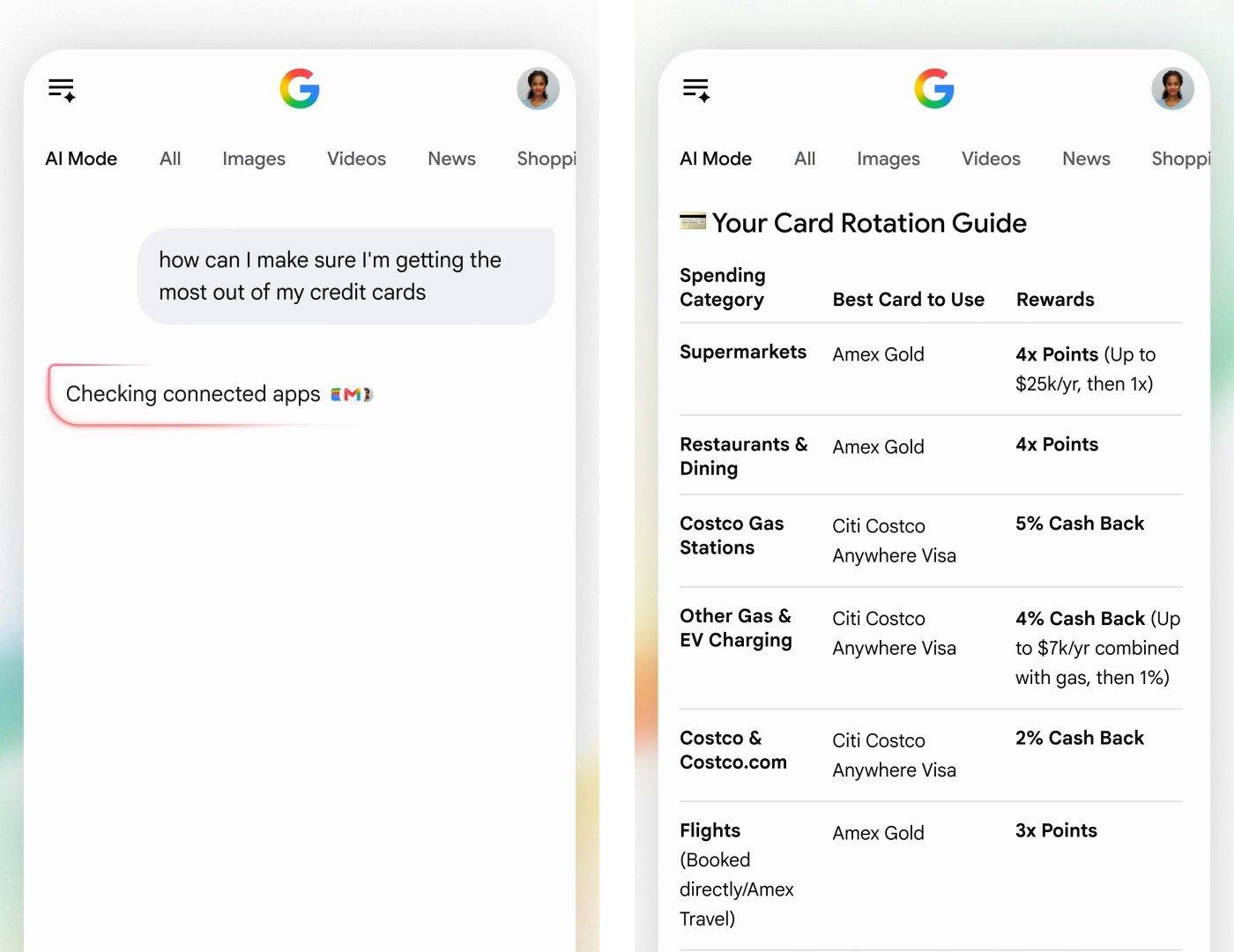
Further down the same demo answer, AI Mode points out a reward certificate the person's records show expiring on December 31, and flags it to redeem before then.
Access to Wallet is read-only. Google says AI Mode can read information from your accounts but can't move, manage or invest your money.
Drive and Gemini chats come next
The Drive link is for files. Google's example is a personal preparation plan for tax season, built from documents, spreadsheets and PDFs spread across your Drive.

The Gemini app link shares context in both directions. If you explore an idea in the Gemini app, AI Mode can build on it, and the other way around.
Google also says you'll soon see what context AI Mode used, through a "Personalization" icon under any tailored answer. To correct it, you tell AI Mode in the thread, like "I'm no longer a vegetarian."
How to turn on Google Wallet in AI Mode, or turn it off
Google's steps: open Search Personalization, select Connected Apps, then choose the apps you want to connect. Each app can be switched off there at any time.
Google hasn't said which countries get the Wallet link. AI Mode's links to Gmail, Calendar and Photos are for people 18 and older searching in English in the US, Canada, India and Australia, according to Google's help page. That page doesn't list Wallet yet.
The Gemini app got its own Wallet link on November 13, for everyone using the app in the US. There, you can also link credit card and bank accounts to Wallet through Plaid for more detail. We went through Plaid, and what it can see, in our guide to AI personal finance apps.
What Google can use for ads and training
Google's help page for connected apps spells out what happens to what it reads, and it's worth knowing before you switch Wallet on. It doesn't mention Wallet by name yet, so these are the rules Google gives for connected apps in general.
Ads. Google says ads won't be based directly on your Gmail inbox or Photos library. But when you connect apps, Search may reference summaries, excerpts and inferences from them, and "that same info may be used to show you ads."
Training. Google says it doesn't train its AI models directly on your inbox or files. It does train them on summaries, excerpts and inferences from them, and when an email or file is short or especially relevant, the summary may be the whole thing. Google says it reduces personal information before training.
Human reviewers. A subset of that data is read by human reviewers, including outside contractors, after Google disconnects it from your account.
Disconnecting. Turning an app off doesn't delete what's already in your Search history, and that data can still be used for training. You delete it separately at activity.google.com.
Google's own advice is not to connect apps that hold personal or confidential information you wouldn't want used for training or seen by a reviewer.
Google came to money questions last
ChatGPT and Claude got here first. ChatGPT's Finances reached Free users in October, and Anthropic launched Personal Finance in Claude on November 5.
Google came last, but it already holds many people's email, photos and payment cards. Its help page says summaries of what it reads can shape ads and train models, so it's asking for more trust than either rival.
Sources
- A more tailored Google Search that's uniquely yours (Google, November 23, 2026)
- Connect your Google content apps to Search (Google Search Help)
- Access to Google Wallet is read-only (Google on X, November 23, 2026)
- Connect Google Wallet to Gemini for personal finance insights (Google, November 13, 2026)
- Personal Intelligence expansion (Google, March 17, 2026)
- Google Search's AI Mode can now tap into Drive and Wallet (TechCrunch, November 23, 2026)


Comments
Sign in to join the conversation.