Grok Bot Now Makes Phone Calls for You
Grok Bot can now call businesses for you to cancel a plan, ask for a refund or sit on hold, and it checks with you before it dials. Here's how a call works, how to brief it, what early users got out of it and who can use it.
 AI for Mortals Staff
On this page
Grok Bot can now make phone calls to businesses for you, like canceling a plan or waiting on hold. It dials, talks to the person on the other end, and reports back in your chat when it's done.
To use it, you need The X Subscription at $30 a month or more, Teslarati reports, and calling works only in the US, except Washington and Illinois, and only to US numbers.
How a Grok Bot phone call works, step by step
Grok Bot's 42-second demo walks through a full call, from the first nudge to the final report.
1. You ask, or the bot suggests it. In the demo, Grok Bot notices that an internet contract renews in three days and asks whether it should call and cancel. The user says "Yes please. And don't let them talk me into a discount."
2. You approve the call. Before it dials, Grok Bot shows a Phone call card with who it plans to call and the number, plus Cancel and Call buttons. Nothing happens until you tap Call.

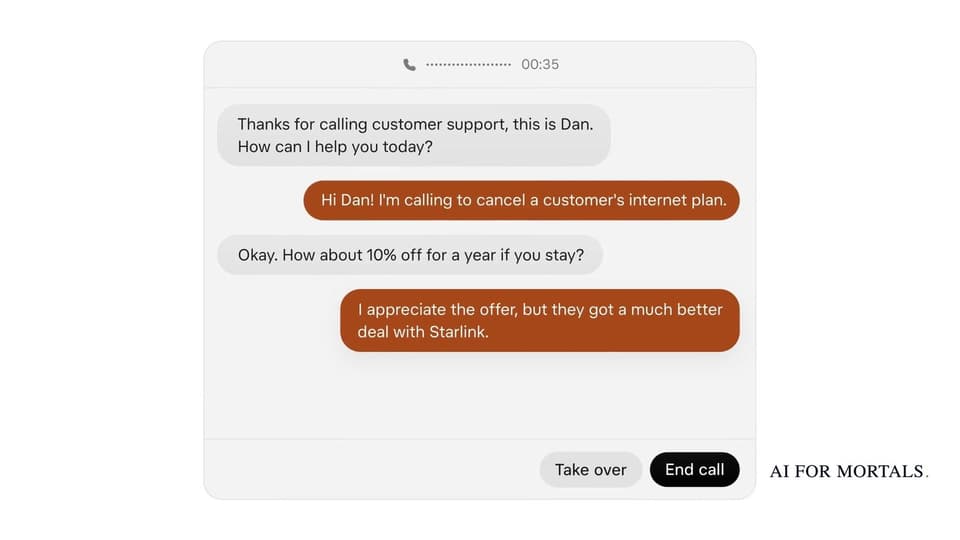
3. You watch it live. During the call, a live transcript shows both sides of the conversation, with Take over and End call buttons underneath, TeslaNorth reports. In the demo, a support agent named Dan offers 10% off for a year to stay, and the bot turns it down.
4. You answer what it doesn't know. When the business asks for something the bot can't answer, a box pops up in your chat. You type the answer and the bot passes it along to the person on the line.
5. It reports back. Once the call ends, Grok Bot writes back in the chat: "Done. Your plan is canceled. As you said, they tried. But I said no thanks."

Write the brief before it dials
The demo works because the user said what they wanted and what to turn down. Give the bot the same: the goal, the details the business will ask for, and the offers to refuse.
Here's a brief you can copy and change:
"Call Iron Peak Gym at (555) 010-2244 and cancel my membership. It's under Jordan Lee, member number 48213. Turn down any discount, freeze or downgrade offer. If they ask why, say I'm moving. Get a confirmation number and ask them to email it to me, then tell me both."
And one for a refund:
"Call Brightline Internet at (555) 010-7781 about my October bill, account 220-4417 under Sam Ortiz. I was charged $40 for a router I returned on October 3. Ask for the $40 back as a refund to my card. Get a reference number and tell me when the refund will show up."
Leave out anything you'd rather not hand over, like a security answer. If the business asks for it, the pop-up box lets you type it in at that moment, or you can tap Take over and finish the call yourself.
What happened when early users let Grok Bot call
People started posting their calls the day before the official launch, according to Teslarati. One call to a cable company cut a monthly bill from $84 to $45 on a faster plan after about 25 minutes, and the bot paused to get the customer's okay before it accepted the final offer.
Teslarati also rounded up a $100 gift card recovered after a 51-minute call to an internet provider, a same-day pediatrician appointment, and one call where the rep refused to cancel once it was clear an AI was on the line.
The rules every Grok Bot call follows
Grok Bot's terms say every call has to say it's a virtual assistant calling for you, and that the call may be recorded. They also rule out sales calls, mass calling and pretending to be someone else.
So the bot won't claim to be you. If a business will only talk to the account holder, Take over is how you step in.
What Grok Bot costs, and how calls count against your limit
Grok Bot comes with The X Subscription from the $30-a-month Premium tier up. The $8 Plus plan doesn't include it, Techloy found, and the free trial is a usage credit that ends after seven days even if you have some left.
Grok Bot's maker, SpaceXSI, hasn't said how calls count against Grok Bot's weekly usage. A call that spends most of its time on hold is a long task, and Grok Bot users ran out of weekly usage early this week, and Elon Musk said serving the bot cost too much.
If you're deciding whether the plan is worth it, here's what each tier of The X Subscription includes.
How Grok Bot did when Pat gave it real jobs
Pat gave Grok Bot, ChatGPT's Dots and Meta's Muse the same three jobs, including running a fake coffee company's inbox for four hours. He didn't test phone calls, but Grok Bot won the work jobs, though Pat found it got very expensive.
The calls you've been putting off
The calls most people dodge are the ones built to wear you down: the hold music, the phone menu and the retention offer at the end. Those are exactly what a bot can sit through, and the Take over button means you're only on the line when it actually needs you.
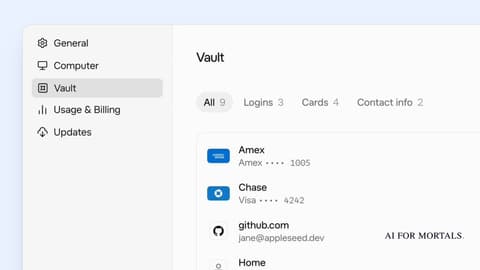
So a cancellation, a refund request or a billing dispute can go to Grok Bot with a clear brief of what you want and what to refuse. It can also pair with Grok Bot's Vault, which saves your logins and cards, for jobs that start on a website and end on the phone.
Sources
- Grok Bot on X: Grok Bot can now make phone calls
- Teslarati: Elon Musk's Grok Bot is picking up the phone now
- TeslaNorth: Grok Bot phone calls are live
- Techloy: Grok Bot review and free trial
- TestingCatalog on X: who can use Grok Bot calls
- Elon Musk on X: Grok Bot can call someone or a business for you





Comments
Sign in to join the conversation.