Chrome Can Now Fill In Forms With Details From Your Gmail
If you've let Gemini into your Gmail, Chrome's autofill menu now suggests flight bookings, order numbers and tracking info pulled from your inbox as you fill out a form. Here's how it works and how to control what it reads.

Google's Chrome now suggests details from your Gmail as you fill out online forms, like a flight booking code, an order number or a tracking number.
Autofill has always handled your name, address and card number. This is for the details buried in confirmation emails, the ones you'd normally go dig up in another tab.
It's rolling out in the US on desktop, Android and iPhone, for people who use Gemini in Chrome with Personal Intelligence turned on.
How a Gmail detail lands in a form
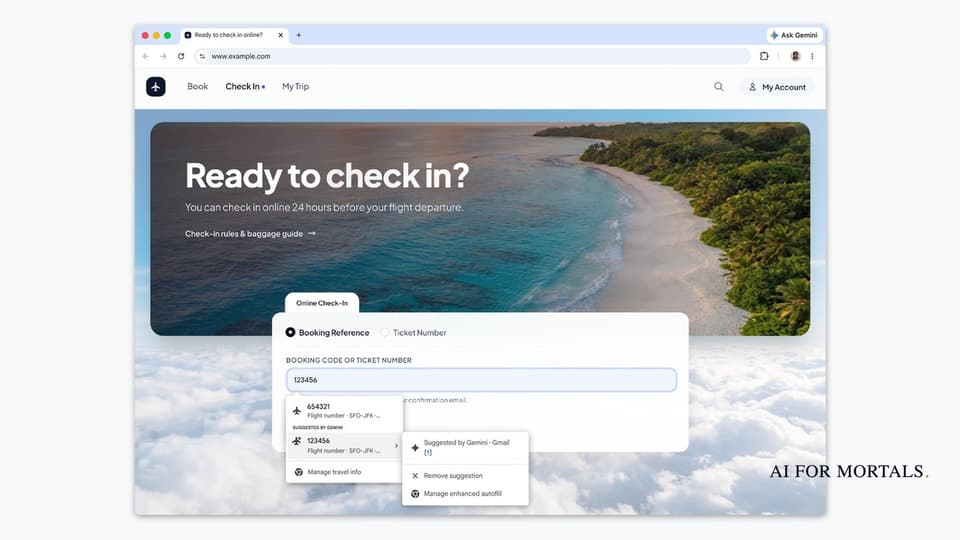
Google's demo uses an airline check-in page that asks for a booking code. Here's how it works in that demo:
- Click into the field. Chrome's usual autofill menu opens.
- Below anything Chrome has already saved, you'll see a section labeled Suggested by Gemini with details it found in your Gmail, like the booking code from your confirmation email.
- Hover over or tap the arrow next to a suggestion to see where it came from, marked Gmail, with options to Remove suggestion or Manage enhanced autofill.
- Pick the suggestion you want and it fills the field. Nothing goes in until you choose it.

In the demo, that one booking code is all the airline needs, and the next screen confirms the check-in with the flight, seat and boarding time.

Google names order numbers, tracking info and flight bookings as the kinds of details it pulls. That covers a return form that wants your order number, a "where's my package" page, or a hotel check-in that asks for a confirmation code.
Beyond travel and shopping details, it can also suggest membership IDs, addresses and phone numbers it finds in your email, per TechCrunch.
Turn on Personal Intelligence first
This only works if you use Gemini in Chrome with Personal Intelligence on. Personal Intelligence is the Gemini setting that lets it look through your Gmail, Photos and other Google apps to answer questions about your own stuff.
Gemini in Chrome is the Ask Gemini button at the top of the browser, as in Google's demo. To turn on Personal Intelligence, go to gemini.google.com, where eligible accounts see a card offering it. Click Get started, then choose Connect all, or Choose apps if you only want to connect Gmail.
It's been free for everyone in the US since March and it's off until you turn it on. It works with personal Google accounts only, so a work or school account won't get it.
If you already use Personal Intelligence in the Gemini app, you've seen it answer questions about your flights and appointments from the car. Chrome's autofill now uses the same access to fill in forms.
What Chrome reads in your Gmail, and how to switch it off
Google says sensitive data is encrypted and that you decide in Chrome's settings whether enhanced autofill is on and what it can reach. The Manage enhanced autofill link in the suggestion menu takes you there.
When it opened Personal Intelligence to everyone in the US, Google said Gemini doesn't train directly on your Gmail inbox or your Photos library. It trains on limited info, like what you type to Gemini and what Gemini answers.
If a browser reading your email doesn't sit right with you, there are two simple outs: leave Personal Intelligence off, or turn off enhanced autofill in Chrome and keep the regular autofill you've always had. If one suggestion is wrong or something you'd rather not see, Remove suggestion drops just that one.
Browsers are starting to do the work for you
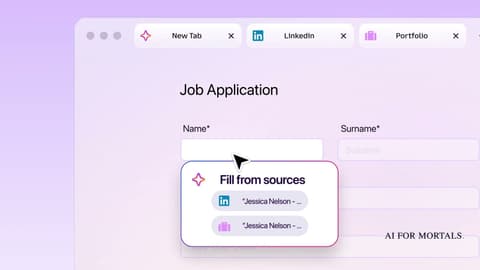
The browser wars keep heating up with little features like this. This week Firefox started filling in forms from your open tabs, and now it's Chrome. ChatGPT's Chrome extension can already read your open tabs and click around in them for you.
Browsers are only going to do more of the work for you from here, and since we live in our browsers every day, whoever gets this right across the board is going to be in a great spot.
If you've already let Gemini into your Gmail, this one's an easy win.
Sources
- Google: Chrome's enhanced autofill helps you fill out forms with suggestions pulled from Gmail
- Google: Personal Intelligence expansion
- TechCrunch: Chrome's AI-powered autofill can now dig through your Gmail to fill out forms
- Google Gemini Help: Get Gemini with Personal Intelligence
- TechCrunch: Google's Personal Intelligence feature is expanding to all US users


Comments
Sign in to join the conversation.