Firefox Can Now Fill In Forms From Your Open Tabs
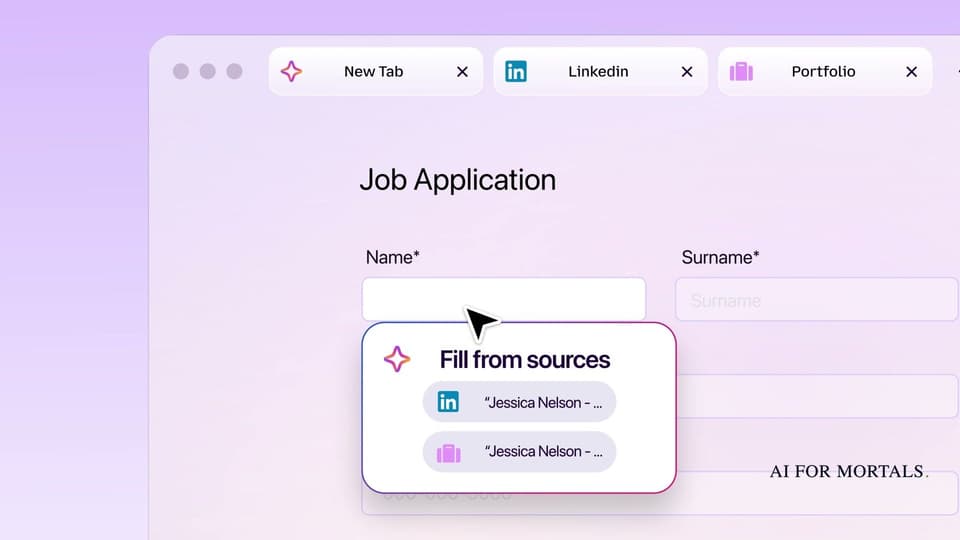
Firefox's Smart Window can now suggest answers for a web form using tabs you pick, like your LinkedIn page for a job application, and watch up to five pages for a sale or a new job listing.

Mozilla added two features to Smart Window, the optional AI browsing mode in Firefox, on Tuesday.
The first fills in web forms using information from tabs you choose. The second, /watch, checks pages for you and tells you when something you're waiting for shows up, like a price drop or a new job listing.
Both are in the Smart Window beta on desktop, in English, for people in the US and Canada.
How Fill from sources turns your LinkedIn tab into a job application
Mozilla's example is a job application. You have the application open in one tab, and your LinkedIn page and online portfolio open in others.
According to Mozilla's announcement, the way it works is:
- Click into a field on the form. If the form has at least four text boxes Smart Window can help with, Fill from sources shows up in the dropdown, with a recommended tab to pull from.
- Pick Fill from sources, or click the pencil icon to open Edit sources and choose different tabs or add more.
- Smart Window suggests an answer for each field. Read them and change anything that's off.
- Fill the form, then submit it yourself. Smart Window never submits the form for you.

Mozilla says it can also draft an answer to an open question like "Tell me about a time when…" from the details in your source tabs, so read those answers closely before they go in.
For now it only works on text boxes in web forms. Dropdown menus and PDF forms don't work yet, and Mozilla says it's exploring both. It also doesn't save what it generates, so the next application starts from your tabs again.
Where your tabs go when Firefox fills a form
When you use Fill from sources, the pages you picked are sent to Google's Gemini 3.1 Flash Lite model, which finds the fields and pulls the right details out of your tabs.
That only happens for the tabs you choose, and only when you use the feature. Firefox's regular autofill, the saved name and address it has always filled in, still stays on your computer and doesn't touch an AI model.
If you've picked a different model for Smart Window's chat, that choice stays the same. Smart Window's chat models include Gemini 3.1 Flash Lite, OpenAI's gpt-oss-120b, Alibaba's Qwen or a model running on your own computer, Mozilla's head of Firefox told The Verge. Form filling uses Gemini either way.
So before you point it at a tab, think about what's on that page. A LinkedIn profile is fine, and a tab with your bank statement isn't something to hand over.
Use /watch to catch a sale or a new job listing
The second feature saves you from refreshing a page over and over. You describe what you're waiting for, and Firefox checks the pages for you.
To set one up, according to Mozilla:
- Open the Smart Window chat and type /watch.
- Describe what you're looking for, like a price under a certain amount or a job title at a company you follow.
- Add the pages to watch, up to five per task, so you can cover several stores or job boards at once.
- Choose whether Firefox checks daily or weekly.

Here are a few requests in that shape, written to be specific enough for Firefox to know what counts as a match:
Tell me when the Nike Pegasus running shoes drop below $90 on any of these pages.
Let me know when a new Marketing Manager job at Shopify or Notion appears on these job boards.
Alert me when this concert adds a new date in Toronto.
When there's a match, you'll see it under the Tasks button in the toolbar. Turn on desktop notifications and Firefox will also pop up an alert, and clicking it opens the watched pages.
A few limits to know:
- Checks only run while Firefox is open. If you close the browser for a week, nothing gets checked that week.
- You can have up to 15 active tasks, and you can edit, pause or delete any of them.
- A task pauses itself after 60 days without a match and stops checking after 90.
Page watching runs on Alibaba's Qwen model, a different one from form filling. It's handy for the sale you've been waiting on, and if you shop across stores you might pair it with Google's Universal Cart, which also sends price-drop alerts.
How to get Smart Window on your computer
Smart Window is opt-in, so you won't see it in Firefox unless you turn it on.

Update Firefox on your computer to the latest version, then open firefox.com/smart-window in Firefox to switch it on. After that, the sparkle button in the toolbar switches any window between Classic Window and Smart Window. It's desktop only, and the new features are in English for the US and Canada, with more countries coming in the next few months, Mozilla says.
If you'd rather not have AI in your browser at all, Firefox's AI Controls settings let you turn Smart Window and the other AI features off in one place.
Why I'd give Firefox's version a shot
I use Codex and Claude in Chrome for this kind of thing, and I haven't tried Firefox's version yet, but it's probably worth a shot.
ChatGPT's Chrome extension can already read your open tabs and click around in them for you, and now Firefox is building some of that help right into the browser. With AI going into every browser, it almost feels like the browser wars are starting up again.
Sources
- Mozilla: Smart Window adds new form filling and page watching features
- Mozilla: Smart Window, privacy-first, AI-powered browsing with Firefox
- Firefox: Smart Window
- Firefox: Get started with Smart Window (beta)
- Mozilla Support: Smart form fill
- Mozilla Support: Create tasks in Smart Window
- The Verge: Firefox's Smart Window adds AI form filling and webpage monitoring
- The Verge: Firefox's Smart Window promises a better AI browser






Comments
Sign in to join the conversation.