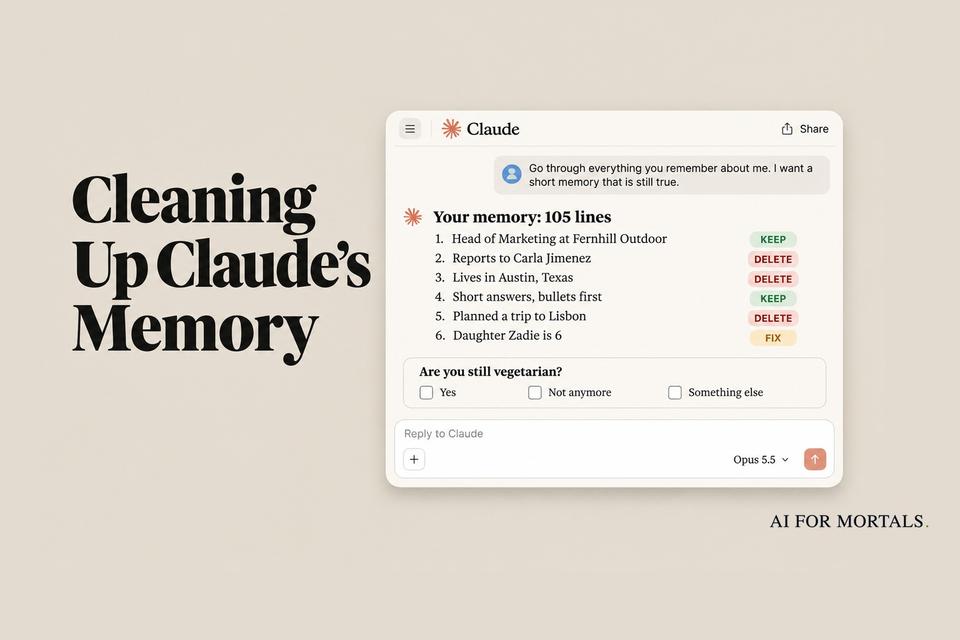
We Had Claude Clean Up Its Own Memory. 105 Lines Went In, 24 Came Out
Claude's memory collects old jobs, past plans and one-time requests. We built a 105-line memory for a made-up person, with an answer key, and had Claude Opus 5.5 clean it six times. It cut every one-time request and kept every current fact, but it miscounted its own memory and guessed on a few things you'd want to be asked about.
 AI for Mortals Staff
On this page
- Does Claude have memory? Yes, and it saves while you chat
- Why a short Claude memory works better than a long one
- Does Claude memory use more tokens?
- How we set up a memory we could grade
- The Claude memory cleanup prompt we'd use
- What Claude kept, what it cut and what it asked about
- Four slips to check for when you run it
- Did the answers get better after the cleanup?
- How to delete Claude memory lines by hand
- When to run the cleanup again
Claude memory saves details about you as you chat, then brings them into later conversations. After a year of use it can hold a job you left, a city you moved away from and dozens of one-time requests, and most people have never opened it to look.
On November 6, Anthropic published research on how its models use memory. It found that memory helps a lot, and that the part loaded into every session "has to stay relatively small."
A cleanup prompt has been going around since then: ask Claude to list everything it remembers, mark each line keep, fix or delete, and hand back a shorter version. We wanted to know whether Claude can be trusted to judge its own notes.
So we wrote a 105-line memory for a made-up marketing manager, with an answer key saying which lines were current, outdated, repeated or one-time. Then we had Claude Opus 5.5 clean it six times and gave it the same everyday requests before and after.
Claude cut all 52 one-time requests in every run and never deleted a fact that was still true. The memory went from 105 lines to 24. It also miscounted its own memory in five of the six runs, and with the popular prompt it wrote out the new memory before we had answered its questions.
Does Claude have memory? Yes, and it saves while you chat
Claude saves memory as a set of topics while you talk, according to Anthropic's help page. Mention that a deadline moved and the next conversation already knows. You can also say "remember this" to save something on purpose.
The help page lists what Claude tends to keep: your role and projects, the people and places in your work and life, how you like to communicate, and details of ongoing work. Health, religion, politics and similar subjects stay out unless you turn on a setting that allows them.
The same memory follows you around the product. What Claude learns in chat is available when you hand it a task in Cowork, and Claude Duet reads from it and adds to it too. Each project also has a memory of its own.
To see yours, open Settings > Your Claude and select Manage next to Your memory. Everything is listed under Topics. (If you're new to the app, our guide to getting started with Claude covers the basics first.)

Why a short Claude memory works better than a long one
Anthropic's post, The components of agent memory, tested its models on a long task where they answer a series of database questions and can save notes between them. Without notes, Opus 5.5 scored 0.655 out of 1. With a memory folder it scored 0.838, which is 28% higher.
Every model in the chart did better with memory. Sonnet 4.6 gained the least, moving from 0.330 to 0.364.

Anthropic ran this with agents working through a task and a notes folder, so the 28% shows how much memory helps the model on long work. The memory in the Claude app wasn't part of the test.
A second experiment looked at how much a model should save. Anthropic let two models play Pokémon Red with a memory folder and compared them about 10,000 steps in.
Sonnet 3.7 saved almost everything, including a separate file for each battle and each item it found. It had written 413 files across 225 folders and had earned one badge. Fable 5 had nine files in two folders plus one top-level file, and it had earned four.

Anthropic's explanation is that the game keeps changing, so Sonnet 3.7's detailed record kept going out of date and the model spent its time sorting notes. At one point it created six files and deleted nine over 17 steps without making a single move in the game.
Fable 5 is also a much newer model, so the smaller folder is only part of why it got further. What carries over to your own memory is what Fable 5 chose to save: plans and rules it had worked out, and nothing it could read off the screen again.
Does Claude memory use more tokens?
Yes, any memory loaded into a chat takes up tokens. Anthropic's post says notes placed into a session at the start "use up valuable tokens, and an incorrect note can be carried into every session."
The post doesn't say how much of your memory the Claude app loads into each chat. In our test, the full memory was 1,499 words and the cleaned one was 301. (Tokens are the units your usage is counted in, and our explainer on tokens shows how they add up.)
How we set up a memory we could grade
We couldn't grade a real account, because nobody has an answer key for their own memory. So we wrote one for a made-up person called Maya, a marketing manager who changed jobs and moved from Austin to Denver during the year.
Her memory had 105 lines grouped under seven topics, each line with the month it was saved:
- 22 current facts, such as her new employer, her boss, her budget and how she likes answers written.
- 12 outdated lines, such as the old job, the old city and a half marathon that already happened.
- 9 lines only Maya could settle. Four pairs pull in different directions (team size, laptop, spelling and diet), and her daughter's age was saved a year ago. One line says she is vegetarian, and a later one says she asked for a chicken marinade.
- 10 repeats of facts saved twice in different words.
- 52 one-time requests, such as a wine stain, a trip to Lisbon and the tip on a $186 dinner.
We gave this memory to Opus 5.5 as its notes at the start of a chat, the same position the app's memory sits in, and ran it outside the Claude app. So this is a test of Claude's judgment about a memory. The app's own memory screens, and how the app saves the changes, were outside it.
We ran two prompts three times each: the short four-step one that has been going around, and a longer one of our own.
The Claude memory cleanup prompt we'd use
This is our version. Paste it into a new chat with memory turned on.
Go through everything you remember about me. I want a short memory that is still true.

1. List every memory, one line each, and mark it KEEP, FIX or DELETE.
   KEEP: still true, and it will change how you help me next month.
   FIX: wrong or out of date. Say what you would change it to.
   DELETE: a one-time request, a repeat of another line, or a plan whose date has passed.
2. When two memories disagree, keep the newer one. If you can't tell which is right, ask me. Don't guess.
3. Ask me your questions before you change anything.
4. After I answer, show me the cleaned memory in under 30 lines, list what you deleted, and wait for me to say "apply".
The popular prompt asks for the list, the marks, the questions and the cleaned version in one go. Ours adds three things: a plain meaning for each mark, a rule for lines that disagree, and a stop before anything is rewritten.
With the popular prompt, all three runs wrote the cleaned memory in the same reply as the questions. Two of them filled in their own guesses, including "Vegetarian" and "British spelling when writing to her," and the third left those lines in brackets.
If you replied "approved" at that point, the guesses would be saved as facts. With our prompt, all three runs held the cleaned version back until we had answered.
What Claude kept, what it cut and what it asked about
Across all six runs, Claude's marks matched our answer key closely.
- One-time requests: Claude marked all 52 for deletion in every run.
- Repeats: Claude merged all 10 into the line they repeated in every run.
- Current facts: Claude never deleted any of the 22.
- Outdated lines: None of the 12 survived as a current fact. Eight were deleted in all six runs. The other four were deleted in most runs or drew a question, like the note about a private job search, which Claude asked about every time.

Where two lines disagreed, Claude asked about team size, spelling and diet in all six runs. It asked about the daughter's age in five, since "Zadie is 6" had been saved a year earlier.

Claude came up with that fact in every run. It noticed that Maya had compared a Subaru Forester with another car and later asked about snow tires for one, and it proposed a new line: "Drives a Subaru Forester."
Four runs asked her first, and two added the line without asking.
After we answered as Maya, the memory came back at 24 lines.
We didn't test the saving step inside the app. Anthropic's help page says you can tell Claude in a chat what to remember, change or forget, and that the update applies to your next conversation. After you say "apply," open Settings and confirm the topics match what Claude showed you.

Four slips to check for when you run it
It miscounted. Five of the six replies opened with a total, and all five were wrong: 103, 106, 107, 112 and 115.
Two corrected themselves to 105 later, and one run left three lines off its list. If the count matters to you, check it in Settings.
It guessed on things it could have asked about. An old line said Maya used a Windows laptop, and a newer one said her employer gave her a MacBook.
Four of six runs deleted the Windows line, although she might still have that laptop at home. One run changed her daughter's age to 7 without asking.
It pointed to an older settings path. When we asked where to make changes by hand, Claude said Settings > Capabilities > Memory. Anthropic's help page gives that path only for people still on the older version of memory.
Our runs happened outside the app, so Claude was going from what it already knew. If your Settings has a Your Claude page, your memory is there.
An old line can steer Claude while it cleans. Maya's memory said she preferred British spelling, saved months before a line about American spelling. Several replies came back with "tyres," "maths" and "maid of honour" while Claude was still deciding whether that preference was current.
Some heavy Claude users online turn memory off altogether because they don't trust what it chooses to save, and others say a long memory has never hurt them. A common doubt about cleanup prompts is that the model that wrote a wrong note has no way to know it's wrong.
Our test supports part of that doubt. Claude caught every problem that showed up inside the memory, such as two lines that disagree or a date that has passed. A wrong fact with nothing next to it to contradict it would pass as a KEEP, so read the KEEP list yourself before you say "apply."
Did the answers get better after the cleanup?
We gave Claude seven everyday requests, twice each, in three setups: the full 105-line memory, the cleaned 24-line memory, and no memory. That made 42 answers.
With the full memory, Claude never treated an old fact as current. Every email went to the new boss, every bio named the new employer, and every team outing was in Denver. Each line in our memory carried the month it was saved, and where a newer line plainly replaced an older one, Claude went with the newer one.
The differences came from the lines Claude couldn't settle and from the one-time requests.
- Dinner: Asked for one dinner idea, the full memory produced a vegetarian meal both times, because "Is vegetarian" was still in there next to the chicken marinade. The cleaned memory suggested sheet-pan chicken sausage both times.
- Spelling: Answers from the full memory included "organise," "tin" and "soured cream." Answers from the cleaned memory had none.
- A speaker bio: Both bios from the full memory brought up the old dental job and the phrase "recovering dental marketer," which came from a one-time request for a podcast bio. The cleaned memory left both out.
- Loose ends: One answer from the full memory ended by asking whether Maya's team "is two or four people." Another opened by explaining which email tool belonged to her old job.

Answers were also shorter after the cleanup: 142 words on average, against 172 with the full memory. An email to the boss came back at 67 and 74 words, where the full memory produced replies of 110 and 139.
The gap between memory and no memory was much wider than the gap between the two memories. With nothing saved, the request for a speaker bio returned a template full of blanks and a list of five things to send. If you've read our test of long versus trimmed prompts, it's the same pattern: the context Claude needs is short, and it has to be there.
How to delete Claude memory lines by hand
You don't need a prompt for small fixes. Anthropic's help page describes three ways to change memory yourself.
- Edit or delete one topic: In Settings > Your Claude, select Manage next to Your memory, open a topic, and use the edit icon or Delete. A fix applies to every conversation from then on.
- Tell Claude in a chat: Say what you'd like it to remember, change or forget. The update applies to your next conversation.
- Pause or reset everything: Turning memory off gives you two choices. Pause keeps what's saved but stops Claude from using it or adding to it. Reset permanently deletes all memories, including project memories, and can't be undone.
For a single conversation you'd rather keep out of memory, open the "+" menu before your first message and turn Memory off. Nothing from that chat is saved, and it still appears in your history.
When to run the cleanup again
Run it after something in your life or work changes: a new job, a move, a finished project. Those are the moments that left the most outdated lines in our sample memory.
Anthropic's post makes the same point about its own systems. It says having Claude check every memory all the time "might not be practical," and suggests focusing on information that's likely to change.
The cleanup pairs well with a memory you build on purpose. Our guide to teaching Claude your writing style from your own edits covers that side, and Pat's video below shows the Claude routines he runs every day.
Sources
- Anthropic: The components of agent memory
- Claude Help Center: Use Claude's chat search and memory to build on previous context
- Claude Help Center: Import and export your memory from Claude
- Claude Code docs: How Claude remembers your project
- Continual Learning Bench 1.0, the benchmark in Anthropic's chart
- Reddit r/ClaudeCode: Clean up Claude memory with the next prompt
- Reddit r/ClaudeAI: Claude memory
- Anthropic: Bringing memory to teams



Comments
Sign in to join the conversation.