Gemini Can Now Edit the Files It Makes for You
Gemini now opens the PDFs, Docs, spreadsheets and slide decks it makes right in the chat, where you can type your own changes or highlight a part and ask Gemini to redo it. It works on the web and, for PDFs, in the phone app.

Google now lets you preview and edit the files Gemini makes for you right inside the chat, from PDFs and Google Docs to spreadsheets and slide decks.
It's free for everyone, in every language the Gemini app supports.
Gemini could already make files earlier this year, but it handed them over as downloads, so any fix meant opening the file somewhere else or asking Gemini to make the whole thing again. Now the file opens next to your chat and you change it there.
From handwritten notes to an editable study guide
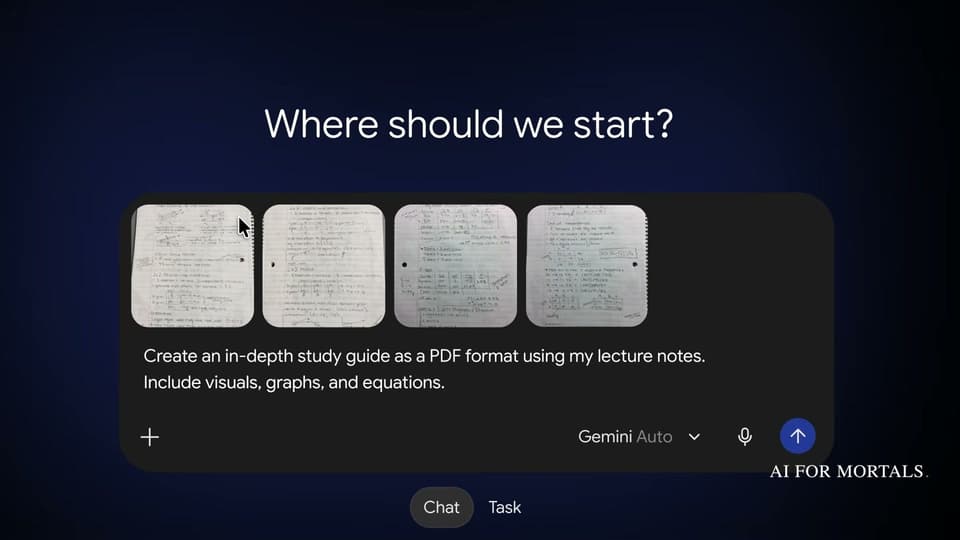
Google's demo starts with four photos of handwritten statistics lecture notes and one request: "Create an in-depth study guide as a PDF format using my lecture notes. Include visuals, graphs, and equations."
Gemini turns them into a multi-page study guide with headings, tables and charts, and opens it in a preview right in the chat.

From there you have three ways to change it:
- Type your own edits. Expand the file to full screen and change the text yourself, like any document.
- Highlight a part and ask Gemini to change it. Select a passage, a table or a chart, describe the change, and Gemini rewrites just that part.
- Highlight a part and ask about it. Use the same selection to ask a question about what's in the file, which is handy when you're studying from it.
In the demo, the student highlights a table of study hours and types "show this as a graph instead." Gemini swaps the table for a bar chart.

When it's done, the Export button at the top of the preview saves the file as a PDF or sends it to Google Drive.
Here's the full 39-second demo:
Which files work on your phone and which need the web
PDFs work on the web and the Gemini phone app.
Google Docs, Google Sheets, slide decks, Markdown files, plain text files and code are web only for now, at gemini.google.com.
Google's announcement covers the files Gemini makes for you. It doesn't say you can open and edit a file you uploaded yourself the same way, so for now treat this as a way to refine what Gemini creates.
Every big platform is moving into your documents
This month alone, Claude opened its tools for making and editing docs, decks and designs to every plan, Microsoft put Word, Excel and PowerPoint inside Copilot, and Apple added an AI assistant to Keynote, Pages and Numbers.
Now Gemini is in too, and every big platform is moving into everyday knowledge work like making slides and updating documents.
My walkthrough of Claude's version, Claude Design:
To try it, open Gemini on the web, attach a few photos of your notes or paste in a rough outline, and ask for a PDF or a Google Doc. Then highlight the part you'd change and tell Gemini what you want instead.






Comments
Sign in to join the conversation.