Gemini Can Now Use Your Mac for You
Computer use in the Gemini app for Mac clicks, types and fills in forms across apps and websites in a background window, for paying Google AI subscribers.
 AI for Mortals Staff
Google added computer use to the Gemini app for Mac on Thursday, so Gemini can now operate a Mac's apps the way a person does. You describe a chore in the chat, and Gemini clicks, types and fills in forms across the files, apps and websites on the Mac until the job is done.
It's rolling out in the US, in English, for Google AI Plus, Pro and Ultra subscribers.
How Gemini computer use works on a Mac
Gemini does the work in a separate window in the background and shows a live preview of that window in the chat. Your own screen and cursor stay free, and Google says you can keep typing, designing or taking calls while it runs.
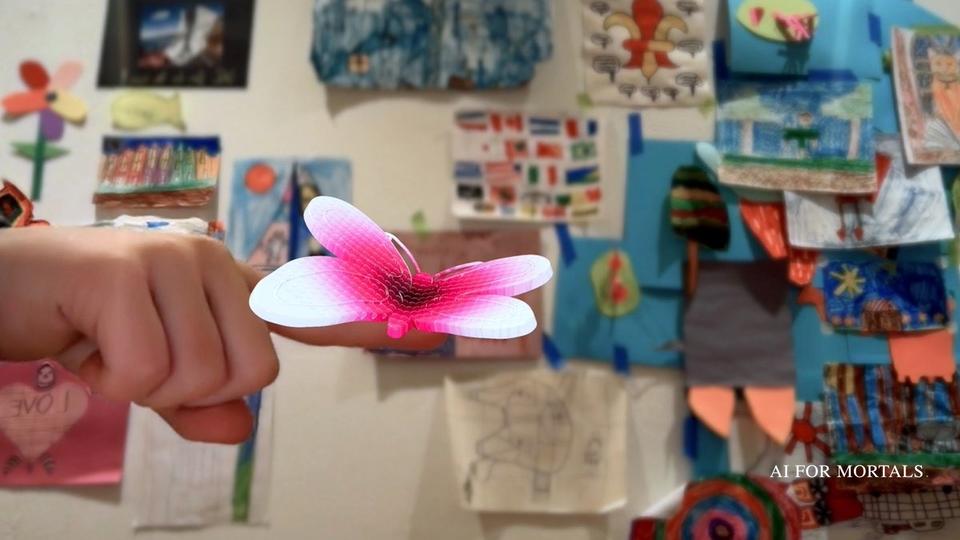
In Google's demo, the request goes into the Mac app's Task mode with "@Computer use" typed at the end: "Could you take my kid's butterfly sketch, model it and rig it for me in Blender?"

Gemini then lists what it's doing, from checking that Blender is installed to building and texturing the model, with Blender visible in the preview underneath.

The demo keeps going from there. The same chat turns the butterfly into a web app that shows it perched on a finger through the camera, and then into a ring ready for a 3D printer.
Google's video carries a note that its sequences are shortened, so it doesn't show how long each step took. The model picker in the demo is set to Hydrogen, Google's fast everyday model.
Four jobs Google says you can hand to Gemini
Google's examples are the repetitive kind of work that takes dozens of clicks:
- Shipping quotes: pulling weights, dimensions and addresses out of PDFs on your Mac and typing them into a multi-box shipping quote.
- Slide decks from live data: collecting numbers and screenshots from dashboards for several regions and building a presentation in Google Slides.
- Resale listings: going through a folder of clothing photos, researching prices, logging each item's details and staging the listings on resale sites.
- Creative chores: color-grading a batch of photos in your design software, or setting up a complex 3D scene.
How you stay in control of what Gemini touches
Google lists four controls. You choose which apps Gemini can open, you can watch every step in the live preview, you can pause it at any time, and Gemini asks for approval before key actions.
Google's post doesn't say which actions count as key.
The video's own fine print reads "Supervise closely, interrupt when needed."
Google's help page for Tasks in the Mac app hasn't been updated to mention computer use. It says Gemini "is still learning and can make mistakes," and its advice for any task is to avoid ones that use information you consider sensitive and to keep sign-in and payment details out of the task chat.
What you need to run Gemini computer use
- A recent Mac: one with an Apple M-series chip, running macOS Sequoia 15 or later.
- A paid plan: Google AI Plus, Pro or Ultra. Our Gemini pricing guide has what each one costs.
- A personal Google account, and you have to be 18 or older.
- The Gemini app for Mac, a download from gemini.google/mac. Google's help page for the app asks for 8 GB of memory and 200 MB of free disk space.
Google hasn't said when computer use will come to other countries, other languages or Windows PCs.
Anthropic, OpenAI and Meta put an agent on the Mac before Google did
Anthropic gave Claude the ability to point and click its way around a Mac on March 23. OpenAI launched ChatGPT Work, its agent that acts across your apps and files, in July, and Meta released a Muse app for the Mac in September that organizes files and fills out forms.
Working in the background isn't new either. Anthropic's help page says Claude works in background windows on macOS 15 or later without taking over the pointer or keyboard.
Google has moved quickly since the end of September. It has released four Gemini 4 models since September 30, and on Tuesday it made Tasks free in six countries, though computer use still needs a paid plan.
Apple is now the slow one on its own computer. Siri AI isn't expected to act like an agent until next year, based on reporting from Bloomberg's Mark Gurman, and Apple is testing daily limits on Siri AI in its latest betas.
Sources
- Let Gemini tackle repetitive chores on your Mac (Google, November 19, 2026)
- Use the Gemini app on Mac (Google Help)
- Assign tasks in the Gemini app on Mac (Google Help)
- Google gives Gemini the ability to use your Mac for you (TechCrunch, November 19, 2026)
- Put Claude to work on your computer (Anthropic, March 23, 2026)
- Let Claude use your computer in Cowork (Claude Help Center)
- Meta launches a Muse app for macOS (BetaNews, September 18, 2026)
- Siri AI Rumored to Become 'More Like an Agent' as Early as Next Year (MacRumors, November 8, 2026)




Comments
Sign in to join the conversation.