
Notion Moves All of Its AI Onto Monthly Credits
Notion rebuilt its AI agents to work on one task for more than 24 hours, and moved every AI feature on its Business and Enterprise plans onto monthly credits.

On this page
- Two monthly allowances, and the AI you pick decides which one you spend
- What your monthly credits cover, by Notion's own estimates
- What happens when you run out, and who can buy more
- How Auto picks a model, and where it trails Opus 5.5
- Notion's agents can now run for a day and use their own computer
- You can plug in your ChatGPT plan instead of spending credits
- Why it matters
Notion changed how you pay for its AI. Every AI feature on its Business and Enterprise plans now runs on monthly credits, and which allowance you spend depends on whether you let Notion pick the AI model or pick it yourself.
New workspaces have been on the system since October 19. Existing workspaces switch on November 2, and Notion says admins will get an email with the details.
The change came with a rebuild of Notion's agents, which can now work on a single task for more than 24 hours, up from five minutes, according to Notion's announcement. Notion co-founder Akshay Kothari wrote on X that instead of having different AI products on different versions of Notion's plans, "all AI capabilities now run on credits."
Two monthly allowances, and the AI you pick decides which one you spend
Each person on a Business or Enterprise seat gets two allowances a month, per Notion's credits help article:
- 1,500 Standard credits for work where Auto, Notion's model picker, chooses the AI. That covers chatting with Notion Agent on Auto, writing and translation, AI blocks, formulas and inline editing, and from December 1, AI Meeting Notes.
- 500 Select credits for when you pick a model yourself in Notion Agent, and for Custom Agents you set up for your own use.
A third kind, Notion credits, is a balance your workspace buys. It pays for the most expensive models, like Claude Fable and GPT-6 Astra, which your Select credits don't cover. It also pays for Custom Agents the workspace funds and for agents you run through Notion's API or a connected app.
The allowances are per person. Unused credits don't roll over, and you can't pool them with a coworker's, move them to someone else or swap one kind for the other.
What your monthly credits cover, by Notion's own estimates
Notion published estimates for common jobs, comparing Auto with picking Claude Opus 5.5 yourself:
| Job | Examples from Notion | Auto | Opus 5.5 |
|---|---|---|---|
| Simple | Polish an email, translate a message, draft a support reply | 5 credits | 50 credits |
| Medium | Write a work report, triage support requests, summarize an hour-long meeting | 10 credits | 85 credits |
| Complex | Draft a performance review, refine a quarterly plan, keep sales follow-ups current | 25 credits | 150 credits |
On Auto, your 1,500 Standard credits cover about 300 simple jobs like polishing an email. If you pick Opus 5.5 for that same email, your 500 Select credits run out after about 10 of them, or after three complex jobs like a performance review.
Notion says these are estimates, and that the same job can cost more in a long thread full of detail.
AI Meeting Notes moves onto Standard credits on December 1. Notion puts an hour-long meeting at about 10 credits, and the notes run on Auto.
What happens when you run out, and who can buy more
You can check what's left under Settings, then Notion AI, then Usage. Notion also warns you in Notion Agent chat when either allowance is running low, and again when it's gone.
When Standard credits run out, the features they cover pause until your next monthly reset. Leftover Select credits don't fill the gap.
When Select credits run out, choosing a model yourself pauses. You can switch Notion Agent back to Auto and keep going on whatever Standard credits you have left.
To keep going past either limit, you need your admin. In Settings, then Notion AI, an admin can turn on Allow workspace to use Notion credits after AI limit is reached, which lets you keep going on credits the workspace bought. It's off by default, and when your credits run out you can ask an admin for more right from the alert.
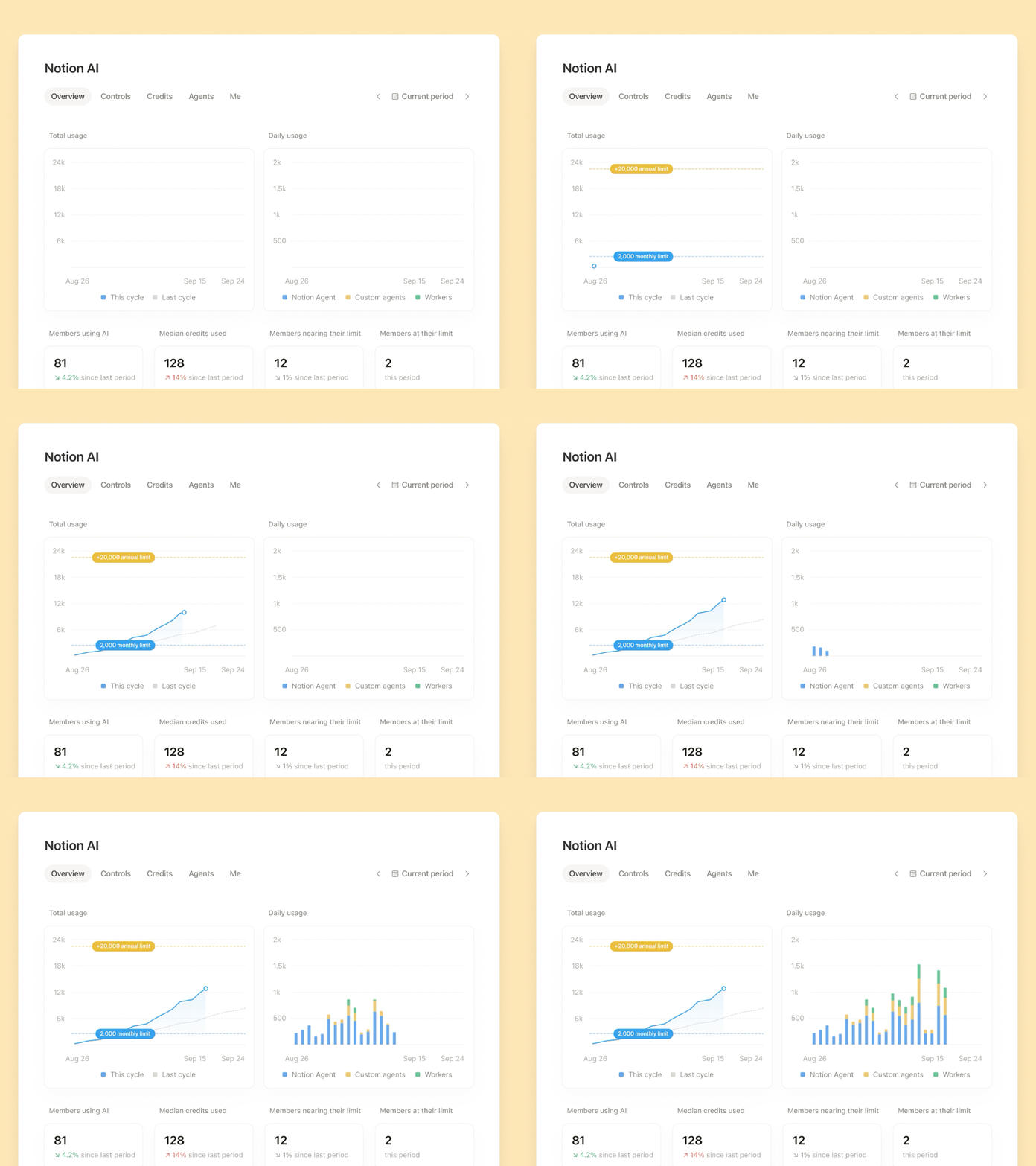
Admins are also getting an AI Command Center, which Notion lists as coming soon. It puts credit use by person, feature and agent in one place, sends alerts as the workspace nears its limit, and lets admins set spending limits and choose which models people can use.
How Auto picks a model, and where it trails Opus 5.5
Auto reads each job and sends it to a model. Quick questions and edits go to fast, cheap models, and harder work like research or multi-step agent jobs goes to stronger ones. According to Notion's Auto help article, it can switch models partway through a long task, and Notion says it changes course when a model gets stuck. It only uses models your workspace allows.
You can't see which model Auto used for a job. Notion doesn't publish a fixed list either, since the lineup changes as new models come out.
Notion tested Auto by replaying thousands of real tasks and having a panel of top AI models judge the results two at a time. It says that across more than 20 common uses, Auto got results similar to Opus 5.5 and GPT-6 Astra at about 90% lower average cost.
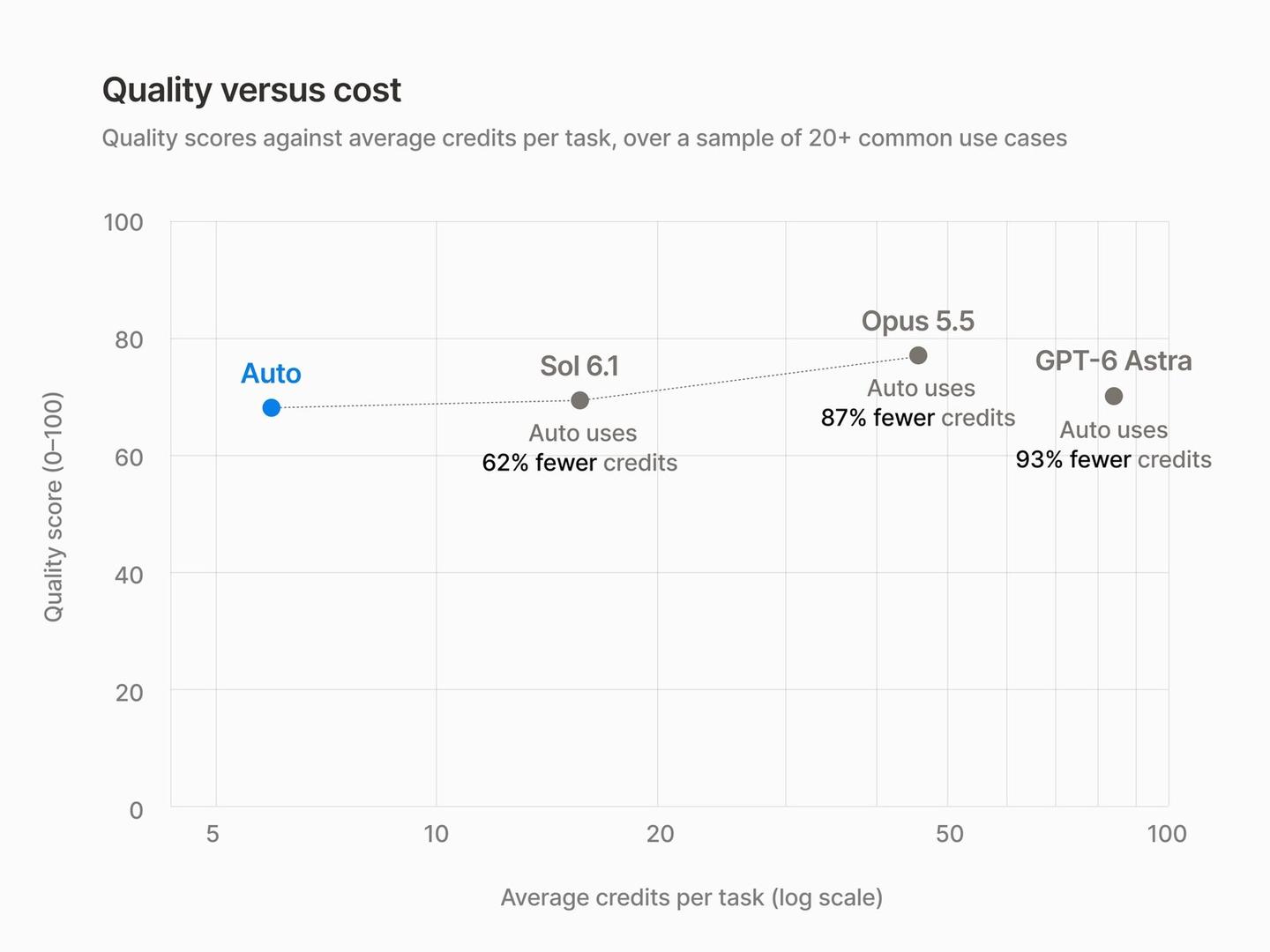
On Notion's own chart, Opus 5.5 still scores a little higher on quality than Auto. Auto used 87% fewer credits than Opus 5.5 and 93% fewer than GPT-6 Astra. Notion's Knowledge Board shows how individual models compare on everyday work.
Notion's agents can now run for a day and use their own computer
The longer agent runs come from what Notion calls the sixth version of its agent setup. Work keeps going through restarts, which is how one task can now run for 24 hours.
Agents also get their own computer and browser, so they can write short scripts for some jobs. Notion says that's faster and cheaper than having the AI do the same work step by step.
A new "Review for me" mode uses a separate AI model to check whether an action is safe before the agent takes it. Notion says agents now run up to 50% faster on web and mobile, and that Custom Agent runs cost about 30% less in its testing. Here's Notion's video on the rebuilt agents:
You can plug in your ChatGPT plan instead of spending credits
If you pay for ChatGPT Plus, Pro or Go, you can connect it to your personal Notion Agent and use it there instead of your Standard and Select credits. It doesn't work for Custom Agents yet. Notion's October 13 release notes say it doesn't add a markup.
Notion was one of the first apps in OpenAI's Sign in with ChatGPT, the DevDay feature that lets your ChatGPT subscription pay for AI inside other apps.
Enterprise customers can also bring their own model key in a private alpha. And Notion rebuilt its connection for outside agents, so tools like ChatGPT, Claude, Grok Bot and Muse can use Notion as shared memory. Back in June, Notion also started letting you assign tasks to Claude and Cursor like teammates.
Kothari says Notion's credits are similar to what Anthropic, OpenAI and Cursor have adopted over the past year. Claude and ChatGPT already cap how much you can use their top models, and Notion now charges ten times the credits when you pick one yourself for a simple job.
There's no point using Opus 5.5 or Fable for follow-up emails, drafting copy or pulling together a report, and in my Sonnet 5.5 review I suggested letting Sonnet 5.5 take the first pass and having Opus or Fable check the work. Auto makes that kind of call for you, and the everyday jobs are exactly what Notion is betting Auto can handle on its own.
You can't see which model Auto used, and when a result comes back weak, Notion's advice is to pick a model yourself, which spends your smaller Select allowance. Here's my Sonnet 5.5 review:
Sources
- Notion: Notion AI, rebuilt for efficiency
- Notion Help Center: Manage your AI credits
- Notion Help Center: Auto
- Notion on X: the Notion AI update thread
- Akshay Kothari on X: why Notion moved to credits
- Notion 3.8 release notes: use your ChatGPT plan in Notion
- Notion Labs: Knowledge Board
- Notion on YouTube: Agents, Rebuilt To Do More For Less





Comments
Sign in to join the conversation.