Everything OpenAI Announced at DevDay 2026, Explained in Plain English
OpenAI shipped 25 things in one morning. Here's what each one is, who gets it, what it costs, and what it changes for you.

On this page
- The short version
- Part 1: The big consumer launches
- Part 2: The models, the speed, and the plan changes
- Part 3: Apps inside ChatGPT
- Part 4: Codex, OpenAI's coding agent
- Part 5: The developer plumbing (and why it still reaches you)
- What didn't happen
- How people reacted
- Questions people keep asking
- What to do this week
OpenAI held its yearly developer conference, DevDay, on September 29 in San Francisco. The official recap lists 25 separate announcements across ChatGPT, Codex, the models, and the tools developers build with.
Most coverage gave each one a sentence ("you can now use your ChatGPT subscription in other apps!") and moved on. That leaves you with the headline and none of the meaning.
This guide goes one announcement at a time: what it is, how it works, who can use it, what it costs, and what it changes for you. The stuff you'll touch this month comes first, and the developer plumbing comes last.
The short version
Almost everything OpenAI announced points at one goal: making ChatGPT the place your work happens, instead of one tab you visit.
So ChatGPT got an always-on assistant that works while you're away (dots), shared documents your team and that assistant edit together (Space and Pages), other companies' apps running inside it (plugin extensions), and a way for your ChatGPT subscription to pay for AI inside other apps (Sign in with ChatGPT).
Underneath, OpenAI shipped a much cheaper model (GPT-6.1 Sol), a very fast and very expensive speed setting (Ultrafast), and a new $500 plan to use it on (Pro 500). It also cut what the $200 plan gets.
Part 1: The big consumer launches
Dots: an assistant that keeps working when you close the app
A dot is an always-on AI assistant that lives in your ChatGPT sidebar. You name it, pick how it looks, and give it ongoing jobs.
Each one runs on Astra, OpenAI's biggest and smartest model, and has its own computer in the cloud. That means it has its own web browser on OpenAI's servers, so it keeps working with your laptop closed.
“Introducing dots, powered by GPT-6 Astra. Remarkably capable, always-on agents built to handle everything.”
@OpenAI, September 29 (on X)
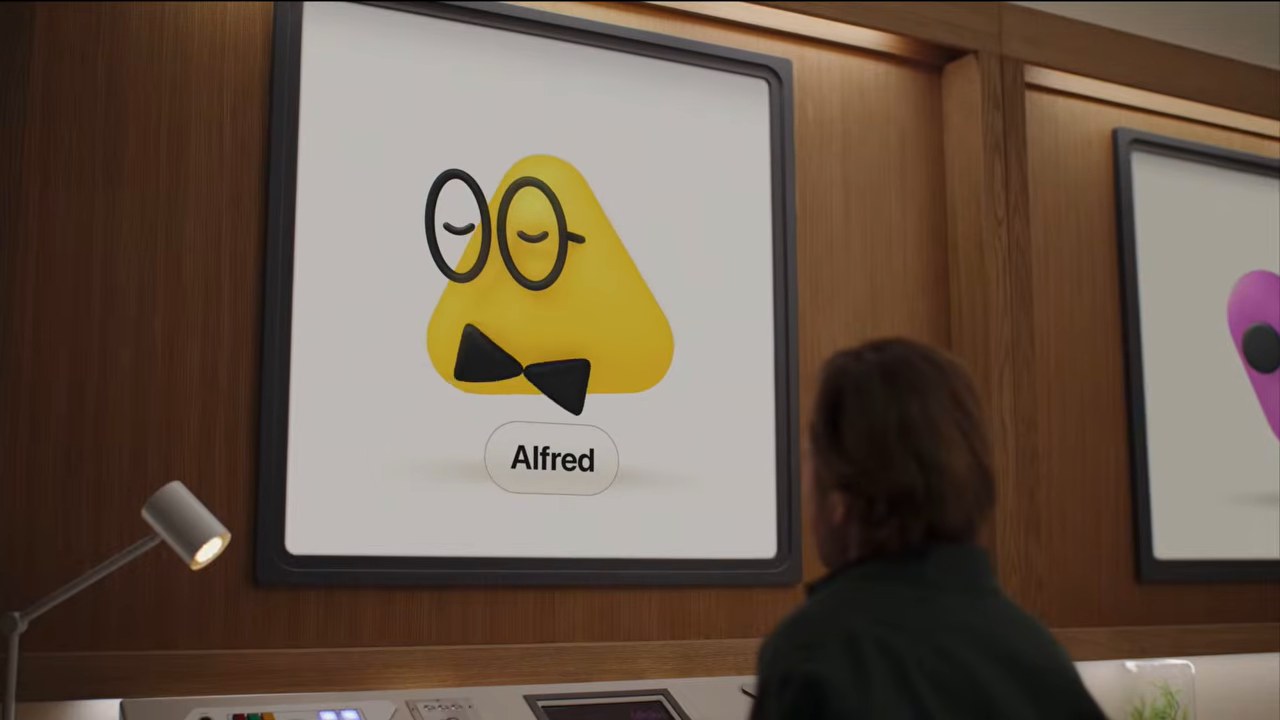
How it works day to day. You talk to the same dot in ChatGPT (web, desktop, or phone), in Slack, in Microsoft Teams, or by calling it on the phone. Texting is "coming soon."
It connects to the apps you've already linked to ChatGPT, and OpenAI says over 4,000 are available. It can also check in with you on its own.
In OpenAI's launch video, Sam Altman's dot finds a backup cake vendor after one cancels, books a tasting, and moves a meeting that clashed with his kid's recital. Altman said his dot reviews what came in overnight and pings him only with what's urgent.
When a job needs real work, your dot hands it off to ChatGPT Work or Codex, then reports back. You can watch its browser, take over, and hand control back.
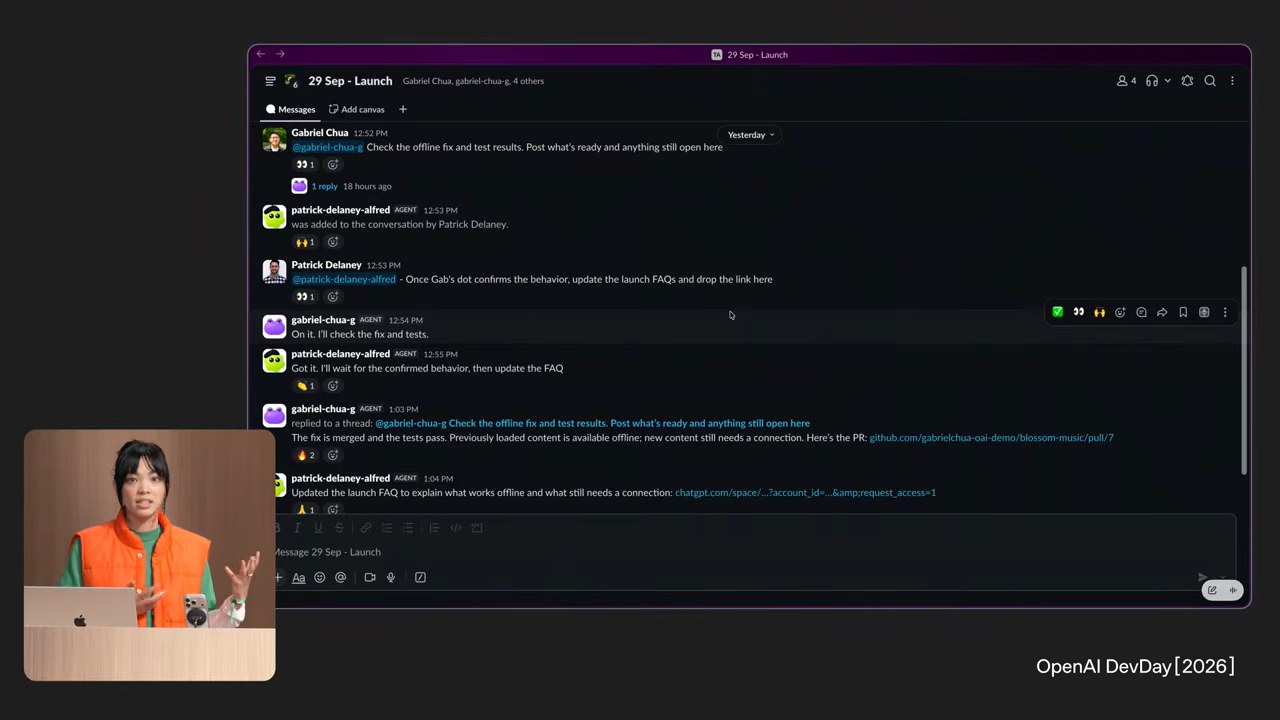
People testing it are running into real limits. It can't phone a business for you, it gets stuck on CAPTCHAs (the "prove you're human" puzzles), and some users report simple tasks taking 20 minutes.
The guardrails. When your dot is looking around on its own for ways to help, it's limited to read-only tools. It can look, but it can't send a message or change anything without you.
You can set Custom Rules that let it do some actions freely, require your approval for others, and block some entirely. A few things, like changing a password, always stay with you.
Who gets it and what it costs. Dots are rolling out to the Pro plans ($100, $200, and $500 a month) and Business Premium. There's also an Enterprise beta that stays off until your company's admin turns it on.
Your first dot is included in your plan. Chatting with your dot doesn't count against your usage, but the Work and Codex tasks it starts do.
OpenAI's release notes add that dot usage won't count against your limits at all for the first month, so expect more room right now than you'll get later.
Pro users in the EU, UK, and Switzerland can't get it yet. You also have to be 18 or older, and setup has to happen on a computer.
What it changes for you. Dots are built to keep working for you while you're not looking at ChatGPT at all. The realistic win is the stuff that falls through the cracks, like a dot noticing that a flight you're rebooking clashes with a meeting someone proposed in a Slack thread you never read.
It's early, though. The live demo stalled on stage when OpenAI's Holly Li called her dot ("I guess Dottie's having a slow morning"), and her explanation on X afterward was two words: "damn wifi."
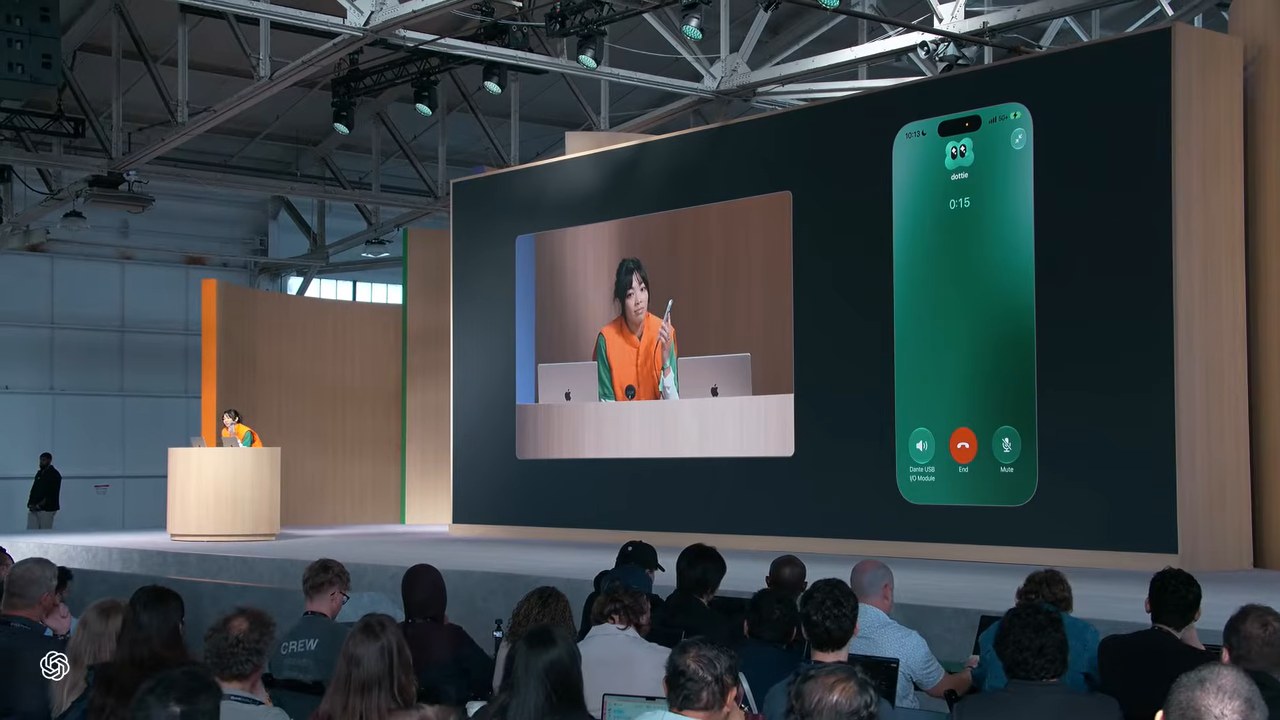
OpenAI posted a redo of the demo two days later:
Most people who've used it for a week describe the same split. It's good at work on your own computer and inside your work apps, and it's shaky at real-world errands like checkout pages, logins, and staying connected.
I spent a day handing my dot real jobs, including a personal shopper, a travel planner, and a marathon training dashboard. The full write-up is in I Gave OpenAI's Dots Real Jobs for a Day, and here's the video:
If you're on Plus ($20), you can't get a dot yet, so you can skip this until it reaches your plan.
Sign in with ChatGPT: your subscription now works inside other apps
This is the announcement that got summarized worst.
How AI apps work today. When you use an app with AI features built in (a writing tool, a coding tool, a note-taking app), that company pays OpenAI or another AI lab every time you use its AI.
Those per-use costs are why so many apps charge their own monthly "AI add-on," even if you're already paying $20 a month for ChatGPT. Use a few of those apps and you're paying for AI several times over.
What changes. With Sign in with ChatGPT, a partner app can show a "Continue with ChatGPT" button. From then on, the AI work you do inside that app is paid for by the ChatGPT plan you already have.
Altman told developers on stage that their users are already paying for an AI subscription, so the developer no longer has to cover those AI costs.
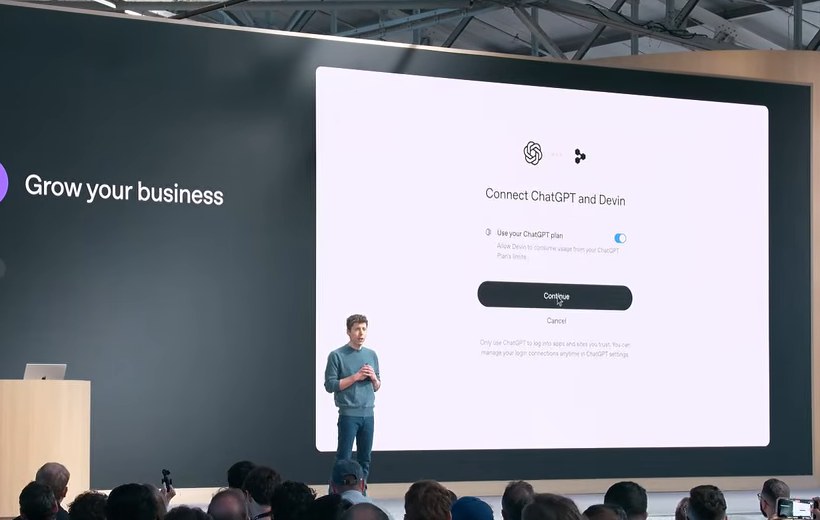
Two separate things happen under that button:
- Signing in. Like "Sign in with Google," the app gets your name, email, and profile photo so you don't have to make another account. This works for everyone, including free users.
- Using your plan. If you're on Plus or Pro, you can also let the app spend your ChatGPT allowance. It counts against the same Work and Codex usage your plan includes, and you never have to touch an API key (the technical password developers use to pay OpenAI).
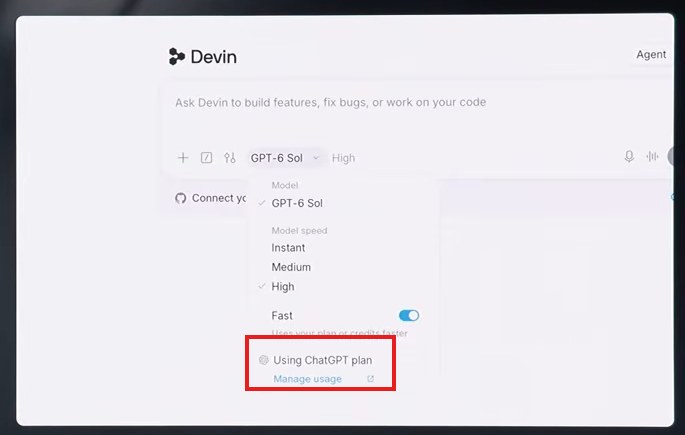
Your controls.
- You can cap each app. In ChatGPT, go to Settings → Usage → App limits and set a weekly cap for each connected app as a percentage of your plan. The cap sits inside your existing allowance, so connecting apps never adds usage. It shares what you have.
- It stops at your limit by default. When you run out, an app can only dip into paid credits if you've opted in, and that's off by default. If you turn it on with auto-purchase enabled, OpenAI warns you can be charged without separate notice.
- Your chats stay private. Connecting an app doesn't give it your ChatGPT conversations or memories.
- The app can still charge you. Your plan covers the AI requests, and the app can still charge for its own features.
- To disconnect: Settings → Security and login → Sign in with ChatGPT → Disconnect.
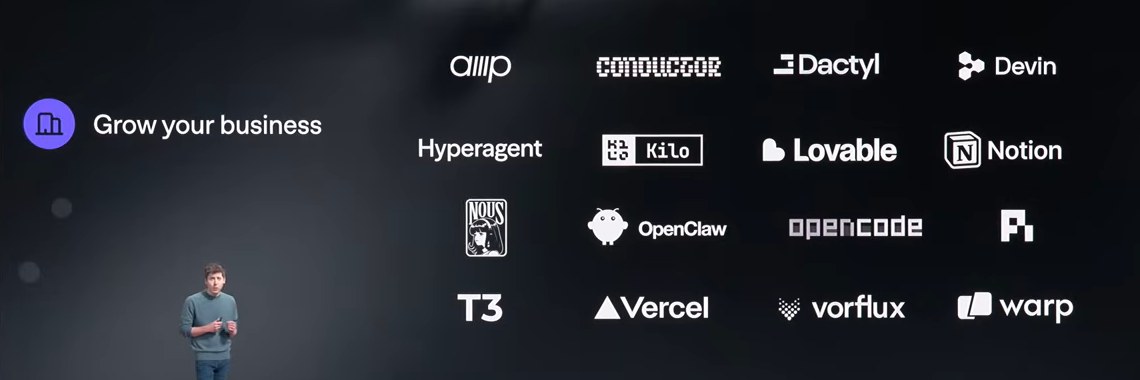
Who's in it. It launched as a limited preview with 16 partners. The ones that can use your plan include Notion, Vercel, Devin, Warp, Amp, Conductor, Kilo Code, Hyperagent, Hermes Agent, Vorflux, and Dactyl.
There are also four free open-source tools (OpenClaw, OpenCode, T3, and Pi), and Lovable is listed as coming soon. Canva, Airtable, HubSpot, GitLab, and Supabase support only the sign-in part for now, and other developers have to apply.
What it changes for you. In the short term, if you pay for ChatGPT Plus or Pro and use one of these apps, check whether you're also paying for its AI add-on.
The longer-term shift is bigger. Small apps can now offer AI features without a subscription to cover AI costs, which should mean more good, cheap AI tools. Hermes Agent, which is becoming the default AI agent for a lot of people, is already on the list.
It also puts OpenAI at the front door of every app that adopts it. The more apps run on your ChatGPT plan, the harder ChatGPT becomes to leave, and every connected app draws down the same weekly allowance you use in ChatGPT itself.
Right now the list leans heavily toward coding tools, so most non-coders will feel this through Notion first.
Space and Pages: shared documents your team and your AI edit together
ChatGPT Space replaces the old Library. It's a home for a team's shared work inside ChatGPT.
Inside Space you make Pages, which are documents that can hold charts, images, tables, and even live mini-apps. You and your teammates edit them together, and you can tag ChatGPT or your dot in a comment ("turn this into a bar chart") to make changes.
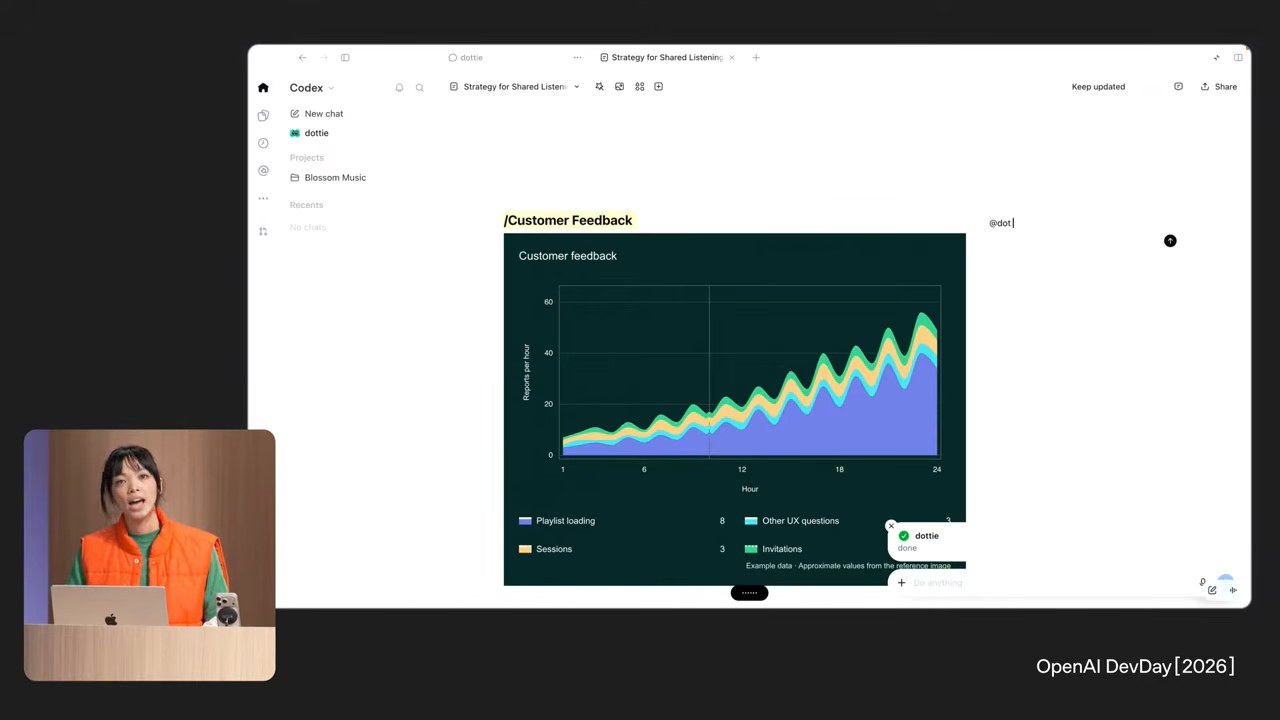
A Page can also keep itself current. You can tell it to refresh from connected sources on a schedule, and in the keynote, a page was set to "check the API platform Slack channel and update it daily."
Collaborative slides that export to PowerPoint and Google Slides are coming "in the coming weeks."
Who gets it. Pro, Business, and Enterprise, on desktop and web. On your phone, Space is read and share only.
What it changes for you. A status doc, dashboard, or project brief can now update itself, so it stays useful after the day you write it. Early users say it works fine as a doc editor, but most teams already live in Google Docs or Notion and won't move overnight.
The rest of the teamwork features
These are mostly for paid work plans, but they're worth knowing about.
- @ChatGPT in Slack and Teams (Business and Enterprise). You can mention ChatGPT in a Slack or Teams thread and it answers there. Teammates don't need their own ChatGPT license to see it work.
- Teams and Team Tasks (Business and Enterprise). You can set up a team and give it shared AI tasks that run on a schedule or when something happens, like a weekly summary of a channel.
- Meetings plugin (beta, Mac only, Pro and Business). ChatGPT takes notes on your calls without a bot joining the meeting. It listens through your computer's microphone and sound, which means you're responsible for telling people they're being recorded. The audio is deleted once notes are ready, and it stops after four hours.
- Shareable profiles (every plan, including free). You get a public ChatGPT profile page at a link like chatgpt.com/u/yourname that shows off sites and plugins you've built. It never shows your conversations.
Part 2: The models, the speed, and the plan changes
GPT-6.1 Sol: almost the smartest model, for a fifth of the price
Sol is the middle of OpenAI's three model sizes, between the big Astra and the small Luna. The new version, GPT-6.1 Sol, "nearly matches GPT-6 Astra's intelligence on agentic coding, computer use, and professional work at one-fifth of Astra's standard input and output token prices," according to OpenAI.
For developers, that's $2 per million tokens (roughly 750,000 words) going in and $10 coming out, versus $10 and $50 for Astra. If you want to see how Astra itself stacks up, I made it build the same app as Opus 5.5 and Fable 5.1.
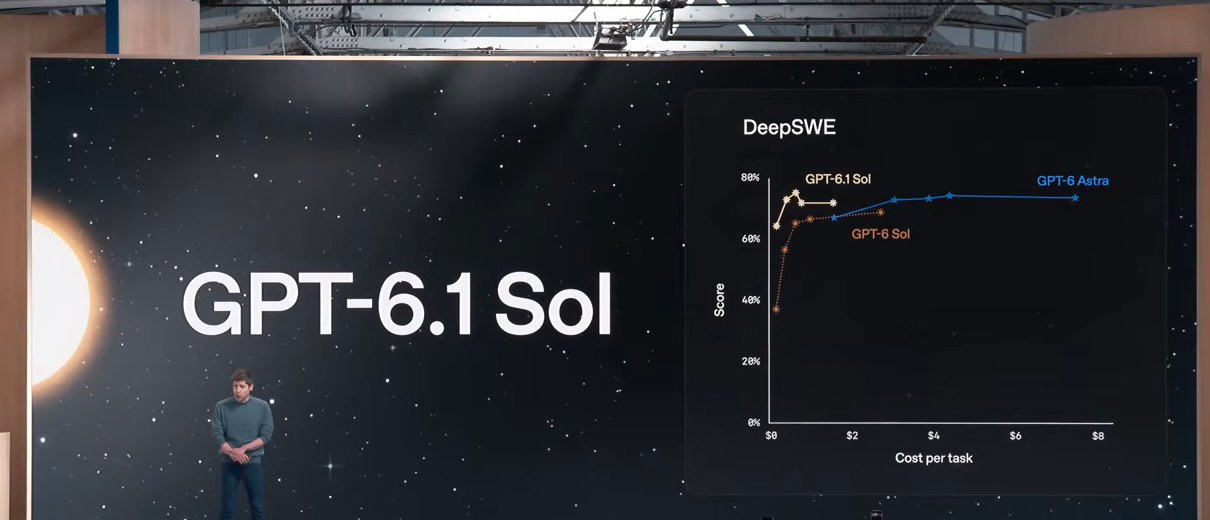
How it holds up. Mostly well. Independent testing by Artificial Analysis put it one point behind Astra on its intelligence index, at $0.72 per task versus $3.26 for Astra.
One support-software company ran real customer tickets through it and got Astra-level answers for about a fifth of the cost. OpenAI also says it makes fewer factual mistakes than the previous Sol.
Where to find it. GPT-6.1 Sol is in ChatGPT Work (the mode for longer, multi-step jobs, which I covered when it launched) and Codex, for Plus and above.
OpenAI says it is "not yet available in Chat." If you open the normal chat and look for it, you won't find it yet.
What it changes for you. If you use Work or Codex, picking Sol over Astra for everyday jobs stretches your weekly allowance much further. Several heavy users say it barely dents their plan.
And because every app built on OpenAI just got a near-top model at a fifth of the price, AI features in the tools you already use should get smarter or cheaper over the next few months.
Ultrafast: the same top model, about eight times faster, for a lot more money
Ultrafast is a speed setting for Astra. In Codex, it writes up to 300 tokens a second, which OpenAI says is up to 8 times faster than normal.
That's roughly 225 words a second, so a long answer appears almost instantly.
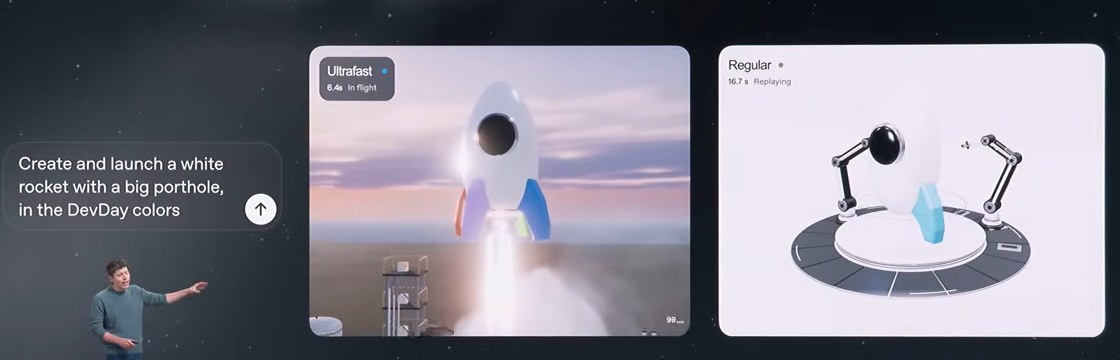
What it costs. In ChatGPT Work and Codex, Ultrafast burns your included usage at 8 times the normal rate, so the same job uses about eight times as much of your allowance. For developers in the API, it's 6 times the standard price.
It's only available on the new Pro 500 plan and some Enterprise and Edu plans, and buying extra credits on a cheaper plan won't get you access. It works with Astra now, and Sol support is "coming soon."
Ultra and Ultrafast are different settings. Ultra controls how hard the model thinks, and Ultrafast controls how quickly it writes.
What it changes for you. For most people, nothing yet. It's built for people whose time is worth more than the usage, and Altman said he pays for Ultrafast because the speed helps him think.
Early users report burning through hundreds of dollars of usage in under an hour. The common verdict is that it's impressive and only worth it if money isn't the constraint.
Pro 500, and the cut to the $200 plan
ChatGPT now has a clean ladder, with each plan's usage set as a multiple of the $20 Plus plan:
| Plan | Price | Usage vs. Plus | Ultrafast? |
|---|---|---|---|
| Plus | $20/month | 1× | No |
| Pro 100 | $100/month | 5× | No |
| Pro 200 | $200/month | 10× | No |
| Pro 500 | $500/month | 25× | Yes |
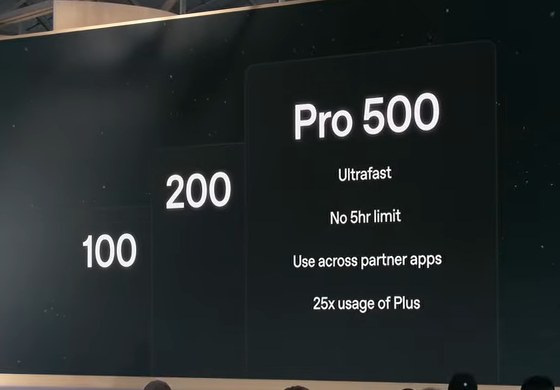
Why $200 subscribers are upset. The $200 Pro plan used to include 20 times Plus usage. It now includes 10 times, which is half.
If you had an active $200 plan between September 22 and the morning of September 29, you keep the old amount through October 29, 2026, and then you drop to the new amount (OpenAI's Pro tiers page has the details).
Existing subscribers also got 62,500 one-time usage credits, which users peg at about $2,500 at API prices, and those expire December 31. OpenAI also dropped the five-hour usage cap on Pro plans, so you can use your weekly allowance in big bursts.
Codex lead Tibo Sottiaux announced the change the night before DevDay:
“Tomorrow we are re-opening the Pro $200 subscriptions to new subscribers, but together with it we are also changing how we calculate the usage for it. In effect, if you do the math, it will net out at half the dollar in API spend compared to the old Pro $200 plan.”
Tibo Sottiaux (@thsottiaux), Codex lead, September 28 (on X)
The biggest question in the replies was "what is 1x?" OpenAI doesn't publish the Plus allowance as a number, so the multipliers only tell you how plans compare to each other.
People also noticed the awkward math: on paper, five Plus accounts ($100) equal one Pro 100 plan, and 25 of them equal Pro 500.
What it changes for you. If you pay $200 a month, your plan gets roughly half the usage starting October 30. Watch your usage this month and decide whether $100, $200, or $500 fits how you actually work.
If you're on Plus, nothing changed for you, and the ladder at least shows how each upgrade compares to what you have.
Part 3: Apps inside ChatGPT
Plugin extensions: other companies' apps, running inside ChatGPT
OpenAI is "opening the platform we use to build ChatGPT features" to outside companies. A plugin extension is a whole app that runs inside ChatGPT and Codex: in the sidebar, in a panel next to your chat, or as the thing that opens when you click a file.
OpenAI's examples include a Canva sidebar, Figma you can mention right in your message, and Adobe Photoshop and Acrobat opening your files inside ChatGPT. It's on every plan, and the web version for free users is "coming soon."

OpenAI has tried this several times: ChatGPT plugins in 2023, then custom GPTs (now being retired in favor of plugins), then the Apps SDK that brought tools like Runway into ChatGPT this summer. None of them really took off.
This time, plugins can be full working apps, and dots can use them on your behalf.
Three related updates:
- Better discovery. ChatGPT can now suggest a plugin in the middle of a conversation when it would help.
- MCP Events. Connected apps can now wake ChatGPT up (MCP is the standard way AI tools plug into other apps). For example, a new bug report in a Slack channel can automatically kick off a task.
- Plugins in Sites (Business and Enterprise). Sites are the small web apps people build in ChatGPT, and they can now pull live data through plugins. Each viewer logs in with their own credentials, so people only see data they're allowed to see.
What it changes for you. There's less copying and pasting between tabs. Instead of asking ChatGPT for an idea and then rebuilding it in Canva, the Canva editor sits next to the conversation.
OpenAI hasn't said how ChatGPT chooses which app to suggest mid-conversation, for example Photoshop over another editor.
Part 4: Codex, OpenAI's coding agent
Non-coders use Codex too. Inside OpenAI, even legal and recruiting moved from Chat to Codex, and a lot of non-coders now use it to build personal apps, dashboards, and automations by describing them in plain English.
- Codex in the cloud (Plus and up). Your coding tasks now keep running on OpenAI's computers after you close your laptop. You can start a task on your phone and pick it up on your desktop, and teams can save a setup once and reuse it.
- A refreshed Codex CLI (every plan). The terminal version of Codex lets you start and steer tasks with your voice and track several agents in one view.
- Code Review (every plan). Codex reviews changes to your code on GitHub (and GitLab, in preview) and can do it automatically.
- Codex Security Cloud (Pro, Business, Enterprise, Edu). Codex scans your projects for security holes on a schedule and drafts fixes, using the Daybreak security models OpenAI opened to defenders in June.
- GPT-5.5 retires on October 14, 2026. It leaves ChatGPT and Codex that day, so if you've been picking it on purpose, switch to Sol before then.
- A global usage reset. Tibo Sottiaux pressed a button on stage that reset Codex usage limits for everyone. It was a one-time reset, and your limits refill on the usual schedule from there.
Part 5: The developer plumbing (and why it still reaches you)
These five are aimed at companies and developers. You won't use them directly, but each one changes the apps you use.
Agents API with computer use
Developers can now build agents that use a web browser running on OpenAI's computers, clicking and typing like a person. The user has to approve each new website the agent visits.
What it means for you: more apps that offer to "go do it for you" on websites, like booking a table or filling out a form.
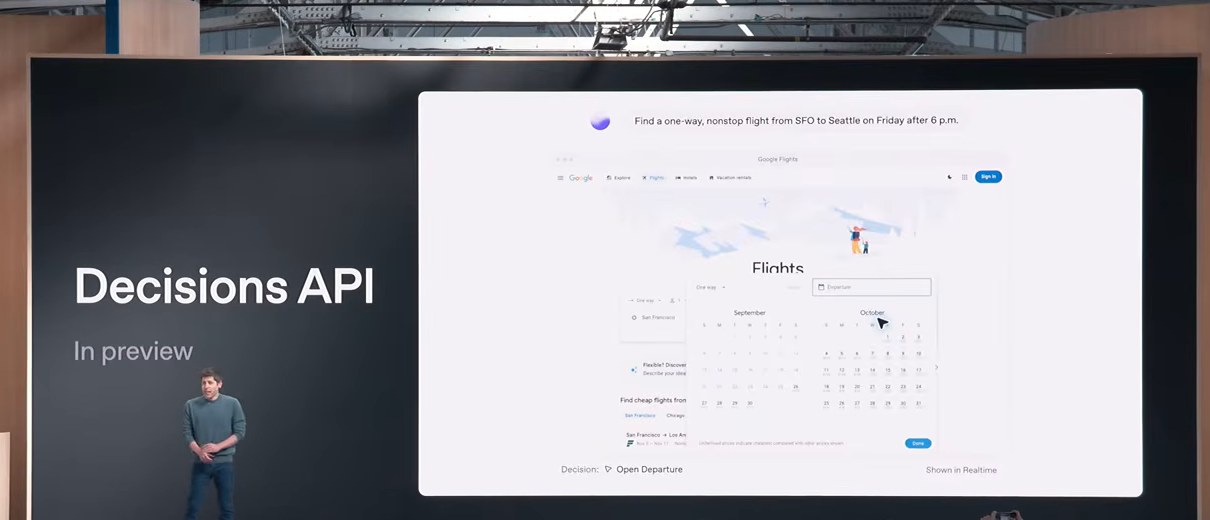
Decisions API (limited preview)
Developers give Luna, the small model, a question and a fixed list of possible answers ("is this support ticket urgent, normal, or spam?"), and it picks one in a fraction of a second.
Because it can only answer from the list, there's nothing to clean up afterward. Pricing hasn't been published yet.
What it means for you: faster, cheaper sorting inside the apps you use, like a support tool sending your ticket to the right person instantly.
Bedrock Managed Agents (preview)
OpenAI's models and Codex's agent setup can now run entirely inside Amazon's cloud.
What it means for you: companies that keep everything on Amazon can use OpenAI agents without their data leaving it, so your employer may roll these out sooner.
OpenAI Private Intelligence
These are privacy controls for businesses. Companies with Zero Data Retention (an agreement that OpenAI won't store their data) can now keep the rare conversations flagged for safety review out of OpenAI's hands.
Those conversations stay locked in the company's own storage, where only an automated, hardware-sealed system can read them. "Private Inference," which keeps data protected even while the AI is processing it, is a preview coming this fall.
What it means for you: it's aimed at banks, hospitals, and big companies. If your employer has blocked ChatGPT over data worries, this could change their mind.

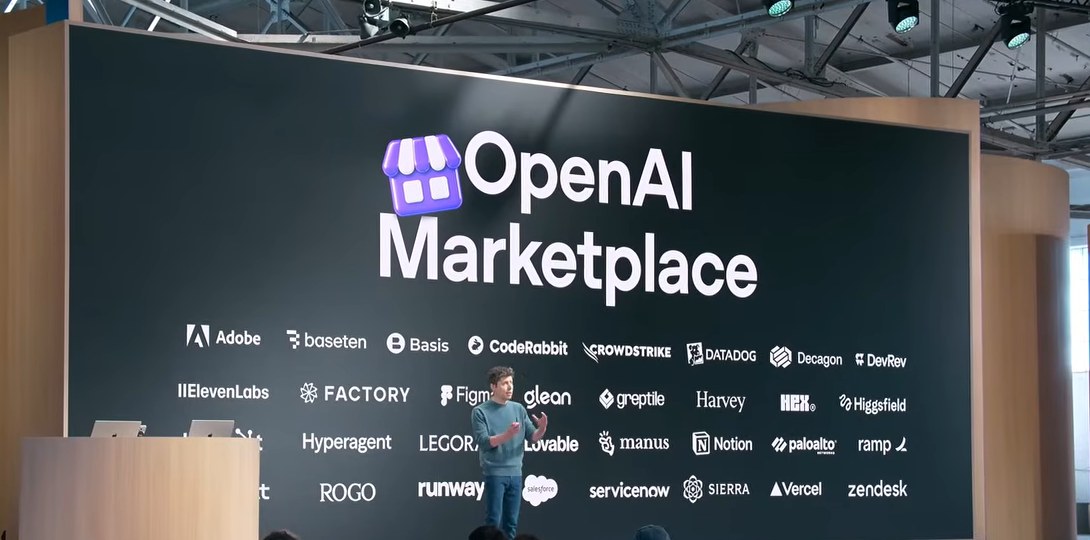
OpenAI Marketplace (beta)
Large companies that have committed to spend money with OpenAI can now spend part of it on 32 partner tools, including Adobe, Figma, Notion, Salesforce, Harvey, and Lovable.
What it means for you: if your company already pays OpenAI, getting approval for tools like these may get easier, because the budget already exists.
What didn't happen
- No hardware. There was no device from OpenAI and Jony Ive. Asked about hardware on CNBC, Altman said "I think we will have something that's worth waiting for," then "Not today. Not today."
- No GPT-6.1 Astra. OpenAI shelved the next version of its top model the day before DevDay. Altman told CNBC, "There's not a big scary thing in this case."
- No new image or video models. Nothing new for Sora or image generation was announced.
How people reacted
Most people landed in the same place: a lot of ambition, with rough edges. Several demos failed on stage, and Altman said he's proud OpenAI takes the risk of doing them live.
A common complaint is that dots look a lot like rivals that got there first, including xAI's Grok Bot, Meta's Muse, and the open-source OpenClaw. The common defense is that dots run on Astra, which is stronger than what powers those rivals.
The other big theme is confusion. People are juggling Chat, Work, Codex, dots, Space, and Pages, plus three model sizes in two versions, and a lot of them say it's too much.
Google also crowded the week by announcing Gemini 4 Argon, with benchmark scores ahead of Astra, though it isn't available to use yet.
OpenAI seems to have heard the complaints. On October 4, Tibo Sottiaux promised a daily improvement for the next four weeks:
“Over the next 28 days, each day we'll either ship one thing that is a clear improvement and relevant for most codex/work users or ship a full reset. Let the improvements begin.”
Tibo Sottiaux (@thsottiaux), October 4 (on X)
Altman posted a few days after launch that "dot is my favorite openai product so far," saying it feels noticeably better each day as it learns his workflow.
Questions people keep asking
These come straight from Reddit, Hacker News, and OpenAI's own forum in the week after DevDay.
Is a dot a device, like an Alexa? No. It's a tab in the ChatGPT sidebar (on web, desktop, and phone) with its own computer running in OpenAI's cloud. There's no separate app and nothing to buy.
Can I give my dot my credit card? You can let it sign in to things, and it can reach checkout pages, but payments are where it most often stalls. Start it on research and drafting jobs before you hand it anything involving money.
I'm on Plus. Where's GPT-6.1 Sol? It lives in Work and Codex for now, and the normal Chat doesn't have it yet. Switch to Work or Codex to use it.
Why are there so many model names? OpenAI now sells three sizes (Astra, Sol, Luna) in two versions (6 and 6.1), with several thinking levels each. If you're unsure, use Sol at medium or high.
Testers also found that the highest thinking levels on 6.1 Sol scored slightly lower than high on OpenAI's own coding test, while costing more.
Is Sign in with ChatGPT allowed, or will it get my account banned? It's an official OpenAI feature, so using it with listed partners is exactly what it's for.
Keep an eye on your allowance, though. Some users report partner apps using up their plan faster than Codex did for similar work, so set the per-app cap on day one.
Does Sign in with ChatGPT let the app read my chats? No. OpenAI says connecting an app doesn't share your conversations or memories.
What happened to hardware? At the end of the keynote, Altman held up a ModRetro Chromatic, a retro handheld game console every attendee got as a gift. That's the "hardware" some posts mentioned, and OpenAI's own device wasn't shown.

What to do this week
The most useful thing to do this week depends on your plan. If you're on Plus, open Settings, find Sign in with ChatGPT, and check whether any app you pay for is on the partner list.
If you're on the $200 Pro plan, your usage halves on October 30, so decide by then whether to stay, drop to $100, or go to $500.
My read on dots, after almost a full day with mine: at first I wasn't convinced it was a step up from ChatGPT Work or Codex, but I came away seeing the potential.
Where it really shines is as an ambient watchdog that's just watching your stuff, and the more apps you connect through plugins, the more proactive it gets. You're still the one approving things and making decisions, so it's a bit like having another employee to manage.
If you're already paying for a Pro plan, it makes total sense to turn it on, connect your apps, and just start chatting with it about your day.
Sources
- OpenAI: DevDay 2026 recap
- OpenAI: Introducing dots
- OpenAI: How we build safety, security, and privacy into dots
- OpenAI: Introducing GPT-6.1 Sol
- OpenAI Help Center: Sign in with ChatGPT
- OpenAI Help Center: About ChatGPT Pro tiers
- OpenAI Help Center: ChatGPT release notes
- OpenAI Developers: Ultrafast mode
- OpenAI Developers: Private Safety Processing
- OpenAI Developers: Plugin extensions
- AWS: Bedrock Managed Agents, powered by OpenAI
- OpenAI DevDay 2026 keynote (YouTube)
- OpenAI: The dots demo, take two (YouTube)
- CNBC: Sam Altman interview transcript
- Artificial Analysis: GPT-6.1 Sol
- OpenAI on X: Introducing dots
- Tibo Sottiaux on X: Pro $200 changes
- Tibo Sottiaux on X: 28 days of improvements
- Sam Altman on X: dot is my favorite OpenAI product
- Holly Li on X: "damn wifi"
- OpenAI Developer Community: DevDay 2026 announcements
- Reddit: r/OpenAI on dots, a day testing dots, the Pro plan changes, Ultra vs Ultrafast
- Hacker News: Dots discussion
- eesel: GPT-6.1 Sol review



Comments
Sign in to join the conversation.