Genie 4 in Project Genie: Type a World, Then Change It From the Inside
Google's Project Genie now runs Genie 4, so you can describe a world, walk around in it and rewrite it with a prompt while you're still inside.
 AI for Mortals Staff
On this page
- What's new in Genie 4
- How to use Project Genie
- Change the world while you're inside it
- Build a world by chatting with the agent
- The gallery, sharing and remixing
- Genie 4 or Genie 3: which one to pick
- What Google AI Ultra costs, and who can use Project Genie
- What still breaks
- What people are saying about Genie 4
Project Genie, Google's app for making worlds you can walk around in, now runs Genie 4. You describe a place in a sentence, step inside it with your keyboard, and type a new prompt while you're there to change the weather, add a person or set off an event.
Google opened it today to Google AI Ultra subscribers, along with a chat agent that helps you build a world in conversation and a public gallery you can remix.
We don't have Project Genie access yet, so we haven't built a world ourselves. This walkthrough comes from Google's launch video, its help page and its research notes, plus what people said when Genie 4 was first shown. We'll add our own test once we're in.
What's new in Genie 4
Genie 4 is the world model, the part that draws each frame as you move. Project Genie is the web app you use it in. The previous version, Genie 3, gave you a world to wander for up to a minute. Genie 4 adds four things:
- Live edits. Type a prompt mid-session ("a snow storm rolls in", "a piano player joins in") and the world changes around you without starting over.
- Sound. Every world now has its own audio: wind, waves, music, and people who talk and answer you.
- More realistic people and physics. Characters move and react more naturally, and things like collisions and wind behave closer to the real thing.
- Gemini watching the scene. Google says Gemini reads what's on screen, fits your edit into what's already there and keeps the world moving between prompts.
Google's research post says worlds hold together over short sessions, and TechCrunch reported that a Genie 4 scene stays consistent for up to two minutes, double Genie 3's limit.
How to use Project Genie
Here's the flow from Google's help page, step by step:
- Go to labs.google/fx/projectgenie and sign in with your personal Google account (the one with Ultra).
- Click Create with Genie. If lots of people are generating at once, you may wait in a queue first.
- Describe your world in the prompt box. You can also upload a photo as a starting point.
- Pick a model (Genie 4 or Genie 3), then click Create.
- Walk around with W, A, S, D, jump or rise with the Spacebar, and turn the camera with the arrow keys.
- Type into the prompt panel at any point to change what's happening.
When the session ends, you can replay it (you'll get something different each time), download a video of your run, share it or remix it.

Prompts to try first
Start small and specific: a place, a time of day, and where you are in it.
A small-town bakery at 7am, seen from behind the counter. Warm light, flour on the worktop, trays of croissants cooling, and a line of three customers waiting. I'm the baker, first person.
Upload a photo of a room, a street or a product and say what to do with it:
Turn this photo into a place I can walk around. Keep the furniture and colors the same, and make it early evening with the lamps on.
Change the world while you're inside it
This is the headline feature. You're walking around, you type a sentence, and the world changes in front of you.
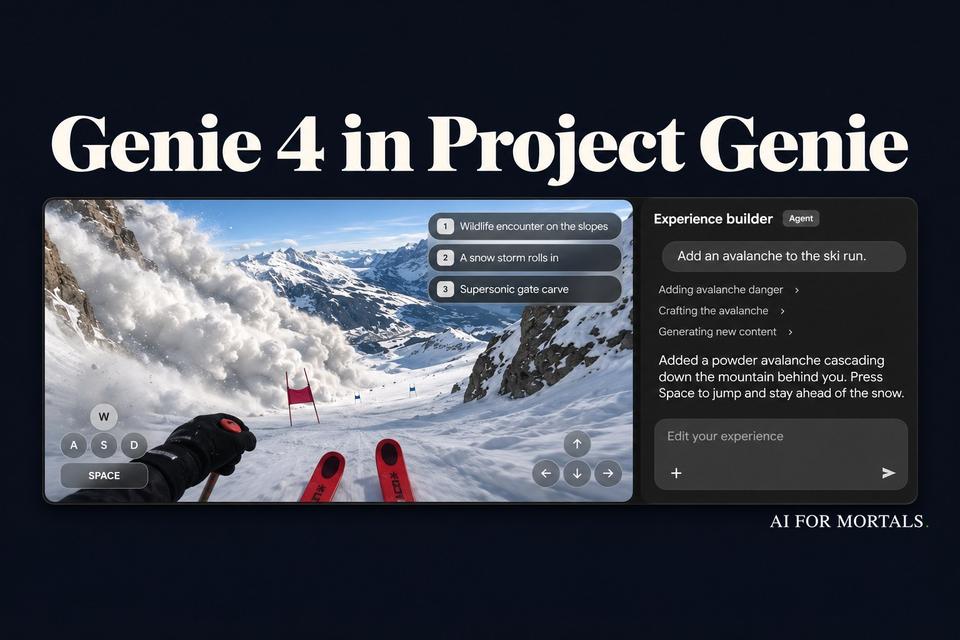
In Google's demo, someone skiing down an alpine course types "Add an avalanche to the ski run." The agent lists what it's doing (adding avalanche danger, crafting the avalanche, generating new content), and then a powder slide pours down the slope behind them. Google notes the video is shortened, so we don't know how long the edit really takes. Later they type "Show me this downhill course at night" and the run switches to floodlights.
The world also offers its own ideas. Small chips in the corner suggest the next event ("Wildlife encounter on the slopes", "A snow storm rolls in"), and you can click one instead of typing.
Edits that tend to land are about weather, time of day, a new person or object, or something happening:
Make it start raining, slowly at first, then heavier. Keep everything else the same.
Add a delivery driver who walks in the front door and asks me where to put the boxes.
Google's own notes say details can drift "after multiple complex prompt edits," so change one thing at a time, and re-check the parts you care about after each edit.
Build a world by chatting with the agent
The other big addition is the Project Genie agent, labeled Experience builder in the app. Instead of writing one long prompt, you describe what you want, and it talks you through it.
Google says it builds the first look of your world, writes a soundtrack to fit the mood and sets up the rules. In the demo, after one request it replies with what it made ("I have created the Alpine Downhill experience…") and tells you the controls: steer with W, A, S, D, or press 1 to 3 to trigger a move. Its step list shows the build itself taking a few minutes: one step ran for 1 minute 23 seconds, another for 2 minutes 3 seconds.

You can also bring Gemini along while you explore. It watches the screen, suggests where to go next and can trigger events on its own as you go.
This is where a short game or a guided scene becomes possible without writing a long prompt. Try:
I want a short mystery set in a 1970s office building after hours. I'm a night security guard. Hide three clues on different floors, and let me talk to one cleaner who knows more than they let on. When I find all three, the lights should go out.
Or something closer to work:
Build a training scene for new retail staff: a busy clothing shop on a Saturday. One customer wants a refund without a receipt and gets impatient if I take too long. Let me walk the shop floor and talk to her.
Google's research post says game developers are using Genie 4 to try ideas before writing any code, and businesses are testing it for quick training and "what if" scenarios. Each run lasts a few minutes, so it's best for sketching an idea and showing it to your team.
The gallery, sharing and remixing
If you'd rather explore before you build, open the gallery. It has Google's own worlds, worlds from creators who had early access, and anything the community publishes.
A few to start with: The Life of Ants (a day as a worker ant), Where in the World? (land somewhere and guess where you are), Villa Giallo (find the clues in a haunted 1970s villa) and Rock Paper Scissors (name a themed object and Gemini referees the fight).

Any world in the gallery has a Remix button, so you can keep its setting and change the characters, soundtrack or rules with the agent.
When you share your own, you pick Private, Unlisted (anyone with the link) or Public (listed in the gallery). Before you share, read this line in the help page: if you allow remixing, other people can see the prompts, images and other files you used. If you built a world from a photo of your home, your kids or a work product, turn remixing off or keep it private.

Genie 4 or Genie 3: which one to pick
Genie 3 stays in the model picker, and it got its own upgrade today. Here's how they compare, based on Google's launch post:
| Genie 4 | Genie 3 | |
|---|---|---|
| Looks | Most real | Less real |
| Sound, voices | Yes | No |
| Edit mid-run | Yes | Yes (new) |
| Longest run | ~2 min | 3 min |
| 360° photo start | No | Yes |
Pick Genie 4 when you want it to look and sound real. Pick Genie 3 for a longer wander, to chain several worlds into one trip, or to start from a 360-degree panorama photo. Google's launch post doesn't mention panorama starts for Genie 4.
What Google AI Ultra costs, and who can use Project Genie
- You need Google AI Ultra, which starts at $99.99 a month. Google AI Pro ($19.99) members can join a waitlist on the Project Genie page, and access is granted gradually.
- You must be 18 or older, and it works wherever Ultra is sold.
- It doesn't use your AI credits. Google says that's because it's still an early research prototype.
- There's a daily limit. Google doesn't publish the number and says it "may vary by plan and demand." If a world won't generate, the help page's first guesses are a content block or that you've hit the day's limit.
- Without access, you can still browse the gallery and watch short previews.
If you already pay for Ultra for Gemini 4 Carbon, Project Genie is included. Paying $99.99 a month just to try it is a lot for something Google still calls a research prototype.
What still breaks
Google is upfront about the rough edges. From its help page and research notes:
- Lag. There's a delay between pressing a key and the world reacting.
- Drift. Objects and details can change the longer you play, after several edits, or as you move around.
- Losing control of your character. Sometimes your character stops responding or walks backwards. Press the Spacebar to reset it.
- Text and sound. Writing on signs and screens often comes out garbled, and audio doesn't always match what's on screen.
- Image quality and darkening. The stream can drop in quality when servers are busy, and some sessions get darker over time.
- Photos that don't match. A world started from your photo may not look much like it. Google's tip: keep the main subject centered, and for a real-world scene, try asking for a more game-like version.
What people are saying about Genie 4
Most early reactions say the same thing: the realism is a big jump, and it still isn't a game. On Reddit, the most upvoted replies to Genie stories say walking around a convincing world is the easy part, and that goals, rules and a reason to keep playing are what make a game.
Others think filmmakers and designers will get the most out of it first. Google told TechCrunch its early testers use it to storyboard and try ideas quickly, and the gallery's ant colony and haunted villa came from a filmmaker and a creative technologist.
There's also the question of who it's for. One AI newsletter asked where the real-world value is when chatbots already earn their keep at work. Another pointed to open-source world models you can try for free today, behind on quality but catching up.
If you'd like to see what AI can already build with a story and real rules, Pat gave Claude a week to make a murder mystery game:
You can read how that game was built in How I Built a Murder Mystery Game With a Team of Claude Agents. For 3D scenes you can keep and edit, see what Fable 5.2 built with Blender. For short clips instead of whole worlds, our AI video generator guide compares the options, including Google's own Gemini Omni.
Sources
- Genie 4 is now available in Project Genie (Google, November 18, 2026)
- Genie 4: A new generation of world simulation (Google DeepMind, October 27, 2026)
- Get started with Project Genie (Google Labs Help)
- Project Genie (Google Labs)
- Google DeepMind on X: Genie 4 is now available in Project Genie, with the launch video (November 18, 2026)
- Google's Genie 4 world model adds audio, more realistic worlds, and real-time steering (TechCrunch, October 27, 2026)
- Project Genie: Experimenting with infinite, interactive worlds (Google, January 29, 2026)
- Google AI plans (Google One, checked November 18, 2026)
- Google's Genie 3 turns a text prompt into a playable open world and Genie 4: A new generation of world simulation (Reddit)




Comments
Sign in to join the conversation.