
I Gave Fable 5.2 Blender Access. Here Is What It Built and What It Cost.
The Stahl House, the entire City of Arts and Sciences in Valencia, and a horror game with its own story and voiceover. The prompts, the Blender skill, and the receipts.

I gave Claude Fable 5.2, Anthropic's newest model, control of Blender, the free 3D modelling software, and asked it to build three things: a flythrough of the Stahl House hanging off the Hollywood Hills, the entire City of Arts and Sciences in Valencia, and a horror game with its own story and voiceover. You don't need to know how to code, 3D or anything about Blender to do this. The setup takes five minutes. Below are the Blender skill, all three prompts, and what each build produced and cost.
Get the skill
How I ran it
Each build got its own folder, a prompt.md and a copy of the skill.
I started Fable 5.2 on high effort in that folder with one line, for example /goal Follow prompt.md in this folder to recreate the entire Valencia Arts and Sciences Center. Don't stop until it looks photo realistic. The /goal command has a length limit, so the full instructions live in prompt.md and Fable reads them from there.
Every prompt asks for the same things in the same order: research the real subject first and write down the sources, build from that research, render test stills, have critic subagents compare them against real photographs, and only then render the final film.
The final renders ran in Cycles on a rented machine with eight RTX 5090 graphics cards from Vast.ai, so a film that would take my Mac all night renders in minutes.
The soundtracks are ElevenLabs, and the horror narrator is Fish Audio's Drama 3 model.
Build one: the Stahl House
Recreate Pierre Koenig's Stahl House (Case Study House #22, Los Angeles, 1960) in Blender as accurately and as beautifully as possible, render a cinematic flythrough film of it at dusk, and put the film on a web page.

Context you should know: this is going into a YouTube video watched by a large audience of non-technical people. The film is shown full screen on camera. At first glance it should look like real footage.

## The house

Research it first, and build from the research. Gather the published plans and sections, Julius Shulman's 1960 photographs, modern photos and tour videos, and the Case Study House program material. Write what you found, with sources, to research/REFERENCES.md before you model anything.

Get the things that make it the Stahl House right: the L-shaped plan on its hillside lot at 1635 Woods Drive; the steel post-and-beam frame with long cantilevered roof beams; the floor-to-ceiling glass walls; the pool that runs along the glass on the city side; the flat roof with its deep overhangs; the period furniture and the kitchen; and the drop to the lights of Los Angeles below. Scale and proportions must match the plans.

## The look

Physically based materials with real wear: painted steel, glass with true reflections and refraction, terrazzo and concrete, wood, water in the pool. Real sky, sun and haze, then dusk: the interior lamps and the pool light on, the glass glowing, and the city grid lit up to the horizon. Use Cycles.

## The film

A 60 to 90 second flythrough at 1920x1080, 24 fps, with smooth, slow camera moves a real drone or Steadicam operator could make: an approach over the hill, a pass along the pool, a move through the living room and kitchen, and a last shot that lands on the angle of Shulman's famous corner photograph at night. Add a quiet ambient soundtrack (wind, distant city, the pool) made with ElevenLabs. No music you didn't generate.

Save the master as out/stahl-house-flythrough.mp4 and 6 hero stills as out/stills/*.png.

## The page

A simple, elegant page: the film full width at the top, the stills in a gallery below, and a short "how it was made" section (Blender, Cycles, GPU render time, number of objects). Name the house and the architect; never claim it is the real building.

## Critique your own work

Render stills of every shot before rendering the sequence. Have critic subagents compare them side by side with the real photographs and list every place the proportions, materials or lighting give it away. Fix and repeat until they have nothing serious left.

DONE when: the house matches the plans and photos closely enough that critics comparing them find nothing serious; the film is rendered at 1080p and plays smoothly; the stills are saved; the page is live and the video plays there.

## How to work

Install whatever you need. Use subagents freely: researchers for reference material, and critics who compare your renders against real photos and list everything that looks fake, mis-scaled or wrong. QA your own work and look at your screenshots and frames critically. Write BUILD_NOTES.md when done (what you built, how, what you'd fix next, total GPU render time).

## Blender

Use the blender-production skill: read its SKILL.md and the references it points to before you open Blender, and follow its workflow for building, rendering and QA.

Render with Cycles on a GPU. Do look-dev at low samples and low resolution, and render single test frames before any sequence. Use the OptiX denoiser and adaptive sampling. Send the final sequence only after your critics have signed off on the stills.

## Publish it

When it's finished and you've checked it, deploy the page, open the live URL in a headless browser and confirm everything works there, not just locally.
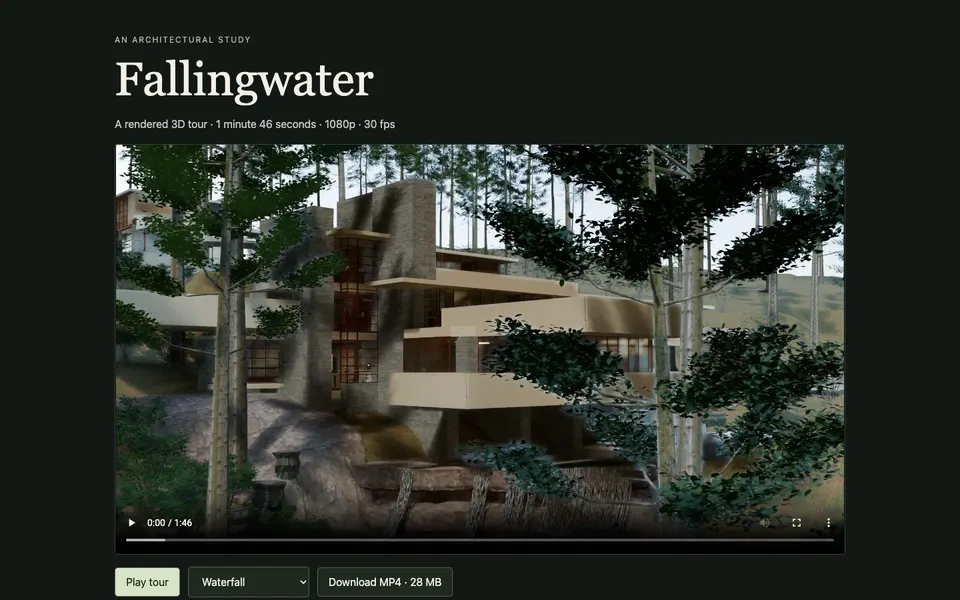
Pierre Koenig's Case Study House #22, finished in 1960 and famous from Julius Shulman's night photograph of two women in the glass corner above the lights of Los Angeles.
Steel frame, glass walls, a pool along the city side.
The test is whether the film reads as real footage at first glance.
Fable 5.2 researched the house first: the 1960 plans, Shulman's photographs, a camera solve for his famous corner shot and a colour table, since most of the photos are black and white.
It built the house, the hillside from real elevation data and the lights of Los Angeles below, then had critic subagents compare its renders with the real photographs over eight rounds before it rendered the film.
Apart from saying continue after a usage limit, I only asked whether it could go faster and whether I could fly around it in the browser.
That browser version is below.
Fly with W A S D and the mouse, and switch between the film's times of day and camera positions.
Build two: the City of Arts and Sciences
Recreate the entire City of Arts and Sciences in Valencia, Spain (Santiago Calatrava and Félix Candela) in Blender, render a cinematic golden-hour drone flythrough of the whole complex, and put the film on a web page.

Context you should know: this is going into a YouTube video watched by a large audience of non-technical people. The film is shown full screen on camera. At first glance it should look like real drone footage.

## The complex

Research it first, and build from the research. Gather aerial photos, site plans, satellite imagery, architectural drawings and drone videos. Write what you found, with sources, to research/REFERENCES.md before you model anything.

Build all of it, laid out in the right order and at the right scale along the old Turia riverbed:
- L'Hemisfèric, the eye, with its lid that opens and its reflection forming the full eye in the pool
- the Museu de les Ciències, the long white ribbed skeleton
- L'Umbracle, the garden walkway under its white arches, with palms and plants
- the Palau de les Arts Reina Sofía, with its feather-shaped roof and two shells
- L'Àgora, the blue tiled, curved hall
- the Pont de l'Assut de l'Or, the white harp bridge with its tall curved mast
- L'Oceanogràfic, Candela's thin concrete roof shaped like a water lily
- the shallow turquoise reflecting pools, the white trencadís broken-tile mosaic, walkways, trees and a few distant city blocks for context

Depth over breadth: the signature buildings must be right in shape and proportion before you add any background detail.

## The look

White concrete and trencadís mosaic that catch the low sun, still turquoise water with clean reflections, glass, palms, a Mediterranean sky at golden hour with soft haze. Use Cycles.

## The film

A 90 to 120 second drone flythrough at 1920x1080, 24 fps, with moves a real drone pilot could make: a high establishing pass down the whole length of the complex, a low skim over the pools to the Hemisfèric's reflection, a pass under the Umbracle arches, an orbit of the Palau de les Arts, and a last rise over the Assut de l'Or bridge as the sun sets. Add an ambient soundtrack (wind, water, distant city) made with ElevenLabs. No music you didn't generate.

Save the master as out/valencia-flythrough.mp4 and 8 hero stills as out/stills/*.png.

## The page

A simple, elegant page: the film full width at the top, the stills in a gallery below, a small labelled map of which building is which, and a short "how it was made" section (Blender, Cycles, GPU render time, number of objects). Name the place and the architects; never claim it is real footage.

## Critique your own work

Render stills of every shot before rendering the sequence. Have critic subagents compare them side by side with real photos of each building and list every place the shape, proportions, materials or lighting give it away. Fix and repeat until they have nothing serious left.

DONE when: all eight structures are present and recognisable, critics comparing them with real photos find nothing serious, the film is rendered at 1080p and plays smoothly, the stills are saved, and the page is live and the video plays there.

## How to work

Install whatever you need. Use subagents freely: researchers for reference material, and critics who compare your renders against real photos and list everything that looks fake, mis-scaled or wrong. QA your own work and look at your screenshots and frames critically. Write BUILD_NOTES.md when done (what you built, how, what you'd fix next, total GPU render time).

## Blender

Use the blender-production skill: read its SKILL.md and the references it points to before you open Blender, and follow its workflow for building, rendering and QA.

Render with Cycles on a GPU. Do look-dev at low samples and low resolution, and render single test frames before any sequence. Use the OptiX denoiser and adaptive sampling. Send the final sequence only after your critics have signed off on the stills.

## Publish it

When it's finished and you've checked it, deploy the page, open the live URL in a headless browser and confirm everything works there, not just locally.
Santiago Calatrava and Félix Candela's complex in the old Turia riverbed in Valencia: the Hemisfèric eye, the Museu de les Ciències, the Umbracle, the Palau de les Arts, the Àgora, the Assut de l'Or bridge and the Oceanogràfic.
Eight structures, all of them, at the right scale and in the right order.
Fable 5.2 took "the entire" literally.
It built every structure, the gardens and pools, about 19,000 trees placed from map data, the surrounding city, the old riverbed and traffic on the roads.
I asked for this one in the browser too.
Blender renders each frame by tracing how light bounces around the scene, which takes far too long to do live.
The browser version uses three.js, which has to draw the scene 60 times a second, so Fable baked the lighting from Blender into the model ahead of time.
It looks good from a distance and loses detail up close: the people are frozen and the water does not move.
Like the Stahl House explorer, it is worth another pass from Fable.
Build three: a horror walk
Make a short, genuinely terrifying first-person horror walk that runs in the browser: one location you explore on foot while a narrator tells you a short story, built with Blender, with the narrator voiced by Fish Audio.

Context you should know: this is going into a YouTube video watched by a large audience. It is played on camera from start to finish, so it should be scary to watch as well as to play.

## Keep it short

One playthrough takes 5 to 8 minutes. One location, one short story, one ending. No inventory, no combat, no menus beyond a start screen and pause. It's a walk with a story, and the terror comes from atmosphere, sound and a few well-timed scares.

## The story

Write an original, simple story that fits in about 15 to 25 narrator lines: who you are, why you're there, what happened in this place, and a final turn that makes the last minute the scariest. Pick the location yourself (one building or one place), and make it something you can make look great. Lines play when you reach certain spots, so the story unfolds as you walk. Save the script to story/SCRIPT.md.

## The look

Model, texture and light the whole location in Blender, and bake the lighting there (render the bakes on a GPU), then run it in real time in three.js. Real materials with grime and wear, darkness that hides things, a flashlight, fog, flickering light. No flat, cartoon, low-poly or placeholder geometry. Make it hold up when the camera is a metre from a wall.

## The sound

- **Narrator: Fish Audio.** Design one narrator voice with Voice Design (POST https://api.fish.audio/v1/voice-design), then generate every line with the Drama 3 model (POST https://api.fish.audio/v1/tts/stream/with-timestamp, headers Authorization: Bearer <your Fish Audio key> and model: drama-3; a missing model header silently falls back to an older model). Use its bracketed performance directions (whispered, shaking, breaking down) so the delivery is acted, not read. Generate each line once and save it as a file in the build; never call the API from the browser.
- **Music and sound effects: ElevenLabs.** A low dread score that swells at the scares, footsteps on each surface, creaks, breathing, distant knocks, and the stingers.

## Controls

WASD and mouse look at eye height with collision, a flashlight on F, and a start screen that says "headphones recommended" and shows the controls. Holds 60 fps at 1920x1080 in a desktop browser.

## Critique your own work

Record a full playthrough with a headless bot and look at the frames. Have critic subagents watch it and list everything that is not scary, looks fake, is too dark to read on a YouTube video, or drags. Fix and repeat until they have nothing serious left.

DONE when: a full playthrough runs start to finish in 5 to 8 minutes, every narrator line plays in Fish Audio's Drama 3 voice at the right spot, the ending lands, it holds 60 fps at 1080p, and it works on its live URL.

## How to work

Install whatever you need. Use subagents freely: researchers for reference material, and critics who compare your renders against real photos and list everything that looks fake, mis-scaled or wrong. QA your own work and look at your screenshots and frames critically. Write BUILD_NOTES.md when done (what you built, how, what you'd fix next, total GPU render time).

## Blender

Use the blender-production skill: read its SKILL.md and the references it points to before you open Blender, and follow its workflow for building, rendering and QA.

Render with Cycles on a GPU. Do look-dev at low samples and low resolution, and render single test frames before any sequence. Use the OptiX denoiser and adaptive sampling. Send the final sequence only after your critics have signed off on the stills.

## Publish it

When it's finished and you've checked it, deploy the page, open the live URL in a headless browser and confirm everything works there, not just locally.
A short first-person horror game that runs in the browser.
You walk one location while a narrator tells you a story, and the last minute is the scariest.
Fable 5.2 picks the location and writes the story, models and lights it in Blender, then runs it in real time.
The narrator is voiced with Fish Audio and the music and sound effects come from ElevenLabs.
Fable 5.2 chose the location and wrote the story itself: Until I Say, a walk through Marlow Street Baths, a derelict 1930s swimming baths at night.
It runs about six minutes from the lobby down to the floor of the drained pool.
Every room was modelled and lit in Blender by script, with the lighting baked on the rented GPUs and then played back in real time in the browser.
The narrator is a voice designed in Fish Audio and performed with its Drama 3 model, 22 lines in all, and the boy's three whispers are a second Fish Audio voice.
The music and 85 sound effects come from ElevenLabs.
What the three cost
I ran all three on my $200 Ultra subscription, so I did not pay these API prices.
The API-equivalent cost is what the same tokens would cost at Fable 5.2's API rates.
Build time leaves out the hours the runs sat paused at my usage limit.
| Input tokens | Output tokens | API-equivalent cost | Build time | |
|---|---|---|---|---|
| The Stahl House | 370M | 2.3M | $250.63 | 8h 35m |
| The City of Arts and Sciences | 678M | 4.3M | $546.41 | 8h 06m |
| The horror walk | 409M | 2.3M | $306.95 | 7h 56m |
| Vast.ai GPU rental, all three builds | $46.51 | 13.1 h |
These are the final numbers.
They are higher than the ones I read out in the video because the agents kept working after I recorded, mostly on the browser versions.
The Vast.ai line covers the eight RTX 5090 machine that rendered every final film, plus a single GPU Fable rented on its own for the Valencia lighting bake.
The three builds also used about a full week of my Ultra plan's usage.

Comments
Sign in to join the conversation.