ChatGPT for Customer Service: How to Use It, With Prompts
ChatGPT does the most for a support team as a drafting assistant: paste in the customer's message and the policy that answers it, then check the reply before you send it. Every plan, price and privacy setting below comes from OpenAI's own pages.

On this page
- How do you use ChatGPT for customer support?
- Copy-paste prompts for support replies
- Set it up once: a Project with your policies (custom GPTs are retiring)
- Is customer data safe to paste into ChatGPT?
- Which ChatGPT plan does a support team need?
- AI chatbots for customer service: when ChatGPT isn't enough
- What is an AI agent for customer service?
- Does ChatGPT have customer support?
- Is there a better AI than ChatGPT for support work?
- Questions people ask
Use ChatGPT for customer service as a drafting assistant for your support team. Paste in the customer's message along with the policy or help article that answers it, say what tone to use and what the reply may and may not promise, then check and edit the draft before you send it. ChatGPT's chat window doesn't answer your customers by itself, so a person stays between the draft and the customer.
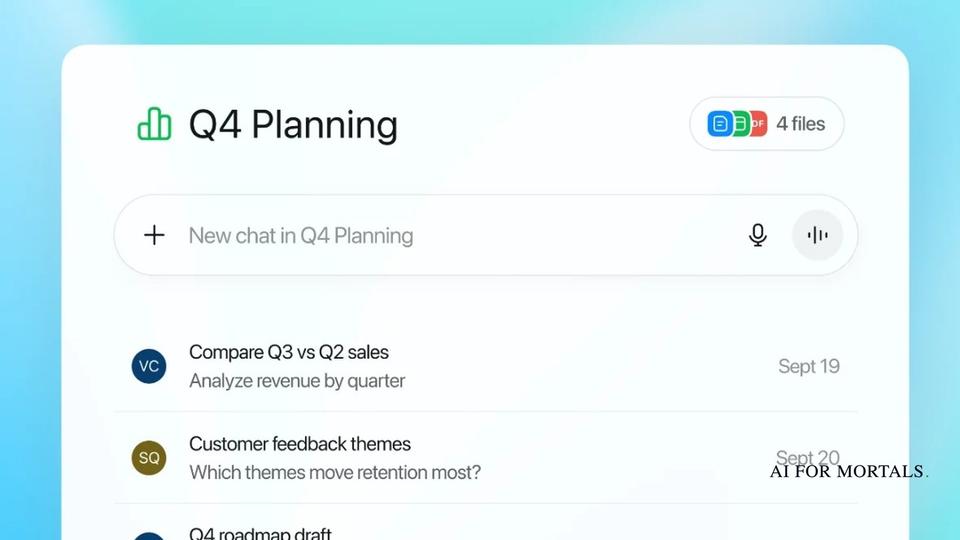
Save your policies and saved replies in a ChatGPT Project once, and every chat you start inside it begins with them. OpenAI's Projects guide says project instructions and files apply to every chat in that project, and Projects come with every plan, Free included. If you want a bot that answers customers on its own, you need OpenAI's developer tools or a help-desk product with an AI agent built in, both covered below.
On ChatGPT Business and Enterprise, OpenAI doesn't train its models on your chats by default, according to OpenAI's business data page. On Free, Go, Plus and Pro you switch training off under Settings, Data controls. Every plan, price and setting on this page comes from OpenAI's and the vendors' own pages, last checked November 6, 2026.
How do you use ChatGPT for customer support?
You give ChatGPT three things for each ticket: the customer's message, the facts that answer it, and the rules for the reply. It writes the draft, and you decide what gets sent. Every step below works on the free plan.
- Open a chat (or a Project, if you've set one up as shown further down).
- Paste the customer's message, with names, emails and order numbers swapped for placeholders like [NAME] unless your plan and settings cover customer data (see the privacy section below).
- Paste the policy, help article or past reply that answers the question. ChatGPT only knows your company's rules if you give them to it.
- Say what the reply must do: the tone, the length, and anything it can't promise, such as a refund or a delivery date.
- Read the draft against the policy, fix anything wrong, and send it from your own help desk.
The same loop covers the other writing a support job involves. You can paste a long email thread and ask for a three-line summary to hand to a colleague, turn a pile of solved tickets into a saved reply your whole team uses, or translate a reply into the customer's language. The prompts in the next section are templates for each of those jobs.
Editing your own draft works the same way. Paste what you wrote and ask ChatGPT to make it shorter and warmer, which is the approach in our guide to using ChatGPT as an editor for your writing.
If your help desk runs in a browser, the ChatGPT extension can read the ticket you have open. OpenAI's browser extension guide says it works in Chrome, Edge, Brave, Opera and Vivaldi alongside the ChatGPT desktop app, and side chat (every browser except Opera) opens ChatGPT beside the page so you can ask about it. ChatGPT asks before it acts on each new website, and OpenAI tells you to treat page content as untrusted. Our write-up shows how ChatGPT's Chrome extension can read your help-desk tab and the tabs around it.
Copy-paste prompts for support replies
These six prompts are templates we wrote for this guide. Fill in the brackets, and keep the line that tells ChatGPT to flag missing information, because that line stops it from inventing a policy you don't have.
Write a reply to the customer message below for [company name].
Use only the policy text I've pasted. If the policy doesn't answer the question, tell me what's missing and leave a [CHECK] note in the reply.
Keep it under 150 words, friendly and plain.
Don't promise refunds, credits, discounts or dates unless the policy says so.

Customer message:
[paste the message]

Policy or help article:
[paste the policy]
Use it for the everyday questions about returns, shipping, billing and account access. The [CHECK] note shows you exactly where the draft needs a human answer.
Rewrite my draft reply below so it sounds like [company name]: [describe your tone, e.g. warm, short sentences, no jargon, first names].
Keep every fact, number and promise exactly as I wrote it.
Cut anything that repeats, and end with one clear next step for the customer.

My draft:
[paste your draft]
The "keep every fact" line stops a tone rewrite from changing what you promised.
Summarize this support thread for a colleague who is taking it over.
Give me: what the customer wants, what we've already tried or promised, what's still open, and the customer's mood, in five short bullet points.
Quote any promise we made word for word.

Thread:
[paste the thread, oldest message first]
Use it when a ticket changes hands or goes to a manager, so nobody has to read forty messages to catch up.
Here are [number] replies our team sent to customers asking about [topic].
Write one saved reply (a macro) we can reuse for this question, with [brackets] for the parts that change, like [NAME] and [ORDER NUMBER].
Then write a short help-center FAQ answer on the same topic, under 120 words.
Only use facts that appear in these replies.

Replies:
[paste 3 to 5 good replies]
Run it on the question your team answers most, and you get both the internal saved reply and the public help article from the same answers.
This customer is upset. Write a reply that acknowledges the specific problem they describe in one sentence, apologizes once, explains what we will do next using only the options below, and gives a realistic time for the next update.
No defensive language, no blaming the customer, no exclamation marks.

Customer message:
[paste the message]

What we can offer:
[list the options you're allowed to give]
Listing what you can offer keeps ChatGPT from settling the complaint with a credit your manager never approved.
Translate my reply below into [language] for a customer in [country].
Keep the meaning, the numbers and the product names exactly the same, and use the polite form of address that's normal for customer service there.
Then translate your version back into English, line by line, so I can check it.

My reply:
[paste your reply]
The back-translation gives you a way to check a language you don't read before the reply goes out.
Set it up once: a Project with your policies (custom GPTs are retiring)
A ChatGPT Project holds your support policies, saved replies and house style, so you don't paste them into every chat. OpenAI's Projects guide says a project keeps related chats, files and instructions together so ChatGPT can use the same context in each one.
To build one for support:
- Select New project in the sidebar and give it a name, such as "Support replies".
- Upload your return policy, shipping policy, pricing page and a handful of your best past replies as files (PDFs, docs and spreadsheets all work, or you can paste text).
- Open the project's ••• menu, select Project settings and add your instructions, for example: "You draft customer support replies for [company]. Use only the policies in this project. Keep replies under 150 words and flag anything the policies don't cover."
- Start each new ticket as a new chat inside the project.
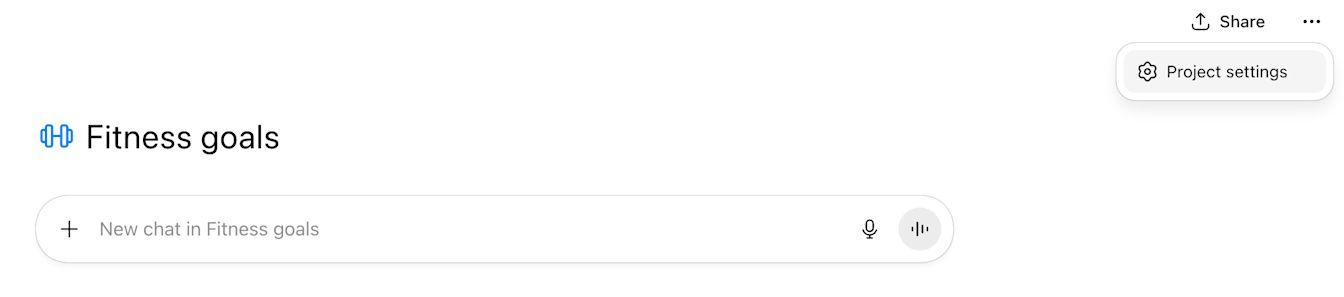
OpenAI says project instructions apply only inside that project and override your general custom instructions, so your support rules won't leak into your other chats. You can also paste a Google Drive file or folder link or a Slack channel link into a private project as a source.
Projects can be shared. OpenAI's guide says every plan can share a project, and members get either chat or edit access. Free users can add up to 5 files and 5 collaborators, Plus and Go users 25 files and 10 collaborators, and Pro users 40 files and 100 collaborators. Business, Enterprise and Edu projects take up to 40 files and 100 collaborators.
Custom GPTs used to be the other way to package a support assistant, and OpenAI is retiring them. Its "Creating and editing GPTs" article says new GPTs can no longer be created or published on Free, Go, Plus or Pro, and its retirement FAQ puts the standard retirement date at December 11, 2026. If your team already has a support GPT, the FAQ says you can migrate it to a plugin from My GPTs: its instructions become a skill and its knowledge files come across as reference files, but custom actions don't transfer.
Plugins are the replacement. OpenAI's plugins article says a plugin brings reusable instructions, reference files and connected apps together, and you build one by installing Plugin Creator from the plugin directory and describing what you want to @plugin-creator. The pricing pages list creating plugins on Go, Plus, Pro, Business and Enterprise, and sharing them across a workspace on Pro, Business and Enterprise.
Is customer data safe to paste into ChatGPT?
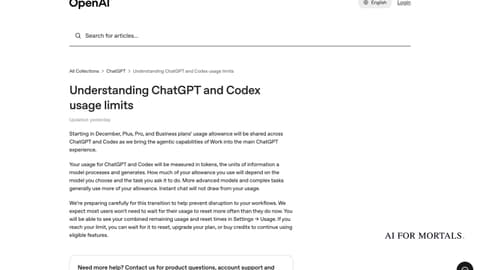
It depends on your plan and one setting. On ChatGPT Business, Enterprise and Edu, OpenAI says it doesn't use your workspace's chats to train its models by default. On Free, Go, Plus and Pro, it may use your chats for training until you turn that off.
OpenAI's business data page says it doesn't use data from ChatGPT Enterprise, Business, Edu or its API platform, inputs and outputs included, for training or improving its models by default. The same page says that data is encrypted at rest and in transit.
For personal plans, OpenAI's Data controls article says data sharing is on by default on Free, Plus and Pro, and you can turn off Improve the model for everyone and keep your chat history. On the web the path is your account menu, Settings, Data controls, then Improve the model for everyone.
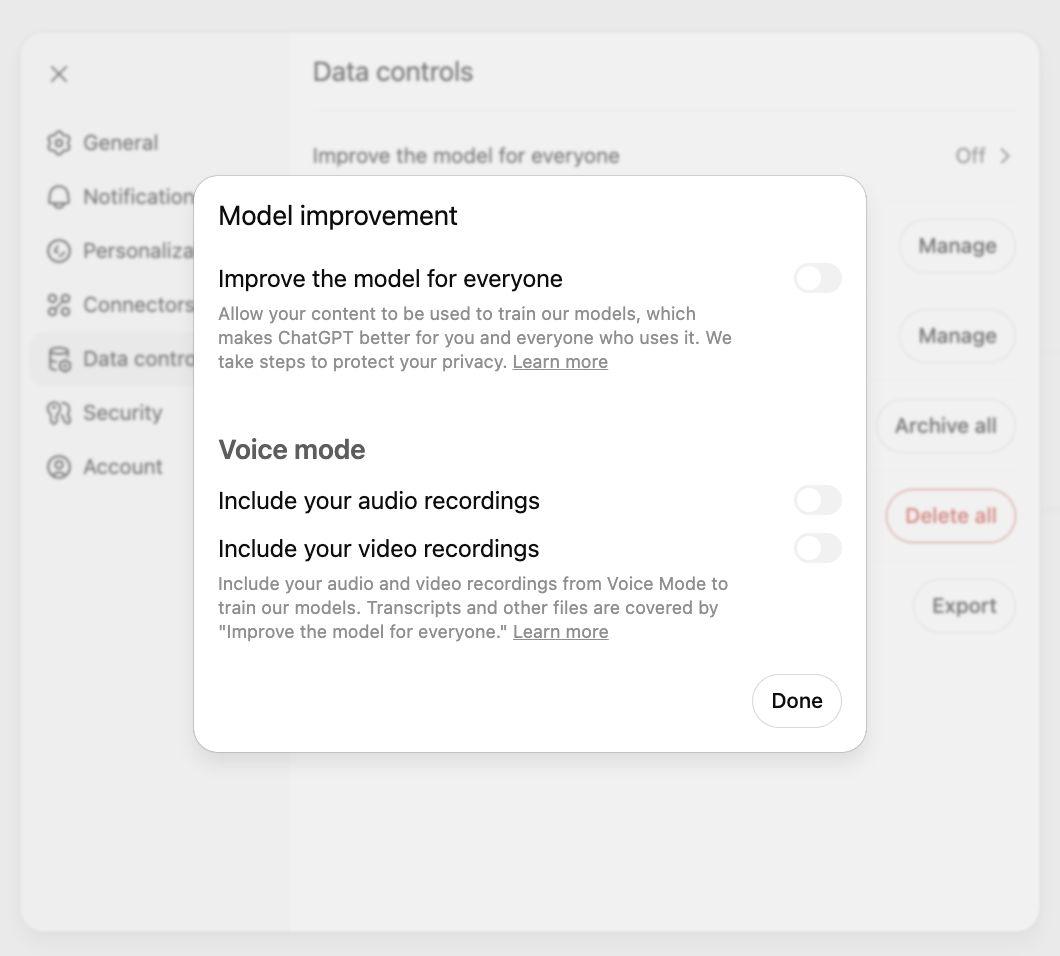
Three more details from OpenAI's training article and its help pages apply to support work:
- After you opt out, OpenAI stops using your new conversations to train its models.
- On Free, Plus and Pro, rating an answer with a thumbs up or down lets OpenAI use that whole conversation for training, even after you opt out.
- Temporary chats aren't used for training while they stay temporary, and OpenAI's Temporary chat article says it may keep a copy for up to 30 days for safety purposes.
Turning off training doesn't delete anything, so customer details you paste stay in your chat history until you delete them. Our guide to deleting ChatGPT chats and what OpenAI keeps covers that. Your company's own privacy rules and any law that covers your customers' data still apply on every plan, so check with whoever owns those before you paste real tickets in.
Which ChatGPT plan does a support team need?
ChatGPT is free to use for drafting replies, and Projects come with every plan. A team that wants its chats kept out of training by default and a shared workspace needs ChatGPT Business, which costs $25 per person a month billed monthly or $20 billed annually for a Standard seat, according to OpenAI's business pricing page.
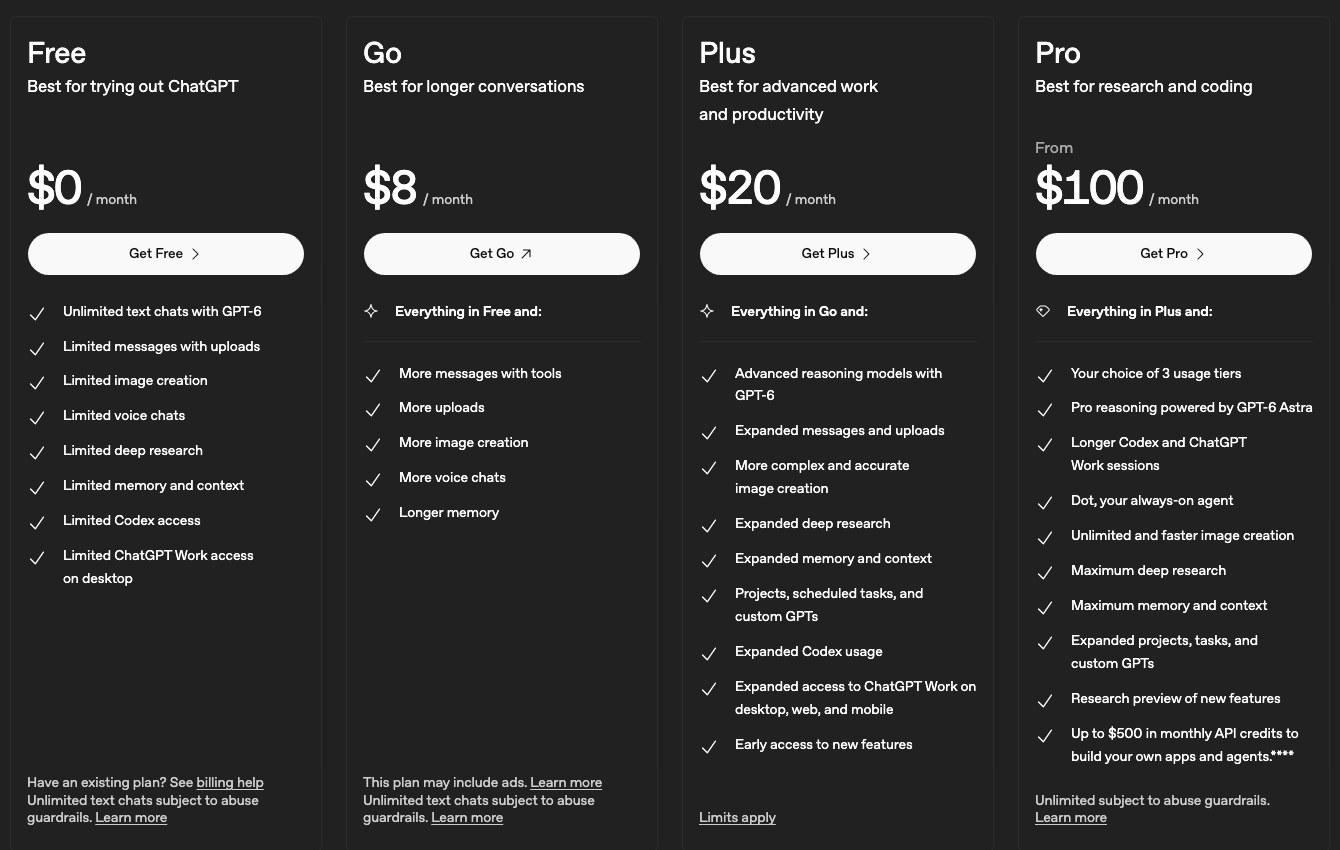
Here is every plan, checked on OpenAI's pages on November 6, 2026.
| Plan | Price | Projects | Make your own plugins | Share plugins with your workspace | Chats used to train OpenAI's models |
|---|---|---|---|---|---|
| Free | $0 | Yes | No | No | Yes, until you turn it off |
| Go | $8 a month | Yes | Yes | No | Opt-out available |
| Plus | $20 a month | Yes | Yes | No | Yes, until you turn it off |
| Pro | From $100 a month | Yes | Yes | Yes | Yes, until you turn it off |
| Business | $25 a person a month ($20 billed annually) for Standard, $125 ($100 annually) for Premium | Yes | Yes | Yes | No, by default |
| Enterprise | Custom pricing from OpenAI's sales team | Yes | Yes | Yes | No, by default |
Business is sold for teams of 2 to 200 people, and OpenAI's page says its Premium seat gives more usage than Standard with no five-hour limit. The same page lists connections to Google Workspace, Slack, GitHub and Microsoft 365, and workspace agents, on Business. Enterprise adds custom data retention and data residency in ten regions.
The plans also differ in which model answers. The comparison table on ChatGPT's pricing page lists GPT-6 Luna on Free and Go, and GPT-6 Sol, GPT-6.1 Sol and GPT-6 Astra on Plus and Pro.
AI chatbots for customer service: when ChatGPT isn't enough
ChatGPT's chat app works for your team, and it can't sit on your website and answer customers. For a chatbot customers talk to directly, you either build one with OpenAI's developer tools or switch on the AI agent inside a help-desk product.
OpenAI's route is for developers. OpenAI's ChatKit guide describes ChatKit as a customizable chat you embed in your own site or app, and lists a support agent among its uses. The agent behind it runs on your own server, built with tools like OpenAI's Agents SDK or Agents API. OpenAI's visual workflow tool, Agent Builder, is being shut down on November 30, 2026, so a new project shouldn't start there.
The help-desk route runs inside a support product, and you pay for each conversation the AI settles. Here's what two help-desk vendors say their products do and charge, from their own pages on November 6, 2026. We haven't tested either one.
| Product | What the vendor says it does | How the vendor says it charges |
|---|---|---|
| Zendesk AI agents | Resolves multi-step requests across channels and takes actions in your other systems; AI agents for messaging, email and voice (voice needs Zendesk's phone product) | Included in every Suite and Support plan, then billed per automated resolution: $1.50 each committed or $2.00 pay-as-you-go beyond the 5 to 10 per agent a month included. Suite plans start at $55 per agent a month, billed yearly |
| Intercom Fin | Answers customers by live chat, email, SMS, WhatsApp, social and voice, and works with Intercom, Zendesk, Salesforce, HubSpot and Freshdesk | $0.99 per outcome, such as a conversation Fin resolves or one it hands to a person under rules you set. Nothing is charged when a conversation simply passes to your team |
Both vendors bill by result, so the cost follows how many tickets the AI closes, and a person still handles whatever it can't. Check the vendor's own pricing page for your volume before you commit, since these numbers change.
What is an AI agent for customer service?
An AI agent for customer service is software that answers a customer and then takes action to settle the request, such as looking up an order or starting a return, without a person writing the reply. Zendesk's AI page describes them as systems that resolve issues on any channel and carry out actions across a company's business systems, which is the difference from a chatbot that only answers questions.
Voice agents do the same job on the phone. OpenAI runs one for its own support: its AI phone support line, 1-888-GPT-0090 in the US and Canada, handles routine questions about ChatGPT and OpenAI's other products. Zendesk's pricing page lists AI agents for voice that handle phone support from start to finish, and Fin lists voice among its channels.
Inside ChatGPT, agents are for your team. ChatGPT Business and Enterprise include workspace agents, which OpenAI says you can build for repeatable tasks, connect to apps and tools, share with teammates, use in Slack, run on a schedule or trigger through an API. With connected apps, eligible users can also set up a task in ChatGPT Work that runs when a new Gmail or Slack message arrives, and the task pauses for your approval when an action needs it. ChatGPT can connect to iCloud Mail as well.
Pat Simmons has tested ChatGPT's own agent, though not on support work. In Pat's test of ChatGPT's Dots agent against Grok Bot, Grok Bot got an A- for running a fake coffee company for four hours and Dots got a B. If you want to try building a simple agent yourself, Pat's video "Zero To Your First AI Agent In 10 Minutes (no code, no n8n)" is below.
Does ChatGPT have customer support?
Yes. OpenAI's support runs through the chat bubble at the bottom right of help.openai.com, where a virtual assistant answers first and a human agent can join if the bot can't solve the problem. OpenAI says to include your account email, your plan, what happened and when, and never your password or one-time codes.
In the US and Canada you can also call OpenAI's AI phone support at 1-888-GPT-0090 (1-888-478-0090) for product questions, account help and troubleshooting. Privacy and data requests go through OpenAI's Privacy Portal instead. OpenAI's training article notes that conversations with its support team may be used to improve its models when Improve the model for everyone is on.
Is there a better AI than ChatGPT for support work?
Nobody at AI for Mortals has tested AI assistants on support replies, so we can't name a winner for this job. What Pat Simmons has tested is building apps and running agents, and those results are below.
In Pat's builds with Claude, ChatGPT and Gemini, Anthropic's Opus 5.5 placed first in all four and ChatGPT's GPT-6 Astra placed above Google's Gemini 4 Argon every time. Those were building jobs such as a product launch video and a car soccer game, which Pat called "very limited tests", and they didn't cover everyday chat or writing.
For drafting replies from your own policies, the features above (somewhere to keep your instructions and files, a way to keep customer data out of training, and a team plan) are what to compare. Our guide covers what Claude, Gemini, Copilot and the other ChatGPT alternatives do and cost.
Questions people ask
How do you use AI for customer service?
Start with AI that drafts for your team: paste the customer's message and the policy that answers it into ChatGPT, then check and send the reply yourself. When you want AI to answer customers directly, use a help-desk AI agent such as Zendesk's or Intercom's Fin, which bill per resolved conversation.
Can ChatGPT replace a customer service agent?
ChatGPT's chat app can't, because it doesn't answer your customers on its own. It drafts replies that a person checks and sends. Customer-facing bots are built with OpenAI's developer tools or bought as a help-desk add-on.
Is ChatGPT free for customer service?
Yes, the Free plan lets you draft replies and use Projects at no cost, according to OpenAI's pricing page. Free chats may be used for training until you turn that off in Data controls.
What is generative AI in customer service?
Generative AI is AI that writes new text, such as a reply to a customer, from what you give it. In support it drafts answers, summarizes long threads, translates replies and turns past answers into help articles.
What is conversational AI for customer service?
It's a chatbot or voice line that holds a back-and-forth conversation with a customer. Zendesk's and Fin's AI agents, and OpenAI's own phone line at 1-888-GPT-0090, are examples.
What are AI tools for customer service?
They fall into two groups: assistants your team drafts with, such as ChatGPT, and help-desk AI agents that answer customers, such as Zendesk AI agents and Intercom Fin. OpenAI's ChatKit is a third route if you have developers to build your own.
Can ChatGPT answer customer emails automatically?
Not by itself. ChatGPT can draft a reply when you paste an email in, and OpenAI's connected apps article says eligible users can set up a task in ChatGPT Work that runs when a new Gmail message arrives, pausing for approval when an action needs it. A help-desk AI agent is the tool built to answer customer emails without a person.
Can I train ChatGPT on my company's help articles?
You can give it your help articles as files in a Project, and every chat in that project uses them. The files give ChatGPT reference material for those chats, and on Business and Enterprise OpenAI says it doesn't use your data to train its models by default.
For everything else ChatGPT does and what's changed lately, see our page on ChatGPT updates and new features.
Sources
- ChatGPT: Plans and pricing (checked November 6, 2026)
- OpenAI: Business pricing (checked November 6, 2026)
- OpenAI Help Center: Projects in ChatGPT
- OpenAI Help Center: Creating and editing GPTs
- OpenAI Help Center: Custom GPT retirement and migration FAQ
- OpenAI Help Center: Plugins in ChatGPT
- OpenAI Help Center: Connected apps in ChatGPT
- OpenAI Help Center: Data controls in ChatGPT
- OpenAI Help Center: How your data is used to improve model performance
- OpenAI: Business data privacy
- OpenAI Help Center: ChatGPT workspace agents
- OpenAI Help Center: How can I contact support?
- OpenAI Help Center: AI phone support
- ChatGPT Learn: Browser extension
- OpenAI developer docs: ChatKit
- OpenAI developer docs: Agents
- OpenAI developer docs: Agent Builder
- Zendesk: AI for customer service
- Zendesk: Pricing (checked November 6, 2026)
- Intercom Fin: Pricing (checked November 6, 2026)
- Intercom Fin: Fin AI Agent




Comments
Sign in to join the conversation.