Is ChatGPT Safe for Confidential Information? Plan by Plan
On ChatGPT Free, Plus and Pro, OpenAI can train on your chats until you switch it off; Business, Enterprise and Edu don't train on them by default, and their admins can read and export them. From each company's own pages: what ChatGPT, Claude, Copilot and Gemini keep from your work, who can see it, and which plans can take patient data under HIPAA.

On this page
- What ChatGPT does with your work chats, plan by plan
- Is ChatGPT HIPAA compliant?
- Can my company see my Claude or ChatGPT chats?
- Claude, Copilot and Gemini: what each keeps from your work
- Is it safe to upload documents to ChatGPT?
- What to check before you paste work data into any AI
- I accidentally put personal information in ChatGPT. What should I do?
- Questions people ask
Not on a personal plan. On ChatGPT Free, Plus and Pro, OpenAI may use your chats to train its models until you turn off Improve the model for everyone under Settings, then Data controls, and your chats stay saved until you delete them. OpenAI doesn't use ChatGPT Business, Enterprise or Edu chats to improve its models by default. ChatGPT isn't HIPAA compliant on its own: patient data needs a Business Associate Agreement (BAA), a contract in which the vendor agrees to protect health information, and OpenAI signs one only for the products on its HIPAA list. If your employer hasn't approved the tool and the plan, keep client, patient and confidential company data out of it.
Last checked November 9, 2026: every plan name, retention period and BAA detail on this page comes from OpenAI's, Anthropic's, Microsoft's and Google's own help and privacy pages, linked where each point appears. Pat hasn't covered AI privacy at work in his videos, so this guide sticks to what those companies have published. New ChatGPT features land on our ChatGPT updates page as they ship.
This table puts the work-relevant plans side by side: whether the company trains on what you type, who decides how long chats are kept, whether your employer's admins can see or export them, and whether the plan can take patient data under a BAA.
| Plan | Trains on your chats by default? | Who controls how long chats are kept | Can admins see or export chats? | BAA for health data? |
|---|---|---|---|---|
| ChatGPT Free, Plus, Pro | Yes, until you turn off "Improve the model for everyone" | You: chats stay until you delete them | No company admin; it's your own account | No |
| ChatGPT Business | No | Workspace admins | Yes: admins can view, export and delete conversations | No: OpenAI doesn't offer one for Business |
| ChatGPT Enterprise, Edu | No | Workspace admins | Yes, through OpenAI's Compliance Platform | Through OpenAI sales for sales-managed accounts |
| ChatGPT for Healthcare | No | Workspace admins | Yes, through the Compliance API audit log | Yes, it's on OpenAI's HIPAA list |
| Claude Free, Pro, Max, Ultra | Only if you allow it | You; if you allow training, Anthropic may keep de-identified data up to 5 years | No company admin | No |
| Claude Team | No | Kept until deleted; deleted chats leave Anthropic's systems within 30 days | Yes: the Primary Owner can export conversation data | No |
| Claude Enterprise | No | Kept until deleted, plus any retention settings your company sets | Yes: data exports, plus 180 days of audit logs | Yes, once the Primary Owner turns on HIPAA |
| Microsoft Copilot at work | No: prompts and responses don't train foundation models | Admins, with Microsoft Purview retention policies | Yes: admins can view stored chats with Content search or Purview | Supports HIPAA when set up properly; web searches aren't covered |
| Gemini in Google Workspace | No, without your organization's permission | Admins: 90 days to indefinite | Admins get audit logs of Gemini activity; Google's privacy hub doesn't say they include chat text | Can support HIPAA work; Gemini Notebook and Gemini in Chrome aren't covered |
Each row comes from the vendor pages linked in the sections below and listed under Sources, checked November 9, 2026.
What ChatGPT does with your work chats, plan by plan
On a personal plan, ChatGPT can train on your chats and keeps them until you delete them. On Business, Enterprise, Edu and ChatGPT for Healthcare, OpenAI doesn't train on them by default, your company owns what goes in and comes out, and your company's admins decide how long chats are kept.
ChatGPT Free, Plus and Pro
On these plans OpenAI may use your conversations to train its models. You can opt out with the Improve the model for everyone switch, or by choosing Do not train on my content in OpenAI's Privacy Portal, and OpenAI says either one is enough.
If you click thumbs up or thumbs down on an answer, OpenAI may use the entire conversation for training even after you've opted out. And according to OpenAI's Data controls article, turning training off doesn't delete or hide any chat you've already saved.
A Temporary chat stays out of your history and out of training while it stays temporary, though OpenAI may keep a copy for up to 30 days for safety. If you save it, it becomes a regular chat and follows your normal settings. For the full walkthrough of personal settings, see what ChatGPT keeps from personal chats and how to lock it down.
ChatGPT Business
OpenAI doesn't train on Business data by default, and as between you and OpenAI, you keep your rights to what you type and own what ChatGPT gives back, to the extent the law allows. OpenAI encrypts the data at rest with AES-256 and in transit with TLS 1.2 or newer, and Business has completed a SOC 2 Type 2 audit, an outside check of a company's security controls.
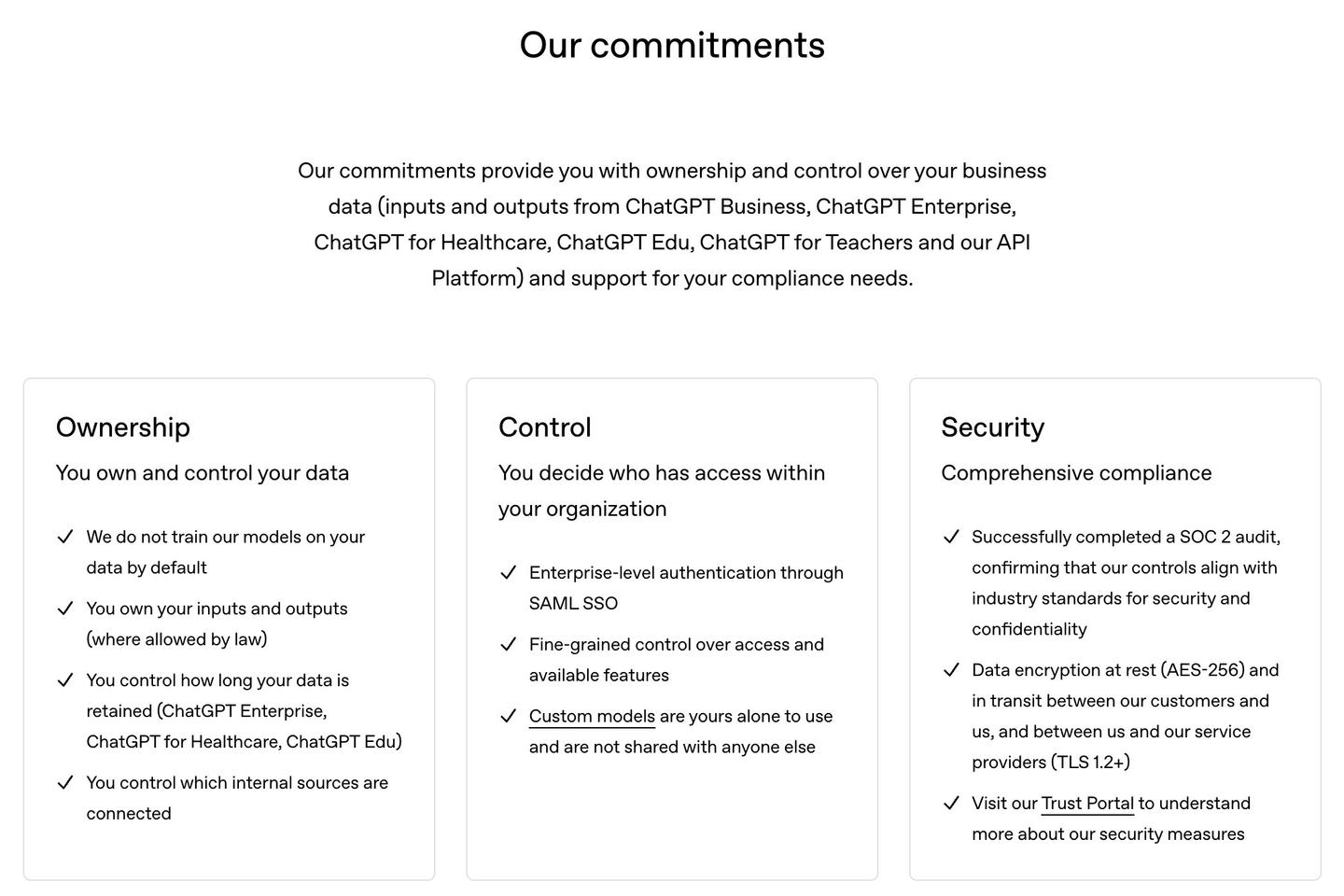
Inside your company, you can see your own conversations, and Business workspace admins can view, access, export and delete everyone's conversations in the workspace. Admins also set how long data is kept, and OpenAI removes deleted or unsaved conversations from its systems within 30 days, unless the law requires it to keep them longer or keeping them is reasonably necessary to protect its services or someone else from harm.
On OpenAI's side, access to stored Business chats is limited to authorized employees who need it for engineering support, abuse investigations or legal compliance, and to contracted reviewers bound by confidentiality who check for abuse. A thumbs up or thumbs down on a Business answer doesn't give OpenAI permission to train on that conversation.
ChatGPT Enterprise, Edu and ChatGPT for Healthcare
These plans carry the same no-training default, and each has completed a SOC 2 Type 2 audit. Workspace admins control retention, and deleted conversations leave OpenAI's systems within 30 days unless OpenAI is legally required to keep them.
OpenAI says its authorized employees open these conversations only to resolve incidents, to recover a user's conversations with your company's explicit permission, or when the law requires it. ChatGPT for Healthcare is OpenAI's workspace for healthcare organizations and their clinicians, administrators and researchers, and it's the plan built to support HIPAA, covered in the next section.
Prices for each plan sit on OpenAI's pricing page, and we keep them in one place in what every ChatGPT and Claude plan costs.
Is ChatGPT HIPAA compliant?
Only certain OpenAI products can be used with patient data, and only after a Business Associate Agreement is in place. ChatGPT Free, Plus, Pro and Business are not among them.
HIPAA is the US health privacy law, and protected health information (PHI) is health information tied to a patient. The US Department of Health and Human Services says the HIPAA rules generally require covered entities (healthcare providers and health plans, for example) and their business associates to sign contracts with any business associate that handles PHI for them, so that it protects that information.
OpenAI's list of HIPAA-eligible products names six that come with a BAA:
- ChatGPT for Healthcare
- ChatGPT for Enterprise with Regulated Workspace
- ChatGPT FedRAMP
- ChatGPT for Clinicians
- API with Modified Retention
- API FedRAMP with Modified Retention
For a sales-managed ChatGPT Enterprise or Edu account, you get a BAA by contacting OpenAI's sales team, and OpenAI's BAA article says plainly: "We do not offer a BAA for ChatGPT Business." The same page says that accepting a BAA doesn't, by itself, make your use HIPAA compliant; your organization is still responsible for how it uses the service.
Individual doctors have their own route. ChatGPT for Clinicians is free for verified clinicians in the United States (physicians, nurse practitioners, physician assistants and pharmacists), and each clinician can sign a BAA under Settings, then Agreements. OpenAI tells clinicians not to share PHI there unless that BAA is in place, and points practices that need one agreement for many users to ChatGPT for Healthcare.
Whether your own use is allowed is a call for your compliance team. What the vendors offer is the starting point for that conversation, and Claude, Copilot and Gemini each have their own BAA rules, covered further down.
Can my company see my Claude or ChatGPT chats?
On a company plan, often yes: the plan's owners or admins can export or review conversations, and how far that goes depends on the plan. A personal account you pay for yourself sits outside your company's workspace, and none of these vendors' admin pages describe company access to it. A company-managed laptop or network is a separate question, so check your employer's policy.
ChatGPT at work
On Business, workspace admins can view, export and delete conversations, as covered above. On Enterprise and Edu, OpenAI's Compliance Platform gives your company logs it can feed into eDiscovery tools (used to collect evidence for lawsuits and audits), data loss prevention tools and security monitoring.
Only a workspace owner can grant the Conversation messages permission that opens chat content. Locked chats are included too: OpenAI says the PIN on a locked chat controls access inside ChatGPT and does not block authorized access through the Compliance Platform.
Managed workspaces also change what you can do yourself. Self-service data export and account deletion aren't available on Business, Enterprise or ChatGPT for Healthcare; those requests go to the workspace owner.
Claude Team and Enterprise
Your company's Primary Owner, the person who manages the Claude account, can export the whole organization's data, including conversation data, from Organization settings. Owners can also let members export their own chats.
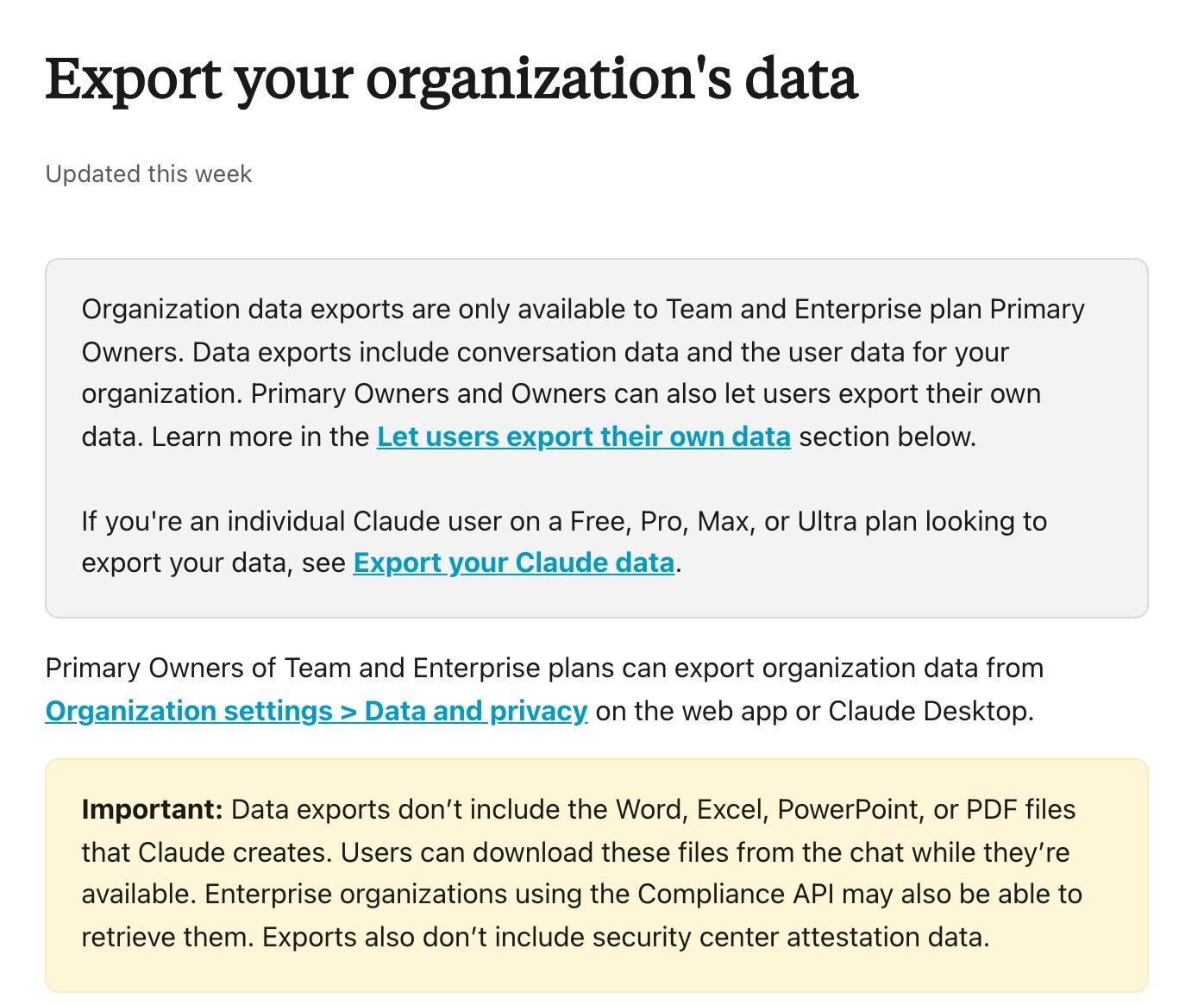
Enterprise adds audit logs, a record of account activity. Owners can export the last 180 days of them. The logs list chats and projects only by ID, without titles or content, but Anthropic notes that Primary Owners can still get chat inputs and outputs through a data export.
Claude, Copilot and Gemini: what each keeps from your work
All three keep business data out of model training by default on their work plans. They differ in how long chats are kept, who controls that, and which plans can take patient data.
Claude
On the personal plans, you choose whether Anthropic can use your chats to improve Claude. If you allow it, Anthropic's retention article says it may keep that data in a de-identified form for up to 5 years. A chat you delete leaves your history right away and Anthropic's back-end storage within 30 days, and Incognito chats aren't used for training even with that setting on.
On Team, Enterprise and the API, Anthropic doesn't use your inputs or outputs to train its models by default. If someone clicks thumbs up or down, Anthropic stores that whole conversation for up to 5 years and may use it for training, and Team and Enterprise owners can switch that button off with the Rate chats setting.
Work chats stay in the product until someone deletes them, then leave Anthropic's back end within 30 days. Chats flagged for breaking Anthropic's usage policy are an exception: Anthropic keeps their inputs and outputs for up to 2 years.
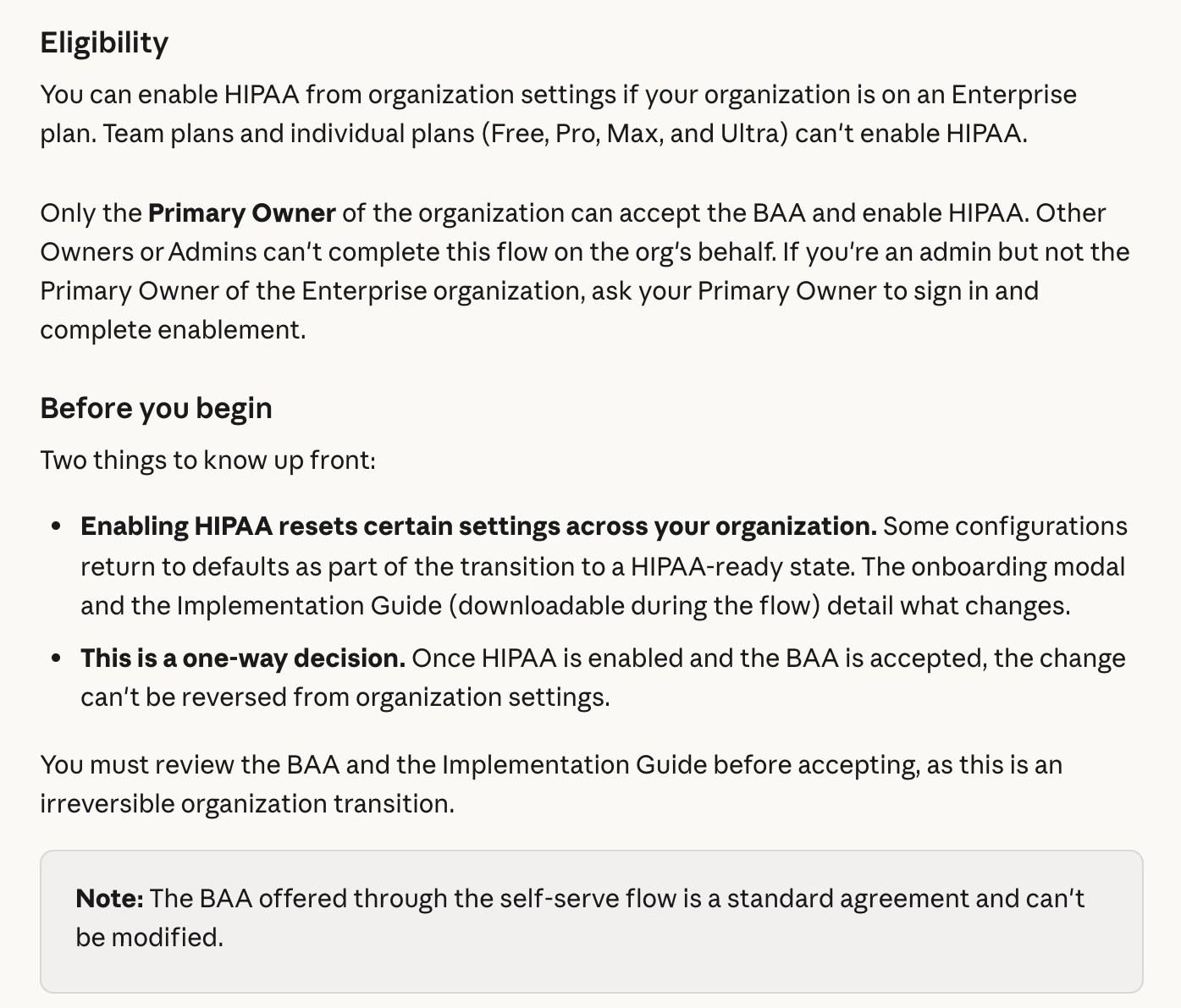
For patient data, only Claude Enterprise qualifies. The Primary Owner turns on HIPAA in organization settings and accepts Anthropic's BAA in the same step, and Anthropic warns the change can't be undone.
Microsoft Copilot
When your organization signs you in, Copilot and Copilot Chat run under Microsoft's business data protection terms, with Microsoft acting as a data processor for your company. Microsoft's enterprise data protection page says prompts, responses and the company data Copilot pulls in aren't used to train its foundation models, and that the data is encrypted at rest and in transit.
Copilot shows you only company files, emails and chats you already have permission to open. Microsoft stores your prompts and Copilot's answers as your Copilot activity history, and Microsoft's Copilot privacy page says admins can view and manage that history with Content search or Microsoft Purview and set retention policies for it. You can delete your own Copilot history from Microsoft's My Account portal.
On health data, Microsoft says Copilot and Copilot Chat support HIPAA compliance for properly configured setups, with one exception: web search queries aren't covered by its data protection terms or its BAA. For how Copilot and ChatGPT compare on everyday work, see Copilot vs ChatGPT at work.
Gemini in Google Workspace
Google says your prompts, Workspace content and Gemini's answers aren't reviewed by humans or used to train generative AI models outside your organization without permission. Prompts count as customer data under Google's data processing terms, and Workspace doesn't use customer data for training without the customer's prior permission.
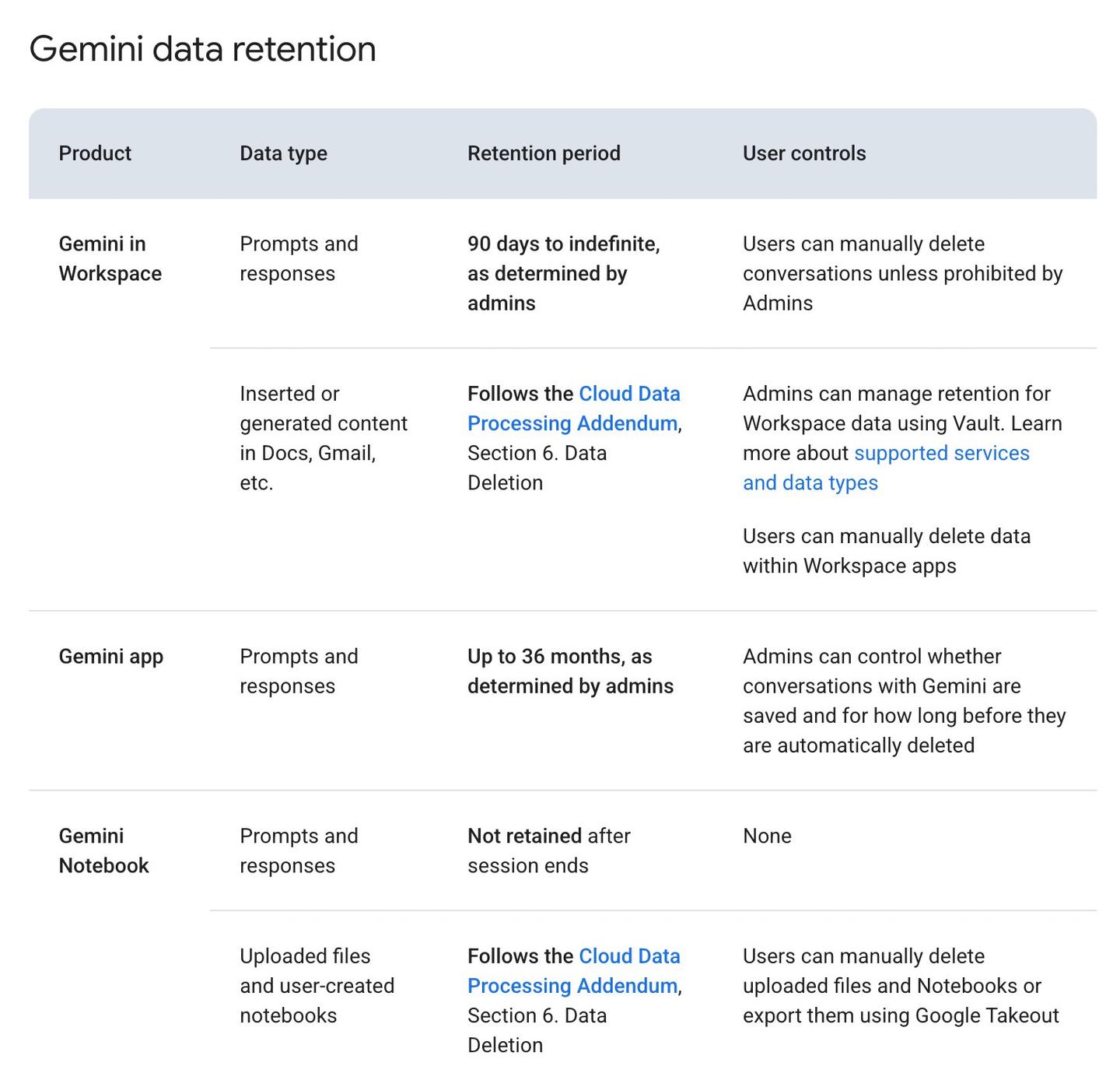
In Gmail, Docs and the other Workspace apps, admins keep Gemini prompts and responses for anywhere from 90 days to indefinitely, and you can delete conversations unless an admin blocks it. In the Gemini app, admins can keep chats for up to 36 months. Admins also get audit logs of how people use Gemini across Workspace apps. Google says Gemini can support HIPAA work, while Gemini Notebook and Gemini in Chrome aren't covered by its BAA.
Is it safe to upload documents to ChatGPT?
A file you upload falls under the same plan rules as your chats. On Business, Enterprise and Edu, OpenAI doesn't use prompts, responses or files to improve its models unless your organization has signed a separate agreement allowing it. On Free, Plus and Pro, your training setting decides, so switch it off or use a Temporary chat before you upload anything private.
Files can also outlive the chat. Deleting a conversation doesn't delete a copy saved separately in ChatGPT's Library or Space, so delete those too if you want the file gone.
Your resume
A resume holds your own details, so the decision is yours: whether you want it in your history and, on a personal plan, available for training. Turn the training setting off or use a Temporary chat in ChatGPT or an Incognito chat in Claude first, then follow our guide to using AI to tailor your resume.
Tax returns and financial documents
The same personal-plan rules apply. Before you upload, black out the numbers your question doesn't need, such as your Social Security number and account numbers, so they never reach the chat.
Medical records
When you upload your own records to a personal plan, OpenAI's personal-plan rules apply: training stays on until you switch it off, and the chat stays saved until you delete it. The BAAs in the HIPAA section are for healthcare organizations and clinicians handling patients' data.
Legal documents and anything from a client
When the document belongs to a client or your employer, the plan your company approved decides what happens to it, along with your company's own rules. Your personal settings don't change that.
What to check before you paste work data into any AI
Check whether your employer has approved the tool, whether you're signed into the company workspace or a personal account, and what that plan does about training, retention and admin access. The table at the top of this page covers the last part for the four biggest assistants.
Your company's AI rules
Use the tool and workspace your employer approved for work data, since its training, retention and BAA terms are the ones your company agreed to.
Which account you're signed into
Look at the workspace or organization name before you paste. A personal account follows personal-plan rules even when you use it for work.
The training setting on personal plans
On ChatGPT Free, Plus and Pro it's on until you turn it off. On Claude's personal plans it's a choice in your Privacy Settings, and you can change it at any time.
The thumbs-up and thumbs-down buttons
On ChatGPT's personal plans, rating an answer can send the whole conversation into training even after you've opted out. Anthropic keeps rated Claude conversations for up to 5 years on every plan.
Custom GPTs and connected apps
When a custom GPT uses an action, the data it sends to an outside service follows that service's privacy policy, which may keep it longer than 30 days and use it for other purposes, according to OpenAI's Temporary chat article.
I accidentally put personal information in ChatGPT. What should I do?
Delete the chat. ChatGPT removes it from your account right away, and OpenAI schedules it for permanent deletion within 30 days, unless it was already de-identified or OpenAI must keep it longer for security or legal reasons. On a company workspace, authorized compliance tools may still reach it under your organization's retention policy.
Then check three things:
- Files saved to Library or Space, which you delete separately
- The training setting, which keeps new chats out of training once it's off
- Your company's policy, if the data belonged to a client or your employer
To clear more than one chat, you can delete a ChatGPT chat or your whole history.
Claude works the same way: a deleted chat leaves your history at once and Anthropic's back end within 30 days. If you'd allowed training, a deleted chat stays out of future training, though Anthropic says data already in a training run in progress, or in a model already trained, stays there.
Questions people ask
Is ChatGPT Plus safe for confidential information?
Plus follows the personal-plan rules: OpenAI may train on your chats until you turn that off, there's no admin control and no BAA. For a client's or employer's confidential data, use the plan your company approved.
Is ChatGPT Business secure?
OpenAI says Business data isn't used for training by default, is encrypted at rest and in transit, and that Business has passed a SOC 2 Type 2 audit. Your workspace admins can read and export your chats, and there's no BAA for patient data.
Is Claude safe for confidential information?
On Team and Enterprise, Anthropic doesn't train on your chats by default, and your company's Primary Owner can export them. On the personal plans, training depends on the choice you made, and only Enterprise can take patient data under a BAA.
Is Copilot safe to use at work?
Signed in through your organization, Copilot runs under Microsoft's business data protection terms: no training on your prompts, and admins can view and set retention for your Copilot history.
Is Gemini safe for confidential information?
With a Google Workspace work account, Google says your content isn't used for training outside your organization or reviewed by people without permission, and your admins decide how long chats are kept.
Does turning off training delete my ChatGPT chats?
No. Saved chats stay where they are; delete them separately if you want them gone.
Sources
- OpenAI: Enterprise privacy at OpenAI
- OpenAI Help Center: How your data is used to improve model performance
- OpenAI Help Center: Getting a Business Associate Agreement
- OpenAI Help Center: HIPAA eligible products and functionality
- OpenAI Help Center: Compliance Platform for Enterprise and Edu
- HHS: Business Associate Contracts
- Anthropic Privacy Center: Is my data used for model training? (commercial)
- Anthropic Privacy Center: How long do you store my data?
- Claude Help Center: HIPAA-ready Enterprise plans
- Microsoft Learn: Enterprise data protection in Microsoft Copilot
- Microsoft Learn: Data, privacy and security for Microsoft Copilot
- Google: Generative AI in Google Workspace Privacy Hub




Comments
Sign in to join the conversation.