Canva Launches Brush, an AI That Edits Your Designs
Canva's new Brush model changes only the parts of a design you ask about, from one line of text to the headers on every slide in a deck. Here's how to switch it on, what it does well, and how it stacks up against Photoshop.

Canva released Brush, its own AI model for editing designs. You tell it what to change, from one line of text to the headers on every slide in a deck, and it leaves the rest of the design alone.
It's rolling out now to Canva Pro subscribers inside Canva AI, with wider access "coming soon."
Brush comes a week after Canva Craft, the first image model Canva built in-house. Craft makes the image, and Brush works on the design around it. Both come from Canva Research, the company's 160-person AI lab.
How to switch Brush on in Canva AI
Open a design in the Canva editor, or attach or link one in Canva AI. Then open the model dropdown at the bottom of the Canva AI box and pick Brush, which Canva labels "our latest and fastest editing model."
The other option in that list is Core, Canva's all-around design model. Canva says picking Brush is how you make sure it powers your whole editing session.

From there you describe the change in plain words. You can keep giving Brush directions, or take over in the editor at any point and keep going by hand, since everything it makes stays a normal, fully editable Canva design.
Three edits Canva says Brush handles well
Canva names three kinds of jobs to try first:
- Restyle an image. Change the color scheme, the weather or the overall vibe of a design or photo.
- Change a whole multi-page design at once. Ask for every header in a deck to change in one request, so you're not clicking through slides one by one.
- Remix a design for another channel. Turn a presentation slide into an Instagram graphic, for example.
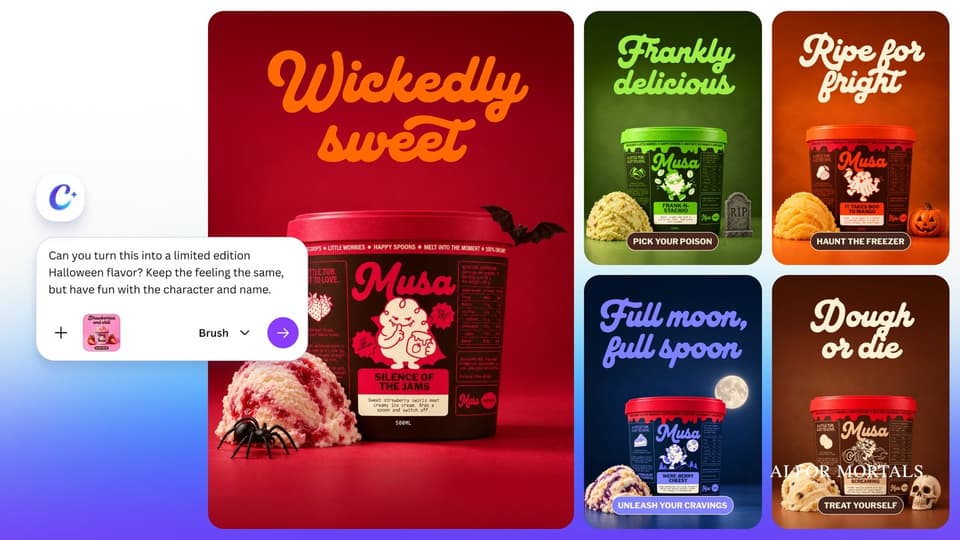
One of the images in Canva's announcement shows the first kind. It starts with an ice cream tub label and asks, "Can you turn this into a limited edition Halloween flavor? Keep the feeling the same, but have fun with the character and name." Brush comes back with a set of spooky versions, each with a new flavor name and mascot.

In Canva's internal testing, Brush matched or beat its old setup on most editing tasks, and did best at restyling designs and adapting them to new formats.
Faster and cheaper than the AI Canva used before
Canva says Brush finishes design edits up to 69% faster than the design agent it used before, at 46% lower cost per edit.

Canva says the cost savings are a big part of why it built Brush. With hundreds of millions of people making designs, a few extra cents per edit adds up fast, and Canva says the savings let it offer more AI to more people.
Under the hood, Brush works in a loop. It writes and runs small bits of code to change the parts of your design, then looks at the page to check the result before taking its next step. Canva started from an open-weights model and trained it on real design and editing tasks, with the team's own designers setting what counts as a good result.
This is the first version. Canva says Brand Kit support, the ability to reference attachments, and better handling of image-heavy layouts are on the way.
Brush or Photoshop for prompt edits
Photoshop already lets you edit with prompts. Generative Fill changes an area you select, Prompt to Edit changes the whole image, and an AI Assistant in early beta makes quick edits, removes objects and tries variations from a chat panel. Image tools are already heading this way, like Nano Banana 2.1 editing pictures inside Gemini.
Those tools work on photos. Brush works on the whole Canva design, so text, layouts and every page of a deck are fair game along with the images.
I guarantee ChatGPT Images will launch something like this soon.
But if you want to edit very specific parts of images, Brush is probably the best way to go, especially if Canva is already part of what you use daily.
My video on what ChatGPT Images can already do:
If you're on Canva Pro, open any design you already have, switch the dropdown to Brush and ask for one change across the whole thing.


Comments
Sign in to join the conversation.