Nano Banana 2.1 vs Nano Banana 2 and Pro: What It Costs and Who Can Use It Free
Google's newest image model costs about half as much per image as Nano Banana 2 on its API, is built into Google Search's AI Mode, and comes with a paid Google AI plan in the Gemini app.

On this page
- What is Nano Banana 2.1?
- Is Nano Banana 2.1 free?
- What does Nano Banana 2.1 cost compared with Nano Banana 2 and Pro?
- Nano Banana 2.1 vs Nano Banana Pro: which is better?
- What happened to Nano Banana 2?
- How to use Nano Banana 2.1 in Google Search and Gemini
- What Nano Banana 2.1 still gets wrong
- How it compares with ChatGPT Images 2.5
- Questions people ask
Updated October 30, 2026: Added what Nano Banana 2.1 costs next to Nano Banana 2 and Nano Banana Pro, which Gemini plans get it, and Google's own test scores. Google's developer page lists no shutdown date for Nano Banana 2, so we corrected the October 29 date this post gave before.
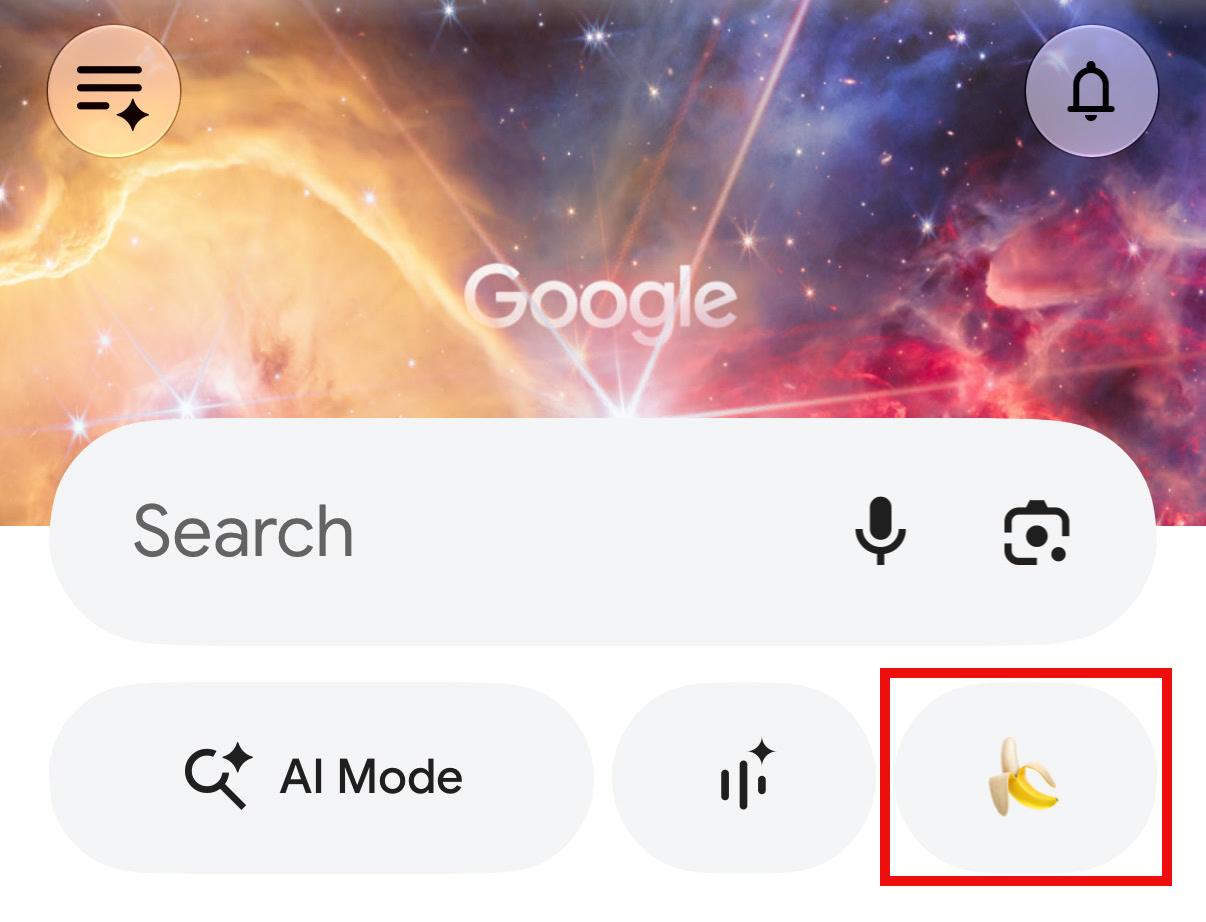
Nano Banana 2.1 is Google's newest AI for making and editing images, released on October 6, 2026 as the replacement for Nano Banana 2 (Google's developer model list). On Google's API it costs $0.0336 for a standard 1K image, about half of Nano Banana 2's $0.067 and a quarter of Nano Banana Pro's $0.134, and none of the three has a free tier (Google's pricing page, checked October 30, 2026). The easiest way in is Google Search: open the Google app and tap the banana icon under the search box, and Google's post about it mentions no subscription. In the Gemini app, 2.1 comes with a paid Google AI plan, and free users get Nano Banana 2 (Google's Gemini image page).
Google says 2.1 beats its earlier image models across the board, with the biggest gains in visual design, editing one part of a picture, and keeping people looking the same from one image to the next.
What is Nano Banana 2.1?
Nano Banana 2.1 is the newest version of Nano Banana, Google's AI for making and editing pictures in the Gemini app. Google's developer docs call it an update to Nano Banana 2 that keeps its speed and low cost, and the more efficient counterpart to Nano Banana Pro, a separate, higher-end image model that paid Gemini users can switch to. It runs on Gemini 3.6 Flash, according to Google's model card.
It's rolling out in the Gemini app, AI Mode in Google Search, Google AI Studio (Google's site for developers), Google's video tool Flow, its design tool Stitch, Google Ads and Gemini Enterprise Platform, per Google's rollout post.
Three changes stand out if you make images for work.
The same people across a series
You can give it up to 14 reference images, and it keeps up to four people looking the same across the pictures it makes, plus up to ten objects, like a product or a mascot. That's what a set of social posts or a storyboard with recurring characters needs.
Those limits come from Google's image generation guide for developers; Google hasn't said how many photos the Gemini app itself takes at once.
Change one part, keep the rest
You can describe in plain words the one thing to change, like a shirt or the sky, and it leaves everything else alone. Google's image-editing guide suggests phrasing it as "change only the [specific element] to [new element/description]. Keep everything else in the image exactly the same."
Better text and layouts
Google says it renders text and lays out infographics more accurately, and its model card pitches it for clear text on posters and detailed diagrams.
It makes images at 1K, 2K or 4K (1K unless you pick a size) and fixes glitches that showed up in very wide or very tall pictures, according to the developer docs.

Is Nano Banana 2.1 free?
Partly. In Google Search's AI Mode, Google's post about Nano Banana 2.1 mentions no subscription. In the Gemini app it needs a paid Google AI plan, and on Google's API it has no free tier.
Google's Gemini image page lists Nano Banana 2 as the free model and Nano Banana 2.1 "with a Google AI plan," and says Google AI Pro, Plus and Ultra users have access to 2.1. Free Gemini users still make images with Nano Banana 2, and Google says paid plans get higher image limits without giving the numbers.
College students can get a free Pro plan for one year, and Pro includes 2.1, per the same Gemini page.
On the Gemini API pricing page, the free tier reads "Not available" for Nano Banana 2.1, Nano Banana 2 and Nano Banana Pro, so every image a developer makes through the API is billed.
What does Nano Banana 2.1 cost compared with Nano Banana 2 and Pro?
On Google's API (pricing page), a standard 1K image from Nano Banana 2.1 costs $0.0336, about half of Nano Banana 2's $0.067 and a quarter of Nano Banana Pro's $0.134. Each model also has a Batch price, half the standard rate, for big jobs a developer can wait on: Google's Batch API page gives 24 hours as the target turnaround.
| Model (API name) | 1K image | 2K image | 4K image | 1K, Batch | Free tier |
|---|---|---|---|---|---|
 Nano Banana 2.1 (gemini-nano-banana-2.1) | $0.0336 | $0.0504 | $0.113 | $0.0168 | None |
| Nano Banana 2 (gemini-3.1-flash-image) | $0.067 | $0.101 | $0.151 | $0.034 | None |
| Nano Banana Pro (gemini-3-pro-image) | $0.134 | $0.134 | $0.24 | $0.067 | None |
Prices are per image on Google's paid API tier, from the Gemini API pricing page, checked October 30, 2026. A 1K image is 1024 by 1024 pixels and a 4K image is 4096 by 4096. Nano Banana 2 also makes a smaller 0.5K image for $0.045.
In the Gemini app you don't pay per image: 2.1 comes with the Google AI Pro, Plus and Ultra plans, per Google's Gemini page.
Nano Banana 2.1 vs Nano Banana Pro: which is better?
In Google's own tests, Nano Banana 2.1 came out ahead of Nano Banana Pro, but one early hands-on test still found Pro's photos more realistic.
For the model card, Google had people compare images side by side and turned their picks into scores, where higher means people preferred that model's images more often. With its thinking mode on, where it works through the prompt before drawing the final image, 2.1 scored 1050 on making images from text, against 990 for Nano Banana 2 and 935 for Pro. On general editing it scored 1026, against 938 and 939.
| Google's preference test | Nano Banana 2.1 | Nano Banana 2 | Nano Banana Pro |
|---|---|---|---|
| Making images from text (overall) | 1050 | 990 | 935 |
| General editing | 1026 | 938 | 939 |
Scores from Google DeepMind's model card, with thinking on for 2.1 and Nano Banana 2. These are Google's own tests, and they also put Nano Banana 2 ahead of Pro on making images from text.
One early hands-on test disagreed: in a side-by-side, Pro's picture of a horse looked more realistic and natural, and 2.1's came out closer to a pony.
Pro also costs four times as much per 1K image on the API ($0.134 against $0.0336). In the Gemini app, paid users get 2.1 and can regenerate an image with Pro from the three-dot menu by choosing "Redo with Pro," according to Google's Gemini page.
What happened to Nano Banana 2?
Nano Banana 2 is still around: it's the free image model in the Gemini app, and developers can still use it, though Google now points them to 2.1.
Google's Gemini page lists Nano Banana 2 as the free option next to 2.1 for paid plans. For developers, Google's model list names 2.1 as the recommended replacement for Nano Banana 2 and, as of October 30, shows no shutdown date for it. An earlier version of this post said Google would shut it off for developers on October 29; Google's page, last updated October 22, lists no shutdown date.
Nano Banana 2 first appeared as a preview on February 26, 2026, per the same list, and Gemini had used it since February. Its API price is still listed at $0.067 per 1K image, twice what 2.1 costs.
How to use Nano Banana 2.1 in Google Search and Gemini
The quickest way is in Search. Open the Google app on your phone and tap the banana icon under the search box. Robby Stein, Google's vice president of product for Search, posted the how-to when it went live in AI Mode.
AI Mode is part of regular Google Search, and Google's post about it mentions no subscription.
In the Gemini app, pick "Create images" (marked with a banana) from the tools menu, then type a prompt or upload a photo to edit, as Google's Gemini page describes. On Google AI Pro, Plus or Ultra that uses 2.1, and on the free plan it uses Nano Banana 2. Google said on October 6 that 2.1 was starting to roll out there.
Developers call it as gemini-nano-banana-2.1 in Google AI Studio and the Gemini API, per the developer docs.
What Nano Banana 2.1 still gets wrong
Small and long text is its biggest known weak spot: Google's model card says small text can come out blurry, especially at 1K, and long paragraphs are still hard for it.
Characters don't always match their reference photos, marks you draw to guide an edit sometimes stay in the picture, and it occasionally mixes up left and right.
Google also says it's still limited on world knowledge, 3D reasoning and getting facts right.
How it compares with ChatGPT Images 2.5
Google's published scores compare 2.1 only with its own models, so there's no Google number for it against ChatGPT Images 2.5. ChatGPT Images 2.5 makes ChatGPT's pictures, and it also powers ChatGPT's Try On button, which shows clothes on your own photo.
Going only on Google's published details, here's where 2.1 could pull ahead:
- Recurring characters: four consistent people and 14 reference images suit a series, like a week of posts with the same cast.
- Small fixes to an image you like: changing one element and leaving the rest alone helps when an image is nearly right.
- Where it lives: it's built into Google Search and the Google app, which you may already have open.
OpenAI is also testing picture ads while images generate for Free and Go users in the US.
And if most of your pictures end up on Instagram or WhatsApp, Meta has its own free image model, Muse Image, built into both.
The banana icon in the Google app makes it easy to give 2.1 and ChatGPT the same prompt and the same small fix. Pat Simmons put the model before 2.5, ChatGPT Images 2.0, through more than 50 use cases in this video:
Our Google page tracks everything Google has shipped in AI. If you work in Google's own apps, Anthropic also put Claude inside Google Docs, Sheets and Slides.
Questions people ask
When did Nano Banana 2.1 come out?
Google released it on October 6, 2026, the date on its model card and its developer model list.
What is Nano Banana 2.1 called on Google's API?
Its model name is gemini-nano-banana-2.1. Nano Banana 2 is gemini-3.1-flash-image and Nano Banana Pro is gemini-3-pro-image, per the pricing page.
Is Nano Banana 2.1 cheaper than Nano Banana 2 Lite?
At 1K they cost the same, $0.0336 per standard image. Google's pricing page lists only a 1K price for Nano Banana 2 Lite, while 2.1 also makes 2K and 4K images.
Can Nano Banana 2.1 work from a video?
On the API, yes. Google's image generation guide says video inputs work with Nano Banana 2.1, Nano Banana 2 and Nano Banana 2 Lite.
What does thinking mode do in Nano Banana 2.1?
The model works through a complicated prompt and can make up to two draft images before the final one, per Google's image generation guide. Developers can set it to minimal, medium (the default) or high, per the developer docs, and on the model card 2.1 scored 1050 with thinking and 1015 without.
Does Gemini label images made with Nano Banana as AI?
Yes. Google says Gemini adds an invisible SynthID watermark and a visible watermark to the images it makes, on its Gemini image page.

Comments
Sign in to join the conversation.