We Tested Claude for Small Business. It Caught the Invoice That Was Already Paid.
We ran Anthropic's Small Business plugin on a made-up design studio with traps planted in its books, and it caught the invoice that had already been paid.
 AI for Mortals Staff
On this page
- What Claude for Small Business is, and what it costs
- How we tested it: a made-up studio with traps in its books
- How to add the Claude for Small Business plugin
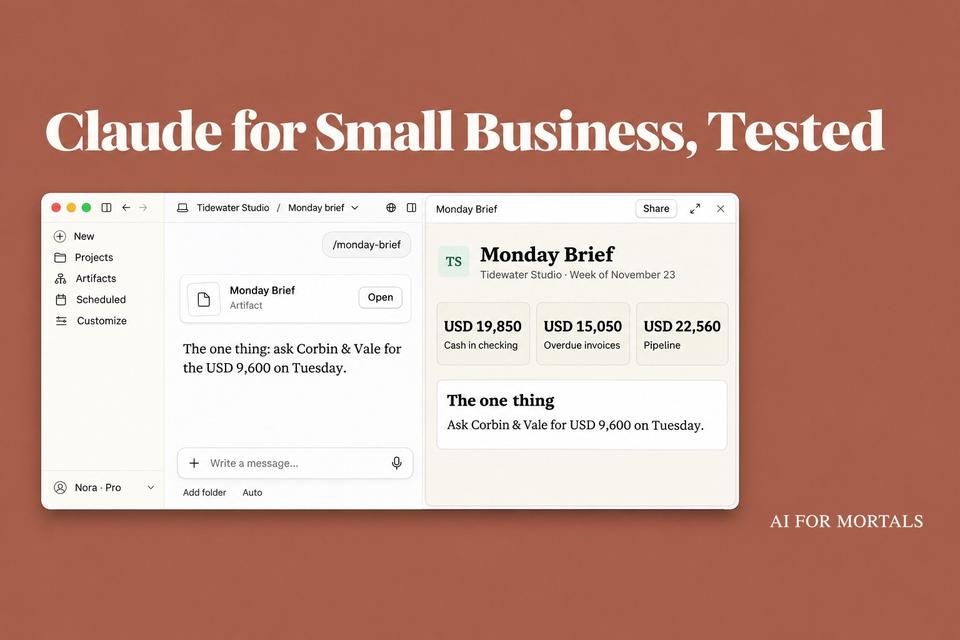
- The Monday brief got the numbers right and picked one thing to do
- It drafted three invoice reminders and held back the one already paid
- A seven-minute call became an $11,850 proposal with no invented prices
- What Claude got wrong
- Sonnet was faster, and Opus slipped less often
- What to check before you approve anything
- Live connections and scheduled runs are still untested
Claude for Small Business is a plugin from Anthropic that gives Claude 44 ready-made skills for running a small company. They include a one-page Monday brief, reminders for overdue invoices and a proposal builder.
We ran those three on a made-up design studio with traps planted in its books. Across nine runs, Claude caught every trap, including an invoice a client had already paid. Most of its mistakes were small, and one put a wrong price in a proposal's fine print.
We loaded the plugin into Claude Code and gave it spreadsheet exports, with nothing connected to QuickBooks, Gmail or a bank. The live connections and the scheduled runs are still untested here.
What Claude for Small Business is, and what it costs
Anthropic launched it in May with connections to seven tools, then added more in September. The current version connects to about three dozen, including QuickBooks, Stripe, Gusto, HubSpot, Gmail, Google Calendar and Slack.
The plugin has no price of its own. Anthropic's setup guide says you need a Pro, Max, Ultra, Team or Enterprise plan, and its small business page suggests Pro ($20 a month) for one person and Team for a business with more than one.
Our Claude pricing guide covers what each of those plans includes.
Besides the brief and the proposal builder, the skills cover four kinds of work:
- Money: a cash forecast, paying bills, payroll prep, closing the month and getting ready for taxes.
- Customers: answering new leads, a daily call list, win-back messages and replies to support emails.
- Marketing: a content calendar, ads, reviews and how you show up in search.
- Team and stock: job posts, screening applicants and reorders.
Every skill drafts first. In Anthropic's words, "nothing sends, posts, or pays until you say so," and once you trust a workflow you can let it run on a schedule.

If your tools aren't connected, Anthropic says most skills still run from a spreadsheet or statement you upload. That's the route we tested.
A plugin is a bundle of skills. To see what single skills do on their own, read our test of five free Claude skills against plain Claude.
How we tested it: a made-up studio with traps in its books
We invented Tidewater Studio, a four-person brand and web design studio, and built its files with a script so we'd have an answer key.
The folder held open invoices, a year of paid invoices, 30 days of bank activity, cash balances, weekly sales, upcoming bills, a six-deal pipeline sheet, one week's calendar, a rate card and the transcript of a seven-minute call with a new client.
Then we planted problems:
- A $3,200 invoice that still showed as open, although the bank export showed the client's transfer four days earlier.
- A $5,400 invoice with a note saying it was on hold over a dispute.
- A $1 test invoice addressed to the studio's own email.
- One client with two overdue invoices, and three clients with very different payment records.
- A pipeline deal with no dollar amount, one with no activity date and one past its expected close.
- A client who, partway through the call, cut the site from 12 pages to 10, cancelled the online store, asked for 10% off and wanted photography the rate card doesn't price.
Anthropic publishes the plugin's files and says plugins also work in Claude Code, so we loaded version 1.35.2 there and pointed it at the folder.
Each job ran three times in fresh chats, twice with Opus 5.5 as the model and once with Sonnet 5.5.
We used the same fake-data-with-an-answer-key approach when we had Claude audit a year of bank statements without linking a bank.
How to add the Claude for Small Business plugin
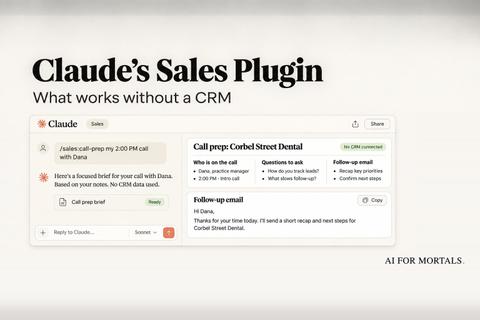
You can add it in Claude on the web or in the desktop app. It's one of several Claude Cowork plugins Anthropic publishes, and we tested Claude's Sales plugin on a made-up business too.
- Open Customize, then Plugins.
- Search for "Small Business" and add it.
- Connect your tools when Claude asks, or skip that for now.
- Start a new chat and paste the setup prompt from Anthropic's guide:
Customize the "small-business" plugin for me based on my company.
According to that guide, Claude asks what you do, who works with you and what's hardest right now, then shows you a tailored copy of the plugin to save.
In our Claude Code run, the same prompt started the plugin's setup interview. It asked one question at a time about our biggest headaches, our bookkeeping, how clients pay, our team, our calendar and email, and how we wanted reports to look.
After our second answer it paused the interview and ran a cash forecast on the exports we'd pointed it to. That first report flagged the paid invoice, the disputed one and the test invoice before we'd asked about any of them.
It also caught a $780 check labelled with an invoice number that had been paid back in October. That one was a slip in our made-up books that we hadn't planted on purpose.
The setup took 11 short answers. At the end, Claude showed the finished business profile and asked before saving it.
The Monday brief got the numbers right and picked one thing to do
Anthropic's guide gives the command as /monday-brief. With the plugin's name in front, as Claude Code lists it, we typed:
/small-business:monday-brief My exports and next week's calendar are in this folder.
All three briefs had the right cash balance, $19,850 in checking, and the right drop in sales, 24% on the week before.

Each brief also worked out something we hadn't asked for. The payroll due that Wednesday was covered, and the next one, on December 11, was not.
Two of the briefs put that gap at $10,852 if no client paid. The third assumed one reliable client would pay on time, put it near $6,100 and said so.
All three noticed the week was short. The studio closes Thursday and Friday for Thanksgiving, and payroll had been moved up to Wednesday.
They flagged the $18,000 deal that had passed its expected close, and the deal with no activity logged at all. The deal with no dollar amount stayed out of the pipeline total.
All three briefs ended on the same "one thing." The studio's biggest overdue invoice, $9,600 from a law firm, belonged to a client the owner was already due to meet on Tuesday.
Claude said to ask for payment on that call, since that one invoice covered most of the December payroll gap.

Each brief also said what it couldn't see, in one line at the bottom: no email or Slack had been read.
Anthropic says you can set the brief to arrive on its own at the same time every Monday. For more jobs Claude can repeat on a schedule, Pat walks through the routines he runs every day:
It drafted three invoice reminders and held back the one already paid
This job needed no command, only a plain request:
Chase my overdue invoices. Draft the reminders, don't send them. My QuickBooks and bank exports are in this folder.
Seven invoices were past due in the books. All three runs drafted three emails covering four of them, $15,050 in all, and held back the other three, each with a reason.

- The $3,200 invoice had already been paid. Claude matched the bank transfer to it and told us to fix the record in QuickBooks.
- The $5,400 invoice was in dispute. Our note said it was on hold until a call with the client, so Claude left it alone.
- The $1 invoice was a test, and Claude skipped it.
Two more invoices weren't due yet, and neither got a reminder.
The tone followed each client's record. The law firm had paid four of its last five invoices late, so it got a firm note with a pay-by date.
The yoga studio had never paid late, so its note assumed an oversight. The plumber's two overdue invoices went into one email.

Nothing was sent. Each run stopped at drafts with a copy button, plus a list of things to check first, like whether a recent Stripe payout hid a payment from one of the three clients.
If you'd like a small tool of your own for this chore, we built a "who owes me" invoice app in Claude Code without writing any code.
A seven-minute call became an $11,850 proposal with no invented prices
We named the transcript file and pointed Claude at the studio's price list:
Build a proposal from this call transcript. My rate card, standard terms and past invoice lines are in this folder too.
All three runs priced the job at $11,850, with the same four lines taken from the rate card. They showed which past jobs they'd compared it with.
They used the 10 pages the client settled on after first listing 12, and they left out the online store the client cancelled later in the call.
The rate card had no price for photography. Each run left that line as "quoted separately," with no dollar figure.

No run applied the 10% discount the client asked for. Each one showed the owner what 10% off would do to the price and left the decision with the owner.
Each kept the studio's standard 50% deposit and noted, for the owner only, that the client wanted 25%.
Those owner-only notes stayed in the chat. The client's page carried the scope, the price, the terms and a "not included" list with the copywriting, hosting, store and blog on it.
One Opus run wrote in a go-live date of Friday, February 26, which nobody said on the call. It listed that date under "things I made up, so check them."
What Claude got wrong
Nothing on this list would have gone out without someone approving a draft.
- At setup, Claude said Shopify was connected and ready. We hadn't signed in to anything.
- One Opus invoice run guessed the next payroll date from the bank history and missed by two days. It hadn't opened the bills file, and it did say "probably."
- One Opus brief called the law firm "always late," though the firm had paid one of its five invoices early. Another said in chat that it had left three invoices out of its totals, when its page left out two.
- One Opus reminder opened "Hi Paula" but was addressed to the firm's accounts inbox. Claude pointed that out itself.
- Sonnet missed the mislabelled $780 check that both Opus runs caught. It also gave the plumber a "gentle-firm" note, where the plugin's own rules call for a neutral one.
- Sonnet's proposal page said pages beyond the ten would be billed at the studio's $950 day rate. The rate card charges $450 for an extra page, and Sonnet's own chat summary said $450.
- Sonnet's brief said to "ask for the check in person" on a call the calendar marks as video. That sentence is the example in the plugin's own instructions.
- No reminder had a working payment link. Opus left a placeholder or pointed to the link on the original invoice, and two of Sonnet's drafts said nothing about how to pay.
- We had switched off Claude's ability to run commands for the test, so it couldn't build the Word and PDF copies the plugin's instructions call for. The proposals came as web pages.
Sonnet was faster, and Opus slipped less often
| Job | Sonnet 5.5 | Opus 5.5 |
|---|---|---|
| Brief | 2.5 min | 2.7 min |
| Invoices | 38 sec | 1.5 min |
| Proposal | 49 sec | 4.5 to 6 min |
Sonnet handled every trap we planted, in less time. By Claude Code's own meter it used about half of what Opus used on the brief and under a third on the other two jobs.
Anthropic's demo video runs the Monday brief on a Sonnet model too.
Sonnet's three runs had about as many slips as Opus's six, and one was that wrong price on a client's page. If you're on Pro, where usage runs out fastest, Sonnet is a fine place to start, and its numbers deserve a second look before a client sees them.
Opus's proposal times are inflated. Both runs spent minutes writing scripts for the Word and PDF files they couldn't make.
What to check before you approve anything
- Give it your bank export along with the invoice list. The paid invoice was only caught because the bank activity was in the folder.
- Check one customer you know well against the draft. That's Anthropic's own advice. If an invoice you know was paid shows up as open, fix the books before anything goes out.
- Read the "check before you send" list. Ours asked us to look in Stripe, add payment links and fix one greeting.
- Look at your privacy settings on Pro or Max. Anthropic's privacy page says chats on those plans can be used to improve its models if you've allowed it. Team and Enterprise plans aren't used for training by default.
- Keep your accountant in the loop. The plugin's own readme says it doesn't give financial, tax, legal or HR advice.
Live connections and scheduled runs are still untested
Our test covered Claude's judgment on tidy, made-up files. It didn't cover the QuickBooks, Gmail or Stripe connections, a brief that arrives on its own every Monday, or anything that sends or pays.
Real books are messier. The plugin's own notes list the ways live data has fooled it, like an overdue report cut off at ten rows, or a payment account showing zero while $3,071 was still on its way.
The connections can fail too. On Reddit, several Canadian owners report that the QuickBooks connection has refused to connect for months.
Sources
- Introducing Claude for Small Business (Anthropic, May 13, 2026)
- Claude for Small Business launches new workflows, integrations, and training programs (Claude, Sept 15, 2026)
- How to install and use the Claude for Small Business plugin (Claude Academy)
- Small Business plugin listing (Claude Marketplace)
- The plugin's files, version 1.35.2 (Anthropic on GitHub)
- Use plugins in Claude (Claude Help Center)
- Is my data used for model training? (Anthropic Privacy Center)
- Error connecting QuickBooks to Claude when using the Small Business plugin in Canada (r/ClaudeCowork)



Comments
Sign in to join the conversation.