Gemini Notebook Can Now Turn Your Sources Into a Website
Type “make me a site” in a Gemini Notebook chat and it builds an interactive page, like a study guide or sales dashboard, from that notebook’s documents.
 AI for Mortals Staff
Google's Gemini Notebook, the research tool that used to be called NotebookLM, can now build an interactive website from the sources in a notebook. It started rolling out on Monday.
You type "make me a site" in the notebook's chat and describe what you want. Gemini Notebook builds the page from the PDFs, docs and links you've already added, and you can open it in its own browser tab or share it.
It's rolling out worldwide on the web for Gemini Notebook users 18 and older, Google Workspace accounts included. Google says the phone app gets it "soon."
How to make a site in Gemini Notebook
Open a notebook that already has your sources in it. In the chat box, start with "make me a site" and say what the site is for and what should be on it.
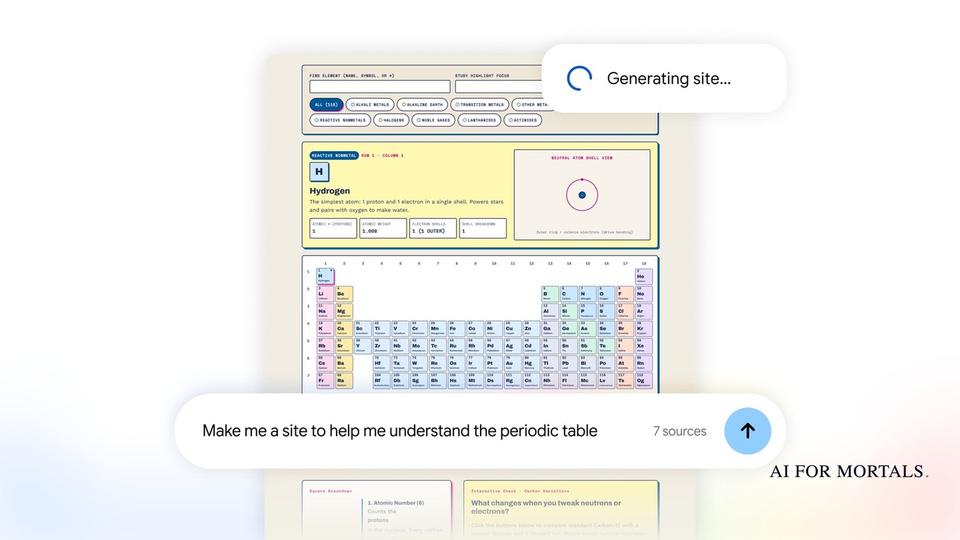
Google's demo asks for a study page about the periodic table, built from seven sources:

The full request reads: "Make me a site to help me understand the periodic table. Explain it to me in simple sections and add a short quiz at the bottom to check I understand."
Notebook replies in the chat that it's building the site, and the finished page shows up in the notebook's Studio panel next to its other outputs, like slide decks and mind maps. From there you select Open in a new tab to use it full screen, or share it with other people.
What Google's example sites look like
The periodic table site came back with simple explainer sections, a clickable table where each tile opens that element's details, and a six-question quiz at the bottom that keeps score.

Google's post names three kinds of site to try:
- Study explainers, like the interactive periodic table or a historical timeline, to prepare for an exam.
- Dashboards to explore your own data, such as quarterly sales.
- Project trackers that lay out tasks and deadlines.
The demo builds one of each. "Build me a project tracker with tasks and deadlines," from four sources, became a launch tracker with progress by team and an Export CSV button. A request for an interactive dashboard, from five sources, became a regional sales page with filters for region and time period.

Why a site built from your own documents is different
Google already lets you build a site from a chat. Since October, an app made in the Gemini app can go straight to Google Sites as a private draft you can publish and share, and the same chat can make PDFs, Docs and Sheets for you.
Notebook's version starts from documents you picked, and Google's examples are aimed at students studying for exams and office teams tracking sales and projects. Each site in the demo has a View sources link that lists the notebook documents it was built from, so a team can see where the page came from.
That's the same idea as Notebook's other outputs. It already turns a notebook into slide decks, mind maps, Audio Overviews and short videos, each one built from your sources.
What Google hasn't said yet
The announcement is short, and a few things are still open:
- Whether a shared site updates when you add or change sources in the notebook.
- Who can open a shared link, such as anyone with the link or only people you invite.
- Whether free accounts and paid Google AI plans get different limits on how many sites you can make.
Google's post doesn't answer any of these, so check the share settings before you send a site with work data to someone outside your team.
For a site that doesn't start from your own documents, AI for Mortals compared the main AI app builders in Lovable vs Replit vs Bolt, and Pat tried OpenAI's version of a chat-built website:
Sources
- Transform notes, research, and sources into interactive sites with Gemini Notebook (Google, November 16, 2026)
- Google's Gemini Notebook sites demo video (Google)
- Publish interactive apps from the Gemini app to Google Sites (Google Workspace Updates, October 19, 2026)
- Google adds shareable interactive sites to Gemini Notebook (Unite.AI, November 16, 2026)



Comments
Sign in to join the conversation.