Ask Maps Will Plan Your Whole Trip. Check Day 1 Before You Leave
Google Maps' Ask Maps turns one message into a day-by-day trip with pins, hours and a Google Docs copy, and even Google's own demo needs a second look.
 AI for Mortals Staff
On this page
- What the Google Maps trip planner gives you
- How to make an itinerary on Google Maps with Ask Maps
- Prompts to copy for your next trip
- What Google's own demo trip got wrong
- How to check an Ask Maps plan before you leave
- Plan a road trip on Google Maps, then change it on the road
- Export your Ask Maps itinerary to Google Docs
- Where Ask Maps works, and why some people can't find it
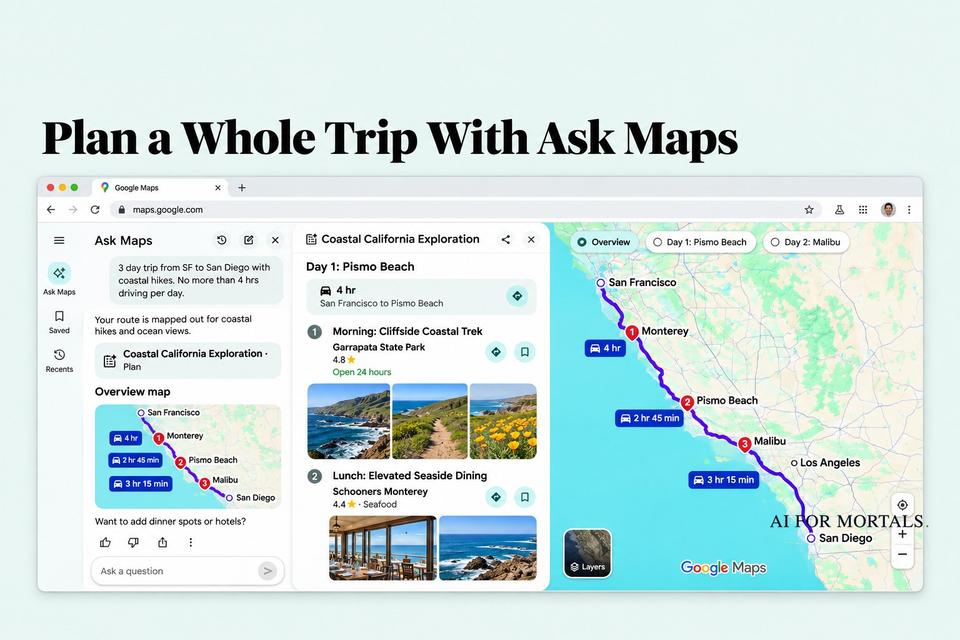
Google Maps now has a trip planner built in. You type one message into Ask Maps, the Gemini chat inside the app, and it hands back a day-by-day itinerary with numbered pins, drive times, opening hours and photos for every stop.
Google added itineraries to Ask Maps on November 16, along with a way to share the plan or export it to Google Docs. It works in every country Ask Maps does, which is now more than 200 after this week's expansion into Europe.
We haven't planned a trip with it ourselves yet. This walkthrough is built from Google's own demo, Google's announcement and the first people to try it, plus one check of our own: we ran Google's sample trip through a route planner, and Day 1 broke the rule it was given.

What the Google Maps trip planner gives you
Ask for a trip and you get a plan you can actually drive. Here's what comes back in Google's demo and in early testers' screenshots:
- A day-by-day schedule. Each day gets a name, a short summary and a drive card with the time and roads ("4 hr, San Francisco to Pismo Beach via I-280 S and US-101 S").
- Numbered stops with the details you'd look up anyway. Every stop has its rating, price range, photos and whether it's open right now, plus a short note on the vibe and what reviewers order.
- Numbered pins on the map. Tap Overview or a single day to see that day's route.
- A plan that keeps the conversation going. You can ask for changes in the same chat ("add a sunset dinner stop to day 2"), and it remembers what you planned.
- Sharing and a Google Docs copy. Share the plan with the people coming along, or export it to Google Docs from a computer.
It's free, since Ask Maps comes with Google Maps.
It also knows more about you than a chatbot does. Ask Maps can lean on places you've saved and things you've searched for in Maps, so one early tester who eats a lot of pizza found a well-reviewed pizza place written into a scenic drive they'd planned.
How to make an itinerary on Google Maps with Ask Maps
- Update Google Maps on your phone. The itinerary feature started rolling out on Android and iOS on November 16, so it may take a few days to reach you.
- Tap Ask Maps under the search bar. On some phones it took the spot where the Home shortcut used to sit.
- Describe the trip in one message. Say where you're starting and ending, how many days, what you want to do and any limits (driving time, budget, kids, a bad knee). Google's suggestion chips include a "Road trip itinerary with hikes" shortcut if you'd rather start there.
- Answer its questions. If you leave something out, it asks first. One tester who tapped the hiking shortcut was asked how many days they had and when they planned to go.
- Open the plan. The reply links to a plan card. Tap it to see the day tabs, the stops and the map.
- Ask for changes in the same chat, then share it or export it to Google Docs from a computer.

To find a plan again later, ask Ask Maps for it or look for the itinerary badge in your Ask Maps chat history.
If you'd like it to plan around your real calendar, you can let Ask Maps read your Gmail and Google Calendar. Tap your profile picture in Maps, then Personal Intelligence, then Connected apps, and switch on Google Workspace. Leave it off if you'd rather keep your inbox out of it.
Prompts to copy for your next trip
The more you put in the first message, the less fixing you do later. Fill in the brackets and paste.
Plan a [number]-day road trip from [start] to [end], leaving [day]. We want [hikes / beaches / small towns / good food]. No more than [number] hours of driving per day, and put every stop in the order we'll pass it so we never double back.
Plan a day in [city] for [number] people, starting at [time] from [hotel or neighborhood]. Mix [museums / shopping / parks] with one sit-down lunch and one dinner near the last stop. Keep walks between stops under [number] minutes and skip anything closed on [day].
Add a [lunch spot / scenic viewpoint / coffee stop] to day [number] of my itinerary, somewhere on the way that doesn't add more than [number] minutes of driving.
Where's a good lunch stop about an hour into this drive that isn't fast food, has decent restrooms and is open on [day]?
For each day of my itinerary, list the total driving time including the detours to every stop, and the hours for each stop on the day we'll be there. Flag anything that's closed that day or needs a reservation or ticket.
The last one matters most, and the next section shows why.
What Google's own demo trip got wrong
Google's demo asks for a three-day drive from San Francisco to San Diego with coastal hikes and oceanfront lunches, and one firm rule: "No more than 4 hrs driving per day."
Day 1 comes back with a "4 hr" drive card for San Francisco to Pismo Beach on I-280 and US-101, which is the straight inland drive. Then it adds three stops along the coast:
- Morning: a hike at Garrapata State Park, south of Carmel
- Lunch: Schooners in Monterey, about 13 miles back north
- Afternoon: a hike at Fort Ord Dunes State Park, farther north again
So the day drives south past Monterey to the first hike, turns around for lunch, keeps going north for the afternoon hike, then drives all the way down to Pismo Beach. We put those stops, in that order, into a public route planner (OSRM, which runs on OpenStreetMap). It came to about 298 miles, against 244 for the straight drive, so roughly 55 extra miles that the 4-hour card doesn't count.
At highway speeds that's at least another hour behind the wheel, which puts Day 1 past the limit the prompt set. Visiting the same three stops from north to south (Fort Ord, then Monterey, then Garrapata) saves about 30 of those miles.
Nothing on the screen is false. The parks are real, the drive card is accurate for the drive it describes, and Google's video carries the line "Some sequences shortened and simulated. Results may vary." The plan just looks finished before it is, and the drive card doesn't add up the detours for you.
Early testers ran into the same kind of gap. One who asked for five days in Lagos got a day-by-day plan with numbered pins, but no directions or travel times between the stops. Another spent two weeks of evenings with Ask Maps and was sent to a dessert spot that had been closed for months, because the Maps listing still said open and had nearly five stars.
How to check an Ask Maps plan before you leave
A few minutes with the plan open saves a bad afternoon:
- Look at the pins in order on the Overview map. If the numbers zigzag back and forth along the route, ask it to reorder the stops so you never double back.
- Add up each day's real driving. The day's drive card can cover only the main leg. Ask for the total with detours (the last prompt above does this), or tap through each stop's directions.
- Check the hours for the day you'll be there. In the demo, the stops show whether they're open right now. That tells you nothing about Saturday, and holiday hours are the ones most likely to be wrong.
- Confirm anything you'd be sad to miss. Call or check the website for restaurants you're driving an hour for, timed-entry parks and anything that needs a ticket.
- Download offline maps for stretches with weak signal, like Big Sur, before you set off.
If Ask Maps gets something wrong, say so in the same chat ("Day 1 has more than 4 hours of driving, fix it"). Google built the itinerary so you can change it there, without starting a new plan.
Plan a road trip on Google Maps, then change it on the road
The plan stays useful after you leave. When you pull it back up, Ask Maps shows live traffic, whether each place is open and what the vibe is at your next stop. You can tap any stop for directions.
You can also change the plan mid-drive. Google's demo asks it to "Add a sunset dinner stop to day 2 of my itinerary," and it slots a restaurant into Malibu with reviewers' picks and a note about valet parking.

On a phone it works while you're already driving. Ask for a lunch stop about an hour out with decent restrooms, and it suggests places along your route with their reviews, hours and how far they are.
In the US, the directions screen now adds Know before you go notes too: where to park and what it costs, when a place closes compared with when you'll arrive, weather, tolls and likely delays.

Export your Ask Maps itinerary to Google Docs
On a computer, the plan exports to a Google Doc with each day, each stop as a link back to Maps, and the notes about vibe and menu. It's the easiest way to print the trip, add flight and hotel details, or hand it to someone who won't open Maps.

Google only mentions export on desktop, so if you plan the whole trip on your phone, open Maps on a computer at the end to make the Doc. When we opened Google Maps in a browser without signing in, the Ask Maps button didn't appear at all, so sign in first.
If you've already been planning in ChatGPT, our family planning guide has trip prompts that work there, and we put a three-day Lisbon plan with a tight budget through GPT-6.2 and Claude. A chatbot can take care of the budget and the packing list, while Ask Maps works from what's on the map today: hours, routes, photos and reviews.
Where Ask Maps works, and why some people can't find it
Ask Maps launched in March in the US and India and, as of this week, is expanding to 30 more countries in Europe, including the UK, Spain and Germany. Itineraries and saved-list search work everywhere Ask Maps does. The Know before you go route notes are US-only for now.
Not everyone has the button yet. On Reddit's Google Maps forum, some people say Ask Maps still hasn't shown up for them, while others say it replaced a shortcut they used and want a way to hide it. There's no setting to turn it off.
The same update also lets Ask Maps call nearby salons, groomers and garages to find you an open appointment, which we covered in Google Maps Can Now Find Appointments and Call Businesses for You. Gemini is in Maps on CarPlay too, as of last month.
Pat put three AI agents through the same everyday jobs, to see which ones you can actually hand an errand to:
Sources
- New Ask Maps features to help with holiday travel and prep (Google, November 16, 2026)
- Google on X: custom trip itineraries in Ask Maps, with the demo video (Google, November 16, 2026)
- Ask Maps is coming to Europe (Google)
- Ask Maps and Immersive Navigation launch (Google, March 12, 2026)
- Google Maps can now build trip itineraries with real-time details about each stop (TechCrunch, November 16, 2026)
- Tried the new Ask Maps road trip feature, and it planned a trip I've already done (Local Guides Connect, November 18, 2026)
- Ask Maps itinerary: how to plan a trip with Google Maps (Techloy, November 2026)
- Google Maps' Ask Maps feature completely changed how I plan my road trips and I asked Google Maps to plan every outing; it was great until it sent me to a closed restaurant (Android Police)
- Ask Maps button still missing and New Ask Maps button replaced my Home button (r/GoogleMaps)
- OSRM route planner, used for our Day 1 mileage check (OpenStreetMap data, checked November 18, 2026)





Comments
Sign in to join the conversation.