Higgsfield Pricing: Is Higgsfield Free, and What Each Plan Gets You
Higgsfield's free plan comes with no credits, and its paid plans cost $19 to $375 a month on monthly billing. What each plan includes, what a credit works out to, how Unlimited models work, and how to cancel or get a refund, from Higgsfield's own pricing and help pages.

On this page
- Higgsfield plans and prices at a glance
- Is Higgsfield free?
- How much does a Higgsfield credit cost?
- How Higgsfield credits work: resets, packs and what uses them
- What are Higgsfield's Unlimited models?
- What Seedance and Nano Banana cost on Higgsfield
- Team, Scale and Enterprise: Higgsfield's business plans
- How to cancel Higgsfield and get a refund
- Questions people ask about Higgsfield pricing
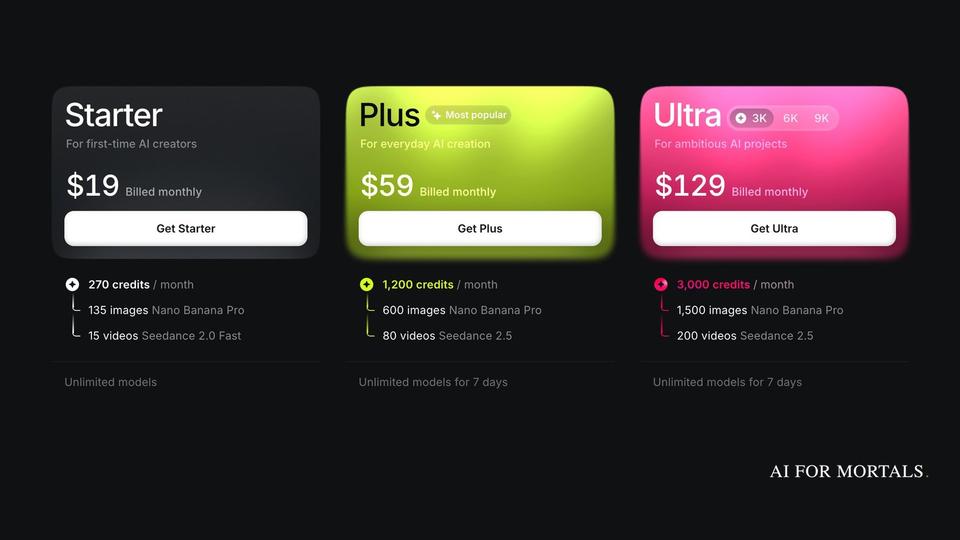
Higgsfield is free to use, but the free plan comes with no credits and only a small set of models, and your downloads carry a Higgsfield watermark, per its help articles on how plans work and who owns your generations. To get credits you pay for one of three individual plans on Higgsfield's pricing page: Starter at $19 a month, Plus at $59 or Ultra at $129, billed monthly. Billed yearly, Plus works out to $47 a month and Ultra to $99, while Starter stays at $19.
Last checked November 8, 2026: every price, credit amount and plan feature on this page comes from higgsfield.ai/pricing and the Higgsfield help-centre articles linked below, read that day. Higgsfield was running several promotions that day, so check the pricing page before you buy.
Higgsfield plans and prices at a glance
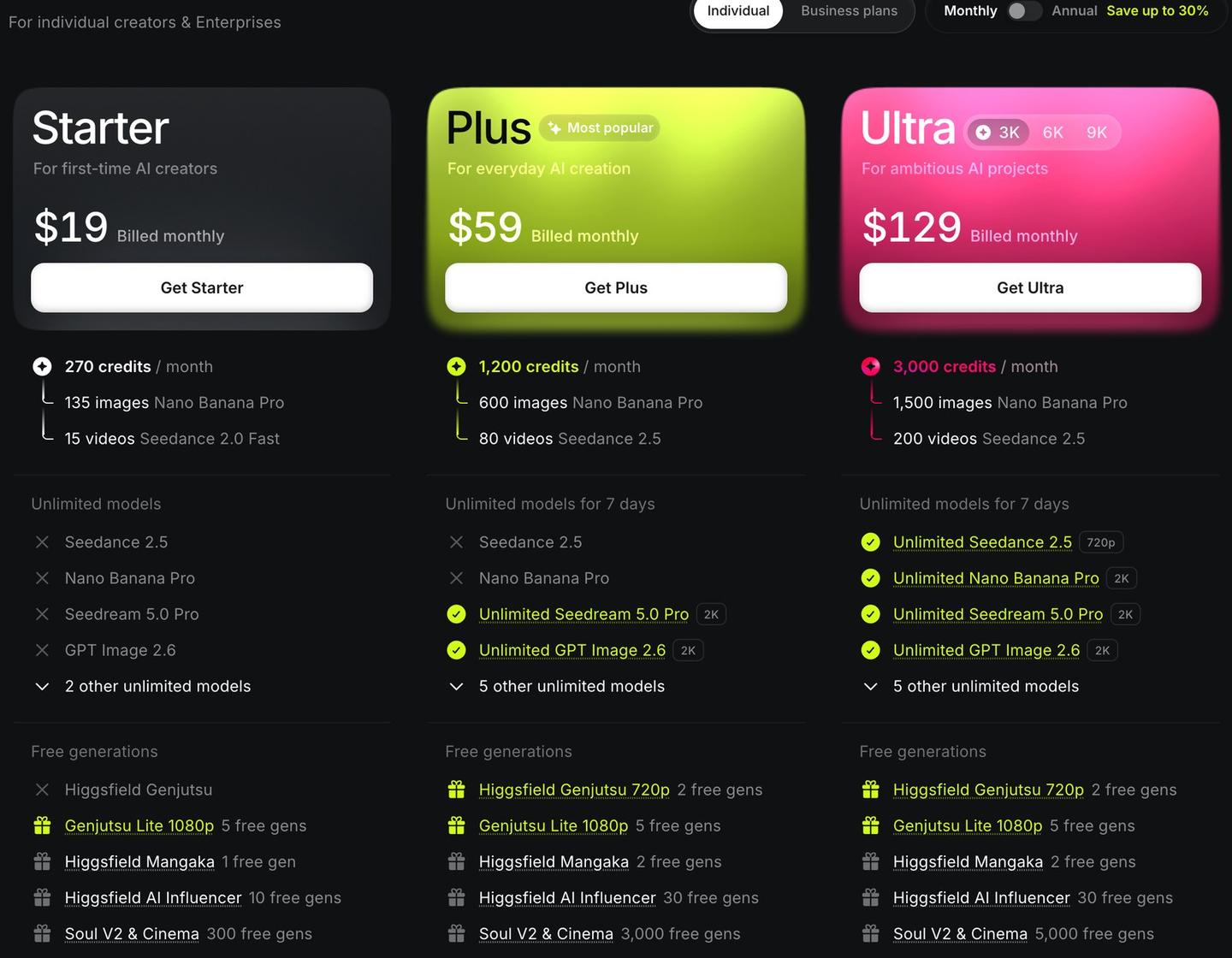
Higgsfield's individual plans cost $19 to $129 a month on monthly billing, and Ultra can be raised to 6,000 or 9,000 credits a month for more. Every plan is a subscription that renews automatically until you cancel. This is what each card on the pricing page showed on November 8, 2026.
| Plan | Billed monthly | Billed yearly (per month) | Credits a month | Unlimited models (7 days) | Generations at once | Models |
|---|---|---|---|---|---|---|
| Free | $0 | $0 | 0 | None | 1 video, 1 image | A small set |
| Starter | $19 | $19 | 270 | None | 2 videos, 4 images | Selected models, including Seedance 2.0 Fast and 2.0 Mini |
| Plus | $59 | $47 | 1,200 | Monthly: Seedream 5.0 Pro and GPT Image 2.6. Yearly: those two plus Seedance 2.5 (720p) and Nano Banana Pro | 6 videos, 8 images (monthly card); unlimited paid parallel generations (yearly card) | All models and features |
| Ultra (3K) | $129 | $99 | 3,000 | Seedance 2.5 (720p monthly, 1080p yearly), Nano Banana Pro, Seedream 5.0 Pro, GPT Image 2.6 | Unlimited paid parallel generations | All models and features |
| Ultra (6K) | $250 ($220 first month) | $194 | 6,000 | Same as Ultra 3K | Unlimited paid parallel generations | All models and features |
| Ultra (9K) | $375 ($310 first month) | $270 | 9,000 | Same as Ultra 3K | Unlimited paid parallel generations | All models and features |
Source: Higgsfield pricing page, checked November 8, 2026. The free plan's row comes from the page's comparison table (0 credits, one job at a time) and the plans article. Prices exclude VAT and local taxes, which are added at checkout.
Yearly billing is paid up front for the year. At the per-month prices above, that comes to $228 a year for Starter, $564 for Plus and $1,188 for Ultra 3K, and the pricing page puts the saving at $144 on Plus and $360 on Ultra against paying monthly.
The two bigger Ultra sizes showed a lower first payment on monthly billing, "renews at $250" and "renews at $375." Higgsfield's promo prices article says a promo price covers the first payment and the plan then renews at its standard price, which is why a second charge can be higher than the first.
Plus is the cheapest plan with every model, including all the Seedance video models. Ultra is the cheapest monthly plan whose card lists Seedance 2.5 and Nano Banana Pro as Unlimited. Starter's card lists no Unlimited models and limits you to selected models.
Is Higgsfield free?
Yes, Higgsfield has a free plan, with limits. Higgsfield's plans article says you can generate without a paid plan, but "access is limited to a small set of models and doesn't include credits." The pricing page's comparison table labels the Free column "Limited use" and lists 0 credits for it.
There is no free trial of the paid plans. The same article says "There's no trial period," and points you to the free tier to look around before you upgrade.
Free downloads also carry a Higgsfield watermark. The ownership article says paid plans include watermark-free downloads, and that the watermark is added when the image or video is made, so upgrading later doesn't clean up older free generations.
Commercial use is less clear on the free plan. The ownership article says Higgsfield's Terms of Use don't tie commercial rights to a specific plan, while the comparison table on the pricing page marks "Commercial use" as not included on Free and included on Starter, Plus and Ultra.
How much does a Higgsfield credit cost?
A Higgsfield credit costs about 3 to 7 cents, depending on the plan. Higgsfield doesn't publish a per-credit price, so the figures below are the plan price divided by the plan's monthly credits, both from the pricing page on November 8, 2026. Smaller plans pay more per credit, and yearly billing pays less.
| Plan | Billed monthly | Billed yearly |
|---|---|---|
| Starter (270 credits) | $19 ÷ 270 = about 7.0 cents | $19 ÷ 270 = about 7.0 cents |
| Plus (1,200 credits) | $59 ÷ 1,200 = about 4.9 cents | $47 ÷ 1,200 = about 3.9 cents |
| Ultra 3K (3,000 credits) | $129 ÷ 3,000 = about 4.3 cents | $99 ÷ 3,000 = about 3.3 cents |
| Ultra 6K (6,000 credits) | $250 ÷ 6,000 = about 4.2 cents | $194 ÷ 6,000 = about 3.2 cents |
| Ultra 9K (9,000 credits) | $375 ÷ 9,000 = about 4.2 cents | $270 ÷ 9,000 = about 3.0 cents |
Our arithmetic on the prices and credit amounts at higgsfield.ai/pricing, November 8, 2026, using the standard monthly price for Ultra 6K and 9K. It assumes you spend every credit before it resets.
What a credit buys depends on the model. The pricing page's comparison table lists Nano Banana Pro at 2 credits an image, so on Plus billed monthly one image costs about 10 cents (2 × 4.9 cents). A 5-second Seedance 2.0 clip at 720p is listed at about 22 credits, or roughly $1.08 on the same plan (22 × 4.9 cents). Higgsfield's credits article says the exact cost of each generation shows on the Generate button before you confirm.
Credit Packs, the one-off top-ups, don't have a public price list. The Credit Packs article says current prices are shown at checkout, and the plan cards say every paid plan gets "Credit top-ups with discount."
How Higgsfield credits work: resets, packs and what uses them
Credits are what you spend to make anything on Higgsfield, and your plan's credits reset instead of piling up. Per the credits article, each generation's cost depends on the model, the resolution and the length, and unused subscription credits don't roll over. On monthly plans they reset when the monthly renewal is paid; on yearly plans they reset every 30 days, so the reset day drifts across the calendar.
Credits pay for every image, video, re-roll and upscale, whether you work on the website or through Higgsfield's MCP, CLI, Canvas or Supercomputer tools. MCP and CLI are ways to run Higgsfield from other software, such as an AI agent or a command line. Browsing costs nothing, and neither do Unlimited models or your plan's free generations on higgsfield.ai.
Free generations are a one-time pool on specific models, given when you buy the plan. Starter's monthly card lists 300 free generations on Soul V2 and Cinema, Plus 3,000 and Ultra 5,000 (5,000 and 10,000 on yearly Plus and Ultra), per the pricing page. They don't renew, and like Unlimited they work on higgsfield.ai and nowhere else.
| Credit type | Where it comes from | How long it lasts | If you cancel |
|---|---|---|---|
| Subscription credits | Your plan, every billing cycle | Until the next reset; unused ones expire | Usable until the end of the period you paid for, then gone |
| Credit Pack credits | A one-off top-up (needs an active plan) | 90 days from purchase | Stay usable on the free plan's models until the 90 days run out |
| Auto-Refill credits | Bought automatically when your balance runs low | 90 days from purchase | Same as Credit Packs; Auto-Refill stops charging |
| Promo credits | Promo codes or compensation | Until the date shown when issued | Stay usable on the free plan's models until they expire |
Sources: Higgsfield's credits, Credit Packs and cancellation articles, checked November 8, 2026.
Credit Packs come in 100, 200, 500, 1,000, 2,000 or 4,000 credits, or any amount from 5,000 to 25,000 in steps of 1,000. You buy one from Buy Credits in the top bar, and you need an active subscription to do it. A pack adds credits only: it doesn't change your plan, add models or move your renewal date.
Higgsfield spends your plan's credits first. After those run out, it spends whichever other balance expires soonest, so a promo balance that ends next week goes before a Credit Pack with two months left. If a generation fails, the credits usually come back within a few minutes, though the credits article says some models don't refund failed generations.
What are Higgsfield's Unlimited models?
Unlimited models are specific models you can use without spending credits for a set period. They come with Plus and Ultra, and the Unlimited models article says the list and the period for each model are on that plan's card on the pricing page.
That article says most included models get 365 days of Unlimited use, while the newest flagship models may get shorter windows, such as 7 days. On November 8, 2026, the Plus and Ultra cards on the pricing page headed their lists "Unlimited models for 7 days," and Ultra's card listed Seedance 2.5, Nano Banana Pro, Seedream 5.0 Pro and GPT Image 2.6. The window runs from when the access starts and doesn't restart when your plan renews.
Unlimited has limits of its own. It works only on higgsfield.ai, and the same models used through MCP, CLI, Canvas or Supercomputer always spend credits. Unlimited jobs wait in the standard queue, which can slow down at busy times, while credit-based jobs go through the priority queue. You can switch a job to Credit Mode to skip the wait and pay in credits.
The access also depends on your subscription. If your plan ends, or you move to a plan without that model, Unlimited stops working, and it only comes back if you resubscribe before the period runs out. Higgsfield says Unlimited is for personal use by a person; automation tools, shared logins and reselling are banned.
You can also buy Unlimited access to a single model, separate from your plan, in the Unlimited Models Marketplace (Buy Credits, then the Unlimited Models tab). Each bundle is priced by model and resolution, and runs one video generation at a time of up to 15 seconds, or two image generations at a time.
What Seedance and Nano Banana cost on Higgsfield
On Higgsfield, Nano Banana Pro and Nano Banana 2 each cost 2 credits an image, and Seedance 2.0 costs about 22 credits for 5 seconds of 720p video, per the comparison table on the pricing page. Seedance 2.5 had no per-clip price in that table on November 8, 2026; it was listed as an Unlimited model on Ultra and on yearly Plus.
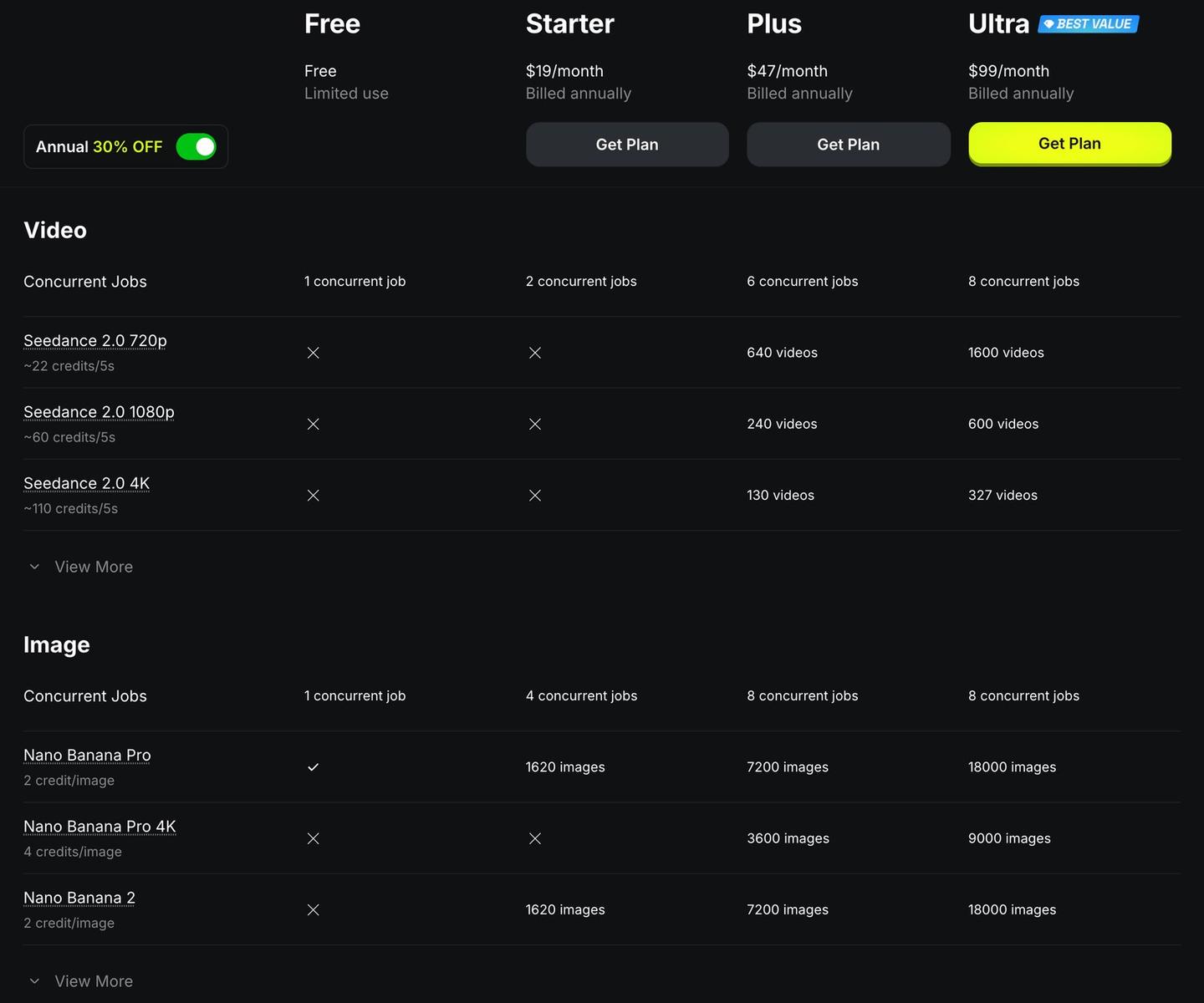
Seedance is ByteDance's video model family. Higgsfield's comparison table lists Seedance 2.0 at about 22 credits per 5 seconds at 720p, 60 at 1080p and 110 at 4K, and Seedance 2.0 Fast at about 12 credits per 5 seconds at 720p. Starter has an X against the full Seedance 2.0 rows; its card lists Seedance 2.0 Fast and 2.0 Mini instead.
Seedance 2.5 is the newer model. Higgsfield's Seedance 2.5 page calls it ByteDance's flagship and says it makes clips of up to 30 seconds with synchronized sound, from up to 50 references such as faces, products and locations. The plan cards put 1,200 credits at about 80 Seedance 2.5 videos and 3,000 credits at about 200, without saying how long each video is. Ultra's card lists Unlimited Seedance 2.5 at 720p on monthly billing and 1080p on yearly.
Nano Banana 2 is Google's Gemini 3.1 Flash Image model, according to Higgsfield's Nano Banana page, and it makes images from 512 pixels up to 4K. The comparison table lists it at 2 credits an image, the same as Nano Banana Pro, while Nano Banana Pro at 4K costs 4 credits and isn't on Starter. Ultra's card, and yearly Plus, list Unlimited Nano Banana Pro at 2K.
Kling 3.0 is also on Higgsfield, at about 7 credits per 5 seconds at 720p, per the same table. For Kling's own app, our Kling post covers what Kling 4.0 Flash costs in credits, and for an image tool sold by subscription, see Midjourney's plans, for comparison.
Team, Scale and Enterprise: Higgsfield's business plans
Higgsfield's business plans are Team, from $69 a seat a month, Scale at $169 a seat a month, and Enterprise at a custom price, on the Business plans tab of the pricing page. All three give a team one shared workspace and one pooled credit balance, per the business plans article.
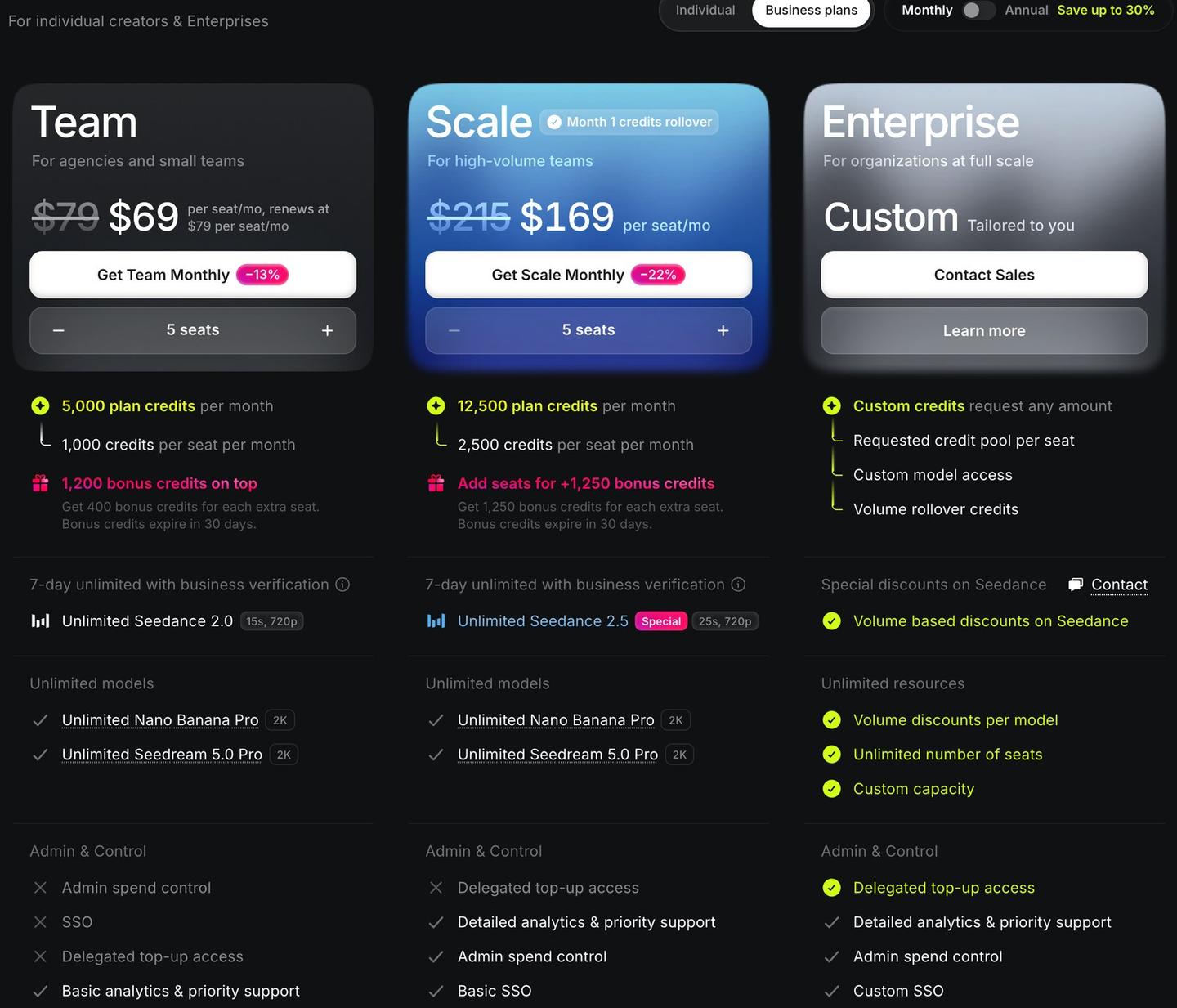
| Plan | Billed monthly, per seat | Billed yearly, per seat a month | Credits per seat a month | Seats | What it adds |
|---|---|---|---|---|---|
| Team | $69 first month, then $79 | $65 | 1,000 | 2 to 9 | Shared workspace and credit pool, basic analytics and priority support |
| Scale | $169 | $150 | 2,500 | 5 to 15 | Priority queue, basic SSO (company single sign-on), admin spend controls, detailed analytics |
| Enterprise | Custom | Custom | Any amount you request | Unlimited | Rollover credits, dedicated capacity, legal indemnification, no training on your content |
Sources: the Business plans tab at higgsfield.ai/pricing and the business plans article, checked November 8, 2026. Prices exclude taxes.
The plan cards defaulted to five seats, which gives Team 5,000 credits a month and Scale 12,500. Team also showed 1,200 bonus credits on top, with 400 more for each extra seat, and Scale 1,250 bonus credits per extra seat; the cards say bonus credits expire in 30 days.
Scale is the plan for teams that need control over spending: its admins can pause one member's credit use, and Team's card crosses out SSO and admin spend control. Enterprise is for organizations with 15 or more people, compliance needs or a custom credit volume. Under an Enterprise agreement, your inputs and outputs aren't used to train Higgsfield's models, and Enterprise is the only plan with legal indemnification, Higgsfield's cover against someone else's copyright claims over what you make. You reach Enterprise through Contact Sales on the same tab.
On November 8, 2026, the business tab also ran a Seedance offer for verified businesses: Unlimited Seedance 2.5 for 30 days on yearly Scale and 7 days on monthly Scale, and Unlimited Seedance 2.0 for 14 days on yearly Team and 7 days on monthly Team.
How to cancel Higgsfield and get a refund
You cancel Higgsfield from your account settings, and cancelling stops the next charge without returning any money. Per the cancellation article:
- Click your avatar and select Manage Account.
- Open Subscription and scroll to Plan Settings at the bottom.
- Open Manage Subscription, select Show, then Cancel Subscription.
Your plan stays active until the end of the period you paid for, then your account moves to the free tier. Subscription credits expire at that point. Credit Pack, Auto-Refill and promo credits stay usable on the free plan's models until they expire, and your account and generations aren't deleted.
Team and Scale are cancelled by the workspace owner: Manage Account, then Organization, then Manage Account and Cancel Subscription, which opens a cancellation request form, per the business plans article.
Refunds have three conditions, per the refund article: it must be your first purchase (renewals can't be refunded), the request must come within 7 days (or longer where your local law requires it), and you must not have used any of its credits. Free generations and Unlimited generations don't count as credit use.
To ask for one, contact Higgsfield Support with your account email and a short reason. Higgsfield keeps a service fee of up to 6%, the plan is cancelled the moment the refund goes through, and the money goes back to your original payment method in 5 to 10 business days. Buyers in the EU, the wider European Economic Area and the UK also have a 14-day right of withdrawal, which ends early once you start spending credits or generating.
Offers that add access instead of credits, such as an Unlimited period or a plan upgrade, can't be refunded once the access starts. If a yearly plan was your first purchase, you bought it in the last 7 days and you haven't used its credits, the billing article says Support can switch you to monthly billing and refund the 11 unused months, minus the same fee of up to 6%.
Questions people ask about Higgsfield pricing
Does Higgsfield have a free trial?
No. Higgsfield's plans article says there's no trial period; you can use the free tier's limited set of models with no credits, then upgrade.
What is the Higgsfield AI video generator?
Higgsfield is a website for making AI images and videos with many companies' models in one place, including ByteDance's Seedance, Kling and Google's Veo and Nano Banana, all paid for in Higgsfield credits per the pricing page. Our tool page covers what Higgsfield does and what changed, and the company page covers Higgsfield AI, the company.
Why was my Higgsfield renewal more than my first payment?
You probably paid a promo price. Higgsfield's promo prices article says a promo applies to the first payment, or the period the offer states, and the plan then renews at its standard price. Taxes are also added at checkout on top of the prices shown.
Can I switch from monthly to yearly billing?
Yes, at any time from the pricing page: switch the toggle to Annual and select Change Commitment on your plan. The billing article says the switch is immediate, your billing date resets, and the unused value of your monthly plan comes off the yearly price.
What happens when I upgrade or downgrade?
Upgrades start straight away with a prorated charge, so you pay the difference after Higgsfield subtracts what's left of your current plan. Downgrades start at your next billing date, and you keep your current plan and credits until then, per the upgrade and downgrade article. The downgrade option is in the comparison section below the plan cards.
Can I buy credits without a plan?
No. You need an active subscription to buy a Credit Pack, per the Credit Packs article. Credits you already bought stay usable on the free plan after you cancel, until their 90 days run out.
Can I use Higgsfield videos and images commercially?
Higgsfield's ownership article says it doesn't claim ownership of what you make and its Terms of Use don't restrict commercial use, including ads, client work and YouTube monetization. Free-plan downloads carry a watermark, and the pricing page's comparison table marks commercial use as included on Starter, Plus and Ultra only. You also can't use Higgsfield outputs to train or fine-tune another AI model without Higgsfield's written permission.
Does Higgsfield train on my generations?
Yes, unless you're on an Enterprise agreement, per the ownership article. Deleting content or your account stops it being used for training from then on.
Does Higgsfield work inside Premiere Pro?
Yes. Higgsfield's plugins for Premiere Pro and After Effects put image and video generation, reframing, background removal, 4K upscaling and draw-on-the-clip edits inside those two Adobe apps. The pricing page lists no separate plan for the plugins.
Sources
- Higgsfield: Pricing (checked November 8, 2026)
- Higgsfield: How do Higgsfield plans work?
- Higgsfield: How do credits work?
- Higgsfield: How do Credit Packs work?
- Higgsfield: What are Unlimited models, and which plans include them?
- Higgsfield: How do promo prices work?
- Higgsfield: Can I switch between monthly and annual billing?
- Higgsfield: How do I upgrade or downgrade my plan?
- Higgsfield: What team and business plans does Higgsfield offer?
- Higgsfield: Who owns my generations, and can I use them commercially?
- Higgsfield: How do I cancel my subscription?
- Higgsfield: How do I request a refund?
- Higgsfield: Seedance 2.5
- Higgsfield: Nano Banana Pro & Nano Banana 2
- AI for Mortals: Higgsfield's AI now lives inside your Premiere timeline


Comments
Sign in to join the conversation.