Is ChatGPT Safe? What It Keeps, How to Lock It Down, and How Claude, Gemini, DeepSeek and Grok Compare
ChatGPT keeps what you type and, on its Free, Plus and Pro plans, can train on it until you switch that off. Each company's own privacy pages show what ChatGPT, Claude, Gemini, DeepSeek, Grok, Copilot, Perplexity and Meta AI keep, for how long, and which setting stops training on your chats.

On this page
- Which AI apps train on your chats by default?
- Is ChatGPT safe to use?
- Is ChatGPT private if you're not logged in?
- What should you never tell an AI chatbot?
- Is Claude safe to use?
- Is DeepSeek safe to use in the US?
- Is Grok safe to use?
- Is Gemini safe for privacy?
- Copilot, Perplexity and Meta AI: what each one keeps
- Questions people ask
ChatGPT is safe for everyday questions, as long as you treat it like a service that keeps what you type. On the Free, Plus and Pro plans, OpenAI uses your chats to train its models by default, and you switch that off under Settings, Data controls, Improve the model for everyone, according to OpenAI's Data controls article.
A Temporary chat stays out of your history and out of training, though OpenAI may keep a copy for up to 30 days for safety.
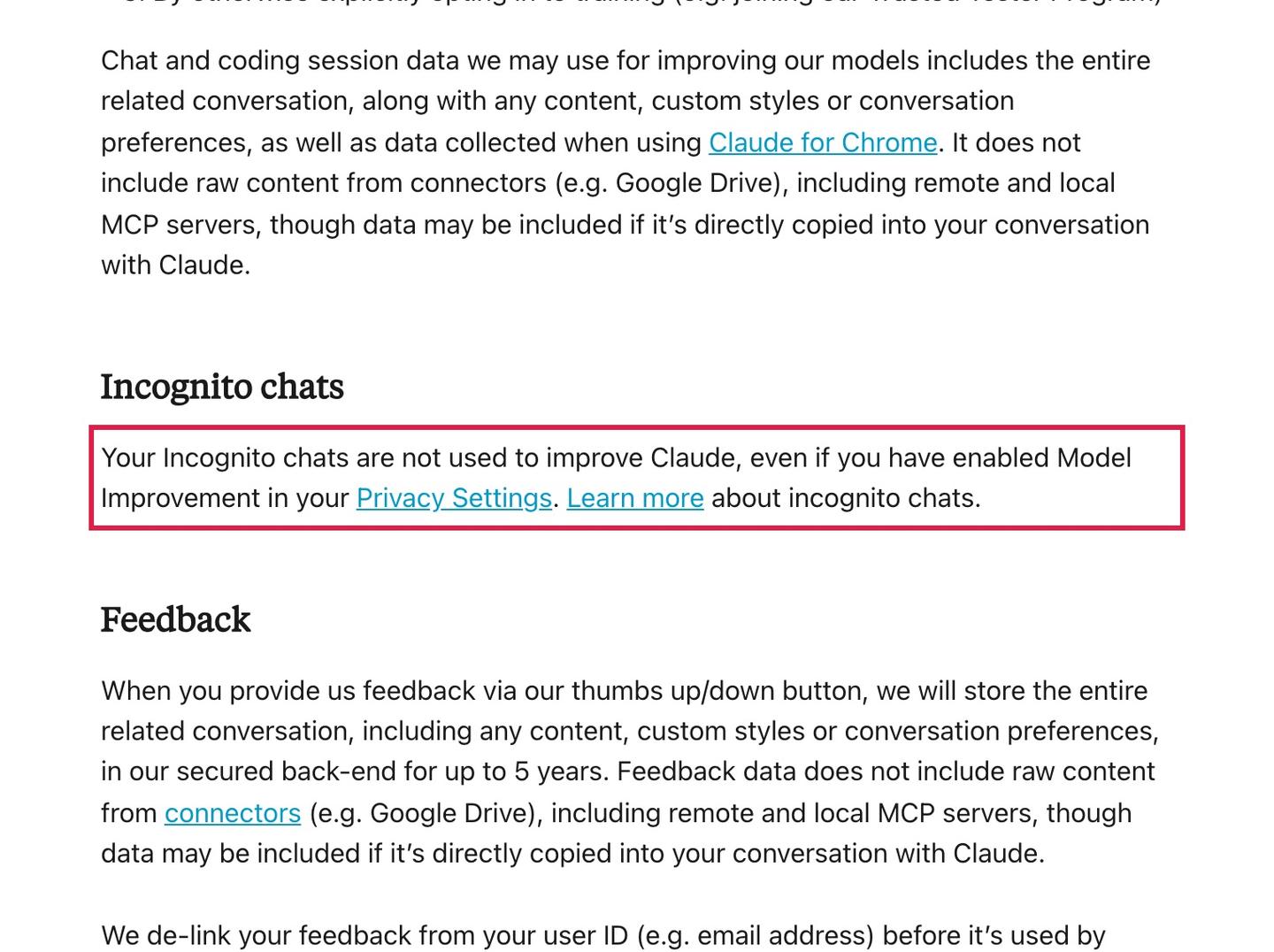
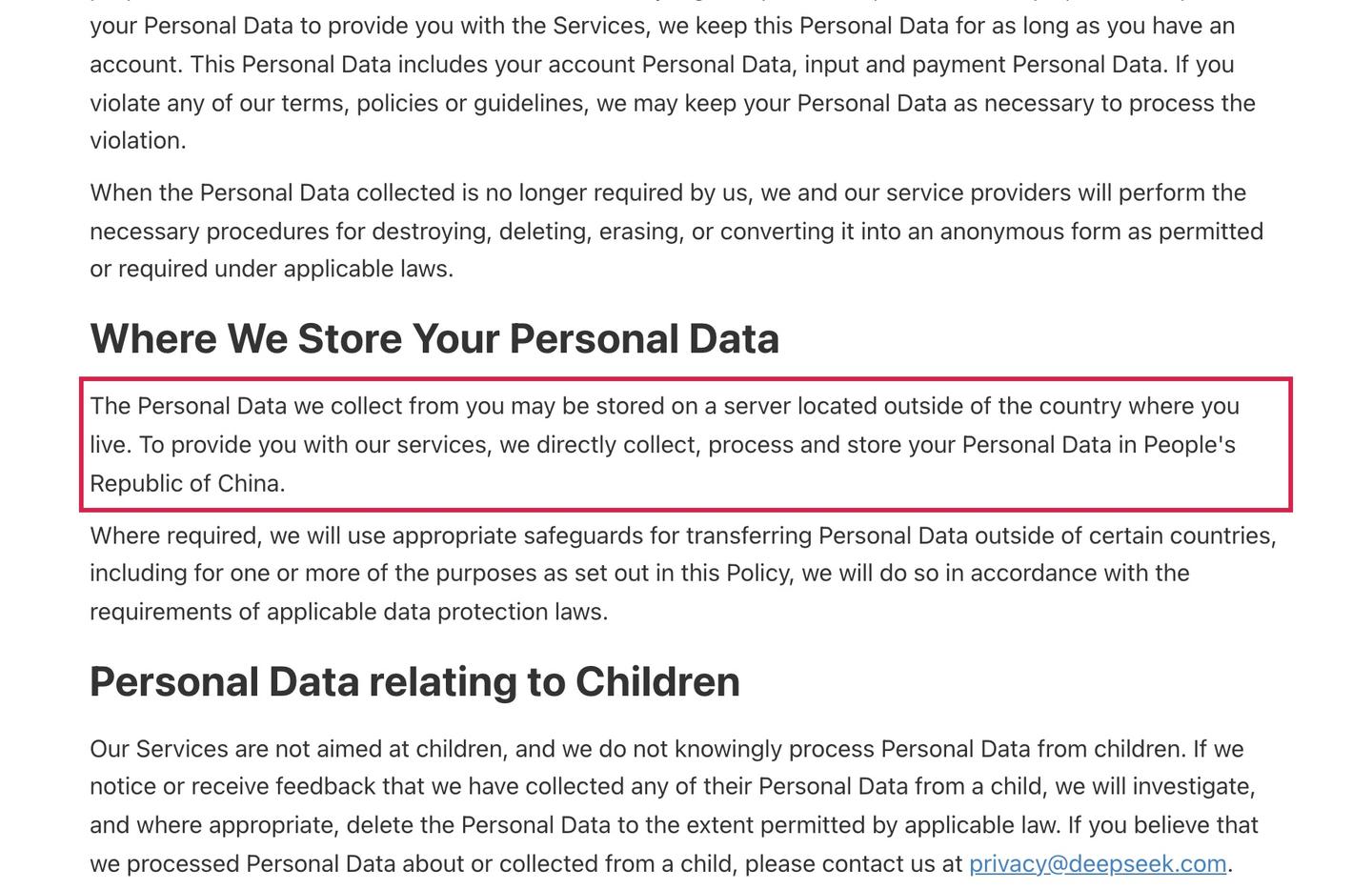
Locked Chats puts the conversations you pick behind a PIN on Free, Go, Plus, Pro, Business, Enterprise and Edu. Claude trains on your chats only if you allow it or a chat is flagged for safety review, and Anthropic says its Incognito chats are not used for training. Google says people review some Gemini chats and keeps the reviewed ones for up to three years. DeepSeek's own policy says it stores your data in China.
For all of them, keep passwords, card numbers, health records and anything you wouldn't want a stranger to read out of the chat box. Every setting, default and number below comes from each company's own help or privacy pages, last checked November 6, 2026.
Which AI apps train on your chats by default?
ChatGPT, DeepSeek, Grok and Perplexity can use your chats to train their models unless you change a setting or send a request, and Gemini does while its Keep Activity setting is on. Claude does it only if you allow it or a chat is flagged for safety review, and Microsoft says the Copilot app doesn't use your chats to train its foundation models (the main models behind it). Each row links to the page it comes from. Where a company's page doesn't say, the cell says "Not stated".
| App | Can it train on your chats? | Setting to turn it off | Private or temporary chat | How long it keeps chats | Where data is stored |
|---|---|---|---|---|---|
| ChatGPT | Yes, on Free, Plus and Pro; no on Business, Enterprise and Edu | Settings, Data controls, Improve the model for everyone | Temporary chat: not saved to history, not used for training | Until you delete them, then gone within 30 days; Temporary chats up to 30 days | The US and other countries where OpenAI's partners and vendors are |
| Claude | Only if you allow it, or if a chat is flagged for safety review | Settings, Privacy, Help improve our AI models | Incognito chat: not saved, not used for training | Deleted chats gone within 30 days; up to 5 years, de-identified, if you allow training | Not stated |
| Gemini | Yes, while Keep Activity is on, with human reviewers | Turn off Keep Activity in Gemini Apps Activity | Temporary chat: kept 72 hours, not used for training | 18 months by default (3 or 36 months, or never); reviewed chats up to 3 years | Not stated |
| DeepSeek | Yes | No setting named; email privacy@deepseek.com to opt out | Not stated | As long as you have an account | China |
| Grok | Yes, unless you turn it off | App: Settings, Data Controls, Improve the model. Web: Settings, Data, Improve the Model | Private Chat: not in history, not used for training | Until you delete them, then gone within 30 days; Private Chat within 30 days | Not stated |
| Microsoft Copilot | No for the foundation models | None needed for training | Not stated | Until you delete them | Not stated |
| Perplexity | Yes, on Free, Pro and Max | Account settings, Preferences, AI data retention | Incognito: search activity not saved across sessions | While your account is active; uploaded files 30 days | Countries including the US |
| Meta AI | Yes; Meta lists your interactions with its AI features as training data | Not stated | Incognito chat: not saved, and Meta says it can't access it | Not stated | Not stated |
Rating an answer with a thumbs up or thumbs down can send that conversation to the company even after you've opted out of training. OpenAI says it may then use the whole conversation to train its models, Anthropic keeps feedback for up to 5 years, and SpaceXSI says Grok feedback may be used for training.
Is ChatGPT safe to use?
Yes, for everyday questions. ChatGPT keeps what you type, and on personal plans it can use your chats for training until you switch that off. OpenAI's Data controls article says "data sharing is enabled by default" on personal workspaces with ChatGPT Free, Plus or Pro, and that you can turn off Improve the model for everyone and keep your chat history.
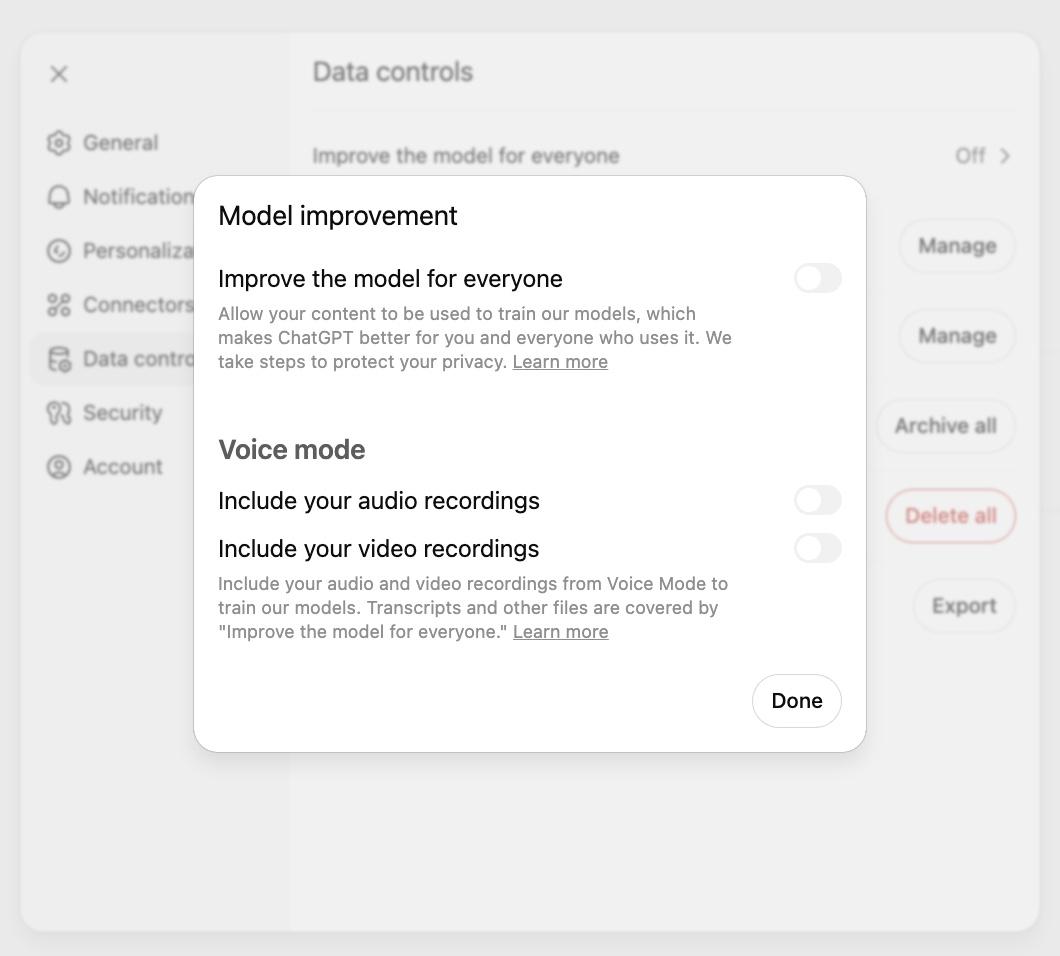
On the web, open your account menu, select Settings, then Data controls, select Improve the model for everyone, turn it off and select Done. In the iPhone and Android apps, open the sidebar, tap your profile icon to open Settings, select Data controls and turn it off. When you're signed in, the choice applies to your account on every device. Voice mode has its own switches for your audio and video recordings, in the same window.
After you opt out, OpenAI's training article says it won't use your new conversations to improve its models. Turning the setting off doesn't delete anything: your chats stay in your history until you delete them, and OpenAI then removes them from its systems within 30 days, with exceptions for security and legal reasons. Our guide covers how to delete your ChatGPT chats and account and what OpenAI keeps afterwards.
Work accounts follow different rules. OpenAI says it doesn't use content from ChatGPT Business, Enterprise or Edu workspaces to train its models by default. Its privacy policy also says the administrators of a business account may access your content, so in a company workspace OpenAI doesn't train on your chats by default, and your employer's admins can see them.
If you're on the Free plan, you're also seeing ads. OpenAI's privacy policy says it collects your ads history and interests on the Free and Go plans to personalize the ads it shows, and OpenAI is testing picture ads for Free and Go users in the US. The advertising controls in your account settings let you choose what data OpenAI uses to personalize those ads. Our ChatGPT page tracks what else has changed in the app.
Is ChatGPT private if you're not logged in?
Not by default. OpenAI's Data controls article says that when you use ChatGPT without signing in, you open Settings and turn off Improve the model for everyone, and the choice is saved only in that browser. OpenAI's privacy policy says it still collects log data such as your IP address, browser type and how you use the service, and uses cookies to remember your preferences when you're not logged in.
For a chat that doesn't land in your history, use Temporary instead.
Start a new chat, select Temporary, and choose Personalized or Unpersonalized before your first message. OpenAI's Temporary chat article says these chats stay out of your history, aren't used to improve its models and don't create or update memories, though OpenAI may keep a copy for up to 30 days for safety purposes. If you save a temporary chat, it becomes a regular chat and follows your normal settings.
Locked Chats does a different job. It hides the chats you choose behind a 4-digit PIN, in a folder under Projects, Locked chats, and keeps them out of your sidebar and search, so they're harder to see when you share your screen or a device.
You can lock private ChatGPT chats behind a PIN on Free, Go, Plus, Pro, Business, Enterprise and Edu. OpenAI's Locked Chats article says locking doesn't add end-to-end encryption, doesn't change how long OpenAI keeps the chat and doesn't change your training setting, and resetting a forgotten PIN permanently deletes every locked chat.
The other apps handle signed-out use in their own ways. Google says Gemini chats you have while signed out fall under the Google Privacy Policy and aren't linked to a Google account. SpaceXSI says that if you use Grok without logging in, it may keep your content on an anonymous basis, and in some regions outside the EU and UK you can't opt out of model training while signed out.
What should you never tell an AI chatbot?
Never type anything you'd mind a stranger reading, because some of these companies say people may read it. Keep these out of every chat:
- Passwords and login codes
- Card numbers and bank account numbers
- Social Security, passport and other ID numbers
- Health records and test results
- Other people's private details
- Confidential work files and client information
The companies say much the same thing in their own policies. Google's Gemini Apps Privacy Hub asks you not to enter confidential information you wouldn't want a reviewer to see, and its section on screen automation says not to enter login or payment information into Gemini chats.
SpaceXSI's Grok FAQ says "please do not share any personal or sensitive information" in your questions, and its privacy policy asks you not to give it health, biometric and other sensitive information. OpenAI's privacy policy says to "take special care in deciding what information you provide".
Your phone number sits in a different place from your chats. OpenAI's privacy policy lists the contact information on your account under Account Information, a separate category from the prompts and files you send. DeepSeek's privacy policy also collects your email address or phone number when you set up an account.
A phone number you type into a chat becomes part of that chat, and it follows the same training and retention rules as everything else you type.
Photos of yourself count as chat content too. OpenAI's privacy policy lists the images you upload alongside your prompts, so they can be used for training unless you turn it off. Google says that when Keep Activity is on, a photo you share with Gemini from a gallery app such as Google Photos is used to improve Google's services with the help of human reviewers.
DeepSeek says it won't extract facial recognition information from photos you give it, and SpaceXSI says no uploaded image is used for identification when it trains Grok.
If you connect a bank, the rules change again: Claude's Personal Finance and ChatGPT's Finances both link through Plaid, and our guide covers whether it's safe to link your bank to Claude or ChatGPT.
Is Claude safe to use?
Claude is safe for everyday use, and it keeps your chats out of training unless you allow it. Anthropic's privacy center says it uses chats from the Free, Pro and Max plans to improve its models in three cases: you allow it in your Model Improvement setting, a conversation is flagged for safety review, or you join a program such as its Trusted Tester Program. Claude for Work and Anthropic's API run on separate commercial terms.
To check the setting on a computer or phone, go to Settings, Privacy, and look at the Help improve our AI models toggle, as Anthropic's settings article describes. If you turn it off, Anthropic says it stops using your previous and new chats in future training, though chats already in a training run, or in a model that's already trained, stay there.
For a chat that leaves no trace in your history, click the ghost icon in the top right corner of a new chat to open an Incognito chat. Anthropic's Incognito article says these chats aren't saved to your history or to Claude's memory, are not used for training and are kept for 30 days. You can't reopen one after you close it.
Deleting a chat removes it from your history right away and from Anthropic's back-end systems within 30 days, according to Anthropic's retention article. If you allow training, Anthropic may keep your chats in a de-identified form for up to 5 years. A chat that its automated systems flag for breaking its Usage Policy is kept for up to 2 years.
On "is Claude more secure than ChatGPT", the documented defaults differ in one place. ChatGPT's personal plans start with training switched on, and Claude uses your chats for training only if you allow it.
Both have a temporary chat mode that isn't used for training and is kept for up to 30 days (OpenAI, Anthropic), both delete a chat within 30 days of you deleting it (OpenAI, Anthropic), and both may use a conversation you rate with a thumbs up or down. Our Claude page tracks the app's latest changes.
Is DeepSeek safe to use in the US?
DeepSeek's own privacy policy says it stores your data in China, which is the fact to weigh before you use it from the US. The policy, last updated February 10, 2026, says: "To provide you with our services, we directly collect, process and store your Personal Data in People's Republic of China." The company in charge of your data is Hangzhou DeepSeek Artificial Intelligence Co., Ltd., with its registered address in China.
The policy says DeepSeek collects your account details (email or phone number and password), your prompts, uploaded files, photos and chat history, plus your IP address, device model, device identifiers and crash and performance logs. It uses that data "to train and improve our technology, such as our machine learning models and algorithms."
The app has no training switch named in the policy. Instead, the policy lists "the right to opt-out of using your Personal Data for training our models" among the privacy rights that may be available to you, depending on where you live, and you use those rights by emailing privacy@deepseek.com.
DeepSeek says it keeps your account data and inputs for as long as you have an account. You can delete your chat history in the app's settings, and deleting your account can't be undone. Our DeepSeek page covers what the app does.
Is Grok safe to use?
Grok can use your chats to train its models until you turn that off, and the switch is in its data controls. Grok is made by SpaceXSI (SpaceX Super Intelligence LLC), a US-based company, and its consumer FAQ says it may use your prompts, searches and other materials, along with Grok's answers, to train its models. In the Grok app, go to Settings, Data Controls and deselect Improve the model; on Grok.com it's Settings, Data, Improve the Model.
After that, SpaceXSI says your new conversations aren't used for training.
For a chat that isn't saved, tap the ghost icon in the top right corner to start a Private Chat. SpaceXSI says Private Chat conversations don't show in your history, aren't used for training and are deleted from its systems within 30 days. Its privacy policy (updated October 27, 2026) says the same 30 days applies when you delete conversations or your account, unless it has to keep them for legal, compliance or safety reasons.
People at SpaceXSI may read your chats. The FAQ says "a limited number of our authorized personnel may review your conversations" to improve the models, investigate security incidents and misuse, and meet legal duties. It also says SpaceXSI doesn't sell your data.
Grok inside X follows different rules. SpaceXSI says that if you use Grok on X, the X Privacy Policy and X's help center settings apply. Our Grok page covers the app itself.
Is Gemini safe for privacy?
People at Google read a subset of Gemini chats, and Google tells you not to enter anything confidential. Its Gemini Apps Privacy Hub says a subset of chats is reviewed by human reviewers, including Google's trained service providers, who rate the answers and suggest better ones, and that "reviewed chats are retained for up to three years."
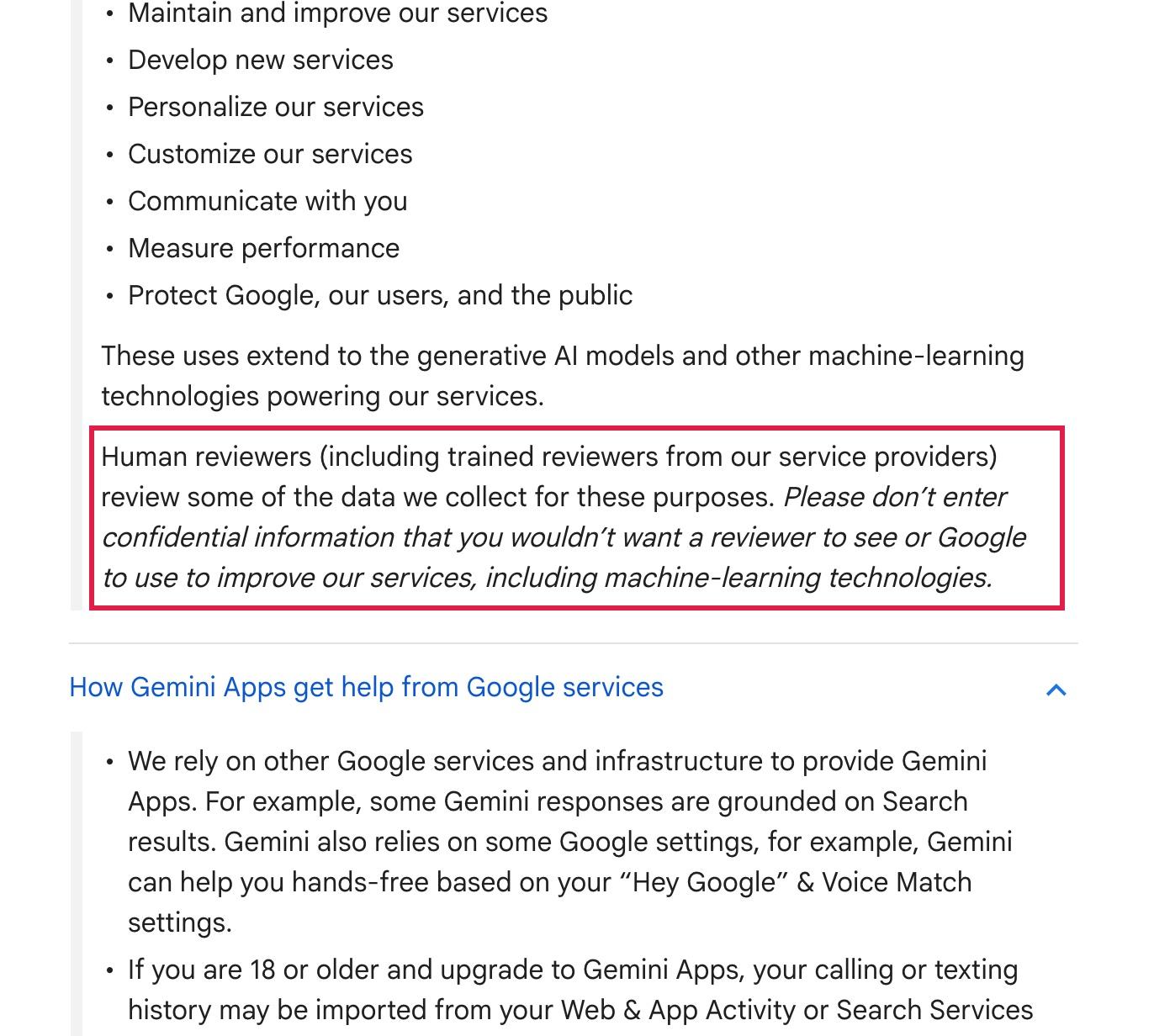
The setting that controls this is Keep Activity, in Gemini Apps Activity. While it's on, Google uses your chats to improve its services, including training its AI models, with help from human reviewers. Your activity auto-deletes after 18 months by default, and you can change that to 3 or 36 months, or to never, according to the Gemini Apps Privacy Hub.
Deleting your activity doesn't remove chats that reviewers have already seen. Google says those are disconnected from your account and kept for up to three years.
Turning Keep Activity off stops your future chats from being reviewed to improve Google's services and from being used for training, unless you send feedback.
Google still keeps those chats with your account for 72 hours to respond to you and protect its users. Temporary chats get the same 72 hours and aren't used to train Google's models. Some features need Keep Activity on, including Google Workspace connected apps and tasks that use a remote browser. Our Gemini page tracks the app's changes.
Copilot, Perplexity and Meta AI: what each one keeps
Microsoft Copilot. Microsoft says prompts, responses and file contents in the Microsoft Copilot app "aren't used to train foundation models," in its activity history article for people signed in with a personal Microsoft account.
Copilot keeps your past chats until you delete them, and its privacy controls sit under Settings, Personalization. There you can turn off saved memories, turn off One shared experience (which lets your Copilot chats personalize Bing, Edge and MSN) and turn off Allow ads personalization if you see ads without a Microsoft 365 subscription. Work and school accounts follow separate rules.
Perplexity. Perplexity trains on your searches by default on the Free, Pro and Max plans. Its data collection article says to open Account settings, go to Preferences and switch off AI data retention. The opt-out covers only data collected after you switch it off, and Perplexity says data already collected for training can't be deleted. Enterprise data is never used for training.
Perplexity keeps your personal information while your account is active and removes it within 30 days of deleting the account, according to its retention article. Files and images you upload are kept for 30 days, per its file upload article. Its privacy policy offers an Incognito mode that doesn't save your search activity across sessions.
Meta AI. Meta lists "your interactions with features that are part of AI at Meta" among the sources it uses to train its models, on its generative AI privacy page, and names no setting to turn that off.
The same page says Meta doesn't train on your private messages with friends and family unless you or someone in the chat shares them with its AI. For a chat that isn't saved, open the Meta AI app, tap Menu, then Incognito chat. Meta's help article says only you can see an incognito chat, Meta can't access it, and it isn't saved or stored after you leave.
For what each of these apps does and costs, see our guide to ChatGPT alternatives and what each costs.
Questions people ask
Is ChatGPT free and safe?
The Free plan has the same privacy controls as Plus and Pro, with training on by default and a switch to turn it off in Data controls. The difference is ads: OpenAI collects your ads history and interests on Free and Go to personalize the ads it shows, and the advertising controls in your settings let you choose what data shapes those ads.
Is the ChatGPT app safe to use on iPhone?
The iPhone app uses the same account settings as the website. OpenAI's Data controls article gives the steps: open the sidebar, tap your profile icon to open Settings, select Data controls and turn off Improve the model for everyone. When you're signed in, the setting applies on every device.
Is ChatGPT safe from hackers?
OpenAI says it uses "commercially reasonable" security measures and that "no Internet or email transmission is ever fully secure or error free", in its privacy policy. OpenAI also says Locked Chats adds a PIN but not end-to-end encryption.
Is AI 100% safe?
No app is risk-free, and the companies say so. SpaceXSI's privacy policy says "no security measure or method of data transmission over the internet is 100% secure", and Perplexity's says it "cannot guarantee" the security of your data. Each one keeps what you type for some period, listed in the table above.
Is Claude AI safe to use for work?
Anthropic's consumer privacy pages cover the Free, Pro and Max plans. Claude for Work and the Anthropic API follow separate commercial terms, so check those with your company before you paste in work files.
Can people at the company read my chats?
At some of them, yes. Google says human reviewers read a subset of Gemini chats, and SpaceXSI says a limited number of its staff may review Grok conversations. If you use ChatGPT through an employer's business account, OpenAI says that account's administrators may access your content.
Does deleting a chat delete it everywhere?
Not straight away. OpenAI, Anthropic and SpaceXSI each say a deleted chat leaves their systems within 30 days, with exceptions for legal and safety reasons, and Google keeps already-reviewed Gemini chats for up to three years even after you delete your activity.
Sources
- OpenAI Help Center: Data controls in ChatGPT (checked November 6, 2026)
- OpenAI Help Center: How your data is used to improve model performance
- OpenAI Help Center: Temporary chat in ChatGPT
- OpenAI Help Center: Chat and file retention in ChatGPT
- OpenAI Help Center: Using locked chats in ChatGPT
- OpenAI: US Privacy Policy (updated September 10, 2026)
- Anthropic Privacy Center: Is my data used for model training?
- Anthropic Privacy Center: How long do you store my data?
- Anthropic Privacy Center: How do I change my model improvement privacy settings?
- Claude Help Center: Use incognito chats
- Google: Gemini Apps Privacy Hub (updated October 26, 2026)
- DeepSeek Privacy Policy (updated February 10, 2026)
- SpaceXSI Privacy Policy (updated October 27, 2026)
- SpaceXSI Consumer FAQs
- Microsoft Support: Microsoft Copilot for individuals, your activity history
- Microsoft Support: Microsoft Copilot for individuals, your privacy controls and choices
- Perplexity Help Center: Data Collection at Perplexity
- Perplexity Help Center: How long Perplexity retains your search and personal data
- Perplexity Help Center: Security and Privacy with File Uploads
- Perplexity Privacy Notice (updated October 23, 2026)
- Meta Privacy Center: How Meta uses information for generative AI models and features
- Meta Help Center: Have an incognito chat with Meta AI




Comments
Sign in to join the conversation.