The Best AI for Your Resume: ChatGPT, Claude, Gemini or a Resume Builder, by Job (With Prompts)
To tailor a resume to a job ad, the free plans of ChatGPT, Claude and Gemini are enough. Resume builders like Rezi, Kickresume and Resume Genius add templates and finished files for a monthly fee. Here is what each costs, from its own pricing page, plus prompts you can copy.

On this page
- Best AI for resume writing, by job
- Can ChatGPT write a resume?
- How to tailor your resume to a job ad with AI
- Copy-paste prompts for your resume, cover letter and LinkedIn
- How to use Claude or Gemini for your resume
- AI for job search and interview prep
- Is it okay to use AI for your resume?
- What to keep out of the chat when you paste your resume
- Questions people ask
There isn't one best AI for a resume, because the right tool depends on the job you want it to do. To tailor a resume to a specific job ad, a general chatbot is enough, and ChatGPT, Claude and Gemini each have a free plan. Paste your resume and the job ad, then ask it to match your wording to the ad without adding anything that isn't true.
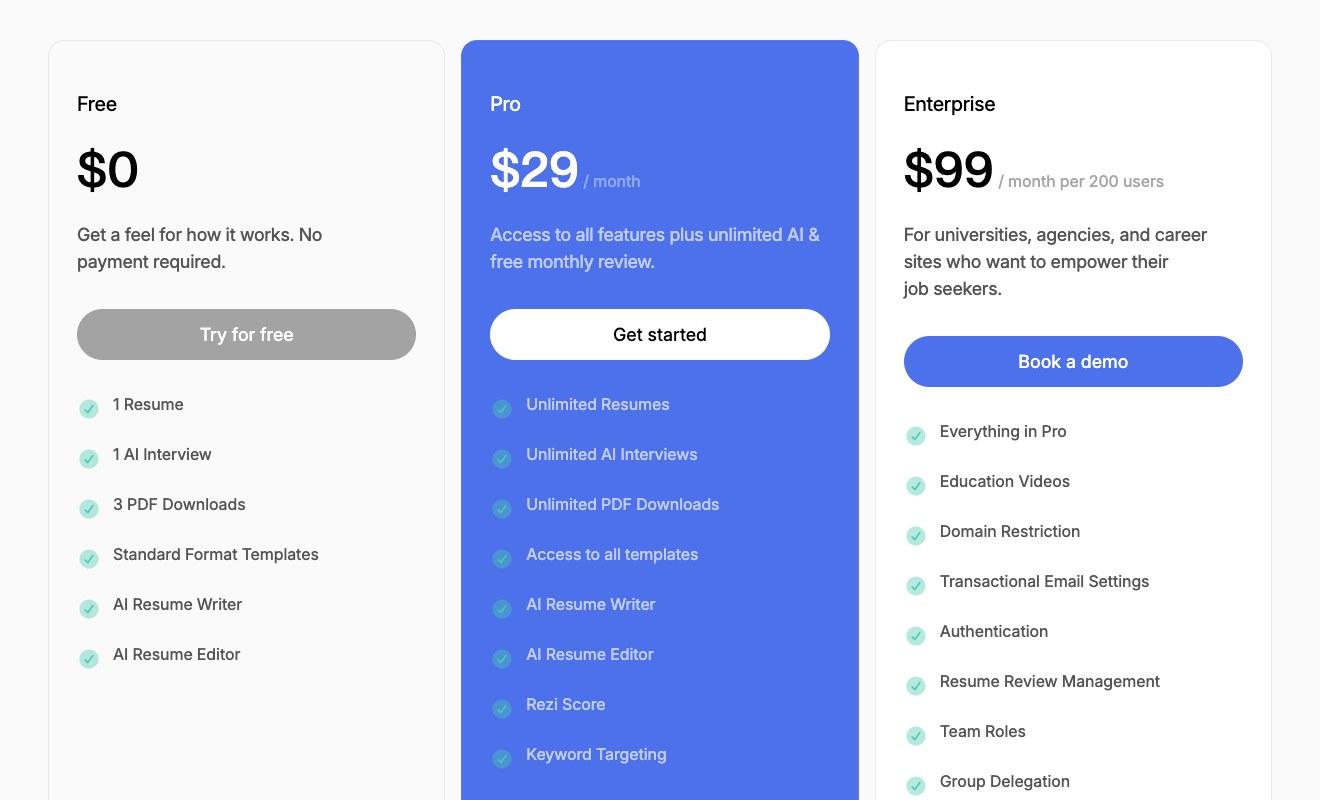
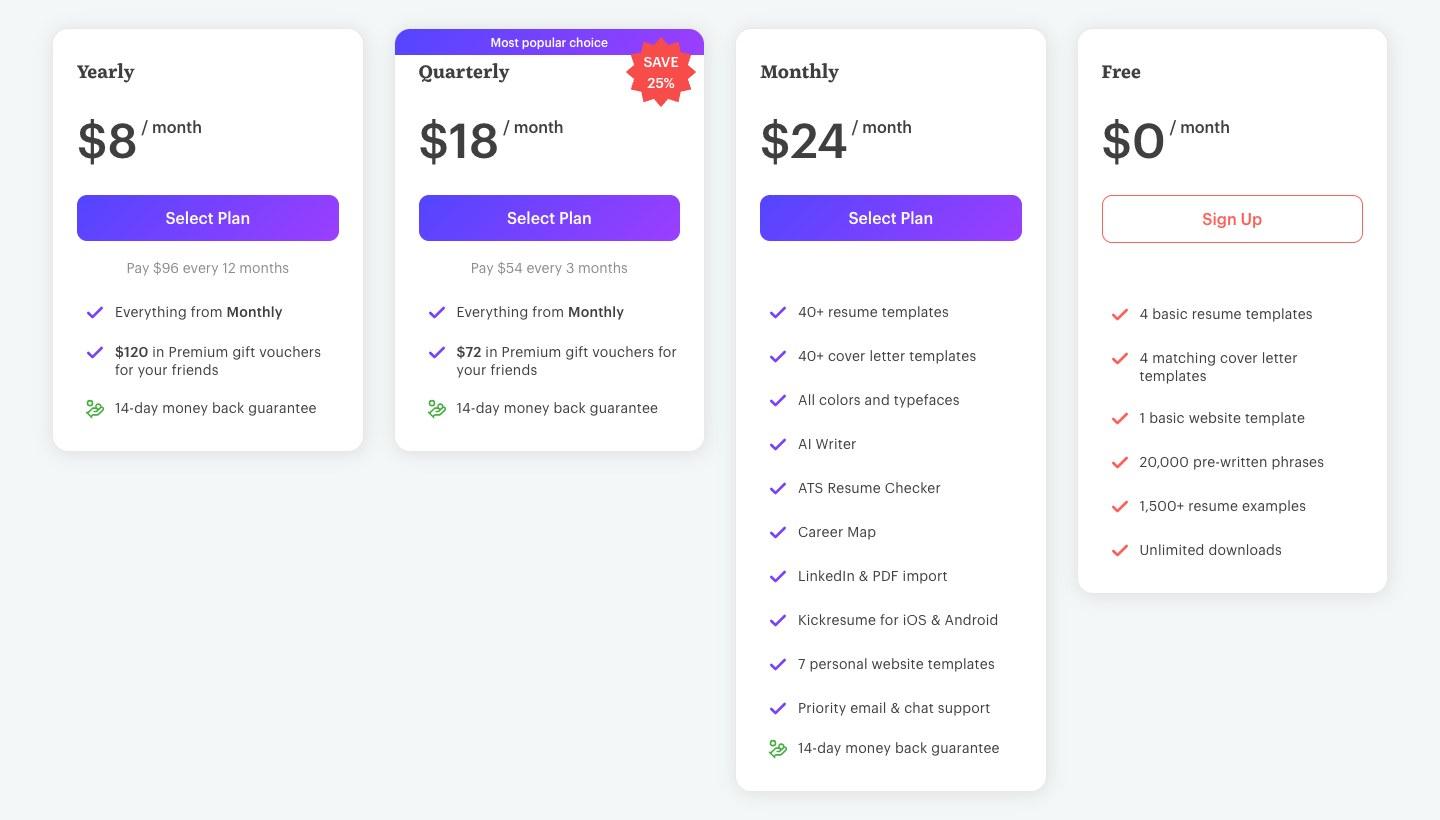
If you want templates, formatting and a finished PDF, a resume builder does that part. Rezi's Pro plan is $29 a month, Kickresume runs from $8 to $24 a month depending on how long you sign up for, and Resume Genius starts with a $2.95 trial that renews at $23.95 every four weeks. All three have a free tier too.
Either way, read every line before you send it. Some employers spell out how they want you to use AI: Anthropic asks applicants to "create your first draft yourself, then use Claude to refine it." Every price below comes from each company's own page, last checked November 9, 2026.
Best AI for resume writing, by job
Use a free chatbot to tailor and rewrite the words, and a resume builder when you want a designed template and a downloadable file. The table shows what each one costs and what it adds for a resume, taken from each company's own pricing page.
From each company's own pricing page, checked November 9, 2026.
When a free chatbot is enough
A chatbot is the better fit when your resume already exists and you need it reworded for each job ad. It can compare your resume with the ad, suggest which experience to put first, and rewrite bullets in the ad's language. You then paste the result back into your own document.
The free plans cover this. ChatGPT's Free plan includes unlimited text chats with GPT-6, and OpenAI's release notes say Free and Go use GPT-6 Luna while Plus and Pro use GPT-6 Sol. There's more on which GPT-6 model you get on each ChatGPT plan in our earlier post.
When a resume builder is worth paying for
A builder is the better fit when you're starting from scratch or your current resume looks dated. You get designed templates, and a matching cover letter on most paid plans, and you download a finished PDF or Word file instead of formatting one yourself.
Watch the billing. Resume Genius's $2.95 trial auto renews after 14 days at $23.95 billed every four weeks, and Kickresume's lowest monthly rate means paying $96 up front for 12 months.
Can ChatGPT write a resume?
Yes, ChatGPT can write a resume from notes you give it, and it can rewrite one you already have. It only knows what you tell it, though, so the useful version is you pasting your real work history, dates and results and asking it to organize and tighten them. Ask it to write "a resume for a marketing manager" with nothing else and it has to fill the gaps itself, which is how made-up details end up on a page with your name on it.
ChatGPT writes plain text, so you still need a document to put it in. Paste its draft into Word or Google Docs, or into a resume builder's template if you want the design done for you. If you already use ChatGPT for other writing, the same approach applies here: treat it as an editor for your draft. Our guide on how to use ChatGPT as an editor for your writing covers that habit in more detail.
How to tailor your resume to a job ad with AI
Paste your current resume and the full job ad into one chat, ask which of your experience matches the ad, then have it rewrite only the bullets that need it. This works the same way in ChatGPT, Claude or Gemini, on their free plans.
- Copy the job ad, including the responsibilities and requirements sections.
- Copy your resume as text. Take out your phone number, home address and email first (more on that below).
- Paste both into a new chat with the tailoring prompt below.
- Read the match list it gives you. Check that every skill it says you have is one you have.
- Ask it to rewrite only the bullets that need the ad's wording, and to mark anything it guessed with [CHECK].
- Copy the bullets you approve into your own resume file, and save that version under the company's name so you know which went where.
Anthropic's own advice to people applying there follows the same order. Its applicant guidance suggests this prompt: "Please review my resume and the job description. Identify the experiences I should highlight in my application responses that align most with the job requirements."
Copy-paste prompts for your resume, cover letter and LinkedIn
These are AI for Mortals' suggested prompts. Each one tells the AI to use only what you paste in, so it can't add jobs, degrees or numbers you don't have. Swap the [brackets] for your own details.
I'm applying for the job in the ad below. Here is my current resume.

1. List the requirements in the ad that my resume already shows, and the ones it doesn't.
2. Rewrite my bullets so the matching experience uses the ad's wording.
3. Use only facts from my resume. Don't add jobs, skills, tools, degrees or numbers I haven't given you. If a bullet would need a number I didn't give, write [CHECK] instead.

Job ad:
[paste the job ad]

My resume:
[paste your resume]
Rewrite these resume bullets so each one starts with what I did and ends with the result.
Use only the facts and numbers in my notes. If a bullet has no result, ask me for one instead of inventing it.
Keep each bullet to one line.

My bullets:
[paste your bullets]

Notes and numbers:
[for example: "cut invoice processing from 5 days to 2", "managed a team of 4"]
Write a cover letter of under 250 words for the job below, from my resume and my notes.
Pick the two pieces of my experience that match the ad best and explain each in two or three sentences.
Use only facts from my resume and notes. Don't add anything about the company that isn't in the ad.
Write it plainly, the way I'd talk to a hiring manager, with no "I am thrilled" or "I am writing to express".

Job ad:
[paste the job ad]

My resume:
[paste your resume]

Why I want this job:
[two or three lines in your own words]
Write a LinkedIn About section from my resume, in the first person, under 200 words.
Start with what I do and who I do it for, then two results from my resume, then the kind of work I'm looking for next.
Use only facts from my resume. Don't add skills or results I haven't listed.

The kind of work I want next:
[one line]

My resume:
[paste your resume]
Act as the hiring manager for the job in the ad below and interview me.
Ask me one question at a time, mixing questions about the skills in the ad with "tell me about a time when" questions.
After each answer, tell me what was clear, what was vague, and which part of my resume I could have used. Then ask the next question.
Stop after 8 questions and list the three answers I should practice most.

Job ad:
[paste the job ad]

My resume:
[paste your resume]
How to use Claude or Gemini for your resume
Use Claude or Gemini the same way you'd use ChatGPT: paste your resume and the job ad into a chat and use the prompts above, which work in all three. Each one also has features of its own that help with a resume.
Claude
Claude's Free plan can search the web, create files and run code, and it remembers past conversations, so you can come back to the same job hunt across several chats. Pro costs $20 a month, or $17 a month if you pay $200 for the year, and adds Projects and more usage.
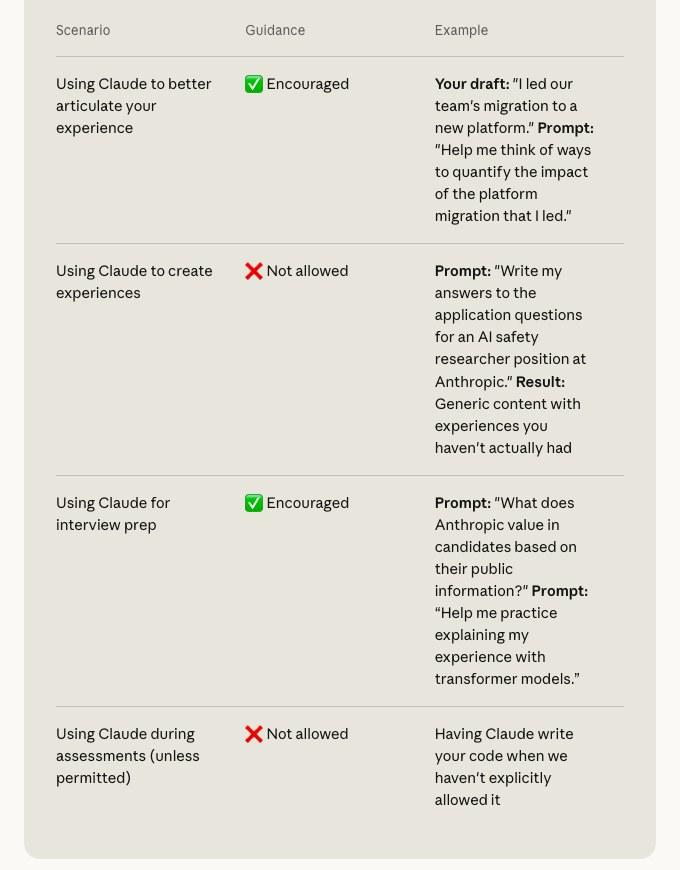
For a job search with Claude, Anthropic's applicant guidance lists the uses it encourages at its own company: refining a draft you wrote, working out how to put numbers on work you did, and interview prep. It lists using Claude "to create experiences" as not allowed.
Gemini
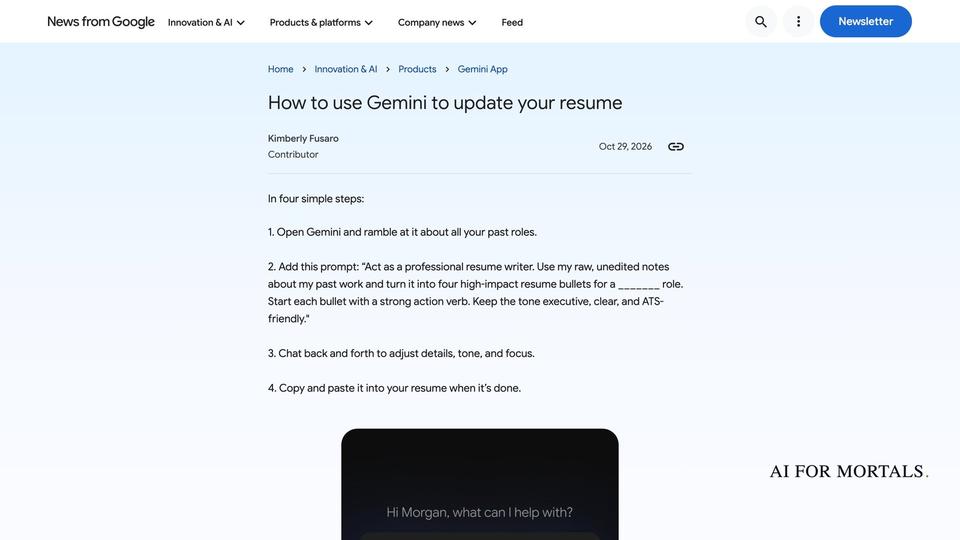
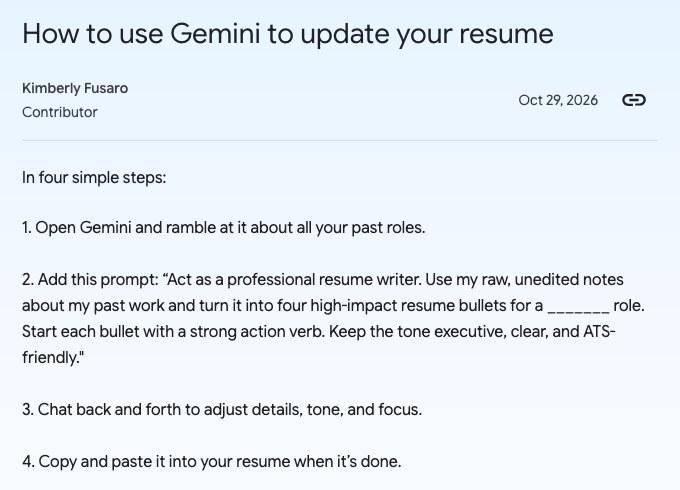
Google published its own four-step method for using Gemini to update your resume on October 29, 2026. You open Gemini, talk through your past roles in your own words, add Google's prompt, then go back and forth until the bullets read right.
Gemini can also make a PDF or Google Doc and let you edit it right in the chat: you type changes yourself or highlight a line and ask Gemini to rework it. PDF editing works on the web and on phones, and Docs editing works on the web, for every Gemini user. Our post on how to edit the resume PDF Gemini makes right in the chat walks through it.
AI for job search and interview prep
AI helps most with a job search in three places: practicing interviews against a real job ad, keeping an eye on job boards, and filling in long application forms. Each of these needs only a free chatbot or browser feature.
Practice interviews from the job ad
Paste the job ad and your resume into ChatGPT, Claude or Gemini and use the practice-interview prompt above, so the questions come from the skills that employer listed. Anthropic's guidance suggests asking Claude to "create a study guide for interviewing for this job" and to help you "practice your answers." Rezi also has a built-in AI Interview: one on the free plan and unlimited on Pro.
Keep AI out of the interview itself unless the employer says otherwise. Anthropic's guidance asks applicants to use no AI during live interviews or take-home assessments unless it tells them they can.
Watch job boards and fill in applications
Firefox's Smart Window can watch up to five pages per task for a new job listing that includes a job title or company name you're following, and it checks daily or weekly while the browser is open. It can also suggest answers for a job application from tabs you pick, such as your online portfolio or professional profile, and it won't submit the form for you. Mozilla says both are in the Smart Window beta on desktop, in English in the US and Canada. More on how Firefox's Smart Window can fill job applications from your open tabs.
Is it okay to use AI for your resume?
Yes, as long as everything on the page is true and you've checked it, since you're the one sending it. Employers set their own rules, so read the application page for any AI policy before you start. Anthropic's, for example, encourages AI for polishing a draft and interview prep but not for writing experiences you haven't had.
Whether employers can detect AI resumes is a question we couldn't answer from a verifiable source. We didn't find an applicant tracking system vendor (the software many employers use to collect and sort applications) that publishes a tested claim about spotting AI-written resumes, so this page makes no claim either way. What a hiring manager can see is a resume that's vague, sounds like every other applicant, or claims something you can't talk about in the interview.
What to keep out of the chat when you paste your resume
Take out your phone number, home address and email before you paste your resume into any chatbot, since the AI doesn't need them to rewrite your bullets. Leave out salary details, references' contact details and anything your current employer would consider confidential. Each chatbot also has a setting for whether your chats help train its AI.
- ChatGPT: On Free, Plus and Pro, data sharing is on by default. Turn it off under Settings, Data controls, Improve the model for everyone.
- Claude: Anthropic uses your chats to improve its models if you allow it, and incognito chats are never used. Change it under Settings, Privacy, Help improve our AI models.
- Gemini: Google's privacy notice says human reviewers read some chats and asks you not to enter confidential information you wouldn't want a reviewer to see. Temporary chats aren't used to train Google's AI models.
For the full picture, see what ChatGPT, Claude and Gemini keep from your chats.
Questions people ask
What is the best AI for resume writing?
It depends on what you need. For rewording a resume you already have to fit a job ad, the free plans of ChatGPT, Claude and Gemini all do it. For a designed template and a finished file, a resume builder such as Rezi, Kickresume or Resume Genius adds that, starting free.
Is there a free AI resume builder?
Yes. Rezi's free plan includes its AI Resume Writer and Editor, one resume and three PDF downloads. Kickresume's free plan has four basic templates and unlimited downloads but no AI writer, and Resume Genius's free plan downloads resumes as TXT only.
Is ChatGPT free for resume writing?
Yes. ChatGPT's Free plan includes unlimited text chats with GPT-6, which covers pasting in a resume and a job ad. File uploads are limited on Free, so paste your resume as text if you hit the limit.
Can I use ChatGPT to tailor my resume to a job description?
Yes. Paste the job ad and your resume into one chat, ask which requirements your resume already shows, and have it rewrite only those bullets using facts from your resume. The tailoring prompt above does exactly that.
How much does Rezi cost?
Rezi Pro is $29 a month, and the Lifetime Plan is a single $149 payment. The free plan stays free.
How much does Kickresume cost?
Kickresume Premium is $24 a month paid monthly, $18 a month paid as $54 every three months, or $8 a month paid as $96 a year. Each comes with a 14-day money back guarantee.
How much does Resume Genius cost?
Resume Genius's 14-day trial is $2.95 and auto renews at $23.95 billed every four weeks. The Annual Plan is a one-time $95.40 for 12 months, which renews each year.
How do I cancel a Resume Genius subscription?
Resume Genius says on its pricing page that you can cancel anytime by email, by phone or from your account dashboard. It also offers a full refund if you ask within 14 days.
Does Claude have a free plan?
Yes. Claude's Free plan costs $0 and includes chat on web, desktop and mobile, web search and file creation, with usage limits that reset every 5 hours and every week.
Can Gemini edit my resume PDF?
Yes. Gemini can make a PDF and let you edit it in the chat, by typing or by highlighting a line and asking for a change, on the web and on phones, according to Google's announcement.
Can AI write a cover letter?
Yes. Any of the three chatbots can draft one from your resume and the job ad, using the cover letter prompt above. Rezi Pro, Kickresume and Resume Genius also have cover letter builders with templates.
Can AI help me find a job?
It can help you watch for listings. Firefox's Smart Window can track up to five job boards per task for titles or companies you follow, and Rezi and Resume Genius list job search features on their pricing pages (Resume Genius's job board is US only). Applying is still up to you.
Should I tell an employer I used AI on my resume?
Follow the employer's own policy if it has one. Anthropic's asks applicants to be transparent and to follow its guidance on when AI is allowed.
What does ATS-friendly mean?
It means a resume laid out so an applicant tracking system, the software employers use to collect and sort applications, can read it. Kickresume and Resume Genius both include a resume checker for this, and Google's Gemini prompt asks for "ATS-friendly" bullets.
Sources
- ChatGPT: Plans and pricing (checked November 9, 2026)
- OpenAI Help Center: ChatGPT release notes
- OpenAI Help Center: Data controls in ChatGPT
- Claude: Pricing (checked November 9, 2026)
- Anthropic Privacy Center: Is my data used for model training?
- Anthropic Privacy Center: How do I change my model improvement privacy settings?
- Anthropic: How to collaborate with Claude during our hiring process
- Google Gemini: Subscriptions (checked November 9, 2026)
- Google: How to use Gemini to update your resume
- Google: Generate, preview and edit files directly in Gemini
- Gemini Apps Privacy Hub
- Rezi: Pricing (checked November 9, 2026)
- Kickresume: Pricing (checked November 9, 2026)
- Resume Genius: Pricing (checked November 9, 2026)
- Mozilla: Skip the busywork with Smart Window



Comments
Sign in to join the conversation.